
Can't Add Custom Toolbars to the Screen Edges?

Zeos

Banned
Local time
7:07 AM
Messages
4
I am a long time user of Windows XP. And I have very basic and specific ways of browsing and launching needed apps and getting to my files.

I recently volunteered my little brothers PC to be the Windows 7 guinea pig. I installed windows 7 with its awesome and simple new gui installer, ran all the updates, video drivers, the works.

Then when I went to add a toolbar to the right hand side of the screen by dragging an empty folder to the edge, the folder just bounced back.. Top, left.. no good. I chatted with several people I know using 7 and they tried with no avail as well. It works on Vista, XP and probably even back to 98-95.

Has this REALLY useful and SUPER IMPORTANT (at least to me) option been removed from the "newest and best" windows build?

Example of "MY" Autohiding Windows XP sidebar. Easy access to all my root drives, a cascading explorer, expanding games, and single click fully labeled program shortcuts.
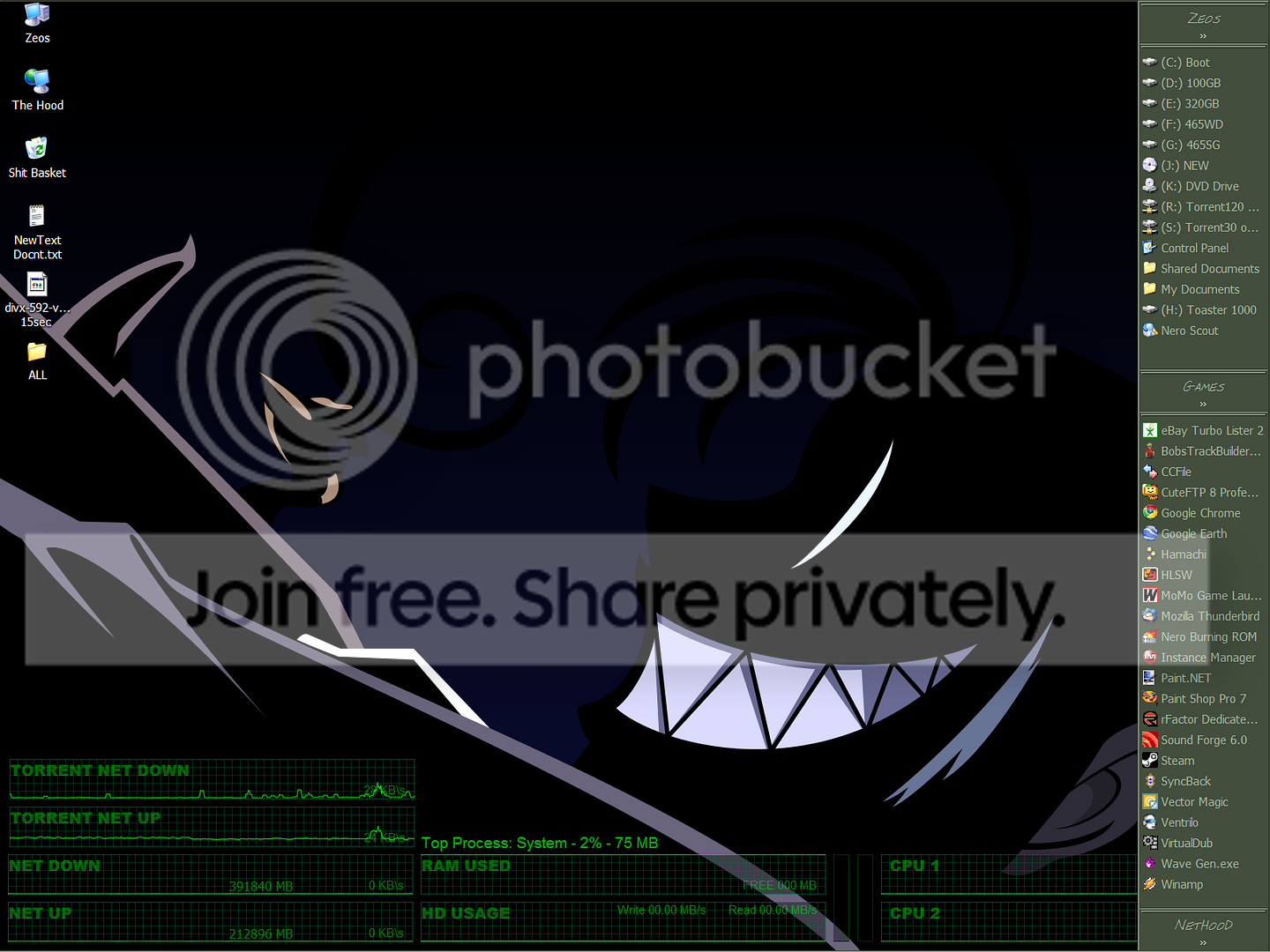
Sidebar.png


Showing Cascading One click file browsing. Just have to mouse over to expand subfolders to easily find buried files.
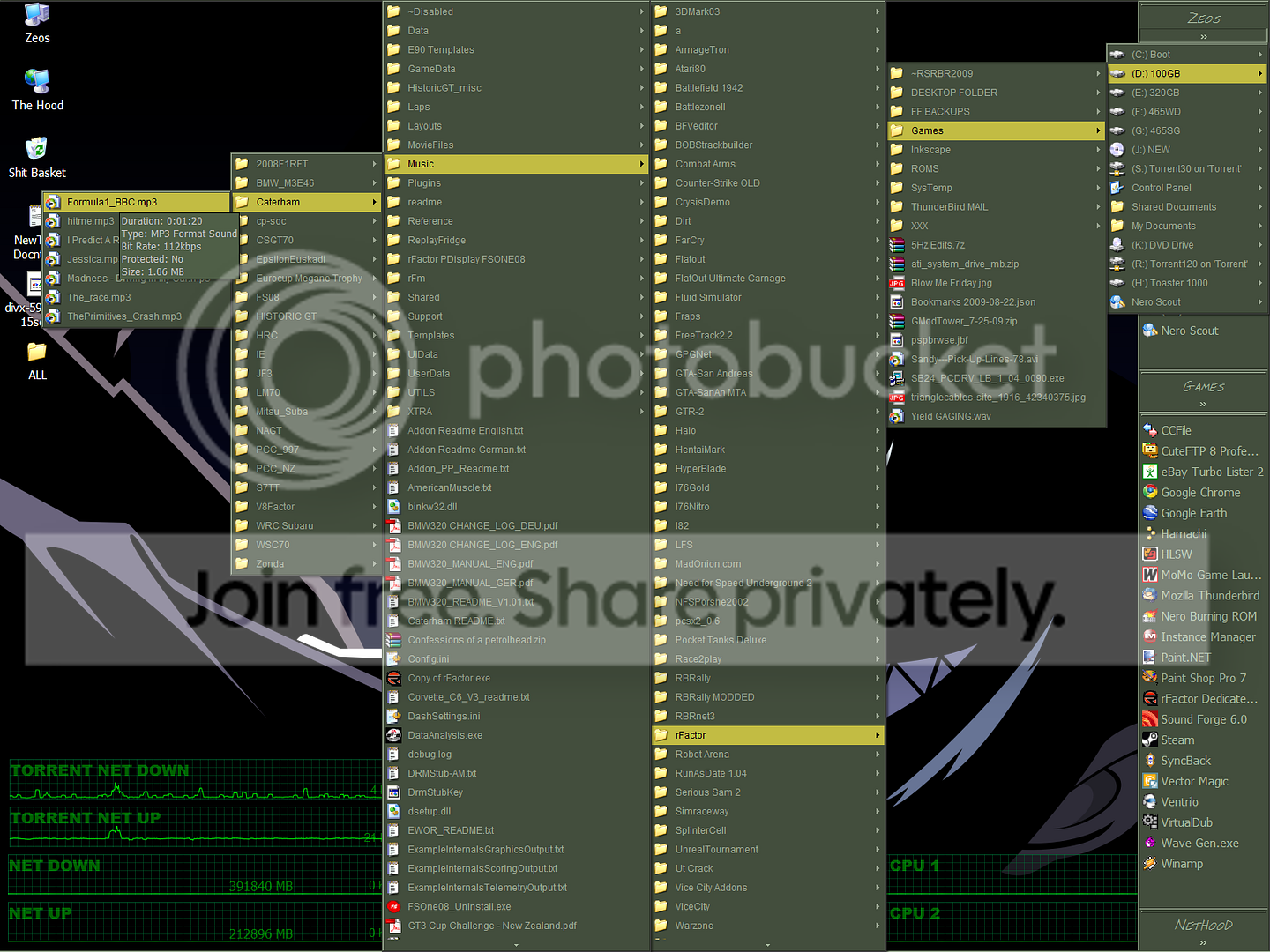
Cascade.png
 

My Computer My Computer

Computer Manufacturer/Model Number
MicronPC ZEOS Pantera
OS
Windows XP 32-bit
CPU
5200+
Motherboard
MSI 790FX Platinum
Memory
4 GB Muskin DDR 1066
Graphics Card(s)
HIS 4890 1Gig
Sound Card
Audigy 1-Ferk Yar!
Monitor(s) Displays
IBM 21" CRT Model P202
Screen Resolution
1600x1200
Hard Drives
Internal
120 WD Ide
320 WD Ide
500 WD Sata
500 SG Sata

External:
120 Simpletech
160 Simpletech x2
500 WD
1000 WD
PSU
Enermax P650 550W
Case
Zeos Pantera
Cooling
Big Typhoon 120mm
Keyboard
Microsoft Natural Ergonomic Keyboard 4000!!!
Mouse
Cyber Snipa Stinger
Internet Speed
15/2

My Computers My Computers

System One System Two

  • Computer type
    PC/Desktop
    Computer Manufacturer/Model Number
    The Beast Model A (homebrew)
    OS
    Windows 11 21H2 Current build
    CPU
    AMD Ryzen 9 3950X
    Motherboard
    MSI MEG X570 GODLIKE
    Memory
    4 * 32 GB - Corsair Vengeance 3600 MHz
    Graphics Card(s)
    EVGA GeForce RTX 3080 Ti XC3 ULTRA GAMING (12G-P5-3955-KR)
    Sound Card
    Realtek® ALC1220 Codec
    Monitor(s) Displays
    2x Eve Spectrum ES07D03 4K Gaming Monitor (Matte) | Eve Spec
    Screen Resolution
    3x 3840 x 2160
    Hard Drives
    3x Samsung 980 Pro NVMe PCIe 4 M.2 2 TB SSD (MZ-V8P2T0B/AM) } 3x Sabrent Rocket NVMe 4.0 1 TB SSD
    PSU
    PC Power & Cooling’s Silencer Series 1050 Watt, 80 Plus Plat
    Case
    Fractal Design Define 7 XL Dark ATX Full Tower Case
    Cooling
    SteelSeries Apex Pro Wired Gaming Keyboard
    Keyboard
    SteelSeries Apex Pro
    Mouse
    Logitech MX Master 3S | MX Master 3 for business
    Internet Speed
    AT&T LightSpeed Gigabit Duplex Ftth
    Antivirus
    Windows Defender + MB 3
    Browser
    Nightly (default) + Firefox (stable),Chrome, Edge
  • Computer type
    PC/Desktop
    System Manufacturer/Model Number
    Dell Latitude E5470
    OS
    ChromeOS Flex Dev Channel (current)
    CPU
    Intel(R) Core(TM) i5-6300U CPU @ 2.40GHz, 2501 Mhz, 2 Core(s), 4 Logical Processor(s)
    Motherboard
    Dell
    Memory
    16 GB
    Graphics Card(s)
    Intel(R) HD Graphics 520
    Sound Card
    Intel(R) HD Graphics 520 + RealTek Audio
    Monitor(s) Displays
    Dell laptop display 15"
    Screen Resolution
    1920 * 1080
    Hard Drives
    Toshiba 128GB M.2 22300 drive
    INTEL Cherryville 520 Series SSDSC2CW180A 180 GB SATA III SSD
    PSU
    Dell
    Case
    Dell
    Cooling
    Dell
    Keyboard
    Dell
    Mouse
    Logitech MX Master 3S (shared w. Sys 1) | Dell TouchPad
    Internet Speed
    AT&T LightSpeed Gigabit Duplex Ftth

My Computer My Computer

Computer Manufacturer/Model Number
MicronPC ZEOS Pantera
OS
Windows XP 32-bit
CPU
5200+
Motherboard
MSI 790FX Platinum
Memory
4 GB Muskin DDR 1066
Graphics Card(s)
HIS 4890 1Gig
Sound Card
Audigy 1-Ferk Yar!
Monitor(s) Displays
IBM 21" CRT Model P202
Screen Resolution
1600x1200
Hard Drives
Internal
120 WD Ide
320 WD Ide
500 WD Sata
500 SG Sata

External:
120 Simpletech
160 Simpletech x2
500 WD
1000 WD
PSU
Enermax P650 550W
Case
Zeos Pantera
Cooling
Big Typhoon 120mm
Keyboard
Microsoft Natural Ergonomic Keyboard 4000!!!
Mouse
Cyber Snipa Stinger
Internet Speed
15/2
Then when I went to add a toolbar to the right hand side of the screen by dragging an empty folder to the edge, the folder just bounced back.. Top, left.. no good. I chatted with several people I know using 7 and they tried with no avail as well. It works on Vista, XP and probably even back to 98-95.

Has this REALLY useful and SUPER IMPORTANT (at least to me) option been removed from the "newest and best" windows build?

Yep, sure has.
 

My Computer My Computer

Computer type
PC/Desktop
Computer Manufacturer/Model Number
Airbot 2.0
OS
Windows 7 Ultimate x64 SP1
CPU
Core i7 920 (D0) @ 4Ghz, *26c idle *65c full load on air
Motherboard
Asus P6X58D Premium - Sata 6Gb/s - USB 3.0
Memory
12GB DDR3 Corsair Dominator -CMD12GX3M6A1600C8 at 1600MHz
Graphics Card(s)
Zotac Geforce GTX 770
Sound Card
ASUS Xonar D2X
Monitor(s) Displays
1 LG 24" Flatron W2453V-PF 1 Samsung 24" P2450H both 2ms RT
Screen Resolution
1920x1080@60hz
Hard Drives
1 Samsung 250GB 840 Evo SSD
1 OCZ Vertex2 180GB SSD
1 TB Samsung Spinpoint F1 7200RPM 32MB cache
2 500GB WD Caviar Blacks 7200RPM 32MB cache (WD5001AALS)

Pioneer DVD Burner DVR-S18M
PSU
Corsair HX1000W
Case
Cooler Master HAF 932
Cooling
Case Fans *3 230mm, *1 140mm/CPU - *Tuniq Tower 120 Extreme
Keyboard
Logitech Wireless MK700
Mouse
Logitech Wireless MK700
Internet Speed
DL 15 Mbps UL 0.98 Mbps
Antivirus
None
Browser
Firefox Nightly
Other Info
Processor-7.7 *RAM- 7.9 *Graphics-7.9 *Gaming Graphics- 7.9 *SSD- 7.8 W.E.I final score= 7.7
*Phone- LG Nexus 5
Why is it no-one seems to care about custom toolbars. The new taskbar isn't that world changing in 7 to let them completely fukc the way people have been doing business for years now.

I don't want to use vista... Wahhhh:cry:
 

My Computer My Computer

Computer Manufacturer/Model Number
MicronPC ZEOS Pantera
OS
Windows XP 32-bit
CPU
5200+
Motherboard
MSI 790FX Platinum
Memory
4 GB Muskin DDR 1066
Graphics Card(s)
HIS 4890 1Gig
Sound Card
Audigy 1-Ferk Yar!
Monitor(s) Displays
IBM 21" CRT Model P202
Screen Resolution
1600x1200
Hard Drives
Internal
120 WD Ide
320 WD Ide
500 WD Sata
500 SG Sata

External:
120 Simpletech
160 Simpletech x2
500 WD
1000 WD
PSU
Enermax P650 550W
Case
Zeos Pantera
Cooling
Big Typhoon 120mm
Keyboard
Microsoft Natural Ergonomic Keyboard 4000!!!
Mouse
Cyber Snipa Stinger
Internet Speed
15/2
Ditto.

I can't believe this function/option has been knocked on the head.

This, combined with the lack of the "Classic" start menu, is a major down for Win7 in my opinion. Why would anyone want to have to scroll around to find programmes they want to open? I know there are utilities to allow access to the Classic start menu but why the need?
 

My Computer My Computer

Computer Manufacturer/Model Number
Wired2fire
OS
Windows 7 Ultimate x64
CPU
Core i7 920
Motherboard
Gigabyte EX58 UD3R
Memory
6GB DDR3
Graphics Card(s)
Radeon HD4890
Sound Card
on board
Monitor(s) Displays
Samsung T240HD + Dell 19"Ultrasharp
Screen Resolution
1920 x 1200 + 1280 x 1024
Hard Drives
2 x 1TB
1 x 300GB
PSU
Thermaltake toughpower 600W
Case
Antec 300
Cooling
Thermalright Ultra 120 + Lots of fans
Keyboard
Logitech Internet 350 Keyboard
Mouse
Razer DeathAdder Gaming Mouse
Internet Speed
5ish MB
Big bummer for me too...I've been trying to do this for awhile. Appreciate knowing this "feature" is no longer available....time for 3rd party work.
 

My Computer My Computer

OS
win 7
Yes, I too need this feature back in Win7. It is basically the first thing I tried to do after I installed this OS (dragging Computer to the top of the desktop)
Would appreciate any info if there has been any solutions found. Will be hunting in the mean time.

Respeck

~Des
 

My Computer My Computer

Computer Manufacturer/Model Number
Dell D510 Notebook
OS
Win 7 32Bit
CPU
1.7GHz (Single Core)
Motherboard
Intel 915
Memory
1 GB
Graphics Card(s)
Intel 915GM
Sound Card
Sigmatel C Audio
Hard Drives
80 GB
Back
Top