Passworded AND unpassworded shares on same machine

paul1149

New member
Guru
Local time
12:51 AM
Messages
1,025
I have a Win7 machine I would like to set up with some shares for Everyone, and others only for users registered on the machine. I'm on a Workgroup.

So I disabled the Sharing global password requirement, but set registered user Security parameters for the folders I want to have restricted access.

The wide-open folders work fine, but the problem is that when trying to access the restricted folders from another network machine, access is denied and no password prompt is afforded. If I got the password prompt I could log in, while others couldn't, and that would be perfect.

I suppose this is standard Windows behavior by design. That seems to leave me with the option of reenabling global sharing passwords and then creating another user whose credentials I would give out for access to the unrestricted folders.

Or is there a way to do this without global passwords?

Thanks!
 

My Computer My Computer

At a glance

Linux Lite 3.2 x64; Windows 7, 8.1Core2Duo 2.46GB ddr2nVidia
Computer type
PC/Desktop
Computer Manufacturer/Model Number
dell precision t3400 tower
OS
Linux Lite 3.2 x64; Windows 7, 8.1
CPU
Core2Duo 2.4
Memory
6GB ddr2
Graphics Card(s)
nVidia
Hard Drives
120gb SSD, 1TB HD, 2TB HD; sata II
Internet Speed
12/2
Browser
Vivaldi, Slimjet (Chromium) x64
I have a Win7 machine I would like to set up with some shares for Everyone, and others only for users registered on the machine. I'm on a Workgroup.

So I disabled the Sharing global password requirement, but set registered user Security parameters for the folders I want to have restricted access.

The wide-open folders work fine, but the problem is that when trying to access the restricted folders from another network machine, access is denied and no password prompt is afforded. If I got the password prompt I could log in, while others couldn't, and that would be perfect.

I suppose this is standard Windows behavior by design. That seems to leave me with the option of reenabling global sharing passwords and then creating another user whose credentials I would give out for access to the unrestricted folders.

Or is there a way to do this without global passwords?

Thanks!

Password protected sharing doesn't really work the way you would think. It isn't really a supported option at all.

The best and easiest way to set up restricted shares is set up a Homegroup but only allow users or machines to join the Homegroup that require complete access to all shared Library's on all Homegroup or Workgroup machines.

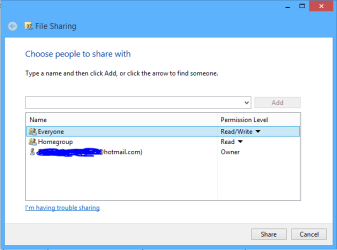
Leave the users who require restricted access out of the Homegroup and if you need to share a particular Library with them then just add the "Everyone" share to the list of users via the Homegroup style sharing options.

In this case the "Everyone" share refers to machines or users who are not joined to the local Homegroup but are included in the local Workgroup.
 

Attachments

  • share with Everyone.PNG
    share with Everyone.PNG
    6.7 KB · Views: 5

My Computer My Computer

At a glance

Windows 7 Ult, Windows 8.1 Pro,Q9650-4.275GHz, E8600 4.5GHz, E6750-3.8GHzG.Skill PC2 9600 1200Mhz 5 5 5 15 2TGTX480
Computer type
PC/Desktop
Computer Manufacturer/Model Number
Home built
OS
Windows 7 Ult, Windows 8.1 Pro,
CPU
Q9650-4.275GHz, E8600 4.5GHz, E6750-3.8GHz
Motherboard
Evga 780i FTW
Memory
G.Skill PC2 9600 1200Mhz 5 5 5 15 2T
Graphics Card(s)
GTX480
Sound Card
Asus Xonar D2
Monitor(s) Displays
HannsG
Screen Resolution
1680X1050
Hard Drives
GSkill Phoenix Pro 120GB SSD
PSU
ThermalTake Toughpower 1000Watt modular
Case
ThermalTake XaserV
Cooling
Xigmatek S1283
Keyboard
Logitech G15
Mouse
Logitech G9
Internet Speed
T1
Thanks, Chev. I appreciate your input. Homegroups are not a terribly good solution for me, as there can be all kinds of machines on this LAN, and I believe Homegroups are supported only by Win7 on. I don't get why Win7 doesn't prompt for the password rather than summarily barring access, as that would solve everything very neatly.

Thanks again,
Paul
 

My Computer My Computer

At a glance

Linux Lite 3.2 x64; Windows 7, 8.1Core2Duo 2.46GB ddr2nVidia
Computer type
PC/Desktop
Computer Manufacturer/Model Number
dell precision t3400 tower
OS
Linux Lite 3.2 x64; Windows 7, 8.1
CPU
Core2Duo 2.4
Memory
6GB ddr2
Graphics Card(s)
nVidia
Hard Drives
120gb SSD, 1TB HD, 2TB HD; sata II
Internet Speed
12/2
Browser
Vivaldi, Slimjet (Chromium) x64
Back
Top