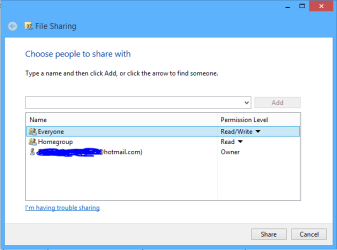
I have a Win7 machine I would like to set up with some shares for Everyone, and others only for users registered on the machine. I'm on a Workgroup.
So I disabled the Sharing global password requirement, but set registered user Security parameters for the folders I want to have restricted access.
The wide-open folders work fine, but the problem is that when trying to access the restricted folders from another network machine, access is denied and no password prompt is afforded. If I got the password prompt I could log in, while others couldn't, and that would be perfect.
I suppose this is standard Windows behavior by design. That seems to leave me with the option of reenabling global sharing passwords and then creating another user whose credentials I would give out for access to the unrestricted folders.
Or is there a way to do this without global passwords?
Thanks!
So I disabled the Sharing global password requirement, but set registered user Security parameters for the folders I want to have restricted access.
The wide-open folders work fine, but the problem is that when trying to access the restricted folders from another network machine, access is denied and no password prompt is afforded. If I got the password prompt I could log in, while others couldn't, and that would be perfect.
I suppose this is standard Windows behavior by design. That seems to leave me with the option of reenabling global sharing passwords and then creating another user whose credentials I would give out for access to the unrestricted folders.
Or is there a way to do this without global passwords?
Thanks!
My Computer
At a glance
Linux Lite 3.2 x64; Windows 7, 8.1Core2Duo 2.46GB ddr2nVidia
- Computer type
- PC/Desktop
- Computer Manufacturer/Model Number
- dell precision t3400 tower
- OS
- Linux Lite 3.2 x64; Windows 7, 8.1
- CPU
- Core2Duo 2.4
- Memory
- 6GB ddr2
- Graphics Card(s)
- nVidia
- Hard Drives
- 120gb SSD, 1TB HD, 2TB HD; sata II
- Internet Speed
- 12/2
- Browser
- Vivaldi, Slimjet (Chromium) x64