Unable to mount ISO as virtual CD-ROM

jchap1590

New member
Member
Local time
11:00 AM
Messages
56
I am trying to create a Windows To Go stick but I am unable to mount an ISO file as a virtual CD-ROM, which I need to do to install the Windows 7 Automated Installation Kit to deploy the OS image. My system does not have an optical drive, burning the ISO to a disk is not an option.

I run Windows 7 Ultimate, 64-bit so Microsoft's Virtual CD-ROM Control Panel is also not an option for me.

Have tried: MagicDisc, WinCDEmu and WinISO

it seems like the virtual CD-ROM driver installation hangs. when I first installed MagicDisc, the driver failed to install. I uninstalled and tried to re-install, but the driver install never initialized the second time around. WinCDEmu hung on the driver install for 15 minutes before I ended the process. Stopped and restarted the 'virtual disk' service (although I'm not sure if that pertains only to virtual hard drives or not). Driver will still not install. WinISO successfully mounted the image (supposedly) but was unable to assign a volume letter. The virtual drive did not appear in 'Disk Management' so I was not able to manually assign a drive letter.

I have exhausted all the options I can think of, I have never had an issue with mounting an ISO on Windows 7 so I am unsure how to proceed.

Any help would be appreciated


Thanks,
JChap1590
 

My Computer My Computer

At a glance

Windows 7 Professional, 64-bitIntel Pentuim G3258Crucial Ballistix Elite DDR3 2x4GB 1866MHz C9MSI Radeon R9 270X Gaming 2G ITX
Computer type
PC/Desktop
Computer Manufacturer/Model Number
Custom Build
OS
Windows 7 Professional, 64-bit
CPU
Intel Pentuim G3258
Motherboard
EVGA Z97 Stinger Core 3D LGA1150 mITX
Memory
Crucial Ballistix Elite DDR3 2x4GB 1866MHz C9
Graphics Card(s)
MSI Radeon R9 270X Gaming 2G ITX
Hard Drives
Samsung 840 EVO, 250GB
PSU
EVGA SuperNOVA 650 G1
Case
Bitfenix Prodigy ITX, Orange
Cooling
EVGA ACX mITX CPU Cooler
Other Info
https://drive.google.com/file/d/0B8di0b5mIKEYYVMtTVNNQ0cyd1E/view?usp=sharing

My Computer My Computer

At a glance

W7 Pro SP1 64biti78GBIntel HD Graphics
Computer type
Laptop
Computer Manufacturer/Model Number
Employer provided Dell Latitude
OS
W7 Pro SP1 64bit
CPU
i7
Memory
8GB
Graphics Card(s)
Intel HD Graphics
Hard Drives
crappy SSD
Antivirus
Employer mandated Symantec Endpoint Protection
Browser
Pale Moon 64bit, IE11 64bit & Chrome 64bit
I use Virtual CloneDrive (Freeware).
(Near the bottom of that web page.)

If that does not install for you, then it might be time for this: SFC scan.

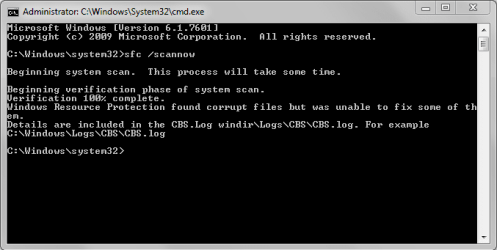
I may run an SFC scan anyways, now that you mention it. certain things with the OS do not seem right, such as not being able to create a bootable USB with RMPrepUSB. the app just hangs.

This is a week-old OS mounted on a RAID array, so the system files should be perfectly fine, but these 2 hang-ups are making me think differently

thanks for the suggestion
 

My Computer My Computer

At a glance

Windows 7 Professional, 64-bitIntel Pentuim G3258Crucial Ballistix Elite DDR3 2x4GB 1866MHz C9MSI Radeon R9 270X Gaming 2G ITX
Computer type
PC/Desktop
Computer Manufacturer/Model Number
Custom Build
OS
Windows 7 Professional, 64-bit
CPU
Intel Pentuim G3258
Motherboard
EVGA Z97 Stinger Core 3D LGA1150 mITX
Memory
Crucial Ballistix Elite DDR3 2x4GB 1866MHz C9
Graphics Card(s)
MSI Radeon R9 270X Gaming 2G ITX
Hard Drives
Samsung 840 EVO, 250GB
PSU
EVGA SuperNOVA 650 G1
Case
Bitfenix Prodigy ITX, Orange
Cooling
EVGA ACX mITX CPU Cooler
Other Info
https://drive.google.com/file/d/0B8di0b5mIKEYYVMtTVNNQ0cyd1E/view?usp=sharing

Attachments

  • Untitled.png
    Untitled.png
    9.4 KB · Views: 36

My Computer My Computer

At a glance

Windows 7 Professional, 64-bitIntel Pentuim G3258Crucial Ballistix Elite DDR3 2x4GB 1866MHz C9MSI Radeon R9 270X Gaming 2G ITX
Computer type
PC/Desktop
Computer Manufacturer/Model Number
Custom Build
OS
Windows 7 Professional, 64-bit
CPU
Intel Pentuim G3258
Motherboard
EVGA Z97 Stinger Core 3D LGA1150 mITX
Memory
Crucial Ballistix Elite DDR3 2x4GB 1866MHz C9
Graphics Card(s)
MSI Radeon R9 270X Gaming 2G ITX
Hard Drives
Samsung 840 EVO, 250GB
PSU
EVGA SuperNOVA 650 G1
Case
Bitfenix Prodigy ITX, Orange
Cooling
EVGA ACX mITX CPU Cooler
Other Info
https://drive.google.com/file/d/0B8di0b5mIKEYYVMtTVNNQ0cyd1E/view?usp=sharing

My Computer My Computer

At a glance

W7 Pro SP1 64biti78GBIntel HD Graphics
Computer type
Laptop
Computer Manufacturer/Model Number
Employer provided Dell Latitude
OS
W7 Pro SP1 64bit
CPU
i7
Memory
8GB
Graphics Card(s)
Intel HD Graphics
Hard Drives
crappy SSD
Antivirus
Employer mandated Symantec Endpoint Protection
Browser
Pale Moon 64bit, IE11 64bit & Chrome 64bit

My Computer My Computer

At a glance

Windows 7 Professional, 64-bitIntel Pentuim G3258Crucial Ballistix Elite DDR3 2x4GB 1866MHz C9MSI Radeon R9 270X Gaming 2G ITX
Computer type
PC/Desktop
Computer Manufacturer/Model Number
Custom Build
OS
Windows 7 Professional, 64-bit
CPU
Intel Pentuim G3258
Motherboard
EVGA Z97 Stinger Core 3D LGA1150 mITX
Memory
Crucial Ballistix Elite DDR3 2x4GB 1866MHz C9
Graphics Card(s)
MSI Radeon R9 270X Gaming 2G ITX
Hard Drives
Samsung 840 EVO, 250GB
PSU
EVGA SuperNOVA 650 G1
Case
Bitfenix Prodigy ITX, Orange
Cooling
EVGA ACX mITX CPU Cooler
Other Info
https://drive.google.com/file/d/0B8di0b5mIKEYYVMtTVNNQ0cyd1E/view?usp=sharing

My Computer My Computer

At a glance

Windows 7 Professional, 64-bitIntel Pentuim G3258Crucial Ballistix Elite DDR3 2x4GB 1866MHz C9MSI Radeon R9 270X Gaming 2G ITX
Computer type
PC/Desktop
Computer Manufacturer/Model Number
Custom Build
OS
Windows 7 Professional, 64-bit
CPU
Intel Pentuim G3258
Motherboard
EVGA Z97 Stinger Core 3D LGA1150 mITX
Memory
Crucial Ballistix Elite DDR3 2x4GB 1866MHz C9
Graphics Card(s)
MSI Radeon R9 270X Gaming 2G ITX
Hard Drives
Samsung 840 EVO, 250GB
PSU
EVGA SuperNOVA 650 G1
Case
Bitfenix Prodigy ITX, Orange
Cooling
EVGA ACX mITX CPU Cooler
Other Info
https://drive.google.com/file/d/0B8di0b5mIKEYYVMtTVNNQ0cyd1E/view?usp=sharing

my Windows Update does not return with error codes, do you still you suggest I try these steps?

thanks
I'm hoping that the SURT will work some magic. I've seen it take minutes to complete on some computers - but take overnight on other computers. It should not hurt to run it even if you don't get Windows Update errors.

I'm no good at reading those CBS files. Maybe other forum members can help you there.
 

My Computer My Computer

At a glance

W7 Pro SP1 64biti78GBIntel HD Graphics
Computer type
Laptop
Computer Manufacturer/Model Number
Employer provided Dell Latitude
OS
W7 Pro SP1 64bit
CPU
i7
Memory
8GB
Graphics Card(s)
Intel HD Graphics
Hard Drives
crappy SSD
Antivirus
Employer mandated Symantec Endpoint Protection
Browser
Pale Moon 64bit, IE11 64bit & Chrome 64bit

my Windows Update does not return with error codes, do you still you suggest I try these steps?

thanks
I'm hoping that the SURT will work some magic. I've seen it take minutes to complete on some computers - but take overnight on other computers. It should not hurt to run it even if you don't get Windows Update errors.

I'm no good at reading those CBS files. Maybe other forum members can help you there.

same result (with errors). thanks anyway
 

My Computer My Computer

At a glance

Windows 7 Professional, 64-bitIntel Pentuim G3258Crucial Ballistix Elite DDR3 2x4GB 1866MHz C9MSI Radeon R9 270X Gaming 2G ITX
Computer type
PC/Desktop
Computer Manufacturer/Model Number
Custom Build
OS
Windows 7 Professional, 64-bit
CPU
Intel Pentuim G3258
Motherboard
EVGA Z97 Stinger Core 3D LGA1150 mITX
Memory
Crucial Ballistix Elite DDR3 2x4GB 1866MHz C9
Graphics Card(s)
MSI Radeon R9 270X Gaming 2G ITX
Hard Drives
Samsung 840 EVO, 250GB
PSU
EVGA SuperNOVA 650 G1
Case
Bitfenix Prodigy ITX, Orange
Cooling
EVGA ACX mITX CPU Cooler
Other Info
https://drive.google.com/file/d/0B8di0b5mIKEYYVMtTVNNQ0cyd1E/view?usp=sharing
I use Virtual CloneDrive (Freeware).
(Near the bottom of that web page.)

If that does not install for you, then it might be time for this: SFC scan.


SFC found corrupt files but was unable to repair them, any suggestions? CBS.log attached

thanks
SFC with /SCANNOW switch needs often to be run several times. Three - four times is totally normal, sometimes even more. This is also clearly told in the tutorial. My rule is: after an SFC /SCANNOW run, if not all errors were fixed, reboot and repeat, although not every geek sees the reboot in between the SFC runs necessary.

This quote from the SFC tutorial:

   Note
  • If SFC could not fix something, then run the command again to see if it may be able to the next time. Sometimes it may take running the sfc /scannow command 3 or more times to completely fix everything that it's able to.
  • If not, then download and run the 32-bit (x86) or 64-bit (x64) System Update Readiness Tool for your same installed 32-bit or 64-bit Windows 7, restart the PC afterwards, and try the sfc /scannow command again.
  • If still not, then try using OPTION ONE above to run the sfc /scannow command at boot.
  • If still not, then you can attempt to run a System Restore using a restore point dated before the bad file occured to fix it. You may need to repeat doing a System Restore until you find a older restore point that may work.
  • If still not, then you can use the steps in the TIP box in the OPTION THREE section below to manually replace the files that SFC could not fix if there are not to many fix.
  • If there are to many files to manually fix, or you prefer not to use OPTION THREE below, then you could do a repair install without losing anything.
  • If you would like to get help with your SFC issue, then be sure to upload and attach your sfcdetails.txt file from OPTION THREE below in your post.
 

My Computer My Computer

At a glance

Windows 10 Pro x64 EN-GB1.6 GHz Intel Core i7-720QM Processor6 GBATI Mobility Radeon HD 5850 Graphics
Computer type
Laptop
Computer Manufacturer/Model Number
HP ENVY 17-1150eg
OS
Windows 10 Pro x64 EN-GB
CPU
1.6 GHz Intel Core i7-720QM Processor
Memory
6 GB
Graphics Card(s)
ATI Mobility Radeon HD 5850 Graphics
Sound Card
Beats sound system with integrated subwoofer
Monitor(s) Displays
17" laptop display, 22" LED and 32" Full HD TV through HDMI
Screen Resolution
1600*900 (1), 1920*1080 (2&3)
Hard Drives
Internal: 2 x 500 GB SATA Hard Disk Drive 7200 rpm
External: 2TB for backups, 3TB USB3 network drive for media
Cooling
As Envy runs a bit warm, I have it on a Cooler Master pad
Keyboard
Logitech diNovo Media Desktop Laser (bluetooth)
Mouse
Logitech Performance Mouse MX
Internet Speed
50/10 Mbps VDSL
Antivirus
Windows Defender 4.3.9431.0
Browser
Maxthon 3.5.2., IE11
I use Virtual CloneDrive (Freeware).
(Near the bottom of that web page.)

If that does not install for you, then it might be time for this: SFC scan.


SFC found corrupt files but was unable to repair them, any suggestions? CBS.log attached

thanks
SFC with /SCANNOW switch needs often to be run several times. Three - four times is totally normal, sometimes even more. This is also clearly told in the tutorial. My rule is: after an SFC /SCANNOW run, if not all errors were fixed, reboot and repeat, although not every geek sees the reboot in between the SFC runs necessary.

This quote from the SFC tutorial:

   Note
  • If SFC could not fix something, then run the command again to see if it may be able to the next time. Sometimes it may take running the sfc /scannow command 3 or more times to completely fix everything that it's able to.
  • If not, then download and run the 32-bit (x86) or 64-bit (x64) System Update Readiness Tool for your same installed 32-bit or 64-bit Windows 7, restart the PC afterwards, and try the sfc /scannow command again.
  • If still not, then try using OPTION ONE above to run the sfc /scannow command at boot.
  • If still not, then you can attempt to run a System Restore using a restore point dated before the bad file occured to fix it. You may need to repeat doing a System Restore until you find a older restore point that may work.
  • If still not, then you can use the steps in the TIP box in the OPTION THREE section below to manually replace the files that SFC could not fix if there are not to many fix.
  • If there are to many files to manually fix, or you prefer not to use OPTION THREE below, then you could do a repair install without losing anything.
  • If you would like to get help with your SFC issue, then be sure to upload and attach your sfcdetails.txt file from OPTION THREE below in your post.

thanks for the tip. I usually run SFC at least twice if there are errors found. I will run it a few more.

I assume the method for running an SFC scan at boot would be from within Windows Recovery Environment command prompt?
 

My Computer My Computer

At a glance

Windows 7 Professional, 64-bitIntel Pentuim G3258Crucial Ballistix Elite DDR3 2x4GB 1866MHz C9MSI Radeon R9 270X Gaming 2G ITX
Computer type
PC/Desktop
Computer Manufacturer/Model Number
Custom Build
OS
Windows 7 Professional, 64-bit
CPU
Intel Pentuim G3258
Motherboard
EVGA Z97 Stinger Core 3D LGA1150 mITX
Memory
Crucial Ballistix Elite DDR3 2x4GB 1866MHz C9
Graphics Card(s)
MSI Radeon R9 270X Gaming 2G ITX
Hard Drives
Samsung 840 EVO, 250GB
PSU
EVGA SuperNOVA 650 G1
Case
Bitfenix Prodigy ITX, Orange
Cooling
EVGA ACX mITX CPU Cooler
Other Info
https://drive.google.com/file/d/0B8di0b5mIKEYYVMtTVNNQ0cyd1E/view?usp=sharing

My Computer My Computer

At a glance

W7 Pro SP1 64biti78GBIntel HD Graphics
Computer type
Laptop
Computer Manufacturer/Model Number
Employer provided Dell Latitude
OS
W7 Pro SP1 64bit
CPU
i7
Memory
8GB
Graphics Card(s)
Intel HD Graphics
Hard Drives
crappy SSD
Antivirus
Employer mandated Symantec Endpoint Protection
Browser
Pale Moon 64bit, IE11 64bit & Chrome 64bit
~~~
I assume the method for running an SFC scan at boot would be from within Windows Recovery Environment command prompt?
Yes and there is a tutorial for the too:
http://www.sevenforums.com/tutorials/139810-sfc-scannow-run-command-prompt-boot.html

I ran the SFC scan about 6 times, I will try this when I am able.

I went to recreate my Windows UEFI USB stick and it fails on "xcopy [source]:\* /d [target]:\ /s /e" command. this is on a separate machine that has an ODD, copying a Windows 7 DVD to USB flash drive.

"overwrite bootmgr? (yes/no/all)"
enter 'y' or 'a'
"access denied"

one problem after another.. *sigh* can't win somedays
 

My Computer My Computer

At a glance

Windows 7 Professional, 64-bitIntel Pentuim G3258Crucial Ballistix Elite DDR3 2x4GB 1866MHz C9MSI Radeon R9 270X Gaming 2G ITX
Computer type
PC/Desktop
Computer Manufacturer/Model Number
Custom Build
OS
Windows 7 Professional, 64-bit
CPU
Intel Pentuim G3258
Motherboard
EVGA Z97 Stinger Core 3D LGA1150 mITX
Memory
Crucial Ballistix Elite DDR3 2x4GB 1866MHz C9
Graphics Card(s)
MSI Radeon R9 270X Gaming 2G ITX
Hard Drives
Samsung 840 EVO, 250GB
PSU
EVGA SuperNOVA 650 G1
Case
Bitfenix Prodigy ITX, Orange
Cooling
EVGA ACX mITX CPU Cooler
Other Info
https://drive.google.com/file/d/0B8di0b5mIKEYYVMtTVNNQ0cyd1E/view?usp=sharing
When I followed the guide for running an SFC scam at boot, I was confused by the /offbootdir switch because my system reserved partition did not have a volume letter. I assigned one so I could run the scan and now the BCD is all screwed up because for some reason it's assigning C: to the system reserve and F: to the Windows partition.

This is so discouraging. None of the guides I look at seem to have the same options I'm given when I follow the steps.
 

My Computer My Computer

At a glance

Windows 7 Professional, 64-bitIntel Pentuim G3258Crucial Ballistix Elite DDR3 2x4GB 1866MHz C9MSI Radeon R9 270X Gaming 2G ITX
Computer type
PC/Desktop
Computer Manufacturer/Model Number
Custom Build
OS
Windows 7 Professional, 64-bit
CPU
Intel Pentuim G3258
Motherboard
EVGA Z97 Stinger Core 3D LGA1150 mITX
Memory
Crucial Ballistix Elite DDR3 2x4GB 1866MHz C9
Graphics Card(s)
MSI Radeon R9 270X Gaming 2G ITX
Hard Drives
Samsung 840 EVO, 250GB
PSU
EVGA SuperNOVA 650 G1
Case
Bitfenix Prodigy ITX, Orange
Cooling
EVGA ACX mITX CPU Cooler
Other Info
https://drive.google.com/file/d/0B8di0b5mIKEYYVMtTVNNQ0cyd1E/view?usp=sharing
When it rains; it pours :-)

Sorry that things are not going as desired. I'm not sure what the cure is - so let's see if others can help you.
 

My Computer My Computer

At a glance

W7 Pro SP1 64biti78GBIntel HD Graphics
Computer type
Laptop
Computer Manufacturer/Model Number
Employer provided Dell Latitude
OS
W7 Pro SP1 64bit
CPU
i7
Memory
8GB
Graphics Card(s)
Intel HD Graphics
Hard Drives
crappy SSD
Antivirus
Employer mandated Symantec Endpoint Protection
Browser
Pale Moon 64bit, IE11 64bit & Chrome 64bit
The drive letters are often different in boot mode than in Windows. This is to be expected.

Much easier to use Option One to automatically create UEFI Bootable USB Flash Drive - Create in Windows

Have you already run SFC from inside Windows? That should be sufficient.

If SFC fails to repair files after three times running then you might want to skip to a Repair Install. Be sure to back up a System image and your files first.
 
The drive letters are often different in boot mode than in Windows. This is to be expected.

Much easier to use Option One to automatically create UEFI Bootable USB Flash Drive - Create in Windows

Have you already run SFC from inside Windows? That should be sufficient.

If SFC fails to repair files after three times running then you might want to skip to a Repair Install. Be sure to back up a System image and your files first.

yes, I ran the SFC scan from within Windows several times and moved onto running it at boot, as another member suggested. I was confused by this guide: http://www.sevenforums.com/tutorials/139810-sfc-scannow-run-command-prompt-boot.html

I used method 2..

"If you are dual/multi booting or have a System Reserved partition as I do and the system boot files are stored on a separate partition than the Operating System partition needing repair, in any case, the volume drive letter where the system boot files are stored goes in the first part."

I could not get the /offbootdir switch to be accepted without A) pointing it to my System Reserved partition, since \Boot\BCD does not exist on my Windows volume, and B) without assigning a volume letter to my system reserved partition.

I don't understand many of the guides or instructions for using bootrec or bcdboot commands because they seem to point the boot directory to the same root as the Windows directory, which is not how Windows 7 installs by default. again, by default, the System Reserved partition is not assigned a drive letter specifically so that those crucial files are hidden yet every guide whizzes right past the part where THE SYSTEM RESERVED DOES NOT HAVE A DRIVE LETTER

I almost feel like, because I assign the system reserved a drive letter, there are now 2 active partitions and Windows no longer knows which one contains the boot configuration. when I type bootrec /rebuildbcd it finds 0 Windows installations.

I'm confused by a few things, and the lack of a ODD plus this being a UEFI install is making all of the information I can find even more confusing. I don't understand how the specific commands for rebuilding the BCD (bcdboot, bootrec, bootsect) rely on the system reserved partition having a drive letter when there isn't one assigned by Windows automatically, even in PE.

  • I need to know the commands to delete the BCD store and all of the boot files. both off the System Reserved and Windows partitions. I want to make sure I'm starting completely fresh
  • I need to know the commands to rebuild the BCD with System Reserved as boot directory (which I suppose will need a drive letter? still confused by that) and C:\Windows as my windows directory (or whatever drive letter it will show as in WinPE)
 

My Computer My Computer

At a glance

Windows 7 Professional, 64-bitIntel Pentuim G3258Crucial Ballistix Elite DDR3 2x4GB 1866MHz C9MSI Radeon R9 270X Gaming 2G ITX
Computer type
PC/Desktop
Computer Manufacturer/Model Number
Custom Build
OS
Windows 7 Professional, 64-bit
CPU
Intel Pentuim G3258
Motherboard
EVGA Z97 Stinger Core 3D LGA1150 mITX
Memory
Crucial Ballistix Elite DDR3 2x4GB 1866MHz C9
Graphics Card(s)
MSI Radeon R9 270X Gaming 2G ITX
Hard Drives
Samsung 840 EVO, 250GB
PSU
EVGA SuperNOVA 650 G1
Case
Bitfenix Prodigy ITX, Orange
Cooling
EVGA ACX mITX CPU Cooler
Other Info
https://drive.google.com/file/d/0B8di0b5mIKEYYVMtTVNNQ0cyd1E/view?usp=sharing
The normal boot Repair regimens (mostly developed here) don't apply to UEFI installs which has no MBR. BCD System Store Settings for UEFI

I would run Startup Repair a few times to see if it finds anything to repair, rely on backup imaging and real-time file backup like in Sync, Backup and Store your Files to the Cloud with Skydrive - Windows 7 Forums.

This is another reason I don't mess with the unnecessary UEFI crapware created to support a Secure Boot environment in Windows 8 and used mainly as a promotional tool that fizzled badly. Business for example, which must run secure Servers to get insurance, ignored the scare warnings and is skipping Win8 to move almost entirely from XP into Win7. They also avoid UEFI for mass deployments.

What I would do is Bypass UEFI to Re-Install WIn7 taking the opportunity to do a perfect install as compiled in Clean Reinstall - Factory OEM Windows 7 which steps are the same for retail.

Otherwise to salvage your present install I'd move to the Repair Install if you have followed all the steps in SFC /SCANNOW Command including trying to identify damaged files to replace them. Frankly however I never waste time with this as it can drag on for days when a Repair Install or taking the opportunity to finally get a perfect install can be done in half the time.

Hope this helps. Keep asking back all the questions needed.
 
I'll just do a clean install. The machine with the BCD issues in an HP OEM install, which seems to be UEFI. The machine had been unable to create system images or shadow copies since the OS newly installed, perhaps because the backup partition had to be create as a logical drive since the HP install create 3 primary partitions. Or, maybe the BCD got moved to the logical backup partition, I have seen VSS failures when Windows moves the BCD tho another partition which is present at install.

Thanks
 

My Computer My Computer

At a glance

Windows 7 Professional, 64-bitIntel Pentuim G3258Crucial Ballistix Elite DDR3 2x4GB 1866MHz C9MSI Radeon R9 270X Gaming 2G ITX
Computer type
PC/Desktop
Computer Manufacturer/Model Number
Custom Build
OS
Windows 7 Professional, 64-bit
CPU
Intel Pentuim G3258
Motherboard
EVGA Z97 Stinger Core 3D LGA1150 mITX
Memory
Crucial Ballistix Elite DDR3 2x4GB 1866MHz C9
Graphics Card(s)
MSI Radeon R9 270X Gaming 2G ITX
Hard Drives
Samsung 840 EVO, 250GB
PSU
EVGA SuperNOVA 650 G1
Case
Bitfenix Prodigy ITX, Orange
Cooling
EVGA ACX mITX CPU Cooler
Other Info
https://drive.google.com/file/d/0B8di0b5mIKEYYVMtTVNNQ0cyd1E/view?usp=sharing
Can you post back a screenshot of Disk Management - Post a Screen Capture Image.
We'll be able to spot any problems and confirm if its a UEFI install by the presence or lack of an EFI System partition.

There are known issues with MBR installs of the System Reserved getting clogged due to writes enabled by a drive letter, resulting in image and shadow copy failure.
 
Back
Top