New Custom Computer, Random Hard Freezes, requiring cold reboot.

Avaava

New member
Local time
11:48 AM
Messages
23
Brand new custom computer running windows 7 64 pro with SP1.
I installed the Os, and drivers from the Asus motherboard disk, on the first day I got it, and
from the 2nd day the computer started having random freezes that vary from 1-3 times per day.
The first time was while watching a video, after that freezes would occur during virtually anything.
Sometimes even just from leaving it on without being used.
These are hard freezes and a hard reboot is the only way to get the computer working again.
During the freeze the mouse cursor disappears, audio stops (if on), and the keyboard and mouse produce no response whatsoever.
I can still open the dvd drive but that's it
I've dealt with a lot of PC problems over the years, using different computers, but none like this.

When I check the Windows event viewer logs, there's nothing I've been able to find about what's causing the freezes. Just the error message of "unexpected shutdown", from me having to do a reboot.
I have"WhoCrased" installed on my computer, and that reports nothing about the freezes either.

My temperatures seem to be fine. I have "CoreTemp" installed and "System Information for Windows".
I ran Memtest with no errors.
I flashed the Bios and there were less freezes for a few days. Then they started reoccurring.
I ran a stress test with no problems, and updated all of the drivers from the manufactures website

My computer is
Intel i7 3rd Generation 3770k, Samsung Evo 840 SSD as primary drive, Seagate 1TB HDD (for storage),
Asus H61M-A Motherboard, 1 Crucial DDR3 Ram 8GB 1600mhz
Intel Onboard graphics, and Orion 585 watt power supply.
I can post more specs about my computer*

In Bios settings, it looks like almost everything is set to default and to automatically detect.

Other troubleshoots I've tried:
Troubleshoot 1.
Went on Intel, Asus and Realtek player's site and uninstalled/updated all of the drivers
Troubleshoot 2.
Checked computer for errors with sfc/scannow. None were found
Troubleshoot 3.
Turned off all unnecessary services and start programs
Troubleshoot 4
Changed my Power setting to "High Performance"
Troubleshoot 5
Installed Windows Hotfixes (for freezes).
Troubleshoot 6
Installed all Windows updates
Troubleshoot 7
Resat The Ram, in a different slot
Troubleshoot 8
Tested my Drives with Seagate Seatools
Troubleshoot 9
Checked and replaced all of the cables connected to the Harddrives, and tried different ports


I can have the motherboard, Cpu or whatever replaced, but I'm trying to
figure out what's causing the problem first.
All of the hardware is new
As far as the SSD, I used it for 3 weeks before getting this computer, so I don't think it's that.

Please help. It would be greatly appreciated!
 
Last edited:

My Computer My Computer

Computer type
PC/Desktop
Computer Manufacturer/Model Number
Custom Build
OS
Windows 7 Professional 64bit
CPU
Intel i7 3rd Generation 3770k
Motherboard
Asus H61M-A
Memory
Crucial DDR3 Ram 8GB 1600mhz
Graphics Card(s)
Onboard Intel Graphics
Sound Card
Line 6 UX2
Hard Drives
Samsung Evo 840 SSD 250Gb
Seagate 1TB HDD for storage
PSU
Orion 585 Watt
Antivirus
Microsoft Security Essentials, Malwarebites
Browser
Google Chrome, Internet Explorer
Reading all of that the first thing that comes to my mind is your power supply.

Orion 585 Watt
 

My Computer My Computer

Computer type
PC/Desktop
Computer Manufacturer/Model Number
Home made Desktop
OS
Windows 10 Pro. 64/ version 1709 Windows 7 Pro/64
CPU
Intel i7-6800K @ 4.3
Motherboard
ASUS X-99 Deluxe II
Memory
Corsair Platinum 16 gig @2400
Graphics Card(s)
EVGA GTX 1070 OC
Monitor(s) Displays
Asus 27" LED LCD/VE278Q
Screen Resolution
1920-1080 or 1280-720 HDMI
Hard Drives
INTEL SSD 730-240 Gb Sata 3.0/
PSU
EVGA Platium 1200W
Case
Phanteks Luxe Tempered Glass 8 fans/ one radiator
Cooling
XSPC/ Water Cooled CPU
Keyboard
Das 4 Professional
Mouse
Logitech M705/MX Anywhere 2-S
Internet Speed
100 mbits
Antivirus
Microsoft Security Essentials/ Malwarebytes Premium 3.0/ SAS
Browser
I.E. 11 default/Firefox/ ISP Time Warner Cable/Spectrum
Other Info
LG BluRay Burner/
Sound system-KLipsch-THX/
Icy Dock ssd Hot Swap bays.
Hi, what about the power supply?
 

My Computer My Computer

Computer type
PC/Desktop
Computer Manufacturer/Model Number
Custom Build
OS
Windows 7 Professional 64bit
CPU
Intel i7 3rd Generation 3770k
Motherboard
Asus H61M-A
Memory
Crucial DDR3 Ram 8GB 1600mhz
Graphics Card(s)
Onboard Intel Graphics
Sound Card
Line 6 UX2
Hard Drives
Samsung Evo 840 SSD 250Gb
Seagate 1TB HDD for storage
PSU
Orion 585 Watt
Antivirus
Microsoft Security Essentials, Malwarebites
Browser
Google Chrome, Internet Explorer
It is one of low quality and very questionable.
If it is not doing it job correctly nothing in the computer will work properly.
You have a $330.00 cpu system powered by a $25.00 power supply that probably is not designed for use with your cpu and system.

http://www.amazon.com/HEC-Orion-585-Watt-Supply-HP585DR/dp/B00181505K

Product Description

HEC Orion HP585DR 585W Power Supply, Features: Compatible with Intel Pentium 4 and AMD, Dual +12V rails provide plenty of power sources to support high end systems, Super Quiet Technology: Smart Fan Control Function Keeps Noise Level Under 22dBA, Excellent Protection Functions Provide Maximum Reliability: OVP (Over-Voltage Protection), UVP (Under-Voltage Protection), OPP (Over-Power Protection), SCP (Short-Circuit Protection),Over and under voltage protection, High Efficiency (>75%), High Energy Power With Low Ripple Noise, 100% Hi-Pot, Chroma & Burn-in Function Tested
 

My Computer My Computer

Computer type
PC/Desktop
Computer Manufacturer/Model Number
Home made Desktop
OS
Windows 10 Pro. 64/ version 1709 Windows 7 Pro/64
CPU
Intel i7-6800K @ 4.3
Motherboard
ASUS X-99 Deluxe II
Memory
Corsair Platinum 16 gig @2400
Graphics Card(s)
EVGA GTX 1070 OC
Monitor(s) Displays
Asus 27" LED LCD/VE278Q
Screen Resolution
1920-1080 or 1280-720 HDMI
Hard Drives
INTEL SSD 730-240 Gb Sata 3.0/
PSU
EVGA Platium 1200W
Case
Phanteks Luxe Tempered Glass 8 fans/ one radiator
Cooling
XSPC/ Water Cooled CPU
Keyboard
Das 4 Professional
Mouse
Logitech M705/MX Anywhere 2-S
Internet Speed
100 mbits
Antivirus
Microsoft Security Essentials/ Malwarebytes Premium 3.0/ SAS
Browser
I.E. 11 default/Firefox/ ISP Time Warner Cable/Spectrum
Other Info
LG BluRay Burner/
Sound system-KLipsch-THX/
Icy Dock ssd Hot Swap bays.
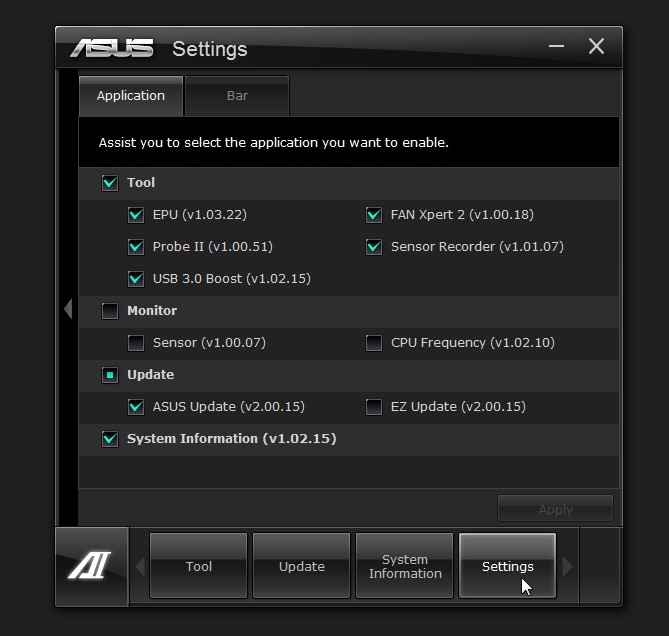
Did you install ASUS's "AI Suite II" (from their software disk)?

If so, are you running with all of the features active and with default settings? Or did you customize to disable certain features?

I had considerable instability (and fairly common BSOD) with my own P8Z77--V Pro custom machine until I configured AI Suite to utilize only the following:

qi80i.jpg


Notice that "sensor monitor" and "CPU frequency" are both DISABLED.
 

My Computer My Computer

Computer type
PC/Desktop
Computer Manufacturer/Model Number
Home-built, two systems (1) and (2)
OS
Windows 7 Pro x64 (1), Win7 Pro X64 (2)
CPU
i5-3350p 3.1Ghz/6MB-cache (1); E8400 3.0Ghz/6MB-cache (2)
Motherboard
ASUS P8Z77-V Pro (1); ASUS P5Q3 (2)
Memory
8GB PC3-12800 DDR3 (1); 4GB PC3-10600 DDR3 (2)
Graphics Card(s)
ATI HD7750 (1), (see TV cards); ATI R7 250 (2)
Sound Card
Realtek ALC892 HD Audio (1); Realtek ALC1200 HD Audio (2)
Monitor(s) Displays
Eizo HD2441W LCD, Eizo S2433W (1); Eizo 24" S2433W (2)
Screen Resolution
1920x1200, 1920x1200 (1); 1920x1200 (2)
Hard Drives
(1) 1TB SATA-II (7200RPM), 2x2TB SATA-III (7200RPM), 250GB SATA-III (10000RPM) for OS; 2x2TB external USB 3.0

(2) 320GB SATA-II (7200RPM), 750GB SATA-II (7200RPM), 150GB SATA-II (10000RPM) for OS; 2TB external USB 3.0
PSU
Nesteq ECS-6001 600W (1); Nesteq ECS-5001 500W (2)
Case
Acousti-Case 360 (1) and (2)
Cooling
Noctua NH-U12P SE2 for CPU, 2x120mm case fans (1) and (2)
Keyboard
IBM PS/2 (1) and (2)
Mouse
Logitech MX Revolution wireless (1); Microsoft wired (2)
Internet Speed
100mbps down / 10mbps up
Antivirus
Microsoft Security Essentials; Malwarebyte Anti-Malware Pro
Browser
Firefox
Other Info
Ceton InfiniTV 4-tuner cablecard-enabled TV card as well as Hauppauge HVR-2250 OTA/ATSC 2-tuner TV card in (1), running under Win7 WMC
I would not install or run any of the Asus software which is especially badly written of all the OEM's, while their hardware is superior.

I would also try running first with the drivers delivered by Win7 in its installer and via Windows Updates once you enable Automatically deliver drivers via Windows Update (Step 3) and run all rounds of Updates, with reboots, until no more are offered when you Check for Updates.

Then import only the drivers still missing in Device Manager.

After each round of Updates, each settings change, and then each program installed, test performance long enough to know if it has changed. This will help pinpoint the problem driver, update, setting or program.
 

My Computer My Computer

Computer type
PC/Desktop
Computer Manufacturer/Model Number
Custom Built
OS
Windows 10 Pro
CPU
AMD Ryzen 5 2400G Processor with Radeon RX Vega 11 Graphics
Motherboard
ASRock X470 Master SLI/AC AM4 AMD Promontory X470 SATA 6Gb/s
Memory
G.SKILL Ripjaws V Series 16GB (2 x 8GB) 288-Pin DDR4 SDRAM D
Graphics Card(s)
2047MB NVIDIA GeForce GTX 1060 6GB (EVGA)
Sound Card
Motherboard Built in
Monitor(s) Displays
Acer R240HY bidx 23.8-Inch IPS HDMI DVI VGA (1920 x 1080) Wi
Screen Resolution
1920 x 1080
Hard Drives
1TB Sandisk SSD PLUS (Main drive)
500 GB Seagate 7200 RPM (Games)
500 GB Western Digital 7200 RPM (Virtual Machines)
PSU
CORSAIR TX Series TX650M 650W 80+ Gold Modular Power Supply
Case
CORSAIR CARBIDE SPEC-02 Mid-Tower Gaming Case, Red LED Fan
Cooling
220mm, two 120mm, and four 60mm fans
Keyboard
Wired Dell keyboard
Mouse
Wireless Logitech mouse
Internet Speed
250mb down, 30mb up
Antivirus
Panda Cloud Antivirus
Browser
Chrome-ish x64
Other Info
Your awesome for reading this.
Alright so Asus AI Suite II, didn't do anything. Will look into upgrading the Psu to one that's more compatible.
Hopefully a fresh Windows install will fix the problem.
 
Last edited:

My Computer My Computer

Computer type
PC/Desktop
Computer Manufacturer/Model Number
Custom Build
OS
Windows 7 Professional 64bit
CPU
Intel i7 3rd Generation 3770k
Motherboard
Asus H61M-A
Memory
Crucial DDR3 Ram 8GB 1600mhz
Graphics Card(s)
Onboard Intel Graphics
Sound Card
Line 6 UX2
Hard Drives
Samsung Evo 840 SSD 250Gb
Seagate 1TB HDD for storage
PSU
Orion 585 Watt
Antivirus
Microsoft Security Essentials, Malwarebites
Browser
Google Chrome, Internet Explorer
I didn't change the Power Supply. However, I did I fix the problem.
The problem that was causing the Hard Freezes was Windows 7 SP1.
I didn't realize my Windows had SP1 built into it (which is known for causing hard freezes on some Pc's)
When I installed Windows 7 64 bit that did not have SP1 the problem went away.
No hard freezes since then.

My recommendation to anyone else who has a hard freeze problem is. Install Ubuntu for like a week. If you still get hard freezes then it's probably hardware related. If not then it's software related.
That'll save you a lot of time troubleshooting.
 

My Computer My Computer

Computer type
PC/Desktop
Computer Manufacturer/Model Number
Custom Build
OS
Windows 7 Professional 64bit
CPU
Intel i7 3rd Generation 3770k
Motherboard
Asus H61M-A
Memory
Crucial DDR3 Ram 8GB 1600mhz
Graphics Card(s)
Onboard Intel Graphics
Sound Card
Line 6 UX2
Hard Drives
Samsung Evo 840 SSD 250Gb
Seagate 1TB HDD for storage
PSU
Orion 585 Watt
Antivirus
Microsoft Security Essentials, Malwarebites
Browser
Google Chrome, Internet Explorer
What are you trying to tell us.
You did or did not install SP-1.

SP-1 Does not cause problems it fixes problems.
 

My Computer My Computer

Computer type
PC/Desktop
Computer Manufacturer/Model Number
Home made Desktop
OS
Windows 10 Pro. 64/ version 1709 Windows 7 Pro/64
CPU
Intel i7-6800K @ 4.3
Motherboard
ASUS X-99 Deluxe II
Memory
Corsair Platinum 16 gig @2400
Graphics Card(s)
EVGA GTX 1070 OC
Monitor(s) Displays
Asus 27" LED LCD/VE278Q
Screen Resolution
1920-1080 or 1280-720 HDMI
Hard Drives
INTEL SSD 730-240 Gb Sata 3.0/
PSU
EVGA Platium 1200W
Case
Phanteks Luxe Tempered Glass 8 fans/ one radiator
Cooling
XSPC/ Water Cooled CPU
Keyboard
Das 4 Professional
Mouse
Logitech M705/MX Anywhere 2-S
Internet Speed
100 mbits
Antivirus
Microsoft Security Essentials/ Malwarebytes Premium 3.0/ SAS
Browser
I.E. 11 default/Firefox/ ISP Time Warner Cable/Spectrum
Other Info
LG BluRay Burner/
Sound system-KLipsch-THX/
Icy Dock ssd Hot Swap bays.
"I didn't change the Power Supply. However, I did I fix the problem.
The problem that was causing the Hard Freezes was Windows 7 SP1.
I didn't realize my Windows had SP1 built into it (which is known for causing hard freezes on some Pc's)
When I installed Windows 7 64 bit that did Not have SP1 the problem went away.
No hard freezes since then.

My recommendation to anyone else who has a hard freeze problem is. Install Ubuntu for like a week. If you still get hard freezes then it's probably hardware related. If not then it's software related.
That'll save you a lot of time troubleshooting."
 

My Computer My Computer

Computer type
PC/Desktop
Computer Manufacturer/Model Number
Custom Build
OS
Windows 7 Professional 64bit
CPU
Intel i7 3rd Generation 3770k
Motherboard
Asus H61M-A
Memory
Crucial DDR3 Ram 8GB 1600mhz
Graphics Card(s)
Onboard Intel Graphics
Sound Card
Line 6 UX2
Hard Drives
Samsung Evo 840 SSD 250Gb
Seagate 1TB HDD for storage
PSU
Orion 585 Watt
Antivirus
Microsoft Security Essentials, Malwarebites
Browser
Google Chrome, Internet Explorer
When I installed Windows 7 64 bit that did Not have SP1 the problem went away.

Coincidental. You obviously performed a better install second time round.
 

My Computer My Computer

Computer type
PC/Desktop
Computer Manufacturer/Model Number
Custom Build
OS
W7 Pro x64 SP1 | W10 Pro IP x64 | W8.1 Pro x64 VM | Linux Mint VM
CPU
i7-4790k @ 4GHz (4.4GHz Boost)
Motherboard
ASUS Sabertooth Z87 (BIOS Rev 2004)
Memory
16GB DDR3 Kingston HyperX Fury @ 1600MHz CL 9-9-9-27
Graphics Card(s)
EVGA GTX 980 Classified
Sound Card
Realtek Onboard
Monitor(s) Displays
Samsung S27D390
Screen Resolution
1920 x 1080
Hard Drives
240GB Intel 520 Series SSD |
Samsung 850 EVO 120GB SSD |
2TB WD Caviar Black |
2TB WD Caviar Green
PSU
Corsair HX850-80 Gold Modular
Case
Cooler Master Silencio 650
Cooling
Corsair H80i w/2 x Corsair SP120 | 2 x 120mm Noctua NF-S12B
Keyboard
Microsoft Sidewinder X4
Mouse
Gigabyte M6900 optical
Internet Speed
152mb
Antivirus
F-Secure
Browser
Firefox 38.0
Other Info
Backup Rig: Win 7 Pro 64-bit | AMD A10-5800k | ASUS F2A85-V Pro | 8GB Samsung DDR3 @1600MHz | 120GB Toshiba SDD | 2TB Seagate HDD | Cooler Master Silencio 550

My Computer My Computer

Computer type
PC/Desktop
Computer Manufacturer/Model Number
Golden Mk. I.4
OS
Windows 10 Pro x64 ; Xubuntu x64
CPU
Intel i7 860 @ 2.80 GHz O/C'ed to 4.0GHz
Motherboard
Gigabyte P55A-UD3R Rev.1. Award BIOS F13
Memory
16GB Corsair Vengance DDR3 @ 661 MHz Dual Channel (9-9-9-24)
Graphics Card(s)
EVGA NVidia GTX 560 1024MB
Sound Card
Realtek Integrated
Monitor(s) Displays
Dual Samsung SyncMaster 2494HS
Screen Resolution
1920*1080 and 1920*1080
Hard Drives
1*Samsung 840 EVO 120GB SSD;
1*OCZ Vertex 2 60GB SSD;
2*Samsung F3 SpinPoint 1TB in RAID0;
1*Samsung F1 SpinPoint 1TB;
2*Western Digital 1TB External USB 3.0
1*Western Digital 500GB External USB 3.0
1*Seagate 500GB External USB 2.0
PSU
Thermaltake ToughPower QFan 750W
Case
Thermaltake Element S VK60001W2Z
Cooling
Corsair H60 Water Cooling, 2*230mm and 2*80mm case fans
Keyboard
Logitech G110
Mouse
Logitech MX518

My Computer My Computer

Computer type
PC/Desktop
Computer Manufacturer/Model Number
Custom Build
OS
Windows 7 Professional 64bit
CPU
Intel i7 3rd Generation 3770k
Motherboard
Asus H61M-A
Memory
Crucial DDR3 Ram 8GB 1600mhz
Graphics Card(s)
Onboard Intel Graphics
Sound Card
Line 6 UX2
Hard Drives
Samsung Evo 840 SSD 250Gb
Seagate 1TB HDD for storage
PSU
Orion 585 Watt
Antivirus
Microsoft Security Essentials, Malwarebites
Browser
Google Chrome, Internet Explorer
If that is the case, how do you explain the millions of computers that don't have the issues yours does, but do have SP1 installed?

Look closer at your system - you are missing something.
 

My Computer My Computer

Computer type
PC/Desktop
Computer Manufacturer/Model Number
Golden Mk. I.4
OS
Windows 10 Pro x64 ; Xubuntu x64
CPU
Intel i7 860 @ 2.80 GHz O/C'ed to 4.0GHz
Motherboard
Gigabyte P55A-UD3R Rev.1. Award BIOS F13
Memory
16GB Corsair Vengance DDR3 @ 661 MHz Dual Channel (9-9-9-24)
Graphics Card(s)
EVGA NVidia GTX 560 1024MB
Sound Card
Realtek Integrated
Monitor(s) Displays
Dual Samsung SyncMaster 2494HS
Screen Resolution
1920*1080 and 1920*1080
Hard Drives
1*Samsung 840 EVO 120GB SSD;
1*OCZ Vertex 2 60GB SSD;
2*Samsung F3 SpinPoint 1TB in RAID0;
1*Samsung F1 SpinPoint 1TB;
2*Western Digital 1TB External USB 3.0
1*Western Digital 500GB External USB 3.0
1*Seagate 500GB External USB 2.0
PSU
Thermaltake ToughPower QFan 750W
Case
Thermaltake Element S VK60001W2Z
Cooling
Corsair H60 Water Cooling, 2*230mm and 2*80mm case fans
Keyboard
Logitech G110
Mouse
Logitech MX518
:ditto:

What are you trying to tell us.

He is trying to tell us it's all windows fault. Sure thats definitely it.....

______________________________________________________________________________________

I know torrent disks have those issues.

Those can cause freezes with sp1 slipstreamed into them due to the way they are modified to remove wga (-WAT-Windows Activation Technologies).

It is always funny to me that someone uses a illegal OS from a unknown source and then complain and wonder why it does not work right.

Brilliant.
 

My Computer My Computer

Computer type
PC/Desktop
Computer Manufacturer/Model Number
Custom Built
OS
Windows 10 Pro
CPU
AMD Ryzen 5 2400G Processor with Radeon RX Vega 11 Graphics
Motherboard
ASRock X470 Master SLI/AC AM4 AMD Promontory X470 SATA 6Gb/s
Memory
G.SKILL Ripjaws V Series 16GB (2 x 8GB) 288-Pin DDR4 SDRAM D
Graphics Card(s)
2047MB NVIDIA GeForce GTX 1060 6GB (EVGA)
Sound Card
Motherboard Built in
Monitor(s) Displays
Acer R240HY bidx 23.8-Inch IPS HDMI DVI VGA (1920 x 1080) Wi
Screen Resolution
1920 x 1080
Hard Drives
1TB Sandisk SSD PLUS (Main drive)
500 GB Seagate 7200 RPM (Games)
500 GB Western Digital 7200 RPM (Virtual Machines)
PSU
CORSAIR TX Series TX650M 650W 80+ Gold Modular Power Supply
Case
CORSAIR CARBIDE SPEC-02 Mid-Tower Gaming Case, Red LED Fan
Cooling
220mm, two 120mm, and four 60mm fans
Keyboard
Wired Dell keyboard
Mouse
Wireless Logitech mouse
Internet Speed
250mb down, 30mb up
Antivirus
Panda Cloud Antivirus
Browser
Chrome-ish x64
Other Info
Your awesome for reading this.
Avaava you have got the problem down to SP-1. That is good, now are experts can help a lot more.

Just do this tutorial and post the results and our experts can take a look and give advice and instructions to cure your problem with SP-1.

A 100 million plus systems have SP-1 with no problems and you can be added to the list.
For the smooth operation and security of Windows 7 SP-1 is a must.
Just complete this tutorial by Brink and our experts will be able to give guidance.

http://www.sevenforums.com/windows-...ne-activation-issue-posting-instructions.html
 

My Computer My Computer

Computer type
PC/Desktop
Computer Manufacturer/Model Number
Home made Desktop
OS
Windows 10 Pro. 64/ version 1709 Windows 7 Pro/64
CPU
Intel i7-6800K @ 4.3
Motherboard
ASUS X-99 Deluxe II
Memory
Corsair Platinum 16 gig @2400
Graphics Card(s)
EVGA GTX 1070 OC
Monitor(s) Displays
Asus 27" LED LCD/VE278Q
Screen Resolution
1920-1080 or 1280-720 HDMI
Hard Drives
INTEL SSD 730-240 Gb Sata 3.0/
PSU
EVGA Platium 1200W
Case
Phanteks Luxe Tempered Glass 8 fans/ one radiator
Cooling
XSPC/ Water Cooled CPU
Keyboard
Das 4 Professional
Mouse
Logitech M705/MX Anywhere 2-S
Internet Speed
100 mbits
Antivirus
Microsoft Security Essentials/ Malwarebytes Premium 3.0/ SAS
Browser
I.E. 11 default/Firefox/ ISP Time Warner Cable/Spectrum
Other Info
LG BluRay Burner/
Sound system-KLipsch-THX/
Icy Dock ssd Hot Swap bays.
Want to update this for anyone having the same problem. After my first troubleshoot it worked for about a month and then froze again. I upgraded my power supply and it ran pretty smooth for almost 2 months. Now it freezes randomly from once a day, week, or even a few weeks. Still haven't figured out the issue.
 

My Computer My Computer

Computer type
PC/Desktop
Computer Manufacturer/Model Number
Custom Build
OS
Windows 7 Professional 64bit
CPU
Intel i7 3rd Generation 3770k
Motherboard
Asus H61M-A
Memory
Crucial DDR3 Ram 8GB 1600mhz
Graphics Card(s)
Onboard Intel Graphics
Sound Card
Line 6 UX2
Hard Drives
Samsung Evo 840 SSD 250Gb
Seagate 1TB HDD for storage
PSU
Orion 585 Watt
Antivirus
Microsoft Security Essentials, Malwarebites
Browser
Google Chrome, Internet Explorer
Follow the link in post #17 and post up the results.
 

My Computer My Computer

Computer type
PC/Desktop
Computer Manufacturer/Model Number
Custom Build
OS
W7 Pro x64 SP1 | W10 Pro IP x64 | W8.1 Pro x64 VM | Linux Mint VM
CPU
i7-4790k @ 4GHz (4.4GHz Boost)
Motherboard
ASUS Sabertooth Z87 (BIOS Rev 2004)
Memory
16GB DDR3 Kingston HyperX Fury @ 1600MHz CL 9-9-9-27
Graphics Card(s)
EVGA GTX 980 Classified
Sound Card
Realtek Onboard
Monitor(s) Displays
Samsung S27D390
Screen Resolution
1920 x 1080
Hard Drives
240GB Intel 520 Series SSD |
Samsung 850 EVO 120GB SSD |
2TB WD Caviar Black |
2TB WD Caviar Green
PSU
Corsair HX850-80 Gold Modular
Case
Cooler Master Silencio 650
Cooling
Corsair H80i w/2 x Corsair SP120 | 2 x 120mm Noctua NF-S12B
Keyboard
Microsoft Sidewinder X4
Mouse
Gigabyte M6900 optical
Internet Speed
152mb
Antivirus
F-Secure
Browser
Firefox 38.0
Other Info
Backup Rig: Win 7 Pro 64-bit | AMD A10-5800k | ASUS F2A85-V Pro | 8GB Samsung DDR3 @1600MHz | 120GB Toshiba SDD | 2TB Seagate HDD | Cooler Master Silencio 550
Back
Top