Can I install a preiously installed Windows 7 CD on a second PC?

thailen

New member
Local time
5:13 AM
Messages
27
Without a long and boring story, I let soeone who works for an ISP remove my Windows disc and reinstall a different Windows 7 OS without a key(not genuine). I have a second PC with a genuine Windows 7 OS CD with the original 25 letter key. Can I just install that disc and get it activated using that 25 letter key or must I buy a new Windows 7 CD??
 

My Computer My Computer

At a glance

Windows 7 Home Premium(64 bit)
OS
Windows 7 Home Premium(64 bit)
Each PC must have its own unique product key - you cannot use an existing one that has already been activated on one computer, to then activate a second PC. You will need to purchase an additional Windows licence.
 

My Computer My Computer

At a glance

Windows 10 Pro x64 ; Xubuntu x64Intel i7 860 @ 2.80 GHz O/C'ed to 4.0GHz16GB Corsair Vengance DDR3 @ 661 MHz Dual Cha...EVGA NVidia GTX 560 1024MB
Computer type
PC/Desktop
Computer Manufacturer/Model Number
Golden Mk. I.4
OS
Windows 10 Pro x64 ; Xubuntu x64
CPU
Intel i7 860 @ 2.80 GHz O/C'ed to 4.0GHz
Motherboard
Gigabyte P55A-UD3R Rev.1. Award BIOS F13
Memory
16GB Corsair Vengance DDR3 @ 661 MHz Dual Channel (9-9-9-24)
Graphics Card(s)
EVGA NVidia GTX 560 1024MB
Sound Card
Realtek Integrated
Monitor(s) Displays
Dual Samsung SyncMaster 2494HS
Screen Resolution
1920*1080 and 1920*1080
Hard Drives
1*Samsung 840 EVO 120GB SSD;
1*OCZ Vertex 2 60GB SSD;
2*Samsung F3 SpinPoint 1TB in RAID0;
1*Samsung F1 SpinPoint 1TB;
2*Western Digital 1TB External USB 3.0
1*Western Digital 500GB External USB 3.0
1*Seagate 500GB External USB 2.0
PSU
Thermaltake ToughPower QFan 750W
Case
Thermaltake Element S VK60001W2Z
Cooling
Corsair H60 Water Cooling, 2*230mm and 2*80mm case fans
Keyboard
Logitech G110
Mouse
Logitech MX518
Does the PC you want to install on have a COA sticker and is it for Windows 7? If so, you can use it to install with.
 

My Computer My Computer

At a glance

Windows 10 Pro X64Intel Quad Core i7-4770 @ 3.4Ghz16.0GB PC3-12800 DDR3 SDRAM 1600 MHzIntel Integrated HD Graphics
Computer type
PC/Desktop
Computer Manufacturer/Model Number
Lenovo IdeaCenter 450
OS
Windows 10 Pro X64
CPU
Intel Quad Core i7-4770 @ 3.4Ghz
Memory
16.0GB PC3-12800 DDR3 SDRAM 1600 MHz
Graphics Card(s)
Intel Integrated HD Graphics
Sound Card
Realtek HD Audio
Monitor(s) Displays
HP 22" LCD
Screen Resolution
1680 x 1050
Hard Drives
250GB Samsung EVO SATA-3 SSD
2TB Seagate ST2000DM001 SATA-2
1.5TB Seagate ST3150041AS SATA
Keyboard
Dell USB
Mouse
Lenovo USB
Internet Speed
Cable via Road Runner 3MB Upload, 30MB Download
Antivirus
Windows Defender, MBAM Pro, MBAE
Browser
Seamonkey
Other Info
UEFI/GPT
PLDS DVD-RW DH16AERSH
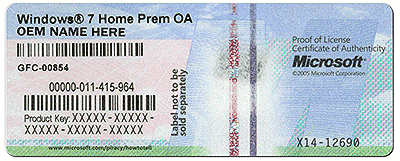
Ztrucker has a good point.....perhaps I misunderstood you? Does the first PC that the ISP botched have its own COA sticker and product code? Like this?

coa-stickers.gif
 

My Computer My Computer

At a glance

Windows 10 Pro x64 ; Xubuntu x64Intel i7 860 @ 2.80 GHz O/C'ed to 4.0GHz16GB Corsair Vengance DDR3 @ 661 MHz Dual Cha...EVGA NVidia GTX 560 1024MB
Computer type
PC/Desktop
Computer Manufacturer/Model Number
Golden Mk. I.4
OS
Windows 10 Pro x64 ; Xubuntu x64
CPU
Intel i7 860 @ 2.80 GHz O/C'ed to 4.0GHz
Motherboard
Gigabyte P55A-UD3R Rev.1. Award BIOS F13
Memory
16GB Corsair Vengance DDR3 @ 661 MHz Dual Channel (9-9-9-24)
Graphics Card(s)
EVGA NVidia GTX 560 1024MB
Sound Card
Realtek Integrated
Monitor(s) Displays
Dual Samsung SyncMaster 2494HS
Screen Resolution
1920*1080 and 1920*1080
Hard Drives
1*Samsung 840 EVO 120GB SSD;
1*OCZ Vertex 2 60GB SSD;
2*Samsung F3 SpinPoint 1TB in RAID0;
1*Samsung F1 SpinPoint 1TB;
2*Western Digital 1TB External USB 3.0
1*Western Digital 500GB External USB 3.0
1*Seagate 500GB External USB 2.0
PSU
Thermaltake ToughPower QFan 750W
Case
Thermaltake Element S VK60001W2Z
Cooling
Corsair H60 Water Cooling, 2*230mm and 2*80mm case fans
Keyboard
Logitech G110
Mouse
Logitech MX518
Without a long and boring story, I let someone who works for an ISP remove my Windows disc and reinstall a different Windows 7 OS without a key(not genuine). I have a second PC with a genuine Windows 7 OS CD with the original 25 letter key. Can I just install that disc and get it activated using that 25 letter key or must I buy a new Windows 7 CD??
If the genuine Win7 OS DVD with the legitimate product key for the second PC is an OEM key, then it can ONLY be used on THAT machine and no other. Period.

If instead it is a RETAIL key, then it can only be USED AND ACTIVATED ON ONE MACHINE AT A TIME.

So if that second machine is currently activated and truly using the installed Win7 on it (from that legitimate Win7 installation DVD), then you CANNOT use that same key to also install and activate Win7 on your first machine. You would need to first deactivate Win7 on the second machine, and then you'd be able to activate the install on the first machine in order to use the same product key. But of course then you wouldn't have a usable second machine.

If you previously had a working Win7 system installed and activated on the first machine (the one which your ISP friend installed a non-genuine Windows on), why can't you reinstall your originally present Win7 on that machine? If the machine has its COA certificate you can use that key to reinstall and activate on that very same machine.
 

My Computer My Computer

At a glance

Windows 7 Pro x64 (1), Win7 Pro X64 (2)i5-3350p 3.1Ghz/6MB-cache (1); E8400 3.0Ghz/6...8GB PC3-12800 DDR3 (1); 4GB PC3-10600 DDR3 (2)ATI HD7750 (1), (see TV cards); ATI R7 250 (2)
Computer type
PC/Desktop
Computer Manufacturer/Model Number
Home-built, two systems (1) and (2)
OS
Windows 7 Pro x64 (1), Win7 Pro X64 (2)
CPU
i5-3350p 3.1Ghz/6MB-cache (1); E8400 3.0Ghz/6MB-cache (2)
Motherboard
ASUS P8Z77-V Pro (1); ASUS P5Q3 (2)
Memory
8GB PC3-12800 DDR3 (1); 4GB PC3-10600 DDR3 (2)
Graphics Card(s)
ATI HD7750 (1), (see TV cards); ATI R7 250 (2)
Sound Card
Realtek ALC892 HD Audio (1); Realtek ALC1200 HD Audio (2)
Monitor(s) Displays
Eizo HD2441W LCD, Eizo S2433W (1); Eizo 24" S2433W (2)
Screen Resolution
1920x1200, 1920x1200 (1); 1920x1200 (2)
Hard Drives
(1) 1TB SATA-II (7200RPM), 2x2TB SATA-III (7200RPM), 250GB SATA-III (10000RPM) for OS; 2x2TB external USB 3.0

(2) 320GB SATA-II (7200RPM), 750GB SATA-II (7200RPM), 150GB SATA-II (10000RPM) for OS; 2TB external USB 3.0
PSU
Nesteq ECS-6001 600W (1); Nesteq ECS-5001 500W (2)
Case
Acousti-Case 360 (1) and (2)
Cooling
Noctua NH-U12P SE2 for CPU, 2x120mm case fans (1) and (2)
Keyboard
IBM PS/2 (1) and (2)
Mouse
Logitech MX Revolution wireless (1); Microsoft wired (2)
Internet Speed
100mbps down / 10mbps up
Antivirus
Microsoft Security Essentials; Malwarebyte Anti-Malware Pro
Browser
Firefox
Other Info
Ceton InfiniTV 4-tuner cablecard-enabled TV card as well as Hauppauge HVR-2250 OTA/ATSC 2-tuner TV card in (1), running under Win7 WMC
I believe that you can legally only activate windows on one machine at a time. So if you have a retail copy you can put it on a new computer if that key isn't still being used on an old computer. However, if it is an OEM copy of windows it is probably tattooed to the motherboard or hard drive. This means that it will most likely only work on the computer and drive that it came on. This is a huge annoyance if you want to change hard drives.

If you need a legal copy of window 7 you can download one off a site called Digital River. You obviously still need a valid key.
 

My Computer My Computer

At a glance

Windows 7 64-bitIntel 4690KCorsair Vengeance 2133EVGA GTX1060
Computer type
PC/Desktop
Computer Manufacturer/Model Number
custom
OS
Windows 7 64-bit
CPU
Intel 4690K
Motherboard
Asus Tuf Gryphon Z97
Memory
Corsair Vengeance 2133
Graphics Card(s)
EVGA GTX1060
Screen Resolution
1080p
Hard Drives
Crucial m500 SSD 240gb
PSU
EVGA
Case
Fractal Design
Cooling
H7
Browser
Chrome
Yes of course you can reinstall the licensed OS on that PC.

As stated if it is OEM then use the Product Key on the attached COA sticker to http://www.sevenforums.com/tutorials/219487-clean-reinstall-factory-oem-windows-7-a.html#post1839164.

If it is retail, then follow the same steps as above but use the Product Key from the COA sticker on the retail packaging.

Be sure to do a booted install, if necessary using the media provided in the tutorial above along with tool to write to flash stick or burn to DVD. Delete all partitions using the Drive Options pictured in Steps 7/8 of http://www.sevenforums.com/tutorials/1649-clean-install-windows-7-a.html, create New as you please, format and isntall Win7 to the first partition.

Let us know if you have any other questions. We will stick with you until it is working perfectly.
 
Last edited:
"Can I install a previously installed Windows 7 CD on a second PC?"
Yes. You can even install it on 100 other PCs.

"May I install a previously installed Windows 7 CD on a second PC?"
NO!
7 CD on a second PC

7 CD on a second PC
 

My Computer My Computer

At a glance

Windows 10 x64i7-7700K16 GB 2400 MHzGTX 1060
Computer type
PC/Desktop
Computer Manufacturer/Model Number
Dell
OS
Windows 10 x64
CPU
i7-7700K
Memory
16 GB 2400 MHz
Graphics Card(s)
GTX 1060
Sound Card
Integrated, plus external Presonus Audiobox USB
Monitor(s) Displays
2x AOC 27"
Screen Resolution
1920x1080
Hard Drives
512 GB M.2 SSD
2 TB 7200 RPM disk
Internet Speed
110 Mbps
Browser
Firefox
Sorry for My Late Reply...

The PC in question has the Microsoft sticker: Winbdows 7 Home Premium OA
Acer Grou[p with a bar code CO.7P201.001
Product Key: ----- ----- ----- ----- -----
Bar Code X16-96072
00196-139-232-047

How can I remove the current bad OS and install a second Window 7 OS, hopefully as cheaply as possible?(That PC has a DVD slot). The only Windows 7 DVD I have(obviously from another PC) is a Professional - not a Home Edition - DVD.


Yes of course you can reinstall the licensed OS on that PC.

As stated if it is OEM then use the Product Key on the attached COA sticker to http://www.sevenforums.com/tutorials/219487-clean-reinstall-factory-oem-windows-7-a.html#post1839164.

If it is retail, then follow the same steps as above but use the Product Key from the COA sticker on the retail packaging.

Be sure to do a booted install, if necessary using the media provided in the tutorial above along with tool to write to flash stick or burn to DVD. Delete all partitions using the Drive Options pictured in Steps 7/8 of http://www.sevenforums.com/tutorials/1649-clean-install-windows-7-a.html, create New as you please, format and isntall Win7 to the first partition.

Let us know if you have any other questions. We will stick with you until it is working perfectly.
 

My Computer My Computer

At a glance

Windows 7 Home Premium(64 bit)
OS
Windows 7 Home Premium(64 bit)
The PC in question has the Microsoft sticker: Winbdows 7 Home Premium OA
Acer Grou[p with a bar code CO.7P201.001
Product Key: ----- ----- ----- ----- -----
Bar Code X16-96072
00196-139-232-047

How can I remove the current bad OS and install a second Window 7 OS, hopefully as cheaply as possible?(That PC has a DVD slot). The only Windows 7 DVD I have(obviously from another PC) is a Professional - not a Home Edition - DVD.

Download the ISO for your relevant OS from Digital River, then create a bootable USB stick with that ISO using the Windows 7 USB/DVD Download Tool from Microsoft. Boot your machine from the USB stick and enter the product key attached to the machine.

Be sure to follow all of the steps in the Clean Install Windows 7 tutorial by Brink.
 

My Computer My Computer

At a glance

W7 Pro x64 SP1 | W10 Pro IP x64 | W8.1 Pro x6...i7-4790k @ 4GHz (4.4GHz Boost)16GB DDR3 Kingston HyperX Fury @ 1600MHz CL 9...EVGA GTX 980 Classified
Computer type
PC/Desktop
Computer Manufacturer/Model Number
Custom Build
OS
W7 Pro x64 SP1 | W10 Pro IP x64 | W8.1 Pro x64 VM | Linux Mint VM
CPU
i7-4790k @ 4GHz (4.4GHz Boost)
Motherboard
ASUS Sabertooth Z87 (BIOS Rev 2004)
Memory
16GB DDR3 Kingston HyperX Fury @ 1600MHz CL 9-9-9-27
Graphics Card(s)
EVGA GTX 980 Classified
Sound Card
Realtek Onboard
Monitor(s) Displays
Samsung S27D390
Screen Resolution
1920 x 1080
Hard Drives
240GB Intel 520 Series SSD |
Samsung 850 EVO 120GB SSD |
2TB WD Caviar Black |
2TB WD Caviar Green
PSU
Corsair HX850-80 Gold Modular
Case
Cooler Master Silencio 650
Cooling
Corsair H80i w/2 x Corsair SP120 | 2 x 120mm Noctua NF-S12B
Keyboard
Microsoft Sidewinder X4
Mouse
Gigabyte M6900 optical
Internet Speed
152mb
Antivirus
F-Secure
Browser
Firefox 38.0
Other Info
Backup Rig: Win 7 Pro 64-bit | AMD A10-5800k | ASUS F2A85-V Pro | 8GB Samsung DDR3 @1600MHz | 120GB Toshiba SDD | 2TB Seagate HDD | Cooler Master Silencio 550
^ Follow Boozad's suggestion and you will be OK :thumbsup:
 

My Computer My Computer

At a glance

Windows 10 Pro x64 ; Xubuntu x64Intel i7 860 @ 2.80 GHz O/C'ed to 4.0GHz16GB Corsair Vengance DDR3 @ 661 MHz Dual Cha...EVGA NVidia GTX 560 1024MB
Computer type
PC/Desktop
Computer Manufacturer/Model Number
Golden Mk. I.4
OS
Windows 10 Pro x64 ; Xubuntu x64
CPU
Intel i7 860 @ 2.80 GHz O/C'ed to 4.0GHz
Motherboard
Gigabyte P55A-UD3R Rev.1. Award BIOS F13
Memory
16GB Corsair Vengance DDR3 @ 661 MHz Dual Channel (9-9-9-24)
Graphics Card(s)
EVGA NVidia GTX 560 1024MB
Sound Card
Realtek Integrated
Monitor(s) Displays
Dual Samsung SyncMaster 2494HS
Screen Resolution
1920*1080 and 1920*1080
Hard Drives
1*Samsung 840 EVO 120GB SSD;
1*OCZ Vertex 2 60GB SSD;
2*Samsung F3 SpinPoint 1TB in RAID0;
1*Samsung F1 SpinPoint 1TB;
2*Western Digital 1TB External USB 3.0
1*Western Digital 500GB External USB 3.0
1*Seagate 500GB External USB 2.0
PSU
Thermaltake ToughPower QFan 750W
Case
Thermaltake Element S VK60001W2Z
Cooling
Corsair H60 Water Cooling, 2*230mm and 2*80mm case fans
Keyboard
Logitech G110
Mouse
Logitech MX518
As you have Acer Factory OEM then everything you need to do a perfect reinstall is in Clean Reinstall - Factory OEM Windows 7 including the installer and tool to use to burn it to DVD or flash stick to make a bootable installer.

The steps make sure you've considered everything that needs to be backed up and the easiest way to to this, then the actual install steps and how to set it up and optimized it perfectly.

Be sure to delete all partitions during the booted install as discussed in the tutorial.

Feel free to ask back any questions you have.
 
I may prove to be the ultimate challenge...

Since I'm at the lower end of the PC-literate pole, you may have your hands full. But I'm willing to try. First, I'm doing this re-install procedure on my second PC, which works fine. The Acer PC is the one with the problem, so I hope the downloading of the ISO and the 7 USAB Download tool on my good PC and then transferring it to the clean 64 GB flash drive, inserting the flash drive in the bad PC with the rogue Windows OS, is the correct way to go. If not, tell me now. Plus, I see when I open the ISO file, there are these files - root, efi, setup.exe, etc. Normally, I'd click on setup, but need guidance. Finally, I'm totally ignorant about partitions. I read the instructions, but need a compass to guide me...
As you can see, I'm the kid in the back of the room, slinking down, so the professor won't see me....
 

My Computer My Computer

At a glance

Windows 7 Home Premium(64 bit)
OS
Windows 7 Home Premium(64 bit)
I hope the downloading of the ISO and the 7 USAB Download tool on my good PC and then transferring it to the clean 64 GB flash drive, inserting the flash drive in the bad PC with the rogue Windows OS, is the correct way to go .If not, tell me now.

It is.

Plus, I see when I open the ISO file, there are these files - root, efi, setup.exe, etc. Normally, I'd click on setup, but need guidance.

You don't need to manually access the files, they're automated. All is explained in step 8 of Greg's linked tutorial, but (with the power turned off and the mains cable unplugged) you'll need to disconnect any other hard drives you have installed and just leave the hard drive you're installing on connected. Then insert the USB stick into the PC, power on and enter your BIOS menu on boot up. Select the boot options and choose to boot from USB, save and exit. The installer will take care of the rest. Remove the USB stick when the installer reboots for the first time.

Finally, I'm totally ignorant about partitions. I read the instructions, but need a compass to guide me...

Take a read through those instructions again, and then again until you understand them. They're the most comprehensive, clear and correct instructions you could get, all the information you need is there. If you're still stuck, let us know exactly what points you need help on.
 

My Computer My Computer

At a glance

W7 Pro x64 SP1 | W10 Pro IP x64 | W8.1 Pro x6...i7-4790k @ 4GHz (4.4GHz Boost)16GB DDR3 Kingston HyperX Fury @ 1600MHz CL 9...EVGA GTX 980 Classified
Computer type
PC/Desktop
Computer Manufacturer/Model Number
Custom Build
OS
W7 Pro x64 SP1 | W10 Pro IP x64 | W8.1 Pro x64 VM | Linux Mint VM
CPU
i7-4790k @ 4GHz (4.4GHz Boost)
Motherboard
ASUS Sabertooth Z87 (BIOS Rev 2004)
Memory
16GB DDR3 Kingston HyperX Fury @ 1600MHz CL 9-9-9-27
Graphics Card(s)
EVGA GTX 980 Classified
Sound Card
Realtek Onboard
Monitor(s) Displays
Samsung S27D390
Screen Resolution
1920 x 1080
Hard Drives
240GB Intel 520 Series SSD |
Samsung 850 EVO 120GB SSD |
2TB WD Caviar Black |
2TB WD Caviar Green
PSU
Corsair HX850-80 Gold Modular
Case
Cooler Master Silencio 650
Cooling
Corsair H80i w/2 x Corsair SP120 | 2 x 120mm Noctua NF-S12B
Keyboard
Microsoft Sidewinder X4
Mouse
Gigabyte M6900 optical
Internet Speed
152mb
Antivirus
F-Secure
Browser
Firefox 38.0
Other Info
Backup Rig: Win 7 Pro 64-bit | AMD A10-5800k | ASUS F2A85-V Pro | 8GB Samsung DDR3 @1600MHz | 120GB Toshiba SDD | 2TB Seagate HDD | Cooler Master Silencio 550
Once again, I need to ask...

When I power the PC on with the USB drive, where is the BIOS menu?
 

My Computer My Computer

At a glance

Windows 7 Home Premium(64 bit)
OS
Windows 7 Home Premium(64 bit)
I gave you a guide that includes everything you need to know to get and keep a perfect installation: Clean Reinstall - Factory OEM Windows 7.

The questions you are asking are covered in Step 8, including a tutorial for how to boot the installer in the blue link.


For 4gb or less RAM I would install 32 bit Win7: Win7 Home Premium x86 SP1 English Official ISO download

For more than 4gb RAM install 64 bit Win7: Win7 Home Premium x64 SP1 English Official ISO download

Start with Step 2 to write to bootable flash stick from Clean Reinstall - Factory OEM Windows 7

The follow the rest of the steps. Have you read them?
 
After cleaning my 64 GB flash drive and installing the reinstall Windows 7 program, I removed the drive and plugged it into the bad PC. I then turned the PC on and got a screen telling mew to activate the OS, and I needed to type in the 25-digit key. Which I did and it was rejected. What next?
 

My Computer My Computer

At a glance

Windows 7 Home Premium(64 bit)
OS
Windows 7 Home Premium(64 bit)
Did you complete the steps to Clean Install Windows 7 or was this key requested in the beginning when you began the install and rejected then?

If you are using the licensed version printed on the COA sticker affixed to that machine then it will always activate as long as you input the correct characters. As it says in Clean Reinstall - Factory OEM Windows 7 the main reason for rejection is almost always an incorrect character being inputted - an 8 can look like a B. Use a magnifying glass if necessary.

You never replied if you have 4gb or more RAM. If you have more than 4gb RAM you should have written this Win7 Home Premium x64 SP1 English Official ISO download to the stick using Windows 7 USB-DVD Download Tool.

You also never made clear if this sticker you quoted is on the same machine or another machine you want to transfer activation to this machine. It may not have been made clear enough to you in the replies early on that you cannot activate another version or OS on this machine using the COA sticker Product Key from another machine. But if the sticker is on the same machine, and you are installing the correct version listed on it, then there is no way it will not activate even if you need to Activate Windows 7 by Phone - Windows 7 Help Forums
 
Back
Top