When I Plug in Ethernet: It Stays Wifi

InceptSean

New member
Local time
12:31 AM
Messages
6
Here is an example of me connected to wifi after inserting ethernet

2hn5qmu.png


102m838.png


Here I am connected to ethernet, but if I enable my Wireless Network Connection, it will switch to wifi even though my ethernet was already plugged in and connected ethernet

6ynu2x.png


102m838.jpg


I assume my problem is that wifi is given a priority over ethernet. That's my assumption, but I would have no idea HOW to test that assumption, or if there even is any such thing as ethernet having priority over wifi/vice versa.

I would appreciate the help immensely. Thank you for your time in reading this!
 

My Computer My Computer

At a glance

Windows 7 Home Premium 64bitProcessor Intel(R) Core(TM) i7-3720QM CPU @ 2...455.52gb
Computer type
Laptop
Computer Manufacturer/Model Number
Alienware M14x R2/6NGWFV1
OS
Windows 7 Home Premium 64bit
CPU
Processor Intel(R) Core(TM) i7-3720QM CPU @ 2.60GHz/3.7Ghz
Memory
455.52gb
Internet Speed
Ping: 16 ms, Download Speed: 34.84Mbps, Upload Speed: 6.54 M
Antivirus
AVG AntiVirus Free Edition 2014
Browser
Google Chrome
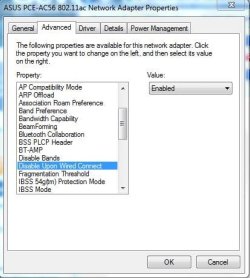
Mine WiFi NIC has an option to turn off its radio when Ethernet connection is established. Does yours have this on your driver options?

Capture.JPG
 

My Computer My Computer

At a glance

Windows 7 Professional x64 SP1Intel® Pentium® 4 @ 2.26 GHz, Intel Core i7-2...512MB Dual channel DDR SDRAM @ 400MHz 2.5-3-3...Intel 82865G, Nvidia GeForce 520M Graphics
Computer type
Laptop
Computer Manufacturer/Model Number
Dell Optiplex SX270, Lenovo Z470
OS
Windows 7 Professional x64 SP1
CPU
Intel® Pentium® 4 @ 2.26 GHz, Intel Core i7-2670QM @ 2.20 GH
Motherboard
Dell, Lenovo
Memory
512MB Dual channel DDR SDRAM @ 400MHz 2.5-3-3-7, 8 GB DDR3
Graphics Card(s)
Intel 82865G, Nvidia GeForce 520M Graphics
Sound Card
SoundMax Integrated Audio, Integrated HD Audio
Monitor(s) Displays
LG W1952
Screen Resolution
1440x900, 1366 x 768
Hard Drives
40 GB 2.5" IDE 4200 RPM HDD, 500 GB 5400 RPM Sata 1.5 + 32 GB SSD
PSU
Dell 145 Watt, Lenovo 120 Watt Power Adapter
Case
Optiplex SX270 Small Form Factor, Laptop
Cooling
Dell Proprietary Air Cooling, Stock laptop cooling
Keyboard
Dell SK-8125 USB Keyboard
Mouse
Dell PS/2 2 button ball mouse with wheel scroll
Internet Speed
300 Mbit down / 20 Mbps up Time Warner Cable
Antivirus
MSE, Malwarebytes Scanner
Browser
Internet (Aizawa) Explorer 11
Other Info
Running Windows Server 2012 Datacenter on a virtual machine to run Metro Apps.
Sounds normal, mine will connect via WiFi with the Ethernet plugged in as well.
 

My Computer My Computer

At a glance

Windows 7 Ultimate X64 SP1Intel i5-2550K, Differing ~4.4-4.8GHz No buil...16GB G.Skill Sniper 1866MHz @ 2133MHz 2x8GBASUS GTX650TIB-DC2OC-2GD5, (650TI Boost)
Computer type
PC/Desktop
Computer Manufacturer/Model Number
Home Built Desktop By DataTech
OS
Windows 7 Ultimate X64 SP1
CPU
Intel i5-2550K, Differing ~4.4-4.8GHz No built in GPU
Motherboard
ASUS P8Z68-V PRO/GEN3
Memory
16GB G.Skill Sniper 1866MHz @ 2133MHz 2x8GB
Graphics Card(s)
ASUS GTX650TIB-DC2OC-2GD5, (650TI Boost)
Sound Card
Onboard Realtek 5-1
Monitor(s) Displays
Samsung P2570HD
Screen Resolution
1920x1080
Hard Drives
Samsung 840 Pro 256GB SSD for OS, 500GB Seagate Constellation (Enterprise drive) for Data
PSU
Corsair HX650W
Case
Inwin Dragon Rider
Cooling
Hyper 212 EVO w/two Noctua fans, push-pull, @1300 RPM
Keyboard
E-Z Eyes, bright yellow keys with large characters
Mouse
steelseries SENSEI Laser Pro Gaming
Internet Speed
48-51Mbs Mbs down, 11 Mbs up Xfinity Cable
Antivirus
Norton Internet Security 2013
Browser
IE 10, Opera, Pale Moon if needed
Other Info
4 case fans, LG BluRay-RE, ASUS DVD-RW, Mr. Fusion power supply, 1.21 gigawatts.
You can always right click either connection and disable it.
 

My Computer My Computer

At a glance

Windows 7 Pro 64 bitIntel i58GB KINGSTON DUAL-DDR3 1600MHz2GB AMD RADEON™ R7 250
Computer type
PC/Desktop
Computer Manufacturer/Model Number
PC Specialist Custom
OS
Windows 7 Pro 64 bit
CPU
Intel i5
Motherboard
ASUS® H81M-PLUS
Memory
8GB KINGSTON DUAL-DDR3 1600MHz
Graphics Card(s)
2GB AMD RADEON™ R7 250
Hard Drives
120GB KINGSTON V300 SSD
1TB WD CAVIAR BLACK WD1003FZEX
Mine WiFi NIC has an option to turn off its radio when Ethernet connection is established. Does yours have this on your driver options?

View attachment 319682

Unfortunately, it doesn't! What! That's the key then..I have to see if I can some how get that option. My ethernet driver is up to date, I am not sure why I do not have this functionality.

rh25jk.png


az88jr.png


9j2mi9.png


You can always right click either connection and disable it.

Yes, but that is such a hassle if you switch from ethernet to wifi often.
 

My Computer My Computer

At a glance

Windows 7 Home Premium 64bitProcessor Intel(R) Core(TM) i7-3720QM CPU @ 2...455.52gb
Computer type
Laptop
Computer Manufacturer/Model Number
Alienware M14x R2/6NGWFV1
OS
Windows 7 Home Premium 64bit
CPU
Processor Intel(R) Core(TM) i7-3720QM CPU @ 2.60GHz/3.7Ghz
Memory
455.52gb
Internet Speed
Ping: 16 ms, Download Speed: 34.84Mbps, Upload Speed: 6.54 M
Antivirus
AVG AntiVirus Free Edition 2014
Browser
Google Chrome
To fix this, go to <Network and Sharing><Change Adapter Settings> and right click your wired and wireless adapters one at a time to change the properties. Select IPv4, click <Properties> then click <Advanced>. For each one, clear the "Automatic metric" check box and assign the metric value manually. Set the wireless to 1 and the wired to 2, which give the wireless priority over the wired connection. Saves settings hit ok etc.

Changing the metric is a bit of a pseudo science so it doesn't always work but this is supposed to work for Windows 7.
 

My Computer My Computer

At a glance

Windows 7 Ult, Windows 8.1 Pro,Q9650-4.275GHz, E8600 4.5GHz, E6750-3.8GHzG.Skill PC2 9600 1200Mhz 5 5 5 15 2TGTX480
Computer type
PC/Desktop
Computer Manufacturer/Model Number
Home built
OS
Windows 7 Ult, Windows 8.1 Pro,
CPU
Q9650-4.275GHz, E8600 4.5GHz, E6750-3.8GHz
Motherboard
Evga 780i FTW
Memory
G.Skill PC2 9600 1200Mhz 5 5 5 15 2T
Graphics Card(s)
GTX480
Sound Card
Asus Xonar D2
Monitor(s) Displays
HannsG
Screen Resolution
1680X1050
Hard Drives
GSkill Phoenix Pro 120GB SSD
PSU
ThermalTake Toughpower 1000Watt modular
Case
ThermalTake XaserV
Cooling
Xigmatek S1283
Keyboard
Logitech G15
Mouse
Logitech G9
Internet Speed
T1
To fix this, go to <Network and Sharing><Change Adapter Settings> and right click your wired and wireless adapters one at a time to change the properties. Select IPv4, click <Properties> then click <Advanced>. For each one, clear the "Automatic metric" check box and assign the metric value manually. Set the wireless to 1 and the wired to 2, which give the wireless priority over the wired connection. Saves settings hit ok etc.

Changing the metric is a bit of a pseudo science so it doesn't always work but this is supposed to work for Windows 7.

I just tried this and it didn't work =[. Should I enable some sort of ipv4 properties?
 

My Computer My Computer

At a glance

Windows 7 Home Premium 64bitProcessor Intel(R) Core(TM) i7-3720QM CPU @ 2...455.52gb
Computer type
Laptop
Computer Manufacturer/Model Number
Alienware M14x R2/6NGWFV1
OS
Windows 7 Home Premium 64bit
CPU
Processor Intel(R) Core(TM) i7-3720QM CPU @ 2.60GHz/3.7Ghz
Memory
455.52gb
Internet Speed
Ping: 16 ms, Download Speed: 34.84Mbps, Upload Speed: 6.54 M
Antivirus
AVG AntiVirus Free Edition 2014
Browser
Google Chrome
Back
Top