Getting redirected when visiting mediafire download pages

For best security, I would have both ticked. This also enabled 64bit Internet explorer, and integrates with UAC better.
 

My Computer My Computer

At a glance

Windows 10 ProAMD Ryzen 5 2400G Processor with Radeon RX Ve...G.SKILL Ripjaws V Series 16GB (2 x 8GB) 288-P...2047MB NVIDIA GeForce GTX 1060 6GB (EVGA)
Computer type
PC/Desktop
Computer Manufacturer/Model Number
Custom Built
OS
Windows 10 Pro
CPU
AMD Ryzen 5 2400G Processor with Radeon RX Vega 11 Graphics
Motherboard
ASRock X470 Master SLI/AC AM4 AMD Promontory X470 SATA 6Gb/s
Memory
G.SKILL Ripjaws V Series 16GB (2 x 8GB) 288-Pin DDR4 SDRAM D
Graphics Card(s)
2047MB NVIDIA GeForce GTX 1060 6GB (EVGA)
Sound Card
Motherboard Built in
Monitor(s) Displays
Acer R240HY bidx 23.8-Inch IPS HDMI DVI VGA (1920 x 1080) Wi
Screen Resolution
1920 x 1080
Hard Drives
1TB Sandisk SSD PLUS (Main drive)
500 GB Seagate 7200 RPM (Games)
500 GB Western Digital 7200 RPM (Virtual Machines)
PSU
CORSAIR TX Series TX650M 650W 80+ Gold Modular Power Supply
Case
CORSAIR CARBIDE SPEC-02 Mid-Tower Gaming Case, Red LED Fan
Cooling
220mm, two 120mm, and four 60mm fans
Keyboard
Wired Dell keyboard
Mouse
Wireless Logitech mouse
Internet Speed
250mb down, 30mb up
Antivirus
Panda Cloud Antivirus
Browser
Chrome-ish x64
Other Info
Your awesome for reading this.
Sorry for the late reply. I had to go out today. I just took a quick look at the tutorial, and I'm a little confused. On my PC, the "enable protected mode" box in the security tab is ticked, and the "enable enhanced protected mode" box in the advanced tab is unticked. Should I tick them both or only one?
As andrew129260 said, check both.

The option named Enable Protected Mode should be checked by default.

Enable Protected Mode = ON
and
Enhanced Protected Mode.= ON
equals "64bit tabs"

Enable Protected Mode = OFF
and
Enhanced Protected Mode.= ON
equals "32bit tabs"


Since you do not use IE, you can reset it using these steps...
http://www.sevenforums.com/tutorials/1222-internet-explorer-reset.html
...including step 5 for total reset.

Then turn on Enhanced Protected Mode per that other tutorial.

A reset plus EPM should put IE in a safe enough state for this test.


For best security, I would have both ticked. This also enabled 64bit Internet explorer, and integrates with UAC better.
Doh! Thanks for mentioning UAC. We might want that slider all the way up :-)
 

My Computer My Computer

At a glance

W7 Pro SP1 64biti78GBIntel HD Graphics
Computer type
Laptop
Computer Manufacturer/Model Number
Employer provided Dell Latitude
OS
W7 Pro SP1 64bit
CPU
i7
Memory
8GB
Graphics Card(s)
Intel HD Graphics
Hard Drives
crappy SSD
Antivirus
Employer mandated Symantec Endpoint Protection
Browser
Pale Moon 64bit, IE11 64bit & Chrome 64bit
Thanks. I followed your instructions and tried two mediafire download links in IE11. I wasn't redirected either time, although one or two of the ad spaces appeared blank sometimes when I refreshed the page.
 

My Computer My Computer

At a glance

Windows 7 Home Premium 64bit (Service Pack 1)Intel Core i76.00 GBNVIDIA GeForce GTX 550 Ti
Computer type
PC/Desktop
Computer Manufacturer/Model Number
Packard Bell ipower G5800
OS
Windows 7 Home Premium 64bit (Service Pack 1)
CPU
Intel Core i7
Memory
6.00 GB
Graphics Card(s)
NVIDIA GeForce GTX 550 Ti
Antivirus
Avira Free Antivirus
Browser
Firefox
Ok good. Keep in mind I do not trust mediafire, but it is up to you.

Glad you have it resolved. :)
 

My Computer My Computer

At a glance

Windows 10 ProAMD Ryzen 5 2400G Processor with Radeon RX Ve...G.SKILL Ripjaws V Series 16GB (2 x 8GB) 288-P...2047MB NVIDIA GeForce GTX 1060 6GB (EVGA)
Computer type
PC/Desktop
Computer Manufacturer/Model Number
Custom Built
OS
Windows 10 Pro
CPU
AMD Ryzen 5 2400G Processor with Radeon RX Vega 11 Graphics
Motherboard
ASRock X470 Master SLI/AC AM4 AMD Promontory X470 SATA 6Gb/s
Memory
G.SKILL Ripjaws V Series 16GB (2 x 8GB) 288-Pin DDR4 SDRAM D
Graphics Card(s)
2047MB NVIDIA GeForce GTX 1060 6GB (EVGA)
Sound Card
Motherboard Built in
Monitor(s) Displays
Acer R240HY bidx 23.8-Inch IPS HDMI DVI VGA (1920 x 1080) Wi
Screen Resolution
1920 x 1080
Hard Drives
1TB Sandisk SSD PLUS (Main drive)
500 GB Seagate 7200 RPM (Games)
500 GB Western Digital 7200 RPM (Virtual Machines)
PSU
CORSAIR TX Series TX650M 650W 80+ Gold Modular Power Supply
Case
CORSAIR CARBIDE SPEC-02 Mid-Tower Gaming Case, Red LED Fan
Cooling
220mm, two 120mm, and four 60mm fans
Keyboard
Wired Dell keyboard
Mouse
Wireless Logitech mouse
Internet Speed
250mb down, 30mb up
Antivirus
Panda Cloud Antivirus
Browser
Chrome-ish x64
Other Info
Your awesome for reading this.
I just visited a few mediafire pages in Firefox and didn't get redirected, but I'm going to keep checking throughout the week to see if it stays that way.
 

My Computer My Computer

At a glance

Windows 7 Home Premium 64bit (Service Pack 1)Intel Core i76.00 GBNVIDIA GeForce GTX 550 Ti
Computer type
PC/Desktop
Computer Manufacturer/Model Number
Packard Bell ipower G5800
OS
Windows 7 Home Premium 64bit (Service Pack 1)
CPU
Intel Core i7
Memory
6.00 GB
Graphics Card(s)
NVIDIA GeForce GTX 550 Ti
Antivirus
Avira Free Antivirus
Browser
Firefox
Bad news. I visited mediafire in Firefox and it redirected me again. I don't know why it didn't happen in Internet Explorer or why I was able to visit mediafire in Firefox yesterday without incident, but it seems the problem hasn't been solved yet.

Update: AdwCleaner found the same key in the registry that I mentioned in the first post. I don't expect MBAM to detect anything new, but I'll run a scan to be safe.

Update 2: MBAM didn't find anything.
 
Last edited:

My Computer My Computer

At a glance

Windows 7 Home Premium 64bit (Service Pack 1)Intel Core i76.00 GBNVIDIA GeForce GTX 550 Ti
Computer type
PC/Desktop
Computer Manufacturer/Model Number
Packard Bell ipower G5800
OS
Windows 7 Home Premium 64bit (Service Pack 1)
CPU
Intel Core i7
Memory
6.00 GB
Graphics Card(s)
NVIDIA GeForce GTX 550 Ti
Antivirus
Avira Free Antivirus
Browser
Firefox
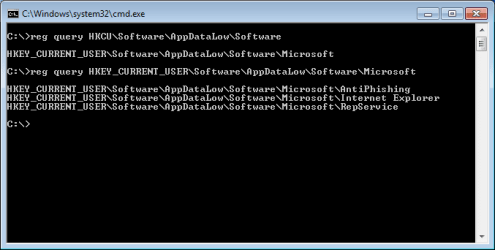
The default (hopefully clean) install of W7 has subkeys under
HKCU\Software\AppDataLow\Software
There should be
HKCU\Software\AppDataLow\Software\Microsoft
And a few other good/valid keys if other software is installed.

Hopefully, AdwCleaner is not removing...
HKCU\Software\AppDataLow\Software
...as you first post seems to indicate.

software-key.png
 

My Computer My Computer

At a glance

W7 Pro SP1 64biti78GBIntel HD Graphics
Computer type
Laptop
Computer Manufacturer/Model Number
Employer provided Dell Latitude
OS
W7 Pro SP1 64bit
CPU
i7
Memory
8GB
Graphics Card(s)
Intel HD Graphics
Hard Drives
crappy SSD
Antivirus
Employer mandated Symantec Endpoint Protection
Browser
Pale Moon 64bit, IE11 64bit & Chrome 64bit
Oh, dear. That's rather worrying. What do you suppose I should do?
 

My Computer My Computer

At a glance

Windows 7 Home Premium 64bit (Service Pack 1)Intel Core i76.00 GBNVIDIA GeForce GTX 550 Ti
Computer type
PC/Desktop
Computer Manufacturer/Model Number
Packard Bell ipower G5800
OS
Windows 7 Home Premium 64bit (Service Pack 1)
CPU
Intel Core i7
Memory
6.00 GB
Graphics Card(s)
NVIDIA GeForce GTX 550 Ti
Antivirus
Avira Free Antivirus
Browser
Firefox
I'll let andrew129260 and/or cottonball advise you on what to do about that registry key. I don't use AdwCleaner - so I'm not all that familiar with it. I'm not saying that AdwCleaner is bad, just that I don't use it.

Some apps will rebuild parts of that key when they start...
...so maybe this is not that big of a deal.
 

My Computer My Computer

At a glance

W7 Pro SP1 64biti78GBIntel HD Graphics
Computer type
Laptop
Computer Manufacturer/Model Number
Employer provided Dell Latitude
OS
W7 Pro SP1 64bit
CPU
i7
Memory
8GB
Graphics Card(s)
Intel HD Graphics
Hard Drives
crappy SSD
Antivirus
Employer mandated Symantec Endpoint Protection
Browser
Pale Moon 64bit, IE11 64bit & Chrome 64bit
Repost the logs again so I can see it.......THIS IS IMPORTANT: Delete both jrt and adwcleaner.

Download them again and run them like before with these instructions:


1.) Download AdwCleaner by Xplode and save to your Desktop.

  • Double click on AdwCleaner.exe to run the tool

  • Vista/Windows 7/8 users right-click and select Run As Administrator.
  • Click on the Scan button.
  • AdwCleaner will begin...be patient as the scan may take some time to complete.
  • After the scan has finished, click on the Report button...a logfile (AdwCleaner[R#].txt) will open in Notepad for review (where the largest value of # represents the most recent report).
  • The contents of the log file may be confusing. Unless you see a program name that you know should not be removed, don't worry about it. If you see an entry you want to keep, let me know about it.
  • Upload the contents of that logfile in your next reply using the paper clip on the reply box.
  • A copy of all logfiles are saved in the C:\AdwCleaner folder which was created when running the tool.

2.) Using AdwCleaner v3: Scan & Clean:

Double click on AdwCleaner.exe to run the tool again.
Click on the Scan button.
AdwCleaner will begin to scan your computer like it did before.
After the scan has finished...

This time click on the Clean button.
Press OK when asked to close all programs and follow the onscreen prompts.
Press OK again to allow AdwCleaner to restart the computer and complete the removal process.
After rebooting, a logfile report (AdwCleaner[S#].txt) will open automatically (where the largest value of # represents the most recent report).
Upload the contents of that logfile in your next reply using the paper clip on the reply box.

Junkware Removal tool:


3.) Please download Junkware Removal Tool to your desktop.


  • Shutdown your antivirus to avoid any conflicts.
  • Right click over JRT.exe and select Run as administrator on Windows Vista or Windows 7, double-click on XP.
  • The tool will open and start scanning your system.
  • Please be patient as this can take a while to complete.
  • On completion, a log (JRT.txt) is saved to your desktop and will automatically open.
  • Upload the contents of that logfile in your next reply using the paper clip on the reply box.
  • When completed make sure to re-enable your antivirus
 

My Computer My Computer

At a glance

Windows 10 ProAMD Ryzen 5 2400G Processor with Radeon RX Ve...G.SKILL Ripjaws V Series 16GB (2 x 8GB) 288-P...2047MB NVIDIA GeForce GTX 1060 6GB (EVGA)
Computer type
PC/Desktop
Computer Manufacturer/Model Number
Custom Built
OS
Windows 10 Pro
CPU
AMD Ryzen 5 2400G Processor with Radeon RX Vega 11 Graphics
Motherboard
ASRock X470 Master SLI/AC AM4 AMD Promontory X470 SATA 6Gb/s
Memory
G.SKILL Ripjaws V Series 16GB (2 x 8GB) 288-Pin DDR4 SDRAM D
Graphics Card(s)
2047MB NVIDIA GeForce GTX 1060 6GB (EVGA)
Sound Card
Motherboard Built in
Monitor(s) Displays
Acer R240HY bidx 23.8-Inch IPS HDMI DVI VGA (1920 x 1080) Wi
Screen Resolution
1920 x 1080
Hard Drives
1TB Sandisk SSD PLUS (Main drive)
500 GB Seagate 7200 RPM (Games)
500 GB Western Digital 7200 RPM (Virtual Machines)
PSU
CORSAIR TX Series TX650M 650W 80+ Gold Modular Power Supply
Case
CORSAIR CARBIDE SPEC-02 Mid-Tower Gaming Case, Red LED Fan
Cooling
220mm, two 120mm, and four 60mm fans
Keyboard
Wired Dell keyboard
Mouse
Wireless Logitech mouse
Internet Speed
250mb down, 30mb up
Antivirus
Panda Cloud Antivirus
Browser
Chrome-ish x64
Other Info
Your awesome for reading this.
Is there anything I need to do when deleting JRT other than delete JRT.exe?
 

My Computer My Computer

At a glance

Windows 7 Home Premium 64bit (Service Pack 1)Intel Core i76.00 GBNVIDIA GeForce GTX 550 Ti
Computer type
PC/Desktop
Computer Manufacturer/Model Number
Packard Bell ipower G5800
OS
Windows 7 Home Premium 64bit (Service Pack 1)
CPU
Intel Core i7
Memory
6.00 GB
Graphics Card(s)
NVIDIA GeForce GTX 550 Ti
Antivirus
Avira Free Antivirus
Browser
Firefox
Just delete it, yes then download the news ones. They are updated constantly.

Can you also:

Download DDS:

DDS.com

Save the file to your pc. Then open the dds icon to run the tool.
When done, DDS will open two (2) logs:
DDS.txt
Attach.txt

Save both reports to your desktop.
Include the contents of both logs in your next post by using the paperclip

picture.php
 

My Computer My Computer

At a glance

Windows 10 ProAMD Ryzen 5 2400G Processor with Radeon RX Ve...G.SKILL Ripjaws V Series 16GB (2 x 8GB) 288-P...2047MB NVIDIA GeForce GTX 1060 6GB (EVGA)
Computer type
PC/Desktop
Computer Manufacturer/Model Number
Custom Built
OS
Windows 10 Pro
CPU
AMD Ryzen 5 2400G Processor with Radeon RX Vega 11 Graphics
Motherboard
ASRock X470 Master SLI/AC AM4 AMD Promontory X470 SATA 6Gb/s
Memory
G.SKILL Ripjaws V Series 16GB (2 x 8GB) 288-Pin DDR4 SDRAM D
Graphics Card(s)
2047MB NVIDIA GeForce GTX 1060 6GB (EVGA)
Sound Card
Motherboard Built in
Monitor(s) Displays
Acer R240HY bidx 23.8-Inch IPS HDMI DVI VGA (1920 x 1080) Wi
Screen Resolution
1920 x 1080
Hard Drives
1TB Sandisk SSD PLUS (Main drive)
500 GB Seagate 7200 RPM (Games)
500 GB Western Digital 7200 RPM (Virtual Machines)
PSU
CORSAIR TX Series TX650M 650W 80+ Gold Modular Power Supply
Case
CORSAIR CARBIDE SPEC-02 Mid-Tower Gaming Case, Red LED Fan
Cooling
220mm, two 120mm, and four 60mm fans
Keyboard
Wired Dell keyboard
Mouse
Wireless Logitech mouse
Internet Speed
250mb down, 30mb up
Antivirus
Panda Cloud Antivirus
Browser
Chrome-ish x64
Other Info
Your awesome for reading this.
Here you go. Next time I run AdwCleaner, if it detects anything in the registry, I won't clean it right away and will post the report for you to check.
 

Attachments

My Computer My Computer

At a glance

Windows 7 Home Premium 64bit (Service Pack 1)Intel Core i76.00 GBNVIDIA GeForce GTX 550 Ti
Computer type
PC/Desktop
Computer Manufacturer/Model Number
Packard Bell ipower G5800
OS
Windows 7 Home Premium 64bit (Service Pack 1)
CPU
Intel Core i7
Memory
6.00 GB
Graphics Card(s)
NVIDIA GeForce GTX 550 Ti
Antivirus
Avira Free Antivirus
Browser
Firefox
Both AdwCleaner and JRT have fixed the start pages of both Firefox and IE (must have been caused by some adware installation). DDS seems to have reset the hosts file so it is worth checking if you still have the same redirection problem.

This looks a bit suspiscious

C:\Program Files\Bonjour\mDNSResponder.exe

Do you know what it is?

And by the way, I'll let Andrew continue from here. I guess you can also try RogueKiller as a last resort (though my word is not the final word for your problem).

DO NOT use RogueKiller unless specified by other professionals in this thread.
 

My Computer My Computer

At a glance

Windows 10 Home 64-BitIntel Core i3 380M @ 2.53GHz Arrandale 32nm T...Total RAM = 4.00 GB and Usable RAM = 3.80 GBGeneric PnP Monitor (1366x768@60Hz) Intel HD ...
Computer type
Laptop
Computer Manufacturer/Model Number
Dell Inspiron N4030
OS
Windows 10 Home 64-Bit
CPU
Intel Core i3 380M @ 2.53GHz Arrandale 32nm Technology
Motherboard
Dell Inc. 0K13WN (CPU 1)
Memory
Total RAM = 4.00 GB and Usable RAM = 3.80 GB
Graphics Card(s)
Generic PnP Monitor (1366x768@60Hz) Intel HD Graphics (Dell)
Sound Card
IDT High Definition Audio CODEC Bluetooth Hands-free Audio
Monitor(s) Displays
1
Screen Resolution
1366 x 768 x 32 bits (4294967296 colors) @ 59 Hz
Hard Drives
ATA WDC WD3200BEVT-7 SCSI Disk Device Size = 320.00 GB
Internet Speed
6-14 Mbps Max and 153 Kbps Min
Antivirus
MBAM Pro, Windows Defender, SuperAntiSpyware, SpyBot S&D
Browser
Microsoft Edge, IE11, Google Chrome, Firefox
Other Info
Your dude.
The redirect is still happening, unfortunately. The last few times have all been to updowntuv.com, with Java being the alleged program in need of updating despite the fact that I uninstalled Java nearly two years ago.

As for "C:\Program Files\Bonjour\mDNSResponder.exe", I had a look on Google and it seems to be part of a program by Apple called Bonjour which is sometimes installed at the same time as iTunes. I installed iTunes a few years ago when I got my first iPhone, although I don't know if Bonjour is needed for iTunes to run properly, nor do I know if I need iTunes installed to be able to transfer photos from my phone to my PC.
 

My Computer My Computer

At a glance

Windows 7 Home Premium 64bit (Service Pack 1)Intel Core i76.00 GBNVIDIA GeForce GTX 550 Ti
Computer type
PC/Desktop
Computer Manufacturer/Model Number
Packard Bell ipower G5800
OS
Windows 7 Home Premium 64bit (Service Pack 1)
CPU
Intel Core i7
Memory
6.00 GB
Graphics Card(s)
NVIDIA GeForce GTX 550 Ti
Antivirus
Avira Free Antivirus
Browser
Firefox
Please download TFC by Old Timer TFC - Temp File Cleaner by OldTimer - Geeks to Go Forum and save it to your desktop


Save any unsaved work. TFC will close ALL open programs including your browser!
Double-click on TFC.exe to run it. If you are using Vista/Windows 7 right-click on the file and choose Run As Administrator.

Click the Start button to begin the cleaning process and let it run uninterrupted to completion.
Important! If TFC prompts you to reboot, please do so immediately. If not prompted, manually reboot the machine anyway to ensure a complete clean.


Disable the proxy settings in Internet Explorer:
1) Under “Tools” in the browser tool bar select “Internet Options”.
2) In the “Internet Options” window that pops up, click the “Connections” tab at the top.
3) Click “LAN Settings” near the bottom of the “Connections” section.
4) If the “Proxy server” checkbox is marked with a check, click it to deselect/uncheck it.
5) Click “Ok” to close the “Local Area Network (LAN) Settings” window.
6) Click “Ok” to close the “Internet Options” window.
Reboot
Make sure "Proxy server" is still disabled under your LAN Settings.


Tell me if you're still being redirected.
 

My Computer My Computer

At a glance

Windows 7 Ultimate 32bit SP1Intel(R) Core(TM)2 Quad CPU @ 2.40GHz, 2400 MHz4 GBATI Radeon HD 2600 Pro
Computer type
PC/Desktop
Computer Manufacturer/Model Number
Bruce ... somewhere in his 40's
OS
Windows 7 Ultimate 32bit SP1
CPU
Intel(R) Core(TM)2 Quad CPU @ 2.40GHz, 2400 MHz
Motherboard
INTEL/D975XBX2
Memory
4 GB
Graphics Card(s)
ATI Radeon HD 2600 Pro
Monitor(s) Displays
Samsung SyncMaster 914v
Screen Resolution
1280 x 1024
Hard Drives
2/500GB each ... ST3500630AS ATA Device.
One is not connected
PSU
Rocketfish 700 W
Case
G.Skill Gigabyte Chassis
Keyboard
Standard PS/2 Keyboard
Mouse
Microsoft PS/2 Mouse
Internet Speed
DSL
Antivirus
Avira Internet Security
Browser
IE 11
Other Info
ATI HDMI Audio
I just followed your instructions, and I didn't get redirected. However, I suspect that the redirect may only occur once every 24 hours. I'll check again tomorrow evening to see what happens.
 

My Computer My Computer

At a glance

Windows 7 Home Premium 64bit (Service Pack 1)Intel Core i76.00 GBNVIDIA GeForce GTX 550 Ti
Computer type
PC/Desktop
Computer Manufacturer/Model Number
Packard Bell ipower G5800
OS
Windows 7 Home Premium 64bit (Service Pack 1)
CPU
Intel Core i7
Memory
6.00 GB
Graphics Card(s)
NVIDIA GeForce GTX 550 Ti
Antivirus
Avira Free Antivirus
Browser
Firefox
That would be one weird redirect to only happen every 24 hours :D

For the record No you don't need iTunes to manually access your iphone's personal pictures/ videos and drag and drop or copy and paste them on to your computer,,
You do however need iTunes to add custom ring tones...
You also need iTunes to add files from your computer to your iphone though,

Bonjour is optional if memory serves it's a separate listing in uninstall a program,
When iTunes updates it might re-add Bonjour I'm not sure though ?
Cheers.
 

My Computer My Computer

At a glance

Win-7-Pro64bit 7-H-Prem-64biti7-5930K 2nd i9-9940x both water blocked VRM'...Trident-z 3200C14 2nd Trident-z 3600C16EVGA 1080ti ftw3 2nd Titan Xp both water blocked
Computer type
PC/Desktop
Computer Manufacturer/Model Number
Custom assembled by me :}
OS
Win-7-Pro64bit 7-H-Prem-64bit
CPU
i7-5930K 2nd i9-9940x both water blocked VRM's too
Motherboard
ASUS SABERTOOTH X99 2nd ASUS x299 Apex
Memory
Trident-z 3200C14 2nd Trident-z 3600C16
Graphics Card(s)
EVGA 1080ti ftw3 2nd Titan Xp both water blocked
Sound Card
Built-in Realtek
Monitor(s) Displays
1-AOC G2460PG 24"G-Sync 144Hz/ 2nd 1-ASUS VG248QE 24" 144Hz
Screen Resolution
1920 x 1080 144Hz
Hard Drives
2-Samsung M.2 Evo & Evo Plus
2-Samsung 850 EVO 500GB SSD's/ 3-2.5 W.D. Black 1tb-&3-1tb/3-3.5 WD Black 1tb hdd's
PSU
EVGA SuperNOVA 1000-P2 2nd 1200-P2
Case
2-Corsair Obsidian Series 450D Black ATX Mid Tower
Cooling
Custom water loops
Keyboard
Logitech G710+/ 2nd Logitech G910
Mouse
2-RedDragon M901 Perdition 16400 dpi Gaming mouse = wired
Internet Speed
Comcast Ping 19ms 89.31mbps download speed 6.12mbps upload
Antivirus
Malwarebytes Pro/ Superantispyware Pro
Browser
FireFox & Pale moon
Other Info
2nd ASUS X299 Apex/Intel i9-9940x with Custom water loop/7H-Prem-x64/Corsair 450D case/Ram Trident-z 3600C16 4x8gb / Samsung970Evo plus 500gb SSD/Dual ssd EZ swap evo/PSU EVGA SuperNova 1200w-P2 80+Platinum/GPU Titan Xp /8-ML-140 on push-pull on 2-280GTX rads
I'm probably completely wrong about the redirect. I've only been checking once a day so far, so it could be something that happens more than once a day and I don't know it. It could be a certain ad that's loading and causing the redirect, for all I know. But there's so much I don't know about computers, all of this is just speculation.

Thanks about iTunes and Bonjour. I may uninstall them both since I only connect my phone to my PC once in a while to transfer photos over.
 

My Computer My Computer

At a glance

Windows 7 Home Premium 64bit (Service Pack 1)Intel Core i76.00 GBNVIDIA GeForce GTX 550 Ti
Computer type
PC/Desktop
Computer Manufacturer/Model Number
Packard Bell ipower G5800
OS
Windows 7 Home Premium 64bit (Service Pack 1)
CPU
Intel Core i7
Memory
6.00 GB
Graphics Card(s)
NVIDIA GeForce GTX 550 Ti
Antivirus
Avira Free Antivirus
Browser
Firefox
Hi,
No problem about iTunes it's pretty much bloatware anyway,
If I didn't play around with ring tones with an app I'd uninstall it too :D
Windows Media Player plays all of my music ;)
Cheers.
 

My Computer My Computer

At a glance

Win-7-Pro64bit 7-H-Prem-64biti7-5930K 2nd i9-9940x both water blocked VRM'...Trident-z 3200C14 2nd Trident-z 3600C16EVGA 1080ti ftw3 2nd Titan Xp both water blocked
Computer type
PC/Desktop
Computer Manufacturer/Model Number
Custom assembled by me :}
OS
Win-7-Pro64bit 7-H-Prem-64bit
CPU
i7-5930K 2nd i9-9940x both water blocked VRM's too
Motherboard
ASUS SABERTOOTH X99 2nd ASUS x299 Apex
Memory
Trident-z 3200C14 2nd Trident-z 3600C16
Graphics Card(s)
EVGA 1080ti ftw3 2nd Titan Xp both water blocked
Sound Card
Built-in Realtek
Monitor(s) Displays
1-AOC G2460PG 24"G-Sync 144Hz/ 2nd 1-ASUS VG248QE 24" 144Hz
Screen Resolution
1920 x 1080 144Hz
Hard Drives
2-Samsung M.2 Evo & Evo Plus
2-Samsung 850 EVO 500GB SSD's/ 3-2.5 W.D. Black 1tb-&3-1tb/3-3.5 WD Black 1tb hdd's
PSU
EVGA SuperNOVA 1000-P2 2nd 1200-P2
Case
2-Corsair Obsidian Series 450D Black ATX Mid Tower
Cooling
Custom water loops
Keyboard
Logitech G710+/ 2nd Logitech G910
Mouse
2-RedDragon M901 Perdition 16400 dpi Gaming mouse = wired
Internet Speed
Comcast Ping 19ms 89.31mbps download speed 6.12mbps upload
Antivirus
Malwarebytes Pro/ Superantispyware Pro
Browser
FireFox & Pale moon
Other Info
2nd ASUS X299 Apex/Intel i9-9940x with Custom water loop/7H-Prem-x64/Corsair 450D case/Ram Trident-z 3600C16 4x8gb / Samsung970Evo plus 500gb SSD/Dual ssd EZ swap evo/PSU EVGA SuperNova 1200w-P2 80+Platinum/GPU Titan Xp /8-ML-140 on push-pull on 2-280GTX rads
Back
Top