Normal service is resumed as Windows 7's growth once again.....

Brilliant riposte Greg!

When is an unsubscribe not an unsubscribe? - when Kari does it! Or doesn't do it? Now I am confused, especially since I also said that I was done with this.

Well, now I am. Officially, no returns, gone, done, exit Stage Right ...
 

My Computer My Computer

At a glance

Windows 7/64 HPremium.AMD FX-6300.Corsair (2x4) GB DDR3 CMXGX3M2A1337CL9.NVidia/Gigabyte GT730 (2GB) GDDR5.
Computer type
PC/Desktop
Computer Manufacturer/Model Number
bertison
OS
Windows 7/64 HPremium.
CPU
AMD FX-6300.
Motherboard
Asus M5A78L-M LE/USB3.
Memory
Corsair (2x4) GB DDR3 CMXGX3M2A1337CL9.
Graphics Card(s)
NVidia/Gigabyte GT730 (2GB) GDDR5.
Sound Card
Onboard.
Monitor(s) Displays
Iiyama PLE2407HDS.
Screen Resolution
1920 x 1280
Hard Drives
Desktop: 1TB. WD10EZEX-00BN5A0.
Zyxel nsa310 NAS: 2TB Seagate Barracuda 7200.14.
Cache Drive: Sandisk SDSSDRC032G.
Laptop Lenovo B50/80 128 GB SSD.
PSU
Corsair 750M.
Case
Coolermaster N300.
Cooling
FRONT: (2X) 140mm. TOP: (1x) 120mm. REAR: (1x) 120mm.
Keyboard
Logitech K290
Mouse
Trust Optical Wired
Internet Speed
15 Mb Down, 0.55 Up.
Antivirus
Kaspersky Total Security 2017, Hitman Pro.
Browser
Firefox.
Other Info
NETWORK:
Sky "Q box" and router.
Desktop & NAS - 30 Metres Cat6 Ethernet wired, via TP-Link 4-port switch.
Lenovo B50/80 Laptop, 2x Wileyfox phones, Lenovo TAB3-8 tablet - all wireless.
Grandchildren, their parents and friends as bandwidth 'parasites' at various times!
Brilliant riposte Greg!

When is an unsubscribe not an unsubscribe? - when Kari does it! Or doesn't do it? Now I am confused, especially since I also said that I was done with this.

Well, now I am. Officially, no returns, gone, done, exit Stage Right ...

Bertison, please use your right to report me and my posts to forum admins. I think you have a strong case against me, it should be enough if you tell in your report that I refuse to unsubscribe a thread and continue correcting false information which must be against the rules.

You showed your double standards by coming back yourself, after telling you will not do that.
 

My Computer My Computer

At a glance

Windows 10 Pro x64 EN-GB1.6 GHz Intel Core i7-720QM Processor6 GBATI Mobility Radeon HD 5850 Graphics
Computer type
Laptop
Computer Manufacturer/Model Number
HP ENVY 17-1150eg
OS
Windows 10 Pro x64 EN-GB
CPU
1.6 GHz Intel Core i7-720QM Processor
Memory
6 GB
Graphics Card(s)
ATI Mobility Radeon HD 5850 Graphics
Sound Card
Beats sound system with integrated subwoofer
Monitor(s) Displays
17" laptop display, 22" LED and 32" Full HD TV through HDMI
Screen Resolution
1600*900 (1), 1920*1080 (2&3)
Hard Drives
Internal: 2 x 500 GB SATA Hard Disk Drive 7200 rpm
External: 2TB for backups, 3TB USB3 network drive for media
Cooling
As Envy runs a bit warm, I have it on a Cooler Master pad
Keyboard
Logitech diNovo Media Desktop Laser (bluetooth)
Mouse
Logitech Performance Mouse MX
Internet Speed
50/10 Mbps VDSL
Antivirus
Windows Defender 4.3.9431.0
Browser
Maxthon 3.5.2., IE11
Someone-is-wrong-on-internet.jpg

Sorry, couldn't resist. ;)
 

My Computer My Computer

At a glance

Win 7 Ultimate 64 bitIntel i7-3930KKingston HyperX Genesis 32GB Kit (8x4GB Modul...MSI R7850 Twin Frozr 2GD5/OC Radeon HD 7850 2...
Computer type
PC/Desktop
Computer Manufacturer/Model Number
Custom Build
OS
Win 7 Ultimate 64 bit
CPU
Intel i7-3930K
Motherboard
ASUS P9X79 WS
Memory
Kingston HyperX Genesis 32GB Kit (8x4GB Modules) 1600MHz DDR
Graphics Card(s)
MSI R7850 Twin Frozr 2GD5/OC Radeon HD 7850 2GB 256-bit GDDR
Sound Card
Asus Xonar Essence STX
Monitor(s) Displays
3x Asus VG248QE 24", Vizio 32" TV
Screen Resolution
1920 x 1080, ?
Hard Drives
Samsung 128GB 840 Pro SSD (1),
Samsung 4TB 850 EVO SSDs (4)
Samsung 4TB 850 EVO SSDs (16) external backup drives used in 2.5" hot swap bays in the computer.
PSU
Corsair HX750w
Case
Antec Two Hundred v2 (modified)
Cooling
Cooler Master GeminII S524 120mm (fan replaced with a 140mm)
Keyboard
Logitech G510s
Mouse
Logitech M525 (two in use)
Internet Speed
=< 32Mbps down, 8Mbps up
Antivirus
AVAST!, MBAM, SAS, Spybot S&D (all but MBAM free) Glary Util
Browser
IE11
Other Info
LSI 9211-8i HBA card (8 SATA III ports), 2.5" & 3.5" Hot Swap Bays, HooToo HT-CR001 PCI-E to USB 3.0 Internal Hub + 6 Slot Card Reader, and LG Model CH12LS28 BD-ROM Optical Drive. Also, ScanSnap S1500 ADF duplexing scanner, Canon 9000F flat bed scanner, Corsair SP2500 2.1 speakers, Samsung CLP 415nw laser color printer, Cyberpower PP2200SW UPS
That's a good one Lady :).
 

My Computer My Computer

At a glance

Windows 10 Pro x64 EN-GB1.6 GHz Intel Core i7-720QM Processor6 GBATI Mobility Radeon HD 5850 Graphics
Computer type
Laptop
Computer Manufacturer/Model Number
HP ENVY 17-1150eg
OS
Windows 10 Pro x64 EN-GB
CPU
1.6 GHz Intel Core i7-720QM Processor
Memory
6 GB
Graphics Card(s)
ATI Mobility Radeon HD 5850 Graphics
Sound Card
Beats sound system with integrated subwoofer
Monitor(s) Displays
17" laptop display, 22" LED and 32" Full HD TV through HDMI
Screen Resolution
1600*900 (1), 1920*1080 (2&3)
Hard Drives
Internal: 2 x 500 GB SATA Hard Disk Drive 7200 rpm
External: 2TB for backups, 3TB USB3 network drive for media
Cooling
As Envy runs a bit warm, I have it on a Cooler Master pad
Keyboard
Logitech diNovo Media Desktop Laser (bluetooth)
Mouse
Logitech Performance Mouse MX
Internet Speed
50/10 Mbps VDSL
Antivirus
Windows Defender 4.3.9431.0
Browser
Maxthon 3.5.2., IE11

My Computer My Computer

At a glance

Win 7 Ultimate 64 bitIntel i7-3930KKingston HyperX Genesis 32GB Kit (8x4GB Modul...MSI R7850 Twin Frozr 2GD5/OC Radeon HD 7850 2...
Computer type
PC/Desktop
Computer Manufacturer/Model Number
Custom Build
OS
Win 7 Ultimate 64 bit
CPU
Intel i7-3930K
Motherboard
ASUS P9X79 WS
Memory
Kingston HyperX Genesis 32GB Kit (8x4GB Modules) 1600MHz DDR
Graphics Card(s)
MSI R7850 Twin Frozr 2GD5/OC Radeon HD 7850 2GB 256-bit GDDR
Sound Card
Asus Xonar Essence STX
Monitor(s) Displays
3x Asus VG248QE 24", Vizio 32" TV
Screen Resolution
1920 x 1080, ?
Hard Drives
Samsung 128GB 840 Pro SSD (1),
Samsung 4TB 850 EVO SSDs (4)
Samsung 4TB 850 EVO SSDs (16) external backup drives used in 2.5" hot swap bays in the computer.
PSU
Corsair HX750w
Case
Antec Two Hundred v2 (modified)
Cooling
Cooler Master GeminII S524 120mm (fan replaced with a 140mm)
Keyboard
Logitech G510s
Mouse
Logitech M525 (two in use)
Internet Speed
=< 32Mbps down, 8Mbps up
Antivirus
AVAST!, MBAM, SAS, Spybot S&D (all but MBAM free) Glary Util
Browser
IE11
Other Info
LSI 9211-8i HBA card (8 SATA III ports), 2.5" & 3.5" Hot Swap Bays, HooToo HT-CR001 PCI-E to USB 3.0 Internal Hub + 6 Slot Card Reader, and LG Model CH12LS28 BD-ROM Optical Drive. Also, ScanSnap S1500 ADF duplexing scanner, Canon 9000F flat bed scanner, Corsair SP2500 2.1 speakers, Samsung CLP 415nw laser color printer, Cyberpower PP2200SW UPS
A bit of humour, always the best way to go :roflmao:
Well done Fitzy :thumbsup:
 

My Computer My Computer

At a glance

Windows 7 home premium 64bitintel Core i7 4790 3.6Ghz16Gb G.Skill SniperNvidia GTX 760
Computer type
PC/Desktop
Computer Manufacturer/Model Number
Self built
OS
Windows 7 home premium 64bit
CPU
intel Core i7 4790 3.6Ghz
Motherboard
Gigabyte H97-D3H
Memory
16Gb G.Skill Sniper
Graphics Card(s)
Nvidia GTX 760
Sound Card
Realtek ALC1150 115dB SNR HD Audio
Monitor(s) Displays
LG 32" TV as monitor
Screen Resolution
1920 x 1080
Hard Drives
Samsung 840 PRO series SATA3 256Gb SSD.
Western Digital Black SATA3 -1Tb.
Western Digital external HDD-1TB.

Pioneer DVD-RW.
PSU
Antec HCG 620w
Case
Thermaltake A41
Cooling
Stock fans x 3. After market Arctic Freezer i11 cpu cooler
Keyboard
Logitech M520r wireless
Mouse
Logitech M310t wireless
Internet Speed
Fair to middlin'
Antivirus
Avast free
Browser
Firefox
Other Info
MBAM Pro
SuperAntiSpyware free edition
AdwCleaner
Ccleaner
Revo uninstaller Pro

My Computer My Computer

At a glance

10 x64 | 7 x64AMD FX-9590 Vishera 4.7 | i5 Sandy Bridge16 gigs Crucial Ballistix | 8 gigs Adata ddr3...RX-570 4gd5 | Intel HD 3000
Computer type
PC/Desktop
Computer Manufacturer/Model Number
Self - Build | Asus K53e Laptop
OS
10 x64 | 7 x64
CPU
AMD FX-9590 Vishera 4.7 | i5 Sandy Bridge
Motherboard
MSI 990 FXA | K53e
Memory
16 gigs Crucial Ballistix | 8 gigs Adata ddr3 1600
Graphics Card(s)
RX-570 4gd5 | Intel HD 3000
Sound Card
Realtek HD OnBoard Audio
Monitor(s) Displays
Samsung 22" & 37" Toshiba | 15.6
Hard Drives
ADATA 240 ssd & 750 Caviar Black 7200 sata | 250 840 EVO ssd & samsung ssd
PSU
Thermaltake 700 | 65w
Case
CoolMaster Centurion 534+
Cooling
Corsair H60
Keyboard
Rosewill RK-800G PS/2 Gaming Keyboard | Asus Chiclet
Mouse
Ventus | MS w/side buttons
Internet Speed
RoadRunner
Other Info
I hate the smell of friggin corn chip butt breath snacks.
Hi......

......I am going to say that I quite disagree with the following quote. My posting it makes it invalid by the merits of this post
Nobody cares what the personal peccadilos(sic) of andrew or Kari are.
I haven't interpreted these 'personal peccadillos' as such. They seem to me to be spirited disagreement.

Thanks to the contributing input of both I now have a much better idea of the win 8/8.1 OS than I did when I started reading this thread 30 mins. ago.

I think that Kari is correct in stating that his goal is to try and prevent confusing disinformation about win8/8.1. Thank you for a rather refreshing outlook.

I also, on the other hand, believe that andrew is also correct in pointing out some of the shortcomings that win8/8.1 present to the casual pc user. Thank you for your pragmatic approach.

Just to set the record straight: I am using XP at the moment, while performing a pc build in order to capably(I hope) get along with a newer version of windows(for sure win7, but I am now open to win8/8.1) in this, the 21st Century. I have also received some excellent help from members in this forum, concerning said build, and I am understandably extremely appreciative of their help and input. I'm still at it(taking me longer than I thought).

This, thread has enabled me to look at win8/8.1 in a new light. It may just not be the hideous demon that some make it out to be..

Since I am not a fan of touchscreen devices my tendency is to stick with my decision to install win7 on my new system. However, if win8/8.1 can perform nearly as nicely as win7 is touted, then perhaps my preferences will be adjusted.

I am still on the fence, but I will say that this thread has been educational. at least for me.

Great post Lady F. That is one that I am going to use on another forum I frequent:roflmao:

KR
Bruce SX
 

My Computer My Computer

At a glance

Win 7Pro 64bitIntel(R) Core(TM) i5 CPU 650 @ 3.20GHz 3.19GHz4 X 1GB at presentonboard
Computer type
PC/Desktop
Computer Manufacturer/Model Number
Dell Optiplex 980
OS
Win 7Pro 64bit
CPU
Intel(R) Core(TM) i5 CPU 650 @ 3.20GHz 3.19GHz
Memory
4 X 1GB at present
Graphics Card(s)
onboard
Sound Card
onboard
Monitor(s) Displays
22" Viewsonic
Screen Resolution
1680 x 1050
Hard Drives
500 GB HDD
Case
Manufacturer specific
Cooling
Manufacturer specific
Keyboard
AZIO KB505U
Mouse
Logitech tracball
Antivirus
Ad-Aware Lavasoft
Browser
Mozilla Firefox 64
Win 8 is about getting users into online subscription services. That is what the metro stuff is for. Boiling frogs.
 

My Computers My Computers

  • At a glance

    7 X64i5 84002x8gb 3200mhz
    Computer type
    PC/Desktop
    OS
    7 X64
    CPU
    i5 8400
    Motherboard
    gigabyte b365m ds3h
    Memory
    2x8gb 3200mhz
    Hard Drives
    various
    PSU
    pure power 11 400w cm
    Case
    Coolermaster
    Cooling
    cryorig m9i
  • At a glance

    7x64g54008gb ddr4 2400
    Computer type
    PC/Desktop
    OS
    7x64
    CPU
    g5400
    Motherboard
    ga b365m ds3h
    Memory
    8gb ddr4 2400
    PSU
    xfx pro 450w
Since I am not a fan of touchscreen devices my tendency is to stick with my decision to install win7 on my new system. However, if win8/8.1 can perform nearly as nicely as win7 is touted, then perhaps my preferences will be adjusted.

But this involves a lot of work to install a suitable Start menu, change all the defaults from the apps (I'd uninstall them), and then you'll still find the need to go looking for important functions hidden in the suppressed Metro settings.

This is why after over a dozen installs by the time its all adjusted I am so done with it I dont' even return. I also will no longer adjust it for friends because of the endless need for follow up. Not one of them has said there is any advantage and most end up wanting to return to 7.

As Si says, this is designed to break us of the desktop even after MS spent 20 years building the desktop to perfection in Win7 to where it drives the world economy. I believe it will continue to do so because they will not be able to kill it in favor of subscription, cloud and social media interface - and I root User folders in the cloud for sync'ing purposes.
 
Last edited:
Win 8 is about getting users into online subscription services. That is what the metro stuff is for. Boiling frogs.
Could you or anyone else explain me why all this complaint about Windows Store apps and their existence? Why to complain about an existing additional feature you don't have to ever see or use?

It's like complaining about additional rear USB ports in a desktop PC. "That AcerDellHP Tower-XXL PC sucks because it has additional USB ports in the back of the case although I do not want them and never use them. It really sucks".

Using a local account and booting to the desktop, you do not have to use any more cloud or online services you use in Windows 7. That really is a fact, as opposite to quite a lot what has been said in this and other similar threads.

But this involves a lot of work to install a suitable Start menu, change all the defaults from the Crapps (I'd uninstall them), and then you'll still find the need to go looking for important functions hidden in the suppressed Metro settings.
A lot of work? Downloading and installing your favorite Start Menu replacement? Excluding setting Lock and Start screen backgrounds and creating new users, what else is hidden "in the suppressed Metro settings"?

Just for my own interest (I like the 8 Start Menu and don't use any replacements), I just timed the process needed. Googled "Windows 8.1 Start Menu replacement", first hit was Don't wait for Windows 9: How to get a Start Menu, windowed Metro apps today | PCWorld, which mentioned Classic Shell quite in the beginning of the article. Googled Classic Shell. I had found, downloaded and installed it in less than two minutes. This two minutes is a one time operation which, if I had kept the kept the Classic Shell, I would not have to repeat this anymore in the future.

Quite funny is that a great number of those complaining about Windows 8 Start Menu do in fact not use the default Windows Start Menu in Windows 7 but have instead replaced it with Classic Shell or something similar. So nothing new there, these users installed it voluntarily in Windows 7 and complain when they have to install it in Windows 8.

This is why after over a dozen installs by the time its all adjusted I am so done with it I dont' even return. I also will no longer adjust it for friends because of the endless need for follow up. Not one of them has said there is any advantage and most end up wanting to return to 7.
I have no proof of this, I only have a theory; I honestly believe this has quite a lot to do with the attitude Windows 8 is shown and presented to new users. I have upgraded quite a many computers both privately for my friends and neighbors and at work to Windows 8 and 8.1, the feedback I get is almost totally positive, the Eight newbies satisfied and happy. Especially lately when a great number of users have not only upgraded from XP to 8 due end of support but also upgraded the hardware, too, a common reaction I get has been "Oh I thought it would be difficult but this is really nice".

As Si says, this is designed to break us of the desktop even after MS spent 20 years building the desktop to perfection in Win7 to where it drives the world economy.
Every now and then I read something here that really surprises me. This statement is one of those, especially coming from a geek I really respect.

Install a Start Menu replacement and set your PC to boot to desktop. It's there, exactly as it was in Vista or Seven (apart of the really enhanced File Explorer). How can Microsoft's gesture to add a setting which makes it possible to totally bypass Start Screen and boot directly to Desktop and use it as you use Windows 7 be seen as a try to "break us of the desktop"?

I have tried to learn to understand this but it seems to be an impossible task, I still do not understand: Windows 8 sucks because of the missing Start Menu which takes a minute or two to install, and because of the Start Screen and Windows Store Apps, all of which a user will never see if he does not want to.

Kari
 

My Computer My Computer

At a glance

Windows 10 Pro x64 EN-GB1.6 GHz Intel Core i7-720QM Processor6 GBATI Mobility Radeon HD 5850 Graphics
Computer type
Laptop
Computer Manufacturer/Model Number
HP ENVY 17-1150eg
OS
Windows 10 Pro x64 EN-GB
CPU
1.6 GHz Intel Core i7-720QM Processor
Memory
6 GB
Graphics Card(s)
ATI Mobility Radeon HD 5850 Graphics
Sound Card
Beats sound system with integrated subwoofer
Monitor(s) Displays
17" laptop display, 22" LED and 32" Full HD TV through HDMI
Screen Resolution
1600*900 (1), 1920*1080 (2&3)
Hard Drives
Internal: 2 x 500 GB SATA Hard Disk Drive 7200 rpm
External: 2TB for backups, 3TB USB3 network drive for media
Cooling
As Envy runs a bit warm, I have it on a Cooler Master pad
Keyboard
Logitech diNovo Media Desktop Laser (bluetooth)
Mouse
Logitech Performance Mouse MX
Internet Speed
50/10 Mbps VDSL
Antivirus
Windows Defender 4.3.9431.0
Browser
Maxthon 3.5.2., IE11
I will say using a local account did take quite a bit of pain out of the transition,
Start 8 took the rest of the pain out ;)
So yea 8.1 is not all that bad,
Flash being built into ie11 I'm not crazy about but flash can be disabled by normal means so it's a non issue,
I do miss aero glass which might be the next tweak ;)

I'd say the weirdest 2 issues I first saw in metro,
1) Closing ie11 :confused: did but very weird probably applies to all apps ;)
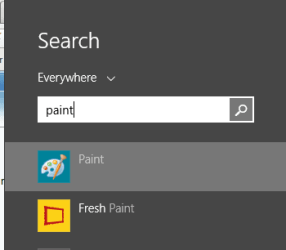
2) Search for Paint from the top right search all/ did not find paint :D
Finally did though but it was weird,
Cheers.
 

My Computer My Computer

At a glance

Win-7-Pro64bit 7-H-Prem-64biti7-5930K 2nd i9-9940x both water blocked VRM'...Trident-z 3200C14 2nd Trident-z 3600C16EVGA 1080ti ftw3 2nd Titan Xp both water blocked
Computer type
PC/Desktop
Computer Manufacturer/Model Number
Custom assembled by me :}
OS
Win-7-Pro64bit 7-H-Prem-64bit
CPU
i7-5930K 2nd i9-9940x both water blocked VRM's too
Motherboard
ASUS SABERTOOTH X99 2nd ASUS x299 Apex
Memory
Trident-z 3200C14 2nd Trident-z 3600C16
Graphics Card(s)
EVGA 1080ti ftw3 2nd Titan Xp both water blocked
Sound Card
Built-in Realtek
Monitor(s) Displays
1-AOC G2460PG 24"G-Sync 144Hz/ 2nd 1-ASUS VG248QE 24" 144Hz
Screen Resolution
1920 x 1080 144Hz
Hard Drives
2-Samsung M.2 Evo & Evo Plus
2-Samsung 850 EVO 500GB SSD's/ 3-2.5 W.D. Black 1tb-&3-1tb/3-3.5 WD Black 1tb hdd's
PSU
EVGA SuperNOVA 1000-P2 2nd 1200-P2
Case
2-Corsair Obsidian Series 450D Black ATX Mid Tower
Cooling
Custom water loops
Keyboard
Logitech G710+/ 2nd Logitech G910
Mouse
2-RedDragon M901 Perdition 16400 dpi Gaming mouse = wired
Internet Speed
Comcast Ping 19ms 89.31mbps download speed 6.12mbps upload
Antivirus
Malwarebytes Pro/ Superantispyware Pro
Browser
FireFox & Pale moon
Other Info
2nd ASUS X299 Apex/Intel i9-9940x with Custom water loop/7H-Prem-x64/Corsair 450D case/Ram Trident-z 3600C16 4x8gb / Samsung970Evo plus 500gb SSD/Dual ssd EZ swap evo/PSU EVGA SuperNova 1200w-P2 80+Platinum/GPU Titan Xp /8-ML-140 on push-pull on 2-280GTX rads
Install a Start Menu replacement and set your PC to boot to desktop. It's there, exactly as it was in Vista or Seven (apart of the really enhanced File Explorer). How can Microsoft's gesture to add a setting which makes it possible to totally bypass Start Screen and boot directly to Desktop and use it as you use Windows 7 be seen as a try to "break us of the desktop"?

The 2 cents plain of a lurker.

I should not have to install a start menu replacement. This is Windows, not Linux. I'm expecting a completely operational, usable OS the moment its installed, not after I go get a bunch of add-ons.

"Microsoft's gesture" to give us a Start Screen bypass was only after a ton of caterwauling, complaining and poor sales. The "Metro" intent WAS to get rid of the desktop and force us all into something that doesn't work well on a non-mobile platform. MS misjudged badly on how attached we are to the desktop.
 

My Computer My Computer

At a glance

Windows 7 Ultimate 64 biti7-3930K16Gb2 nVidia GeForce GTX550Ti in SLi
Computer type
PC/Desktop
Computer Manufacturer/Model Number
Homebuilt
OS
Windows 7 Ultimate 64 bit
CPU
i7-3930K
Motherboard
Gigabyte Socket LGA2011
Memory
16Gb
Graphics Card(s)
2 nVidia GeForce GTX550Ti in SLi
Sound Card
MB Integrated
Monitor(s) Displays
Viewsonic 22" & LG 23" in Extended Desktop
Hard Drives
480Gb SSD OS drive
2Tb secondary drive
Case
Corsair Carbon Series Spec 2
Cooling
Corsair Liquid Cooler
Keyboard
Logitech backlit
Mouse
Microsoft gaming
Internet Speed
20Mbps
Antivirus
ESET Security Suite 7
Browser
IE 11
Search for Paint from the top right search all/ did not find paint.

Something wrong in your system:

2014-06-26_22h51_11.png

I should not have to install a start menu replacement. This is Windows, not Linux. I'm expecting a completely operational, usable OS the moment its installed, not after I go get a bunch of add-ons.
You don't have to install anything. Windows 8 has a Start Menu. It's then a totally different thing if you want to replace it.

Do I understand you correctly that in Windows 7 you did not have to install any additional tools, that straight out of the box it had everything you needed? You installed no Flash player (included by default IE11 in Windows 8.1), no PDF reader (built-in in Windows 8.1), you did not install any AV protection (built-in in Windows 8.1), nothing?
 

My Computer My Computer

At a glance

Windows 10 Pro x64 EN-GB1.6 GHz Intel Core i7-720QM Processor6 GBATI Mobility Radeon HD 5850 Graphics
Computer type
Laptop
Computer Manufacturer/Model Number
HP ENVY 17-1150eg
OS
Windows 10 Pro x64 EN-GB
CPU
1.6 GHz Intel Core i7-720QM Processor
Memory
6 GB
Graphics Card(s)
ATI Mobility Radeon HD 5850 Graphics
Sound Card
Beats sound system with integrated subwoofer
Monitor(s) Displays
17" laptop display, 22" LED and 32" Full HD TV through HDMI
Screen Resolution
1600*900 (1), 1920*1080 (2&3)
Hard Drives
Internal: 2 x 500 GB SATA Hard Disk Drive 7200 rpm
External: 2TB for backups, 3TB USB3 network drive for media
Cooling
As Envy runs a bit warm, I have it on a Cooler Master pad
Keyboard
Logitech diNovo Media Desktop Laser (bluetooth)
Mouse
Logitech Performance Mouse MX
Internet Speed
50/10 Mbps VDSL
Antivirus
Windows Defender 4.3.9431.0
Browser
Maxthon 3.5.2., IE11
I'm thinking again.
If Microsoft put the good things Kari has pointed out in Windows 8x and the good thing we know are in Windows 7 together in Windows 9 most all would be very happy.
 

My Computer My Computer

At a glance

Windows 10 Pro. 64/ version 1709 Windows 7 Pr...Intel i7-6800K @ 4.3Corsair Platinum 16 gig @2400EVGA GTX 1070 OC
Computer type
PC/Desktop
Computer Manufacturer/Model Number
Home made Desktop
OS
Windows 10 Pro. 64/ version 1709 Windows 7 Pro/64
CPU
Intel i7-6800K @ 4.3
Motherboard
ASUS X-99 Deluxe II
Memory
Corsair Platinum 16 gig @2400
Graphics Card(s)
EVGA GTX 1070 OC
Monitor(s) Displays
Asus 27" LED LCD/VE278Q
Screen Resolution
1920-1080 or 1280-720 HDMI
Hard Drives
INTEL SSD 730-240 Gb Sata 3.0/
PSU
EVGA Platium 1200W
Case
Phanteks Luxe Tempered Glass 8 fans/ one radiator
Cooling
XSPC/ Water Cooled CPU
Keyboard
Das 4 Professional
Mouse
Logitech M705/MX Anywhere 2-S
Internet Speed
100 mbits
Antivirus
Microsoft Security Essentials/ Malwarebytes Premium 3.0/ SAS
Browser
I.E. 11 default/Firefox/ ISP Time Warner Cable/Spectrum
Other Info
LG BluRay Burner/
Sound system-KLipsch-THX/
Icy Dock ssd Hot Swap bays.
Win 8 is about getting users into online subscription services. That is what the metro stuff is for. Boiling frogs.

:roflmao: I wonder how many people will get the boiling frogs reference.
 

My Computer My Computer

At a glance

Win 7 Ultimate 64 bitIntel i7-3930KKingston HyperX Genesis 32GB Kit (8x4GB Modul...MSI R7850 Twin Frozr 2GD5/OC Radeon HD 7850 2...
Computer type
PC/Desktop
Computer Manufacturer/Model Number
Custom Build
OS
Win 7 Ultimate 64 bit
CPU
Intel i7-3930K
Motherboard
ASUS P9X79 WS
Memory
Kingston HyperX Genesis 32GB Kit (8x4GB Modules) 1600MHz DDR
Graphics Card(s)
MSI R7850 Twin Frozr 2GD5/OC Radeon HD 7850 2GB 256-bit GDDR
Sound Card
Asus Xonar Essence STX
Monitor(s) Displays
3x Asus VG248QE 24", Vizio 32" TV
Screen Resolution
1920 x 1080, ?
Hard Drives
Samsung 128GB 840 Pro SSD (1),
Samsung 4TB 850 EVO SSDs (4)
Samsung 4TB 850 EVO SSDs (16) external backup drives used in 2.5" hot swap bays in the computer.
PSU
Corsair HX750w
Case
Antec Two Hundred v2 (modified)
Cooling
Cooler Master GeminII S524 120mm (fan replaced with a 140mm)
Keyboard
Logitech G510s
Mouse
Logitech M525 (two in use)
Internet Speed
=< 32Mbps down, 8Mbps up
Antivirus
AVAST!, MBAM, SAS, Spybot S&D (all but MBAM free) Glary Util
Browser
IE11
Other Info
LSI 9211-8i HBA card (8 SATA III ports), 2.5" & 3.5" Hot Swap Bays, HooToo HT-CR001 PCI-E to USB 3.0 Internal Hub + 6 Slot Card Reader, and LG Model CH12LS28 BD-ROM Optical Drive. Also, ScanSnap S1500 ADF duplexing scanner, Canon 9000F flat bed scanner, Corsair SP2500 2.1 speakers, Samsung CLP 415nw laser color printer, Cyberpower PP2200SW UPS
Very few.

Humans fall for it all the time. It has been going on forever.

Like this famous quote:

“The best way to take control over a people and control them utterly is to take a little of their freedom at a time, to erode rights by a thousand tiny and almost imperceptible reductions. In this way, the people will not see those rights and freedoms being removed until past the point at which these changes cannot be reversed.”

Lady F
I wonder how many people will get the boiling frogs reference.
 

My Computers My Computers

  • At a glance

    7 X64i5 84002x8gb 3200mhz
    Computer type
    PC/Desktop
    OS
    7 X64
    CPU
    i5 8400
    Motherboard
    gigabyte b365m ds3h
    Memory
    2x8gb 3200mhz
    Hard Drives
    various
    PSU
    pure power 11 400w cm
    Case
    Coolermaster
    Cooling
    cryorig m9i
  • At a glance

    7x64g54008gb ddr4 2400
    Computer type
    PC/Desktop
    OS
    7x64
    CPU
    g5400
    Motherboard
    ga b365m ds3h
    Memory
    8gb ddr4 2400
    PSU
    xfx pro 450w

My Computer My Computer

At a glance

Windows 7 Ultimate X64 SP1Intel i5-2550K, Differing ~4.4-4.8GHz No buil...16GB G.Skill Sniper 1866MHz @ 2133MHz 2x8GBASUS GTX650TIB-DC2OC-2GD5, (650TI Boost)
Computer type
PC/Desktop
Computer Manufacturer/Model Number
Home Built Desktop By DataTech
OS
Windows 7 Ultimate X64 SP1
CPU
Intel i5-2550K, Differing ~4.4-4.8GHz No built in GPU
Motherboard
ASUS P8Z68-V PRO/GEN3
Memory
16GB G.Skill Sniper 1866MHz @ 2133MHz 2x8GB
Graphics Card(s)
ASUS GTX650TIB-DC2OC-2GD5, (650TI Boost)
Sound Card
Onboard Realtek 5-1
Monitor(s) Displays
Samsung P2570HD
Screen Resolution
1920x1080
Hard Drives
Samsung 840 Pro 256GB SSD for OS, 500GB Seagate Constellation (Enterprise drive) for Data
PSU
Corsair HX650W
Case
Inwin Dragon Rider
Cooling
Hyper 212 EVO w/two Noctua fans, push-pull, @1300 RPM
Keyboard
E-Z Eyes, bright yellow keys with large characters
Mouse
steelseries SENSEI Laser Pro Gaming
Internet Speed
48-51Mbs Mbs down, 11 Mbs up Xfinity Cable
Antivirus
Norton Internet Security 2013
Browser
IE 10, Opera, Pale Moon if needed
Other Info
4 case fans, LG BluRay-RE, ASUS DVD-RW, Mr. Fusion power supply, 1.21 gigawatts.
But this involves a lot of work to install a suitable Start menu, change all the defaults from the Crapps (I'd uninstall them), and then you'll still find the need to go looking for important functions hidden in the suppressed Metro settings.
A lot of work? Downloading and installing your favorite Start Menu replacement? Excluding setting Lock and Start screen backgrounds and creating new users, what else is hidden "in the suppressed Metro settings"?

Just for my own interest (I like the 8 Start Menu and don't use any replacements), I just timed the process needed. Googled "Windows 8.1 Start Menu replacement", first hit was Don't wait for Windows 9: How to get a Start Menu, windowed Metro apps today | PCWorld, which mentioned Classic Shell quite in the beginning of the article. Googled Classic Shell. I had found, downloaded and installed it in less than two minutes. This two minutes is a one time operation which, if I had kept the kept the Classic Shell, I would not have to repeat this anymore in the future.

Once you have a suitable Start Menu it still opens cumbersome and annoying Apps for photos, videos, reader and others. Each of these must be uninstalled and/or changed in Default Programs in Control Panel to reasonable apps that don't grab the whole screen and refuse to close without a map. This is more work than most consumers want to bother with.

Quite funny is that a great number of those complaining about Windows 8 Start Menu do in fact not use the default Windows Start Menu in Windows 7 but have instead replaced it with Classic Shell or something similar. So nothing new there, these users installed it voluntarily in Windows 7 and complain when they have to install it in Windows 8.

I have never seen, heard of or read about anyone replacing the Win7 Start menu. It is perfect. In fact I was really only happy when there was a Windows 7 Start Menu for Windows 8 but I'm not sure if Tuify built one yet for 8.1.

As Si says, this is designed to break us of the desktop even after MS spent 20 years building the desktop to perfection in Win7 to where it drives the world economy.

Every now and then I read something here that really surprises me. This statement is one of those, especially coming from a geek I really respect.

Install a Start Menu replacement and set your PC to boot to desktop. It's there, exactly as it was in Vista or Seven (apart of the really enhanced File Explorer). How can Microsoft's gesture to add a setting which makes it possible to totally bypass Start Screen and boot directly to Desktop and use it as you use Windows 7 be seen as a try to "break us of the desktop"?

I have tried to learn to understand this but it seems to be an impossible task, I still do not understand: Windows 8 sucks because of the missing Start Menu which takes a minute or two to install, and because of the Start Screen and Windows Store Apps, all of which a user will never see if he does not want to.

Kari

Kari I don't know how you've missed it since it was revealed years ago by our esteemed professor SIW2, who lives inside the OS, regularly emerging to reveal really important stuff including most of the best Win7 workarounds and fixes that are now Best Practices.

He was the first here to blow the whistle on how MS is trying to kill off the desktop to drive consumers into a Social Media interface (badly) aping Ipad, which will then vend apps and eventually the OS by subscription via the cloud (paywall). To do this we needed to be crAptured into Apps and eventually weaned off the desktop completely. This became obvious to me when the Surface Pro was released and I was given a copy at MVP Summit but could not find the desktop because it was left off the Metro screen. I eventually by accident found it hiding behind the Control Panel.


Please do not paint skeptics as haters. I really couldn't care less about Windows 8 except that I am sad that it presumes to replace Windows 7 which I believe is the best OS ever and one of the greatest achievements in tech. To see it treated as an unwanted stepson with retail copies hidden and no SP2 is appalling. But since most of the world loves Windows 7 our mission is clear here at the home of Windows 7.
 
Last edited:
Back
Top