Normal service is resumed as Windows 7's growth once again.....

:roflmao:
 

My Computer My Computer

At a glance

Windows 10 ProAMD Ryzen 5 2400G Processor with Radeon RX Ve...G.SKILL Ripjaws V Series 16GB (2 x 8GB) 288-P...2047MB NVIDIA GeForce GTX 1060 6GB (EVGA)
Computer type
PC/Desktop
Computer Manufacturer/Model Number
Custom Built
OS
Windows 10 Pro
CPU
AMD Ryzen 5 2400G Processor with Radeon RX Vega 11 Graphics
Motherboard
ASRock X470 Master SLI/AC AM4 AMD Promontory X470 SATA 6Gb/s
Memory
G.SKILL Ripjaws V Series 16GB (2 x 8GB) 288-Pin DDR4 SDRAM D
Graphics Card(s)
2047MB NVIDIA GeForce GTX 1060 6GB (EVGA)
Sound Card
Motherboard Built in
Monitor(s) Displays
Acer R240HY bidx 23.8-Inch IPS HDMI DVI VGA (1920 x 1080) Wi
Screen Resolution
1920 x 1080
Hard Drives
1TB Sandisk SSD PLUS (Main drive)
500 GB Seagate 7200 RPM (Games)
500 GB Western Digital 7200 RPM (Virtual Machines)
PSU
CORSAIR TX Series TX650M 650W 80+ Gold Modular Power Supply
Case
CORSAIR CARBIDE SPEC-02 Mid-Tower Gaming Case, Red LED Fan
Cooling
220mm, two 120mm, and four 60mm fans
Keyboard
Wired Dell keyboard
Mouse
Wireless Logitech mouse
Internet Speed
250mb down, 30mb up
Antivirus
Panda Cloud Antivirus
Browser
Chrome-ish x64
Other Info
Your awesome for reading this.
I was a W8 basher after a couple of brief run ins with it trying to help people out, but now I have it installed as a dual boot I've played with it and got it set up so it looks virtually identical to my W7 set up. In that respect I'm warming to it a bit more each week, it's not as bad as I thought it was.

However, it takes work to get there. You have to do a lot of research to get 8 running like 7, and the majority of people who've made the switch are running a third party program to replace the Start button, and that is where I think 8's sales have drastically been hurt. Yes they made the OS to target mobile device users and that UI doesn't translate well to a desktop environment, and while you can poke and prod it to make it like previous versions it's not something MS have blatantly advertised. Many laymen who have used PCs over the years for basic tasks and recreational use aren't going to be digging round looking how to change the OS, they'll simply think that's what they have and they must learn how to use it and that's where they give up.

Of course, word of mouth speaks volumes and that will have hammered sales extremely hard but it's all of MS's own doing. While I don't dislike 8 any more it's still obvious that MS are indeed trying to force the touch screen UI on people through advertising and the lack of information on how to use the OS solely as a desktop environment.
 

My Computer My Computer

At a glance

W7 Pro x64 SP1 | W10 Pro IP x64 | W8.1 Pro x6...i7-4790k @ 4GHz (4.4GHz Boost)16GB DDR3 Kingston HyperX Fury @ 1600MHz CL 9...EVGA GTX 980 Classified
Computer type
PC/Desktop
Computer Manufacturer/Model Number
Custom Build
OS
W7 Pro x64 SP1 | W10 Pro IP x64 | W8.1 Pro x64 VM | Linux Mint VM
CPU
i7-4790k @ 4GHz (4.4GHz Boost)
Motherboard
ASUS Sabertooth Z87 (BIOS Rev 2004)
Memory
16GB DDR3 Kingston HyperX Fury @ 1600MHz CL 9-9-9-27
Graphics Card(s)
EVGA GTX 980 Classified
Sound Card
Realtek Onboard
Monitor(s) Displays
Samsung S27D390
Screen Resolution
1920 x 1080
Hard Drives
240GB Intel 520 Series SSD |
Samsung 850 EVO 120GB SSD |
2TB WD Caviar Black |
2TB WD Caviar Green
PSU
Corsair HX850-80 Gold Modular
Case
Cooler Master Silencio 650
Cooling
Corsair H80i w/2 x Corsair SP120 | 2 x 120mm Noctua NF-S12B
Keyboard
Microsoft Sidewinder X4
Mouse
Gigabyte M6900 optical
Internet Speed
152mb
Antivirus
F-Secure
Browser
Firefox 38.0
Other Info
Backup Rig: Win 7 Pro 64-bit | AMD A10-5800k | ASUS F2A85-V Pro | 8GB Samsung DDR3 @1600MHz | 120GB Toshiba SDD | 2TB Seagate HDD | Cooler Master Silencio 550
I used to think Windows 8 would not be good because of the changes but now that I got to use it, I'm used to it and I am getting used to the Start Screen.
 

My Computer My Computer

At a glance

Windows 7 Professional 32-bit/Windows 8 64-bi...Intel Core 2 Quad Q6600/Intel Core i7 4790/In...2GB/16GB/4GBIntel G33/G31 Express(Vostro)/NVIDIA GeForce ...
Computer type
PC/Desktop
Computer Manufacturer/Model Number
Dell Vostro 400/Dell XPS 8700(Slightly Customized for me by Dell)/Toshiba Satellite T135
OS
Windows 7 Professional 32-bit/Windows 8 64-bit/Win7 Pro64-bit
CPU
Intel Core 2 Quad Q6600/Intel Core i7 4790/Intel Pentium
Memory
2GB/16GB/4GB
Graphics Card(s)
Intel G33/G31 Express(Vostro)/NVIDIA GeForce GTX 745(XPS)
Monitor(s) Displays
HP 2009m(Vostro)/ViewSonic VX2250wm-LED(XPS)
Screen Resolution
1600x900(Vostro)/1920x1080(XPS)
Hard Drives
Seagate ST3160815AS(Vostro)/Western Digital Blue(Satellite)
External:
Western Digital My Passport 0748
Samsung HM121HC
Keyboard
Dell L100)(Vostro)/Dell KB2133p(XPS)
Mouse
Dell M-UAV-DEL8(XPS)
Internet Speed
100 Mbit/s(Only when IPTV is plugged out)
Antivirus
Avast, Malwarebytes PRO
Browser
Internet Explorer 11
Other Info
Note: Names with slashes between two different parts mean that the left is my old desktop and the right is my old laptop and the middle is my new desktop.(Unless specified)
Ping is horrible for servers overseas in US and Europe.
New laptop:LG Gram(Not available in US) Processor:Intel Core i3 4th Gen Ultra Low Power RAM:4GB Hard Drive:SK Hynix OEM MSATA or M.2 Graphics:Intel HD
I wish it worked like XP 7. I liked the way it worked in XP 7 better. You have to go through several steps to make it work like XP 7. Seems I have seen all this years ago.

Using 8 and discovering you do not like it is one thing, but once you get used to it, and make it work for you (as you did with 7), it can apparently be a great OS. Based on opinions from people who I respect, like Kari. Not liking it for valid reasons is also acceptable. And like Si has said, it's still not selling particularly well so far.

A Guy
 

My Computer My Computer

At a glance

Windows 10 Home x64INTEL Core i5-750 Quad-Core 3.37GHzHyperX Fury Black Series 8GB (2 x 4GB) 1866MhzEVGA GeForce GTX 750 Superclocked 1GB 128-Bit...
Computer type
PC/Desktop
OS
Windows 10 Home x64
CPU
INTEL Core i5-750 Quad-Core 3.37GHz
Motherboard
ASUS P7P55D
Memory
HyperX Fury Black Series 8GB (2 x 4GB) 1866Mhz
Graphics Card(s)
EVGA GeForce GTX 750 Superclocked 1GB 128-Bit GDDR5
Monitor(s) Displays
LG 32MA68HY 32" IPS
Screen Resolution
1920 x 1080
Hard Drives
Samsung 840 Evo 120GB, SEAGATE 500GB Barracuda® 7200.12, SATA 3 Gb/s, 7200 RPM, 16MB cache
PSU
ANTEC TruePower New TP-550, 80 PLUS, 550W
Case
ANTEC Three Hundred Illusion
Cooling
COOLER MASTER Hyper 212 Plus, 4 x 120mm 1 x 140mm Noctua's
Internet Speed
85 + Mbps
Antivirus
Avast
Browser
Vivaldi
... and then trying to get back to desktop, which never worked on the first try, or going into metro interface any time I accidently put my mouse on the right edge, with no easy way to go back I mean the list goes on and did I mentioned how ugly and space wasting Metro is. But I totally lost it when I wasted almost an hour downloading win 8.1 upgrade, then wasted another 30 min waiting for computer to update files etc and then I got to the screen asking to input my e-mail. Since I don't have one with MS I pressed skip, which promptly, without any warning revert back to Win 8 and deleted whole 8.1 upgrade download without even asking.
...


Yes Siw, I laughed too when I saw the Pete's post; I couldn't have hoped a better example of purposely misleading and wrong information and sometimes simple lies the anti-Eight troops are spreading to falsify the facts.

Let's see that post. First what I have marked with bold red font: If the user is not experienced enough to switch between Start Screen and Desktop by a simple press of the WIN key, or by clicking Desktop tile on Start Screen, then maybe Windows (any version) is simply too much and user should find a system better suitable to his / her capacities.

About the bold green statement in above quote of Pete's post: Switching between Start Screen and Desktop does not happen when you bring the pointer to right edge. Never. It does not even happen when pointer is brought to left edge. It only happens when user clicks left mouse button when pointer is located at the bottom left corner. Even the Charms Bar does not show when the mouse is brought to top or bottom right without user thereafter clearly moving pointer up or down.

I repeat: Bottom left, not right edge. And no, it does not switch to Start Screen simply by bringing the pointer there. Never.

Then the clear untruth (can't use here the word I would like to), the part I have highlighted yellow. That is so invalid, false disinformation that it together with the strange "bringing mouse to right edge brings Start Screen" (real name for so called Metro UI) makes me wonder if this user has ever even seen Eight in action. There is no Skip button when setting it up, and the upgrade does not revert back to 8 without user actions and notifying the user.

If we users do not read instructions, we cannot blame Microsoft or any other company.

Let's see what happens when a Windows 8 with only Local account (no email based Microsoft account in the whole machine) is upgraded to 8.1. I did this just now to get screenshots to prove my point.

First the start situation, only one local account, no Microsoft accounts:
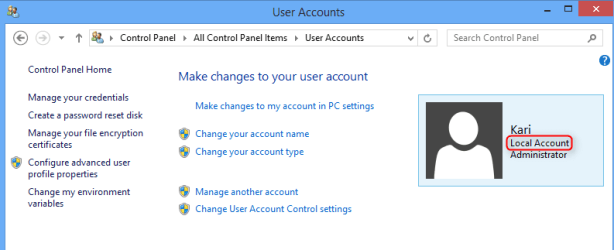
2014-06-05_08h10_43.png

After 28 minutes, the over 2 GB upgrade was downloaded and installed. Reboot, 16 minutes for upgrade to set itself up, finally there:
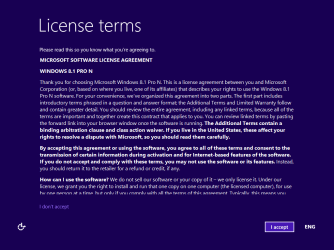
2014-06-05_08h01_27.png

Next screen asks if I want to go with defaults or change something small (customer feedback options and such can be disabled / enabled here):

2014-06-05_08h02_07.png

Next screen asks me to sign to my Microsoft account, which I do not want to use in this machine, so naturally I select what Windows documentation asks me to select at this point:
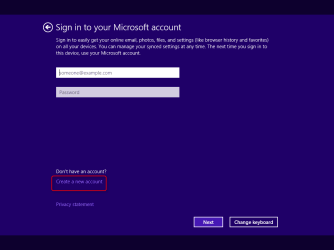
2014-06-05_08h02_44.png

Which brings me to screen where I can tell Windows I want to continue using my existing (local) account:
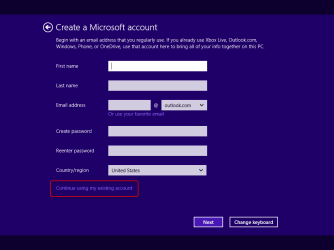
2014-06-05_08h04_04.png

That's it, Windows 8 upgraded to 8.1 in about 50 minutes (including the download time), absolutely no SKIP buttons there. Only the four screens shown above are shown after first reboot when 8.1 upgrade is applied.

Again, I repeat: Absolutely sure there are no dialogs showing a SKIP button which can cause you to lose the upgrade.

I hope those users still not sure if they want to upgrade to Windows 8 can and will use their own brain and see through this disinformation spread on the Internet.

Kari

 
Last edited:

My Computer My Computer

At a glance

Windows 10 Pro x64 EN-GB1.6 GHz Intel Core i7-720QM Processor6 GBATI Mobility Radeon HD 5850 Graphics
Computer type
Laptop
Computer Manufacturer/Model Number
HP ENVY 17-1150eg
OS
Windows 10 Pro x64 EN-GB
CPU
1.6 GHz Intel Core i7-720QM Processor
Memory
6 GB
Graphics Card(s)
ATI Mobility Radeon HD 5850 Graphics
Sound Card
Beats sound system with integrated subwoofer
Monitor(s) Displays
17" laptop display, 22" LED and 32" Full HD TV through HDMI
Screen Resolution
1600*900 (1), 1920*1080 (2&3)
Hard Drives
Internal: 2 x 500 GB SATA Hard Disk Drive 7200 rpm
External: 2TB for backups, 3TB USB3 network drive for media
Cooling
As Envy runs a bit warm, I have it on a Cooler Master pad
Keyboard
Logitech diNovo Media Desktop Laser (bluetooth)
Mouse
Logitech Performance Mouse MX
Internet Speed
50/10 Mbps VDSL
Antivirus
Windows Defender 4.3.9431.0
Browser
Maxthon 3.5.2., IE11
Hi there
Actually W8.1 update 1 is not too bad at all -- there is a LOT of difference between W8 and the latest 8.1 with its updates so when people are writing about W8 they should make sure it's the LATEST version -- the Native (Original) W8 is actually now OBSOLETE.

You do though need a few bits of effort to get it to work if you are primarily a desktop type user - but as it now can boot straight to desktop that's not an issue any more --and you can use CUSTOM TOOLBARS as well as the quick launch bar and desktop short cuts so you can make W8.1 behave almost identically to W7 if you want.

Unless you have zillions of apps not having the START menu isn't really an issue any more --even with W7 I used custom toolbars in preference to the start menu.

My main complaints are - that unless you know the "get arounds" you need to create an Ms account, you need to input the serial number at install time (so no 30 day testing / etc until you get the config correct) and no ISO's (Grrrhhhhhh). (Retail copies have the ISO but not pre-installed versions).

Not having an ISO means you have to do updates via the wretched store thing so doing a clean re-install becomes very cumbersome. If you intend to use W8.1 it's worth getting a retail copy even if your machine comes pre-installed with W8.

If you can overcome these obstacles W8.1 runs often a lot slicker than W7, has native in built security and you know it's getting the latest security updates. Note also that those desktop themes you created for W7 will work on W8. The converse isn't true however.

Cheers
jimbo
 

My Computer My Computer

At a glance

Linux CENTOS 7 / various Windows OS'es and se...Intel i7 Intel i58GB, 16GBOn Motherboard
Computer type
PC/Desktop
Computer Manufacturer/Model Number
Custom built, several laptops HP/ASUS
OS
Linux CENTOS 7 / various Windows OS'es and servers
CPU
Intel i7 Intel i5
Memory
8GB, 16GB
Graphics Card(s)
On Motherboard
Sound Card
Realtek HD audio
Monitor(s) Displays
Apple Cinema display, Samsung LCD
Screen Resolution
1920 X 1080
Hard Drives
4 X 1TB SATA
Mouse
Toshiba wireless laser
Internet Speed
> 20MB up
Remind me to never get between Kari and a bone :mad2:
 

My Computer My Computer

At a glance

Windows 7 home premium 64bitintel Core i7 4790 3.6Ghz16Gb G.Skill SniperNvidia GTX 760
Computer type
PC/Desktop
Computer Manufacturer/Model Number
Self built
OS
Windows 7 home premium 64bit
CPU
intel Core i7 4790 3.6Ghz
Motherboard
Gigabyte H97-D3H
Memory
16Gb G.Skill Sniper
Graphics Card(s)
Nvidia GTX 760
Sound Card
Realtek ALC1150 115dB SNR HD Audio
Monitor(s) Displays
LG 32" TV as monitor
Screen Resolution
1920 x 1080
Hard Drives
Samsung 840 PRO series SATA3 256Gb SSD.
Western Digital Black SATA3 -1Tb.
Western Digital external HDD-1TB.

Pioneer DVD-RW.
PSU
Antec HCG 620w
Case
Thermaltake A41
Cooling
Stock fans x 3. After market Arctic Freezer i11 cpu cooler
Keyboard
Logitech M520r wireless
Mouse
Logitech M310t wireless
Internet Speed
Fair to middlin'
Antivirus
Avast free
Browser
Firefox
Other Info
MBAM Pro
SuperAntiSpyware free edition
AdwCleaner
Ccleaner
Revo uninstaller Pro
Unless you have zillions of apps not having the START menu isn't really an issue any more --even with W7 I used custom toolbars in preference to the start menu.

That's the one area I'd beg to differ on. OK, if people used custom toolbars on W7 then no problem, carry on as usual. But for people who do use the Start Menu religously then there's a big difference. I was completely lost without it so bought Start8 virtually straight away, it's now how I like it and it cost me $5. While there are alternatives to not having a Start button, you don't have to use them and learn a new way of interacting with your desktop.
 

My Computer My Computer

At a glance

W7 Pro x64 SP1 | W10 Pro IP x64 | W8.1 Pro x6...i7-4790k @ 4GHz (4.4GHz Boost)16GB DDR3 Kingston HyperX Fury @ 1600MHz CL 9...EVGA GTX 980 Classified
Computer type
PC/Desktop
Computer Manufacturer/Model Number
Custom Build
OS
W7 Pro x64 SP1 | W10 Pro IP x64 | W8.1 Pro x64 VM | Linux Mint VM
CPU
i7-4790k @ 4GHz (4.4GHz Boost)
Motherboard
ASUS Sabertooth Z87 (BIOS Rev 2004)
Memory
16GB DDR3 Kingston HyperX Fury @ 1600MHz CL 9-9-9-27
Graphics Card(s)
EVGA GTX 980 Classified
Sound Card
Realtek Onboard
Monitor(s) Displays
Samsung S27D390
Screen Resolution
1920 x 1080
Hard Drives
240GB Intel 520 Series SSD |
Samsung 850 EVO 120GB SSD |
2TB WD Caviar Black |
2TB WD Caviar Green
PSU
Corsair HX850-80 Gold Modular
Case
Cooler Master Silencio 650
Cooling
Corsair H80i w/2 x Corsair SP120 | 2 x 120mm Noctua NF-S12B
Keyboard
Microsoft Sidewinder X4
Mouse
Gigabyte M6900 optical
Internet Speed
152mb
Antivirus
F-Secure
Browser
Firefox 38.0
Other Info
Backup Rig: Win 7 Pro 64-bit | AMD A10-5800k | ASUS F2A85-V Pro | 8GB Samsung DDR3 @1600MHz | 120GB Toshiba SDD | 2TB Seagate HDD | Cooler Master Silencio 550
Remind me to never get between Kari and a bone :mad2:
True, Kari (and myself) get a 'bit' ruffled when opinions are presented as fact. If you have Win 8.x, maybe try a local PC tech for assistance. My neighbor just got a Win 8 lappy and I installed ClassicShell and she loves it, boots right to the desktop. Start8 is a paid-for option that does basically the same thing.

Try either one, it seems you've not really done anything.
 

My Computer My Computer

At a glance

Windows 7 Ultimate X64 SP1Intel i5-2550K, Differing ~4.4-4.8GHz No buil...16GB G.Skill Sniper 1866MHz @ 2133MHz 2x8GBASUS GTX650TIB-DC2OC-2GD5, (650TI Boost)
Computer type
PC/Desktop
Computer Manufacturer/Model Number
Home Built Desktop By DataTech
OS
Windows 7 Ultimate X64 SP1
CPU
Intel i5-2550K, Differing ~4.4-4.8GHz No built in GPU
Motherboard
ASUS P8Z68-V PRO/GEN3
Memory
16GB G.Skill Sniper 1866MHz @ 2133MHz 2x8GB
Graphics Card(s)
ASUS GTX650TIB-DC2OC-2GD5, (650TI Boost)
Sound Card
Onboard Realtek 5-1
Monitor(s) Displays
Samsung P2570HD
Screen Resolution
1920x1080
Hard Drives
Samsung 840 Pro 256GB SSD for OS, 500GB Seagate Constellation (Enterprise drive) for Data
PSU
Corsair HX650W
Case
Inwin Dragon Rider
Cooling
Hyper 212 EVO w/two Noctua fans, push-pull, @1300 RPM
Keyboard
E-Z Eyes, bright yellow keys with large characters
Mouse
steelseries SENSEI Laser Pro Gaming
Internet Speed
48-51Mbs Mbs down, 11 Mbs up Xfinity Cable
Antivirus
Norton Internet Security 2013
Browser
IE 10, Opera, Pale Moon if needed
Other Info
4 case fans, LG BluRay-RE, ASUS DVD-RW, Mr. Fusion power supply, 1.21 gigawatts.
Personally i have no issues with the new interface of "Windows 8" and actually i like it. But in my experience, 8 seems to be less stable than 7. After testing 8 on a wide variety of hardware ( ranging from Pentium dual core to core i7 ), i decided to stick with the rock solid "Windows 7" as my primary OS .
 

My Computer My Computer

At a glance

Windows 7 Ultimate x64
Computer type
PC/Desktop
OS
Windows 7 Ultimate x64
Remind me to never get between Kari and a bone :mad2:

But what Kari has said holds a lot of truth..


I have had Windows 8 installed since PR, it has now gotten to the point that I am happy with where everything is, i even gave up using the start menu 'fixes' because it became a waste of time.


At the end of the day, after all the bashing that it was given i do find Win8 to be a quick and responsive system, and i like the fact i don't need to search for drivers for everything! It comes down to humans as a whole, hating change. I believe windows 8 is better than 7 because of the tweaks to the os (ignoring metro).


But you will still find me on the 7 forums, helping here. Because this is where the majority of users problems will be displayed.
 

My Computer My Computer

At a glance

Windows 8.1Intel i5 3750k OC'd 4.0Ghz16GB Vengence CorsairGTX 770 OC 2GB Windforce
Computer type
PC/Desktop
Computer Manufacturer/Model Number
Custom Build
OS
Windows 8.1
CPU
Intel i5 3750k OC'd 4.0Ghz
Motherboard
P8Z77-V LX3
Memory
16GB Vengence Corsair
Graphics Card(s)
GTX 770 OC 2GB Windforce
Sound Card
C-Media 7.1 Surround Card
Monitor(s) Displays
Asus 3D 23" & BenQ 24" & LG 19"
Screen Resolution
1920*1080, 1920*1080, 1440*900
Hard Drives
Crucial 512GB SSD
WD 1.5 TB
WD 500Gb
PSU
850MW Silverstone
Case
inWin DragonRider
Cooling
4 * 140mm LED Akasa, One 140mm Fan Akasa
Keyboard
Corsair k95
Mouse
R.A.T 7 Contagion
Internet Speed
152 Mb Fiber Optic
Antivirus
ESET Nod32
Browser
Waterfox x64 / Chrome x64
Other Info
Freenas / Plex Media server
Q6600
6Gb DDR3
6TB ZFS Raid
500W PSu
2 x Intel NIC's
To my understanding, it is not the lack of start menu but Microsoft's dumbest decisions like hiding shutdown button, safe mode etc pissed off most users. In additions to that, UEFI and "SecureBoot" made multi-booting very difficult even for tech savvy people.
 

My Computer My Computer

At a glance

Windows 7 Ultimate x64
Computer type
PC/Desktop
OS
Windows 7 Ultimate x64
To my understanding, it is not the lack of start menu but Microsoft's dumbest decisions like hiding shutdown button, safe mode etc pissed off most users. In additions to that, UEFI and "SecureBoot" made multi-booting very difficult even for tech savvy people.

The first two points they addressed after release in 8.1..

I have had no problems multibooting to XP / 7 / 8, there is a boot manager program which is very good at fixing boot paths (BootDr, Or something? I can't remember)...

So it's not like MS didn't listen, even though they only listened to try and increase profits...
 

My Computer My Computer

At a glance

Windows 8.1Intel i5 3750k OC'd 4.0Ghz16GB Vengence CorsairGTX 770 OC 2GB Windforce
Computer type
PC/Desktop
Computer Manufacturer/Model Number
Custom Build
OS
Windows 8.1
CPU
Intel i5 3750k OC'd 4.0Ghz
Motherboard
P8Z77-V LX3
Memory
16GB Vengence Corsair
Graphics Card(s)
GTX 770 OC 2GB Windforce
Sound Card
C-Media 7.1 Surround Card
Monitor(s) Displays
Asus 3D 23" & BenQ 24" & LG 19"
Screen Resolution
1920*1080, 1920*1080, 1440*900
Hard Drives
Crucial 512GB SSD
WD 1.5 TB
WD 500Gb
PSU
850MW Silverstone
Case
inWin DragonRider
Cooling
4 * 140mm LED Akasa, One 140mm Fan Akasa
Keyboard
Corsair k95
Mouse
R.A.T 7 Contagion
Internet Speed
152 Mb Fiber Optic
Antivirus
ESET Nod32
Browser
Waterfox x64 / Chrome x64
Other Info
Freenas / Plex Media server
Q6600
6Gb DDR3
6TB ZFS Raid
500W PSu
2 x Intel NIC's
 

My Computer My Computer

At a glance

Windows 7 64 Bit Home Premium SP1i7-3820GSkill F3-14900CL9Q - 16GBEVGA GeForce GTX660 - Driver 352.86
Computer type
PC/Desktop
Computer Manufacturer/Model Number
Home Built - Jan 2013
OS
Windows 7 64 Bit Home Premium SP1
CPU
i7-3820
Motherboard
Asus P9X79-PRO - Bios 4608
Memory
GSkill F3-14900CL9Q - 16GB
Graphics Card(s)
EVGA GeForce GTX660 - Driver 352.86
Sound Card
On board Realtek ALC898
Monitor(s) Displays
Acer S271HL
Screen Resolution
1920 x 1080
Hard Drives
#1- Samsung 840 Pro Series
#2- Western Digital WD1002FAEX Sata3 Black
#3- Western Digital WD1002FAEX Sata3 Black
PSU
Corsair CMPSU-850TX-V2 - 850 watt (by Seasonic)
Case
Corsair Obsidian 550D
Cooling
Standard 3 120mm case fans, Cooler Master Hyper 212 EVO
Keyboard
MS KC-0405
Mouse
Intellimouse 5-button
Internet Speed
56 Mbits/Sec (on a good day)
Antivirus
Avast & Malwarebytes
Browser
Firefox
Other Info
Asus DVD - DRW-24B1ST 24X
I have had no problems multibooting to XP / 7 / 8, there is a boot manager program which is very good at fixing boot paths (BootDr, Or something? I can't remember)...

For a custom desktop which uses MBR partition scheme that is true but what about the vast majority of branded PC and laptops which uses UEFI and "SecureBoot" ?. It is still possible to install newest "SecureBoot" compatible Linux distros along with 8 but the process is not easy even for experienced users.

On some laptops it is possible to disable UEFI and enable "legacy" mode to install custom OS but due to pressure from Microsoft, recently manufacturers are started to sell "Windows 8" locked laptops which won't install any other OS even if "SecureBoot" is disabled.

Acer Aspire XC-603G-UW31 Windows Downgrade Problem.
 

My Computer My Computer

At a glance

Windows 7 Ultimate x64
Computer type
PC/Desktop
OS
Windows 7 Ultimate x64
I have had no problems multibooting to XP / 7 / 8, there is a boot manager program which is very good at fixing boot paths (BootDr, Or something? I can't remember)...

For a custom desktop which uses MBR partition scheme that is true but what about the vast majority of branded PC and laptops which uses UEFI and "SecureBoot" ?. It is still possible to install newest "SecureBoot" compatible Linux distros along with 8 but the process is not easy even for experienced users.

On some laptops it is possible to disable UEFI and enable "legacy" mode to install custom OS but due to pressure from Microsoft, recently manufacturers are started to sell "Windows 8" locked laptops which won't install any other OS even if "SecureBoot" is disabled.

Acer Aspire XC-603G-UW31 Windows Downgrade Problem.

I'm sorry this detracts from the thread,

But that is down right atrocious!


What would happen if you wanted to upgrade to windows9 (if it ever happens)? If you need to reinstall windows 8 due to a fault?
 

My Computer My Computer

At a glance

Windows 8.1Intel i5 3750k OC'd 4.0Ghz16GB Vengence CorsairGTX 770 OC 2GB Windforce
Computer type
PC/Desktop
Computer Manufacturer/Model Number
Custom Build
OS
Windows 8.1
CPU
Intel i5 3750k OC'd 4.0Ghz
Motherboard
P8Z77-V LX3
Memory
16GB Vengence Corsair
Graphics Card(s)
GTX 770 OC 2GB Windforce
Sound Card
C-Media 7.1 Surround Card
Monitor(s) Displays
Asus 3D 23" & BenQ 24" & LG 19"
Screen Resolution
1920*1080, 1920*1080, 1440*900
Hard Drives
Crucial 512GB SSD
WD 1.5 TB
WD 500Gb
PSU
850MW Silverstone
Case
inWin DragonRider
Cooling
4 * 140mm LED Akasa, One 140mm Fan Akasa
Keyboard
Corsair k95
Mouse
R.A.T 7 Contagion
Internet Speed
152 Mb Fiber Optic
Antivirus
ESET Nod32
Browser
Waterfox x64 / Chrome x64
Other Info
Freenas / Plex Media server
Q6600
6Gb DDR3
6TB ZFS Raid
500W PSu
2 x Intel NIC's
I'm sorry this detracts from the thread,

But that is down right atrocious!

What would happen if you wanted to upgrade to windows9 (if it ever happens)? If you need to reinstall windows 8 due to a fault?

We are still on the subject mate. I was just trying to point out why 8 failed to meet the sales expectations.

Only god and Microsoft knows what they are going to do with "Windows 9".
 

My Computer My Computer

At a glance

Windows 7 Ultimate x64
Computer type
PC/Desktop
OS
Windows 7 Ultimate x64
Folks I will in a short post try to explain.

My poke and go phrase came from watching Microsoft commercials and the opinion I gathered by watching them.
In my opinion Microsoft is reaching out for such people. (poke and go)

That does not mean that you can't use Windows 8.xx on a desktop or any way you please to. Many use it on their desktop and like it.

I have never seen a Microsoft commercial that show the use of a mouse and or keyboard. All the commercials show touch screens so I must assume that is the crowd Microsoft is reaching out for.

Is Windows 8.xx much more than a touch screen; absolutely and lots of members here have proven that.

Watch Microsoft's commercials and make your own opinion on who Microsoft is reaching out for with Windows 8.xx.
 

My Computer My Computer

At a glance

Windows 10 Pro. 64/ version 1709 Windows 7 Pr...Intel i7-6800K @ 4.3Corsair Platinum 16 gig @2400EVGA GTX 1070 OC
Computer type
PC/Desktop
Computer Manufacturer/Model Number
Home made Desktop
OS
Windows 10 Pro. 64/ version 1709 Windows 7 Pro/64
CPU
Intel i7-6800K @ 4.3
Motherboard
ASUS X-99 Deluxe II
Memory
Corsair Platinum 16 gig @2400
Graphics Card(s)
EVGA GTX 1070 OC
Monitor(s) Displays
Asus 27" LED LCD/VE278Q
Screen Resolution
1920-1080 or 1280-720 HDMI
Hard Drives
INTEL SSD 730-240 Gb Sata 3.0/
PSU
EVGA Platium 1200W
Case
Phanteks Luxe Tempered Glass 8 fans/ one radiator
Cooling
XSPC/ Water Cooled CPU
Keyboard
Das 4 Professional
Mouse
Logitech M705/MX Anywhere 2-S
Internet Speed
100 mbits
Antivirus
Microsoft Security Essentials/ Malwarebytes Premium 3.0/ SAS
Browser
I.E. 11 default/Firefox/ ISP Time Warner Cable/Spectrum
Other Info
LG BluRay Burner/
Sound system-KLipsch-THX/
Icy Dock ssd Hot Swap bays.
MS needs to come home to Win7, its most successful product, the most successful OS of all time, and one of the greatest achievements in tech history. It shows no signs of age, yet badly needs a SP2 for USB3 drivers alone, and could benefit from some of the popular improvements in 8 like the Task Manager and Explorer copy graphing.

The gambit of creating an all-in-one OS for both touch and mouse use has utterly failed, mainly due to poor execution and absurd assumptions that the desktop - where the productive work that drives the global economy is done - is dying. Instead Win8 became the catalyst for this - murder if you ask me.

If consumers want a touchscreen tablet or laptop then Win8 will work fine for them or they can get the real Ipad, but focus first on the desktop and laptop and come home to Win7, Microsoft, before it is too late. To pretend that Win8 is the future when all of business and most consumers are migrating off XPired to Win7 is foolishness worthy of a Saturday Night Live parody, which may be next if you don't come home soon to the best OS ever.

We need Win7 upgrades for all consumers stuck with 8 on their new laptops and desktops, distributed freely through the OEM's and retail stores. Then 8 should be rebranded for touch. Win7 w/SP2 retail copies put back on sale and not hidden. What company would take their most popular product off sale just when it's growth is spiking?

 
Last edited:
You know it's kind of interesting to me anyway ;)

When I first got win-7 I didn't have to do anything and I got one of the first upgrade disks from the manufacture,

Point being I still have not done any real tweaks,
Only one in the beginning to kill auto sort long enough to drag my files around and rename them in bulk with win-explorer,

I can't imagine having to use most of the tweaks to get to a win-7 display in win-8,
But it's nice to know the tweaks exist :D
Time cures all voids,
Some day win-8.... will be used by me but that's not in the near future,
Cheers.
 

My Computer My Computer

At a glance

Win-7-Pro64bit 7-H-Prem-64biti7-5930K 2nd i9-9940x both water blocked VRM'...Trident-z 3200C14 2nd Trident-z 3600C16EVGA 1080ti ftw3 2nd Titan Xp both water blocked
Computer type
PC/Desktop
Computer Manufacturer/Model Number
Custom assembled by me :}
OS
Win-7-Pro64bit 7-H-Prem-64bit
CPU
i7-5930K 2nd i9-9940x both water blocked VRM's too
Motherboard
ASUS SABERTOOTH X99 2nd ASUS x299 Apex
Memory
Trident-z 3200C14 2nd Trident-z 3600C16
Graphics Card(s)
EVGA 1080ti ftw3 2nd Titan Xp both water blocked
Sound Card
Built-in Realtek
Monitor(s) Displays
1-AOC G2460PG 24"G-Sync 144Hz/ 2nd 1-ASUS VG248QE 24" 144Hz
Screen Resolution
1920 x 1080 144Hz
Hard Drives
2-Samsung M.2 Evo & Evo Plus
2-Samsung 850 EVO 500GB SSD's/ 3-2.5 W.D. Black 1tb-&3-1tb/3-3.5 WD Black 1tb hdd's
PSU
EVGA SuperNOVA 1000-P2 2nd 1200-P2
Case
2-Corsair Obsidian Series 450D Black ATX Mid Tower
Cooling
Custom water loops
Keyboard
Logitech G710+/ 2nd Logitech G910
Mouse
2-RedDragon M901 Perdition 16400 dpi Gaming mouse = wired
Internet Speed
Comcast Ping 19ms 89.31mbps download speed 6.12mbps upload
Antivirus
Malwarebytes Pro/ Superantispyware Pro
Browser
FireFox & Pale moon
Other Info
2nd ASUS X299 Apex/Intel i9-9940x with Custom water loop/7H-Prem-x64/Corsair 450D case/Ram Trident-z 3600C16 4x8gb / Samsung970Evo plus 500gb SSD/Dual ssd EZ swap evo/PSU EVGA SuperNova 1200w-P2 80+Platinum/GPU Titan Xp /8-ML-140 on push-pull on 2-280GTX rads
Back
Top