
Solved I want to factory reset!

these are the files i have copied so far if you want to see what`s inside just ask
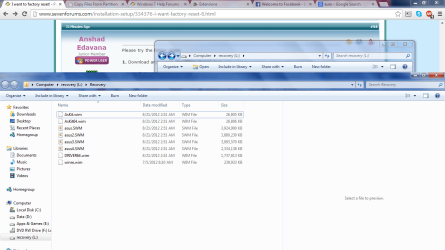
3.png
 

My Computer My Computer

At a glance

windows 7 home premium 64 bitintel cor i3-3110mram 4gbintel hd graphics 4000
Computer type
Laptop
Computer Manufacturer/Model Number
Asus
OS
windows 7 home premium 64 bit
CPU
intel cor i3-3110m
Motherboard
k55a
Memory
ram 4gb
Graphics Card(s)
intel hd graphics 4000
Hard Drives
500gb
Cooling
within laptop
Keyboard
built-in
Mouse
touchpad built in
Internet Speed
4mbs
Antivirus
trend micro titanium internet security 2012
Browser
google chrome
There is a typo in the second command but never mind, the screenshot is more than enough. There is only one image inside the SWM files and it is straightly named as "Recovery image". Recovering OS from it is the hard part.

You need to build a "WinPE" boot disc with some special tools ( created by WinPE guru "SIW2" ).

Download the latest version of the builder from https://www.dropbox.com/s/8q4mqlo4qwoq7dl/REv18.zip

Follow instruction from this page to ceate the boot disc : http://www.sevenforums.com/software/325669-new-versions-simple-winpe-maker.html

(instruction are for old version 7 builder ). When it asks for permission to download some files from net, press "Y" to confirm.

Burn the resulting ISO to a blank CD and boot from it. You can optionally create a USB flash drive but avoid that if your system do have an optical drive.

Please report whether you can successfully boot using SIW2's WinPE disc.

http://www.sevenforums.com/attachme...new-versions-simple-winpe-maker-wdo-vista.jpg
 

My Computer My Computer

At a glance

Windows 7 Ultimate x64
Computer type
PC/Desktop
OS
Windows 7 Ultimate x64
There is a typo in the second command but never mind, the screenshot is more than enough. There is only one image inside the SWM files and it is straightly named as "Recovery image". Recovering OS from it is the hard part.

You need to build a "WinPE" boot disc with some special tools ( created by WinPE guru "SIW2" ).

Download the latest version of the builder from https://www.dropbox.com/s/8q4mqlo4qwoq7dl/REv18.zip

Follow instruction from this page to ceate the boot disc : http://www.sevenforums.com/software/325669-new-versions-simple-winpe-maker.html

(instruction are for old version 7 builder ). When it asks for permission to download some files from net, press "Y" to confirm.

Burn the resulting ISO to a blank CD and boot from it. You can optionally create a USB flash drive but avoid that if your system do have an optical drive.

Please report whether you can successfully boot using SIW2's WinPE disc.

http://www.sevenforums.com/attachme...new-versions-simple-winpe-maker-wdo-vista.jpg

Can't I just boot from easybc because I don't have a 10+gb flash drive or disk
 

My Computer My Computer

At a glance

windows 7 home premium 64 bitintel cor i3-3110mram 4gbintel hd graphics 4000
Computer type
Laptop
Computer Manufacturer/Model Number
Asus
OS
windows 7 home premium 64 bit
CPU
intel cor i3-3110m
Motherboard
k55a
Memory
ram 4gb
Graphics Card(s)
intel hd graphics 4000
Hard Drives
500gb
Cooling
within laptop
Keyboard
built-in
Mouse
touchpad built in
Internet Speed
4mbs
Antivirus
trend micro titanium internet security 2012
Browser
google chrome
should i extart it in the recovery partition which i have created?
 

My Computer My Computer

At a glance

windows 7 home premium 64 bitintel cor i3-3110mram 4gbintel hd graphics 4000
Computer type
Laptop
Computer Manufacturer/Model Number
Asus
OS
windows 7 home premium 64 bit
CPU
intel cor i3-3110m
Motherboard
k55a
Memory
ram 4gb
Graphics Card(s)
intel hd graphics 4000
Hard Drives
500gb
Cooling
within laptop
Keyboard
built-in
Mouse
touchpad built in
Internet Speed
4mbs
Antivirus
trend micro titanium internet security 2012
Browser
google chrome
You don't need a 10 GB flash drive or disc. We boot from the 300 MB sized disc and use SWM files stored on the HDD to recover the OS. We need to format the "C" drive which can only be done from outside of Windows. I don't think we can use "EasyBCD" here as GPT won't allow us to assign a drive letter to the OEM recovery partition.

Even if our attempts failed, you can always opt the clean install which requires to wipe the disk anyway. So will worth a try as a learning exercise.
 

My Computer My Computer

At a glance

Windows 7 Ultimate x64
Computer type
PC/Desktop
OS
Windows 7 Ultimate x64
You don't need a 10 GB flash drive or disc. We boot from the 300 MB sized disc and use SWM files stored on the HDD to recover the OS. We need to format the "C" drive which can only be done from outside of Windows. I don't think we can use "EasyBCD" here as GPT won't allow us to assign a drive letter to the OEM recovery partition.

I didn't understand how to use his tool? Could you tell me where to extract it exactly and do I have to delethe files I already copied? Does it look for swm and image files in hidden partition also?
Thanks
 

My Computer My Computer

At a glance

windows 7 home premium 64 bitintel cor i3-3110mram 4gbintel hd graphics 4000
Computer type
Laptop
Computer Manufacturer/Model Number
Asus
OS
windows 7 home premium 64 bit
CPU
intel cor i3-3110m
Motherboard
k55a
Memory
ram 4gb
Graphics Card(s)
intel hd graphics 4000
Hard Drives
500gb
Cooling
within laptop
Keyboard
built-in
Mouse
touchpad built in
Internet Speed
4mbs
Antivirus
trend micro titanium internet security 2012
Browser
google chrome
Hi

Leave the SWM files there. We need to use that after booting from the disc.

To build the disc, simply extract the zip package and then execute "RunmeAsAdmin.cmd" file inside it. Make sure to right click on it and "Run As Administrator". A command prompt window will appear and ask for your permission to download some file from net. Allow it to do so. You may receive another prompt to add "Paragon partition manager". Press "n" to skip that and the option to add drivers will appear. Skip that also and the CMD will create a bootable ISO within 2-3 minutes. The resulting ISO file will be located inside the same folder. Burn it to a blank CD and check whether you can boot from it.
 

My Computer My Computer

At a glance

Windows 7 Ultimate x64
Computer type
PC/Desktop
OS
Windows 7 Ultimate x64
Hi

Leave the SWM files there. We need to use that after booting from the disc.

To build the disc, simply extract the zip package and then execute "RunmeAsAdmin.cmd" file inside it. Make sure to right click on it and "Run As Administrator". A command prompt window will appear and ask for your permission to download some file from net. Allow it to do so. You may receive another prompt to add "Paragon partition manager". Press "n" to skip that and the option to add drivers will appear. Skip that also and the CMD will create a bootable ISO within 2-3 minutes. The resulting ISO file will be located inside the same folder. Burn it to a blank CD and check whether you can boot from it.

Should I extract it in l:\recovery which I made as you told me before? Also I want to use usb flash drive, so how to do it on usb?
 

My Computer My Computer

At a glance

windows 7 home premium 64 bitintel cor i3-3110mram 4gbintel hd graphics 4000
Computer type
Laptop
Computer Manufacturer/Model Number
Asus
OS
windows 7 home premium 64 bit
CPU
intel cor i3-3110m
Motherboard
k55a
Memory
ram 4gb
Graphics Card(s)
intel hd graphics 4000
Hard Drives
500gb
Cooling
within laptop
Keyboard
built-in
Mouse
touchpad built in
Internet Speed
4mbs
Antivirus
trend micro titanium internet security 2012
Browser
google chrome
Hi

Don't extract it in to the "Recovery" folder. Copy the zip file to the root of "L:" and then right click -->Extract all. This will extract the file to folder "L:\REv18".

It is better to install "WinRAR" which can extract both zip and ISO file : http://www.rarlab.com/rar/winrar-x64-510.exe

The easiest way to create a bootable USB flash drive is to use "Rufus". Please refer this guide for instructions : http://www.eightforums.com/tutorials/15458-uefi-bootable-usb-flash-drive-create-windows.html

Instead of the Windows ISO, select our WinPE iso created earlier with the batch file.
 

My Computer My Computer

At a glance

Windows 7 Ultimate x64
Computer type
PC/Desktop
OS
Windows 7 Ultimate x64
It's midnight in my place. Need some sleep.... See you in the morning (In the meantime, prepare and check the USB drive ).
 

My Computer My Computer

At a glance

Windows 7 Ultimate x64
Computer type
PC/Desktop
OS
Windows 7 Ultimate x64

My Computer My Computer

At a glance

windows 7 home premium 64 bitintel cor i3-3110mram 4gbintel hd graphics 4000
Computer type
Laptop
Computer Manufacturer/Model Number
Asus
OS
windows 7 home premium 64 bit
CPU
intel cor i3-3110m
Motherboard
k55a
Memory
ram 4gb
Graphics Card(s)
intel hd graphics 4000
Hard Drives
500gb
Cooling
within laptop
Keyboard
built-in
Mouse
touchpad built in
Internet Speed
4mbs
Antivirus
trend micro titanium internet security 2012
Browser
google chrome
Have you had success in creating the USB and booting it in UEFI mode ?.

Also please do the below steps and let us know the result.

1. Download "MountstorPe" from http://www.kare-net.de/Download/MountStorPe.zip

2. Extract the archive and you will find "mountstorPE.exe" inside the folder named "Files". Right click on it and choose "Run As Administrator". This utility will try to assign drive letters to hidden partitions. If it works as expected, recovery partition will be assigned with a drive letter and you will be able to browse the contents using explorer.

Let me know whether "MountstorPE" can mount the recovery partition successfully.
 

My Computer My Computer

At a glance

Windows 7 Ultimate x64
Computer type
PC/Desktop
OS
Windows 7 Ultimate x64
Have you had success in creating the USB and booting it in UEFI mode ?.

Also please do the below steps and let us know the result.

1. Download "MountstorPe" from http://www.kare-net.de/Download/MountStorPe.zip

2. Extract the archive and you will find "mountstorPE.exe" inside the folder named "Files". Right click on it and choose "Run As Administrator". This utility will try to assign drive letters to hidden partitions. If it works as expected, recovery partition will be assigned with a drive letter and you will be able to browse the contents using explorer.

Let me know whether "MountstorPE" can mount the recovery partition successfully.

I can use minitool partition wizard to unhide and assign letter to recovery partition and it's scceeded
 

My Computer My Computer

At a glance

windows 7 home premium 64 bitintel cor i3-3110mram 4gbintel hd graphics 4000
Computer type
Laptop
Computer Manufacturer/Model Number
Asus
OS
windows 7 home premium 64 bit
CPU
intel cor i3-3110m
Motherboard
k55a
Memory
ram 4gb
Graphics Card(s)
intel hd graphics 4000
Hard Drives
500gb
Cooling
within laptop
Keyboard
built-in
Mouse
touchpad built in
Internet Speed
4mbs
Antivirus
trend micro titanium internet security 2012
Browser
google chrome
Should I put siw2's zip file in the recovery partition after unhidding and do the steps?
 

My Computer My Computer

At a glance

windows 7 home premium 64 bitintel cor i3-3110mram 4gbintel hd graphics 4000
Computer type
Laptop
Computer Manufacturer/Model Number
Asus
OS
windows 7 home premium 64 bit
CPU
intel cor i3-3110m
Motherboard
k55a
Memory
ram 4gb
Graphics Card(s)
intel hd graphics 4000
Hard Drives
500gb
Cooling
within laptop
Keyboard
built-in
Mouse
touchpad built in
Internet Speed
4mbs
Antivirus
trend micro titanium internet security 2012
Browser
google chrome
Can you add it with EasyBCD now? It may boot with a drive letter.

I have tried that but it is still stuck at windows is loading file but I will give it anoyher go
 

My Computer My Computer

At a glance

windows 7 home premium 64 bitintel cor i3-3110mram 4gbintel hd graphics 4000
Computer type
Laptop
Computer Manufacturer/Model Number
Asus
OS
windows 7 home premium 64 bit
CPU
intel cor i3-3110m
Motherboard
k55a
Memory
ram 4gb
Graphics Card(s)
intel hd graphics 4000
Hard Drives
500gb
Cooling
within laptop
Keyboard
built-in
Mouse
touchpad built in
Internet Speed
4mbs
Antivirus
trend micro titanium internet security 2012
Browser
google chrome
I have tried that but it is still stuck at windows is loading file but I will give it anoyher go

Add the "WInRE.WIM" to BCD store using "EasyBCD" but before trying to boot from it, run the below command and attach the resulting file with next reply.

Bcdedit /enum >L:\BCD.TXT

Feel free to change the drive letter if needed. Attach the file with next reply and we can check whether it is possible to use the "EasyBCD" method instead manually restoring OS from the SWM file.
 

My Computer My Computer

At a glance

Windows 7 Ultimate x64
Computer type
PC/Desktop
OS
Windows 7 Ultimate x64
I have tried that but it is still stuck at windows is loading file but I will give it anoyher go

Add the "WInRE.WIM" to BCD store using "EasyBCD" but before trying to boot from it, run the below command and attach the resulting file with next reply.

Bcdedit /enum >L:\BCD.TXT

Feel free to change the drive letter if needed. Attach the file with next reply and we can check whether it is possible to use the "EasyBCD" method instead manually restoring OS from the SWM file.

The l letter refers to the recovery partition that came with laptop or the one I have made?
 

My Computer My Computer

At a glance

windows 7 home premium 64 bitintel cor i3-3110mram 4gbintel hd graphics 4000
Computer type
Laptop
Computer Manufacturer/Model Number
Asus
OS
windows 7 home premium 64 bit
CPU
intel cor i3-3110m
Motherboard
k55a
Memory
ram 4gb
Graphics Card(s)
intel hd graphics 4000
Hard Drives
500gb
Cooling
within laptop
Keyboard
built-in
Mouse
touchpad built in
Internet Speed
4mbs
Antivirus
trend micro titanium internet security 2012
Browser
google chrome
In aus support it says ems have to be enable should I enable it in easybc?
 

My Computer My Computer

At a glance

windows 7 home premium 64 bitintel cor i3-3110mram 4gbintel hd graphics 4000
Computer type
Laptop
Computer Manufacturer/Model Number
Asus
OS
windows 7 home premium 64 bit
CPU
intel cor i3-3110m
Motherboard
k55a
Memory
ram 4gb
Graphics Card(s)
intel hd graphics 4000
Hard Drives
500gb
Cooling
within laptop
Keyboard
built-in
Mouse
touchpad built in
Internet Speed
4mbs
Antivirus
trend micro titanium internet security 2012
Browser
google chrome
The l letter refers to the recovery partition that came with laptop or the one I have made?

You can use any drive letter other than the one for built in recovery partition. Be it D , E , or L , output of the command will be saved there with the name BCD.TXT. Simply attach that file with next reply.
 

My Computer My Computer

At a glance

Windows 7 Ultimate x64
Computer type
PC/Desktop
OS
Windows 7 Ultimate x64
Back
Top