best backup software for windows 7

ah, ok.

I know what I was doing wrong. I was trying to send files to the root of a drive, thus is was showing everything. I created a few folders and set up some syncs.

is there a way to schedule this app to run and sync the folders if there's any changes made?
 

My Computer My Computer

At a glance

windows 7 professional 64 bit
OS
windows 7 professional 64 bit
is there a way to schedule this app to run and sync the folders if there's any changes made?

I assume you could schedule it through Task Scheduler to run at certain times.

I don't know if any other scheduling capability is built into the app.

However, I deliberately don't want to rely on any "automated" type of scheduling as I don't trust that stuff as a general proposition.

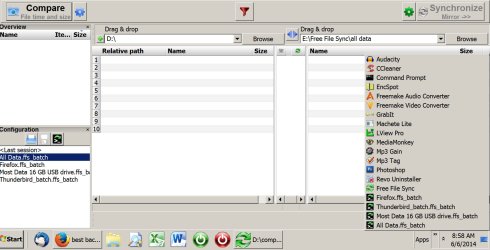
Instead, I've used the batch file capability within Free File Sync to set up 4 separate jobs. Each job runs on demand with a single mouse click.

You can see the jobs listed at the lower left of the image below. One for all data, another for most data, another for Firefox, and another for Thunderbird email.

I run each job with a single click from the tall column of applications you can see at the right. You can see each of the 4 jobs mentioned above listed in that column. That column springs open when I poke that "Apps" link you see right next to the clock. Works for me.
 

Attachments

  • free file sync2.jpg
    free file sync2.jpg
    128.1 KB · Views: 4

My Computer My Computer

At a glance

Windows 7 Home Premium SP1, 64-bitIntel Skylake i5-6600K, not overclocked8 GB HyperX DDR4-2666 (2 x 4 GB)none; graphics are integrated on CPU
Computer type
PC/Desktop
Computer Manufacturer/Model Number
Ignatz Special; 4 speed manual gearbox; factory air conditioning; one of one
OS
Windows 7 Home Premium SP1, 64-bit
CPU
Intel Skylake i5-6600K, not overclocked
Motherboard
AsRock Z170M Extreme 4, micro ATX
Memory
8 GB HyperX DDR4-2666 (2 x 4 GB)
Graphics Card(s)
none; graphics are integrated on CPU
Sound Card
onboard: Realtek ALC1150; external: USB Behringer UF0-202
Monitor(s) Displays
Dell S2340M 23 inch IPS
Screen Resolution
1600 x 900
Hard Drives
System: Crucial MX100 series SSD, 128 GB;
Data: Samsung Spinpoint 103SJ, 1 TB;
Backup: WD Caviar Green WD30EZRX-00D8PB0, 3 TB
PSU
Rosewill SilentNight 500 watt fanless, semi-modular
Case
Antec Solo II
Cooling
Noctua NH-U12S; Noctua F12 intake, Noctua S12A exhaust
Keyboard
Microsoft 200 6JH-00001 USB
Mouse
Dell or Microsoft optical wired; USB
Antivirus
Microsoft Security Essentials and Malwarebytes Premium
Browser
Pale Moon
Other Info
All fans PWM; speeds at idle: CPU circa 500 rpm; intake circa 600 rpm; exhaust circa 600 rpm; CPU temps 27 idle and 47 C load in a warm room (27 C/81 F) when running Intel Extreme Tuning Utility stress test.
ignatzatsonic did a good job of describing it. FreeFileSync works by syncing folder pairs; HDDs can be treated as folders. To be able to sync from Computer A to Computer B, first, Computer A has to able "see" all the HDDs and folders on Computer B and Computer B has to be able to "see" all the HDDs and folders on Computer A. For that to happen, the HDDs you want to sync from A to B have to have different drive letters. In other words, you can't do this if both HDDs you are syncing are D:. For example, you would have to have the HDD on Computer A named D: and the one on Computer B named E:

I do something similar between my desktop machine and my notebook but I use an intermediary HDD to actually transfer the data. Since I maintain a backup of the notebook on an external HDD any way, I first set up empty folders on the backup external HDD with the same names as the folders on the notebook I wanted to backup, making sure the folder pairs had the same folder names as the ones I was going to later sync with on my desktop. A simplified example is I wanted the folder named Doohickey and its contents to also be on my notebook. I made an empty folder named Doohickey on both the notebook's drive and the external drive. I then made and saved a configuration in the installation of FFS on the desktop computer that was set to Mirror and would sync the data from my desktop's Doohickey folder to the external drive's doohickey folder. Then I made and saved a second configuration in FFS in the notebook that was set to Mirror and would sync data from the external HDD's Doohicky folder to the notebook's doohickey folder.

For backing up the notebook's Doohickey folder, I made and saved yet another configuration in FFS on the notebook, again using Mirror to ensure data transfer was strictly one way and the source folder would remain unchanged, that would sync data from the notebook's Doohickey folder to the external HDD's Doohickey folder. I did the same in the desktop computer's FFS, still using Mirror, to sync the data in the external HDD's Doohickey's folder to the desktop's Doohickey folder.

It was actually much more complicated to set up in actual practice because of the number of folders actually involved but, once the configurations were set up and saved, it's extremely easy to use. I only use the notebook when I travel. Shortly before my trip, I dig out the notebook, do any necessary updates (there are usually a bunch), then connect the external HDD to my desktop to update the folders that are paired with folders on the desktop. I then connect the external HDD to the notebook and update the folders on the notebook that are paired with the folders on the external HDD. To make my life much simpler, while on the trip, I save any new files (mostly photos taken on the trip) and changed files to a single folder on the notebook. That folder gets backed up to the external HDD. When I get home, I connect the external HDD to my desktop and let FFS transfer the new and changed files from the external HDD to a matching folder on the desktop. I can later redistribute the files in that folder.

Have I thoroughly confused you?

 

My Computer My Computer

At a glance

Win 7 Ultimate 64 bitIntel i7-3930KKingston HyperX Genesis 32GB Kit (8x4GB Modul...MSI R7850 Twin Frozr 2GD5/OC Radeon HD 7850 2...
Computer type
PC/Desktop
Computer Manufacturer/Model Number
Custom Build
OS
Win 7 Ultimate 64 bit
CPU
Intel i7-3930K
Motherboard
ASUS P9X79 WS
Memory
Kingston HyperX Genesis 32GB Kit (8x4GB Modules) 1600MHz DDR
Graphics Card(s)
MSI R7850 Twin Frozr 2GD5/OC Radeon HD 7850 2GB 256-bit GDDR
Sound Card
Asus Xonar Essence STX
Monitor(s) Displays
3x Asus VG248QE 24", Vizio 32" TV
Screen Resolution
1920 x 1080, ?
Hard Drives
Samsung 128GB 840 Pro SSD (1),
Samsung 4TB 850 EVO SSDs (4)
Samsung 4TB 850 EVO SSDs (16) external backup drives used in 2.5" hot swap bays in the computer.
PSU
Corsair HX750w
Case
Antec Two Hundred v2 (modified)
Cooling
Cooler Master GeminII S524 120mm (fan replaced with a 140mm)
Keyboard
Logitech G510s
Mouse
Logitech M525 (two in use)
Internet Speed
=< 32Mbps down, 8Mbps up
Antivirus
AVAST!, MBAM, SAS, Spybot S&D (all but MBAM free) Glary Util
Browser
IE11
Other Info
LSI 9211-8i HBA card (8 SATA III ports), 2.5" & 3.5" Hot Swap Bays, HooToo HT-CR001 PCI-E to USB 3.0 Internal Hub + 6 Slot Card Reader, and LG Model CH12LS28 BD-ROM Optical Drive. Also, ScanSnap S1500 ADF duplexing scanner, Canon 9000F flat bed scanner, Corsair SP2500 2.1 speakers, Samsung CLP 415nw laser color printer, Cyberpower PP2200SW UPS
...is there a way to schedule this app to run and sync the folders if there's any changes made?

Yes, there are directions in FFS on how to set it up with Windows task scheduler. I do that to automagically backup my Favorites folder and my calendar program's data overnight.
 

My Computer My Computer

At a glance

Win 7 Ultimate 64 bitIntel i7-3930KKingston HyperX Genesis 32GB Kit (8x4GB Modul...MSI R7850 Twin Frozr 2GD5/OC Radeon HD 7850 2...
Computer type
PC/Desktop
Computer Manufacturer/Model Number
Custom Build
OS
Win 7 Ultimate 64 bit
CPU
Intel i7-3930K
Motherboard
ASUS P9X79 WS
Memory
Kingston HyperX Genesis 32GB Kit (8x4GB Modules) 1600MHz DDR
Graphics Card(s)
MSI R7850 Twin Frozr 2GD5/OC Radeon HD 7850 2GB 256-bit GDDR
Sound Card
Asus Xonar Essence STX
Monitor(s) Displays
3x Asus VG248QE 24", Vizio 32" TV
Screen Resolution
1920 x 1080, ?
Hard Drives
Samsung 128GB 840 Pro SSD (1),
Samsung 4TB 850 EVO SSDs (4)
Samsung 4TB 850 EVO SSDs (16) external backup drives used in 2.5" hot swap bays in the computer.
PSU
Corsair HX750w
Case
Antec Two Hundred v2 (modified)
Cooling
Cooler Master GeminII S524 120mm (fan replaced with a 140mm)
Keyboard
Logitech G510s
Mouse
Logitech M525 (two in use)
Internet Speed
=< 32Mbps down, 8Mbps up
Antivirus
AVAST!, MBAM, SAS, Spybot S&D (all but MBAM free) Glary Util
Browser
IE11
Other Info
LSI 9211-8i HBA card (8 SATA III ports), 2.5" & 3.5" Hot Swap Bays, HooToo HT-CR001 PCI-E to USB 3.0 Internal Hub + 6 Slot Card Reader, and LG Model CH12LS28 BD-ROM Optical Drive. Also, ScanSnap S1500 ADF duplexing scanner, Canon 9000F flat bed scanner, Corsair SP2500 2.1 speakers, Samsung CLP 415nw laser color printer, Cyberpower PP2200SW UPS
To backup my data, I use a folder/file syncing program called FreeFileSync. I have it set to Mirror. It syncs folder pairs that one has predetermined; an entire disk can be considered to be a folder. It will only copy over new and changed files on the source disk to a destination disk and delete files on the destination disk that have been deleted on the source disk. I also have it set to put any files it deletes on the destination disk to a Versioning folder on another internal disk. Since only changed data is being dealt with, he process is so fast, I can do daily backups onto two different backup HDDs.

Hi - I've recently changed computers, moving from XP to Windows 7, and it's quite a deep learning curve for me. Does FreeFileSync maintain the original time/date (and similarly pertinent associated info) of the files and folders when copying/syncing?

Sorry for such a basic question but I am still new at using these programs and had previously used SyncBack. In the backup I made the time/date of the folders was set as the backup time/date and not the originals. Maybe there was a setting that I didn't know to configure in SyncBack?

Jeannie, could you share the steps for setting up the versioning folder? Many thanks to everyone for all the help!
 
Last edited:

My Computer My Computer

At a glance

Windows 7 Pro Version 6.1.7601 Service Pack 1...Intel core i5-2467M CPU @160GHz4Gb installed RAMIntel HD Graphics 3000
Computer type
Laptop
Computer Manufacturer/Model Number
Dell XPS 13 (L321X) x64
OS
Windows 7 Pro Version 6.1.7601 Service Pack 1 Build 7601, clean OEM re-install
CPU
Intel core i5-2467M CPU @160GHz
Motherboard
Dell Inc. 085X6F A00
Memory
4Gb installed RAM
Graphics Card(s)
Intel HD Graphics 3000
Hard Drives
SAMSUNG SSD PM830 mSATA 128GB ATA Device, ACHI enabled
SEAGATE FREEAGENT USB HDD - 640GB
Antivirus
Kaspersky Internet Security 2014 G patch
Browser
Firefox 29.1
...Hi - I've recently changed computers, moving from XP to Windows 7, and it's quite a deep learning curve for me. Does FreeFileSync maintain the original time/date (and similarly pertinent associated info) of the files and folders when copying/syncing?...

Yes.

...Sorry for such a basic question but I am still new at using these programs and had previously used SyncBack. In the backup I made the time/date of the folders was set as the backup time/date and not the originals. Maybe there was a setting that I didn't know to configure in SyncBack?...

I can't speak for SyncBack. The one time I looked at it, it appeared that I would have to buy the paid version to get what I wanted. I also found their directions very confusing (typical written by a geek for gee type directions). Overall, it didn't impress me.

...Is there a tutorial on how to set up FreeFileSync, including the versioning folder setting? Thank you for all the help!

Our own KADO did this video tutorial. It's very well done but I found it a bit hard to follow because of my ADHD (I find all video tutorials hard to follow although they often can clear up questions raised by written ones). I found a written tutorial when I first started using it but I can't find it know (I'm surprised I didn't keep it). It wasn't great but it did make following Kado's tutorial easier for me (let me hasten to say again the problem is mine, not Kado's).

I've been planning to write a tutorial on how to use FFS for backups, including the use of the versioning folder and making scheduled backups but, right now, I just have too many irons in the fire and am dealing with health issues (mostly severe allergies).
 

My Computer My Computer

At a glance

Win 7 Ultimate 64 bitIntel i7-3930KKingston HyperX Genesis 32GB Kit (8x4GB Modul...MSI R7850 Twin Frozr 2GD5/OC Radeon HD 7850 2...
Computer type
PC/Desktop
Computer Manufacturer/Model Number
Custom Build
OS
Win 7 Ultimate 64 bit
CPU
Intel i7-3930K
Motherboard
ASUS P9X79 WS
Memory
Kingston HyperX Genesis 32GB Kit (8x4GB Modules) 1600MHz DDR
Graphics Card(s)
MSI R7850 Twin Frozr 2GD5/OC Radeon HD 7850 2GB 256-bit GDDR
Sound Card
Asus Xonar Essence STX
Monitor(s) Displays
3x Asus VG248QE 24", Vizio 32" TV
Screen Resolution
1920 x 1080, ?
Hard Drives
Samsung 128GB 840 Pro SSD (1),
Samsung 4TB 850 EVO SSDs (4)
Samsung 4TB 850 EVO SSDs (16) external backup drives used in 2.5" hot swap bays in the computer.
PSU
Corsair HX750w
Case
Antec Two Hundred v2 (modified)
Cooling
Cooler Master GeminII S524 120mm (fan replaced with a 140mm)
Keyboard
Logitech G510s
Mouse
Logitech M525 (two in use)
Internet Speed
=< 32Mbps down, 8Mbps up
Antivirus
AVAST!, MBAM, SAS, Spybot S&D (all but MBAM free) Glary Util
Browser
IE11
Other Info
LSI 9211-8i HBA card (8 SATA III ports), 2.5" & 3.5" Hot Swap Bays, HooToo HT-CR001 PCI-E to USB 3.0 Internal Hub + 6 Slot Card Reader, and LG Model CH12LS28 BD-ROM Optical Drive. Also, ScanSnap S1500 ADF duplexing scanner, Canon 9000F flat bed scanner, Corsair SP2500 2.1 speakers, Samsung CLP 415nw laser color printer, Cyberpower PP2200SW UPS

My Computers My Computers

  • At a glance

    7 X64i5 84002x8gb 3200mhz
    Computer type
    PC/Desktop
    OS
    7 X64
    CPU
    i5 8400
    Motherboard
    gigabyte b365m ds3h
    Memory
    2x8gb 3200mhz
    Hard Drives
    various
    PSU
    pure power 11 400w cm
    Case
    Coolermaster
    Cooling
    cryorig m9i
  • At a glance

    7x64g54008gb ddr4 2400
    Computer type
    PC/Desktop
    OS
    7x64
    CPU
    g5400
    Motherboard
    ga b365m ds3h
    Memory
    8gb ddr4 2400
    PSU
    xfx pro 450w
Thank you, Jeannie, for the quick reply and the video link. I'll check it out as soon as I finish installing core programs (and will put VLC on top of that list). Look forward to reading the tutorial when you get to doing it (totally understand about having full plate) and do hope you feel better soon!
 

My Computer My Computer

At a glance

Windows 7 Pro Version 6.1.7601 Service Pack 1...Intel core i5-2467M CPU @160GHz4Gb installed RAMIntel HD Graphics 3000
Computer type
Laptop
Computer Manufacturer/Model Number
Dell XPS 13 (L321X) x64
OS
Windows 7 Pro Version 6.1.7601 Service Pack 1 Build 7601, clean OEM re-install
CPU
Intel core i5-2467M CPU @160GHz
Motherboard
Dell Inc. 085X6F A00
Memory
4Gb installed RAM
Graphics Card(s)
Intel HD Graphics 3000
Hard Drives
SAMSUNG SSD PM830 mSATA 128GB ATA Device, ACHI enabled
SEAGATE FREEAGENT USB HDD - 640GB
Antivirus
Kaspersky Internet Security 2014 G patch
Browser
Firefox 29.1
Thank you, SIW2...will also look into Aomei Backupper; please let me know if there's a tutorial for using this program as well.
 

My Computer My Computer

At a glance

Windows 7 Pro Version 6.1.7601 Service Pack 1...Intel core i5-2467M CPU @160GHz4Gb installed RAMIntel HD Graphics 3000
Computer type
Laptop
Computer Manufacturer/Model Number
Dell XPS 13 (L321X) x64
OS
Windows 7 Pro Version 6.1.7601 Service Pack 1 Build 7601, clean OEM re-install
CPU
Intel core i5-2467M CPU @160GHz
Motherboard
Dell Inc. 085X6F A00
Memory
4Gb installed RAM
Graphics Card(s)
Intel HD Graphics 3000
Hard Drives
SAMSUNG SSD PM830 mSATA 128GB ATA Device, ACHI enabled
SEAGATE FREEAGENT USB HDD - 640GB
Antivirus
Kaspersky Internet Security 2014 G patch
Browser
Firefox 29.1

My Computer My Computer

At a glance

Windows 10 Pro x64 ; Xubuntu x64Intel i7 860 @ 2.80 GHz O/C'ed to 4.0GHz16GB Corsair Vengance DDR3 @ 661 MHz Dual Cha...EVGA NVidia GTX 560 1024MB
Computer type
PC/Desktop
Computer Manufacturer/Model Number
Golden Mk. I.4
OS
Windows 10 Pro x64 ; Xubuntu x64
CPU
Intel i7 860 @ 2.80 GHz O/C'ed to 4.0GHz
Motherboard
Gigabyte P55A-UD3R Rev.1. Award BIOS F13
Memory
16GB Corsair Vengance DDR3 @ 661 MHz Dual Channel (9-9-9-24)
Graphics Card(s)
EVGA NVidia GTX 560 1024MB
Sound Card
Realtek Integrated
Monitor(s) Displays
Dual Samsung SyncMaster 2494HS
Screen Resolution
1920*1080 and 1920*1080
Hard Drives
1*Samsung 840 EVO 120GB SSD;
1*OCZ Vertex 2 60GB SSD;
2*Samsung F3 SpinPoint 1TB in RAID0;
1*Samsung F1 SpinPoint 1TB;
2*Western Digital 1TB External USB 3.0
1*Western Digital 500GB External USB 3.0
1*Seagate 500GB External USB 2.0
PSU
Thermaltake ToughPower QFan 750W
Case
Thermaltake Element S VK60001W2Z
Cooling
Corsair H60 Water Cooling, 2*230mm and 2*80mm case fans
Keyboard
Logitech G110
Mouse
Logitech MX518
AOMEI Backupper is an imaging program. Primarily for imaging your partitions. It has more functions than any other free version- e.g. incremental/differential. Overall, it is the best free imaging program around. It doesn't support phone type storage, though they will be adding that soon. It also has file and folder backup. However that is for backup, not the same as syncing.

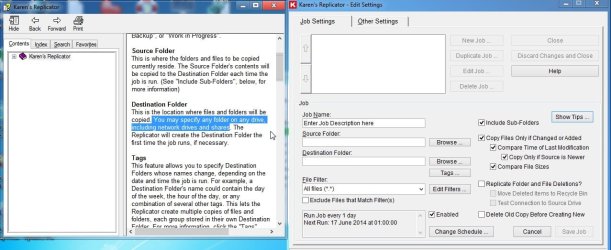
If you want a sync type program, Karen's Replicator is excellent, and a couple of others have been mentioned.
 

My Computers My Computers

  • At a glance

    7 X64i5 84002x8gb 3200mhz
    Computer type
    PC/Desktop
    OS
    7 X64
    CPU
    i5 8400
    Motherboard
    gigabyte b365m ds3h
    Memory
    2x8gb 3200mhz
    Hard Drives
    various
    PSU
    pure power 11 400w cm
    Case
    Coolermaster
    Cooling
    cryorig m9i
  • At a glance

    7x64g54008gb ddr4 2400
    Computer type
    PC/Desktop
    OS
    7x64
    CPU
    g5400
    Motherboard
    ga b365m ds3h
    Memory
    8gb ddr4 2400
    PSU
    xfx pro 450w
Thank you for all the suggestions....please correct if I'm wrong:
AOMEI Backupper: image backup w/ files & folders backup, no sync
SyncToy: files & folders sync (does it do full backups?)
FreeFileSync: files & folders sync with versioning option
SyncBack (free version): as share earlier, I had trouble with copied folders not keeping origiinal dates/time; please help show if there is an option that I missed setting up.

Being inexperienced, I'd prefer to keep it simple but seems that I might have to use more than one programs for backup in addition to Macrium.

By the way, ignatzatsonic, would you mind showing me how you had set up the "Apps" link? That seems to be a useful setup to help me keep up with the daily and weekly backup. Greatly appreciate everyone's help!
 

My Computer My Computer

At a glance

Windows 7 Pro Version 6.1.7601 Service Pack 1...Intel core i5-2467M CPU @160GHz4Gb installed RAMIntel HD Graphics 3000
Computer type
Laptop
Computer Manufacturer/Model Number
Dell XPS 13 (L321X) x64
OS
Windows 7 Pro Version 6.1.7601 Service Pack 1 Build 7601, clean OEM re-install
CPU
Intel core i5-2467M CPU @160GHz
Motherboard
Dell Inc. 085X6F A00
Memory
4Gb installed RAM
Graphics Card(s)
Intel HD Graphics 3000
Hard Drives
SAMSUNG SSD PM830 mSATA 128GB ATA Device, ACHI enabled
SEAGATE FREEAGENT USB HDD - 640GB
Antivirus
Kaspersky Internet Security 2014 G patch
Browser
Firefox 29.1
By the way, ignatzatsonic, would you mind showing me how you had set up the "Apps" link? That seems to be a useful setup to help me keep up with the daily and weekly backup. Greatly appreciate everyone's help!

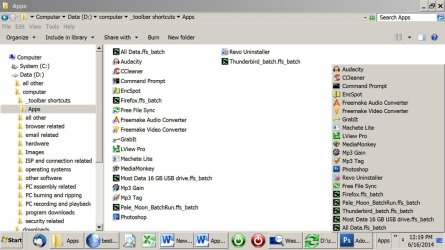
I created a folder named “apps” on my data drive D at D:\computer\_toolbar shortcuts\apps, but I’d think you could put it anywhere. I used the underscore only because that forces the folder to appear as the first folder under D:\computer when viewed in Windows Explorer.

I then made a shortcut for each application that I wanted to put in the apps folder and placed each shortcut in D:\computer\_toolbar\apps. The FreeFileSync batch files are placed in that folder along with the other shortcuts.

See pic below.

I then right clicked the taskbar and chose “new toolbar”. You’re asked to choose a folder, so I navigated to D:\computer\_toolbar shortcuts\apps.

Prestomatic—the “apps” toolbar appears on the taskbar and shows those 20 shortcuts. Each shortcut will open the app on demand.
 

Attachments

  • apps folder.jpg
    apps folder.jpg
    116.9 KB · Views: 1

My Computer My Computer

At a glance

Windows 7 Home Premium SP1, 64-bitIntel Skylake i5-6600K, not overclocked8 GB HyperX DDR4-2666 (2 x 4 GB)none; graphics are integrated on CPU
Computer type
PC/Desktop
Computer Manufacturer/Model Number
Ignatz Special; 4 speed manual gearbox; factory air conditioning; one of one
OS
Windows 7 Home Premium SP1, 64-bit
CPU
Intel Skylake i5-6600K, not overclocked
Motherboard
AsRock Z170M Extreme 4, micro ATX
Memory
8 GB HyperX DDR4-2666 (2 x 4 GB)
Graphics Card(s)
none; graphics are integrated on CPU
Sound Card
onboard: Realtek ALC1150; external: USB Behringer UF0-202
Monitor(s) Displays
Dell S2340M 23 inch IPS
Screen Resolution
1600 x 900
Hard Drives
System: Crucial MX100 series SSD, 128 GB;
Data: Samsung Spinpoint 103SJ, 1 TB;
Backup: WD Caviar Green WD30EZRX-00D8PB0, 3 TB
PSU
Rosewill SilentNight 500 watt fanless, semi-modular
Case
Antec Solo II
Cooling
Noctua NH-U12S; Noctua F12 intake, Noctua S12A exhaust
Keyboard
Microsoft 200 6JH-00001 USB
Mouse
Dell or Microsoft optical wired; USB
Antivirus
Microsoft Security Essentials and Malwarebytes Premium
Browser
Pale Moon
Other Info
All fans PWM; speeds at idle: CPU circa 500 rpm; intake circa 600 rpm; exhaust circa 600 rpm; CPU temps 27 idle and 47 C load in a warm room (27 C/81 F) when running Intel Extreme Tuning Utility stress test.
Ive always used the Windows Backup Utility, to my USB External Hdd. I have never had a problem.

If you "accidentally" delete a file, you can go back and retrieve it. Or you can replace your whole system.

It has saved my data lots of times
 

My Computer My Computer

At a glance

Windows 7 Home Premuim 64 BitIntel Core 2 Duo E4600 @ 2.4GhzCrucial 4GBATI Raedon 5450 1GB
Computer type
PC/Desktop
Computer Manufacturer/Model Number
Dell Insprion 530s
OS
Windows 7 Home Premuim 64 Bit
CPU
Intel Core 2 Duo E4600 @ 2.4Ghz
Motherboard
Foxconn
Memory
Crucial 4GB
Graphics Card(s)
ATI Raedon 5450 1GB
Sound Card
Integrated
Monitor(s) Displays
Dell 19 inch
Screen Resolution
4:3
Hard Drives
1TB Western Digital
PSU
Bestec 250w
Keyboard
Dell
Mouse
GE
Antivirus
Microsoft Security Essentinals
Browser
Internet Explorer 11
Please help....I've clicked on the link Jeanie had given for FreeFileSync and the report from VirusTotal shows possible malware - are these false positives (that is, there might be options to add toolbars etc that I can opt out)? Does anyone have a safe link to download the software, preferably just the .exe (without a downloader program)?

View attachment Antivirus scan for FreeFileSync - aa90bbbe649c9065593bc2522d4e3a5eaf32e9d444acb075121020c486f550.pdf
View attachment Antivirus scan addt'l info for FFS - aa90bbbe649c9065593bc2522d4e3a5eaf32e9d444acb075121020c486f.pdf
 

My Computer My Computer

At a glance

Windows 7 Pro Version 6.1.7601 Service Pack 1...Intel core i5-2467M CPU @160GHz4Gb installed RAMIntel HD Graphics 3000
Computer type
Laptop
Computer Manufacturer/Model Number
Dell XPS 13 (L321X) x64
OS
Windows 7 Pro Version 6.1.7601 Service Pack 1 Build 7601, clean OEM re-install
CPU
Intel core i5-2467M CPU @160GHz
Motherboard
Dell Inc. 085X6F A00
Memory
4Gb installed RAM
Graphics Card(s)
Intel HD Graphics 3000
Hard Drives
SAMSUNG SSD PM830 mSATA 128GB ATA Device, ACHI enabled
SEAGATE FREEAGENT USB HDD - 640GB
Antivirus
Kaspersky Internet Security 2014 G patch
Browser
Firefox 29.1
Please help....I've clicked on the link Jeanie had given for FreeFileSync and the report from VirusTotal shows possible malware - are these false positives (that is, there might be options to add toolbars etc that I can opt out)? Does anyone have a safe link to download the software, preferably just the .exe (without a downloader program)?

View attachment 322053
View attachment 322054

The possible malware is a PUP—Potentially Unwanted Program—called Open Candy. All Open Candy does is offer crapware, such as the Ask Toolbar, Google Toolbar, Google Chrome, etc. when running the FFS installer. It doesn't install itself and will run only when the installer runs. It's a nuisance but not dangerous. Just pay attention when installing FFS and watch for any offers to install anything other than FFS; just uncheck them if it does. I also rename FFS's installation file after installing FFS by adding .disable to the end of the file name so it won't trigger a hit on AV and antimalware programs and can't start itself (although the latter is highly unlikely). I've never had a problem from it.
 

My Computer My Computer

At a glance

Win 7 Ultimate 64 bitIntel i7-3930KKingston HyperX Genesis 32GB Kit (8x4GB Modul...MSI R7850 Twin Frozr 2GD5/OC Radeon HD 7850 2...
Computer type
PC/Desktop
Computer Manufacturer/Model Number
Custom Build
OS
Win 7 Ultimate 64 bit
CPU
Intel i7-3930K
Motherboard
ASUS P9X79 WS
Memory
Kingston HyperX Genesis 32GB Kit (8x4GB Modules) 1600MHz DDR
Graphics Card(s)
MSI R7850 Twin Frozr 2GD5/OC Radeon HD 7850 2GB 256-bit GDDR
Sound Card
Asus Xonar Essence STX
Monitor(s) Displays
3x Asus VG248QE 24", Vizio 32" TV
Screen Resolution
1920 x 1080, ?
Hard Drives
Samsung 128GB 840 Pro SSD (1),
Samsung 4TB 850 EVO SSDs (4)
Samsung 4TB 850 EVO SSDs (16) external backup drives used in 2.5" hot swap bays in the computer.
PSU
Corsair HX750w
Case
Antec Two Hundred v2 (modified)
Cooling
Cooler Master GeminII S524 120mm (fan replaced with a 140mm)
Keyboard
Logitech G510s
Mouse
Logitech M525 (two in use)
Internet Speed
=< 32Mbps down, 8Mbps up
Antivirus
AVAST!, MBAM, SAS, Spybot S&D (all but MBAM free) Glary Util
Browser
IE11
Other Info
LSI 9211-8i HBA card (8 SATA III ports), 2.5" & 3.5" Hot Swap Bays, HooToo HT-CR001 PCI-E to USB 3.0 Internal Hub + 6 Slot Card Reader, and LG Model CH12LS28 BD-ROM Optical Drive. Also, ScanSnap S1500 ADF duplexing scanner, Canon 9000F flat bed scanner, Corsair SP2500 2.1 speakers, Samsung CLP 415nw laser color printer, Cyberpower PP2200SW UPS
Thank you, ignatzatsonic, for the toolbar instructions and Jeannie for further guidance on installing FFS...and the great tip to rename the FFS installation .exe file to .disable afterwards....I'm off to try these items and checkout programs others have suggested, since I've not had much luck with Windows Backup utility...I can make the backup images but the OS refuse to recognize the images in order to use them to restore. Much appreciation for all the help given!
 

My Computer My Computer

At a glance

Windows 7 Pro Version 6.1.7601 Service Pack 1...Intel core i5-2467M CPU @160GHz4Gb installed RAMIntel HD Graphics 3000
Computer type
Laptop
Computer Manufacturer/Model Number
Dell XPS 13 (L321X) x64
OS
Windows 7 Pro Version 6.1.7601 Service Pack 1 Build 7601, clean OEM re-install
CPU
Intel core i5-2467M CPU @160GHz
Motherboard
Dell Inc. 085X6F A00
Memory
4Gb installed RAM
Graphics Card(s)
Intel HD Graphics 3000
Hard Drives
SAMSUNG SSD PM830 mSATA 128GB ATA Device, ACHI enabled
SEAGATE FREEAGENT USB HDD - 640GB
Antivirus
Kaspersky Internet Security 2014 G patch
Browser
Firefox 29.1
Thank you, ignatzatsonic, for the toolbar instructions and Jeannie for further guidance on installing FFS...and the great tip to rename the FFS installation .exe file to .disable afterwards....I'm off to try these items and checkout programs others have suggested, since I've not had much luck with Windows Backup utility...I can make the backup images but the OS refuse to recognize the images in order to use them to restore. Much appreciation for all the help given!

Macrium Reflect Free (here is a good tutorial on how to use Macrium Reflect) is excellent for imaging the OS and Wolfgang wrote an excellent tutorial for it.
 

My Computer My Computer

At a glance

Win 7 Ultimate 64 bitIntel i7-3930KKingston HyperX Genesis 32GB Kit (8x4GB Modul...MSI R7850 Twin Frozr 2GD5/OC Radeon HD 7850 2...
Computer type
PC/Desktop
Computer Manufacturer/Model Number
Custom Build
OS
Win 7 Ultimate 64 bit
CPU
Intel i7-3930K
Motherboard
ASUS P9X79 WS
Memory
Kingston HyperX Genesis 32GB Kit (8x4GB Modules) 1600MHz DDR
Graphics Card(s)
MSI R7850 Twin Frozr 2GD5/OC Radeon HD 7850 2GB 256-bit GDDR
Sound Card
Asus Xonar Essence STX
Monitor(s) Displays
3x Asus VG248QE 24", Vizio 32" TV
Screen Resolution
1920 x 1080, ?
Hard Drives
Samsung 128GB 840 Pro SSD (1),
Samsung 4TB 850 EVO SSDs (4)
Samsung 4TB 850 EVO SSDs (16) external backup drives used in 2.5" hot swap bays in the computer.
PSU
Corsair HX750w
Case
Antec Two Hundred v2 (modified)
Cooling
Cooler Master GeminII S524 120mm (fan replaced with a 140mm)
Keyboard
Logitech G510s
Mouse
Logitech M525 (two in use)
Internet Speed
=< 32Mbps down, 8Mbps up
Antivirus
AVAST!, MBAM, SAS, Spybot S&D (all but MBAM free) Glary Util
Browser
IE11
Other Info
LSI 9211-8i HBA card (8 SATA III ports), 2.5" & 3.5" Hot Swap Bays, HooToo HT-CR001 PCI-E to USB 3.0 Internal Hub + 6 Slot Card Reader, and LG Model CH12LS28 BD-ROM Optical Drive. Also, ScanSnap S1500 ADF duplexing scanner, Canon 9000F flat bed scanner, Corsair SP2500 2.1 speakers, Samsung CLP 415nw laser color printer, Cyberpower PP2200SW UPS
Just wanted to share that I’ve just tried FreeFileSync and it is really fast. However, it didn’t retain the original subfolders’ time/date stamps when I set up a custom sync to copy original files and folders within folder “CommWork” from left (G:) to right (D:) folder with same name, which was newly created and empty. Where did I miss to specify such information is retained? I’ve zipped the FFS gui file to attach here:

View attachment SyncSettings- HDD to SSD.zip
 

My Computer My Computer

At a glance

Windows 7 Pro Version 6.1.7601 Service Pack 1...Intel core i5-2467M CPU @160GHz4Gb installed RAMIntel HD Graphics 3000
Computer type
Laptop
Computer Manufacturer/Model Number
Dell XPS 13 (L321X) x64
OS
Windows 7 Pro Version 6.1.7601 Service Pack 1 Build 7601, clean OEM re-install
CPU
Intel core i5-2467M CPU @160GHz
Motherboard
Dell Inc. 085X6F A00
Memory
4Gb installed RAM
Graphics Card(s)
Intel HD Graphics 3000
Hard Drives
SAMSUNG SSD PM830 mSATA 128GB ATA Device, ACHI enabled
SEAGATE FREEAGENT USB HDD - 640GB
Antivirus
Kaspersky Internet Security 2014 G patch
Browser
Firefox 29.1
Just wanted to share that I’ve just tried FreeFileSync and it is really fast. However, it didn’t retain the original subfolders’ time/date stamps when I set up a custom sync to copy original files and folders within folder “CommWork” from left (G:) to right (D:) folder with same name, which was newly created and empty. Where did I miss to specify such information is retained? I’ve zipped the FFS gui file to attach here:

View attachment 322208

I want to make sure I'm following you.

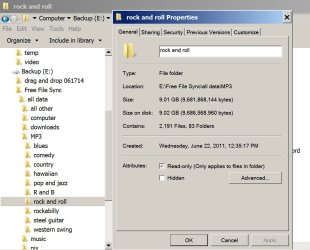
Here is a picture of my FFS destination folder tree on my E drive. It's a sync of the original source folder tree on my D drive; synced from D to E.

What you see is the Explorer tree and the details of the properties page of the "rock and roll" folder. Note the date of June 22, 2011; 12:35:17 PM.

I just checked. That is the same exact day and time as the rock and roll folder on the D (source) drive.

I ran Free File Sync within the last 2 hours, but the folder still has a 2011 date.

I didn't do anything special to get those dates and times to agree as best I recall. I think it's the default.

Are you saying that your properties page for a folder shows a different date/time on the source than on the destination? Or are you reading the dates/times from somewhere else?
 

Attachments

  • freefilesync.jpg
    freefilesync.jpg
    99.5 KB · Views: 0

My Computer My Computer

At a glance

Windows 7 Home Premium SP1, 64-bitIntel Skylake i5-6600K, not overclocked8 GB HyperX DDR4-2666 (2 x 4 GB)none; graphics are integrated on CPU
Computer type
PC/Desktop
Computer Manufacturer/Model Number
Ignatz Special; 4 speed manual gearbox; factory air conditioning; one of one
OS
Windows 7 Home Premium SP1, 64-bit
CPU
Intel Skylake i5-6600K, not overclocked
Motherboard
AsRock Z170M Extreme 4, micro ATX
Memory
8 GB HyperX DDR4-2666 (2 x 4 GB)
Graphics Card(s)
none; graphics are integrated on CPU
Sound Card
onboard: Realtek ALC1150; external: USB Behringer UF0-202
Monitor(s) Displays
Dell S2340M 23 inch IPS
Screen Resolution
1600 x 900
Hard Drives
System: Crucial MX100 series SSD, 128 GB;
Data: Samsung Spinpoint 103SJ, 1 TB;
Backup: WD Caviar Green WD30EZRX-00D8PB0, 3 TB
PSU
Rosewill SilentNight 500 watt fanless, semi-modular
Case
Antec Solo II
Cooling
Noctua NH-U12S; Noctua F12 intake, Noctua S12A exhaust
Keyboard
Microsoft 200 6JH-00001 USB
Mouse
Dell or Microsoft optical wired; USB
Antivirus
Microsoft Security Essentials and Malwarebytes Premium
Browser
Pale Moon
Other Info
All fans PWM; speeds at idle: CPU circa 500 rpm; intake circa 600 rpm; exhaust circa 600 rpm; CPU temps 27 idle and 47 C load in a warm room (27 C/81 F) when running Intel Extreme Tuning Utility stress test.
Back
Top