Hello,
I had a problem last week with my system, which I posted in this forum. Turns out one of my hard drives was the culprit.
I have (had) two internal hard drives on my desktop. I removed the faulty one, and my system now runs properly, but I need the data off of that faulty drive. (I need the data added since the last back up.)
I purchased a SATA to USB adapter kit, but of course it isn't that easy. The drive is not showing up in My Computer.
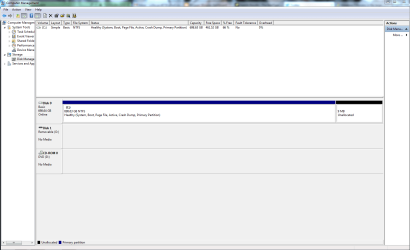
When I go to Disk Management, it is there... but I can't click on it. (Listed as Disk 1 Removable O: in screen cap)
Can anyone tell me (dumb it down, please) how I can recover my data?
(the drive in question is a Seagate that was partitioned into sections.)
thanks in advance
I had a problem last week with my system, which I posted in this forum. Turns out one of my hard drives was the culprit.
I have (had) two internal hard drives on my desktop. I removed the faulty one, and my system now runs properly, but I need the data off of that faulty drive. (I need the data added since the last back up.)
I purchased a SATA to USB adapter kit, but of course it isn't that easy. The drive is not showing up in My Computer.
When I go to Disk Management, it is there... but I can't click on it. (Listed as Disk 1 Removable O: in screen cap)
Can anyone tell me (dumb it down, please) how I can recover my data?
(the drive in question is a Seagate that was partitioned into sections.)
thanks in advance
Attachments
My Computer
At a glance
Windows 7 Home Premium 32 bitIntel(R) Core(TM)2 Duo CPU E6750 @ 2.66GHz4.00 GB with 3.25 GB available(1) Radeon X1950 Series (Microsoft Corporatio...
- OS
- Windows 7 Home Premium 32 bit
- CPU
- Intel(R) Core(TM)2 Duo CPU E6750 @ 2.66GHz
- Motherboard
- ASUSTeK Computer INC. P5E
- Memory
- 4.00 GB with 3.25 GB available
- Graphics Card(s)
- (1) Radeon X1950 Series (Microsoft Corporation - WDDM) (
- Sound Card
- High Definition Audio Device
- Hard Drives
- (1) WDC WD7501AALS-00J7B0 ATA Device


 . They seem to have AK47s)