MBAM Pro settings - how to automatically get "missed updates"?

dsperber

New member
Guru
Gold Member
VIP
Local time
2:09 AM
Messages
2,752
Location
Marina Del Rey, CA
MBAM Pro settings - how to automatically get "missed updates"?

I've been struggling with this problem (clearly must be a settings issue), but cannot seem to figure out what to do in order to avoid the problem symptom. Either that, or it's a program bug (which I will report on the MBAM forum, but I hate to post there because of "attitude").

I would like outside opinions HERE (where people respond intelligently) on which one it is, and if it's simply a settings problem then please tell me what to change.

Thoughts?


The problem is that I shut down (i.e. truly "shut down") one of my machines every night. Then sometime the next morning (or maybe even days later) I power it back on. This clearly means MBAM was not able to do its automatic scheduled database updates during those hours/days when the machine was powered off.

I would expect that at the next opportunity (i.e. when the machine is next powered on and the Windows startup boot process runs), that the program would automatically catch up with all missed database updates. I shouldn't be bothered by any notifications or prompts, nor should I have to do anything manual myself. It should just "catch up" automatically and quietly.

Note that there's no problem if the machine is left on forever. Automatic scheduled updates occur regularly, and without any involvement from me. It's only after this other situation when the machine was powered off past its scheduled update (and perhaps very long past that scheduled update) that the expected automatic update or "catch-up update" doesn't occur automatically.

So, what have I done wrong in my settings? Or, is this a program issue which should be reported to MBAM??


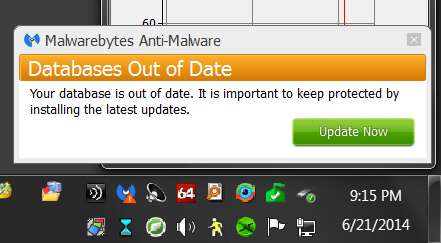
Here's what appears upon the next re-boot following a long powered-off period: The little red exclamation mark notifying me that there's a problem.

o2h7k.jpg


And if I open the program it tells me "database is out of date". I know that, but I wanted the program to simply "catch up" automatically in this situation, not require me to get involved manually to fix the problem.
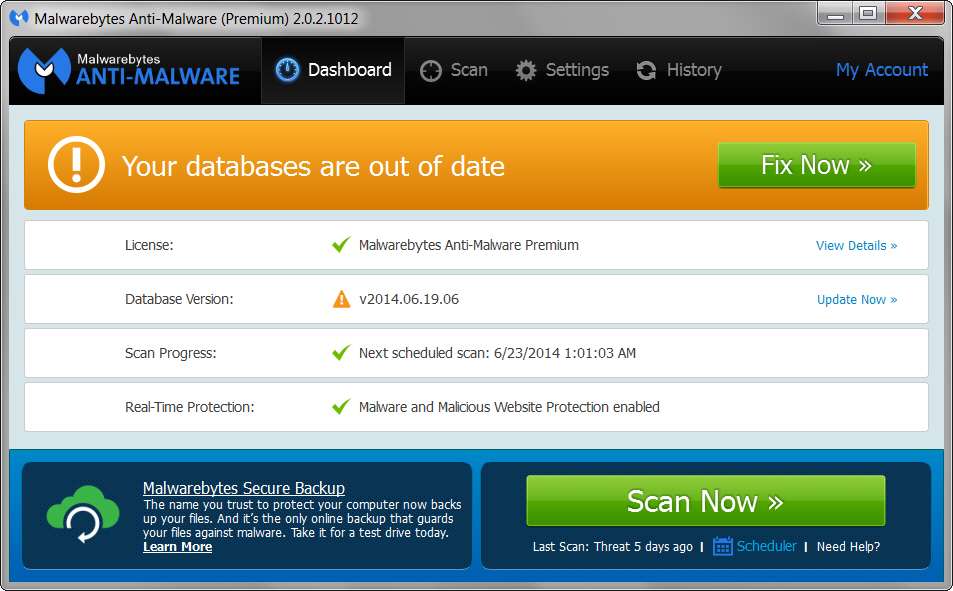
vzop5.jpg


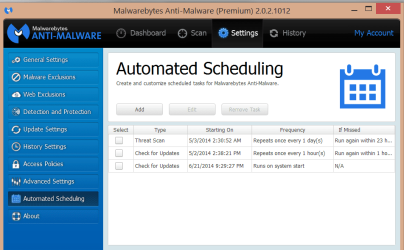
And here are my settings: I believe I'm requesting database updates 4 times per day, i.e. every 6 hours.
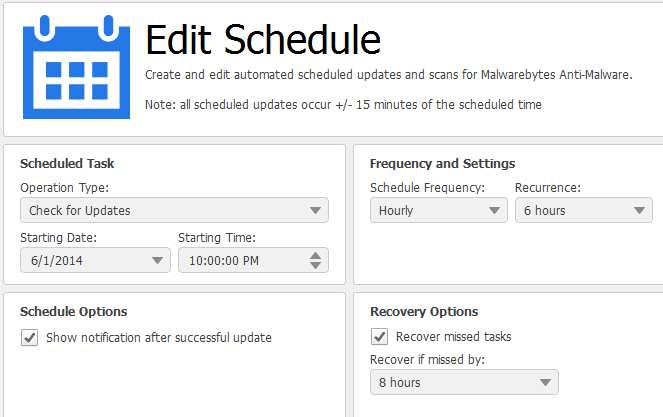
8dud.jpg


o07s.jpg


NOTE: I have set 60-seconds as my "protection delay" interval at Windows startup, just to try and ensure that internet access is available when the machine is rebooted and MBAM is started. I thought this might help, but it doesn't seem to make an impact.

v2vkb.jpg
 

My Computer My Computer

At a glance

Windows 7 Pro x64 (1), Win7 Pro X64 (2)i5-3350p 3.1Ghz/6MB-cache (1); E8400 3.0Ghz/6...8GB PC3-12800 DDR3 (1); 4GB PC3-10600 DDR3 (2)ATI HD7750 (1), (see TV cards); ATI R7 250 (2)
Computer type
PC/Desktop
Computer Manufacturer/Model Number
Home-built, two systems (1) and (2)
OS
Windows 7 Pro x64 (1), Win7 Pro X64 (2)
CPU
i5-3350p 3.1Ghz/6MB-cache (1); E8400 3.0Ghz/6MB-cache (2)
Motherboard
ASUS P8Z77-V Pro (1); ASUS P5Q3 (2)
Memory
8GB PC3-12800 DDR3 (1); 4GB PC3-10600 DDR3 (2)
Graphics Card(s)
ATI HD7750 (1), (see TV cards); ATI R7 250 (2)
Sound Card
Realtek ALC892 HD Audio (1); Realtek ALC1200 HD Audio (2)
Monitor(s) Displays
Eizo HD2441W LCD, Eizo S2433W (1); Eizo 24" S2433W (2)
Screen Resolution
1920x1200, 1920x1200 (1); 1920x1200 (2)
Hard Drives
(1) 1TB SATA-II (7200RPM), 2x2TB SATA-III (7200RPM), 250GB SATA-III (10000RPM) for OS; 2x2TB external USB 3.0

(2) 320GB SATA-II (7200RPM), 750GB SATA-II (7200RPM), 150GB SATA-II (10000RPM) for OS; 2TB external USB 3.0
PSU
Nesteq ECS-6001 600W (1); Nesteq ECS-5001 500W (2)
Case
Acousti-Case 360 (1) and (2)
Cooling
Noctua NH-U12P SE2 for CPU, 2x120mm case fans (1) and (2)
Keyboard
IBM PS/2 (1) and (2)
Mouse
Logitech MX Revolution wireless (1); Microsoft wired (2)
Internet Speed
100mbps down / 10mbps up
Antivirus
Microsoft Security Essentials; Malwarebyte Anti-Malware Pro
Browser
Firefox
Other Info
Ceton InfiniTV 4-tuner cablecard-enabled TV card as well as Hauppauge HVR-2250 OTA/ATSC 2-tuner TV card in (1), running under Win7 WMC
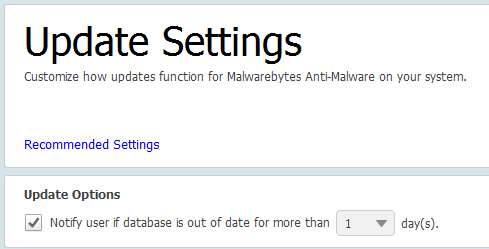
You have it set to notify if out of date by more than one day.
 

My Computer My Computer

At a glance

Windows 10, Home Clean InstallIntel Core2 processsor Q8200(2.33Ghz 1333FSB)...6 gbATI Radeon 256MB HD3650
Computer type
PC/Desktop
Computer Manufacturer/Model Number
Dell XPS 420
OS
Windows 10, Home Clean Install
CPU
Intel Core2 processsor Q8200(2.33Ghz 1333FSB) Quad Core Tech
Motherboard
Dell
Memory
6 gb
Graphics Card(s)
ATI Radeon 256MB HD3650
Sound Card
Intergrated 7.1 Channel Audio
Monitor(s) Displays
Dell SP2009W 20"
Hard Drives
640 GB Serial ATA Hard drive
Cooling
Fan
Keyboard
Dell USB Keyboard
Mouse
Dell Premium Optical USB
Internet Speed
DSL 2.85
You have it set to notify if out of date by more than one day.
Are you sure this is the relevant setting to change? The one that says "notify user if database is out of date for more than X days"?

1 day was already checked there, and that's the minimum. Alternate values are 2, 3, etc. Per your suggestion I've changed it to 2, though I honestly don't think it's going to accomplish a solution to this issue.

But really I don't ever want to be notified about the database being out-of-date... ever, no matter how out-of-date it is, even if it's from being powered-OFF for a week or two if I'm away. I just want the program to automatically "catch up" and update the database WHENEVER it learns it's out-of date, quietly and automatically. For example that's how MSE and other anti-virus software works.

Doesn't that make more sense for this particular item? Why should I have to get involved with database updates at all?


Now I don't know for sure (which is why I'm asking for suggestions here), but I'd intuitively expect the relevant setting to more likely be "Recovery options", i.e. "recover missed tasks". I have "recover if missed by 8 hours" set, so maybe that means "ONLY RECOVER the missed scheduled update if you miss it by 8 hours or more, but if you miss it by less than 8 hours don't recover it and instead show the red exclamation mark an notify the user". Maybe that was my problem, that if the machine was only off less than 8 hours before being powered on again, that this value was actually preventing it from doing the expected automatic catch-up update.

I've now just changed that setting to be the minimum value of 1 hour. There's nothing less than that to set... LIKE WHY NOT HAVE A VALUE OF ZERO, TO ALWAYS PERFORM ANY MISSED UPDATE???

Here's hoping that means "recover the missed scheduled update if it was missed by at least 1 hour". which of course would cover me in my overnight-OFF situation.


Again, personally I don't know why I would need to or want to have so many seemingly overlapping and interacting user-specified settings governing automatic updates of the database. Maybe I would want some control over scans, but database updates???

Anyway, we'll see what happens tomorrow morning.
 

My Computer My Computer

At a glance

Windows 7 Pro x64 (1), Win7 Pro X64 (2)i5-3350p 3.1Ghz/6MB-cache (1); E8400 3.0Ghz/6...8GB PC3-12800 DDR3 (1); 4GB PC3-10600 DDR3 (2)ATI HD7750 (1), (see TV cards); ATI R7 250 (2)
Computer type
PC/Desktop
Computer Manufacturer/Model Number
Home-built, two systems (1) and (2)
OS
Windows 7 Pro x64 (1), Win7 Pro X64 (2)
CPU
i5-3350p 3.1Ghz/6MB-cache (1); E8400 3.0Ghz/6MB-cache (2)
Motherboard
ASUS P8Z77-V Pro (1); ASUS P5Q3 (2)
Memory
8GB PC3-12800 DDR3 (1); 4GB PC3-10600 DDR3 (2)
Graphics Card(s)
ATI HD7750 (1), (see TV cards); ATI R7 250 (2)
Sound Card
Realtek ALC892 HD Audio (1); Realtek ALC1200 HD Audio (2)
Monitor(s) Displays
Eizo HD2441W LCD, Eizo S2433W (1); Eizo 24" S2433W (2)
Screen Resolution
1920x1200, 1920x1200 (1); 1920x1200 (2)
Hard Drives
(1) 1TB SATA-II (7200RPM), 2x2TB SATA-III (7200RPM), 250GB SATA-III (10000RPM) for OS; 2x2TB external USB 3.0

(2) 320GB SATA-II (7200RPM), 750GB SATA-II (7200RPM), 150GB SATA-II (10000RPM) for OS; 2TB external USB 3.0
PSU
Nesteq ECS-6001 600W (1); Nesteq ECS-5001 500W (2)
Case
Acousti-Case 360 (1) and (2)
Cooling
Noctua NH-U12P SE2 for CPU, 2x120mm case fans (1) and (2)
Keyboard
IBM PS/2 (1) and (2)
Mouse
Logitech MX Revolution wireless (1); Microsoft wired (2)
Internet Speed
100mbps down / 10mbps up
Antivirus
Microsoft Security Essentials; Malwarebyte Anti-Malware Pro
Browser
Firefox
Other Info
Ceton InfiniTV 4-tuner cablecard-enabled TV card as well as Hauppauge HVR-2250 OTA/ATSC 2-tuner TV card in (1), running under Win7 WMC
First, I just noticed that I mistakenly called it "MBAM Pro" whereas it's correctly named "MBAM Premium". Sorry for the confusion.


Next, according to this page on the Malwarebytes site that describes "Automated scheduling" settings, Recovery Options allows you to perform a database update if you missed your scheduled one, and define what constitutes overdue.

So it looks like I was on the right track. I'm guessing that my 8 hour value was too large, in that it described "overdue" as only when the scheduled database update was missed by 8 hours or more. But if it was missed by less than 8 hours, it was not considered "overdue" and thus was not needed to be "recovered" as a missed update. To me, this all seems quite convoluted and unnecessary, and I really would NEVER want this behavior, but I guess that's how it should be interpreted.

So I'm guessing that changing this value to 1 hour as I've now done should guarantee that ANY missed update by at least 1 hour (which will almost certainly always be the case when powering my machine back ON from its overnight OFF state) should trigger the automatic recovery of the "overdue missed update", and hopefully I should never again be bothered by that notification.

We shall see in the morning.
 

My Computer My Computer

At a glance

Windows 7 Pro x64 (1), Win7 Pro X64 (2)i5-3350p 3.1Ghz/6MB-cache (1); E8400 3.0Ghz/6...8GB PC3-12800 DDR3 (1); 4GB PC3-10600 DDR3 (2)ATI HD7750 (1), (see TV cards); ATI R7 250 (2)
Computer type
PC/Desktop
Computer Manufacturer/Model Number
Home-built, two systems (1) and (2)
OS
Windows 7 Pro x64 (1), Win7 Pro X64 (2)
CPU
i5-3350p 3.1Ghz/6MB-cache (1); E8400 3.0Ghz/6MB-cache (2)
Motherboard
ASUS P8Z77-V Pro (1); ASUS P5Q3 (2)
Memory
8GB PC3-12800 DDR3 (1); 4GB PC3-10600 DDR3 (2)
Graphics Card(s)
ATI HD7750 (1), (see TV cards); ATI R7 250 (2)
Sound Card
Realtek ALC892 HD Audio (1); Realtek ALC1200 HD Audio (2)
Monitor(s) Displays
Eizo HD2441W LCD, Eizo S2433W (1); Eizo 24" S2433W (2)
Screen Resolution
1920x1200, 1920x1200 (1); 1920x1200 (2)
Hard Drives
(1) 1TB SATA-II (7200RPM), 2x2TB SATA-III (7200RPM), 250GB SATA-III (10000RPM) for OS; 2x2TB external USB 3.0

(2) 320GB SATA-II (7200RPM), 750GB SATA-II (7200RPM), 150GB SATA-II (10000RPM) for OS; 2TB external USB 3.0
PSU
Nesteq ECS-6001 600W (1); Nesteq ECS-5001 500W (2)
Case
Acousti-Case 360 (1) and (2)
Cooling
Noctua NH-U12P SE2 for CPU, 2x120mm case fans (1) and (2)
Keyboard
IBM PS/2 (1) and (2)
Mouse
Logitech MX Revolution wireless (1); Microsoft wired (2)
Internet Speed
100mbps down / 10mbps up
Antivirus
Microsoft Security Essentials; Malwarebyte Anti-Malware Pro
Browser
Firefox
Other Info
Ceton InfiniTV 4-tuner cablecard-enabled TV card as well as Hauppauge HVR-2250 OTA/ATSC 2-tuner TV card in (1), running under Win7 WMC
Last edited:

My Computer My Computer

At a glance

Win-7-Pro64bit 7-H-Prem-64biti7-5930K 2nd i9-9940x both water blocked VRM'...Trident-z 3200C14 2nd Trident-z 3600C16EVGA 1080ti ftw3 2nd Titan Xp both water blocked
Computer type
PC/Desktop
Computer Manufacturer/Model Number
Custom assembled by me :}
OS
Win-7-Pro64bit 7-H-Prem-64bit
CPU
i7-5930K 2nd i9-9940x both water blocked VRM's too
Motherboard
ASUS SABERTOOTH X99 2nd ASUS x299 Apex
Memory
Trident-z 3200C14 2nd Trident-z 3600C16
Graphics Card(s)
EVGA 1080ti ftw3 2nd Titan Xp both water blocked
Sound Card
Built-in Realtek
Monitor(s) Displays
1-AOC G2460PG 24"G-Sync 144Hz/ 2nd 1-ASUS VG248QE 24" 144Hz
Screen Resolution
1920 x 1080 144Hz
Hard Drives
2-Samsung M.2 Evo & Evo Plus
2-Samsung 850 EVO 500GB SSD's/ 3-2.5 W.D. Black 1tb-&3-1tb/3-3.5 WD Black 1tb hdd's
PSU
EVGA SuperNOVA 1000-P2 2nd 1200-P2
Case
2-Corsair Obsidian Series 450D Black ATX Mid Tower
Cooling
Custom water loops
Keyboard
Logitech G710+/ 2nd Logitech G910
Mouse
2-RedDragon M901 Perdition 16400 dpi Gaming mouse = wired
Internet Speed
Comcast Ping 19ms 89.31mbps download speed 6.12mbps upload
Antivirus
Malwarebytes Pro/ Superantispyware Pro
Browser
FireFox & Pale moon
Other Info
2nd ASUS X299 Apex/Intel i9-9940x with Custom water loop/7H-Prem-x64/Corsair 450D case/Ram Trident-z 3600C16 4x8gb / Samsung970Evo plus 500gb SSD/Dual ssd EZ swap evo/PSU EVGA SuperNova 1200w-P2 80+Platinum/GPU Titan Xp /8-ML-140 on push-pull on 2-280GTX rads
I don't think you have a problem with your settings.
I see the same thing, MBAM alerts out of date when I start/wake a PC that has been off for day(s).

MBAM has always had a problem where it will try to connect to the server to update definitions before the network connection is re-established.
In V 1.75 an error is logged in the protection log, I think it is error code 100.
In V 2.x I have never seen a log entry for this error.
I think I was told it should be there, but I've never seen it in a V 2.x log...

I asked if the "update failed" error was fixed in V2 during BETA testing, and was told no.
If this issue has been been fixed since I asked, I don't know - I haven't read it's been fixed ...
You have "Protection delayed on startup", but does that also delay attempting to update the virus definitions ?
I don't know, I never used that option ... this would be a question best answered by MBAM.

As a workaround to this issue in V 1.75 I created a scheduled task to update definitions that ran 1 minute after startup/wakeup.
In V 2.x "command processing" has not been implemented, so a scheduled task is not possible (yet).
If "command processing" has been since added to V 2.x, I don't know, I haven't read anywhere that has been implemented yet.

I mostly login to Windows with a Standard (Limited) account.
In V 1.75 I did not get the "Out of date" alert, and I could not manually update definitions from the tray icon.
To manually update required Admin authority.
For me V 2.x is better as I now get alerted (tray icon) and can manually update from the tray icon, without running MBAM with "Run as administrator".

I'd like to see "command processing" in V2.x so I can add a scheduled task if I want to.
I'd like to see different (better imho) logging in V2.x.
For me, accepting these "deficiencies" for a Lifetime License is one thing.
For me, accepting these "deficiencies" for an Annual License is something else.
I have Lifetime Licenses, so I can live with it "as-is" for the protection cost/benefit value.
Hopefully these will be addressed in a future release.

You can also add another Scheduled Update that "Runs on system start" and see if that helps.
I added this, but it doesn't help me, I don't normally shut down, I use Sleep.
I don't think "Runs on system start" includes waking from sleep, from what I have seen.
I never asked.

Please post back with what you find with your latest change.
I've got MBAM real-time on 5 OSs right now, so I've tested this every way I can think of...
I'm thinking of buying another license right now for a VM OS I might install, so I'm very interested.

Thanks,
David
 

My Computer My Computer

At a glance

Multi-Boot W7_Pro_x64 W8.1_Pro_x64 W10_Pro_x6...AMD Athlon II x4 6206GB GSkill DDR2 800AMD 4670 GPU + AMD 4200 IGP
Computer type
PC/Desktop
Computer Manufacturer/Model Number
home built
OS
Multi-Boot W7_Pro_x64 W8.1_Pro_x64 W10_Pro_x64 +Linux_VMs +Chromium_VM
CPU
AMD Athlon II x4 620
Motherboard
Gigabyte GA-MA785G-UD3H
Memory
6GB GSkill DDR2 800
Graphics Card(s)
AMD 4670 GPU + AMD 4200 IGP
Sound Card
on board Realtek ALC889A
Monitor(s) Displays
RCA 40" LCD TV, Insignia 32" LCD TV, HP 15" LCD monitor
Screen Resolution
1680 x 1050
Hard Drives
OCZ Vertex 3 120GB,
Samsung F3 1TB (3),
Several others - WD, Seagate, Hitachi, ...
PSU
Corsair 500 W
Case
Rosewill mid tower
Cooling
CM 90mm rifle
Keyboard
Gyration wireless, Logitech wireless, Dell USB wired
Mouse
Gyration wireless, Logitech wireless, V7 USB wired
Internet Speed
Spectrum - 100Mbps D / 10Mbps U
Antivirus
Avast, MBAM3, EMET, WinPatrol
Browser
Pale Moon, Firefox, IE
Other Info
2 multi-boot PC's
Mainly HTPC/Office/Gen purpose (no gaming).
Trendnet USB KVM.
LG DVD burner/Blue Ray Player.
Tray system for removable SATA backup drives.

Not currently OCd, under-volted.
I use Hybrid sleep, rarely re-boot or shutdown.

Hauppauge HD-PVR, Avermedia PCIe TV Tuner, Hauppauge PCI TV Tuner.
You need to think about this from a security perspective.

It is never a good thing to expect your security software to "just work". That is the apple way and is the least secure way. It causes the most problems as well.

What I mean is, if the program never notified you about being out of date, malware could easily disable the updating function, and since there would be no alert that you are out of date; you are compromised immediately and would have no idea anything is wrong. You would scan your system for threats as usual and they would not find anything, as the new malware that took over and stepped it from updating is not in its definitions meaning it can do whatever it wants without being detected. It is To the equivalent of having a year old trial antivirus on your system. It just is not good practice.

#1 Goal of malware: Keep hidden from the user
#2 Disable the updating function of the security software, or disable it completely if possible to be done silently.
#3 Trick the user into accepting something or already start the process of what it intends to do.

Updates are the life line of a security product. To ignore these notifications, or expect the product to do it without notifying you of it being out of date is simply foolish and unwise.

Also: If you leave malwarebytes alone for a little bit, it will update and the notification will go away once it updates on its own. But the warning is a very good reminder to keep tabs on making sure you are up to date so you can be protected of the latest threats.
 

My Computer My Computer

At a glance

Windows 10 ProAMD Ryzen 5 2400G Processor with Radeon RX Ve...G.SKILL Ripjaws V Series 16GB (2 x 8GB) 288-P...2047MB NVIDIA GeForce GTX 1060 6GB (EVGA)
Computer type
PC/Desktop
Computer Manufacturer/Model Number
Custom Built
OS
Windows 10 Pro
CPU
AMD Ryzen 5 2400G Processor with Radeon RX Vega 11 Graphics
Motherboard
ASRock X470 Master SLI/AC AM4 AMD Promontory X470 SATA 6Gb/s
Memory
G.SKILL Ripjaws V Series 16GB (2 x 8GB) 288-Pin DDR4 SDRAM D
Graphics Card(s)
2047MB NVIDIA GeForce GTX 1060 6GB (EVGA)
Sound Card
Motherboard Built in
Monitor(s) Displays
Acer R240HY bidx 23.8-Inch IPS HDMI DVI VGA (1920 x 1080) Wi
Screen Resolution
1920 x 1080
Hard Drives
1TB Sandisk SSD PLUS (Main drive)
500 GB Seagate 7200 RPM (Games)
500 GB Western Digital 7200 RPM (Virtual Machines)
PSU
CORSAIR TX Series TX650M 650W 80+ Gold Modular Power Supply
Case
CORSAIR CARBIDE SPEC-02 Mid-Tower Gaming Case, Red LED Fan
Cooling
220mm, two 120mm, and four 60mm fans
Keyboard
Wired Dell keyboard
Mouse
Wireless Logitech mouse
Internet Speed
250mb down, 30mb up
Antivirus
Panda Cloud Antivirus
Browser
Chrome-ish x64
Other Info
Your awesome for reading this.
It is never a good thing to expect your security software to "just work". That is the apple way and is the least secure way. It causes the most problems as well.

What I mean is, if the program never notified you about being out of date, malware could easily disable the updating function, and since there would be no alert that you are out of date; you are compromised immediately and would have no idea anything is wrong. You would scan your system for threats as usual and they would not find anything, as the new malware that took over and stepped it from updating is not in its definitions meaning it can do whatever it wants without being detected. It is To the equivalent of having a year old trial antivirus on your system. It just is not good practice.
I understand what you're saying, and I agree. It's one of the reasons I'm part of the "anythingbutipod.com" user community (I own a Cowon J3 player, 32GB+63GB=96GB, to support my FLAC music collection).

But appropriately MBAM has its own additional independent "notify user if database is out-of-date by more than X days" setting, which I've kept at the minimum value of 1 day. Presumably this test for out-of-date age is performed after (not before) the scheduled database update is performed, including the "catch-up recovery update" of a missed scheduled update.

So if MBAM does somehow get prevented by malware from actually doing its scheduled automatic updates (every 6 hours for me) or the "recovery update at next opportunity" if the scheduled update is missed, then if the database does finally get to be more than 1 day out-of-date you will now appropriately be notified (with the red exclamation mark). Whatever it was that caused the unexpected failure to do the scheduled updates, benign or malignant, notification of the user is now appropriate. I would then investigate the cause and take appropriate corrective action, including possibly hunting for malware if this condition should not have occurred naturally.

However in my opinion this notification for an out-of-date condition is unrelated to simply performing the automatic database "recovery of missed task" update that got missed because of perfectly normal conditions, such as the machine being powered off. And that's exactly why MBAM offers the other "recovery of missed tasks" options, to ensure that if/when an automatic database update is missed it will automatically be performed at the next opportunity.

Yes, you'd of course like to know if malware has actually somehow moved in to prevent database updates (including this special "recovery" update) so that it could persist, and that WILL be advised if/when the "notify user if database is eventually out-of-date by more than X days" setting is actually ever reached. This can't happen normally as long as normal scheduled updates are still being performed, and also if the "recovery of missed update" is performed immediately at the next opportunity... BEFORE testing for out-of-date database.

Because simply powering off a machine at night and powering it on sometime the next morning is by far the more common situation these settings (and especially the "recovery from missed update") are dealing with, I just want the missed overnight update(s) to be performed quietly and automatically at the next normal opportunity. I don't want to be notified or required to be involved in doing that update. And once it's performed, and the out-of-date test performed (which shouldn't any longer be out-of-date), I should not be notified of anything at all... and nothing is amiss.


Anyway, to report the results of last night's test, sure enough when I powered the machine on earlier today I was NOT notified (with the red exclamation mark) of the out-of-date condition!!

YAY!! I will of course watch this over the next few days until I'm convinced I've resolved it.

But based at least on this first test it does appear that changing the "recover missed update if missed by X hours" value to 1 (i.e. something sure to be LESS THAN the number of hours the machine is powered off overnight) correctly triggers the automatic "recovery update" when the machine is next powered on. And then the presumably later-tested out-of-date condition (of 1 day or more) is not met, so that I did NOT get the red exclamation mark.

It's not really clear whether my setting of 60 second delay before starting (to try and ensure enough time for my network connection is established during Windows startup) is relevant or not, but I have that delay value set on anyway.


I'll confirm if the next few days work just as well as this morning did.
 

My Computer My Computer

At a glance

Windows 7 Pro x64 (1), Win7 Pro X64 (2)i5-3350p 3.1Ghz/6MB-cache (1); E8400 3.0Ghz/6...8GB PC3-12800 DDR3 (1); 4GB PC3-10600 DDR3 (2)ATI HD7750 (1), (see TV cards); ATI R7 250 (2)
Computer type
PC/Desktop
Computer Manufacturer/Model Number
Home-built, two systems (1) and (2)
OS
Windows 7 Pro x64 (1), Win7 Pro X64 (2)
CPU
i5-3350p 3.1Ghz/6MB-cache (1); E8400 3.0Ghz/6MB-cache (2)
Motherboard
ASUS P8Z77-V Pro (1); ASUS P5Q3 (2)
Memory
8GB PC3-12800 DDR3 (1); 4GB PC3-10600 DDR3 (2)
Graphics Card(s)
ATI HD7750 (1), (see TV cards); ATI R7 250 (2)
Sound Card
Realtek ALC892 HD Audio (1); Realtek ALC1200 HD Audio (2)
Monitor(s) Displays
Eizo HD2441W LCD, Eizo S2433W (1); Eizo 24" S2433W (2)
Screen Resolution
1920x1200, 1920x1200 (1); 1920x1200 (2)
Hard Drives
(1) 1TB SATA-II (7200RPM), 2x2TB SATA-III (7200RPM), 250GB SATA-III (10000RPM) for OS; 2x2TB external USB 3.0

(2) 320GB SATA-II (7200RPM), 750GB SATA-II (7200RPM), 150GB SATA-II (10000RPM) for OS; 2TB external USB 3.0
PSU
Nesteq ECS-6001 600W (1); Nesteq ECS-5001 500W (2)
Case
Acousti-Case 360 (1) and (2)
Cooling
Noctua NH-U12P SE2 for CPU, 2x120mm case fans (1) and (2)
Keyboard
IBM PS/2 (1) and (2)
Mouse
Logitech MX Revolution wireless (1); Microsoft wired (2)
Internet Speed
100mbps down / 10mbps up
Antivirus
Microsoft Security Essentials; Malwarebyte Anti-Malware Pro
Browser
Firefox
Other Info
Ceton InfiniTV 4-tuner cablecard-enabled TV card as well as Hauppauge HVR-2250 OTA/ATSC 2-tuner TV card in (1), running under Win7 WMC
Give this a try. I set up two Updates - one at bootup and the other at 1 hr intervals.

Will see if it works in the morning.

MBAM  1.PNG

Jim :cool:
 

My Computer My Computer

At a glance

Windows 8.1 Pro w/Media Center 64bit, Windows...Phenom II X6 1100TCrucial Balistic 8gb DDR3-1866 CL9MSI R6850 Cyclone IGD5 PE
Computer type
PC/Desktop
Computer Manufacturer/Model Number
Home Built
OS
Windows 8.1 Pro w/Media Center 64bit, Windows 7 HP 64bit
CPU
Phenom II X6 1100T
Motherboard
ASUS M5A99X EVO
Memory
Crucial Balistic 8gb DDR3-1866 CL9
Graphics Card(s)
MSI R6850 Cyclone IGD5 PE
Sound Card
On Board
Monitor(s) Displays
ASUS VE258Q 25" LED with DVI-HDMI-DisplayPort
Screen Resolution
1920 x 1080
Hard Drives
Two WD Cavier Black 2TB Sata III, WD My Book Essential 2TB USB 3.0
PSU
Seasonic X650 80 Plus GOLD Modular
Case
Corsair 400R
Cooling
Antec Kuhler H2O 620, Two 120mm and four 140mm
Keyboard
Logitech K120
Mouse
Logitech Marble Mouse USB, Logitech Precision Game Pad
Internet Speed
15MB
Antivirus
Norton IS 2013, Malwarebytes Pro Beta 2
Browser
IE-11, FF-27
Other Info
APC UPS ES 750, Netgear WNR3500L Gigabit & Wireless N Router with SamKnows Test Program, Motorola SB6120 Gigabit Cable Modem. Brother HL-2170W Laser Printer, Epson V300 Scanner
Well, I went away for a few hours with the machine still ON (as it's been for the past 4 hours or so) ever since starting up earlier today. When it was powered on 4 hours ago it did NOT produce the out-of-date notification after emerging from being in its power-OFF state for at least 10 hours, so I thought my "recover if missed by 1 hour" change had been successful.

I just assumed it had performed the missed overnight update and was totally satisfied that the database was up-to-date.


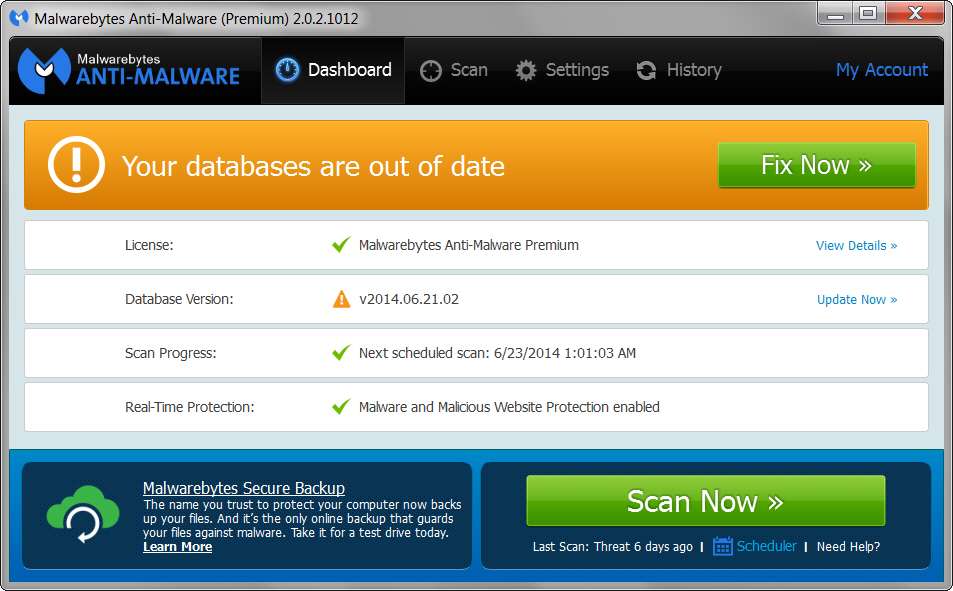
Well, imagine my surprise when I looked at the screen and discovered the following:

uoby.jpg


And looking at the dashboard to see just what the database version was, it looked like this:

ihuw2.jpg


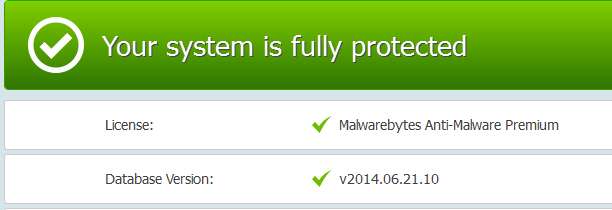
I then ran the requested update and when finished the database version looks as follows:

1vkv.jpg


So its now updated to 06.21.10, whereas before it was at 06.21.02. I'm not sure of this, but assuming MB provides updates every hour and since the machine was powered ON about 4 hours ago, that would mean it did NOT, as originally assumed, perform the missed overnight update during its 8 hours of power-OFF state (remember, I have it scheduled to update every 6 hours) when it was powered up 4 hours ago!!!

Well I don't know what the "recover missed updates" setting of 1 hour is supposed to do if not "run the missed update if you miss it by at least 1 hour" which I obviously had, but apparently it did NOT trigger the anticipated catch-up update when I booted the machine 4 hours ago. Presumably it would have updated to 06.21.06 maybe.

Even more mysterious, it's only been 4 hours since the machine was powered on, and the last out-of-date test run. So if the database was 06.21.02 only 4 hours ago and was apparently NOT out-of-date by more than 1 day, why is it now out-of-date only 4 hours later, and with a now most-current database version of only 06.21.10 (which presumably means only 8 hours newer than the previous 06.21.02 on my machine)????


This is just silliness. It shouldn't be so complicated to get the program to just do automatic database updates whenever scheduled, or if not possible when scheduled then simply at the next available opportunity.

In my opinion there is no reason to have the user get so involved trying to pick what presumably is the magically correct combination of values to cause the program to behave the way it should simply be programmed to behave with no user-settings at all.

I'm obviously missing the point here. I guess it's almost time to post this question to the MBAM forum, something I'm really not anxious to do.
 

My Computer My Computer

At a glance

Windows 7 Pro x64 (1), Win7 Pro X64 (2)i5-3350p 3.1Ghz/6MB-cache (1); E8400 3.0Ghz/6...8GB PC3-12800 DDR3 (1); 4GB PC3-10600 DDR3 (2)ATI HD7750 (1), (see TV cards); ATI R7 250 (2)
Computer type
PC/Desktop
Computer Manufacturer/Model Number
Home-built, two systems (1) and (2)
OS
Windows 7 Pro x64 (1), Win7 Pro X64 (2)
CPU
i5-3350p 3.1Ghz/6MB-cache (1); E8400 3.0Ghz/6MB-cache (2)
Motherboard
ASUS P8Z77-V Pro (1); ASUS P5Q3 (2)
Memory
8GB PC3-12800 DDR3 (1); 4GB PC3-10600 DDR3 (2)
Graphics Card(s)
ATI HD7750 (1), (see TV cards); ATI R7 250 (2)
Sound Card
Realtek ALC892 HD Audio (1); Realtek ALC1200 HD Audio (2)
Monitor(s) Displays
Eizo HD2441W LCD, Eizo S2433W (1); Eizo 24" S2433W (2)
Screen Resolution
1920x1200, 1920x1200 (1); 1920x1200 (2)
Hard Drives
(1) 1TB SATA-II (7200RPM), 2x2TB SATA-III (7200RPM), 250GB SATA-III (10000RPM) for OS; 2x2TB external USB 3.0

(2) 320GB SATA-II (7200RPM), 750GB SATA-II (7200RPM), 150GB SATA-II (10000RPM) for OS; 2TB external USB 3.0
PSU
Nesteq ECS-6001 600W (1); Nesteq ECS-5001 500W (2)
Case
Acousti-Case 360 (1) and (2)
Cooling
Noctua NH-U12P SE2 for CPU, 2x120mm case fans (1) and (2)
Keyboard
IBM PS/2 (1) and (2)
Mouse
Logitech MX Revolution wireless (1); Microsoft wired (2)
Internet Speed
100mbps down / 10mbps up
Antivirus
Microsoft Security Essentials; Malwarebyte Anti-Malware Pro
Browser
Firefox
Other Info
Ceton InfiniTV 4-tuner cablecard-enabled TV card as well as Hauppauge HVR-2250 OTA/ATSC 2-tuner TV card in (1), running under Win7 WMC
I can't blame you the responses from mbam are predictable,
Use clean.exe.....

I was always happy just for mbam to update on startup with the notification and that's it/ No hourly/ No realtime...
Such a simple task,
Which by the way still works perfectly in 1.75... ;)
Probably all the silly intergraded adds messing up the updater,
Cheers.

Disabling Malicious website protection only reactivates automatically,
Just messing around
 

My Computer My Computer

At a glance

Win-7-Pro64bit 7-H-Prem-64biti7-5930K 2nd i9-9940x both water blocked VRM'...Trident-z 3200C14 2nd Trident-z 3600C16EVGA 1080ti ftw3 2nd Titan Xp both water blocked
Computer type
PC/Desktop
Computer Manufacturer/Model Number
Custom assembled by me :}
OS
Win-7-Pro64bit 7-H-Prem-64bit
CPU
i7-5930K 2nd i9-9940x both water blocked VRM's too
Motherboard
ASUS SABERTOOTH X99 2nd ASUS x299 Apex
Memory
Trident-z 3200C14 2nd Trident-z 3600C16
Graphics Card(s)
EVGA 1080ti ftw3 2nd Titan Xp both water blocked
Sound Card
Built-in Realtek
Monitor(s) Displays
1-AOC G2460PG 24"G-Sync 144Hz/ 2nd 1-ASUS VG248QE 24" 144Hz
Screen Resolution
1920 x 1080 144Hz
Hard Drives
2-Samsung M.2 Evo & Evo Plus
2-Samsung 850 EVO 500GB SSD's/ 3-2.5 W.D. Black 1tb-&3-1tb/3-3.5 WD Black 1tb hdd's
PSU
EVGA SuperNOVA 1000-P2 2nd 1200-P2
Case
2-Corsair Obsidian Series 450D Black ATX Mid Tower
Cooling
Custom water loops
Keyboard
Logitech G710+/ 2nd Logitech G910
Mouse
2-RedDragon M901 Perdition 16400 dpi Gaming mouse = wired
Internet Speed
Comcast Ping 19ms 89.31mbps download speed 6.12mbps upload
Antivirus
Malwarebytes Pro/ Superantispyware Pro
Browser
FireFox & Pale moon
Other Info
2nd ASUS X299 Apex/Intel i9-9940x with Custom water loop/7H-Prem-x64/Corsair 450D case/Ram Trident-z 3600C16 4x8gb / Samsung970Evo plus 500gb SSD/Dual ssd EZ swap evo/PSU EVGA SuperNova 1200w-P2 80+Platinum/GPU Titan Xp /8-ML-140 on push-pull on 2-280GTX rads
Back
Top