ntoskrnl.exe BSOD Randomly every few days

Please explain. What you are describing is a restart of the computer and not a classic BSOD. BOODs (Blue Screen of Death) is when the screen turns blue and text appears telling you a bunch of stuff. Like this

Is that what you are getting or something else?​


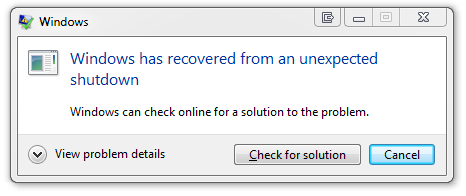
Okay I have never gotten that screen, the PC just restarts, and once I am at my dekstop again, I get a window such as this one :
recovered.png


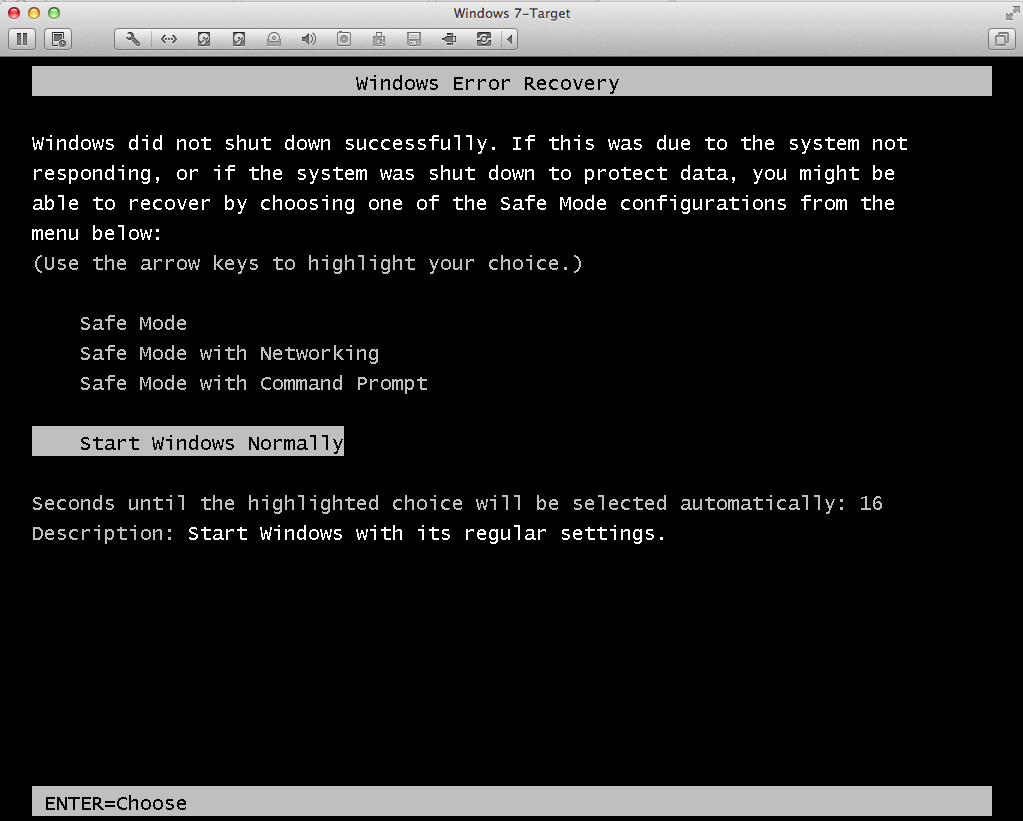
Then once I click ''View Problem Details'' , it tells me it was a blue screen etc and ofcourse the 'Check for solution' button does nothing helpful... Also all the restarts do come up in BlueScreenViewer. What I was just saying was that I used to go straight to my dekstop after a PC BSOD restart and get that window shown above but now it brings me to this screen first :
p8x8.png


and then once I am back onto my desktop I get that window as shown above again.


But yes, I have never actually gotten the physical ''Blue Screen'' that you posted upon restarts.

Will do the new tests you advised now and post results. Thanks.​
 
Last edited:

My Computer My Computer

At a glance

Windows 7 Home Premium 64bitAMD FX63000 HexacoreKingston HyperX Beast DDR3 8GB(2x4GB)AMD R7 260X
Computer type
PC/Desktop
OS
Windows 7 Home Premium 64bit
CPU
AMD FX63000 Hexacore
Motherboard
ASUS M5A78L-M USB3
Memory
Kingston HyperX Beast DDR3 8GB(2x4GB)
Graphics Card(s)
AMD R7 260X
Hard Drives
WD 1TB
Antivirus
AVG
Browser
Chrome
Next, Open a elevated command prompt ( click start, type cmd in the search box, right click on the cmd entry and select run as administrator) in the black box that opens, copy/paste sfc /scannow. If you decide to type it, notice the space between the sfc and the /. It is a system file checker which will scan your system files and attempt to correct any missing or corrupt files. What we want are the results to say windows found no integrity violations. If it says files were found but could not be repaired, close the box, reboot and run it again, after opening the administrative command prompt. You may have to reboot and run it three times for it to repair all system files. If it can't repair them after 3 reboots, let us know.

Also, please go into bios and give us the reading of the +12V, +5V and +3.3V.

The cmd sfc /scannow file checker resulted in no integrity violations. Also the voltage readings are as follows:

VCORE Voltage: 1.2724V
3.3V : 3.304V
5V: 5.100V
12V: 12.105V

not sure if these values are good or not?

Also, a question about driver verifier, I have enabled it and re booted my PC as per your instructions, however I am confused as to what I am looking for. Do I keep it on for 24hrs and it posts results somewhere which I have to upload? Or do I just look for increased number of BSODs and take note of them manually? So far I don't see any difference in my PC since the reboot except for the fact that my CPU usage is highly fluctuating, from 10% all the way to the 90%s when idle(usually between 20-70, but it fluctuates alot), is this due to the driver verifier(my pc was stable CPU usage at 10% idle before this), should I keep an eye on my CPU temperatures(so far they are stable at 30-45 degrees)? Thanks.
 

My Computer My Computer

At a glance

Windows 7 Home Premium 64bitAMD FX63000 HexacoreKingston HyperX Beast DDR3 8GB(2x4GB)AMD R7 260X
Computer type
PC/Desktop
OS
Windows 7 Home Premium 64bit
CPU
AMD FX63000 Hexacore
Motherboard
ASUS M5A78L-M USB3
Memory
Kingston HyperX Beast DDR3 8GB(2x4GB)
Graphics Card(s)
AMD R7 260X
Hard Drives
WD 1TB
Antivirus
AVG
Browser
Chrome
Create a restore point so you can get back to where you were before Driver Verifier was enabled. http://www.sevenforums.com/tutorials/67114-system-restore-point-create-system-startup.html

Driver verifier should be enabled on non Microsoft drivers. It will make your system run sluggish. It puts stress on your drivers, trying to make the weaker ones BSOD, thus being able to identify the offending driver, if there is one. That is the purpose of driver verifier. So, although the BSOD code says it is a hardware error, we are trying to make sure a driver is not causing the hardware error. Does that make it a little more understandable? I hope so, if not, ask away. BTW, to answer your question more fully, no it creates no file. It has to BSOD to identify the driver that is causing your issues to work, that is assuming it is a driver.
 

My Computers My Computers

  • At a glance

    Windows 11 ProRyzen 9 5900X32GB G Skill DDR4-3600EVGA RTX 3080 FTW 3 Ultra
    Computer type
    PC/Desktop
    Computer Manufacturer/Model Number
    ALWAYS UNDER CONSTRUCTION
    OS
    Windows 11 Pro
    CPU
    Ryzen 9 5900X
    Motherboard
    Asus X570 Crosshair Viii Hero
    Memory
    32GB G Skill DDR4-3600
    Graphics Card(s)
    EVGA RTX 3080 FTW 3 Ultra
    Sound Card
    On Board/Sennheiser PC37X Headset
    Monitor(s) Displays
    3 X Asus 27"
    Screen Resolution
    2560x1440
    Hard Drives
    2 X 1 TB NVME drives
    PSU
    EVGA 850
    Case
    Phanteks Eclipse P400A
    Cooling
    EVGA 280 AIO
    Keyboard
    Logitech G510s/ Logitech G13
    Mouse
    Logitech G502
    Internet Speed
    24/1
    Antivirus
    ESET/MBAM Pro/SAS Pro
    Browser
    Chrome/ Firefox/ Edge
  • At a glance

    Windows 11 ProIntel Ultra 9 288V32 GB LPDDR5X 8533
    Computer type
    Laptop
    System Manufacturer/Model Number
    Dell 16 Plus
    OS
    Windows 11 Pro
    CPU
    Intel Ultra 9 288V
    Memory
    32 GB LPDDR5X 8533
    Monitor(s) Displays
    16" Mini-LED HDR600 Touch 90 Hz
    Screen Resolution
    2560X1600
    Hard Drives
    1 TB NVME
Yes, thanks that did clear things up. Also I have noticed now since enabling this driver verifier games are unplayable on my pc. sure they run and evrything but the FPS fluctuates between 10-100fps and thus makes the game unplayable and I get FPS 'lagg', I assume this is normal because of the verifier and not the GPU or its drivers messing up? My PC has become pretty useless apart from just general web browsing and I will probably leave it Idle for driververifier to run in the background, but amn't sure if that is the right way to test the drivers? It said to leave the verifier running while I carry out normal tasks, but since I cannot do that and am leaving the PC idle, I don't know if im getting full use out of this test, any advice?

NB. As I was typing this another BSOD happened. Same error code, no outstanding drivers etc, feel its not because of the driver verifier and just another ''normal'' BSOD that happened to take place now. Will keep you posted on any more BSOD, so far they haven't changed in frequency since enabling DV.
 
Last edited:

My Computer My Computer

At a glance

Windows 7 Home Premium 64bitAMD FX63000 HexacoreKingston HyperX Beast DDR3 8GB(2x4GB)AMD R7 260X
Computer type
PC/Desktop
OS
Windows 7 Home Premium 64bit
CPU
AMD FX63000 Hexacore
Motherboard
ASUS M5A78L-M USB3
Memory
Kingston HyperX Beast DDR3 8GB(2x4GB)
Graphics Card(s)
AMD R7 260X
Hard Drives
WD 1TB
Antivirus
AVG
Browser
Chrome
The experience you see is to be expected. I hope you can do without gaming or tolerate it for 24 hours of use. Gaming, as I understand it, is when you usually get the BSODs, so try other activities that will put some stress on everything. This is one time we want you to BSOD as often as possible. But, in Gaming we always get the same codes, so lets make an effort to either find ehich driver it is, or rule out drivers.

I am not at my normal computer at the moment, so will need to wait a while until I get back to look at the dump file. When you get time, could you save me the trouble of reading this whole thread and make a list of everything you have done, tests we have done so I can see if we have overlooked anything. I really don't think so. Also, did you try another card on this board since we started this?

Please understand, I'm old and forget a lot and we are dealing with quite a few cases all at the same time, so sometimes it's difficult for us old foggies to keep things straight. So, please bear with me. But, these type of BSODs are some of the most difficult to deal with because we get no specific information from the dump files. That's why Boozad asked you to run Driver verifier. Maybe with a couple of BSODs, it will give us some info to go on. But, don't give up, we haven't.
 

My Computers My Computers

  • At a glance

    Windows 11 ProRyzen 9 5900X32GB G Skill DDR4-3600EVGA RTX 3080 FTW 3 Ultra
    Computer type
    PC/Desktop
    Computer Manufacturer/Model Number
    ALWAYS UNDER CONSTRUCTION
    OS
    Windows 11 Pro
    CPU
    Ryzen 9 5900X
    Motherboard
    Asus X570 Crosshair Viii Hero
    Memory
    32GB G Skill DDR4-3600
    Graphics Card(s)
    EVGA RTX 3080 FTW 3 Ultra
    Sound Card
    On Board/Sennheiser PC37X Headset
    Monitor(s) Displays
    3 X Asus 27"
    Screen Resolution
    2560x1440
    Hard Drives
    2 X 1 TB NVME drives
    PSU
    EVGA 850
    Case
    Phanteks Eclipse P400A
    Cooling
    EVGA 280 AIO
    Keyboard
    Logitech G510s/ Logitech G13
    Mouse
    Logitech G502
    Internet Speed
    24/1
    Antivirus
    ESET/MBAM Pro/SAS Pro
    Browser
    Chrome/ Firefox/ Edge
  • At a glance

    Windows 11 ProIntel Ultra 9 288V32 GB LPDDR5X 8533
    Computer type
    Laptop
    System Manufacturer/Model Number
    Dell 16 Plus
    OS
    Windows 11 Pro
    CPU
    Intel Ultra 9 288V
    Memory
    32 GB LPDDR5X 8533
    Monitor(s) Displays
    16" Mini-LED HDR600 Touch 90 Hz
    Screen Resolution
    2560X1600
    Hard Drives
    1 TB NVME
Gaming, as I understand it, is when you usually get the BSODs,

It is actually the complete opposite of this. I have never gotten a BSOD while gaming. I have gotten them while idle/browsing internet/alt tabbed from games, but never ever when I am actually playing a game. I do not know if this is luck or related to the problem, but it is the truth.

Please understand, I'm old and forget a lot and we are dealing with quite a few cases all at the same time, so sometimes it's difficult for us old foggies to keep things straight. So, please bear with me. But, these type of BSODs are some of the most difficult to deal with because we get no specific information from the dump files. That's why Boozad asked you to run Driver verifier. Maybe with a couple of BSODs, it will give us some info to go on. But, don't give up, we haven't.

lol no problem, here is a summary of what has happened so far, for you or anyone else viewing this thread:


SUMMARY:
-Random BSODs(no physical blue screen appears upon restart but upon PC restart I get the following:
Capture.png


-Tested RAM(with Memtest+) : 8 Passes, No errors
-Tested GPU(With Furmark): No errors, Stable GPU temperature
-Tested CPU(with Prime95): Ran for 1.5hours, no errors, stable CPU temperature
-Tested HDD(with Seagate): No errors found in short and long tests.
-Checked Voltage from BIOS:

VCORE Voltage: 1.2724V
3.3V : 3.304V
5V: 5.100V
12V: 12.105V

-Currently have DriverVerifier running to stress my drivers. So far I have had 3 BSODs today(seems more than usual if it continues I shall keep you updated).


I am thinking of doing a vanilla reinstall of windows. Perhaps it is just a faulty driver, and if it isn't atleast with a clean reinstall of windows if the BSODs continue we can completely rule out software/driver issues. I just don't know the right way of doing this, e.g., do I update windows after a vanilla reinstall? What drivers should I start with(I need GPU/sound/wireless dongle drivers for gaming), how to test the driver etc. Ofc this is just my opinion and if more hardware testing is what you recommend then I would be happy to carry them out. Thanks.


EDIT:
Since posting this I have BlueScreened again, making the BSODs for today upto 4. This IS abnormal and the BSODs seem more frequent than normal. I am just browsing these forums while the BSODs occur. Attached the minidump files for the 4 BSODs that occurred today. This has led me to believe that this is a driver issue, what are your thoughts on this?
 

My Computer My Computer

At a glance

Windows 7 Home Premium 64bitAMD FX63000 HexacoreKingston HyperX Beast DDR3 8GB(2x4GB)AMD R7 260X
Computer type
PC/Desktop
OS
Windows 7 Home Premium 64bit
CPU
AMD FX63000 Hexacore
Motherboard
ASUS M5A78L-M USB3
Memory
Kingston HyperX Beast DDR3 8GB(2x4GB)
Graphics Card(s)
AMD R7 260X
Hard Drives
WD 1TB
Antivirus
AVG
Browser
Chrome
They're all 0x124s and I can't get a thing out of them. Driver Verifier seems to be doing something to cause that many BSODs but there's absolutely nothing showing except for this:

Code:
WHEA_UNCORRECTABLE_ERROR (124)
A fatal hardware error has occurred. Parameter 1 identifies the type of error
source that reported the error. Parameter 2 holds the address of the
WHEA_ERROR_RECORD structure that describes the error conditon.
Arguments:
Arg1: 0000000000000000, Machine Check Exception
Arg2: fffffa80087f6038, Address of the WHEA_ERROR_RECORD structure.
Arg3: 0000000000000000, High order 32-bits of the MCi_STATUS value.
Arg4: 0000000000000000, Low order 32-bits of the MCi_STATUS value.

The same as all the others. I'm going to ask a couple more people take a look because if all hardware tests have passed and DV isn't showing up any rogue drivers then all I can think of is the motherboard.
 

My Computer My Computer

At a glance

W7 Pro x64 SP1 | W10 Pro IP x64 | W8.1 Pro x6...i7-4790k @ 4GHz (4.4GHz Boost)16GB DDR3 Kingston HyperX Fury @ 1600MHz CL 9...EVGA GTX 980 Classified
Computer type
PC/Desktop
Computer Manufacturer/Model Number
Custom Build
OS
W7 Pro x64 SP1 | W10 Pro IP x64 | W8.1 Pro x64 VM | Linux Mint VM
CPU
i7-4790k @ 4GHz (4.4GHz Boost)
Motherboard
ASUS Sabertooth Z87 (BIOS Rev 2004)
Memory
16GB DDR3 Kingston HyperX Fury @ 1600MHz CL 9-9-9-27
Graphics Card(s)
EVGA GTX 980 Classified
Sound Card
Realtek Onboard
Monitor(s) Displays
Samsung S27D390
Screen Resolution
1920 x 1080
Hard Drives
240GB Intel 520 Series SSD |
Samsung 850 EVO 120GB SSD |
2TB WD Caviar Black |
2TB WD Caviar Green
PSU
Corsair HX850-80 Gold Modular
Case
Cooler Master Silencio 650
Cooling
Corsair H80i w/2 x Corsair SP120 | 2 x 120mm Noctua NF-S12B
Keyboard
Microsoft Sidewinder X4
Mouse
Gigabyte M6900 optical
Internet Speed
152mb
Antivirus
F-Secure
Browser
Firefox 38.0
Other Info
Backup Rig: Win 7 Pro 64-bit | AMD A10-5800k | ASUS F2A85-V Pro | 8GB Samsung DDR3 @1600MHz | 120GB Toshiba SDD | 2TB Seagate HDD | Cooler Master Silencio 550
OK, I'll take a look in a minute, but the vanilla reinstall is where I was thinking of going next. Download all of your Motherboard drivers from the Asus site, they should be the most current, and your GPU driver from AMD and Microsoft security essentials.. Put them on a USB Flash drive. What I do, which will upset some people here. As soon as I get to the desktop, go to Windows update and in the left column select change settings, set it to download updates and let me decide what to install. But, install no updates, which you should not have internet access anyway. Transfer the drivers from the USB drive to the desktop. Install all of your drivers, but, install the chipset driver first and do all the restarts for each driver. Do not install any of the Asus utilities like AI tuner. Install the rest of the drivers, but make sure the Lan driver is installed last of the motherboard drivers. Then install Msft Security essentials, then the GPU driver. Select custom install and only install the Display driver and the PhysX driver.making sure the 'clean install' checkbox is checked even though it should not be necessary. Once all of that is installed, go to windows update, you will have about 100 updates to inwstall. Take your time. Select about 10 at a time, and install them. Be sure throughout this process to install no hardware drivers. After each 10, use the computer for a few minutes to make sure it is running OK, then install another 10, give it a little time between each so if something is not right, you will know which ones messed it up. Continue this until you check and there are no more updates to install. Then install nothing else. That should put you in a clean state. I forgot to mention, when you do the install, disconnect 1 wire from each hard drive except the one you are installing windows on. After all drivers and windows updates are installed, do an image of the install and save it on another drive somewhere or a DVD drive. That may save you from having to do this again. You can install the image and have a perfectly clean install.

Now, install nothing at all and do not connect any drives for a few days, if possible. You will have nothing that should cause a driver problem. Now, if you can hold out for a few days and get no BSODs, you will have a pretty god idea that a driver is at fault. If you have BSODs after this, you will know you have a hardware problem. that is exactly what I would do. With just the basic clean install, use it for doing normal stuff, which will not be a lot, but give it a good run for as long as possible. Once you feel good about it, if that happens, install 1 program at a time and use it for awhile until you feel good about it, then another. I know this is a PITA, but at least if you install a program and all of a sudden start having BSODs, you will know exactly what it is. That is exactly the way to do this to identify what is wrong. Before the install, set BIOS to optimized defaults, set the sata controller to what you want (AHCI is best and probably the default) set your ram timings, frequency and voltage to manufacturers specs), you can set the boot order to DVD/CD 1st boot device and hard drive to second device. That way if you need to use the installation disk or recovery disk, it will be no problem.

So, disconnect all but the drive you are installing windows to first, set bios to defaults next, while in bios put the installation DVD in the drive, set the boot order save and exit. You should boot straight into the installation disk. When you get to the screen of where do you want to install windows, you may want to select advanced options and select format first, when that is done, select that drive and install. You will have no 100MB partition, the boot files will be on the C drive if you do that, but it will hopefully clean off anything that may be on the drive that could mess you up.

If you have any doubts or questions be sure to ask before starting. I don't mind a bit. But, I would wait until you have run driver verifier for the full 24 hours first, and that is 24 hours of use.

 

My Computers My Computers

  • At a glance

    Windows 11 ProRyzen 9 5900X32GB G Skill DDR4-3600EVGA RTX 3080 FTW 3 Ultra
    Computer type
    PC/Desktop
    Computer Manufacturer/Model Number
    ALWAYS UNDER CONSTRUCTION
    OS
    Windows 11 Pro
    CPU
    Ryzen 9 5900X
    Motherboard
    Asus X570 Crosshair Viii Hero
    Memory
    32GB G Skill DDR4-3600
    Graphics Card(s)
    EVGA RTX 3080 FTW 3 Ultra
    Sound Card
    On Board/Sennheiser PC37X Headset
    Monitor(s) Displays
    3 X Asus 27"
    Screen Resolution
    2560x1440
    Hard Drives
    2 X 1 TB NVME drives
    PSU
    EVGA 850
    Case
    Phanteks Eclipse P400A
    Cooling
    EVGA 280 AIO
    Keyboard
    Logitech G510s/ Logitech G13
    Mouse
    Logitech G502
    Internet Speed
    24/1
    Antivirus
    ESET/MBAM Pro/SAS Pro
    Browser
    Chrome/ Firefox/ Edge
  • At a glance

    Windows 11 ProIntel Ultra 9 288V32 GB LPDDR5X 8533
    Computer type
    Laptop
    System Manufacturer/Model Number
    Dell 16 Plus
    OS
    Windows 11 Pro
    CPU
    Intel Ultra 9 288V
    Memory
    32 GB LPDDR5X 8533
    Monitor(s) Displays
    16" Mini-LED HDR600 Touch 90 Hz
    Screen Resolution
    2560X1600
    Hard Drives
    1 TB NVME
What manufacturer, nodel and size of PSU do you have? The values you gave me fro Bios are all quite good. But that is at idle, what it does under stress could be something very different.
 

My Computers My Computers

  • At a glance

    Windows 11 ProRyzen 9 5900X32GB G Skill DDR4-3600EVGA RTX 3080 FTW 3 Ultra
    Computer type
    PC/Desktop
    Computer Manufacturer/Model Number
    ALWAYS UNDER CONSTRUCTION
    OS
    Windows 11 Pro
    CPU
    Ryzen 9 5900X
    Motherboard
    Asus X570 Crosshair Viii Hero
    Memory
    32GB G Skill DDR4-3600
    Graphics Card(s)
    EVGA RTX 3080 FTW 3 Ultra
    Sound Card
    On Board/Sennheiser PC37X Headset
    Monitor(s) Displays
    3 X Asus 27"
    Screen Resolution
    2560x1440
    Hard Drives
    2 X 1 TB NVME drives
    PSU
    EVGA 850
    Case
    Phanteks Eclipse P400A
    Cooling
    EVGA 280 AIO
    Keyboard
    Logitech G510s/ Logitech G13
    Mouse
    Logitech G502
    Internet Speed
    24/1
    Antivirus
    ESET/MBAM Pro/SAS Pro
    Browser
    Chrome/ Firefox/ Edge
  • At a glance

    Windows 11 ProIntel Ultra 9 288V32 GB LPDDR5X 8533
    Computer type
    Laptop
    System Manufacturer/Model Number
    Dell 16 Plus
    OS
    Windows 11 Pro
    CPU
    Intel Ultra 9 288V
    Memory
    32 GB LPDDR5X 8533
    Monitor(s) Displays
    16" Mini-LED HDR600 Touch 90 Hz
    Screen Resolution
    2560X1600
    Hard Drives
    1 TB NVME
Now, install nothing at all and do not connect any drives for a few days, if possible. You will have nothing that should cause a driver problem.
Does this include programmes such as games and such? Or just drivers? Or can I install one game then wait a few days and no BSOD then next game, like that?

What manufacturer, nodel and size of PSU do you have? The values you gave me fro Bios are all quite good. But that is at idle, what it does under stress could be something very different.

The PSU is a Corsair CX500M Modular(500W 80+ Bronze Certified)


I will let the DriverVerifier run for 24hrs and let you all know, planning to do the Vanilla reinstall on Saturday/Sunday.
 

My Computer My Computer

At a glance

Windows 7 Home Premium 64bitAMD FX63000 HexacoreKingston HyperX Beast DDR3 8GB(2x4GB)AMD R7 260X
Computer type
PC/Desktop
OS
Windows 7 Home Premium 64bit
CPU
AMD FX63000 Hexacore
Motherboard
ASUS M5A78L-M USB3
Memory
Kingston HyperX Beast DDR3 8GB(2x4GB)
Graphics Card(s)
AMD R7 260X
Hard Drives
WD 1TB
Antivirus
AVG
Browser
Chrome
Hi, The BSODs were on going so I re installed Windows today. So far so good, no BSODs, installed the required drivers which you advised. Will not do any windows updates for a couple days until I am sure that there is no BSODs happening, after which I will install them 10-15 at a time. You said once the updates are done, I should make a system image, however making a system restore point is much more convenient for me therefore I was wondering if system restore point also saves my drivers.

Thanks.
 

My Computer My Computer

At a glance

Windows 7 Home Premium 64bitAMD FX63000 HexacoreKingston HyperX Beast DDR3 8GB(2x4GB)AMD R7 260X
Computer type
PC/Desktop
OS
Windows 7 Home Premium 64bit
CPU
AMD FX63000 Hexacore
Motherboard
ASUS M5A78L-M USB3
Memory
Kingston HyperX Beast DDR3 8GB(2x4GB)
Graphics Card(s)
AMD R7 260X
Hard Drives
WD 1TB
Antivirus
AVG
Browser
Chrome
No, do the Windows updates now. Just do a few at a time, the way I suggested. Also, a restore point will be overwritten and will not be able to reinstall the OS to that point. If you do a system image after drivers and updates have been installed, you should not ever have to do another clean install again. You can restore the image and back to that point without reinstalling Windows. http://www.sevenforums.com/tutorials/663-backup-complete-computer-create-image-backup.html
 

My Computers My Computers

  • At a glance

    Windows 11 ProRyzen 9 5900X32GB G Skill DDR4-3600EVGA RTX 3080 FTW 3 Ultra
    Computer type
    PC/Desktop
    Computer Manufacturer/Model Number
    ALWAYS UNDER CONSTRUCTION
    OS
    Windows 11 Pro
    CPU
    Ryzen 9 5900X
    Motherboard
    Asus X570 Crosshair Viii Hero
    Memory
    32GB G Skill DDR4-3600
    Graphics Card(s)
    EVGA RTX 3080 FTW 3 Ultra
    Sound Card
    On Board/Sennheiser PC37X Headset
    Monitor(s) Displays
    3 X Asus 27"
    Screen Resolution
    2560x1440
    Hard Drives
    2 X 1 TB NVME drives
    PSU
    EVGA 850
    Case
    Phanteks Eclipse P400A
    Cooling
    EVGA 280 AIO
    Keyboard
    Logitech G510s/ Logitech G13
    Mouse
    Logitech G502
    Internet Speed
    24/1
    Antivirus
    ESET/MBAM Pro/SAS Pro
    Browser
    Chrome/ Firefox/ Edge
  • At a glance

    Windows 11 ProIntel Ultra 9 288V32 GB LPDDR5X 8533
    Computer type
    Laptop
    System Manufacturer/Model Number
    Dell 16 Plus
    OS
    Windows 11 Pro
    CPU
    Intel Ultra 9 288V
    Memory
    32 GB LPDDR5X 8533
    Monitor(s) Displays
    16" Mini-LED HDR600 Touch 90 Hz
    Screen Resolution
    2560X1600
    Hard Drives
    1 TB NVME
Hi, The PC just did a BSOD. I just had re installed windows, and just the GPU, Chipset, Audio, and the driver for my wireless dongle and microsoft security essentials(SATA, USB3 and LAN drivers were excluded from the installation process). So I assume this is a hardware issue but amn't sure, unless it is caused by one of those drivers. Also windows automatically installed 3 updates by itself, even though I had set it to not update unless I tell it to. Here are the 3 updates it installed by itself:
Capture.png


A thing I did notice different with the BSOD was that the Locale ID is now different(6153) whereas all the ones before were the same(all were 1057 Locale ID before Windows Reinstall). Would appreciate any help now.

Attached is the minidump file for the new BSOD. This was the only BSOD that occured since I reinstalled windows. The BSOD occured during a YouTube video(I had a 10hr loop video running, as I had alot of BSODs watching youtube videos before and thus thought this was a good way to test the integrity of the new install)
 

My Computer My Computer

At a glance

Windows 7 Home Premium 64bitAMD FX63000 HexacoreKingston HyperX Beast DDR3 8GB(2x4GB)AMD R7 260X
Computer type
PC/Desktop
OS
Windows 7 Home Premium 64bit
CPU
AMD FX63000 Hexacore
Motherboard
ASUS M5A78L-M USB3
Memory
Kingston HyperX Beast DDR3 8GB(2x4GB)
Graphics Card(s)
AMD R7 260X
Hard Drives
WD 1TB
Antivirus
AVG
Browser
Chrome
I read online that some BSOD dump files can indicate a bus error therefore determining the motherboard as the cause.
 

My Computer My Computer

At a glance

Windows 8 64bitAMD FX 81208GB Corsair Vengeance LPSapphire R9 270x Toxic Edition
Computer type
PC/Desktop
Computer Manufacturer/Model Number
Custom
OS
Windows 8 64bit
CPU
AMD FX 8120
Motherboard
Asus M5A78L-M USB3
Memory
8GB Corsair Vengeance LP
Graphics Card(s)
Sapphire R9 270x Toxic Edition
Hard Drives
60GB Kingston SSDNow v200+
500GB 5400RPM Samsung
Antivirus
Avast
Browser
Google Chrome
Well, Ihaven't looked at the dump files yet, but you need to install the sata drivers, and if you don't install USB 3 drivers, disable all USB 3.0 ports in BIOS and do not use them.
 

My Computers My Computers

  • At a glance

    Windows 11 ProRyzen 9 5900X32GB G Skill DDR4-3600EVGA RTX 3080 FTW 3 Ultra
    Computer type
    PC/Desktop
    Computer Manufacturer/Model Number
    ALWAYS UNDER CONSTRUCTION
    OS
    Windows 11 Pro
    CPU
    Ryzen 9 5900X
    Motherboard
    Asus X570 Crosshair Viii Hero
    Memory
    32GB G Skill DDR4-3600
    Graphics Card(s)
    EVGA RTX 3080 FTW 3 Ultra
    Sound Card
    On Board/Sennheiser PC37X Headset
    Monitor(s) Displays
    3 X Asus 27"
    Screen Resolution
    2560x1440
    Hard Drives
    2 X 1 TB NVME drives
    PSU
    EVGA 850
    Case
    Phanteks Eclipse P400A
    Cooling
    EVGA 280 AIO
    Keyboard
    Logitech G510s/ Logitech G13
    Mouse
    Logitech G502
    Internet Speed
    24/1
    Antivirus
    ESET/MBAM Pro/SAS Pro
    Browser
    Chrome/ Firefox/ Edge
  • At a glance

    Windows 11 ProIntel Ultra 9 288V32 GB LPDDR5X 8533
    Computer type
    Laptop
    System Manufacturer/Model Number
    Dell 16 Plus
    OS
    Windows 11 Pro
    CPU
    Intel Ultra 9 288V
    Memory
    32 GB LPDDR5X 8533
    Monitor(s) Displays
    16" Mini-LED HDR600 Touch 90 Hz
    Screen Resolution
    2560X1600
    Hard Drives
    1 TB NVME
Run all the Windows updates except for your graphics card. Instead of all at one time, break them up a little and install a few at a time, it's just easier that way. If you still get BSODs, it has to be a bad motherboard or a bad CPU. We have tested every other component in the system. Set your BIOS to optimized defaults (F5 usually), set the sata controller to what it is now (usually AHCI by default on Asus boards), set your Ram frequency, timings and voltage to Manufacturer's specs, save and exit. Then run all of the Windows updates until there are no more. If you have done as I asked before, The only things not tested were the Motherboard and PSU. The PSU is showing good voltages, so I highly doubt it is that. The CPU was tested under stress, but you say your BSODs are not while under stress, but at low usage.

I would also like you to run your hard drive manufacturers diagnostic test for DOS again, both the short and long test.
 

My Computers My Computers

  • At a glance

    Windows 11 ProRyzen 9 5900X32GB G Skill DDR4-3600EVGA RTX 3080 FTW 3 Ultra
    Computer type
    PC/Desktop
    Computer Manufacturer/Model Number
    ALWAYS UNDER CONSTRUCTION
    OS
    Windows 11 Pro
    CPU
    Ryzen 9 5900X
    Motherboard
    Asus X570 Crosshair Viii Hero
    Memory
    32GB G Skill DDR4-3600
    Graphics Card(s)
    EVGA RTX 3080 FTW 3 Ultra
    Sound Card
    On Board/Sennheiser PC37X Headset
    Monitor(s) Displays
    3 X Asus 27"
    Screen Resolution
    2560x1440
    Hard Drives
    2 X 1 TB NVME drives
    PSU
    EVGA 850
    Case
    Phanteks Eclipse P400A
    Cooling
    EVGA 280 AIO
    Keyboard
    Logitech G510s/ Logitech G13
    Mouse
    Logitech G502
    Internet Speed
    24/1
    Antivirus
    ESET/MBAM Pro/SAS Pro
    Browser
    Chrome/ Firefox/ Edge
  • At a glance

    Windows 11 ProIntel Ultra 9 288V32 GB LPDDR5X 8533
    Computer type
    Laptop
    System Manufacturer/Model Number
    Dell 16 Plus
    OS
    Windows 11 Pro
    CPU
    Intel Ultra 9 288V
    Memory
    32 GB LPDDR5X 8533
    Monitor(s) Displays
    16" Mini-LED HDR600 Touch 90 Hz
    Screen Resolution
    2560X1600
    Hard Drives
    1 TB NVME
Right, I may be stretching with this one but in the outside possibility of it being a corrupted driver let's look at the Windows installation itself, just to rule it out. As this is a new build and has been been getting BSODs from the beginning I'd like to rule out a corrupt copy of the media. What copy of the Windows media do you actually have? Is it a DVD?
 

My Computer My Computer

At a glance

W7 Pro x64 SP1 | W10 Pro IP x64 | W8.1 Pro x6...i7-4790k @ 4GHz (4.4GHz Boost)16GB DDR3 Kingston HyperX Fury @ 1600MHz CL 9...EVGA GTX 980 Classified
Computer type
PC/Desktop
Computer Manufacturer/Model Number
Custom Build
OS
W7 Pro x64 SP1 | W10 Pro IP x64 | W8.1 Pro x64 VM | Linux Mint VM
CPU
i7-4790k @ 4GHz (4.4GHz Boost)
Motherboard
ASUS Sabertooth Z87 (BIOS Rev 2004)
Memory
16GB DDR3 Kingston HyperX Fury @ 1600MHz CL 9-9-9-27
Graphics Card(s)
EVGA GTX 980 Classified
Sound Card
Realtek Onboard
Monitor(s) Displays
Samsung S27D390
Screen Resolution
1920 x 1080
Hard Drives
240GB Intel 520 Series SSD |
Samsung 850 EVO 120GB SSD |
2TB WD Caviar Black |
2TB WD Caviar Green
PSU
Corsair HX850-80 Gold Modular
Case
Cooler Master Silencio 650
Cooling
Corsair H80i w/2 x Corsair SP120 | 2 x 120mm Noctua NF-S12B
Keyboard
Microsoft Sidewinder X4
Mouse
Gigabyte M6900 optical
Internet Speed
152mb
Antivirus
F-Secure
Browser
Firefox 38.0
Other Info
Backup Rig: Win 7 Pro 64-bit | AMD A10-5800k | ASUS F2A85-V Pro | 8GB Samsung DDR3 @1600MHz | 120GB Toshiba SDD | 2TB Seagate HDD | Cooler Master Silencio 550
Also, what part of the world are you in and where did you buy the Windows 7 from?. Just like Boozad, I am questioning the OS disk and where you bought it?
 

My Computers My Computers

  • At a glance

    Windows 11 ProRyzen 9 5900X32GB G Skill DDR4-3600EVGA RTX 3080 FTW 3 Ultra
    Computer type
    PC/Desktop
    Computer Manufacturer/Model Number
    ALWAYS UNDER CONSTRUCTION
    OS
    Windows 11 Pro
    CPU
    Ryzen 9 5900X
    Motherboard
    Asus X570 Crosshair Viii Hero
    Memory
    32GB G Skill DDR4-3600
    Graphics Card(s)
    EVGA RTX 3080 FTW 3 Ultra
    Sound Card
    On Board/Sennheiser PC37X Headset
    Monitor(s) Displays
    3 X Asus 27"
    Screen Resolution
    2560x1440
    Hard Drives
    2 X 1 TB NVME drives
    PSU
    EVGA 850
    Case
    Phanteks Eclipse P400A
    Cooling
    EVGA 280 AIO
    Keyboard
    Logitech G510s/ Logitech G13
    Mouse
    Logitech G502
    Internet Speed
    24/1
    Antivirus
    ESET/MBAM Pro/SAS Pro
    Browser
    Chrome/ Firefox/ Edge
  • At a glance

    Windows 11 ProIntel Ultra 9 288V32 GB LPDDR5X 8533
    Computer type
    Laptop
    System Manufacturer/Model Number
    Dell 16 Plus
    OS
    Windows 11 Pro
    CPU
    Intel Ultra 9 288V
    Memory
    32 GB LPDDR5X 8533
    Monitor(s) Displays
    16" Mini-LED HDR600 Touch 90 Hz
    Screen Resolution
    2560X1600
    Hard Drives
    1 TB NVME
Also, what part of the world are you in and where did you buy the Windows 7 from?. Just like Boozad, I am questioning the OS disk and where you bought it?

Hi, I don't think the media is corrupted as my first windows install when I built the PC was from a Bootable USB drive, whereas this reinstall I did with the Windows 7 CD that I got from amazon UK. I have reinstalled windows once again this time with no drivers except for my wireless dongle drivers(the BSODs occured before I had used this driver so I assume is not the cause). If I get a BSOD now we can pretty much confirm it is a hard ware issue.(unless the very unlikely event that both the installation media were corrupt)
 

My Computer My Computer

At a glance

Windows 7 Home Premium 64bitAMD FX63000 HexacoreKingston HyperX Beast DDR3 8GB(2x4GB)AMD R7 260X
Computer type
PC/Desktop
OS
Windows 7 Home Premium 64bit
CPU
AMD FX63000 Hexacore
Motherboard
ASUS M5A78L-M USB3
Memory
Kingston HyperX Beast DDR3 8GB(2x4GB)
Graphics Card(s)
AMD R7 260X
Hard Drives
WD 1TB
Antivirus
AVG
Browser
Chrome
Do, I understand correctly, that you have installed no drivers, only the Windows updates? If that is true Show me a screenshot of Device manager, please. Expand disk drives, ATA YDE.ATAPI Controllers an Network Adapters as well as any other items with a Yellow Triangle on it. I'm sure there will be one for USB 3.0.

When you bought your Windows from Amazon UK, was it sold by and shipped by Amazon or one of their vendors?

If I am correct in the above, there is little doubt that it is hardware if you get a BSOD. As long as you have checked for Windows updates and installed every one of them until there are no more, including SP1.
 

My Computers My Computers

  • At a glance

    Windows 11 ProRyzen 9 5900X32GB G Skill DDR4-3600EVGA RTX 3080 FTW 3 Ultra
    Computer type
    PC/Desktop
    Computer Manufacturer/Model Number
    ALWAYS UNDER CONSTRUCTION
    OS
    Windows 11 Pro
    CPU
    Ryzen 9 5900X
    Motherboard
    Asus X570 Crosshair Viii Hero
    Memory
    32GB G Skill DDR4-3600
    Graphics Card(s)
    EVGA RTX 3080 FTW 3 Ultra
    Sound Card
    On Board/Sennheiser PC37X Headset
    Monitor(s) Displays
    3 X Asus 27"
    Screen Resolution
    2560x1440
    Hard Drives
    2 X 1 TB NVME drives
    PSU
    EVGA 850
    Case
    Phanteks Eclipse P400A
    Cooling
    EVGA 280 AIO
    Keyboard
    Logitech G510s/ Logitech G13
    Mouse
    Logitech G502
    Internet Speed
    24/1
    Antivirus
    ESET/MBAM Pro/SAS Pro
    Browser
    Chrome/ Firefox/ Edge
  • At a glance

    Windows 11 ProIntel Ultra 9 288V32 GB LPDDR5X 8533
    Computer type
    Laptop
    System Manufacturer/Model Number
    Dell 16 Plus
    OS
    Windows 11 Pro
    CPU
    Intel Ultra 9 288V
    Memory
    32 GB LPDDR5X 8533
    Monitor(s) Displays
    16" Mini-LED HDR600 Touch 90 Hz
    Screen Resolution
    2560X1600
    Hard Drives
    1 TB NVME
Back
Top