Accessing files on HDD causes Explorer to crash

Womac911

New member
Local time
9:50 AM
Messages
5
Hello, this is my first post here.
I've been wracking my brain over this since March...

I built a new system consisting of:
Gigabyte G1 Sniper 5 motherboard
EVGA 760 GTX video card
16 GB of G.Skill Ripjaws ram...
two hard drives, a 3TB Seagate and a 4TB seagate.
1000 watt PSU.

Windows 7 Ultimate 64bit is installed on the 3TB drive.
The 4TB drive is split into two partitions, one for program installations and one for file storage.

The 4TB drive is GUID Partition Table/GPT.

Here's the problem.
Whenever I try to access... copy, rename, move or mount a large-ish file on the 4tb drive, Explorer crashes, giving a "Not responding" message, and hangs for several minutes. Eventually, Explorer restarts itself, and things are fine. Until I try it again.
Installed programs seem to work fine.

I cannot unzip a file onto the drive from another drive.
Right clicking to get properties will crash the drive.


I've run Seatools in both Windows and DOS. Drive pass tests.
I've tried different SATA cables and ports.
BIOS is set for AHCI.

I'm goign nuts trying to figure this out....
 

My Computer My Computer

At a glance

Win 7 Ultimate 64bitIntel i7-4770kG.Skill Ripjaws Z 16GBEVGA 760GTX
Computer type
PC/Desktop
Computer Manufacturer/Model Number
custom buld
OS
Win 7 Ultimate 64bit
CPU
Intel i7-4770k
Motherboard
Gigabyte G1 Sniper 5
Memory
G.Skill Ripjaws Z 16GB
Graphics Card(s)
EVGA 760GTX
Hard Drives
Seagate ST3000DM001
Seagate ST4000DM000
Antivirus
Kaspersky
Browser
Firefox
Welcome to the forums!

What format is the partition? It's not MBR if it's > 2 TB. I remember something vaguely about an issue there, :huh: but I'll have to hunt around. Just dropping the thought out there to fill the void. :o
 

My Computer My Computer

At a glance

Win 7 Pro 64-bitIntel Core i516 GB Dell, 6 GB ToshibaIntel crap on both but Dell also has nVidia G...
Computer type
Laptop
Computer Manufacturer/Model Number
Dell Insprion 7559 next to a Toshiba Portege
OS
Win 7 Pro 64-bit
CPU
Intel Core i5
Motherboard
Intel
Memory
16 GB Dell, 6 GB Toshiba
Graphics Card(s)
Intel crap on both but Dell also has nVidia GeForce GTX960M
Sound Card
RealTek
Monitor(s) Displays
internal and external ACER KA270H 27"
Screen Resolution
1920x1080
Hard Drives
SSD 256 GB plus numerous WD Red or Purple on USB3 docks. Used to buy a lot of Seagate but tossed them the second time I got unrecoverable disc corruption in the midst of use.
Keyboard
Garage Mouse SW and some cheap Amazon China made USB device
Mouse
Garage Mouse and some cheap Amazon China made USB device
Internet Speed
50 Mbps (allegedly, depends on server)
Antivirus
Defender, Malwarebytes Premium and Kaspersky
Browser
IE 11, and Chrome something
Thanks!

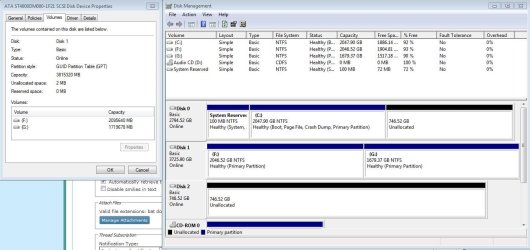
GPT so far as I understand? Hopefully this answers your question. It's not Master Boot...
Problem happens on Disk1
 

Attachments

  • disk.JPG
    disk.JPG
    106.4 KB · Views: 4

My Computer My Computer

At a glance

Win 7 Ultimate 64bitIntel i7-4770kG.Skill Ripjaws Z 16GBEVGA 760GTX
Computer type
PC/Desktop
Computer Manufacturer/Model Number
custom buld
OS
Win 7 Ultimate 64bit
CPU
Intel i7-4770k
Motherboard
Gigabyte G1 Sniper 5
Memory
G.Skill Ripjaws Z 16GB
Graphics Card(s)
EVGA 760GTX
Hard Drives
Seagate ST3000DM001
Seagate ST4000DM000
Antivirus
Kaspersky
Browser
Firefox
4TB drives will use 4KB sized sectors to achieve this great capacity. Larger capacity drives are still new to the PC world and even modern systems are not fully prepared for them.

First thing you should make sure is your "Windows 7" is SP1 and all hotfixes are applied. There are some post SP1 updates which are specifically intended to solve issues with large capacity disks. So make sure to run "Windows Update" and install all hotfixes including the optional ones it offers. Make sure the option "Give me recommended updates" is selected.

http://www.sevenforums.com/tutorials/2797-windows-update-settings-change.html

Run Windows update repeatedly until it says there are no more updates to install.

Secondly, download and install latest version of "Intel Rapid Storage Technology" driver from the below link. It is required to properly support large capacity disks on Intel storage controllers.

https://downloadcenter.intel.com/co...23496/eng/SetupRST.exe&lang=eng&Dwnldid=23496


Last but not least, go to your MoBo manufacturer's support site and check whether there is a recent BIOS update available. If yes, update to it.

GIGABYTE - Motherboard - Socket 1150 - G1.Sniper 5 (rev. 1.x)
 

My Computer My Computer

At a glance

Windows 7 Ultimate x64
Computer type
PC/Desktop
OS
Windows 7 Ultimate x64
4TB drives will use 4KB sized sectors to achieve this great capacity. Larger capacity drives are still new to the PC world and even modern systems are not fully prepared for them.
.... etc.....

GIGABYTE - Motherboard - Socket 1150 - G1.Sniper 5 (rev. 1.x)

Mobo has most recent bios.
Service Pack 1 installed. All updates are current.

According to the Gigabyte Apps center, the Intel storage driver does need updating. I've updated it before, but I'll run it again and see what happens.
 

My Computer My Computer

At a glance

Win 7 Ultimate 64bitIntel i7-4770kG.Skill Ripjaws Z 16GBEVGA 760GTX
Computer type
PC/Desktop
Computer Manufacturer/Model Number
custom buld
OS
Win 7 Ultimate 64bit
CPU
Intel i7-4770k
Motherboard
Gigabyte G1 Sniper 5
Memory
G.Skill Ripjaws Z 16GB
Graphics Card(s)
EVGA 760GTX
Hard Drives
Seagate ST3000DM001
Seagate ST4000DM000
Antivirus
Kaspersky
Browser
Firefox
Problem persists.

Rapid Storage drivers have been updated, although I think they were already current. The Gigabyte App still says they need updating, yet Device manager says it's the new driver version. (13.0.3.1001)

Motherboard bios is most current. (version F9)
 

My Computer My Computer

At a glance

Win 7 Ultimate 64bitIntel i7-4770kG.Skill Ripjaws Z 16GBEVGA 760GTX
Computer type
PC/Desktop
Computer Manufacturer/Model Number
custom buld
OS
Win 7 Ultimate 64bit
CPU
Intel i7-4770k
Motherboard
Gigabyte G1 Sniper 5
Memory
G.Skill Ripjaws Z 16GB
Graphics Card(s)
EVGA 760GTX
Hard Drives
Seagate ST3000DM001
Seagate ST4000DM000
Antivirus
Kaspersky
Browser
Firefox
Basically there are two types of large capacity disks. One is to use internal 4K sectors but reports to OS the sector size as 512 bytes. They are known as 512e or 512 emulation disks. Second kind is the one which uses 4K physical sectors and report the exact size to OS. They are called 4kn or 4K native. Below Microsoft article discuss details about different disk types and which OS supports which.

Advanced format (4K) disk compatibility update (Windows)

From the article, it seems that 4K native disks are only supported under "Windows 8" and "Windows Server 2012". I checked the "seagate" spec page of your HDD but it is not clear whether your disk is a 512e one or 4k native.

http://www.seagate.com/www-content/...12/en-gb/docs/desktop-hdd-ds1770-4-1405gb.pdf

Please try the below steps.

1. Download and install the below update.

An update that improves the compatibility of Windows 7 and Windows Server 2008 R2 with Advanced Format Disks is available

This update is aimed to improve support for 512e disks (even with this update, 4Kn disks are a "no no" to Win7.)

2. After installing the update, open an elevated command prompt as per http://www.sevenforums.com/tutorials/783-elevated-command-prompt.html

Then enter the below command :

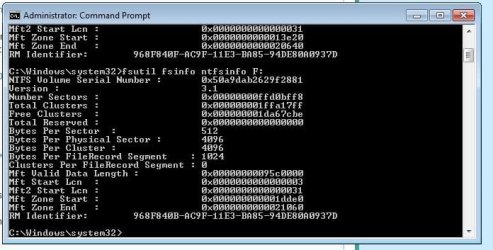
fsutil fsinfo ntfsinfo F:

( drive letter of 4 TB disk ).

Then use "Windows snipping tool" to capture a screenshot of the command prompt window and post it with next reply.


Above steps are based on http://support.microsoft.com/kb/2510009
 
Last edited:

My Computer My Computer

At a glance

Windows 7 Ultimate x64
Computer type
PC/Desktop
OS
Windows 7 Ultimate x64
Basically there are two types of large capacity disks. One is to use internal 4K sectors but reports to OS the sector size as 512 bytes. They are known as 512e or 512 emulation disks. Second kind is the one which uses 4K physical sectors and report the exact size to OS. They are called 4kn or 4K native. Below Microsoft article discuss details about different disk types and which OS supports which.

Advanced format (4K) disk compatibility update (Windows)

From the article, it seems that 4K native disks are only supported under "Windows 8" and "Windows Server 2012". I checked the "seagate" spec page of your HDD but it is not clear whether your disk is a 512e one or 4k native.

http://www.seagate.com/www-content/...12/en-gb/docs/desktop-hdd-ds1770-4-1405gb.pdf

Please try the below steps.

1. Download and install the below update.

An update that improves the compatibility of Windows 7 and Windows Server 2008 R2 with Advanced Format Disks is available

This update is aimed to improve support for 512e disks (even with this update, 4Kn disks are a "no no" to Win7.)


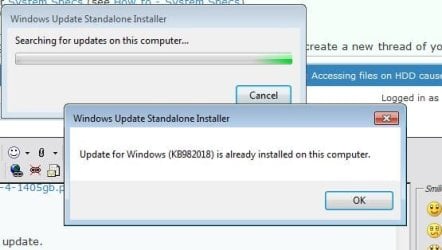
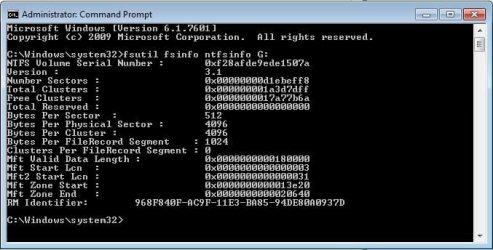
Just tried this. I was given the notice that it's already installed on my system. If I'm reading it right, it looks like a 512 disk to me...
On Seagate's advice, a second identical drive was bought today. It's having the same issue.
Gigabyte has advised to make sure it's not the disk before they do anything...


Attachments

  • update.jpg
    update.jpg
    28.8 KB · Views: 12
  • cmd F.JPG
    cmd F.JPG
    52.8 KB · Views: 12
  • cmd G.JPG
    cmd G.JPG
    47.4 KB · Views: 12

My Computer My Computer

At a glance

Win 7 Ultimate 64bitIntel i7-4770kG.Skill Ripjaws Z 16GBEVGA 760GTX
Computer type
PC/Desktop
Computer Manufacturer/Model Number
custom buld
OS
Win 7 Ultimate 64bit
CPU
Intel i7-4770k
Motherboard
Gigabyte G1 Sniper 5
Memory
G.Skill Ripjaws Z 16GB
Graphics Card(s)
EVGA 760GTX
Hard Drives
Seagate ST3000DM001
Seagate ST4000DM000
Antivirus
Kaspersky
Browser
Firefox
"Bytes Per Sector" is 512 and "Bytes Per Physical Sector" is 4096 so the drive is essentially a 512e ( 512 emulation ) disk which is fully supported under "Windows 7".

By looking at the specs, it seems that your MoBo came with two different SATA controllers - Intell and Marvell. Since we already updated Intel driver, make sure to update "Marvell" drivers too.

Marvell SATA driver : http://download.gigabyte.us/FileList/Driver/mb_driver_marvell_sata_controller_8series.exe

Marvell Storage Utility : http://download.gigabyte.us/FileList/Driver/mb_driver_marvell_msu_8series.exe


If the issue persist, try changing SATA port. If the 4 TB disk is currently connected to a black colored port, reconnect it to a white one ( or just the opposite ).
 

My Computer My Computer

At a glance

Windows 7 Ultimate x64
Computer type
PC/Desktop
OS
Windows 7 Ultimate x64
Back
Top