Solved memtest86+ showing different speeds for memory slots

QPhysics

New member
Local time
9:44 AM
Messages
16
I have a Pegatron Violet6 motherboard. There are four memory slots, and I have four 4-GB sticks of RAM.
I've been having a lot of BSODs lately, so I decided to test my RAM again.

Putting in one stick at a time and running memtest86+ gives:
Slot 1: All four sticks test okay and show 666 MHz (1333 MHz and 9-9-9-24)
Slot 2: All four sticks test okay and show 666 MHz
Slot 3: All four sticks test okay and show 400 MHz
Slot 4: All four sticks test okay and show 200 MHz (7-7-7-20)

If I put RAM in slots 1 and 2 and run memtest, it shows 666 MHz. But if I put something in slots 1, 2, and 3, I get 533 MHz.

Is my MB failing, or is this normal behavior? I'm currently only running with RAM in slots 1 and 2...is this going to work for a while, or should I be ordering a new motherboard?

Thanks!
 

My Computer My Computer

At a glance

Windows 7 Home Premium 64-bit
OS
Windows 7 Home Premium 64-bit
I have never experienced readings like that, and can only guess as to what would cause it.

I tried looking for a motherboard manual with no luck. I thought there might be something in the RAM section about the slots that might explain it.

Installing RAM in odd combinations will toggle between dual channel and single channel mode but that should not change the speed. So it does not sound like anything normal.

You could be having trouble with voltage going to the slots. But even then I can't think of why that would knock the speed down.

Try running CPU-Z and see what it gives for RAM stats in different combinations.
You could populate all the slots and test it first.
 

My Computer My Computer

At a glance

Windows 7 64 Bit Home Premium SP1i7-3820GSkill F3-14900CL9Q - 16GBEVGA GeForce GTX660 - Driver 352.86
Computer type
PC/Desktop
Computer Manufacturer/Model Number
Home Built - Jan 2013
OS
Windows 7 64 Bit Home Premium SP1
CPU
i7-3820
Motherboard
Asus P9X79-PRO - Bios 4608
Memory
GSkill F3-14900CL9Q - 16GB
Graphics Card(s)
EVGA GeForce GTX660 - Driver 352.86
Sound Card
On board Realtek ALC898
Monitor(s) Displays
Acer S271HL
Screen Resolution
1920 x 1080
Hard Drives
#1- Samsung 840 Pro Series
#2- Western Digital WD1002FAEX Sata3 Black
#3- Western Digital WD1002FAEX Sata3 Black
PSU
Corsair CMPSU-850TX-V2 - 850 watt (by Seasonic)
Case
Corsair Obsidian 550D
Cooling
Standard 3 120mm case fans, Cooler Master Hyper 212 EVO
Keyboard
MS KC-0405
Mouse
Intellimouse 5-button
Internet Speed
56 Mbits/Sec (on a good day)
Antivirus
Avast & Malwarebytes
Browser
Firefox
Other Info
Asus DVD - DRW-24B1ST 24X
Test results

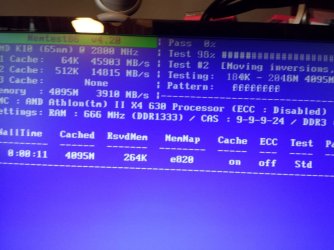
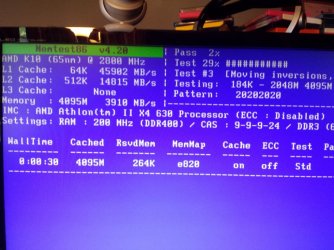
There is something very odd going on, it seems.
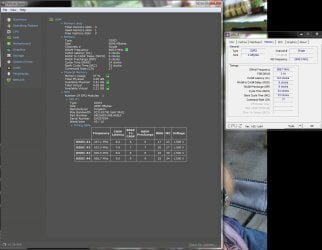
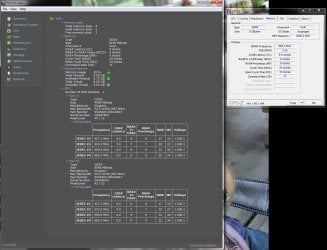
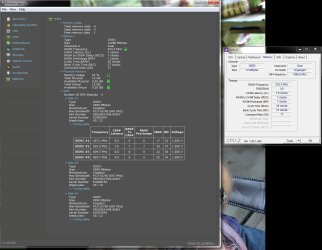
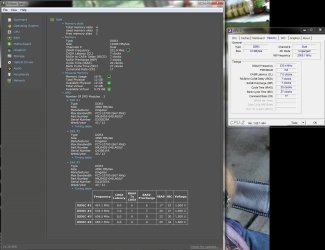
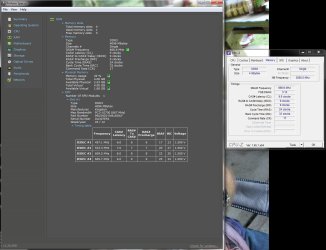
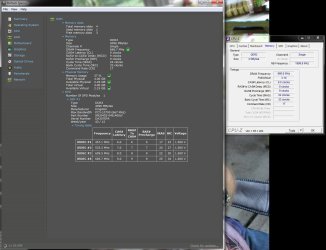
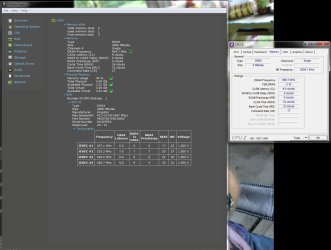
Same stick of RAM for the memtest screenshots and the single-stick reports from Speccy/CPU-Z.

In slots 1-3, memtest86+ reports 666 MHz, 9-9-9-24
In slot 4 (same RAM stick), 200 MHz, 9-9-9-24

If I have RAM in 1 or 2 slots (any 1 or 2 slots) I get 666 MHz, 9-9-9-24 from CPU-Z.
But if I have 3 or more (anywhere) it shows 533 MHz, 7-7-7-20.

Weird, huh?

Not conclusive, but no BSOD in the day and a half or so I was running with RAM only in slots 1 and 2.

Thanks for the help.
 

Attachments

  • RAM_Memtest_S1-3.jpg
    RAM_Memtest_S1-3.jpg
    76.7 KB · Views: 1
  • RAM_Memtest_S4.jpg
    RAM_Memtest_S4.jpg
    93 KB · Views: 1
  • RAM_S1.jpg
    RAM_S1.jpg
    113.8 KB · Views: 7
  • RAM_S1-S2.jpg
    RAM_S1-S2.jpg
    131 KB · Views: 4
  • RAM_S1-S2-S3.jpg
    RAM_S1-S2-S3.jpg
    127.6 KB · Views: 3
  • RAM_S1-S2-S4.jpg
    RAM_S1-S2-S4.jpg
    123.3 KB · Views: 3
  • RAM_S2.jpg
    RAM_S2.jpg
    114.2 KB · Views: 2
  • RAM_S3.jpg
    RAM_S3.jpg
    114.9 KB · Views: 3
  • RAM_S4.jpg
    RAM_S4.jpg
    110.5 KB · Views: 3

My Computer My Computer

At a glance

Windows 7 Home Premium 64-bit
OS
Windows 7 Home Premium 64-bit
Nice screen shots.

I do not see anything wrong with the RAM. You have a matched set of 4 modules and they all match in timings and every other spec. If I were going to bet, I would bet that the RAM is OK.

That is not a good thing. RAM is easy to replace, motherboards not so much.
And if I were going to guess that would be my guess - there is something going on on the motherboard.

Have you ever changed the Advanced Settings in BIOS, particularly in RAM? Overclocking anything?
Are you running in XMS mode? (It does not look like the Kingston RAM is XMS)
Have you tried resetting BIOS defaults?
Have you tried a ClearCMOS procedure?

Another thing - a long shot - is that if this is an AMD system you could look to see if you can run the RAM in constant "Unganged" mode. Just to see if that makes any difference.
 

My Computer My Computer

At a glance

Windows 7 64 Bit Home Premium SP1i7-3820GSkill F3-14900CL9Q - 16GBEVGA GeForce GTX660 - Driver 352.86
Computer type
PC/Desktop
Computer Manufacturer/Model Number
Home Built - Jan 2013
OS
Windows 7 64 Bit Home Premium SP1
CPU
i7-3820
Motherboard
Asus P9X79-PRO - Bios 4608
Memory
GSkill F3-14900CL9Q - 16GB
Graphics Card(s)
EVGA GeForce GTX660 - Driver 352.86
Sound Card
On board Realtek ALC898
Monitor(s) Displays
Acer S271HL
Screen Resolution
1920 x 1080
Hard Drives
#1- Samsung 840 Pro Series
#2- Western Digital WD1002FAEX Sata3 Black
#3- Western Digital WD1002FAEX Sata3 Black
PSU
Corsair CMPSU-850TX-V2 - 850 watt (by Seasonic)
Case
Corsair Obsidian 550D
Cooling
Standard 3 120mm case fans, Cooler Master Hyper 212 EVO
Keyboard
MS KC-0405
Mouse
Intellimouse 5-button
Internet Speed
56 Mbits/Sec (on a good day)
Antivirus
Avast & Malwarebytes
Browser
Firefox
Other Info
Asus DVD - DRW-24B1ST 24X
Something with the MB was also my fear since all the RAM sticks produced the same readings.

No overclocking.

I'm not sure what you mean about running in XMS mode. The BIOS recognizes all 16 GB of RAM (startup screen reports all four slots being populated by 4 GB each), memtest sees all 16 GB when they're all in, the "System" tab in Control Panel lists 16.0 GB as the amount of installed RAM, and the Windows memory test program sees all 16 GB.


The only thing I've changed in BIOS was changing the video from onboard to the card when I installed it. I can reset BIOS if you think it's worth testing.

I've never done a ClearCMOS.

This is a weird system, IMHO, because it is an HP computer with an nVidia nForce 720a chipset but an AMD Athlon II X4 processor.
CPU-Z shows "Unganged" as the DC Mode whenever there is more than one RAM stick installed.
 

My Computer My Computer

At a glance

Windows 7 Home Premium 64-bit
OS
Windows 7 Home Premium 64-bit

My Computer My Computer

At a glance

Windows 10 Pro. 64/ version 1709 Windows 7 Pr...Intel i7-6800K @ 4.3Corsair Platinum 16 gig @2400EVGA GTX 1070 OC
Computer type
PC/Desktop
Computer Manufacturer/Model Number
Home made Desktop
OS
Windows 10 Pro. 64/ version 1709 Windows 7 Pro/64
CPU
Intel i7-6800K @ 4.3
Motherboard
ASUS X-99 Deluxe II
Memory
Corsair Platinum 16 gig @2400
Graphics Card(s)
EVGA GTX 1070 OC
Monitor(s) Displays
Asus 27" LED LCD/VE278Q
Screen Resolution
1920-1080 or 1280-720 HDMI
Hard Drives
INTEL SSD 730-240 Gb Sata 3.0/
PSU
EVGA Platium 1200W
Case
Phanteks Luxe Tempered Glass 8 fans/ one radiator
Cooling
XSPC/ Water Cooled CPU
Keyboard
Das 4 Professional
Mouse
Logitech M705/MX Anywhere 2-S
Internet Speed
100 mbits
Antivirus
Microsoft Security Essentials/ Malwarebytes Premium 3.0/ SAS
Browser
I.E. 11 default/Firefox/ ISP Time Warner Cable/Spectrum
Other Info
LG BluRay Burner/
Sound system-KLipsch-THX/
Icy Dock ssd Hot Swap bays.
I'm not sure what you mean about running in XMS mode.

XMS is a RAM specification. XMS RAM can signal the motherboard as to what speed it can be run at. If the motherboard has the RAM "automatic overclock" setting set to XMS mode then the board will automatically make the adjustments needed to run the RAM at it's rated speed.
Since you do not know of XMS Mode we can assume that you system either does not have that feature or you are running in default mode - which is fine.

The only thing I've changed in BIOS was changing the video from onboard to the card when I installed it. I can reset BIOS if you think it's worth testing.

Resetting the BIOS to defaults would only be helpful if you had made a number of BIOS changes or were overclocking in any way. This probably will not change anything. But it is a can't hurt - might help sort of deal.
Just be sure to note all your current RAM settings so you can set them back to the way they were if the procedure yields no results.

I've never done a ClearCMOS.
ClearCMOS is going to do the same as resetting defaults, but with the added benefit of forcing the system to re-initialize and "enumerate" the system hardware fresh. This can correct some quirky problems. If interested in trying it let me know and I can post some instructions (if you can't find this in your PC manual)


This is a weird system, IMHO, because it is an HP computer with an nVidia nForce 720a chipset but an AMD Athlon II X4 processor.

AMD socket motherboards usually use an nVidia chipset, this is normal.

CPU-Z shows "Unganged" as the DC Mode whenever there is more than one RAM stick installed.

That is the default. But on motherboards with advanced system settings you can change the default setting to one that will run the RAM ganged even when there are 2 modules installed. I do not see any benefit in running a system like that. But in your case I thought it might be interesting to see if that changed anything in your odd readings.
 

My Computer My Computer

At a glance

Windows 7 64 Bit Home Premium SP1i7-3820GSkill F3-14900CL9Q - 16GBEVGA GeForce GTX660 - Driver 352.86
Computer type
PC/Desktop
Computer Manufacturer/Model Number
Home Built - Jan 2013
OS
Windows 7 64 Bit Home Premium SP1
CPU
i7-3820
Motherboard
Asus P9X79-PRO - Bios 4608
Memory
GSkill F3-14900CL9Q - 16GB
Graphics Card(s)
EVGA GeForce GTX660 - Driver 352.86
Sound Card
On board Realtek ALC898
Monitor(s) Displays
Acer S271HL
Screen Resolution
1920 x 1080
Hard Drives
#1- Samsung 840 Pro Series
#2- Western Digital WD1002FAEX Sata3 Black
#3- Western Digital WD1002FAEX Sata3 Black
PSU
Corsair CMPSU-850TX-V2 - 850 watt (by Seasonic)
Case
Corsair Obsidian 550D
Cooling
Standard 3 120mm case fans, Cooler Master Hyper 212 EVO
Keyboard
MS KC-0405
Mouse
Intellimouse 5-button
Internet Speed
56 Mbits/Sec (on a good day)
Antivirus
Avast & Malwarebytes
Browser
Firefox
Other Info
Asus DVD - DRW-24B1ST 24X
I'm pretty certain I know where the jumper is to reset the CMOS.
As I can't think of anything bad that could come from clearing it, and if it forces the system to rescan the hardware (so maybe actually recognize the RAM upgrade in a way that it didn't a couple years ago when I went from 6 to 16 GB?)...I don't see any reason not to do it.
 

My Computer My Computer

At a glance

Windows 7 Home Premium 64-bit
OS
Windows 7 Home Premium 64-bit
Bob meant XMP mode for the RAM. Check through all the RAM related setting in BIOS to see if there is one for XMP, it should be in the overclocking section.
 

My Computer My Computer

At a glance

Windows 7 Ultimate X64 SP1Intel i5-2550K, Differing ~4.4-4.8GHz No buil...16GB G.Skill Sniper 1866MHz @ 2133MHz 2x8GBASUS GTX650TIB-DC2OC-2GD5, (650TI Boost)
Computer type
PC/Desktop
Computer Manufacturer/Model Number
Home Built Desktop By DataTech
OS
Windows 7 Ultimate X64 SP1
CPU
Intel i5-2550K, Differing ~4.4-4.8GHz No built in GPU
Motherboard
ASUS P8Z68-V PRO/GEN3
Memory
16GB G.Skill Sniper 1866MHz @ 2133MHz 2x8GB
Graphics Card(s)
ASUS GTX650TIB-DC2OC-2GD5, (650TI Boost)
Sound Card
Onboard Realtek 5-1
Monitor(s) Displays
Samsung P2570HD
Screen Resolution
1920x1080
Hard Drives
Samsung 840 Pro 256GB SSD for OS, 500GB Seagate Constellation (Enterprise drive) for Data
PSU
Corsair HX650W
Case
Inwin Dragon Rider
Cooling
Hyper 212 EVO w/two Noctua fans, push-pull, @1300 RPM
Keyboard
E-Z Eyes, bright yellow keys with large characters
Mouse
steelseries SENSEI Laser Pro Gaming
Internet Speed
48-51Mbs Mbs down, 11 Mbs up Xfinity Cable
Antivirus
Norton Internet Security 2013
Browser
IE 10, Opera, Pale Moon if needed
Other Info
4 case fans, LG BluRay-RE, ASUS DVD-RW, Mr. Fusion power supply, 1.21 gigawatts.
I think I would clear CMOS too. just be sure to unplug the system forst. And you may have to reset the date and time when finished. I always reset defaults after I do it.
 

My Computers My Computers

  • At a glance

    Windows 11 ProRyzen 9 5900X32GB G Skill DDR4-3600EVGA RTX 3080 FTW 3 Ultra
    Computer type
    PC/Desktop
    Computer Manufacturer/Model Number
    ALWAYS UNDER CONSTRUCTION
    OS
    Windows 11 Pro
    CPU
    Ryzen 9 5900X
    Motherboard
    Asus X570 Crosshair Viii Hero
    Memory
    32GB G Skill DDR4-3600
    Graphics Card(s)
    EVGA RTX 3080 FTW 3 Ultra
    Sound Card
    On Board/Sennheiser PC37X Headset
    Monitor(s) Displays
    3 X Asus 27"
    Screen Resolution
    2560x1440
    Hard Drives
    2 X 1 TB NVME drives
    PSU
    EVGA 850
    Case
    Phanteks Eclipse P400A
    Cooling
    EVGA 280 AIO
    Keyboard
    Logitech G510s/ Logitech G13
    Mouse
    Logitech G502
    Internet Speed
    24/1
    Antivirus
    ESET/MBAM Pro/SAS Pro
    Browser
    Chrome/ Firefox/ Edge
  • At a glance

    Windows 11 ProIntel Ultra 9 288V32 GB LPDDR5X 8533
    Computer type
    Laptop
    System Manufacturer/Model Number
    Dell 16 Plus
    OS
    Windows 11 Pro
    CPU
    Intel Ultra 9 288V
    Memory
    32 GB LPDDR5X 8533
    Monitor(s) Displays
    16" Mini-LED HDR600 Touch 90 Hz
    Screen Resolution
    2560X1600
    Hard Drives
    1 TB NVME
XMP is an Intel setting. I've never seen that on an AMD board. You can pretty much do the same thing, but you have to do it by hand. But, it being an older AMD board and an HP machine, I doubt you have any options to change anything.
 

My Computers My Computers

  • At a glance

    Windows 11 ProRyzen 9 5900X32GB G Skill DDR4-3600EVGA RTX 3080 FTW 3 Ultra
    Computer type
    PC/Desktop
    Computer Manufacturer/Model Number
    ALWAYS UNDER CONSTRUCTION
    OS
    Windows 11 Pro
    CPU
    Ryzen 9 5900X
    Motherboard
    Asus X570 Crosshair Viii Hero
    Memory
    32GB G Skill DDR4-3600
    Graphics Card(s)
    EVGA RTX 3080 FTW 3 Ultra
    Sound Card
    On Board/Sennheiser PC37X Headset
    Monitor(s) Displays
    3 X Asus 27"
    Screen Resolution
    2560x1440
    Hard Drives
    2 X 1 TB NVME drives
    PSU
    EVGA 850
    Case
    Phanteks Eclipse P400A
    Cooling
    EVGA 280 AIO
    Keyboard
    Logitech G510s/ Logitech G13
    Mouse
    Logitech G502
    Internet Speed
    24/1
    Antivirus
    ESET/MBAM Pro/SAS Pro
    Browser
    Chrome/ Firefox/ Edge
  • At a glance

    Windows 11 ProIntel Ultra 9 288V32 GB LPDDR5X 8533
    Computer type
    Laptop
    System Manufacturer/Model Number
    Dell 16 Plus
    OS
    Windows 11 Pro
    CPU
    Intel Ultra 9 288V
    Memory
    32 GB LPDDR5X 8533
    Monitor(s) Displays
    16" Mini-LED HDR600 Touch 90 Hz
    Screen Resolution
    2560X1600
    Hard Drives
    1 TB NVME
That's right, I think AMD calls it AMP on their boards.
 

My Computer My Computer

At a glance

Windows 7 64 Bit Home Premium SP1i7-3820GSkill F3-14900CL9Q - 16GBEVGA GeForce GTX660 - Driver 352.86
Computer type
PC/Desktop
Computer Manufacturer/Model Number
Home Built - Jan 2013
OS
Windows 7 64 Bit Home Premium SP1
CPU
i7-3820
Motherboard
Asus P9X79-PRO - Bios 4608
Memory
GSkill F3-14900CL9Q - 16GB
Graphics Card(s)
EVGA GeForce GTX660 - Driver 352.86
Sound Card
On board Realtek ALC898
Monitor(s) Displays
Acer S271HL
Screen Resolution
1920 x 1080
Hard Drives
#1- Samsung 840 Pro Series
#2- Western Digital WD1002FAEX Sata3 Black
#3- Western Digital WD1002FAEX Sata3 Black
PSU
Corsair CMPSU-850TX-V2 - 850 watt (by Seasonic)
Case
Corsair Obsidian 550D
Cooling
Standard 3 120mm case fans, Cooler Master Hyper 212 EVO
Keyboard
MS KC-0405
Mouse
Intellimouse 5-button
Internet Speed
56 Mbits/Sec (on a good day)
Antivirus
Avast & Malwarebytes
Browser
Firefox
Other Info
Asus DVD - DRW-24B1ST 24X
CMOS reset. BIOS settings to default.
Same readings from memtest, CPU-Z, and Speccy.

I think it's pretty clearly a motherboard issue. If I get more BSODs, I'll pull that one stick of RAM...I'll still have 12 GB, so it's not like it's going to make the system unusable.

Thanks for the tips. May not have a solution (well, other than buying a new computer which would probably be about the same money as replacing the MB)...but at least it seems you've helped me definitively identify the problem.
 

My Computer My Computer

At a glance

Windows 7 Home Premium 64-bit
OS
Windows 7 Home Premium 64-bit
Running 3 sticks in a dual channel system may knock all the RAM down to single channel mode. (Check your motherboard manual)
You may not notice any performance difference in single channel mode either. Depends on what you are doing. Video editing, you'll notice.
 

My Computer My Computer

At a glance

Windows 7 64 Bit Home Premium SP1i7-3820GSkill F3-14900CL9Q - 16GBEVGA GeForce GTX660 - Driver 352.86
Computer type
PC/Desktop
Computer Manufacturer/Model Number
Home Built - Jan 2013
OS
Windows 7 64 Bit Home Premium SP1
CPU
i7-3820
Motherboard
Asus P9X79-PRO - Bios 4608
Memory
GSkill F3-14900CL9Q - 16GB
Graphics Card(s)
EVGA GeForce GTX660 - Driver 352.86
Sound Card
On board Realtek ALC898
Monitor(s) Displays
Acer S271HL
Screen Resolution
1920 x 1080
Hard Drives
#1- Samsung 840 Pro Series
#2- Western Digital WD1002FAEX Sata3 Black
#3- Western Digital WD1002FAEX Sata3 Black
PSU
Corsair CMPSU-850TX-V2 - 850 watt (by Seasonic)
Case
Corsair Obsidian 550D
Cooling
Standard 3 120mm case fans, Cooler Master Hyper 212 EVO
Keyboard
MS KC-0405
Mouse
Intellimouse 5-button
Internet Speed
56 Mbits/Sec (on a good day)
Antivirus
Avast & Malwarebytes
Browser
Firefox
Other Info
Asus DVD - DRW-24B1ST 24X
Running 3 sticks in a dual channel system may knock all the RAM down to single channel mode. (Check your motherboard manual)
You may not notice any performance difference in single channel mode either. Depends on what you are doing. Video editing, you'll notice.

CPU-Z showed it still running in Dual when there were three sticks installed.
No BSOD lately (and yes, I'm sure I just jinxed myself), so I'm going to mark this thread as solved and thank you all for your help.
 

My Computer My Computer

At a glance

Windows 7 Home Premium 64-bit
OS
Windows 7 Home Premium 64-bit
Back
Top