I went back to my old monitor, but now it doesn't look right.

hbenthow

New member
Local time
4:57 PM
Messages
19
I have been using an old CRT monitor for years. I recently bought an LCD monitor, but didn't like how it looked. So I switched back to my old CRT. The problem is, now the CRT has some of the LCD's settings. I changed all the settings I know of (Screen Resolution, AMD Vision Control Center settings, monitor brightness/contrast settings) back to the correct settings for the CRT. But now, it has ugly, "digital-looking" (for lack of a better term) text, just like the LCD did. My old CRT used to have beautiful, very readable text. But now it has the thin, pixelly text that I had never seen until I got the LCD (especially on web-pages). Also, all the text on my CRT now looks a little blurry (before I got the LCD, it always looked as sharp as a pin). And I can't put my finger on it, but some things look a little darker than they used to, and some things look a little too bright (some white web-pages look too bright, some photos look too dark, even though I have set my monitor brightness and contrast settings back to normal, and didn't and still don't have any brightness and contrast settings from the software end of things). It can't be that my eyes got used to the LCD, because I didn't use it long enough for that to happen.

The only thing I can think of is that some of the drivers for my graphics card (an integrated ATI Radeon HD 4200) may have somehow locked on to certain settings optimized for the LCD screen, and just won't let go of them now that I have started using my old CRT again.

Does anyone know what this problem could be, or how to fix it?
 

My Computer My Computer

At a glance

Windows 7 Professional 64-bitAMD Athlon II X28.00GB Dual-Channel DDR3 @ 537MHzATI Radeon HD 4200
Computer type
PC/Desktop
Computer Manufacturer/Model Number
HP
OS
Windows 7 Professional 64-bit
CPU
AMD Athlon II X2
Motherboard
Hewlett-Packard 3047h (XU1 PROCESSOR)
Memory
8.00GB Dual-Channel DDR3 @ 537MHz
Graphics Card(s)
ATI Radeon HD 4200
Hard Drives
931GB Hitachi HDS721010KLA330 SATA Disk Device (SATA) 42 °C

931GB Western Digital WD Ext HDD 1021 USB Device (USB (SATA))
Antivirus
AVG Antivirus
I don't know what brand of LCD monitor you bought but to compare a LCD to CRT is like 10 to 0 for color, clarity and contrast. But folks choose what they like. Did you run the Clear Type routine for LCDs? It's an option on the Display menu. This should be run to adjust how the text appears on the screen.

But, I would suggest removing the ATI drivers, reboot then install them again with the CRT attached.
 

My Computer My Computer

At a glance

Windows 7 Pro-x64i7-2600 3.4GHz - 3.8GHz Turbo8Gb - 2x4GB, Muskin 991770 PC3-1333Integrated Intel HD 2000
Computer type
PC/Desktop
Computer Manufacturer/Model Number
Built 2/11/2011
OS
Windows 7 Pro-x64
CPU
i7-2600 3.4GHz - 3.8GHz Turbo
Motherboard
Intel DH67BL-B3
Memory
8Gb - 2x4GB, Muskin 991770 PC3-1333
Graphics Card(s)
Integrated Intel HD 2000
Sound Card
Integrated Intel 10.1 HD, RealTek ALC892
Monitor(s) Displays
Asus LCD VH222H, Haier HL24XSL2a
Screen Resolution
1920x1080, 1920x1080
Hard Drives
Crucial SSD C300-128Gb,
Western Digital WD5002AALX - 500Gb,
Western Digital WD7501AALS - 750Gb
PSU
Seasonic 650W 80+ Gold Modular
Case
Rosewill Defender
Cooling
Stock CPU, Four 120mm case fans, PCH fan added
Keyboard
Logitech EX100 Y-RBH94 Wireless
Mouse
Logitech EX100 M-RCE95 Wireless
Internet Speed
3.0/1.5 Mbs
Antivirus
Microsoft Security Essentials
Browser
Microsoft Internet Explorer 11
Other Info
Antec Veris Premier-Multimedia IR Station,
Cyber Accoustics-3602 Speakers,
AFT XM-5U Card Reader,
Hauppauge TV-HVR-2250,
Sony LX300 USB Turntable
I don't know what brand of LCD monitor you bought but to compare a LCD to CRT is like 10 to 0 for color, clarity and contrast. But folks choose what they like.
That depends. A good high-quality CRT can be excellent. There are CRTs that have super-flat screens (ie, not just flat on the front but curved on the inside) and high refresh rates that reduces visible flicker to zero. My old CRT is one of those. High-quality CRTs have such good picture quality that some professionals who work with photography, video, etc, still use CRTs. There are several companies that make high-end CRTs that cost thousands of dollars especially for these professionals.

Of course, a low-quality CRT can look awful. But the one I have is pretty top-notch. The reason that I decided to get an LCD was that my CRT, after many years of use, started making sizzling noises and other such irregularities. The LCD I bought is a Dell from around 2009. From what I've gathered, LCDs with a constant backlight all look pretty bad for anything beyond reading text. There are some high-end OLED and IPS LCDs that I've heard are about as good as a good CRT, if not better, but those aren't in my price range.

Did you run the Clear Type routine for LCDs? It's an option on the Display menu. This should be run to adjust how the text appears on the screen.
Yes. I ran it when I was using the LCD. I disabled it when I started using my CRT again.

But, I would suggest removing the ATI drivers, reboot then install them again with the CRT attached.
That's a pretty good suggestion. If the brightness/contrast issues continue to be a problem, I might try that if i can't find anything else that seems to help.

I discovered that the text problem could be solved by closing the browser tab then opening a new tab and going to the same address. It appears that only tabs that I had used when I was using the LCD were effected.
 

My Computer My Computer

At a glance

Windows 7 Professional 64-bitAMD Athlon II X28.00GB Dual-Channel DDR3 @ 537MHzATI Radeon HD 4200
Computer type
PC/Desktop
Computer Manufacturer/Model Number
HP
OS
Windows 7 Professional 64-bit
CPU
AMD Athlon II X2
Motherboard
Hewlett-Packard 3047h (XU1 PROCESSOR)
Memory
8.00GB Dual-Channel DDR3 @ 537MHz
Graphics Card(s)
ATI Radeon HD 4200
Hard Drives
931GB Hitachi HDS721010KLA330 SATA Disk Device (SATA) 42 °C

931GB Western Digital WD Ext HDD 1021 USB Device (USB (SATA))
Antivirus
AVG Antivirus
With sizzling sounds how long is the CRT going to last? I suspect it's on the way south.
What is the brand/model of the CRT? I did some quick Googling and find there are/were some pricey good CRTs available. Since you apparently bought a 5 year old LCD used it's like a not very good at all.
Modern new ones do very well and one does not need a fancy IPS panel. I do lots of graphic work on a TN panel LCD with CCFL backlighting.
I will soon be getting a new one with LED backlight which provides more contrast and brilliance.
You said the Dell LCD you had made the text "pixely", mine displays text as sharp as a finely printed page.
 

My Computer My Computer

At a glance

Windows 7 Ultimate X64 SP1Intel i5-2550K, Differing ~4.4-4.8GHz No buil...16GB G.Skill Sniper 1866MHz @ 2133MHz 2x8GBASUS GTX650TIB-DC2OC-2GD5, (650TI Boost)
Computer type
PC/Desktop
Computer Manufacturer/Model Number
Home Built Desktop By DataTech
OS
Windows 7 Ultimate X64 SP1
CPU
Intel i5-2550K, Differing ~4.4-4.8GHz No built in GPU
Motherboard
ASUS P8Z68-V PRO/GEN3
Memory
16GB G.Skill Sniper 1866MHz @ 2133MHz 2x8GB
Graphics Card(s)
ASUS GTX650TIB-DC2OC-2GD5, (650TI Boost)
Sound Card
Onboard Realtek 5-1
Monitor(s) Displays
Samsung P2570HD
Screen Resolution
1920x1080
Hard Drives
Samsung 840 Pro 256GB SSD for OS, 500GB Seagate Constellation (Enterprise drive) for Data
PSU
Corsair HX650W
Case
Inwin Dragon Rider
Cooling
Hyper 212 EVO w/two Noctua fans, push-pull, @1300 RPM
Keyboard
E-Z Eyes, bright yellow keys with large characters
Mouse
steelseries SENSEI Laser Pro Gaming
Internet Speed
48-51Mbs Mbs down, 11 Mbs up Xfinity Cable
Antivirus
Norton Internet Security 2013
Browser
IE 10, Opera, Pale Moon if needed
Other Info
4 case fans, LG BluRay-RE, ASUS DVD-RW, Mr. Fusion power supply, 1.21 gigawatts.
With sizzling sounds how long is the CRT going to last? I suspect it's on the way south.
That's why I bought the LCD: I'm not sure what's causing the sizzling, and don't want it to go out without a replacement ready. Today, I used a vacuum cleaner on the CRT, hoping that getting dust out of it might help. So far, it hasn't been sizzling since then. I don't yet know whether the sizzling will start again or not.

What is the brand/model of the CRT? I did some quick Googling and find there are/were some pricey good CRTs available.

It's a KDS XF 7S manufactured in September 2002.

Since you apparently bought a 5 year old LCD used it's like a not very good at all.

It's a Dell 1708FPt. I thought it was from 2009, but looking at the owner's manual, it appears to be from 2006 or 2007. I got it because it was the most affordable LCD I could find that had a DVI input (I wanted to upgrade to something HDCP compatible). It also has a 4:3 aspect ratio, which few LCDs made these days have. (I don't like a widescreen aspect ration for monitors because I like a lot of vertical space when viewing web pages.).

Modern new ones do very well and one does not need a fancy IPS panel. I do lots of graphic work on a TN panel LCD with CCFL backlighting.

Does it have problems showing black? One thing I love about my CRT is that it portrays inky black perfectly. In my experience, every LCD screen I've ever seen (monitor or television) shows black (and even darker areas of the screen in general) in an irritating backlit cloudy greyish way. From what I've previously heard, only screens with a special LED backlight that dims the LEDs directly behind the dark portion of the picture off, IPS screens, and the like have solved this problem.

You said the Dell LCD you had made the text "pixely", mine displays text as sharp as a finely printed page.
It depends. There's some text that shows up clearly on it, and some that doesn't. Generally, the bolder the text, the better it shows up. I'm not sure that it's a problem with the monitor itself, as I still had the problem when I switched back to my CRT, until I figured out how to solve it.
 

My Computer My Computer

At a glance

Windows 7 Professional 64-bitAMD Athlon II X28.00GB Dual-Channel DDR3 @ 537MHzATI Radeon HD 4200
Computer type
PC/Desktop
Computer Manufacturer/Model Number
HP
OS
Windows 7 Professional 64-bit
CPU
AMD Athlon II X2
Motherboard
Hewlett-Packard 3047h (XU1 PROCESSOR)
Memory
8.00GB Dual-Channel DDR3 @ 537MHz
Graphics Card(s)
ATI Radeon HD 4200
Hard Drives
931GB Hitachi HDS721010KLA330 SATA Disk Device (SATA) 42 °C

931GB Western Digital WD Ext HDD 1021 USB Device (USB (SATA))
Antivirus
AVG Antivirus
Sizzling can be a component, well, sizzling, from heat/overload or also electronic crackles, neither are a good sign.

The Dell 1708FPt looks a bit clunky from the pics I found and may have a huge lamp or lamps behind the LCD panel. New monitors are going away from the DVI (my preference) in favor of HDMI and Display Port or its mini version.

If I look at my monitor with an all black image in low light I do see some minor bleed through. It has several smaller CCFL tubes placed horizontally, each about 1/8" in diameter I think. An LED monitor is generally edge-lit with a row of white LEDs at the top and bottom of the screen.

With an image or video blacks look black though, the bleed through is not an issue.

The text display may be due to not using the native resolution, even CRTs look better with native. If you want vertical space an LCD monitor that swivels 90° would be great for you. Instead of 1920x1080 you can have 1080x1920, really tall with a wide screen. There are also a few LCDs available with a 16:10 ration, the extra 120 vertical pixels make a huge difference.
 

My Computer My Computer

At a glance

Windows 7 Ultimate X64 SP1Intel i5-2550K, Differing ~4.4-4.8GHz No buil...16GB G.Skill Sniper 1866MHz @ 2133MHz 2x8GBASUS GTX650TIB-DC2OC-2GD5, (650TI Boost)
Computer type
PC/Desktop
Computer Manufacturer/Model Number
Home Built Desktop By DataTech
OS
Windows 7 Ultimate X64 SP1
CPU
Intel i5-2550K, Differing ~4.4-4.8GHz No built in GPU
Motherboard
ASUS P8Z68-V PRO/GEN3
Memory
16GB G.Skill Sniper 1866MHz @ 2133MHz 2x8GB
Graphics Card(s)
ASUS GTX650TIB-DC2OC-2GD5, (650TI Boost)
Sound Card
Onboard Realtek 5-1
Monitor(s) Displays
Samsung P2570HD
Screen Resolution
1920x1080
Hard Drives
Samsung 840 Pro 256GB SSD for OS, 500GB Seagate Constellation (Enterprise drive) for Data
PSU
Corsair HX650W
Case
Inwin Dragon Rider
Cooling
Hyper 212 EVO w/two Noctua fans, push-pull, @1300 RPM
Keyboard
E-Z Eyes, bright yellow keys with large characters
Mouse
steelseries SENSEI Laser Pro Gaming
Internet Speed
48-51Mbs Mbs down, 11 Mbs up Xfinity Cable
Antivirus
Norton Internet Security 2013
Browser
IE 10, Opera, Pale Moon if needed
Other Info
4 case fans, LG BluRay-RE, ASUS DVD-RW, Mr. Fusion power supply, 1.21 gigawatts.
The Dell 1708FPt looks a bit clunky from the pics I found and may have a huge lamp or lamps behind the LCD panel.
It probably does. At its default settings, it's so bright that it feels like staring into a car headlight. Adjust the brightness and contrast so that the light isn't headache-inducingly bright, and everything other than text on a white background looks too dark and murky.

An LED monitor is generally edge-lit with a row of white LEDs at the top and bottom of the screen.
I'm aware that most LED backlit monitors only have LEDs around the edges. However, there are some that have LEDs behind the entire panel, and those directly behind a dark portion of the picture dim. That gives the monitor the ability to have near-perfect contrast. Unfortunately, they are expensive.

The text display may be due to not using the native resolution, even CRTs look better with native. If you want vertical space an LCD monitor that swivels 90° would be great for you. Instead of 1920x1080 you can have 1080x1920, really tall with a wide screen. There are also a few LCDs available with a 16:10 ration, the extra 120 vertical pixels make a huge difference.
I'm not interested in swiveling my screen. I don't want that much vertical space. I think that 4:3 is perfect for most computer tasks. 16:10 might be worth looking into, though.

Can you recommend any good LCDs with great contrast, that will look great for reading internet articles, viewing and editing photos and videos, and can be found used or refurbished for less that $150? Preferably with a 4:3 or 16:10 aspect ratio (but I could maybe learn to tolerate a 16:9 if that's all there is that fits the description).
 

My Computer My Computer

At a glance

Windows 7 Professional 64-bitAMD Athlon II X28.00GB Dual-Channel DDR3 @ 537MHzATI Radeon HD 4200
Computer type
PC/Desktop
Computer Manufacturer/Model Number
HP
OS
Windows 7 Professional 64-bit
CPU
AMD Athlon II X2
Motherboard
Hewlett-Packard 3047h (XU1 PROCESSOR)
Memory
8.00GB Dual-Channel DDR3 @ 537MHz
Graphics Card(s)
ATI Radeon HD 4200
Hard Drives
931GB Hitachi HDS721010KLA330 SATA Disk Device (SATA) 42 °C

931GB Western Digital WD Ext HDD 1021 USB Device (USB (SATA))
Antivirus
AVG Antivirus
CRTs Rock, it takes getting use to an LCD.

Does it have a factory reset on it ?
 

My Computer My Computer

At a glance

Windows 10 Pro x64Intel Core i7 6700KGSkill TridentZ RGB 16GB 3600 16-16-16-36EVGA GTX 980 Ti SC x2
Computer type
PC/Desktop
Computer Manufacturer/Model Number
Skylake Special #666
OS
Windows 10 Pro x64
CPU
Intel Core i7 6700K
Motherboard
Asus Sabertooth Z170 Mark 1
Memory
GSkill TridentZ RGB 16GB 3600 16-16-16-36
Graphics Card(s)
EVGA GTX 980 Ti SC x2
Sound Card
Realtek High Definition
Monitor(s) Displays
AOC G2460PG
Screen Resolution
1920 x 1080 144Hz
Hard Drives
Samsung 860 Pro 256GB, Seagate Barracuda 4TB x2
PSU
EVGA 1000 P2, EVGA White Custom Braided Cables
Case
Corsair Vengeance C70 Gunmetal Black
Cooling
Corsair H100i v2, Corsair ML120 x2, Thermal Grizzly Kryonaut
Keyboard
Logitech G910 Orion Spectrum
Mouse
Logitech G700s
Internet Speed
Verizon Fios Quantum Gateway 75/75
Antivirus
Windows Defender, Malwarebytes Free 3.8.3
Browser
Chrome
Other Info
Corsair SP120 x4, LG Blu-ray Drive, Durabrand HT-395 100 Watt Dolby Digital Amp, Corsair H2100 Wireless 7.1 Headset
Does it have a factory reset on it ?
When I first hooked it back up to my computer, I reset all the settings to what they had been before I got the LCD.
 

My Computer My Computer

At a glance

Windows 7 Professional 64-bitAMD Athlon II X28.00GB Dual-Channel DDR3 @ 537MHzATI Radeon HD 4200
Computer type
PC/Desktop
Computer Manufacturer/Model Number
HP
OS
Windows 7 Professional 64-bit
CPU
AMD Athlon II X2
Motherboard
Hewlett-Packard 3047h (XU1 PROCESSOR)
Memory
8.00GB Dual-Channel DDR3 @ 537MHz
Graphics Card(s)
ATI Radeon HD 4200
Hard Drives
931GB Hitachi HDS721010KLA330 SATA Disk Device (SATA) 42 °C

931GB Western Digital WD Ext HDD 1021 USB Device (USB (SATA))
Antivirus
AVG Antivirus
The sizzling sound is most likely a high voltage leak. It will usually start from dust build up but once it starts, it'll will track over components and will eventually go POP then go dead. If you catch it soon enough, the dust can be blown out but DO NOT remove the back unless you know what you're doing around HIGH voltage. The CRT tube can store over 50,000 volts and remains "live" long after the equipment is unplugged.
 

My Computer My Computer

At a glance

Windows 7 Pro-x64i7-2600 3.4GHz - 3.8GHz Turbo8Gb - 2x4GB, Muskin 991770 PC3-1333Integrated Intel HD 2000
Computer type
PC/Desktop
Computer Manufacturer/Model Number
Built 2/11/2011
OS
Windows 7 Pro-x64
CPU
i7-2600 3.4GHz - 3.8GHz Turbo
Motherboard
Intel DH67BL-B3
Memory
8Gb - 2x4GB, Muskin 991770 PC3-1333
Graphics Card(s)
Integrated Intel HD 2000
Sound Card
Integrated Intel 10.1 HD, RealTek ALC892
Monitor(s) Displays
Asus LCD VH222H, Haier HL24XSL2a
Screen Resolution
1920x1080, 1920x1080
Hard Drives
Crucial SSD C300-128Gb,
Western Digital WD5002AALX - 500Gb,
Western Digital WD7501AALS - 750Gb
PSU
Seasonic 650W 80+ Gold Modular
Case
Rosewill Defender
Cooling
Stock CPU, Four 120mm case fans, PCH fan added
Keyboard
Logitech EX100 Y-RBH94 Wireless
Mouse
Logitech EX100 M-RCE95 Wireless
Internet Speed
3.0/1.5 Mbs
Antivirus
Microsoft Security Essentials
Browser
Microsoft Internet Explorer 11
Other Info
Antec Veris Premier-Multimedia IR Station,
Cyber Accoustics-3602 Speakers,
AFT XM-5U Card Reader,
Hauppauge TV-HVR-2250,
Sony LX300 USB Turntable
The sizzling sound is most likely a high voltage leak. It will usually start from dust build up but once it starts, it'll will track over components and will eventually go POP then go dead. If you catch it soon enough, the dust can be blown out but DO NOT remove the back unless you know what you're doing around HIGH voltage. The CRT tube can store over 50,000 volts and remains "live" long after the equipment is unplugged.
I didn't open up the case. I just vacuumed it out through the air vents in the back. So far, the sizzling hasn't come back.
 

My Computer My Computer

At a glance

Windows 7 Professional 64-bitAMD Athlon II X28.00GB Dual-Channel DDR3 @ 537MHzATI Radeon HD 4200
Computer type
PC/Desktop
Computer Manufacturer/Model Number
HP
OS
Windows 7 Professional 64-bit
CPU
AMD Athlon II X2
Motherboard
Hewlett-Packard 3047h (XU1 PROCESSOR)
Memory
8.00GB Dual-Channel DDR3 @ 537MHz
Graphics Card(s)
ATI Radeon HD 4200
Hard Drives
931GB Hitachi HDS721010KLA330 SATA Disk Device (SATA) 42 °C

931GB Western Digital WD Ext HDD 1021 USB Device (USB (SATA))
Antivirus
AVG Antivirus
Can you recommend any good LCDs with great contrast, that will look great for reading internet articles, viewing and editing photos and videos, and can be found used or refurbished for less that $150? Preferably with a 4:3 or 16:10 aspect ratio (but I could maybe learn to tolerate a 16:9 if that's all there is that fits the description).
You're looking for a diamond in a coal pile, but I understand finances very well, or the lack of them.
You might try checking you local Craig's List or other sale sites. I live near a large University so things like that pop up often.
EBay is another possibility-if you can message the seller with questions before making a commitment.
 

My Computer My Computer

At a glance

Windows 7 Ultimate X64 SP1Intel i5-2550K, Differing ~4.4-4.8GHz No buil...16GB G.Skill Sniper 1866MHz @ 2133MHz 2x8GBASUS GTX650TIB-DC2OC-2GD5, (650TI Boost)
Computer type
PC/Desktop
Computer Manufacturer/Model Number
Home Built Desktop By DataTech
OS
Windows 7 Ultimate X64 SP1
CPU
Intel i5-2550K, Differing ~4.4-4.8GHz No built in GPU
Motherboard
ASUS P8Z68-V PRO/GEN3
Memory
16GB G.Skill Sniper 1866MHz @ 2133MHz 2x8GB
Graphics Card(s)
ASUS GTX650TIB-DC2OC-2GD5, (650TI Boost)
Sound Card
Onboard Realtek 5-1
Monitor(s) Displays
Samsung P2570HD
Screen Resolution
1920x1080
Hard Drives
Samsung 840 Pro 256GB SSD for OS, 500GB Seagate Constellation (Enterprise drive) for Data
PSU
Corsair HX650W
Case
Inwin Dragon Rider
Cooling
Hyper 212 EVO w/two Noctua fans, push-pull, @1300 RPM
Keyboard
E-Z Eyes, bright yellow keys with large characters
Mouse
steelseries SENSEI Laser Pro Gaming
Internet Speed
48-51Mbs Mbs down, 11 Mbs up Xfinity Cable
Antivirus
Norton Internet Security 2013
Browser
IE 10, Opera, Pale Moon if needed
Other Info
4 case fans, LG BluRay-RE, ASUS DVD-RW, Mr. Fusion power supply, 1.21 gigawatts.
You're looking for a diamond in a coal pile, but I understand finances very well, or the lack of them.
You might try checking you local Craig's List or other sale sites. I live near a large University so things like that pop up often.
EBay is another possibility-if you can message the seller with questions before making a commitment.
I see. Thank you for the suggestions.

One more thing: do you have any suggestions of what to look for in listings (any particular kind of labeling, a particular contrast ratio, or something of that nature) to distinguish a good monitor from a poor one?
 

My Computer My Computer

At a glance

Windows 7 Professional 64-bitAMD Athlon II X28.00GB Dual-Channel DDR3 @ 537MHzATI Radeon HD 4200
Computer type
PC/Desktop
Computer Manufacturer/Model Number
HP
OS
Windows 7 Professional 64-bit
CPU
AMD Athlon II X2
Motherboard
Hewlett-Packard 3047h (XU1 PROCESSOR)
Memory
8.00GB Dual-Channel DDR3 @ 537MHz
Graphics Card(s)
ATI Radeon HD 4200
Hard Drives
931GB Hitachi HDS721010KLA330 SATA Disk Device (SATA) 42 °C

931GB Western Digital WD Ext HDD 1021 USB Device (USB (SATA))
Antivirus
AVG Antivirus
Likely the seller won't know much, if any, info on it. You would need to either call or email and ask for info from the label. If you can get the brand and model then you can do some Google searches for it. If it would be from a local seller you may be able to see it work beforehand.

Often contrast ratios are misstated by the manufacturer and have little meaning, but the higher the better. In general, I think, 5000:1 or better is what to look for.
 

My Computer My Computer

At a glance

Windows 7 Ultimate X64 SP1Intel i5-2550K, Differing ~4.4-4.8GHz No buil...16GB G.Skill Sniper 1866MHz @ 2133MHz 2x8GBASUS GTX650TIB-DC2OC-2GD5, (650TI Boost)
Computer type
PC/Desktop
Computer Manufacturer/Model Number
Home Built Desktop By DataTech
OS
Windows 7 Ultimate X64 SP1
CPU
Intel i5-2550K, Differing ~4.4-4.8GHz No built in GPU
Motherboard
ASUS P8Z68-V PRO/GEN3
Memory
16GB G.Skill Sniper 1866MHz @ 2133MHz 2x8GB
Graphics Card(s)
ASUS GTX650TIB-DC2OC-2GD5, (650TI Boost)
Sound Card
Onboard Realtek 5-1
Monitor(s) Displays
Samsung P2570HD
Screen Resolution
1920x1080
Hard Drives
Samsung 840 Pro 256GB SSD for OS, 500GB Seagate Constellation (Enterprise drive) for Data
PSU
Corsair HX650W
Case
Inwin Dragon Rider
Cooling
Hyper 212 EVO w/two Noctua fans, push-pull, @1300 RPM
Keyboard
E-Z Eyes, bright yellow keys with large characters
Mouse
steelseries SENSEI Laser Pro Gaming
Internet Speed
48-51Mbs Mbs down, 11 Mbs up Xfinity Cable
Antivirus
Norton Internet Security 2013
Browser
IE 10, Opera, Pale Moon if needed
Other Info
4 case fans, LG BluRay-RE, ASUS DVD-RW, Mr. Fusion power supply, 1.21 gigawatts.
Likely the seller won't know much, if any, info on it. You would need to either call or email and ask for info from the label. If you can get the brand and model then you can do some Google searches for it. If it would be from a local seller you may be able to see it work beforehand.

Often contrast ratios are misstated by the manufacturer and have little meaning, but the higher the better. In general, I think, 5000:1 or better is what to look for.
Wow. The LCD I bought has a 800:1 contrast ratio. That appears to fall far short.

I'm aware that most sellers won't have the full specs. But once I find out the brand and model of a monitor, I can often find the specs on a website like Cnet. For example, here are the specs for my LCD:

Dell UltraSharp 1708FP Specs - CNET
 

My Computer My Computer

At a glance

Windows 7 Professional 64-bitAMD Athlon II X28.00GB Dual-Channel DDR3 @ 537MHzATI Radeon HD 4200
Computer type
PC/Desktop
Computer Manufacturer/Model Number
HP
OS
Windows 7 Professional 64-bit
CPU
AMD Athlon II X2
Motherboard
Hewlett-Packard 3047h (XU1 PROCESSOR)
Memory
8.00GB Dual-Channel DDR3 @ 537MHz
Graphics Card(s)
ATI Radeon HD 4200
Hard Drives
931GB Hitachi HDS721010KLA330 SATA Disk Device (SATA) 42 °C

931GB Western Digital WD Ext HDD 1021 USB Device (USB (SATA))
Antivirus
AVG Antivirus
 

My Computer My Computer

At a glance

Windows 7 Ultimate X64 SP1Intel i5-2550K, Differing ~4.4-4.8GHz No buil...16GB G.Skill Sniper 1866MHz @ 2133MHz 2x8GBASUS GTX650TIB-DC2OC-2GD5, (650TI Boost)
Computer type
PC/Desktop
Computer Manufacturer/Model Number
Home Built Desktop By DataTech
OS
Windows 7 Ultimate X64 SP1
CPU
Intel i5-2550K, Differing ~4.4-4.8GHz No built in GPU
Motherboard
ASUS P8Z68-V PRO/GEN3
Memory
16GB G.Skill Sniper 1866MHz @ 2133MHz 2x8GB
Graphics Card(s)
ASUS GTX650TIB-DC2OC-2GD5, (650TI Boost)
Sound Card
Onboard Realtek 5-1
Monitor(s) Displays
Samsung P2570HD
Screen Resolution
1920x1080
Hard Drives
Samsung 840 Pro 256GB SSD for OS, 500GB Seagate Constellation (Enterprise drive) for Data
PSU
Corsair HX650W
Case
Inwin Dragon Rider
Cooling
Hyper 212 EVO w/two Noctua fans, push-pull, @1300 RPM
Keyboard
E-Z Eyes, bright yellow keys with large characters
Mouse
steelseries SENSEI Laser Pro Gaming
Internet Speed
48-51Mbs Mbs down, 11 Mbs up Xfinity Cable
Antivirus
Norton Internet Security 2013
Browser
IE 10, Opera, Pale Moon if needed
Other Info
4 case fans, LG BluRay-RE, ASUS DVD-RW, Mr. Fusion power supply, 1.21 gigawatts.
I'll tell you, for $150 you are just wasting your time and money. Any monitor you get for that price will be a god awful TN panel slapped together with the lowest quality imaginable. You are better off sticking with the higher end crt until you save up more then $150 and can afford a proper monitor.
 

My Computer My Computer

At a glance

Windows 10 Pro (x64)Intel Core i7-3930K (3.2GHz - 4.5GHz)4x Samsung 4GB PC3-12800 DDR3 (16GB 1600MHz)Nvidia Geforce GTX 690
Computer type
PC/Desktop
Computer Manufacturer/Model Number
Alienware Aurora ALX R4
OS
Windows 10 Pro (x64)
CPU
Intel Core i7-3930K (3.2GHz - 4.5GHz)
Motherboard
Alienware Aurora-R4 x79
Memory
4x Samsung 4GB PC3-12800 DDR3 (16GB 1600MHz)
Graphics Card(s)
Nvidia Geforce GTX 690
Sound Card
SteelSeries Siberia Elite
Monitor(s) Displays
Dell UltraSharp U3011
Screen Resolution
2560x1600
Hard Drives
Samsung 850 Pro 256 GB, Seagate 1TB Desktop Hybrid HDD, 2x Western Digital 4TB Green HDD
PSU
875W Some Dell PSU <.<
Case
Alienware Aurora ALX
Cooling
Custom Liquid Cooling (EK CPU & GPU blocks) dual EK 480RAD
Keyboard
Logitech G710+ Mechanical
Mouse
Logitech G700s
Internet Speed
Verizon Fios (50 mbps average)
Other Info
Server: Intel NUC D54250WYK: i5-4250U, 16GB, 256 GB mSATA, Windows Server 2012 R2
Actually the Viewsonic I linked to is a 21.5" IPS panel.
 

My Computer My Computer

At a glance

Windows 7 Ultimate X64 SP1Intel i5-2550K, Differing ~4.4-4.8GHz No buil...16GB G.Skill Sniper 1866MHz @ 2133MHz 2x8GBASUS GTX650TIB-DC2OC-2GD5, (650TI Boost)
Computer type
PC/Desktop
Computer Manufacturer/Model Number
Home Built Desktop By DataTech
OS
Windows 7 Ultimate X64 SP1
CPU
Intel i5-2550K, Differing ~4.4-4.8GHz No built in GPU
Motherboard
ASUS P8Z68-V PRO/GEN3
Memory
16GB G.Skill Sniper 1866MHz @ 2133MHz 2x8GB
Graphics Card(s)
ASUS GTX650TIB-DC2OC-2GD5, (650TI Boost)
Sound Card
Onboard Realtek 5-1
Monitor(s) Displays
Samsung P2570HD
Screen Resolution
1920x1080
Hard Drives
Samsung 840 Pro 256GB SSD for OS, 500GB Seagate Constellation (Enterprise drive) for Data
PSU
Corsair HX650W
Case
Inwin Dragon Rider
Cooling
Hyper 212 EVO w/two Noctua fans, push-pull, @1300 RPM
Keyboard
E-Z Eyes, bright yellow keys with large characters
Mouse
steelseries SENSEI Laser Pro Gaming
Internet Speed
48-51Mbs Mbs down, 11 Mbs up Xfinity Cable
Antivirus
Norton Internet Security 2013
Browser
IE 10, Opera, Pale Moon if needed
Other Info
4 case fans, LG BluRay-RE, ASUS DVD-RW, Mr. Fusion power supply, 1.21 gigawatts.

My Computer My Computer

At a glance

Windows 7 Professional 64-bitAMD Athlon II X28.00GB Dual-Channel DDR3 @ 537MHzATI Radeon HD 4200
Computer type
PC/Desktop
Computer Manufacturer/Model Number
HP
OS
Windows 7 Professional 64-bit
CPU
AMD Athlon II X2
Motherboard
Hewlett-Packard 3047h (XU1 PROCESSOR)
Memory
8.00GB Dual-Channel DDR3 @ 537MHz
Graphics Card(s)
ATI Radeon HD 4200
Hard Drives
931GB Hitachi HDS721010KLA330 SATA Disk Device (SATA) 42 °C

931GB Western Digital WD Ext HDD 1021 USB Device (USB (SATA))
Antivirus
AVG Antivirus
CRTs Rock, it takes getting use to an LCD.

Does it have a factory reset on it ?

Does it have a factory reset on it ?
When I first hooked it back up to my computer, I reset all the settings to what they had been before I got the LCD.

I think Adram meant on the monitor.

The monitor manual might be of some use:
ftp://ftp.dell.com/Manuals/all-prod...rt_Display/dell-1708fp_User's Guide_en-us.pdf

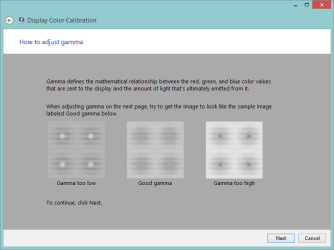
You might also want to run the Calibration wizard with the LCD connected
display-b.PNG
Display-a.PNG
display-c.png
 

My Computer My Computer

At a glance

x64 (6.3.9600) Win8.1 Pro & soon dual boot x6...AMD A6-3420M APU with Radeon(tm) HD Graphics6.00 GBAMD Radeon(TM) HD 6520G
Computer type
Laptop
Computer Manufacturer/Model Number
HP Pavilion dv6-6c10us
OS
x64 (6.3.9600) Win8.1 Pro & soon dual boot x64 (6.1.7601) Win7_SP1 HomePrem
CPU
AMD A6-3420M APU with Radeon(tm) HD Graphics
Motherboard
Hewlett-Packard 1805
Memory
6.00 GB
Graphics Card(s)
AMD Radeon(TM) HD 6520G
Sound Card
(1) AMD High Definition Audio Device (2) IDT High Definiti
Monitor(s) Displays
HP W2072a 20" LCD (1600 x 900) @ 60 Hz
Screen Resolution
1366 x 768 x 32 bits (4294967296 colors) @ 60 Hz
Hard Drives
ST640LM0 00 HM641JI SATA Disk Device
Keyboard
Logitech k520 wireless KB
Mouse
Logitech m320 wireless mouse (bundled with KB)
Internet Speed
15/5 | 54 MB Wireless 'n'
Antivirus
Realtime: Defender or Avast | On-demand: Malwarebytes, ESET
Browser
IE 11 on Win8, IE 10 on win 7
Other Info
Media: [Gimp, Audacity, VLC] || Comm: [WEmail 2012, Skype] || Productivity: [OpenOffice,| Textpad] || Utils: [Sysinternals, cCleaner, Speccy, Defraggler]
Back
Top