Solved How to change background color of Folders in Windows 7

damando25

New member
Local time
1:37 PM
Messages
20

My Computer My Computer

At a glance

Windows 7 Ultimate 64-bit SP1Phenom II X4 98012.0GB Dual-Channel DDR3 @ 669MHz (9-9-9-24)2047MB NVIDIA GeForce GTX 650 Ti (Gigabyte)
Computer type
PC/Desktop
Computer Manufacturer/Model Number
custom build
OS
Windows 7 Ultimate 64-bit SP1
CPU
Phenom II X4 980
Motherboard
GA-890GPA-UD3H
Memory
12.0GB Dual-Channel DDR3 @ 669MHz (9-9-9-24)
Graphics Card(s)
2047MB NVIDIA GeForce GTX 650 Ti (Gigabyte)
Monitor(s) Displays
EQ3266e auria tv monitor
Screen Resolution
1360 x 768
Hard Drives
1863GB Western Digital WDC WD20EARX-00PASB0 ATA Device (SATA)
119GB OCZ-VERTEX4 ATA Device (SSD)
465GB Western Digital WDC WD5000AAKS-75A7B0 ATA Device (SATA)
PSU
Rosewill Xtreme Series RX750
Case
Antec Nine Hundred
Cooling
CPU water cooled and Case air cooled
Keyboard
Logitech wireless k260
Mouse
Logitech wireless M210
Antivirus
Malewarebytes,SpyBot S&D,SuperAntispyware
Browser
FireFoxe 30.0
Change background color of folders

Well this works for me:

Run regedit and navigate to:

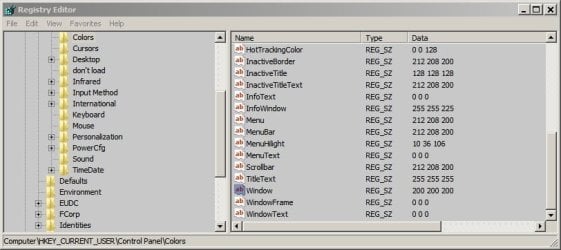
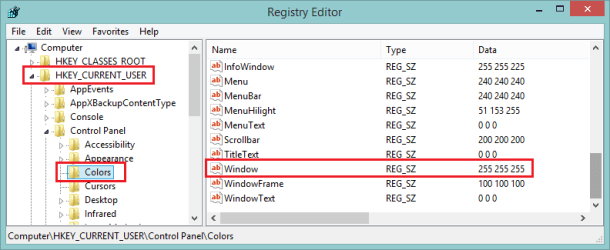
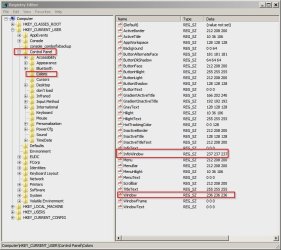
HKEY_CURRENT_USER\Control Panel\Colors

Right click on the "colors" key and make a backup (export the reg key).

Then in the right pane scroll down to window - double click and change the value to 200 200 200

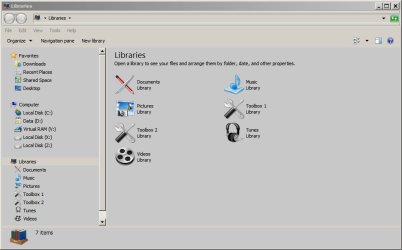
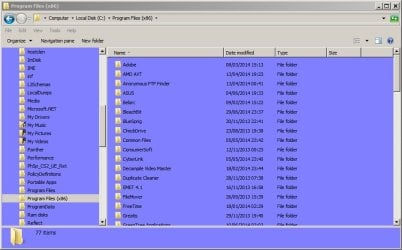
Exit registry editor and log off then log back on again. You'll see a background like this:

However if you want to change the background color in your photo viewer - read this:

Registry Tweak and Freeware to Change ?Photo Viewer? or ?Photo Gallery? Background Color in Windows - AskVG

There are two tweaks shown. One is for Windows Photo Viewer and the other is for Windows Live Photo Gallery if you've installed it instead of the default Windows Photo Viewer.
 

Attachments

  • Background.jpg
    Background.jpg
    41.3 KB · Views: 12
  • Background 2.jpg
    Background 2.jpg
    37.9 KB · Views: 5

My Computer My Computer

At a glance

Microsoft Windows 7 Home Premium 64-bit 7601 ...AMD C-60 APU with Radeon(tm) HD Graphics4.00 GBAMD Radeon HD 6290 Graphics
Computer type
Laptop
Computer Manufacturer/Model Number
ASUS
OS
Microsoft Windows 7 Home Premium 64-bit 7601 Multiprocessor Free Service Pack 1
CPU
AMD C-60 APU with Radeon(tm) HD Graphics
Motherboard
ASUSTeK COMPUTER INC. X501U
Memory
4.00 GB
Graphics Card(s)
AMD Radeon HD 6290 Graphics
Sound Card
(1) AMD High Definition Audio Device (2) Realtek High Defi
Screen Resolution
1366 x 768 x 32 bits (4294967296 colors) @ 60 Hz
Hard Drives
Hitachi HTS545050A7E380 SATA Disk Device
Antivirus
Comodo CIS & FW, SecureAplus App Whitelisting, Threatfire
Browser
Cyberfox 64bit, Opera 64bit, Airfox
Other Info
Spy-The-Spy, HitmanPro.Alert, Norton Connect Safe, MJRegWatcher, BitDefender TrafficLight, Voodoo Shield, Zemana AntiMalware
I am talking about the general folders color such as when you open up "my computer" the background is white then local disc c is white also then program files (86) is white and so on etc... What you are offering is just changing the color on those two Viewers (Windows Live Photo Gallery and Windows Photo Viewer).
 

My Computer My Computer

At a glance

Windows 7 Ultimate 64-bit SP1Phenom II X4 98012.0GB Dual-Channel DDR3 @ 669MHz (9-9-9-24)2047MB NVIDIA GeForce GTX 650 Ti (Gigabyte)
Computer type
PC/Desktop
Computer Manufacturer/Model Number
custom build
OS
Windows 7 Ultimate 64-bit SP1
CPU
Phenom II X4 980
Motherboard
GA-890GPA-UD3H
Memory
12.0GB Dual-Channel DDR3 @ 669MHz (9-9-9-24)
Graphics Card(s)
2047MB NVIDIA GeForce GTX 650 Ti (Gigabyte)
Monitor(s) Displays
EQ3266e auria tv monitor
Screen Resolution
1360 x 768
Hard Drives
1863GB Western Digital WDC WD20EARX-00PASB0 ATA Device (SATA)
119GB OCZ-VERTEX4 ATA Device (SSD)
465GB Western Digital WDC WD5000AAKS-75A7B0 ATA Device (SATA)
PSU
Rosewill Xtreme Series RX750
Case
Antec Nine Hundred
Cooling
CPU water cooled and Case air cooled
Keyboard
Logitech wireless k260
Mouse
Logitech wireless M210
Antivirus
Malewarebytes,SpyBot S&D,SuperAntispyware
Browser
FireFoxe 30.0
Try a different theme - if I understand your question, you want the window background color to not be so bright.

A quick test would be to select the High Contrast Black theme.

That might not be what you want, but there are more themes available. click the Get more themes online and see if there's one that meets your needs.

You can also create your own theme, but I've never done it.
 

My Computer My Computer

At a glance

x64 (6.3.9600) Win8.1 Pro & soon dual boot x6...AMD A6-3420M APU with Radeon(tm) HD Graphics6.00 GBAMD Radeon(TM) HD 6520G
Computer type
Laptop
Computer Manufacturer/Model Number
HP Pavilion dv6-6c10us
OS
x64 (6.3.9600) Win8.1 Pro & soon dual boot x64 (6.1.7601) Win7_SP1 HomePrem
CPU
AMD A6-3420M APU with Radeon(tm) HD Graphics
Motherboard
Hewlett-Packard 1805
Memory
6.00 GB
Graphics Card(s)
AMD Radeon(TM) HD 6520G
Sound Card
(1) AMD High Definition Audio Device (2) IDT High Definiti
Monitor(s) Displays
HP W2072a 20" LCD (1600 x 900) @ 60 Hz
Screen Resolution
1366 x 768 x 32 bits (4294967296 colors) @ 60 Hz
Hard Drives
ST640LM0 00 HM641JI SATA Disk Device
Keyboard
Logitech k520 wireless KB
Mouse
Logitech m320 wireless mouse (bundled with KB)
Internet Speed
15/5 | 54 MB Wireless 'n'
Antivirus
Realtime: Defender or Avast | On-demand: Malwarebytes, ESET
Browser
IE 11 on Win8, IE 10 on win 7
Other Info
Media: [Gimp, Audacity, VLC] || Comm: [WEmail 2012, Skype] || Productivity: [OpenOffice,| Textpad] || Utils: [Sysinternals, cCleaner, Speccy, Defraggler]
I am talking about the general folders color such as when you open up "my computer" the background is white then local disc c is white also then program files (86) is white and so on etc... What you are offering is just changing the color on those two Viewers (Windows Live Photo Gallery and Windows Photo Viewer).

Not exactly, the link Callender provided does reference Photo Gallery and Photo Viewer, but this is more general and I think it's what you're looking for - go back and read his post again.

Callender:
Then in the right pane scroll down to window - double click and change the value to 200 200 200
 

My Computer My Computer

At a glance

x64 (6.3.9600) Win8.1 Pro & soon dual boot x6...AMD A6-3420M APU with Radeon(tm) HD Graphics6.00 GBAMD Radeon(TM) HD 6520G
Computer type
Laptop
Computer Manufacturer/Model Number
HP Pavilion dv6-6c10us
OS
x64 (6.3.9600) Win8.1 Pro & soon dual boot x64 (6.1.7601) Win7_SP1 HomePrem
CPU
AMD A6-3420M APU with Radeon(tm) HD Graphics
Motherboard
Hewlett-Packard 1805
Memory
6.00 GB
Graphics Card(s)
AMD Radeon(TM) HD 6520G
Sound Card
(1) AMD High Definition Audio Device (2) IDT High Definiti
Monitor(s) Displays
HP W2072a 20" LCD (1600 x 900) @ 60 Hz
Screen Resolution
1366 x 768 x 32 bits (4294967296 colors) @ 60 Hz
Hard Drives
ST640LM0 00 HM641JI SATA Disk Device
Keyboard
Logitech k520 wireless KB
Mouse
Logitech m320 wireless mouse (bundled with KB)
Internet Speed
15/5 | 54 MB Wireless 'n'
Antivirus
Realtime: Defender or Avast | On-demand: Malwarebytes, ESET
Browser
IE 11 on Win8, IE 10 on win 7
Other Info
Media: [Gimp, Audacity, VLC] || Comm: [WEmail 2012, Skype] || Productivity: [OpenOffice,| Textpad] || Utils: [Sysinternals, cCleaner, Speccy, Defraggler]
Screenshot

It would be better if you could just post a screenshot of the background that you want to change with an arrow pointing at the background.

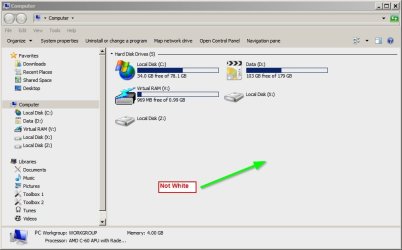
Here the background is "off white" and is the same if I click on C or Program Files and so on. Is this the color that you mean?

If it is - use an RGB colour picker tool to define the color via HKEY_CURRENT_USER\Control Panel\Colors as defined in my earlier post or else as Slatybart suggests try another theme entirely.

Here's a color picker:

Online color picker tool,online pick color tool as HTML,RGB,HEX

Suggest any matching set of three numbers over 200 to get an off white background. The current setting on my machine is 236 236 236

Background 3.jpg
 

My Computer My Computer

At a glance

Microsoft Windows 7 Home Premium 64-bit 7601 ...AMD C-60 APU with Radeon(tm) HD Graphics4.00 GBAMD Radeon HD 6290 Graphics
Computer type
Laptop
Computer Manufacturer/Model Number
ASUS
OS
Microsoft Windows 7 Home Premium 64-bit 7601 Multiprocessor Free Service Pack 1
CPU
AMD C-60 APU with Radeon(tm) HD Graphics
Motherboard
ASUSTeK COMPUTER INC. X501U
Memory
4.00 GB
Graphics Card(s)
AMD Radeon HD 6290 Graphics
Sound Card
(1) AMD High Definition Audio Device (2) Realtek High Defi
Screen Resolution
1366 x 768 x 32 bits (4294967296 colors) @ 60 Hz
Hard Drives
Hitachi HTS545050A7E380 SATA Disk Device
Antivirus
Comodo CIS & FW, SecureAplus App Whitelisting, Threatfire
Browser
Cyberfox 64bit, Opera 64bit, Airfox
Other Info
Spy-The-Spy, HitmanPro.Alert, Norton Connect Safe, MJRegWatcher, BitDefender TrafficLight, Voodoo Shield, Zemana AntiMalware
"Callender" I tried and change the value to 200 200 200 and still does nothing ? Ok I see some change now as I changed the value to 37 55 187 and came up with a blue using this online tool at http://color.shawnolson.net/ However it changes the background when I go into regedit and also my web pages address bar but it does not change what I am looking for which is odd ?
 

My Computer My Computer

At a glance

Windows 7 Ultimate 64-bit SP1Phenom II X4 98012.0GB Dual-Channel DDR3 @ 669MHz (9-9-9-24)2047MB NVIDIA GeForce GTX 650 Ti (Gigabyte)
Computer type
PC/Desktop
Computer Manufacturer/Model Number
custom build
OS
Windows 7 Ultimate 64-bit SP1
CPU
Phenom II X4 980
Motherboard
GA-890GPA-UD3H
Memory
12.0GB Dual-Channel DDR3 @ 669MHz (9-9-9-24)
Graphics Card(s)
2047MB NVIDIA GeForce GTX 650 Ti (Gigabyte)
Monitor(s) Displays
EQ3266e auria tv monitor
Screen Resolution
1360 x 768
Hard Drives
1863GB Western Digital WDC WD20EARX-00PASB0 ATA Device (SATA)
119GB OCZ-VERTEX4 ATA Device (SSD)
465GB Western Digital WDC WD5000AAKS-75A7B0 ATA Device (SATA)
PSU
Rosewill Xtreme Series RX750
Case
Antec Nine Hundred
Cooling
CPU water cooled and Case air cooled
Keyboard
Logitech wireless k260
Mouse
Logitech wireless M210
Antivirus
Malewarebytes,SpyBot S&D,SuperAntispyware
Browser
FireFoxe 30.0

My Computer My Computer

At a glance

x64 (6.3.9600) Win8.1 Pro & soon dual boot x6...AMD A6-3420M APU with Radeon(tm) HD Graphics6.00 GBAMD Radeon(TM) HD 6520G
Computer type
Laptop
Computer Manufacturer/Model Number
HP Pavilion dv6-6c10us
OS
x64 (6.3.9600) Win8.1 Pro & soon dual boot x64 (6.1.7601) Win7_SP1 HomePrem
CPU
AMD A6-3420M APU with Radeon(tm) HD Graphics
Motherboard
Hewlett-Packard 1805
Memory
6.00 GB
Graphics Card(s)
AMD Radeon(TM) HD 6520G
Sound Card
(1) AMD High Definition Audio Device (2) IDT High Definiti
Monitor(s) Displays
HP W2072a 20" LCD (1600 x 900) @ 60 Hz
Screen Resolution
1366 x 768 x 32 bits (4294967296 colors) @ 60 Hz
Hard Drives
ST640LM0 00 HM641JI SATA Disk Device
Keyboard
Logitech k520 wireless KB
Mouse
Logitech m320 wireless mouse (bundled with KB)
Internet Speed
15/5 | 54 MB Wireless 'n'
Antivirus
Realtime: Defender or Avast | On-demand: Malwarebytes, ESET
Browser
IE 11 on Win8, IE 10 on win 7
Other Info
Media: [Gimp, Audacity, VLC] || Comm: [WEmail 2012, Skype] || Productivity: [OpenOffice,| Textpad] || Utils: [Sysinternals, cCleaner, Speccy, Defraggler]

My Computer My Computer

At a glance

x64 (6.3.9600) Win8.1 Pro & soon dual boot x6...AMD A6-3420M APU with Radeon(tm) HD Graphics6.00 GBAMD Radeon(TM) HD 6520G
Computer type
Laptop
Computer Manufacturer/Model Number
HP Pavilion dv6-6c10us
OS
x64 (6.3.9600) Win8.1 Pro & soon dual boot x64 (6.1.7601) Win7_SP1 HomePrem
CPU
AMD A6-3420M APU with Radeon(tm) HD Graphics
Motherboard
Hewlett-Packard 1805
Memory
6.00 GB
Graphics Card(s)
AMD Radeon(TM) HD 6520G
Sound Card
(1) AMD High Definition Audio Device (2) IDT High Definiti
Monitor(s) Displays
HP W2072a 20" LCD (1600 x 900) @ 60 Hz
Screen Resolution
1366 x 768 x 32 bits (4294967296 colors) @ 60 Hz
Hard Drives
ST640LM0 00 HM641JI SATA Disk Device
Keyboard
Logitech k520 wireless KB
Mouse
Logitech m320 wireless mouse (bundled with KB)
Internet Speed
15/5 | 54 MB Wireless 'n'
Antivirus
Realtime: Defender or Avast | On-demand: Malwarebytes, ESET
Browser
IE 11 on Win8, IE 10 on win 7
Other Info
Media: [Gimp, Audacity, VLC] || Comm: [WEmail 2012, Skype] || Productivity: [OpenOffice,| Textpad] || Utils: [Sysinternals, cCleaner, Speccy, Defraggler]
Here the background is "off white" and is the same if I click on C or Program Files and so on. Is this the color that you mean?

Yes Exactly .
 

My Computer My Computer

At a glance

Windows 7 Ultimate 64-bit SP1Phenom II X4 98012.0GB Dual-Channel DDR3 @ 669MHz (9-9-9-24)2047MB NVIDIA GeForce GTX 650 Ti (Gigabyte)
Computer type
PC/Desktop
Computer Manufacturer/Model Number
custom build
OS
Windows 7 Ultimate 64-bit SP1
CPU
Phenom II X4 980
Motherboard
GA-890GPA-UD3H
Memory
12.0GB Dual-Channel DDR3 @ 669MHz (9-9-9-24)
Graphics Card(s)
2047MB NVIDIA GeForce GTX 650 Ti (Gigabyte)
Monitor(s) Displays
EQ3266e auria tv monitor
Screen Resolution
1360 x 768
Hard Drives
1863GB Western Digital WDC WD20EARX-00PASB0 ATA Device (SATA)
119GB OCZ-VERTEX4 ATA Device (SSD)
465GB Western Digital WDC WD5000AAKS-75A7B0 ATA Device (SATA)
PSU
Rosewill Xtreme Series RX750
Case
Antec Nine Hundred
Cooling
CPU water cooled and Case air cooled
Keyboard
Logitech wireless k260
Mouse
Logitech wireless M210
Antivirus
Malewarebytes,SpyBot S&D,SuperAntispyware
Browser
FireFoxe 30.0

My Computer My Computer

At a glance

Windows 7 Ultimate 64-bit SP1Phenom II X4 98012.0GB Dual-Channel DDR3 @ 669MHz (9-9-9-24)2047MB NVIDIA GeForce GTX 650 Ti (Gigabyte)
Computer type
PC/Desktop
Computer Manufacturer/Model Number
custom build
OS
Windows 7 Ultimate 64-bit SP1
CPU
Phenom II X4 980
Motherboard
GA-890GPA-UD3H
Memory
12.0GB Dual-Channel DDR3 @ 669MHz (9-9-9-24)
Graphics Card(s)
2047MB NVIDIA GeForce GTX 650 Ti (Gigabyte)
Monitor(s) Displays
EQ3266e auria tv monitor
Screen Resolution
1360 x 768
Hard Drives
1863GB Western Digital WDC WD20EARX-00PASB0 ATA Device (SATA)
119GB OCZ-VERTEX4 ATA Device (SSD)
465GB Western Digital WDC WD5000AAKS-75A7B0 ATA Device (SATA)
PSU
Rosewill Xtreme Series RX750
Case
Antec Nine Hundred
Cooling
CPU water cooled and Case air cooled
Keyboard
Logitech wireless k260
Mouse
Logitech wireless M210
Antivirus
Malewarebytes,SpyBot S&D,SuperAntispyware
Browser
FireFoxe 30.0
Here is the picture
 

Attachments

  • two.jpg
    two.jpg
    88.1 KB · Views: 25

My Computer My Computer

At a glance

Windows 7 Ultimate 64-bit SP1Phenom II X4 98012.0GB Dual-Channel DDR3 @ 669MHz (9-9-9-24)2047MB NVIDIA GeForce GTX 650 Ti (Gigabyte)
Computer type
PC/Desktop
Computer Manufacturer/Model Number
custom build
OS
Windows 7 Ultimate 64-bit SP1
CPU
Phenom II X4 980
Motherboard
GA-890GPA-UD3H
Memory
12.0GB Dual-Channel DDR3 @ 669MHz (9-9-9-24)
Graphics Card(s)
2047MB NVIDIA GeForce GTX 650 Ti (Gigabyte)
Monitor(s) Displays
EQ3266e auria tv monitor
Screen Resolution
1360 x 768
Hard Drives
1863GB Western Digital WDC WD20EARX-00PASB0 ATA Device (SATA)
119GB OCZ-VERTEX4 ATA Device (SSD)
465GB Western Digital WDC WD5000AAKS-75A7B0 ATA Device (SATA)
PSU
Rosewill Xtreme Series RX750
Case
Antec Nine Hundred
Cooling
CPU water cooled and Case air cooled
Keyboard
Logitech wireless k260
Mouse
Logitech wireless M210
Antivirus
Malewarebytes,SpyBot S&D,SuperAntispyware
Browser
FireFoxe 30.0
Screenshots would help

Perhaps you could post a few screenshots making it clear which colors you want to change.

If you look at registry settings here:

HKEY_CURRENT_USER\Control Panel\Colors

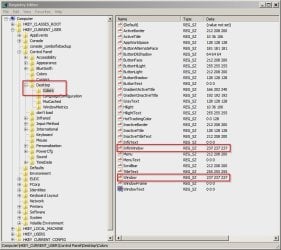
HKEY_CURRENT_USER\Control Panel\Desktop\Colors

Then backup those two registry keys you can mess about changing colors without worry.

If you see 255 255 255 (That's white) listed for anything labelled window or info window then you can change the values to match the desired color. Just don't change any text colors!

It does require logging off/ on or a reboot to take effect.
 

My Computer My Computer

At a glance

Microsoft Windows 7 Home Premium 64-bit 7601 ...AMD C-60 APU with Radeon(tm) HD Graphics4.00 GBAMD Radeon HD 6290 Graphics
Computer type
Laptop
Computer Manufacturer/Model Number
ASUS
OS
Microsoft Windows 7 Home Premium 64-bit 7601 Multiprocessor Free Service Pack 1
CPU
AMD C-60 APU with Radeon(tm) HD Graphics
Motherboard
ASUSTeK COMPUTER INC. X501U
Memory
4.00 GB
Graphics Card(s)
AMD Radeon HD 6290 Graphics
Sound Card
(1) AMD High Definition Audio Device (2) Realtek High Defi
Screen Resolution
1366 x 768 x 32 bits (4294967296 colors) @ 60 Hz
Hard Drives
Hitachi HTS545050A7E380 SATA Disk Device
Antivirus
Comodo CIS & FW, SecureAplus App Whitelisting, Threatfire
Browser
Cyberfox 64bit, Opera 64bit, Airfox
Other Info
Spy-The-Spy, HitmanPro.Alert, Norton Connect Safe, MJRegWatcher, BitDefender TrafficLight, Voodoo Shield, Zemana AntiMalware
Perhaps you could post a few screenshots making it clear which colors you want to change.

If you look at registry settings here:

HKEY_CURRENT_USER\Control Panel\Colors

HKEY_CURRENT_USER\Control Panel\Desktop\Colors

Then backup those two registry keys you can mess about changing colors without worry.

If you see 255 255 255 (That's white) listed for anything labelled window or info window then you can change the values to match the desired color. Just don't change any text colors!

It does require logging off/ on or a reboot to take effect.

Ok Thank you will do.
 

My Computer My Computer

At a glance

Windows 7 Ultimate 64-bit SP1Phenom II X4 98012.0GB Dual-Channel DDR3 @ 669MHz (9-9-9-24)2047MB NVIDIA GeForce GTX 650 Ti (Gigabyte)
Computer type
PC/Desktop
Computer Manufacturer/Model Number
custom build
OS
Windows 7 Ultimate 64-bit SP1
CPU
Phenom II X4 980
Motherboard
GA-890GPA-UD3H
Memory
12.0GB Dual-Channel DDR3 @ 669MHz (9-9-9-24)
Graphics Card(s)
2047MB NVIDIA GeForce GTX 650 Ti (Gigabyte)
Monitor(s) Displays
EQ3266e auria tv monitor
Screen Resolution
1360 x 768
Hard Drives
1863GB Western Digital WDC WD20EARX-00PASB0 ATA Device (SATA)
119GB OCZ-VERTEX4 ATA Device (SSD)
465GB Western Digital WDC WD5000AAKS-75A7B0 ATA Device (SATA)
PSU
Rosewill Xtreme Series RX750
Case
Antec Nine Hundred
Cooling
CPU water cooled and Case air cooled
Keyboard
Logitech wireless k260
Mouse
Logitech wireless M210
Antivirus
Malewarebytes,SpyBot S&D,SuperAntispyware
Browser
FireFoxe 30.0
Screenshots

Try changing the highlighted items to whatever values you want to use.

I will be away from my computer for around 14 hours or so.

Background 4.jpg

Background 5.jpg
 

My Computer My Computer

At a glance

Microsoft Windows 7 Home Premium 64-bit 7601 ...AMD C-60 APU with Radeon(tm) HD Graphics4.00 GBAMD Radeon HD 6290 Graphics
Computer type
Laptop
Computer Manufacturer/Model Number
ASUS
OS
Microsoft Windows 7 Home Premium 64-bit 7601 Multiprocessor Free Service Pack 1
CPU
AMD C-60 APU with Radeon(tm) HD Graphics
Motherboard
ASUSTeK COMPUTER INC. X501U
Memory
4.00 GB
Graphics Card(s)
AMD Radeon HD 6290 Graphics
Sound Card
(1) AMD High Definition Audio Device (2) Realtek High Defi
Screen Resolution
1366 x 768 x 32 bits (4294967296 colors) @ 60 Hz
Hard Drives
Hitachi HTS545050A7E380 SATA Disk Device
Antivirus
Comodo CIS & FW, SecureAplus App Whitelisting, Threatfire
Browser
Cyberfox 64bit, Opera 64bit, Airfox
Other Info
Spy-The-Spy, HitmanPro.Alert, Norton Connect Safe, MJRegWatcher, BitDefender TrafficLight, Voodoo Shield, Zemana AntiMalware
Confirm that settings stuck

Suggestion:

Go back into the registry and confirm that the settings that you applied have stuck. Since my last post I've tested several machines and was able to change background color by editing the registry on all of them without problems even without an admin account.

Check that any custom theme changer programs are not active or have been fully removed.

Also see the tutorial here and read about the restrictions on color changes depending upon the theme that 's in use.

http://www.sevenforums.com/tutorials/282-window-color-appearance-change.html

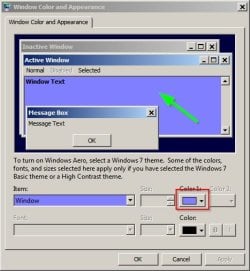
If you can live with "Classic Theme" use it then personalize. (Right click a blank part of your desktop then choose "Personalize" then "Window Color")

Background 6.jpg

Background 7.jpg

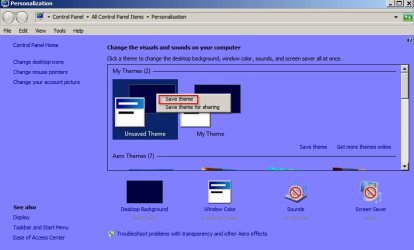
Save your current theme first though!

Background 8.jpg
 

My Computer My Computer

At a glance

Microsoft Windows 7 Home Premium 64-bit 7601 ...AMD C-60 APU with Radeon(tm) HD Graphics4.00 GBAMD Radeon HD 6290 Graphics
Computer type
Laptop
Computer Manufacturer/Model Number
ASUS
OS
Microsoft Windows 7 Home Premium 64-bit 7601 Multiprocessor Free Service Pack 1
CPU
AMD C-60 APU with Radeon(tm) HD Graphics
Motherboard
ASUSTeK COMPUTER INC. X501U
Memory
4.00 GB
Graphics Card(s)
AMD Radeon HD 6290 Graphics
Sound Card
(1) AMD High Definition Audio Device (2) Realtek High Defi
Screen Resolution
1366 x 768 x 32 bits (4294967296 colors) @ 60 Hz
Hard Drives
Hitachi HTS545050A7E380 SATA Disk Device
Antivirus
Comodo CIS & FW, SecureAplus App Whitelisting, Threatfire
Browser
Cyberfox 64bit, Opera 64bit, Airfox
Other Info
Spy-The-Spy, HitmanPro.Alert, Norton Connect Safe, MJRegWatcher, BitDefender TrafficLight, Voodoo Shield, Zemana AntiMalware
I really appreciate your help. I have changed a lot of stuff but not what I want. It is mind boggling but I am backing up everything I change or making a copy at least.
 

My Computer My Computer

At a glance

Windows 7 Ultimate 64-bit SP1Phenom II X4 98012.0GB Dual-Channel DDR3 @ 669MHz (9-9-9-24)2047MB NVIDIA GeForce GTX 650 Ti (Gigabyte)
Computer type
PC/Desktop
Computer Manufacturer/Model Number
custom build
OS
Windows 7 Ultimate 64-bit SP1
CPU
Phenom II X4 980
Motherboard
GA-890GPA-UD3H
Memory
12.0GB Dual-Channel DDR3 @ 669MHz (9-9-9-24)
Graphics Card(s)
2047MB NVIDIA GeForce GTX 650 Ti (Gigabyte)
Monitor(s) Displays
EQ3266e auria tv monitor
Screen Resolution
1360 x 768
Hard Drives
1863GB Western Digital WDC WD20EARX-00PASB0 ATA Device (SATA)
119GB OCZ-VERTEX4 ATA Device (SSD)
465GB Western Digital WDC WD5000AAKS-75A7B0 ATA Device (SATA)
PSU
Rosewill Xtreme Series RX750
Case
Antec Nine Hundred
Cooling
CPU water cooled and Case air cooled
Keyboard
Logitech wireless k260
Mouse
Logitech wireless M210
Antivirus
Malewarebytes,SpyBot S&D,SuperAntispyware
Browser
FireFoxe 30.0
Good stuff!

I really appreciate your help. I have changed a lot of stuff but not what I want. It is mind boggling but I am backing up everything I change or making a copy at least.

Yes, backing up is really sensible!
 

My Computer My Computer

At a glance

Microsoft Windows 7 Home Premium 64-bit 7601 ...AMD C-60 APU with Radeon(tm) HD Graphics4.00 GBAMD Radeon HD 6290 Graphics
Computer type
Laptop
Computer Manufacturer/Model Number
ASUS
OS
Microsoft Windows 7 Home Premium 64-bit 7601 Multiprocessor Free Service Pack 1
CPU
AMD C-60 APU with Radeon(tm) HD Graphics
Motherboard
ASUSTeK COMPUTER INC. X501U
Memory
4.00 GB
Graphics Card(s)
AMD Radeon HD 6290 Graphics
Sound Card
(1) AMD High Definition Audio Device (2) Realtek High Defi
Screen Resolution
1366 x 768 x 32 bits (4294967296 colors) @ 60 Hz
Hard Drives
Hitachi HTS545050A7E380 SATA Disk Device
Antivirus
Comodo CIS & FW, SecureAplus App Whitelisting, Threatfire
Browser
Cyberfox 64bit, Opera 64bit, Airfox
Other Info
Spy-The-Spy, HitmanPro.Alert, Norton Connect Safe, MJRegWatcher, BitDefender TrafficLight, Voodoo Shield, Zemana AntiMalware
Since I can not get mine to work any chance you want to use teamviewer ?
 

My Computer My Computer

At a glance

Windows 7 Ultimate 64-bit SP1Phenom II X4 98012.0GB Dual-Channel DDR3 @ 669MHz (9-9-9-24)2047MB NVIDIA GeForce GTX 650 Ti (Gigabyte)
Computer type
PC/Desktop
Computer Manufacturer/Model Number
custom build
OS
Windows 7 Ultimate 64-bit SP1
CPU
Phenom II X4 980
Motherboard
GA-890GPA-UD3H
Memory
12.0GB Dual-Channel DDR3 @ 669MHz (9-9-9-24)
Graphics Card(s)
2047MB NVIDIA GeForce GTX 650 Ti (Gigabyte)
Monitor(s) Displays
EQ3266e auria tv monitor
Screen Resolution
1360 x 768
Hard Drives
1863GB Western Digital WDC WD20EARX-00PASB0 ATA Device (SATA)
119GB OCZ-VERTEX4 ATA Device (SSD)
465GB Western Digital WDC WD5000AAKS-75A7B0 ATA Device (SATA)
PSU
Rosewill Xtreme Series RX750
Case
Antec Nine Hundred
Cooling
CPU water cooled and Case air cooled
Keyboard
Logitech wireless k260
Mouse
Logitech wireless M210
Antivirus
Malewarebytes,SpyBot S&D,SuperAntispyware
Browser
FireFoxe 30.0
Team Viewer

Thanks for the invite. Unfortunately I won't use Team Viewer or allow Remote Desktop connections. sorry about that.

If you look at the tutorial here on Seven Forums that I mentioned in my last post and look at this image:

14581d1245181650-window-color-appearance-change-window.jpg


(It's some way down the page under 8. The Default Advanced Appearance Settings)

You should notice that it's only possible to change the Window Color if you also select the Basic Theme or an Ease Of Access Theme.

That means using one of the themes listed in this screenshot:

173043d1314806313-theme-change-save-starter_basic-2.jpg


From this tutorial:

http://www.sevenforums.com/tutorials/280-theme-change-save.html

Other than that I'm afraid that it's going to mean other another third party theme changing software. Since the one that you tried to use didn't work.

Just for good measure here's the Advanced Appearance Settings - Backup and Restore in Windows tutorial that you could use before going any further!

http://www.sevenforums.com/tutorials/324228-advanced-appearance-settings-backup-restore-windows.html

I've used software from this site operated by another Seven Forums member and here's a link to some of the themes that are available:

WinAero: Classic Themes For Windows 7 - the Colorful Classic Themes

Also see the following:

WinAero: How to install 3rd party theme in Windows

Please note that this is not a recommendation and I haven't used these themes/ methods. It's just something that you could consider.

I reckon that you would probably be better off sticking with one of the themes that are supplied with Windows!
 

My Computer My Computer

At a glance

Microsoft Windows 7 Home Premium 64-bit 7601 ...AMD C-60 APU with Radeon(tm) HD Graphics4.00 GBAMD Radeon HD 6290 Graphics
Computer type
Laptop
Computer Manufacturer/Model Number
ASUS
OS
Microsoft Windows 7 Home Premium 64-bit 7601 Multiprocessor Free Service Pack 1
CPU
AMD C-60 APU with Radeon(tm) HD Graphics
Motherboard
ASUSTeK COMPUTER INC. X501U
Memory
4.00 GB
Graphics Card(s)
AMD Radeon HD 6290 Graphics
Sound Card
(1) AMD High Definition Audio Device (2) Realtek High Defi
Screen Resolution
1366 x 768 x 32 bits (4294967296 colors) @ 60 Hz
Hard Drives
Hitachi HTS545050A7E380 SATA Disk Device
Antivirus
Comodo CIS & FW, SecureAplus App Whitelisting, Threatfire
Browser
Cyberfox 64bit, Opera 64bit, Airfox
Other Info
Spy-The-Spy, HitmanPro.Alert, Norton Connect Safe, MJRegWatcher, BitDefender TrafficLight, Voodoo Shield, Zemana AntiMalware
Back
Top