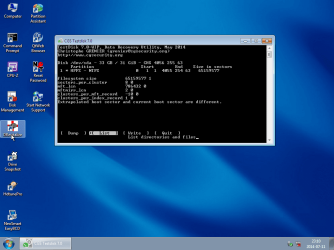
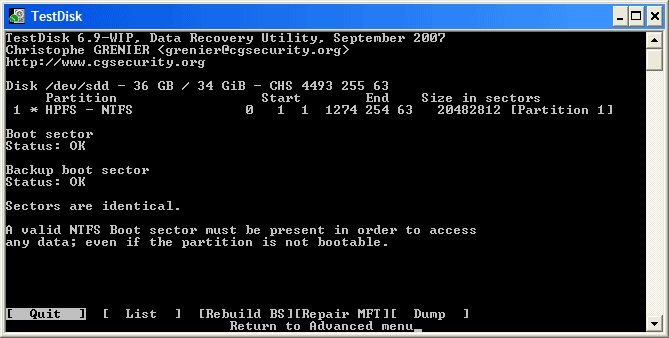
Recover data from a diskpart > clean command

It did find the $MFT mirror. NTFS bootsector and backup boot sector can be reconstructed with that information.

Actually not. MFT mirror is not a copy of MFT. Typically it is 4096 bytes in size and will only contain the first four entries of MFT table. Since MFT is the main structure defining NTFS, it is not possible to keep a full backup copy.

In this case, original MFT is not lost but rather partition table, "boot sector" and backup boot sectors are lost. To rebuilt the boot sectors, a valid partition entry with correct offset information should be present. Fortunately we can rebuilt the partition table with the info found by DMDE.

1985 sectors are overwritten.... less than 1MB.


I MB is very important than you think. I actually did some exercises which replicates OP's condition. Every time when i recovered the partition, Windows refused to identify the file system because of the zeroed out first sectors. Fortunately CHKDSK managed to recover those sectors as well as entire data.
 

My Computer My Computer

Computer type
PC/Desktop
OS
Windows 7 Ultimate x64
Sure walk me through it and Ill do it.
 

My Computer My Computer

Computer type
PC/Desktop
Computer Manufacturer/Model Number
Custom build
OS
Windows 10 Pro (64-bit)
CPU
Intel Core i7 - 4790K (4.0 GHz)
Motherboard
ASUS Z97 Sabertooth Mark 1
Memory
32GB Corsair Vengeance Pro 1600 MHz DDR3 RAM (Dual Channel)
Graphics Card(s)
ASUS 1GB DDR5 450GTS
Screen Resolution
2048x1152
Hard Drives
480GB OCZ Vector 150 SSD (Internal) -Primary OS Drive
160GB Segate x 2 (Internal)
2TB Seagate External USB 2.0
PSU
Corsair 850W
Case
Corsair Obsidian 900D
Cooling
Fan cooling
Keyboard
Logitech Flat Keyboard
Mouse
Razer Ouroboros Lazer Mouse
Antivirus
BitDefender Total Security 2015
Browser
All browsers
Other Info
Razer Kraken 7.1 Headset
Creative 7.1 Speaker System
It did find the $MFT mirror. NTFS bootsector and backup boot sector can be reconstructed with that information.

Actually not. MFT mirror is not a copy of MFT. Typically it is 4096 bytes in size and will only contain the first four entries of MFT table. Since MFT is the main structure defining NTFS, it is not possible to keep a full backup copy.

In this case, original MFT is not lost but rather partition table, "boot sector" and backup boot sectors are lost. To rebuilt the boot sectors, a valid partition entry with correct offset information should be present. Fortunately we can rebuilt the partition table with the info found by DMDE.

1985 sectors are overwritten.... less than 1MB.


I MB is very important than you think. I actually did some exercises which replicates OP's condition. Every time when i recovered the partition, Windows refused to identify the file system because of the zeroed out first sectors. Fortunately CHKDSK managed to recover those sectors as well as entire data.
I did write it wrong indeed, sorry for that. $MFT and $MFTMirr are still intact. NTFS bootsector can be rebuilt with that information.

Indeed sector 63 to 2047 are cleared.
 

My Computer My Computer

Computer type
Laptop
Computer Manufacturer/Model Number
ACER ASPIRE 5742G
OS
Microsoft Windows 7 Home Premium 64-bits 7601 Multiprocessor Free Service Pack 1
CPU
Intel(R) Core(TM) i3 CPU M 370 @ 2.40GHz
Motherboard
Acer Aspire 5742G
Memory
4,00 GB
Graphics Card(s)
ATI Mobility Radeon HD 5400 Series
Sound Card
(1) AMD High Definition Audio Device (2) Realtek High Defi
Screen Resolution
1366 x 768 x 32 bits (4294967296 colors) @ 60 Hz
Hard Drives
WDC WD5000BEVT-22ZAT0
Hi

This steps should be performed in a row. We are going to do this in three phases. Please follow the below steps.

1. Download and install "PartitionGuru" from Recover deleted files, Partition manager and Windows backup - PartitionGuru

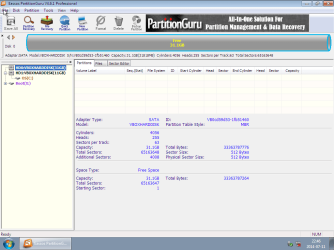
2. Open the tool and select your external HDD from the left pane. You will see the free disk space is illustrated like a cylindrical structure.

1 PG.png


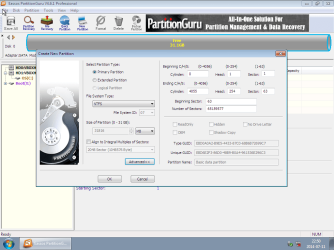
3. Right click on the unallocated space and choose "Create Ne Partition". You will see the new volume creation wizard. Make sure to uncheck the default tick mark at "Align to Integral Multiple of Sectors".

2 PG.png


4. Press the "Advanced" button and change the beginning sector to 63 if it is not already so. Leave all other settings intact. Take a screenshot for later reference and then press OK.


3 PG.png


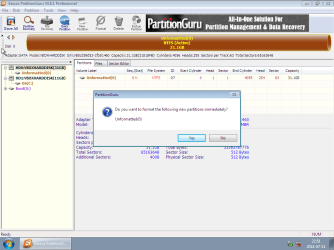
5. Press the "Save All" button and then press Yes to the dialogue box.

4 PG.png


6. Press No to the format dialogue. This is very important as choosing "Yes" may cause data loss. The format process will destroy original MFT and create an empty one. As long as the MFT is there untouched, we will be able to restore the lost partition.

5 PG.png


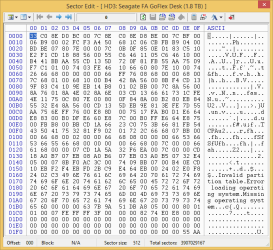
Then close "PartitionGuru" and post a snapshot of LBA 0 using "BOOTICE".
 
Last edited:

My Computer My Computer

Computer type
PC/Desktop
OS
Windows 7 Ultimate x64
OK I did exactly that and this is the screen of LBA 0 now

2.png
 

My Computer My Computer

Computer type
PC/Desktop
Computer Manufacturer/Model Number
Custom build
OS
Windows 10 Pro (64-bit)
CPU
Intel Core i7 - 4790K (4.0 GHz)
Motherboard
ASUS Z97 Sabertooth Mark 1
Memory
32GB Corsair Vengeance Pro 1600 MHz DDR3 RAM (Dual Channel)
Graphics Card(s)
ASUS 1GB DDR5 450GTS
Screen Resolution
2048x1152
Hard Drives
480GB OCZ Vector 150 SSD (Internal) -Primary OS Drive
160GB Segate x 2 (Internal)
2TB Seagate External USB 2.0
PSU
Corsair 850W
Case
Corsair Obsidian 900D
Cooling
Fan cooling
Keyboard
Logitech Flat Keyboard
Mouse
Razer Ouroboros Lazer Mouse
Antivirus
BitDefender Total Security 2015
Browser
All browsers
Other Info
Razer Kraken 7.1 Headset
Creative 7.1 Speaker System
In elevated command prompt:

Code:
diskpart
list disks  [COLOR=red](pick the correct disk number)[/COLOR]
select disk # [COLOR=red](replace # with the correct number)[/COLOR]
list part [COLOR=red](pick the correct parition number)[/COLOR]
select part # [COLOR=red](replace # with the correct number)[/COLOR]
detail part
exit

post output
 

My Computer My Computer

Computer type
Laptop
Computer Manufacturer/Model Number
ACER ASPIRE 5742G
OS
Microsoft Windows 7 Home Premium 64-bits 7601 Multiprocessor Free Service Pack 1
CPU
Intel(R) Core(TM) i3 CPU M 370 @ 2.40GHz
Motherboard
Acer Aspire 5742G
Memory
4,00 GB
Graphics Card(s)
ATI Mobility Radeon HD 5400 Series
Sound Card
(1) AMD High Definition Audio Device (2) Realtek High Defi
Screen Resolution
1366 x 768 x 32 bits (4294967296 colors) @ 60 Hz
Hard Drives
WDC WD5000BEVT-22ZAT0
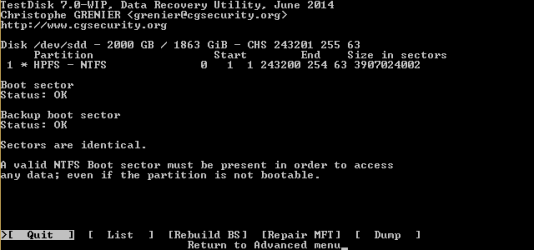
So far is good. Now the MBR is updated with partition info. A single NTFS partition starting at LBA63 and it consist of 3907024002 sectors or 1907726 MB in size. Now please follow the below steps.

1. Download latest version of "TestDisk" from http://www.cgsecurity.org/testdisk-7.0-WIP.win.zip

2. Run "TestDisk" and choose "Create" to create a new log file.

File:Create_log.gif


3. On the second screen, choose your "External Disk" (confirm by size and model number ).

File:Select_disk_update.gif


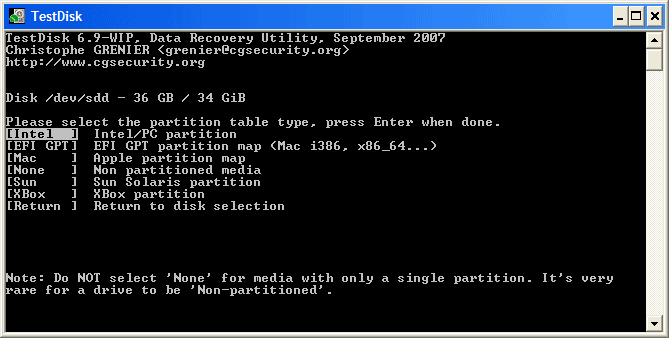
4.Choose "Intel" as the partition type.

Partition_table_type.gif


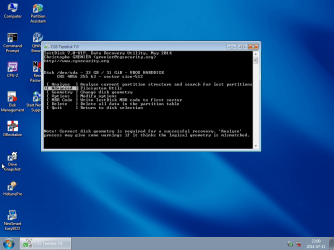
5. Select "[Advanced] Filesystem Utils".

9 TestDisk.png


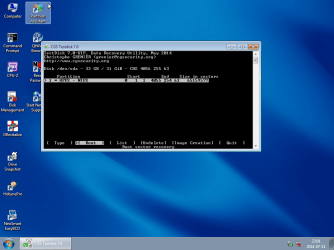
6. A single NTFS partition will be displayed. Make sure Boot is selected at the bottom and press Enter.

10 TestDisk.png


7.On the next window, select "Rebuild BS".

11 TestDisk.png


8.Now "TestDisk" will search for MFT and after sometime it will (hopefully) display a screen similar to the below one.

13 TestDisk.png


Now take a screenshot of that window (to post with next reply ).


9.Then use "Tab" key to select "Write" and press Enter. Confirm "Y" to the confirmation dialogue.

14 TestDisk.png


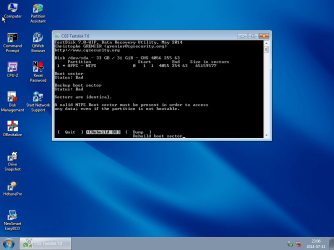
10. You should see a window similar to the below one with both "Boot sector" and "Backup Boot sector" status are displayed as OK.

After_backup_bs.gif


11. Now close "TestDisk" and open "BOOTICE". Navigate to "LBA 63" and press "Backup to file" button. This will allow you to save LBA63 as "bin" file. Zip this file and attach with next reply along with the "TestDisk" screenshot.


Make sure not to power down or reboot the system and not to try opening or running CHKDSK against the disk until i confirm.
 

My Computer My Computer

Computer type
PC/Desktop
OS
Windows 7 Ultimate x64
Here it is

3.png
 

My Computer My Computer

Computer type
PC/Desktop
Computer Manufacturer/Model Number
Custom build
OS
Windows 10 Pro (64-bit)
CPU
Intel Core i7 - 4790K (4.0 GHz)
Motherboard
ASUS Z97 Sabertooth Mark 1
Memory
32GB Corsair Vengeance Pro 1600 MHz DDR3 RAM (Dual Channel)
Graphics Card(s)
ASUS 1GB DDR5 450GTS
Screen Resolution
2048x1152
Hard Drives
480GB OCZ Vector 150 SSD (Internal) -Primary OS Drive
160GB Segate x 2 (Internal)
2TB Seagate External USB 2.0
PSU
Corsair 850W
Case
Corsair Obsidian 900D
Cooling
Fan cooling
Keyboard
Logitech Flat Keyboard
Mouse
Razer Ouroboros Lazer Mouse
Antivirus
BitDefender Total Security 2015
Browser
All browsers
Other Info
Razer Kraken 7.1 Headset
Creative 7.1 Speaker System
Did... its searching MFT. Will it take a lot of time? I think its scanning the whole disk again?
 

My Computer My Computer

Computer type
PC/Desktop
Computer Manufacturer/Model Number
Custom build
OS
Windows 10 Pro (64-bit)
CPU
Intel Core i7 - 4790K (4.0 GHz)
Motherboard
ASUS Z97 Sabertooth Mark 1
Memory
32GB Corsair Vengeance Pro 1600 MHz DDR3 RAM (Dual Channel)
Graphics Card(s)
ASUS 1GB DDR5 450GTS
Screen Resolution
2048x1152
Hard Drives
480GB OCZ Vector 150 SSD (Internal) -Primary OS Drive
160GB Segate x 2 (Internal)
2TB Seagate External USB 2.0
PSU
Corsair 850W
Case
Corsair Obsidian 900D
Cooling
Fan cooling
Keyboard
Logitech Flat Keyboard
Mouse
Razer Ouroboros Lazer Mouse
Antivirus
BitDefender Total Security 2015
Browser
All browsers
Other Info
Razer Kraken 7.1 Headset
Creative 7.1 Speaker System
Did... its searching MFT. Will it take a lot of time? I think its scanning the whole disk again?
It will take a lot of time! Follow Anshad Edavana advice. After that the volume bootsector and $MFT are fine again. I think you will get 99.9% percent of data back.

If Anshad Edavana advises you to do a chkdsk please watch carefully which files are damaged!
 

My Computer My Computer

Computer type
Laptop
Computer Manufacturer/Model Number
ACER ASPIRE 5742G
OS
Microsoft Windows 7 Home Premium 64-bits 7601 Multiprocessor Free Service Pack 1
CPU
Intel(R) Core(TM) i3 CPU M 370 @ 2.40GHz
Motherboard
Acer Aspire 5742G
Memory
4,00 GB
Graphics Card(s)
ATI Mobility Radeon HD 5400 Series
Sound Card
(1) AMD High Definition Audio Device (2) Realtek High Defi
Screen Resolution
1366 x 768 x 32 bits (4294967296 colors) @ 60 Hz
Hard Drives
WDC WD5000BEVT-22ZAT0

My Computer My Computer

Computer type
PC/Desktop
Computer Manufacturer/Model Number
Custom build
OS
Windows 10 Pro (64-bit)
CPU
Intel Core i7 - 4790K (4.0 GHz)
Motherboard
ASUS Z97 Sabertooth Mark 1
Memory
32GB Corsair Vengeance Pro 1600 MHz DDR3 RAM (Dual Channel)
Graphics Card(s)
ASUS 1GB DDR5 450GTS
Screen Resolution
2048x1152
Hard Drives
480GB OCZ Vector 150 SSD (Internal) -Primary OS Drive
160GB Segate x 2 (Internal)
2TB Seagate External USB 2.0
PSU
Corsair 850W
Case
Corsair Obsidian 900D
Cooling
Fan cooling
Keyboard
Logitech Flat Keyboard
Mouse
Razer Ouroboros Lazer Mouse
Antivirus
BitDefender Total Security 2015
Browser
All browsers
Other Info
Razer Kraken 7.1 Headset
Creative 7.1 Speaker System
It will take some time. Just wait patiently - eventually it will find the MFT and display the new boot sector write dialogue.
 

My Computer My Computer

Computer type
PC/Desktop
OS
Windows 7 Ultimate x64

My Computer My Computer

Computer type
PC/Desktop
Computer Manufacturer/Model Number
Custom build
OS
Windows 10 Pro (64-bit)
CPU
Intel Core i7 - 4790K (4.0 GHz)
Motherboard
ASUS Z97 Sabertooth Mark 1
Memory
32GB Corsair Vengeance Pro 1600 MHz DDR3 RAM (Dual Channel)
Graphics Card(s)
ASUS 1GB DDR5 450GTS
Screen Resolution
2048x1152
Hard Drives
480GB OCZ Vector 150 SSD (Internal) -Primary OS Drive
160GB Segate x 2 (Internal)
2TB Seagate External USB 2.0
PSU
Corsair 850W
Case
Corsair Obsidian 900D
Cooling
Fan cooling
Keyboard
Logitech Flat Keyboard
Mouse
Razer Ouroboros Lazer Mouse
Antivirus
BitDefender Total Security 2015
Browser
All browsers
Other Info
Razer Kraken 7.1 Headset
Creative 7.1 Speaker System
sector 63 (in rar file) looks like a valid bootsector. Testdisk says it's valid and backup boot sector is the same. Wait for Anshad Edavana to get further instructions.

Windows sees the disk with a drive letter now? Does Disk Management see the partition, is it NTFS?
 

My Computer My Computer

Computer type
Laptop
Computer Manufacturer/Model Number
ACER ASPIRE 5742G
OS
Microsoft Windows 7 Home Premium 64-bits 7601 Multiprocessor Free Service Pack 1
CPU
Intel(R) Core(TM) i3 CPU M 370 @ 2.40GHz
Motherboard
Acer Aspire 5742G
Memory
4,00 GB
Graphics Card(s)
ATI Mobility Radeon HD 5400 Series
Sound Card
(1) AMD High Definition Audio Device (2) Realtek High Defi
Screen Resolution
1366 x 768 x 32 bits (4294967296 colors) @ 60 Hz
Hard Drives
WDC WD5000BEVT-22ZAT0
Great."TestDIsk" is able to construct a valid NTFS boot sector. Total number of sectors and MFT start cluster numbers are perfectly matching. Now it is the time to do check disk. Please follow the below instructions.

1.Open an elevated command prompt.

http://www.sevenforums.com/tutorials/783-elevated-command-prompt.html

2.Enter check disk command like in the below example.

CHKDSK X: /F


Where replace "X" with the actual drive letter of the external disk( it will be probably recognized as RAW ).


This may take some time to complete. When it finishes, reboot the system and report whether you can access the partition.
 

My Computer My Computer

Computer type
PC/Desktop
OS
Windows 7 Ultimate x64
Great."TestDIsk" is able to construct a valid NTFS boot sector. Total number of sectors and MFT start cluster numbers are perfectly matching. Now it is the time to do check disk. Please follow the below instructions.

1.Open an elevated command prompt.

http://www.sevenforums.com/tutorials/783-elevated-command-prompt.html

2.Enter check disk command like in the below example.

CHKDSK X: /F


Where replace "X" with the actual drive letter of the external disk.


This may take some time to complete. Wren it finishes, reboot the system and report whether you can access the partition.
please write down which files have been corrupted!
 

My Computer My Computer

Computer type
Laptop
Computer Manufacturer/Model Number
ACER ASPIRE 5742G
OS
Microsoft Windows 7 Home Premium 64-bits 7601 Multiprocessor Free Service Pack 1
CPU
Intel(R) Core(TM) i3 CPU M 370 @ 2.40GHz
Motherboard
Acer Aspire 5742G
Memory
4,00 GB
Graphics Card(s)
ATI Mobility Radeon HD 5400 Series
Sound Card
(1) AMD High Definition Audio Device (2) Realtek High Defi
Screen Resolution
1366 x 768 x 32 bits (4294967296 colors) @ 60 Hz
Hard Drives
WDC WD5000BEVT-22ZAT0
CHKDSK finished and it found some free space marked as allocated.

Errors like below..

Correcting error in index $I30 for file 1600.
CHKDSK discovered free space marked as allocated in the bitmap for index $I30 for file 1600.


And recovering orphaned files messages like below...

Recovering orphaned file ~UTORR~1.DAT (9342) into directory file 9358.

But more or less I found all the data back :) Thanks a lot for the enormous help in the past few weeks.

Was wondering though, should I back up my data and format the drive so as to align the boot sector to 2048? or 63 as it is now is good too?
 

My Computer My Computer

Computer type
PC/Desktop
Computer Manufacturer/Model Number
Custom build
OS
Windows 10 Pro (64-bit)
CPU
Intel Core i7 - 4790K (4.0 GHz)
Motherboard
ASUS Z97 Sabertooth Mark 1
Memory
32GB Corsair Vengeance Pro 1600 MHz DDR3 RAM (Dual Channel)
Graphics Card(s)
ASUS 1GB DDR5 450GTS
Screen Resolution
2048x1152
Hard Drives
480GB OCZ Vector 150 SSD (Internal) -Primary OS Drive
160GB Segate x 2 (Internal)
2TB Seagate External USB 2.0
PSU
Corsair 850W
Case
Corsair Obsidian 900D
Cooling
Fan cooling
Keyboard
Logitech Flat Keyboard
Mouse
Razer Ouroboros Lazer Mouse
Antivirus
BitDefender Total Security 2015
Browser
All browsers
Other Info
Razer Kraken 7.1 Headset
Creative 7.1 Speaker System
Glad to hear that. The errors you saw are actually i expected. The index allocation repairing is needed because of the damage caused by DISKPART. Can you please open some randome files on random directories and make sure they are working ?.

Was wondering though, should I back up my data and format the drive so as to align the boot sector to 2048? or 63 as it is now is good too?


Unless you are going to try DISKPART again, it is not necessary. However if you have another spare disk which is big enough to hold all the data, you can definitely try that.
 

My Computer My Computer

Computer type
PC/Desktop
OS
Windows 7 Ultimate x64
CHKDSK finished and it found some free space marked as allocated.

Errors like below..

Correcting error in index $I30 for file 1600.
CHKDSK discovered free space marked as allocated in the bitmap for index $I30 for file 1600.

And recovering orphaned files messages like below...

Recovering orphaned file ~UTORR~1.DAT (9342) into directory file 9358.

But more or less I found all the data back :) Thanks a lot for the enormous help in the past few weeks.

Was wondering though, should I back up my data and format the drive so as to align the boot sector to 2048? or 63 as it is now is good too?
You can align a partition with partitioning software. No need to reformat. Aligning isn't needed in your case.
 

My Computer My Computer

Computer type
Laptop
Computer Manufacturer/Model Number
ACER ASPIRE 5742G
OS
Microsoft Windows 7 Home Premium 64-bits 7601 Multiprocessor Free Service Pack 1
CPU
Intel(R) Core(TM) i3 CPU M 370 @ 2.40GHz
Motherboard
Acer Aspire 5742G
Memory
4,00 GB
Graphics Card(s)
ATI Mobility Radeon HD 5400 Series
Sound Card
(1) AMD High Definition Audio Device (2) Realtek High Defi
Screen Resolution
1366 x 768 x 32 bits (4294967296 colors) @ 60 Hz
Hard Drives
WDC WD5000BEVT-22ZAT0

My Computer My Computer

Computer type
PC/Desktop
Computer Manufacturer/Model Number
Acer
OS
Windows 7 Home Premium x64bit
CPU
AMD Processor C-50
Memory
3 GB DDR3
Antivirus
Norton
Browser
Google Chrome
Back
Top