Solved Stuck at windows logon / recovery environment

heinzlet

New member
Local time
11:08 PM
Messages
12
Hi, I hope you guys can help... the other day I was reinstalling windows 7 when a power blackout happened
... the process was just starting, I mean really.. I literally clicked install windows and after like 5-10 seconds the power went out ... ok so after that I turn on the computer and I find out that my session was still there but I couldn't log In it says "the user profile service failed the logon user profile cannot be loaded"... I tried reinstalling windows 7 with the disk thru the bios but it seems that I can't access the bios either... the only thing I have left is system recovery options which are only accesible through pressing the power button when I turn the computer on... Startup repair doesn't work, tried several times... I don't have an image recovery, neither does the system restore option works... it seems that the only hope I have is the command prompt option but I have no idea what to do there... the only thing I tried was creating a new admin user but it didn't work... I don't care about my files... I just want to be able to install windows 7 again from scratch... could I do that from the command prompt? or like anything at the recovery options environment ?


Hoping you guys can help me:):cry:
 

My Computer My Computer

At a glance

windows 7 ultimate 32 bits
Computer type
PC/Desktop
Computer Manufacturer/Model Number
lenovo g400
OS
windows 7 ultimate 32 bits

My Computer My Computer

At a glance

Windows 10 ProAMD Ryzen 5 2400G Processor with Radeon RX Ve...G.SKILL Ripjaws V Series 16GB (2 x 8GB) 288-P...2047MB NVIDIA GeForce GTX 1060 6GB (EVGA)
Computer type
PC/Desktop
Computer Manufacturer/Model Number
Custom Built
OS
Windows 10 Pro
CPU
AMD Ryzen 5 2400G Processor with Radeon RX Vega 11 Graphics
Motherboard
ASRock X470 Master SLI/AC AM4 AMD Promontory X470 SATA 6Gb/s
Memory
G.SKILL Ripjaws V Series 16GB (2 x 8GB) 288-Pin DDR4 SDRAM D
Graphics Card(s)
2047MB NVIDIA GeForce GTX 1060 6GB (EVGA)
Sound Card
Motherboard Built in
Monitor(s) Displays
Acer R240HY bidx 23.8-Inch IPS HDMI DVI VGA (1920 x 1080) Wi
Screen Resolution
1920 x 1080
Hard Drives
1TB Sandisk SSD PLUS (Main drive)
500 GB Seagate 7200 RPM (Games)
500 GB Western Digital 7200 RPM (Virtual Machines)
PSU
CORSAIR TX Series TX650M 650W 80+ Gold Modular Power Supply
Case
CORSAIR CARBIDE SPEC-02 Mid-Tower Gaming Case, Red LED Fan
Cooling
220mm, two 120mm, and four 60mm fans
Keyboard
Wired Dell keyboard
Mouse
Wireless Logitech mouse
Internet Speed
250mb down, 30mb up
Antivirus
Panda Cloud Antivirus
Browser
Chrome-ish x64
Other Info
Your awesome for reading this.
I can't even get to the bios, how am I supposed to do a clean install... all I have is the recovery environment display with the command prompt option (the other ones doesn't work... along with the startup thingy...)... of course to get there I have to press the power button when I turn the computer on otherwise I just get to the logon screen and that message comes up when I log in "the user profile service failed the logon user profile cannot be loaded"

I hope you guys can help me :cry:

EDIT: also I can't get to safe mode... the option just doesn't show up... is there anything I can do...?
 

My Computer My Computer

At a glance

windows 7 ultimate 32 bits
Computer type
PC/Desktop
Computer Manufacturer/Model Number
lenovo g400
OS
windows 7 ultimate 32 bits
I think you need to read the tutorial more closely :)
 

My Computer My Computer

At a glance

Windows 10 ProAMD Ryzen 5 2400G Processor with Radeon RX Ve...G.SKILL Ripjaws V Series 16GB (2 x 8GB) 288-P...2047MB NVIDIA GeForce GTX 1060 6GB (EVGA)
Computer type
PC/Desktop
Computer Manufacturer/Model Number
Custom Built
OS
Windows 10 Pro
CPU
AMD Ryzen 5 2400G Processor with Radeon RX Vega 11 Graphics
Motherboard
ASRock X470 Master SLI/AC AM4 AMD Promontory X470 SATA 6Gb/s
Memory
G.SKILL Ripjaws V Series 16GB (2 x 8GB) 288-Pin DDR4 SDRAM D
Graphics Card(s)
2047MB NVIDIA GeForce GTX 1060 6GB (EVGA)
Sound Card
Motherboard Built in
Monitor(s) Displays
Acer R240HY bidx 23.8-Inch IPS HDMI DVI VGA (1920 x 1080) Wi
Screen Resolution
1920 x 1080
Hard Drives
1TB Sandisk SSD PLUS (Main drive)
500 GB Seagate 7200 RPM (Games)
500 GB Western Digital 7200 RPM (Virtual Machines)
PSU
CORSAIR TX Series TX650M 650W 80+ Gold Modular Power Supply
Case
CORSAIR CARBIDE SPEC-02 Mid-Tower Gaming Case, Red LED Fan
Cooling
220mm, two 120mm, and four 60mm fans
Keyboard
Wired Dell keyboard
Mouse
Wireless Logitech mouse
Internet Speed
250mb down, 30mb up
Antivirus
Panda Cloud Antivirus
Browser
Chrome-ish x64
Other Info
Your awesome for reading this.
I just don't know how to boot my computer from my Windows 7 DVD in my current situation, could you please help me?:cry:
 

My Computer My Computer

At a glance

windows 7 ultimate 32 bits
Computer type
PC/Desktop
Computer Manufacturer/Model Number
lenovo g400
OS
windows 7 ultimate 32 bits
Most users have BIOS set to boot from dvd/cd first anyways.. make the required cd/dvd from the tutorial, insert it in the dvd , then start computer up and it should boot straight from the dvd .
 

My Computer My Computer

At a glance

Win 7 Home Premium SP1 32 bitAMD Athlon 64 X2 5000B4.00 GB Dual-Channel DDR2 @ 370MHz (6-6-6-18)Acer E181H (1366x768@60Hz) 64MB GeForce 6150 ...
Computer type
PC/Desktop
Computer Manufacturer/Model Number
Dell optiplex 740
OS
Win 7 Home Premium SP1 32 bit
CPU
AMD Athlon 64 X2 5000B
Motherboard
Dell Inc. 0YP696 (Socket M2 )
Memory
4.00 GB Dual-Channel DDR2 @ 370MHz (6-6-6-18)
Graphics Card(s)
Acer E181H (1366x768@60Hz) 64MB GeForce 6150 LE (Dell)
Sound Card
SigmaTel High Definition Audio CODEC
Monitor(s) Displays
Acer E181H (1366x768@60Hz) 64MB GeForce 6150 LE (Dell)
Hard Drives
699GB Seagate ST375064 0NS SCSI Disk Device (ATA)
Case
Mini tower
Internet Speed
Ping 36 ms, Download 57.71 mbps , Upload 11.79mbps
Antivirus
Free Avast. Pro paid Mbam , Free Sas
Browser
Palemoon .
I tried inserting the dvd in but nothing happens, it takes me to the logon screen and I just can't log in... the only thing I have as I said before is the command prompt at the recovery environment...

please help :(
 

My Computer My Computer

At a glance

windows 7 ultimate 32 bits
Computer type
PC/Desktop
Computer Manufacturer/Model Number
lenovo g400
OS
windows 7 ultimate 32 bits
once you put the dvd in.. power off.. then power back on.. should boot from the dvd
 

My Computer My Computer

At a glance

Win 7 Home Premium SP1 32 bitAMD Athlon 64 X2 5000B4.00 GB Dual-Channel DDR2 @ 370MHz (6-6-6-18)Acer E181H (1366x768@60Hz) 64MB GeForce 6150 ...
Computer type
PC/Desktop
Computer Manufacturer/Model Number
Dell optiplex 740
OS
Win 7 Home Premium SP1 32 bit
CPU
AMD Athlon 64 X2 5000B
Motherboard
Dell Inc. 0YP696 (Socket M2 )
Memory
4.00 GB Dual-Channel DDR2 @ 370MHz (6-6-6-18)
Graphics Card(s)
Acer E181H (1366x768@60Hz) 64MB GeForce 6150 LE (Dell)
Sound Card
SigmaTel High Definition Audio CODEC
Monitor(s) Displays
Acer E181H (1366x768@60Hz) 64MB GeForce 6150 LE (Dell)
Hard Drives
699GB Seagate ST375064 0NS SCSI Disk Device (ATA)
Case
Mini tower
Internet Speed
Ping 36 ms, Download 57.71 mbps , Upload 11.79mbps
Antivirus
Free Avast. Pro paid Mbam , Free Sas
Browser
Palemoon .
If it is stuck in a recovery environment, such as a vista recovery partition, you'll have to delete that partition before you can reinstall windows 7. The recovery partition will supersede the OS partition and will usurp the drive C assignment. Just make a partition manager boot disk from acronis/paragon/ or use hiren's, from that you can delete the partition directly using any number of tools that are on that disk.
 

My Computer My Computer

At a glance

Windows 10/Windows 7 (My Idea- Virtual PC)Intel(R) Core(TM) i5-3470 CPU @ 3.20GHz16 GBnVidia GeForce GTX 750 Ti (2GB)
Computer type
PC/Desktop
Computer Manufacturer/Model Number
Lenovo Thinkcenter M92p
OS
Windows 10/Windows 7 (My Idea- Virtual PC)
CPU
Intel(R) Core(TM) i5-3470 CPU @ 3.20GHz
Motherboard
Lenovo MahoBay
Memory
16 GB
Graphics Card(s)
nVidia GeForce GTX 750 Ti (2GB)
Sound Card
nVidia HD Audio
Monitor(s) Displays
RCA 4KTV 50"
Screen Resolution
3840p x 2160p
Hard Drives
Onboard:
Seagate ST500DM009-2F110A 500GB
WDC WD4000FYYZ-01UL1B1 (WD-WCC131910831) [3726 GB]

USB 3.0
My Book 1140 (WCAZAD122454) [1862 GB]
Apple MDT MD10EAVS-00D7B0 (0000AB123473) [931 GB]

External:
WD Blue Innostar/Matsunichi (465 GB)
WD
PSU
Stock Thinkcenter M92p
Case
Stock Thinkcenter M92p
Cooling
Active
Keyboard
BYTEC BY-GA-KT-100-AC
Mouse
BYTEC
Internet Speed
1 GHz Down, 40 Mbps Up
Antivirus
Windows Defender
Browser
EDGE
Other Info
Old Other Info:
I finally have an Intel machine that has more than 8GB of Ram.
My ASUS M2N-SE AMD Windows 7 machine is back to Windows 7. Replaced the AMD 4400+ CPU and maxed out the RAM (4GB).
My Core Duo machine is only 2GB of Ram and it is locked to Windows XP in order to run Pro Tools 6.4, which I have been using since 2004.
I have one other Dell OptiPlex 980 tower, Identical to this one,
did as you said, still nothing... it takes me to the logon screen again.

help please:cry:
 

My Computer My Computer

At a glance

windows 7 ultimate 32 bits
Computer type
PC/Desktop
Computer Manufacturer/Model Number
lenovo g400
OS
windows 7 ultimate 32 bits
If it is stuck in a recovery environment, such as a vista recovery partition, you'll have to delete that partition before you can reinstall windows 7. The recovery partition will supersede the OS partition and will usurp the drive C assignment. Just make a partition manager boot disk from acronis/paragon/ or use hiren's, from that you can delete the partition directly using any number of tools that are on that disk.

I'm not actually stuck at it but its the only thing I got apart from the logon screen... anyway could you please explain to me how to exactly do that? I'm kinda new to this... please help :cry:

EDIT: I'm on windows 7 ultimate
EDIT: Even the session photo is not there anymore, its like if it was deleted...
 

My Computer My Computer

At a glance

windows 7 ultimate 32 bits
Computer type
PC/Desktop
Computer Manufacturer/Model Number
lenovo g400
OS
windows 7 ultimate 32 bits
You need to make bios look at the dvd drive first. If you have a bootable dvd in there, then it will boot and you can clean install.

Most bios have a key (mine is f11) if pressed during post brings up a one time boot menu selection screen.

They also have another key ( mine is F2 )which takes you into bios setup. From there you can manually set dvd drive to first boot device.

It seems your bios currently has your primary hard drive set first in boot order.

Either of the above methods will be fine to select dvd drive.
 

My Computers My Computers

  • At a glance

    7 X64i5 84002x8gb 3200mhz
    Computer type
    PC/Desktop
    OS
    7 X64
    CPU
    i5 8400
    Motherboard
    gigabyte b365m ds3h
    Memory
    2x8gb 3200mhz
    Hard Drives
    various
    PSU
    pure power 11 400w cm
    Case
    Coolermaster
    Cooling
    cryorig m9i
  • At a glance

    7x64g54008gb ddr4 2400
    Computer type
    PC/Desktop
    OS
    7x64
    CPU
    g5400
    Motherboard
    ga b365m ds3h
    Memory
    8gb ddr4 2400
    PSU
    xfx pro 450w
If you can't access the BIOS to set the first boot drive to DVD your other option may be to start immediately tapping F8 at boot. F8 allows you to override the preset BIOS boot order for this boot only. If that doesn't work either then your BIOS may be damaged. Hope that isn't the case as it isn't repairable. Are you quite certain you know how to access BIOS? On my Lenovo E355 it's Enter at boot.
 

My Computer My Computer

At a glance

Windows 7 Pro 64 bitIntel i58GB KINGSTON DUAL-DDR3 1600MHz2GB AMD RADEON™ R7 250
Computer type
PC/Desktop
Computer Manufacturer/Model Number
PC Specialist Custom
OS
Windows 7 Pro 64 bit
CPU
Intel i5
Motherboard
ASUS® H81M-PLUS
Memory
8GB KINGSTON DUAL-DDR3 1600MHz
Graphics Card(s)
2GB AMD RADEON™ R7 250
Hard Drives
120GB KINGSTON V300 SSD
1TB WD CAVIAR BLACK WD1003FZEX
You need to make bios look at the dvd drive first. If you have a bootable dvd in there, then it will boot and you can clean install.

Most bios have a key (mine is f11) if pressed during post brings up a one time boot menu selection screen.

They also have another key ( mine is F2 )which takes you into bios setup. From there you can manually set dvd drive to first boot device.

It seems your bios currently has your primary hard drive set first in boot order.

Either of the above methods will be fine to select dvd drive.


how can I know which one is my key? I tried with every single F key with no result the only thing that actually does something is pressing del + supr but that takes me to something called " windows boot manager" and it gives me two options, windows 7 ultimate and a windows memory diagnostic... what should I do? .......... Is it possible to set my bios to boot the dvd first from the command prompt? please help :cry:


EDIT: its a lenovo g400
 

My Computer My Computer

At a glance

windows 7 ultimate 32 bits
Computer type
PC/Desktop
Computer Manufacturer/Model Number
lenovo g400
OS
windows 7 ultimate 32 bits
If you can't access the BIOS to set the first boot drive to DVD your other option may be to start immediately tapping F8 at boot. F8 allows you to override the preset BIOS boot order for this boot only. If that doesn't work either then your BIOS may be damaged. Hope that isn't the case as it isn't repairable. Are you quite certain you know how to access BIOS? On my Lenovo E355 it's Enter at boot.

F8 doesn't work, Its a lenovo g400
 

My Computer My Computer

At a glance

windows 7 ultimate 32 bits
Computer type
PC/Desktop
Computer Manufacturer/Model Number
lenovo g400
OS
windows 7 ultimate 32 bits
and what about Enter at boot?
 

My Computer My Computer

At a glance

Windows 7 Pro 64 bitIntel i58GB KINGSTON DUAL-DDR3 1600MHz2GB AMD RADEON™ R7 250
Computer type
PC/Desktop
Computer Manufacturer/Model Number
PC Specialist Custom
OS
Windows 7 Pro 64 bit
CPU
Intel i5
Motherboard
ASUS® H81M-PLUS
Memory
8GB KINGSTON DUAL-DDR3 1600MHz
Graphics Card(s)
2GB AMD RADEON™ R7 250
Hard Drives
120GB KINGSTON V300 SSD
1TB WD CAVIAR BLACK WD1003FZEX
and what about Enter at boot?

I just tried that and it works just like del + supr, it takes me to something called "windows boot manager" and it gives me two options as I said above, windows 7 ultimate (takes me to the logon screen which doesn't work) and a tool called windows memory diagnostic...

please help, thank you for all your support you've given me so far guys :cry:
 

My Computer My Computer

At a glance

windows 7 ultimate 32 bits
Computer type
PC/Desktop
Computer Manufacturer/Model Number
lenovo g400
OS
windows 7 ultimate 32 bits
There are a lot of prblems with win 8 due to fast startup.


That shouldn't be affecting you here.

Last I heard F2 is for bios setup on lenovo 400. They changed it to F1 at some stage. F12 should be for boot menu.

Press power button to start the machine, then immediately start tapping F2 key to enter BIOS setup. You need to hit F2 ( or F12 ) before it has a chance to try and boot from the HD.
 

My Computers My Computers

  • At a glance

    7 X64i5 84002x8gb 3200mhz
    Computer type
    PC/Desktop
    OS
    7 X64
    CPU
    i5 8400
    Motherboard
    gigabyte b365m ds3h
    Memory
    2x8gb 3200mhz
    Hard Drives
    various
    PSU
    pure power 11 400w cm
    Case
    Coolermaster
    Cooling
    cryorig m9i
  • At a glance

    7x64g54008gb ddr4 2400
    Computer type
    PC/Desktop
    OS
    7x64
    CPU
    g5400
    Motherboard
    ga b365m ds3h
    Memory
    8gb ddr4 2400
    PSU
    xfx pro 450w
There are a lot of prblems with win 8 due to fast startup.


That shouldn't be affecting you here.

Last I heard F2 is for bios setup on lenovo 400. They changed it to F1 at some stage. F12 should be for boot menu.

Press power button to start the machine, then immediately start tapping F2 key to enter BIOS setup. You need to hit F2 ( or F12 ) before it has a chance to try and boot from the HD.

none of the keys worked.... I tried so many times that it took me to the recovery environment again... Is the bios the only way to solve my problem? is there any other chance of getting to reinstall windows 7 through the command prompt at the recovery environment? :cry::cry:

thanks, please help :cry:
 

My Computer My Computer

At a glance

windows 7 ultimate 32 bits
Computer type
PC/Desktop
Computer Manufacturer/Model Number
lenovo g400
OS
windows 7 ultimate 32 bits
is there any other chance of getting to reinstall windows 7 through the command prompt at the recovery environment?


Yes, but it may be complicated to explain.

At cmd propmt, type notepad.

When notepad pops up, clikc File>Save. You will now be able to browse around.

NOTE - you must select "all files " not "text files" in notepad dropdown.

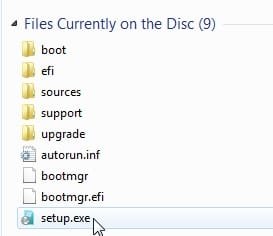
Browse to setup on your dvd drive and run it.

setup.jpg
 

My Computers My Computers

  • At a glance

    7 X64i5 84002x8gb 3200mhz
    Computer type
    PC/Desktop
    OS
    7 X64
    CPU
    i5 8400
    Motherboard
    gigabyte b365m ds3h
    Memory
    2x8gb 3200mhz
    Hard Drives
    various
    PSU
    pure power 11 400w cm
    Case
    Coolermaster
    Cooling
    cryorig m9i
  • At a glance

    7x64g54008gb ddr4 2400
    Computer type
    PC/Desktop
    OS
    7x64
    CPU
    g5400
    Motherboard
    ga b365m ds3h
    Memory
    8gb ddr4 2400
    PSU
    xfx pro 450w
Back
Top