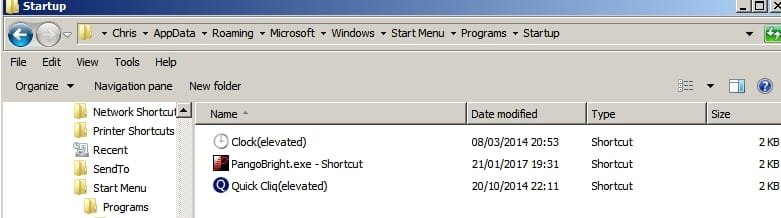
I'm having a problem with remembering how to add/enable a program that will start at Windows Logon. I don't seem to be having much luck with various searches. Perhaps I'm not using the right search terms/parameters.
Could someone kindly enlighten me as to how to do this, or provide a link to a source that explains how to accomplish this (in simple terms this aged, non-techie person [me]can understand)?
Thank you for your time and any help!
My Computer
Computer type
PC/Desktop
Computer Manufacturer/Model Number
Dell Inspiron Desktop (refurbished)
OS
Win 7 Home Premium x64 SP1
CPU
Intel Core i3, 3.07 gHz
Motherboard
Dell
Memory
6 GB
Graphics Card(s)
ASUS VH198 (1440x900@60Hz) Intel Q965/Q963 Express Chipset F
Monitor(s) Displays
Asus
Hard Drives
Western Digital 1 TB SATA HDD (Internal)
WD 1-TB "My Passport Ultra" (external drive used for system images)
Keyboard
Azio KB505U wired, standard, large print 3-color backlit
Mouse
Logitech (wired)
Internet Speed
Download: up to 50 Mbps | Upload: 5 Mbps
Antivirus
MSE
Browser
Firefox (default) and IE11
Other Info
MBAM 3xx (lifetime license) |
SAS (on-demand) | FF w/NoScript & IE11 | uBlock Origin | POP Peeper Pro | Aeris Calendar | GWX Control Panel Monitor | CPUID
2nd ASUS X299 Apex/Intel i9-9940x with Custom water loop/7H-Prem-x64/Corsair 450D case/Ram Trident-z 3600C16 4x8gb / Samsung970Evo plus 500gb SSD/Dual ssd EZ swap evo/PSU EVGA SuperNova 1200w-P2 80+Platinum/GPU Titan Xp /8-ML-140 on push-pull on 2-280GTX rads
Hi,
You could first see if they are listed using start button and type in the search box
msconfig
Then the enter key and startup section and see if they exist and are checked.
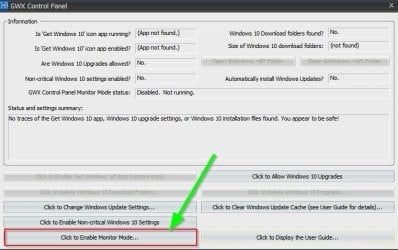
If so then review each of the programs setting gwx I know has the option to start or not with windows
The other I have no idea but it should have basic settings so just take a look see
My Computer
Computer type
PC/Desktop
Computer Manufacturer/Model Number
Custom assembled by me :}
OS
Win-7-Pro64bit 7-H-Prem-64bit
CPU
i7-5930K 2nd i9-9940x both water blocked VRM's too
2nd ASUS X299 Apex/Intel i9-9940x with Custom water loop/7H-Prem-x64/Corsair 450D case/Ram Trident-z 3600C16 4x8gb / Samsung970Evo plus 500gb SSD/Dual ssd EZ swap evo/PSU EVGA SuperNova 1200w-P2 80+Platinum/GPU Titan Xp /8-ML-140 on push-pull on 2-280GTX rads
Gyration wireless, Logitech wireless, Dell USB wired
Mouse
Gyration wireless, Logitech wireless, V7 USB wired
Internet Speed
Spectrum - 100Mbps D / 10Mbps U
Antivirus
Avast, MBAM3, EMET, WinPatrol
Browser
Pale Moon, Firefox, IE
Other Info
2 multi-boot PC's
Mainly HTPC/Office/Gen purpose (no gaming).
Trendnet USB KVM.
LG DVD burner/Blue Ray Player.
Tray system for removable SATA backup drives.
Not currently OCd, under-volted.
I use Hybrid sleep, rarely re-boot or shutdown.
Hauppauge HD-PVR, Avermedia PCIe TV Tuner, Hauppauge PCI TV Tuner.
My thanks to TZ, Callender, and DavidE for your respective replies
to my inquiry!
Given what Callender said about the GWX Control Panel......I'll not bother doing anything with that program. I'm still in the process of reviewing what each of you has contributed...so it will be a while before I can complete everything.
Thanks again to each of you for all your help!
My Computer
Computer type
PC/Desktop
Computer Manufacturer/Model Number
Dell Inspiron Desktop (refurbished)
OS
Win 7 Home Premium x64 SP1
CPU
Intel Core i3, 3.07 gHz
Motherboard
Dell
Memory
6 GB
Graphics Card(s)
ASUS VH198 (1440x900@60Hz) Intel Q965/Q963 Express Chipset F
Monitor(s) Displays
Asus
Hard Drives
Western Digital 1 TB SATA HDD (Internal)
WD 1-TB "My Passport Ultra" (external drive used for system images)
Keyboard
Azio KB505U wired, standard, large print 3-color backlit
Mouse
Logitech (wired)
Internet Speed
Download: up to 50 Mbps | Upload: 5 Mbps
Antivirus
MSE
Browser
Firefox (default) and IE11
Other Info
MBAM 3xx (lifetime license) |
SAS (on-demand) | FF w/NoScript & IE11 | uBlock Origin | POP Peeper Pro | Aeris Calendar | GWX Control Panel Monitor | CPUID