Solved Re-purposing an old hard drive

Senator

New member
Local time
2:45 PM
Messages
29
I have an old hard drive that was originally drive C in my laptop so it contained a recovery partition, a data partition and a couple of other smaller partitions. I'm admittedly confused about partitions, formatting, etc.

I'd like to use the drive to either be a new drive C and install Windows 7 or as an external data / backup device. I'm afraid I may have erased or corrupted some important files or partitions on the drive because I am unable to install Windows 7 on it.

I was hoping someone could either explain or point me to instructions for how I can return the drive to the condition it was in when it came from the hard drive manufacturer (not the laptop manufacturer).

Many thanks
 

My Computer My Computer

Computer type
PC/Desktop
Computer Manufacturer/Model Number
HP
OS
Windows 7 Professional 64bit
CPU
Core2 Duo
Memory
4GB
Hard Drives
1TB WD
I was hoping someone could either explain or point me to instructions for how I can return the drive to the condition it was in when it came from the hard drive manufacturer (not the laptop manufacturer).

Is it now connected to a PC of some type? If not, do you know how to connect it?

Do you have any reason to believe it is broken or defective?

If not broken, the general procedure would be to simply "reformat" the drive. That will wipe out all existing partitions and data. The drive would then be as it was from the hard drive manufacturer, less any wear and tear.

You'd connect it to another PC and then reformat using certain menus within Windows, taking care to select the drive in question and NOT SOME OTHER DRIVE.

You'd be left with an empty drive containing a single partition.

Here's a tutorial:

http://www.sevenforums.com/tutorials/168358-format-hdd-usb.html
 

My Computer My Computer

Computer type
PC/Desktop
Computer Manufacturer/Model Number
Ignatz Special; 4 speed manual gearbox; factory air conditioning; one of one
OS
Windows 7 Home Premium SP1, 64-bit
CPU
Intel Skylake i5-6600K, not overclocked
Motherboard
AsRock Z170M Extreme 4, micro ATX
Memory
8 GB HyperX DDR4-2666 (2 x 4 GB)
Graphics Card(s)
none; graphics are integrated on CPU
Sound Card
onboard: Realtek ALC1150; external: USB Behringer UF0-202
Monitor(s) Displays
Dell S2340M 23 inch IPS
Screen Resolution
1600 x 900
Hard Drives
System: Crucial MX100 series SSD, 128 GB;
Data: Samsung Spinpoint 103SJ, 1 TB;
Backup: WD Caviar Green WD30EZRX-00D8PB0, 3 TB
PSU
Rosewill SilentNight 500 watt fanless, semi-modular
Case
Antec Solo II
Cooling
Noctua NH-U12S; Noctua F12 intake, Noctua S12A exhaust
Keyboard
Microsoft 200 6JH-00001 USB
Mouse
Dell or Microsoft optical wired; USB
Antivirus
Microsoft Security Essentials and Malwarebytes Premium
Browser
Pale Moon
Other Info
All fans PWM; speeds at idle: CPU circa 500 rpm; intake circa 600 rpm; exhaust circa 600 rpm; CPU temps 27 idle and 47 C load in a warm room (27 C/81 F) when running Intel Extreme Tuning Utility stress test.
Just to clarify, use Windows Disk Management by typing diskmgmt.msc in Start > Search, right clicking and deleting each partition on the drive and then creating a new simple volume.

Be very sure you are deleting on the right disk ;)
 

My Computer My Computer

Computer type
PC/Desktop
Computer Manufacturer/Model Number
PC Specialist Custom
OS
Windows 7 Pro 64 bit
CPU
Intel i5
Motherboard
ASUS® H81M-PLUS
Memory
8GB KINGSTON DUAL-DDR3 1600MHz
Graphics Card(s)
2GB AMD RADEON™ R7 250
Hard Drives
120GB KINGSTON V300 SSD
1TB WD CAVIAR BLACK WD1003FZEX
Here is what the drive looks like.

2014-07-31_17-36-27.png

Because I am not confident in my understanding of formatting, partitioning, boot records, file managers, etc., I don't know if I should format both Drive L and Drive M. They are both on the same physical drive. Notice that drive M is a recovery partition from when this was Drive C in my old laptop. I believe the Recovery partition contains Windows XP, which I have no interest in using or saving.

What should I do with each of the four partitions?

Cheers
 

My Computer My Computer

Computer type
PC/Desktop
Computer Manufacturer/Model Number
HP
OS
Windows 7 Professional 64bit
CPU
Core2 Duo
Memory
4GB
Hard Drives
1TB WD
What should I do with each of the four partitions?

IF, I say IF, repeat IF you want to clean that drive completely and put it in the state it was when it was built, you would DELETE all of those partitions.

That would leave you with 100 percent unallocated space.

You'd then make a partition (volume) from that unallocated space and format it.

You could then do what you want with the drive--put Windows on it, put data on it, etc.

Choose the "NTFS" file system when you format.
 

My Computer My Computer

Computer type
PC/Desktop
Computer Manufacturer/Model Number
Ignatz Special; 4 speed manual gearbox; factory air conditioning; one of one
OS
Windows 7 Home Premium SP1, 64-bit
CPU
Intel Skylake i5-6600K, not overclocked
Motherboard
AsRock Z170M Extreme 4, micro ATX
Memory
8 GB HyperX DDR4-2666 (2 x 4 GB)
Graphics Card(s)
none; graphics are integrated on CPU
Sound Card
onboard: Realtek ALC1150; external: USB Behringer UF0-202
Monitor(s) Displays
Dell S2340M 23 inch IPS
Screen Resolution
1600 x 900
Hard Drives
System: Crucial MX100 series SSD, 128 GB;
Data: Samsung Spinpoint 103SJ, 1 TB;
Backup: WD Caviar Green WD30EZRX-00D8PB0, 3 TB
PSU
Rosewill SilentNight 500 watt fanless, semi-modular
Case
Antec Solo II
Cooling
Noctua NH-U12S; Noctua F12 intake, Noctua S12A exhaust
Keyboard
Microsoft 200 6JH-00001 USB
Mouse
Dell or Microsoft optical wired; USB
Antivirus
Microsoft Security Essentials and Malwarebytes Premium
Browser
Pale Moon
Other Info
All fans PWM; speeds at idle: CPU circa 500 rpm; intake circa 600 rpm; exhaust circa 600 rpm; CPU temps 27 idle and 47 C load in a warm room (27 C/81 F) when running Intel Extreme Tuning Utility stress test.
Actually there are only three partitions, between the first and second there is 8Mb that is unallocated.

However the easiest thing to to is what BJB said to do. That is to right click drive L and drive M (separately) & left click Delete Volume, you will be notified that you will lose any data stored on these partitions, click OK or Yes, also delete that 1Gb partition at the end of the drive, no drive letter assigned to it so I assume you haven't written anything important there.

Once you have deleted all the partitions, again following what BJB said, right click the drive and left click Create New Simple Volume. It should automatically set it to be the maximum amount of space available, also not that it shows available space to partition in MB, as against GB as you may expect, so it can be confusing to people not expecting a large number.

Good luck, if you're still not sure after you've deleted the three partitions then post another screenshot of what you have left.
 

My Computer My Computer

Computer type
PC/Desktop
Computer Manufacturer/Model Number
Self Built
OS
Windows 7 Ultimate x64
CPU
Intil i7-860
Motherboard
Gigabyte GA-P55a-UD6
Memory
16Gb Corsair XMS3 1600MHz
Graphics Card(s)
MSI N470GTXTwin FrozR II
Monitor(s) Displays
Samsung S23A700D
Hard Drives
1x Samsung 840Pro SSD 256Gb for Windows
2x WD Green 2Tb (for Storage)
1x Western Digital Caviar Black 2 TB 7200 RPM (also for storage)
1x Samsung HD501LJ 500Gb for Ubuntu
PSU
Antec TruePower New Blue Modular 750W
Case
Antec 300
Cooling
Cosair H70
Internet Speed
60Mb/s DL, 3Mb/s UL
Antivirus
Norton Internet Security
Browser
IE, FF, Chrome
This is a bit embarrassing. Could someone tell me how to use the Quote feature on this forum? I've just spent the last two hours and can't seem to figure it out.

But back to the issue at hand. Let's say that I plan to perform the steps we have been discussing using this computer, the one I'm on now, where the drive is currently connected. But I plan to use the drive in my other computer, a laptop, as the new Drive C, and I plan to install Windows 7 from a DVD.

Just to be clear, there is nothing on the drive now I want to keep, unless it is needed for some system-level function, like a master boot record or some basic file manager or directory. There is no data I need to save.

Should I delete all "volumes" all "partitions" so there is only one partition remaining?

If I intend to load Windows 7, should I create a new Recovery partition. If so, how big should it be? Is it a separate volume or just a partition?

Sorry to be so ignorant or anal about this.

Many thanks
 

My Computer My Computer

Computer type
PC/Desktop
Computer Manufacturer/Model Number
HP
OS
Windows 7 Professional 64bit
CPU
Core2 Duo
Memory
4GB
Hard Drives
1TB WD
Sorry, but I have no idea what you mean here "See the Youtube. The next one to the left # the next one is Quote."
 

My Computer My Computer

Computer type
PC/Desktop
Computer Manufacturer/Model Number
HP
OS
Windows 7 Professional 64bit
CPU
Core2 Duo
Memory
4GB
Hard Drives
1TB WD
Just to be clear, there is nothing on the drive now I want to keep, unless it is needed for some system-level function, like a master boot record or some basic file manager or directory. There is no data I need to save.

Should I delete all "volumes" all "partitions" so there is only one partition remaining?

If I intend to load Windows 7, should I create a new Recovery partition. If so, how big should it be? Is it a separate volume or just a partition?

Yes, you should delete all partitions.

That will NOT leave you with one partition.

It will leave you with NO partitions. Just unallocated space. Unallocated space is NOT a partition.

You cannot create a recovery partition. That's something that manufacturers like HP and Dell do.

To install Windows, you'd then boot from the Windows installation disc with the drive connected. At that moment, the drive is 100 percent unallocated space.

You'd come to a screen where you are asked "where do you want to install Windows"? You choose the unallocated space. Windows will then automatically format that space and make partitions as necessary. You'd end up with a very small "system reserved" partition and a very large C partition covering the rest of the drive.

Alternatively, you could first make a single partition from that unallocated space and then tell Windows to install to that single partition. You'd end up with no system reserved and just a single C partition.

Either way will work. Take your pick. One way you have a system reserved and C. The other way you have just C. Most people have both system reserved and C. I don't.

For practical purposes, you can consider partitions and volumes as synonyms. Drives are not partitions. Partitions are not drives. Unallocated space is just that and nothing more.

Here's an analogy: a drive is an empty cigarette carton, originally containing only unallocated space. The cigarette packs within the carton are analogous to partitions within the drive. If you remove one pack of cigarettes from a full carton, you have 9 partitions left and some unallocated space where the 10th pack used to be.
 

My Computer My Computer

Computer type
PC/Desktop
Computer Manufacturer/Model Number
Ignatz Special; 4 speed manual gearbox; factory air conditioning; one of one
OS
Windows 7 Home Premium SP1, 64-bit
CPU
Intel Skylake i5-6600K, not overclocked
Motherboard
AsRock Z170M Extreme 4, micro ATX
Memory
8 GB HyperX DDR4-2666 (2 x 4 GB)
Graphics Card(s)
none; graphics are integrated on CPU
Sound Card
onboard: Realtek ALC1150; external: USB Behringer UF0-202
Monitor(s) Displays
Dell S2340M 23 inch IPS
Screen Resolution
1600 x 900
Hard Drives
System: Crucial MX100 series SSD, 128 GB;
Data: Samsung Spinpoint 103SJ, 1 TB;
Backup: WD Caviar Green WD30EZRX-00D8PB0, 3 TB
PSU
Rosewill SilentNight 500 watt fanless, semi-modular
Case
Antec Solo II
Cooling
Noctua NH-U12S; Noctua F12 intake, Noctua S12A exhaust
Keyboard
Microsoft 200 6JH-00001 USB
Mouse
Dell or Microsoft optical wired; USB
Antivirus
Microsoft Security Essentials and Malwarebytes Premium
Browser
Pale Moon
Other Info
All fans PWM; speeds at idle: CPU circa 500 rpm; intake circa 600 rpm; exhaust circa 600 rpm; CPU temps 27 idle and 47 C load in a warm room (27 C/81 F) when running Intel Extreme Tuning Utility stress test.
I remove that post because it was to hard to understand.

From your post #7

This is a bit embarrassing. Could someone tell me how to use the Quote feature on this forum? I've just spent the last two hours and can't seem to figure it out.
I was trying to give instruction on how to post a QUOTE.

You will get this
when you tick on the quote in your replies.
Right tick between the two center brackets and paste the quote.

THIS IS A QUOTE.PNG

Sorry if I got in the way.
 

My Computer My Computer

Computer type
PC/Desktop
Computer Manufacturer/Model Number
Home made Desktop
OS
Windows 10 Pro. 64/ version 1709 Windows 7 Pro/64
CPU
Intel i7-6800K @ 4.3
Motherboard
ASUS X-99 Deluxe II
Memory
Corsair Platinum 16 gig @2400
Graphics Card(s)
EVGA GTX 1070 OC
Monitor(s) Displays
Asus 27" LED LCD/VE278Q
Screen Resolution
1920-1080 or 1280-720 HDMI
Hard Drives
INTEL SSD 730-240 Gb Sata 3.0/
PSU
EVGA Platium 1200W
Case
Phanteks Luxe Tempered Glass 8 fans/ one radiator
Cooling
XSPC/ Water Cooled CPU
Keyboard
Das 4 Professional
Mouse
Logitech M705/MX Anywhere 2-S
Internet Speed
100 mbits
Antivirus
Microsoft Security Essentials/ Malwarebytes Premium 3.0/ SAS
Browser
I.E. 11 default/Firefox/ ISP Time Warner Cable/Spectrum
Other Info
LG BluRay Burner/
Sound system-KLipsch-THX/
Icy Dock ssd Hot Swap bays.
OK, now the drive looks like this...

2014-07-31_23-40-13.png

I did not attempt to format the drive. Is it ready to go into the laptop and install Windows 7?

Thanks
 

My Computer My Computer

Computer type
PC/Desktop
Computer Manufacturer/Model Number
HP
OS
Windows 7 Professional 64bit
CPU
Core2 Duo
Memory
4GB
Hard Drives
1TB WD
Looks OK to me. I'm assuming it's not broken and has the appropriate connectors. Boot from the Windows installation disc. Within a few screens you'll come to one that asks "where do you want to install Windows"? You point Windows to that unallocated space.
 

My Computer My Computer

Computer type
PC/Desktop
Computer Manufacturer/Model Number
Ignatz Special; 4 speed manual gearbox; factory air conditioning; one of one
OS
Windows 7 Home Premium SP1, 64-bit
CPU
Intel Skylake i5-6600K, not overclocked
Motherboard
AsRock Z170M Extreme 4, micro ATX
Memory
8 GB HyperX DDR4-2666 (2 x 4 GB)
Graphics Card(s)
none; graphics are integrated on CPU
Sound Card
onboard: Realtek ALC1150; external: USB Behringer UF0-202
Monitor(s) Displays
Dell S2340M 23 inch IPS
Screen Resolution
1600 x 900
Hard Drives
System: Crucial MX100 series SSD, 128 GB;
Data: Samsung Spinpoint 103SJ, 1 TB;
Backup: WD Caviar Green WD30EZRX-00D8PB0, 3 TB
PSU
Rosewill SilentNight 500 watt fanless, semi-modular
Case
Antec Solo II
Cooling
Noctua NH-U12S; Noctua F12 intake, Noctua S12A exhaust
Keyboard
Microsoft 200 6JH-00001 USB
Mouse
Dell or Microsoft optical wired; USB
Antivirus
Microsoft Security Essentials and Malwarebytes Premium
Browser
Pale Moon
Other Info
All fans PWM; speeds at idle: CPU circa 500 rpm; intake circa 600 rpm; exhaust circa 600 rpm; CPU temps 27 idle and 47 C load in a warm room (27 C/81 F) when running Intel Extreme Tuning Utility stress test.
Sorry if I got in the way.

No worries. I think I may have it! I'm doing a Quick Reply so I can't preview.

Cheers
 

My Computer My Computer

Computer type
PC/Desktop
Computer Manufacturer/Model Number
HP
OS
Windows 7 Professional 64bit
CPU
Core2 Duo
Memory
4GB
Hard Drives
1TB WD
Looks OK to me. I'm assuming it's not broken and has the appropriate connectors. Boot from the Windows installation disc. Within a few screens you'll come to one that asks "where do you want to install Windows"? You point Windows to that unallocated space.

Well, it didn't go very well. Perhaps there is a problem with the drive. The installation was "cancelled" and the error message reads....

"Windows cannot install required files. Make sure all files required for installation are available, and restart the installation. Error code: 0x8007045D"
 

My Computer My Computer

Computer type
PC/Desktop
Computer Manufacturer/Model Number
HP
OS
Windows 7 Professional 64bit
CPU
Core2 Duo
Memory
4GB
Hard Drives
1TB WD
Describe what you are installing from:

A burned disc your friend gave you?

A factory disk you got from Ebay?

A USB thumb drive with installation files you got somewhere?

A burned disc you made from something?

A factory disk you bought from Best Buy?

Tell us about its pedigree with as much detail as you can provide.

When you begin the installation, you should only have 1 hard drive connected: the one to which you are installing Windows. Any others should be disconnected.

Since this drive was originally in a laptop, it could have some hidden code on it that is interfering. You could get rid of that code.

To what ports is this hard drive connected?
 
Last edited:

My Computer My Computer

Computer type
PC/Desktop
Computer Manufacturer/Model Number
Ignatz Special; 4 speed manual gearbox; factory air conditioning; one of one
OS
Windows 7 Home Premium SP1, 64-bit
CPU
Intel Skylake i5-6600K, not overclocked
Motherboard
AsRock Z170M Extreme 4, micro ATX
Memory
8 GB HyperX DDR4-2666 (2 x 4 GB)
Graphics Card(s)
none; graphics are integrated on CPU
Sound Card
onboard: Realtek ALC1150; external: USB Behringer UF0-202
Monitor(s) Displays
Dell S2340M 23 inch IPS
Screen Resolution
1600 x 900
Hard Drives
System: Crucial MX100 series SSD, 128 GB;
Data: Samsung Spinpoint 103SJ, 1 TB;
Backup: WD Caviar Green WD30EZRX-00D8PB0, 3 TB
PSU
Rosewill SilentNight 500 watt fanless, semi-modular
Case
Antec Solo II
Cooling
Noctua NH-U12S; Noctua F12 intake, Noctua S12A exhaust
Keyboard
Microsoft 200 6JH-00001 USB
Mouse
Dell or Microsoft optical wired; USB
Antivirus
Microsoft Security Essentials and Malwarebytes Premium
Browser
Pale Moon
Other Info
All fans PWM; speeds at idle: CPU circa 500 rpm; intake circa 600 rpm; exhaust circa 600 rpm; CPU temps 27 idle and 47 C load in a warm room (27 C/81 F) when running Intel Extreme Tuning Utility stress test.

My Computer My Computer

Computer type
PC/Desktop
Computer Manufacturer/Model Number
Home made Desktop
OS
Windows 10 Pro. 64/ version 1709 Windows 7 Pro/64
CPU
Intel i7-6800K @ 4.3
Motherboard
ASUS X-99 Deluxe II
Memory
Corsair Platinum 16 gig @2400
Graphics Card(s)
EVGA GTX 1070 OC
Monitor(s) Displays
Asus 27" LED LCD/VE278Q
Screen Resolution
1920-1080 or 1280-720 HDMI
Hard Drives
INTEL SSD 730-240 Gb Sata 3.0/
PSU
EVGA Platium 1200W
Case
Phanteks Luxe Tempered Glass 8 fans/ one radiator
Cooling
XSPC/ Water Cooled CPU
Keyboard
Das 4 Professional
Mouse
Logitech M705/MX Anywhere 2-S
Internet Speed
100 mbits
Antivirus
Microsoft Security Essentials/ Malwarebytes Premium 3.0/ SAS
Browser
I.E. 11 default/Firefox/ ISP Time Warner Cable/Spectrum
Other Info
LG BluRay Burner/
Sound system-KLipsch-THX/
Icy Dock ssd Hot Swap bays.

My Computer My Computer

Computer type
Laptop
Computer Manufacturer/Model Number
HP Pavilion dv6-6c10us
OS
x64 (6.3.9600) Win8.1 Pro & soon dual boot x64 (6.1.7601) Win7_SP1 HomePrem
CPU
AMD A6-3420M APU with Radeon(tm) HD Graphics
Motherboard
Hewlett-Packard 1805
Memory
6.00 GB
Graphics Card(s)
AMD Radeon(TM) HD 6520G
Sound Card
(1) AMD High Definition Audio Device (2) IDT High Definiti
Monitor(s) Displays
HP W2072a 20" LCD (1600 x 900) @ 60 Hz
Screen Resolution
1366 x 768 x 32 bits (4294967296 colors) @ 60 Hz
Hard Drives
ST640LM0 00 HM641JI SATA Disk Device
Keyboard
Logitech k520 wireless KB
Mouse
Logitech m320 wireless mouse (bundled with KB)
Internet Speed
15/5 | 54 MB Wireless 'n'
Antivirus
Realtime: Defender or Avast | On-demand: Malwarebytes, ESET
Browser
IE 11 on Win8, IE 10 on win 7
Other Info
Media: [Gimp, Audacity, VLC] || Comm: [WEmail 2012, Skype] || Productivity: [OpenOffice,| Textpad] || Utils: [Sysinternals, cCleaner, Speccy, Defraggler]
UPDATE: I have put the disk in question aside because it may have hardware issues. However, I have another disk with the same lineage (former drive C on my laptop). I followed the instructions as recommended and it worked!

Perhaps I should mark this thread as "Solved", but I'm going to press on unless one of you think otherwise.

Windows 7 is running on the laptop and looks good. Thank you. :)

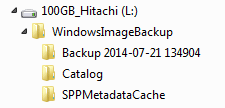
Next, I want to install / Recover a Windows 7 Image I created on this computer to the laptop. I'll deal with the license key later. I'm more interested in the process right now. Here is what the drive looks like when it is attached to this computer.

2014-08-01_11-18-01.png

The disk containing the Image files is now connected to the laptop through a USB enclosure.

When I go through these steps: Control Panel > System and Security > Backup and Restore, under the Restore section I see the message "Windows could not find a backup for this computer". Even though I can see it clearly in Windows Explorer.

If I use the Advanced feature, I can navigate to the folder by simply typing "E:" and it automatically completes the path "E:\WindowsImageBackup". However, when I select the path and it is in the Browse box, the "OK" button will not turn active. My only option is Cancel.

Where do you suppose I have gone wrong?

Cheers
 

My Computer My Computer

Computer type
PC/Desktop
Computer Manufacturer/Model Number
HP
OS
Windows 7 Professional 64bit
CPU
Core2 Duo
Memory
4GB
Hard Drives
1TB WD
If you're interested in the process, it would be better to start with an image from the laptop.

It's not just the licensing you'll have to deal with, it's all of the drivers. Possibly fighting BSODs or other boot issues.

The image you created is not for that laptop and won't be available for restore. The image tags the computer name and probably lots of other information specific to the machine when the image was created.

There might be a way to fool restore, but I don't know it or recommend it.
 

My Computer My Computer

Computer type
Laptop
Computer Manufacturer/Model Number
HP Pavilion dv6-6c10us
OS
x64 (6.3.9600) Win8.1 Pro & soon dual boot x64 (6.1.7601) Win7_SP1 HomePrem
CPU
AMD A6-3420M APU with Radeon(tm) HD Graphics
Motherboard
Hewlett-Packard 1805
Memory
6.00 GB
Graphics Card(s)
AMD Radeon(TM) HD 6520G
Sound Card
(1) AMD High Definition Audio Device (2) IDT High Definiti
Monitor(s) Displays
HP W2072a 20" LCD (1600 x 900) @ 60 Hz
Screen Resolution
1366 x 768 x 32 bits (4294967296 colors) @ 60 Hz
Hard Drives
ST640LM0 00 HM641JI SATA Disk Device
Keyboard
Logitech k520 wireless KB
Mouse
Logitech m320 wireless mouse (bundled with KB)
Internet Speed
15/5 | 54 MB Wireless 'n'
Antivirus
Realtime: Defender or Avast | On-demand: Malwarebytes, ESET
Browser
IE 11 on Win8, IE 10 on win 7
Other Info
Media: [Gimp, Audacity, VLC] || Comm: [WEmail 2012, Skype] || Productivity: [OpenOffice,| Textpad] || Utils: [Sysinternals, cCleaner, Speccy, Defraggler]
I believe the WindowsImageBackups created by Win 7 are rather different from backups created by third party imaging software such as Acronis or Macrium Reflect. The latter can be restored to any computer - though that doesn't necessarily mean they will work - but system images created by Win 7 are limited to being restored to the computer they were created on. This may be Microsoft trying to protect users from restoring images that aren't suitable, :sarc: or just maybe it's to try to stop ppl from cloning licensed installations. ;)

You could of course re-image using Macrium and do it that way.

Sorry Slartybart, I'm sort of duplicating what you have said, I'm just a lot slower ;)
 

My Computer My Computer

Computer type
PC/Desktop
Computer Manufacturer/Model Number
PC Specialist Custom
OS
Windows 7 Pro 64 bit
CPU
Intel i5
Motherboard
ASUS® H81M-PLUS
Memory
8GB KINGSTON DUAL-DDR3 1600MHz
Graphics Card(s)
2GB AMD RADEON™ R7 250
Hard Drives
120GB KINGSTON V300 SSD
1TB WD CAVIAR BLACK WD1003FZEX
Back
Top