Google chrome does not open after you close it - please help !!!

ZTEK77

New member
Local time
3:38 PM
Messages
11
For the past week or so I've had a problem opening Google Chrome after I close it. The only way I can open it is when I do a reboot. Then if I close it again - same thing !!!!

I've already uninstalled and re-installed Chrome and same thing. I always have the habit of deleting browsing history after an internet session.

Firefox and Internet Explorer is fine.

Any advice would be much appreciated.

Thanks.
 

My Computer My Computer

Computer type
PC/Desktop
Computer Manufacturer/Model Number
Dell
OS
Windows 7 Professional 64bit
Hi there ... When you close Chrome open the Task Manager .. Are there any Chrome processes still running ? If you close them does it work then ? ...
 

My Computer My Computer

Computer Manufacturer/Model Number
W530-3630QM1
OS
windows 7 home 64bit
CPU
INTEL-CORE I7
Memory
16GB
Hard Drives
750GB
Browser
Chrome
Hi there ... When you close Chrome open the Task Manager .. Are there any Chrome processes still running ? If you close them does it work then ? ...


Yes there are 2 Chrome processes still running and when I closed them - same outcome.

I also observed when I do a re-boot and I can open Chrome, on the Task manager there are up to 3 to 4 Chrome processes running. Is this normal ??
 

My Computer My Computer

Computer type
PC/Desktop
Computer Manufacturer/Model Number
Dell
OS
Windows 7 Professional 64bit
Welcome to Seven Forums ZTEK77. You can try running Chrome in incognito mode, which will disable all extensions, and see if it will restart after closing.

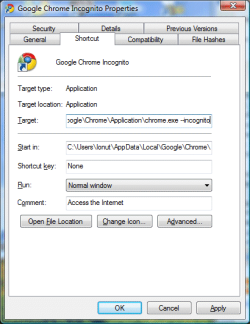
Right click your current Chrome shortcut and choose Create shortcut> Right click the new shortcut> Rename> Rename to Google Chrome Incognito> Now right click the new Google Chrome Incognito shortcut and choose Properties> In the Target field at the end of the target, make a space and then type -incognito> Apply

chrome-incognito-shortcut.png

Start the new Incognito shortcut, close it out, and see if it will open again. If so, it's likely an extension causing this. People have had issues with Lastpass for instance. Let us know how it goes. A Guy
 

My Computer My Computer

Computer type
PC/Desktop
OS
Windows 10 Home x64
CPU
INTEL Core i5-750 Quad-Core 3.37GHz
Motherboard
ASUS P7P55D
Memory
HyperX Fury Black Series 8GB (2 x 4GB) 1866Mhz
Graphics Card(s)
EVGA GeForce GTX 750 Superclocked 1GB 128-Bit GDDR5
Monitor(s) Displays
LG 32MA68HY 32" IPS
Screen Resolution
1920 x 1080
Hard Drives
Samsung 840 Evo 120GB, SEAGATE 500GB Barracuda® 7200.12, SATA 3 Gb/s, 7200 RPM, 16MB cache
PSU
ANTEC TruePower New TP-550, 80 PLUS, 550W
Case
ANTEC Three Hundred Illusion
Cooling
COOLER MASTER Hyper 212 Plus, 4 x 120mm 1 x 140mm Noctua's
Internet Speed
85 + Mbps
Antivirus
Avast
Browser
Vivaldi
In Advanced Settings make sure ...

Continue running background apps when Google Chrome is closed in Unticked

Type in msconfig in the start search check the start Tab ....
 

My Computer My Computer

Computer Manufacturer/Model Number
W530-3630QM1
OS
windows 7 home 64bit
CPU
INTEL-CORE I7
Memory
16GB
Hard Drives
750GB
Browser
Chrome
Welcome to Seven Forums ZTEK77. You can try running Chrome in incognito mode, which will disable all extensions, and see if it will restart after closing.

Right click your current Chrome shortcut and choose Create shortcut> Right click the new shortcut> Rename> Rename to Google Chrome Incognito> Now right click the new Google Chrome Incognito shortcut and choose Properties> In the Target field at the end of the target, make a space and then type -incognito> Apply

View attachment 327919

Start the new Incognito shortcut, close it out, and see if it will open again. If so, it's likely an extension causing this. People have had issues with Lastpass for instance. Let us know how it goes. A Guy

I was not able to complete the process, all was fine until I had to enter at the end of Target, incognito then Apply (A message then popped up to say " etc etc.... Target box is not valid. Make sure the path and file name are correct "

I'm not sure how I entered incognito was correct ?? Example :-

.exe -incognito"

.exe-incognito"

.exe incognito"

Please advise if I have made a mistake on the Target stage ?
 

My Computer My Computer

Computer type
PC/Desktop
Computer Manufacturer/Model Number
Dell
OS
Windows 7 Professional 64bit
If there are quotation marks around the current path, it would be

.exe" -incognito

Space after .exe" and -incognito

A Guy
 

My Computer My Computer

Computer type
PC/Desktop
OS
Windows 10 Home x64
CPU
INTEL Core i5-750 Quad-Core 3.37GHz
Motherboard
ASUS P7P55D
Memory
HyperX Fury Black Series 8GB (2 x 4GB) 1866Mhz
Graphics Card(s)
EVGA GeForce GTX 750 Superclocked 1GB 128-Bit GDDR5
Monitor(s) Displays
LG 32MA68HY 32" IPS
Screen Resolution
1920 x 1080
Hard Drives
Samsung 840 Evo 120GB, SEAGATE 500GB Barracuda® 7200.12, SATA 3 Gb/s, 7200 RPM, 16MB cache
PSU
ANTEC TruePower New TP-550, 80 PLUS, 550W
Case
ANTEC Three Hundred Illusion
Cooling
COOLER MASTER Hyper 212 Plus, 4 x 120mm 1 x 140mm Noctua's
Internet Speed
85 + Mbps
Antivirus
Avast
Browser
Vivaldi
If there are quotation marks around the current path, it would be

.exe" -incognito

Space after .exe" and -incognito

A Guy

I've entered as above and Applied but still the same result. Should I have re-booted my PC before trying it to full affect OR makes no difference either way ??

I did before uninstall and reinstall Chrome, I did a reset on Chrome settings. In Advanced settings I also un-ticked background Apps running.

Internet Explorer and Firefox is fine but I have been so used to using Chrome for these past years.
 

My Computer My Computer

Computer type
PC/Desktop
Computer Manufacturer/Model Number
Dell
OS
Windows 7 Professional 64bit
On the further investigation on Chrome settings - Privacy - Content Settings :-

Is there anything on this section that can be considered that maybe affecting this problem ??
 

My Computer My Computer

Computer type
PC/Desktop
Computer Manufacturer/Model Number
Dell
OS
Windows 7 Professional 64bit
Generally, no settings within the program itself should cause such behavior. The thinking behind incognito is that it disables extensions, which could have been the cause. Try this, boot to Safe Mode with Networking, see if you can surf OK, then close and try and open again. If it works fine in safe mode, try a clean start and see if there is a conflict.

http://www.sevenforums.com/tutorials/69585-safe-mode.html

http://www.sevenforums.com/tutorial...ation-conflicts-performing-clean-startup.html

A Guy
 

My Computer My Computer

Computer type
PC/Desktop
OS
Windows 10 Home x64
CPU
INTEL Core i5-750 Quad-Core 3.37GHz
Motherboard
ASUS P7P55D
Memory
HyperX Fury Black Series 8GB (2 x 4GB) 1866Mhz
Graphics Card(s)
EVGA GeForce GTX 750 Superclocked 1GB 128-Bit GDDR5
Monitor(s) Displays
LG 32MA68HY 32" IPS
Screen Resolution
1920 x 1080
Hard Drives
Samsung 840 Evo 120GB, SEAGATE 500GB Barracuda® 7200.12, SATA 3 Gb/s, 7200 RPM, 16MB cache
PSU
ANTEC TruePower New TP-550, 80 PLUS, 550W
Case
ANTEC Three Hundred Illusion
Cooling
COOLER MASTER Hyper 212 Plus, 4 x 120mm 1 x 140mm Noctua's
Internet Speed
85 + Mbps
Antivirus
Avast
Browser
Vivaldi
Back
Top