Solved IE11 - This page can't be displayed

tjg79

New member
Power User
VIP
Local time
3:41 PM
Messages
512
Hi,

I'm running Win 7 Pro x64 and IE11. I often get a situation while browsing where I click on a link to read an article and the page comes up blank with the text: This page can't be displayed.

This condition seems to happen randomly. I usually have several tabs open. Once IE11 starts doing this, the majority of tabs produce the same blank page. I even opened a new tab and clicked on Google where the same thing happened.

The solution is to close IE11 and restart IE11. I've tried other solutions such as a complete IE11 reset, but that doesn't cure the issue.

Is there a fix for this condition?

Regards
 

My Computer My Computer

At a glance

Windows 7 Professional x64 SP1Intel i7-980x @ 3.6GHzCorsair 12GB DDR3 RAM (3x4GB)EVGA NVIDIA GeForce GTX 760 SC
Computer type
PC/Desktop
Computer Manufacturer/Model Number
Custom Build
OS
Windows 7 Professional x64 SP1
CPU
Intel i7-980x @ 3.6GHz
Motherboard
Intel DX58SO
Memory
Corsair 12GB DDR3 RAM (3x4GB)
Graphics Card(s)
EVGA NVIDIA GeForce GTX 760 SC
Sound Card
Intel High Definition 7.1 Audio Subsystem - Realtek ALC889
Monitor(s) Displays
Dual Display - LG Electronics Flatron L227WTG
Screen Resolution
1680 x 1050 60Hz 32-bit
Hard Drives
2 Seagate Constellation ST1000NM0033 1TB SATA 6Gb/s HDDs configured as Intel SATA Array 0, RST RAID 1, Vol. 0 (C:\) & Vol. 1 (D:\), & 2 Seagate Barracuda ST500DM002 500GB SATA 6Gb/s HDDs configured as Intel SATA Array 1 RST RAID 1, Vol. 0 (E:\)
PSU
Corsair HX850W
Case
Antec P182
Cooling
Stock Intel i7-980x Cooling Solution + 4 120mm Case Fans
Keyboard
Microsoft Wireless Multimedia Keyboard 1.1
Mouse
Microsoft Standard Wireless Optical Mouse
Internet Speed
DSL - 3.0 Mb/s download 768 Kb/s upload
Antivirus
ESET Smart Security 12, Defender & SuperAntiSpyware Pro
Browser
Firefox Quantum 64-bit
Other Info
Optical Drives: Pioneer DVR-216R & TSSTcorp SH-S223Q, Anker USB 3.0 PCI-E Card, Hauppauge WinTV-HVR 2250 Dual TV Tuner Board for Windows Media Center, Bose Companion 3 Series II multimedia speaker system, APC Smart-UPS SMT1500
Hi See what this does,
Use No Add-ons mode/ Click the Start button and type in the search box,
Internet explorer
Start-no%20add-ons-7.jpg

Click on the suggestion (No Add-ons) or it’s located at,
Start/ All programs/ Accessories folder/ System tools folder/ No add-ons.
http://windows.microsoft.com/en-us/internet-explorer/manage-add-ons#ie=ie-10-win-7

Activate EPM if on a 64 bit version of windows,
http://www.sevenforums.com/tutorials/280434-internet-explorer-10-enable-32-bit-64-bit-ie10-windows-7-a.html#post2312336
Add the Run box to the Start menu list,
http://www.sevenforums.com/tutorials/559-start-menu-add-run-button.html
Open the Run command and Paste this into it and Okay,
"C:\Program Files\Internet Explorer\iexplore.exe" -extoff

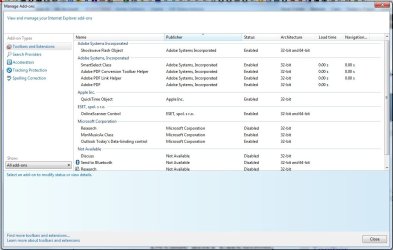
Take screen shots of your Show All add-ons pages Toolbars and extensions,
all%20add-ons.jpg
 

My Computer My Computer

At a glance

Win-7-Pro64bit 7-H-Prem-64biti7-5930K 2nd i9-9940x both water blocked VRM'...Trident-z 3200C14 2nd Trident-z 3600C16EVGA 1080ti ftw3 2nd Titan Xp both water blocked
Computer type
PC/Desktop
Computer Manufacturer/Model Number
Custom assembled by me :}
OS
Win-7-Pro64bit 7-H-Prem-64bit
CPU
i7-5930K 2nd i9-9940x both water blocked VRM's too
Motherboard
ASUS SABERTOOTH X99 2nd ASUS x299 Apex
Memory
Trident-z 3200C14 2nd Trident-z 3600C16
Graphics Card(s)
EVGA 1080ti ftw3 2nd Titan Xp both water blocked
Sound Card
Built-in Realtek
Monitor(s) Displays
1-AOC G2460PG 24"G-Sync 144Hz/ 2nd 1-ASUS VG248QE 24" 144Hz
Screen Resolution
1920 x 1080 144Hz
Hard Drives
2-Samsung M.2 Evo & Evo Plus
2-Samsung 850 EVO 500GB SSD's/ 3-2.5 W.D. Black 1tb-&3-1tb/3-3.5 WD Black 1tb hdd's
PSU
EVGA SuperNOVA 1000-P2 2nd 1200-P2
Case
2-Corsair Obsidian Series 450D Black ATX Mid Tower
Cooling
Custom water loops
Keyboard
Logitech G710+/ 2nd Logitech G910
Mouse
2-RedDragon M901 Perdition 16400 dpi Gaming mouse = wired
Internet Speed
Comcast Ping 19ms 89.31mbps download speed 6.12mbps upload
Antivirus
Malwarebytes Pro/ Superantispyware Pro
Browser
FireFox & Pale moon
Other Info
2nd ASUS X299 Apex/Intel i9-9940x with Custom water loop/7H-Prem-x64/Corsair 450D case/Ram Trident-z 3600C16 4x8gb / Samsung970Evo plus 500gb SSD/Dual ssd EZ swap evo/PSU EVGA SuperNova 1200w-P2 80+Platinum/GPU Titan Xp /8-ML-140 on push-pull on 2-280GTX rads
Hi See what this does,
Use No Add-ons mode/ Click the Start button and type in the search box,
Internet explorer
Start-no%20add-ons-7.jpg

Click on the suggestion (No Add-ons) or it’s located at,
Start/ All programs/ Accessories folder/ System tools folder/ No add-ons.
http://windows.microsoft.com/en-us/internet-explorer/manage-add-ons#ie=ie-10-win-7

I've used the "No Add-on" version of IE11. I don't like to use it, because some of the add-ons are necessary for webpages to display correctly. It's a good tool for troubleshooting, but it's not a good browser for regular web surfing.


I'm running IE11 on Win 7 Pro x64. The information on the link above appears to be for IE10. Does it apply to IE11 as well?

Add the Run box to the Start menu list,
I've done that some time ago. Thanks for the suggestion.

http://www.sevenforums.com/tutorials/559-start-menu-add-run-button.html
Open the Run command and Paste this into it and Okay,
"C:\Program Files\Internet Explorer\iexplore.exe" -extoff

Take screen shots of your Show All add-ons pages Toolbars and extensions,
all%20add-ons.jpg

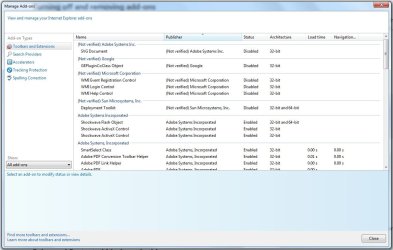
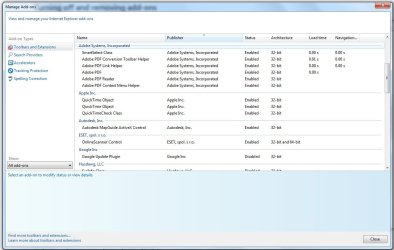
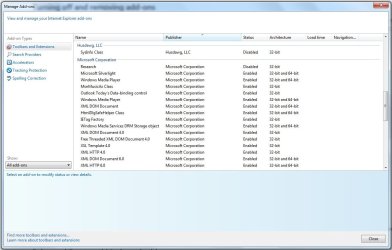
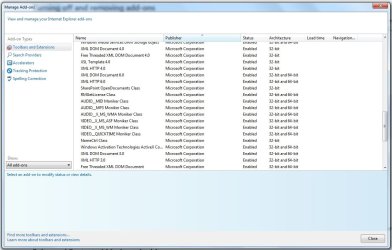
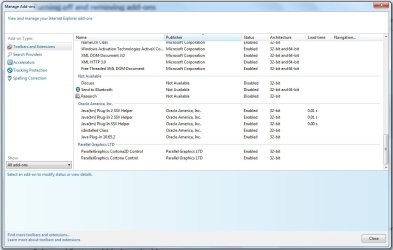
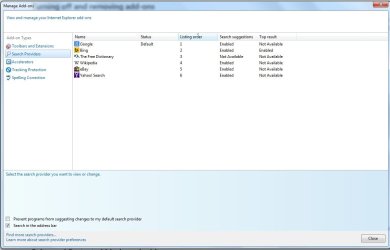
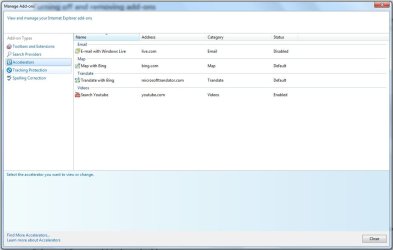
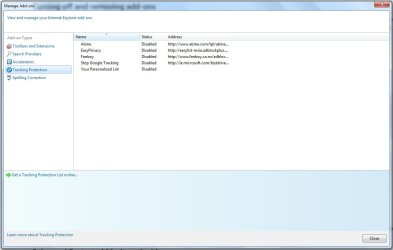
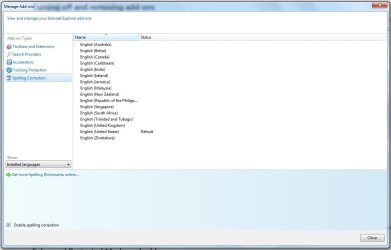
Attached below are the screen shots of my IE11 Add-ons. I've tried to remove the ones that I have disabled, but there doesn't appear to be a way to do it from the IE11 "Manage Add-ons" window. Do you see any known troublemakers?

Toolbars & Extensions
add-ons 1.jpg

add-ons 2.jpg

add-ons 3.jpg

add-ons 4.jpg

add-ons 5.jpg

Search Providers
add-ons 6.jpg

Accelerators
add-ons 7.jpg

Tracking Protection
add-ons 8.jpg

Spelling Correction
add-ons 9.jpg
 

My Computer My Computer

At a glance

Windows 7 Professional x64 SP1Intel i7-980x @ 3.6GHzCorsair 12GB DDR3 RAM (3x4GB)EVGA NVIDIA GeForce GTX 760 SC
Computer type
PC/Desktop
Computer Manufacturer/Model Number
Custom Build
OS
Windows 7 Professional x64 SP1
CPU
Intel i7-980x @ 3.6GHz
Motherboard
Intel DX58SO
Memory
Corsair 12GB DDR3 RAM (3x4GB)
Graphics Card(s)
EVGA NVIDIA GeForce GTX 760 SC
Sound Card
Intel High Definition 7.1 Audio Subsystem - Realtek ALC889
Monitor(s) Displays
Dual Display - LG Electronics Flatron L227WTG
Screen Resolution
1680 x 1050 60Hz 32-bit
Hard Drives
2 Seagate Constellation ST1000NM0033 1TB SATA 6Gb/s HDDs configured as Intel SATA Array 0, RST RAID 1, Vol. 0 (C:\) & Vol. 1 (D:\), & 2 Seagate Barracuda ST500DM002 500GB SATA 6Gb/s HDDs configured as Intel SATA Array 1 RST RAID 1, Vol. 0 (E:\)
PSU
Corsair HX850W
Case
Antec P182
Cooling
Stock Intel i7-980x Cooling Solution + 4 120mm Case Fans
Keyboard
Microsoft Wireless Multimedia Keyboard 1.1
Mouse
Microsoft Standard Wireless Optical Mouse
Internet Speed
DSL - 3.0 Mb/s download 768 Kb/s upload
Antivirus
ESET Smart Security 12, Defender & SuperAntiSpyware Pro
Browser
Firefox Quantum 64-bit
Other Info
Optical Drives: Pioneer DVR-216R & TSSTcorp SH-S223Q, Anker USB 3.0 PCI-E Card, Hauppauge WinTV-HVR 2250 Dual TV Tuner Board for Windows Media Center, Bose Companion 3 Series II multimedia speaker system, APC Smart-UPS SMT1500
OK, I did some reading on the EPM for IE11 on Win 7 x64 and I enabled the feature. It seems to me that there is some increase in the level of performance of IE11 in EPM on a Win 7 x64 system. The EPM feature caused several add-ons to not load, because they are incompatible with the 64-bit feature. Some of those add-ons were Adobe which is usually a desired add-on for the pdfs encountered on the web. Are there 64-bit versions of these Adobe add-ons available?

It will be interesting to see if the "Page can't be displayed" condition appears again in this IE11 browser configured in EPM mode. I couldn't predict when it would happen before EPM mode was activated and I don't know if it will or will not happen in EPM mode. I'll just have to wait and see.

Thanks for the suggestions.

Regards

PS - I just got my first "This page can't be displayed" in EPM.
 
Last edited:

My Computer My Computer

At a glance

Windows 7 Professional x64 SP1Intel i7-980x @ 3.6GHzCorsair 12GB DDR3 RAM (3x4GB)EVGA NVIDIA GeForce GTX 760 SC
Computer type
PC/Desktop
Computer Manufacturer/Model Number
Custom Build
OS
Windows 7 Professional x64 SP1
CPU
Intel i7-980x @ 3.6GHz
Motherboard
Intel DX58SO
Memory
Corsair 12GB DDR3 RAM (3x4GB)
Graphics Card(s)
EVGA NVIDIA GeForce GTX 760 SC
Sound Card
Intel High Definition 7.1 Audio Subsystem - Realtek ALC889
Monitor(s) Displays
Dual Display - LG Electronics Flatron L227WTG
Screen Resolution
1680 x 1050 60Hz 32-bit
Hard Drives
2 Seagate Constellation ST1000NM0033 1TB SATA 6Gb/s HDDs configured as Intel SATA Array 0, RST RAID 1, Vol. 0 (C:\) & Vol. 1 (D:\), & 2 Seagate Barracuda ST500DM002 500GB SATA 6Gb/s HDDs configured as Intel SATA Array 1 RST RAID 1, Vol. 0 (E:\)
PSU
Corsair HX850W
Case
Antec P182
Cooling
Stock Intel i7-980x Cooling Solution + 4 120mm Case Fans
Keyboard
Microsoft Wireless Multimedia Keyboard 1.1
Mouse
Microsoft Standard Wireless Optical Mouse
Internet Speed
DSL - 3.0 Mb/s download 768 Kb/s upload
Antivirus
ESET Smart Security 12, Defender & SuperAntiSpyware Pro
Browser
Firefox Quantum 64-bit
Other Info
Optical Drives: Pioneer DVR-216R & TSSTcorp SH-S223Q, Anker USB 3.0 PCI-E Card, Hauppauge WinTV-HVR 2250 Dual TV Tuner Board for Windows Media Center, Bose Companion 3 Series II multimedia speaker system, APC Smart-UPS SMT1500
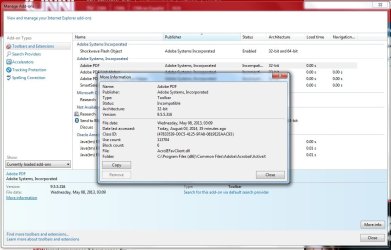
I would like to delete some of these add-ons, but I'm only able to disable them. When I attempt to delete them by highlighting and clicking on "More Information," the "remove" button is greyed out.

Is there a way to enable the greyed out "remove" button?

A screen shot is attached to show what I see.

Regards

AAAAA.jpg
 

My Computer My Computer

At a glance

Windows 7 Professional x64 SP1Intel i7-980x @ 3.6GHzCorsair 12GB DDR3 RAM (3x4GB)EVGA NVIDIA GeForce GTX 760 SC
Computer type
PC/Desktop
Computer Manufacturer/Model Number
Custom Build
OS
Windows 7 Professional x64 SP1
CPU
Intel i7-980x @ 3.6GHz
Motherboard
Intel DX58SO
Memory
Corsair 12GB DDR3 RAM (3x4GB)
Graphics Card(s)
EVGA NVIDIA GeForce GTX 760 SC
Sound Card
Intel High Definition 7.1 Audio Subsystem - Realtek ALC889
Monitor(s) Displays
Dual Display - LG Electronics Flatron L227WTG
Screen Resolution
1680 x 1050 60Hz 32-bit
Hard Drives
2 Seagate Constellation ST1000NM0033 1TB SATA 6Gb/s HDDs configured as Intel SATA Array 0, RST RAID 1, Vol. 0 (C:\) & Vol. 1 (D:\), & 2 Seagate Barracuda ST500DM002 500GB SATA 6Gb/s HDDs configured as Intel SATA Array 1 RST RAID 1, Vol. 0 (E:\)
PSU
Corsair HX850W
Case
Antec P182
Cooling
Stock Intel i7-980x Cooling Solution + 4 120mm Case Fans
Keyboard
Microsoft Wireless Multimedia Keyboard 1.1
Mouse
Microsoft Standard Wireless Optical Mouse
Internet Speed
DSL - 3.0 Mb/s download 768 Kb/s upload
Antivirus
ESET Smart Security 12, Defender & SuperAntiSpyware Pro
Browser
Firefox Quantum 64-bit
Other Info
Optical Drives: Pioneer DVR-216R & TSSTcorp SH-S223Q, Anker USB 3.0 PCI-E Card, Hauppauge WinTV-HVR 2250 Dual TV Tuner Board for Windows Media Center, Bose Companion 3 Series II multimedia speaker system, APC Smart-UPS SMT1500
Hi thanks,
Yes every reference to ie10 applies to ie11 as well ;)
If you want to uninstall a add-on you'll need to uninstall the program and use the custom install and uncheck those items from the install options,

Firstly I would Uninstall Sun Oracle Java from the Uninstall a program list or programs and features to test without it installed,
http://www.java.com/en/download/faq/remove_olderversions.xml
http://www.java.com/en/download/help/uninstall_java.xml
Then use this to get rid of any left over Java crud,
Temp files delete,
Run this as administrator and Start the scanner,
Shut your machine down after it finishes,
http://www.geekstogo.com/forum/files/file/187-tfc-temp-file-cleaner-by-oldtimer/

Once the above is done then reset ie,
It's important to Delete personal settings when you reset,
Reset process first opening Internet explorer

If still no joy after doing the above,
Review Jacee’s instructions to run Adwcleaner here post #7,
Ignore the title of the thread,
http://www.sevenforums.com/system-security/316404-instant-savings-app.html
Screen shot of the download button to use for Adwcleaner
You can use these free tools to see if they find anything,
Manually Update them before running full scans,
Try not to use your computer while the scans are running, (one at a time of course).
Uncheck the box to Activate the Free trial from the final install options,
Also use the Custom scan option not the Threat scan,
Select the drive to scan usually C,
If your really infected check the box to scan for Rootkits = this scan option will take several hours to complete,
Never use your machine while scans are running for best results,
Please Do Not clean/ Delete or Remove Any detections before posting the scan results first before review especially Malwarebytes,
http://www.malwarebytes.org/products/malwarebytes_free
SAS is safe to remove anything it finds ;)
http://www.superantispyware.com/?tag=SUPERANTISPYWARE
This one is the longest up to 4 hours, the others are only about 45 minutes,
http://www.microsoft.com/security/scanner/en-us/default.aspx
 

My Computer My Computer

At a glance

Win-7-Pro64bit 7-H-Prem-64biti7-5930K 2nd i9-9940x both water blocked VRM'...Trident-z 3200C14 2nd Trident-z 3600C16EVGA 1080ti ftw3 2nd Titan Xp both water blocked
Computer type
PC/Desktop
Computer Manufacturer/Model Number
Custom assembled by me :}
OS
Win-7-Pro64bit 7-H-Prem-64bit
CPU
i7-5930K 2nd i9-9940x both water blocked VRM's too
Motherboard
ASUS SABERTOOTH X99 2nd ASUS x299 Apex
Memory
Trident-z 3200C14 2nd Trident-z 3600C16
Graphics Card(s)
EVGA 1080ti ftw3 2nd Titan Xp both water blocked
Sound Card
Built-in Realtek
Monitor(s) Displays
1-AOC G2460PG 24"G-Sync 144Hz/ 2nd 1-ASUS VG248QE 24" 144Hz
Screen Resolution
1920 x 1080 144Hz
Hard Drives
2-Samsung M.2 Evo & Evo Plus
2-Samsung 850 EVO 500GB SSD's/ 3-2.5 W.D. Black 1tb-&3-1tb/3-3.5 WD Black 1tb hdd's
PSU
EVGA SuperNOVA 1000-P2 2nd 1200-P2
Case
2-Corsair Obsidian Series 450D Black ATX Mid Tower
Cooling
Custom water loops
Keyboard
Logitech G710+/ 2nd Logitech G910
Mouse
2-RedDragon M901 Perdition 16400 dpi Gaming mouse = wired
Internet Speed
Comcast Ping 19ms 89.31mbps download speed 6.12mbps upload
Antivirus
Malwarebytes Pro/ Superantispyware Pro
Browser
FireFox & Pale moon
Other Info
2nd ASUS X299 Apex/Intel i9-9940x with Custom water loop/7H-Prem-x64/Corsair 450D case/Ram Trident-z 3600C16 4x8gb / Samsung970Evo plus 500gb SSD/Dual ssd EZ swap evo/PSU EVGA SuperNova 1200w-P2 80+Platinum/GPU Titan Xp /8-ML-140 on push-pull on 2-280GTX rads
Hi thanks,
Yes every reference to ie10 applies to ie11 as well ;)
If you want to uninstall a add-on you'll need to uninstall the program and use the custom install and uncheck those items from the install options,

Firstly I would Uninstall Sun Oracle Java from the Uninstall a program list or programs and features to test without it installed,
http://www.java.com/en/download/faq/remove_olderversions.xml
http://www.java.com/en/download/help/uninstall_java.xml
Then use this to get rid of any left over Java crud,
Temp files delete,

OK, thanks, I'm working through your task list and I have a few questions as I go along.

I've removed/uninstalled the Sun Oracle Java program from Programs & Features. It also removed all the java/sun/oracle related IE11 add-ons. I performed a full disk clean-up, manually deleted the Java folder in C:\Program Files, and cleaned up the registry with CCleaner. I used the second java link posted above which actually reinstalled Java (x64), but did a Java clean-up before it did so. I then completely removed the Java (x64) as I described. The Java I removed was 32-bit and removing these IE11 add-ons was easy, because there was a program in Programs & Features that removed everything once it was removed.

I'd like to remove the "not verified" add-ons that are presently disabled (Adobe, Google, & Microsoft) in my first screen shot as well as the "Not Available" add-ons (Research & Discuss) in my 5th screen shot above in post #3. Do you know how to do that? For the Research and Discuss add-ons, I have no idea what to remove from Programs & Features to accomplish their removal. The same applies to the Adobe, Google, & Microsoft add-on mentioned above. I'd prefer not to remove Adobe Acrobat if possible. I have Google Earth installed, but I hope there is a way to avoid removing that to get the "Not Verified" add-ons. What would I need to delete to remove the Microsoft "Not Verified" add-ons?

I'm monitor the IE11 browser performance to see if I get another "Can't display page" now that the Java is history.

Thanks for your assistance.

Regards
 

My Computer My Computer

At a glance

Windows 7 Professional x64 SP1Intel i7-980x @ 3.6GHzCorsair 12GB DDR3 RAM (3x4GB)EVGA NVIDIA GeForce GTX 760 SC
Computer type
PC/Desktop
Computer Manufacturer/Model Number
Custom Build
OS
Windows 7 Professional x64 SP1
CPU
Intel i7-980x @ 3.6GHz
Motherboard
Intel DX58SO
Memory
Corsair 12GB DDR3 RAM (3x4GB)
Graphics Card(s)
EVGA NVIDIA GeForce GTX 760 SC
Sound Card
Intel High Definition 7.1 Audio Subsystem - Realtek ALC889
Monitor(s) Displays
Dual Display - LG Electronics Flatron L227WTG
Screen Resolution
1680 x 1050 60Hz 32-bit
Hard Drives
2 Seagate Constellation ST1000NM0033 1TB SATA 6Gb/s HDDs configured as Intel SATA Array 0, RST RAID 1, Vol. 0 (C:\) & Vol. 1 (D:\), & 2 Seagate Barracuda ST500DM002 500GB SATA 6Gb/s HDDs configured as Intel SATA Array 1 RST RAID 1, Vol. 0 (E:\)
PSU
Corsair HX850W
Case
Antec P182
Cooling
Stock Intel i7-980x Cooling Solution + 4 120mm Case Fans
Keyboard
Microsoft Wireless Multimedia Keyboard 1.1
Mouse
Microsoft Standard Wireless Optical Mouse
Internet Speed
DSL - 3.0 Mb/s download 768 Kb/s upload
Antivirus
ESET Smart Security 12, Defender & SuperAntiSpyware Pro
Browser
Firefox Quantum 64-bit
Other Info
Optical Drives: Pioneer DVR-216R & TSSTcorp SH-S223Q, Anker USB 3.0 PCI-E Card, Hauppauge WinTV-HVR 2250 Dual TV Tuner Board for Windows Media Center, Bose Companion 3 Series II multimedia speaker system, APC Smart-UPS SMT1500
Just for information.
I got 8 add-on's in I.E. 11 and it works just fine.

I find the biggest problem people have with any browser is all the add'-on's.
 

My Computer My Computer

At a glance

Windows 10 Pro. 64/ version 1709 Windows 7 Pr...Intel i7-6800K @ 4.3Corsair Platinum 16 gig @2400EVGA GTX 1070 OC
Computer type
PC/Desktop
Computer Manufacturer/Model Number
Home made Desktop
OS
Windows 10 Pro. 64/ version 1709 Windows 7 Pro/64
CPU
Intel i7-6800K @ 4.3
Motherboard
ASUS X-99 Deluxe II
Memory
Corsair Platinum 16 gig @2400
Graphics Card(s)
EVGA GTX 1070 OC
Monitor(s) Displays
Asus 27" LED LCD/VE278Q
Screen Resolution
1920-1080 or 1280-720 HDMI
Hard Drives
INTEL SSD 730-240 Gb Sata 3.0/
PSU
EVGA Platium 1200W
Case
Phanteks Luxe Tempered Glass 8 fans/ one radiator
Cooling
XSPC/ Water Cooled CPU
Keyboard
Das 4 Professional
Mouse
Logitech M705/MX Anywhere 2-S
Internet Speed
100 mbits
Antivirus
Microsoft Security Essentials/ Malwarebytes Premium 3.0/ SAS
Browser
I.E. 11 default/Firefox/ ISP Time Warner Cable/Spectrum
Other Info
LG BluRay Burner/
Sound system-KLipsch-THX/
Icy Dock ssd Hot Swap bays.
Just for information.
I got 8 add-on's in I.E. 11 and it works just fine.

I find the biggest problem people have with any browser is all the add'-on's.

I agree. The problem I have is figuring out how to remove some of these add-ons. I'd like to remove all the add-ons that don't really do anything useful.
 

My Computer My Computer

At a glance

Windows 7 Professional x64 SP1Intel i7-980x @ 3.6GHzCorsair 12GB DDR3 RAM (3x4GB)EVGA NVIDIA GeForce GTX 760 SC
Computer type
PC/Desktop
Computer Manufacturer/Model Number
Custom Build
OS
Windows 7 Professional x64 SP1
CPU
Intel i7-980x @ 3.6GHz
Motherboard
Intel DX58SO
Memory
Corsair 12GB DDR3 RAM (3x4GB)
Graphics Card(s)
EVGA NVIDIA GeForce GTX 760 SC
Sound Card
Intel High Definition 7.1 Audio Subsystem - Realtek ALC889
Monitor(s) Displays
Dual Display - LG Electronics Flatron L227WTG
Screen Resolution
1680 x 1050 60Hz 32-bit
Hard Drives
2 Seagate Constellation ST1000NM0033 1TB SATA 6Gb/s HDDs configured as Intel SATA Array 0, RST RAID 1, Vol. 0 (C:\) & Vol. 1 (D:\), & 2 Seagate Barracuda ST500DM002 500GB SATA 6Gb/s HDDs configured as Intel SATA Array 1 RST RAID 1, Vol. 0 (E:\)
PSU
Corsair HX850W
Case
Antec P182
Cooling
Stock Intel i7-980x Cooling Solution + 4 120mm Case Fans
Keyboard
Microsoft Wireless Multimedia Keyboard 1.1
Mouse
Microsoft Standard Wireless Optical Mouse
Internet Speed
DSL - 3.0 Mb/s download 768 Kb/s upload
Antivirus
ESET Smart Security 12, Defender & SuperAntiSpyware Pro
Browser
Firefox Quantum 64-bit
Other Info
Optical Drives: Pioneer DVR-216R & TSSTcorp SH-S223Q, Anker USB 3.0 PCI-E Card, Hauppauge WinTV-HVR 2250 Dual TV Tuner Board for Windows Media Center, Bose Companion 3 Series II multimedia speaker system, APC Smart-UPS SMT1500
Temp files delete,
Run this as administrator and Start the scanner,
Shut your machine down after it finishes,
http://www.geekstogo.com/forum/files/file/187-tfc-temp-file-cleaner-by-oldtimer/

Once the above is done then reset ie,
It's important to Delete personal settings when you reset,
Reset process first opening Internet explorer

Temp File Cleaner (TFC) is a good program. I ran that one and then rebooted.

As for IE11 Reset, if I follow those instructions, it will deactivate EPM, because EPM is not a default setting. I'll go back and reactivate EPM after the reset. I've used a "Do a Complete IE Optimization" procedure to reset IE that went through each Internet Options tab and basically cleared all the non-default settings and made a few recommendations in the form of settings to improve IE performance. The instructions can be found on the following link:

http://atechjourney.com/how-to-do-a-complete-internet-explorer-optimization.html/

So far, the only changes I've made to IE reset settings pertains to cookies on the Privacy tab Advanced button. I have "Override Automatic Cookie Handling" checked and I accept all first-party cookies and block all third-party cookies. I also unchecked the "Automatically detect settings" on the Connections tab, Local Area Network (LAN) Settings. Additionally, I reactivated EPM.

Another good recommendation from the link I posted above is to open the IE Internet Options without opening IE by typing "inetcpl.cpl" in the Run box and hitting enter.

I
 
Last edited:

My Computer My Computer

At a glance

Windows 7 Professional x64 SP1Intel i7-980x @ 3.6GHzCorsair 12GB DDR3 RAM (3x4GB)EVGA NVIDIA GeForce GTX 760 SC
Computer type
PC/Desktop
Computer Manufacturer/Model Number
Custom Build
OS
Windows 7 Professional x64 SP1
CPU
Intel i7-980x @ 3.6GHz
Motherboard
Intel DX58SO
Memory
Corsair 12GB DDR3 RAM (3x4GB)
Graphics Card(s)
EVGA NVIDIA GeForce GTX 760 SC
Sound Card
Intel High Definition 7.1 Audio Subsystem - Realtek ALC889
Monitor(s) Displays
Dual Display - LG Electronics Flatron L227WTG
Screen Resolution
1680 x 1050 60Hz 32-bit
Hard Drives
2 Seagate Constellation ST1000NM0033 1TB SATA 6Gb/s HDDs configured as Intel SATA Array 0, RST RAID 1, Vol. 0 (C:\) & Vol. 1 (D:\), & 2 Seagate Barracuda ST500DM002 500GB SATA 6Gb/s HDDs configured as Intel SATA Array 1 RST RAID 1, Vol. 0 (E:\)
PSU
Corsair HX850W
Case
Antec P182
Cooling
Stock Intel i7-980x Cooling Solution + 4 120mm Case Fans
Keyboard
Microsoft Wireless Multimedia Keyboard 1.1
Mouse
Microsoft Standard Wireless Optical Mouse
Internet Speed
DSL - 3.0 Mb/s download 768 Kb/s upload
Antivirus
ESET Smart Security 12, Defender & SuperAntiSpyware Pro
Browser
Firefox Quantum 64-bit
Other Info
Optical Drives: Pioneer DVR-216R & TSSTcorp SH-S223Q, Anker USB 3.0 PCI-E Card, Hauppauge WinTV-HVR 2250 Dual TV Tuner Board for Windows Media Center, Bose Companion 3 Series II multimedia speaker system, APC Smart-UPS SMT1500
If still no joy after doing the above,
Review Jacee’s instructions to run Adwcleaner here post #7,
Ignore the title of the thread,
http://www.sevenforums.com/system-security/316404-instant-savings-app.html
Screen shot of the download button to use for Adwcleaner

Adwcleaner scan report:

Code:
# AdwCleaner v3.302 - Report created 04/08/2014 at 02:38:20
# Updated 30/07/2014 by Xplode
# Operating System : Windows 7 Professional Service Pack 1 (64 bits)
# Username : TJG - DESKTOPVA
# Running from : C:\Users\TJG\Desktop\adwcleaner_3.302.exe
# Option : Scan
***** [ Services ] *****
 
***** [ Files / Folders ] *****
 
***** [ Scheduled Tasks ] *****
Task Found : SUPERAntiSpyware Scheduled Task 548d58d4-cf1c-4a16-96ff-c83f07f24f7c
***** [ Shortcuts ] *****
 
***** [ Registry ] *****
 
***** [ Browsers ] *****
-\\ Internet Explorer v11.0.9600.17207
 
*************************
AdwCleaner[R0].txt - [1902 octets] - [01/08/2014 19:29:13]
AdwCleaner[R1].txt - [879 octets] - [01/08/2014 20:21:54]
AdwCleaner[R2].txt - [997 octets] - [02/08/2014 18:50:05]
AdwCleaner[R3].txt - [1117 octets] - [02/08/2014 18:57:38]
AdwCleaner[R4].txt - [1237 octets] - [02/08/2014 23:20:11]
AdwCleaner[R5].txt - [919 octets] - [04/08/2014 02:38:20]
AdwCleaner[S0].txt - [1839 octets] - [01/08/2014 19:31:30]
AdwCleaner[S1].txt - [941 octets] - [01/08/2014 20:22:32]
AdwCleaner[S2].txt - [1059 octets] - [02/08/2014 18:50:31]
AdwCleaner[S3].txt - [1181 octets] - [02/08/2014 18:58:21]
AdwCleaner[S4].txt - [1301 octets] - [02/08/2014 23:20:32]
########## EOF - C:\AdwCleaner\AdwCleaner[R5].txt - [1277 octets] ##########

Adwcleaner clean report:

Code:
# AdwCleaner v3.302 - Report created 04/08/2014 at 02:42:34
# Updated 30/07/2014 by Xplode
# Operating System : Windows 7 Professional Service Pack 1 (64 bits)
# Username : TJG - DESKTOPVA
# Running from : C:\Users\TJG\Desktop\adwcleaner_3.302.exe
# Option : Clean
***** [ Services ] *****

***** [ Files / Folders ] *****

***** [ Scheduled Tasks ] *****
Task Deleted : SUPERAntiSpyware Scheduled Task 548d58d4-cf1c-4a16-96ff-c83f07f24f7c
***** [ Shortcuts ] *****

***** [ Registry ] *****

***** [ Browsers ] *****
-\\ Internet Explorer v11.0.9600.17207

*************************
AdwCleaner[R0].txt - [1902 octets] - [01/08/2014 19:29:13]
AdwCleaner[R1].txt - [879 octets] - [01/08/2014 20:21:54]
AdwCleaner[R2].txt - [997 octets] - [02/08/2014 18:50:05]
AdwCleaner[R3].txt - [1117 octets] - [02/08/2014 18:57:38]
AdwCleaner[R4].txt - [1237 octets] - [02/08/2014 23:20:11]
AdwCleaner[R5].txt - [1357 octets] - [04/08/2014 02:38:20]
AdwCleaner[S0].txt - [1839 octets] - [01/08/2014 19:31:30]
AdwCleaner[S1].txt - [941 octets] - [01/08/2014 20:22:32]
AdwCleaner[S2].txt - [1059 octets] - [02/08/2014 18:50:31]
AdwCleaner[S3].txt - [1181 octets] - [02/08/2014 18:58:21]
AdwCleaner[S4].txt - [1301 octets] - [02/08/2014 23:20:32]
AdwCleaner[S5].txt - [1281 octets] - [04/08/2014 02:42:34]
########## EOF - C:\AdwCleaner\AdwCleaner[S5].txt - [1341 octets] ##########

There's not much that was cleaned, because I've run this program recently resolving a system file checker issue. Adwcleaner is another good program.

Regards
 

My Computer My Computer

At a glance

Windows 7 Professional x64 SP1Intel i7-980x @ 3.6GHzCorsair 12GB DDR3 RAM (3x4GB)EVGA NVIDIA GeForce GTX 760 SC
Computer type
PC/Desktop
Computer Manufacturer/Model Number
Custom Build
OS
Windows 7 Professional x64 SP1
CPU
Intel i7-980x @ 3.6GHz
Motherboard
Intel DX58SO
Memory
Corsair 12GB DDR3 RAM (3x4GB)
Graphics Card(s)
EVGA NVIDIA GeForce GTX 760 SC
Sound Card
Intel High Definition 7.1 Audio Subsystem - Realtek ALC889
Monitor(s) Displays
Dual Display - LG Electronics Flatron L227WTG
Screen Resolution
1680 x 1050 60Hz 32-bit
Hard Drives
2 Seagate Constellation ST1000NM0033 1TB SATA 6Gb/s HDDs configured as Intel SATA Array 0, RST RAID 1, Vol. 0 (C:\) & Vol. 1 (D:\), & 2 Seagate Barracuda ST500DM002 500GB SATA 6Gb/s HDDs configured as Intel SATA Array 1 RST RAID 1, Vol. 0 (E:\)
PSU
Corsair HX850W
Case
Antec P182
Cooling
Stock Intel i7-980x Cooling Solution + 4 120mm Case Fans
Keyboard
Microsoft Wireless Multimedia Keyboard 1.1
Mouse
Microsoft Standard Wireless Optical Mouse
Internet Speed
DSL - 3.0 Mb/s download 768 Kb/s upload
Antivirus
ESET Smart Security 12, Defender & SuperAntiSpyware Pro
Browser
Firefox Quantum 64-bit
Other Info
Optical Drives: Pioneer DVR-216R & TSSTcorp SH-S223Q, Anker USB 3.0 PCI-E Card, Hauppauge WinTV-HVR 2250 Dual TV Tuner Board for Windows Media Center, Bose Companion 3 Series II multimedia speaker system, APC Smart-UPS SMT1500
Hi thanks for the link,
How to do a complete Internet explorer optimization?
On item 3 from the above I would Uncheck the top box this will get rid of some problematic cache's

Not sure why Adwcleaner would find and delete Superantispyware task as corrupt :confused:

I wouldn't worry about Microsoft add-ons that are unavailable Research and discus,

Ideally epm would be disabled but when you have so many third party add-ons epm is just a trouble shooting mode to test and see if epm will improve or remove an issue,
But as any issue you will need to figure out which add-on is the problem,
Removing Java is just the first step,
If the issue remains reset can make the process must easier,
Then enable or re-install each add-on one at a time testing as you do until you find the one that's causing the page can't be displayed,

Some add-ons don't disable well and continue to interfere as epm would verify or clean boot would also tend to verify,
Cheers.
 

My Computer My Computer

At a glance

Win-7-Pro64bit 7-H-Prem-64biti7-5930K 2nd i9-9940x both water blocked VRM'...Trident-z 3200C14 2nd Trident-z 3600C16EVGA 1080ti ftw3 2nd Titan Xp both water blocked
Computer type
PC/Desktop
Computer Manufacturer/Model Number
Custom assembled by me :}
OS
Win-7-Pro64bit 7-H-Prem-64bit
CPU
i7-5930K 2nd i9-9940x both water blocked VRM's too
Motherboard
ASUS SABERTOOTH X99 2nd ASUS x299 Apex
Memory
Trident-z 3200C14 2nd Trident-z 3600C16
Graphics Card(s)
EVGA 1080ti ftw3 2nd Titan Xp both water blocked
Sound Card
Built-in Realtek
Monitor(s) Displays
1-AOC G2460PG 24"G-Sync 144Hz/ 2nd 1-ASUS VG248QE 24" 144Hz
Screen Resolution
1920 x 1080 144Hz
Hard Drives
2-Samsung M.2 Evo & Evo Plus
2-Samsung 850 EVO 500GB SSD's/ 3-2.5 W.D. Black 1tb-&3-1tb/3-3.5 WD Black 1tb hdd's
PSU
EVGA SuperNOVA 1000-P2 2nd 1200-P2
Case
2-Corsair Obsidian Series 450D Black ATX Mid Tower
Cooling
Custom water loops
Keyboard
Logitech G710+/ 2nd Logitech G910
Mouse
2-RedDragon M901 Perdition 16400 dpi Gaming mouse = wired
Internet Speed
Comcast Ping 19ms 89.31mbps download speed 6.12mbps upload
Antivirus
Malwarebytes Pro/ Superantispyware Pro
Browser
FireFox & Pale moon
Other Info
2nd ASUS X299 Apex/Intel i9-9940x with Custom water loop/7H-Prem-x64/Corsair 450D case/Ram Trident-z 3600C16 4x8gb / Samsung970Evo plus 500gb SSD/Dual ssd EZ swap evo/PSU EVGA SuperNova 1200w-P2 80+Platinum/GPU Titan Xp /8-ML-140 on push-pull on 2-280GTX rads
Hi thanks for the link,
How to do a complete Internet explorer optimization?
On item 3 from the above I would Uncheck the top box this will get rid of some problematic cache's

I agree with the "uncheck the box at the top of item 3." I usually have that box unchecked.

Not sure why Adwcleaner would find and delete Superantispyware task as corrupt :confused:

I'm not sure why either, but the program reestablishes the task each time I restart the computer.

I wouldn't worry about Microsoft add-ons that are unavailable Research and discus,

I really don't have a choice, because I don't see how they could be deleted.

Ideally epm would be disabled but when you have so many third party add-ons epm is just a trouble shooting mode to test and see if epm will improve or remove an issue,
But as any issue you will need to figure out which add-on is the problem,
Removing Java is just the first step,
If the issue remains reset can make the process must easier,
Then enable or re-install each add-on one at a time testing as you do until you find the one that's causing the page can't be displayed,

OK, I was under the impression that it was a good idea to leave EPM activated. I changed it to not activated and will monitor the browser to see if I get the issue again. I had a lot of add-ons that are now history. The IE reset wiped most of them away. I've only got one page now.

Add-ons.jpg

Some add-ons don't disable well and continue to interfere as epm would verify or clean boot would also tend to verify,
Cheers.

I've still got a few of the malicious software tools to run, but I suspect the issue should be resolved now that most of the add-ons are gone.

Regards
 

My Computer My Computer

At a glance

Windows 7 Professional x64 SP1Intel i7-980x @ 3.6GHzCorsair 12GB DDR3 RAM (3x4GB)EVGA NVIDIA GeForce GTX 760 SC
Computer type
PC/Desktop
Computer Manufacturer/Model Number
Custom Build
OS
Windows 7 Professional x64 SP1
CPU
Intel i7-980x @ 3.6GHz
Motherboard
Intel DX58SO
Memory
Corsair 12GB DDR3 RAM (3x4GB)
Graphics Card(s)
EVGA NVIDIA GeForce GTX 760 SC
Sound Card
Intel High Definition 7.1 Audio Subsystem - Realtek ALC889
Monitor(s) Displays
Dual Display - LG Electronics Flatron L227WTG
Screen Resolution
1680 x 1050 60Hz 32-bit
Hard Drives
2 Seagate Constellation ST1000NM0033 1TB SATA 6Gb/s HDDs configured as Intel SATA Array 0, RST RAID 1, Vol. 0 (C:\) & Vol. 1 (D:\), & 2 Seagate Barracuda ST500DM002 500GB SATA 6Gb/s HDDs configured as Intel SATA Array 1 RST RAID 1, Vol. 0 (E:\)
PSU
Corsair HX850W
Case
Antec P182
Cooling
Stock Intel i7-980x Cooling Solution + 4 120mm Case Fans
Keyboard
Microsoft Wireless Multimedia Keyboard 1.1
Mouse
Microsoft Standard Wireless Optical Mouse
Internet Speed
DSL - 3.0 Mb/s download 768 Kb/s upload
Antivirus
ESET Smart Security 12, Defender & SuperAntiSpyware Pro
Browser
Firefox Quantum 64-bit
Other Info
Optical Drives: Pioneer DVR-216R & TSSTcorp SH-S223Q, Anker USB 3.0 PCI-E Card, Hauppauge WinTV-HVR 2250 Dual TV Tuner Board for Windows Media Center, Bose Companion 3 Series II multimedia speaker system, APC Smart-UPS SMT1500
Hi,
Yes your add-ons list is looking allot more reasonable/ manageable :D
Some times Tracking protections can cause conflicts when too many are used but not your issue here :thumbsup:

I can not remember what the two add-on research and discus were associated with but I believe they were replaced but oddly not removed by OneNote when it morphed into what it is now ?
Possibly even Bing Desktop search when it morphed into what it is now ?
I don't know about the send to Bluetooth ?

Everyone has the two you were wondering about and I don't know if win-8 and ie11 has the same two entries or not I'll have to check later,
Cheers.
 

My Computer My Computer

At a glance

Win-7-Pro64bit 7-H-Prem-64biti7-5930K 2nd i9-9940x both water blocked VRM'...Trident-z 3200C14 2nd Trident-z 3600C16EVGA 1080ti ftw3 2nd Titan Xp both water blocked
Computer type
PC/Desktop
Computer Manufacturer/Model Number
Custom assembled by me :}
OS
Win-7-Pro64bit 7-H-Prem-64bit
CPU
i7-5930K 2nd i9-9940x both water blocked VRM's too
Motherboard
ASUS SABERTOOTH X99 2nd ASUS x299 Apex
Memory
Trident-z 3200C14 2nd Trident-z 3600C16
Graphics Card(s)
EVGA 1080ti ftw3 2nd Titan Xp both water blocked
Sound Card
Built-in Realtek
Monitor(s) Displays
1-AOC G2460PG 24"G-Sync 144Hz/ 2nd 1-ASUS VG248QE 24" 144Hz
Screen Resolution
1920 x 1080 144Hz
Hard Drives
2-Samsung M.2 Evo & Evo Plus
2-Samsung 850 EVO 500GB SSD's/ 3-2.5 W.D. Black 1tb-&3-1tb/3-3.5 WD Black 1tb hdd's
PSU
EVGA SuperNOVA 1000-P2 2nd 1200-P2
Case
2-Corsair Obsidian Series 450D Black ATX Mid Tower
Cooling
Custom water loops
Keyboard
Logitech G710+/ 2nd Logitech G910
Mouse
2-RedDragon M901 Perdition 16400 dpi Gaming mouse = wired
Internet Speed
Comcast Ping 19ms 89.31mbps download speed 6.12mbps upload
Antivirus
Malwarebytes Pro/ Superantispyware Pro
Browser
FireFox & Pale moon
Other Info
2nd ASUS X299 Apex/Intel i9-9940x with Custom water loop/7H-Prem-x64/Corsair 450D case/Ram Trident-z 3600C16 4x8gb / Samsung970Evo plus 500gb SSD/Dual ssd EZ swap evo/PSU EVGA SuperNova 1200w-P2 80+Platinum/GPU Titan Xp /8-ML-140 on push-pull on 2-280GTX rads
You can use these free tools to see if they find anything,
Manually Update them before running full scans,
Try not to use your computer while the scans are running, (one at a time of course).
Uncheck the box to Activate the Free trial from the final install options,
Also use the Custom scan option not the Threat scan,
Select the drive to scan usually C,
If your really infected check the box to scan for Rootkits = this scan option will take several hours to complete,
Never use your machine while scans are running for best results,
Please Do Not clean/ Delete or Remove Any detections before posting the scan results first before review especially Malwarebytes,
http://www.malwarebytes.org/products/malwarebytes_free
SAS is safe to remove anything it finds ;)
http://www.superantispyware.com/?tag=SUPERANTISPYWARE
This one is the longest up to 4 hours, the others are only about 45 minutes,
http://www.microsoft.com/security/scanner/en-us/default.aspx

I have SUPERAntiSpyware Professional installed. I read on the forum that they just came out with a version 6. I've scanned with SAS and didn't detect any malicious software.

I've downloaded and run the Microsoft Safety Scanner (Quick Scan). I set the machine to run the full scan when I quit for the evening.

I'm running ESET Smart Security 7. Do you think Malwarebytes will cause a conflict? If I recall correctly, I think I had a conflict between Malwarebytes and ESET a few years ago.

I haven't had an IE11 "Can't display this page" since yesterday. Perhaps the IE reset was the fix.

Thanks for the help.

Regards
 

My Computer My Computer

At a glance

Windows 7 Professional x64 SP1Intel i7-980x @ 3.6GHzCorsair 12GB DDR3 RAM (3x4GB)EVGA NVIDIA GeForce GTX 760 SC
Computer type
PC/Desktop
Computer Manufacturer/Model Number
Custom Build
OS
Windows 7 Professional x64 SP1
CPU
Intel i7-980x @ 3.6GHz
Motherboard
Intel DX58SO
Memory
Corsair 12GB DDR3 RAM (3x4GB)
Graphics Card(s)
EVGA NVIDIA GeForce GTX 760 SC
Sound Card
Intel High Definition 7.1 Audio Subsystem - Realtek ALC889
Monitor(s) Displays
Dual Display - LG Electronics Flatron L227WTG
Screen Resolution
1680 x 1050 60Hz 32-bit
Hard Drives
2 Seagate Constellation ST1000NM0033 1TB SATA 6Gb/s HDDs configured as Intel SATA Array 0, RST RAID 1, Vol. 0 (C:\) & Vol. 1 (D:\), & 2 Seagate Barracuda ST500DM002 500GB SATA 6Gb/s HDDs configured as Intel SATA Array 1 RST RAID 1, Vol. 0 (E:\)
PSU
Corsair HX850W
Case
Antec P182
Cooling
Stock Intel i7-980x Cooling Solution + 4 120mm Case Fans
Keyboard
Microsoft Wireless Multimedia Keyboard 1.1
Mouse
Microsoft Standard Wireless Optical Mouse
Internet Speed
DSL - 3.0 Mb/s download 768 Kb/s upload
Antivirus
ESET Smart Security 12, Defender & SuperAntiSpyware Pro
Browser
Firefox Quantum 64-bit
Other Info
Optical Drives: Pioneer DVR-216R & TSSTcorp SH-S223Q, Anker USB 3.0 PCI-E Card, Hauppauge WinTV-HVR 2250 Dual TV Tuner Board for Windows Media Center, Bose Companion 3 Series II multimedia speaker system, APC Smart-UPS SMT1500
Hi,
I doubt eset was the issue,
Although allot of add-ons were removed so eset might of not liked one or more,
I doubt mbam was in conflict with eset or the other way around,
Eset is enabled via your last screen shot and everything is fine,

I would guess most of the issue was with Java and uninstalling it and reset cured the issue for now,
Test for a day or so and report back ;)
Cheers.
 

My Computer My Computer

At a glance

Win-7-Pro64bit 7-H-Prem-64biti7-5930K 2nd i9-9940x both water blocked VRM'...Trident-z 3200C14 2nd Trident-z 3600C16EVGA 1080ti ftw3 2nd Titan Xp both water blocked
Computer type
PC/Desktop
Computer Manufacturer/Model Number
Custom assembled by me :}
OS
Win-7-Pro64bit 7-H-Prem-64bit
CPU
i7-5930K 2nd i9-9940x both water blocked VRM's too
Motherboard
ASUS SABERTOOTH X99 2nd ASUS x299 Apex
Memory
Trident-z 3200C14 2nd Trident-z 3600C16
Graphics Card(s)
EVGA 1080ti ftw3 2nd Titan Xp both water blocked
Sound Card
Built-in Realtek
Monitor(s) Displays
1-AOC G2460PG 24"G-Sync 144Hz/ 2nd 1-ASUS VG248QE 24" 144Hz
Screen Resolution
1920 x 1080 144Hz
Hard Drives
2-Samsung M.2 Evo & Evo Plus
2-Samsung 850 EVO 500GB SSD's/ 3-2.5 W.D. Black 1tb-&3-1tb/3-3.5 WD Black 1tb hdd's
PSU
EVGA SuperNOVA 1000-P2 2nd 1200-P2
Case
2-Corsair Obsidian Series 450D Black ATX Mid Tower
Cooling
Custom water loops
Keyboard
Logitech G710+/ 2nd Logitech G910
Mouse
2-RedDragon M901 Perdition 16400 dpi Gaming mouse = wired
Internet Speed
Comcast Ping 19ms 89.31mbps download speed 6.12mbps upload
Antivirus
Malwarebytes Pro/ Superantispyware Pro
Browser
FireFox & Pale moon
Other Info
2nd ASUS X299 Apex/Intel i9-9940x with Custom water loop/7H-Prem-x64/Corsair 450D case/Ram Trident-z 3600C16 4x8gb / Samsung970Evo plus 500gb SSD/Dual ssd EZ swap evo/PSU EVGA SuperNova 1200w-P2 80+Platinum/GPU Titan Xp /8-ML-140 on push-pull on 2-280GTX rads
I think everything is good to go now. I haven't had the "Page is not available" since the add-on clean-up.

Also, I haven't detected any malicious software with all the suggested tools.

I did notice that when I view all add-ons, a number of Microsoft add-ons are coming back. Most aren't loaded and don't show in the currently loaded add-ons.

I'm not really concerned with the MS add-ons.

I think you're correct about the Java add-on. I wonder what's up with Java? Either I had an old copy of the Java add-on or Java just can't get its stuff together.

I can' recall why I let Java load an add-on in the first place. I must have been on some website that requested it.

Thanks again for all your assistance.

I'm going to mark this thread as solved.

Regards
 

My Computer My Computer

At a glance

Windows 7 Professional x64 SP1Intel i7-980x @ 3.6GHzCorsair 12GB DDR3 RAM (3x4GB)EVGA NVIDIA GeForce GTX 760 SC
Computer type
PC/Desktop
Computer Manufacturer/Model Number
Custom Build
OS
Windows 7 Professional x64 SP1
CPU
Intel i7-980x @ 3.6GHz
Motherboard
Intel DX58SO
Memory
Corsair 12GB DDR3 RAM (3x4GB)
Graphics Card(s)
EVGA NVIDIA GeForce GTX 760 SC
Sound Card
Intel High Definition 7.1 Audio Subsystem - Realtek ALC889
Monitor(s) Displays
Dual Display - LG Electronics Flatron L227WTG
Screen Resolution
1680 x 1050 60Hz 32-bit
Hard Drives
2 Seagate Constellation ST1000NM0033 1TB SATA 6Gb/s HDDs configured as Intel SATA Array 0, RST RAID 1, Vol. 0 (C:\) & Vol. 1 (D:\), & 2 Seagate Barracuda ST500DM002 500GB SATA 6Gb/s HDDs configured as Intel SATA Array 1 RST RAID 1, Vol. 0 (E:\)
PSU
Corsair HX850W
Case
Antec P182
Cooling
Stock Intel i7-980x Cooling Solution + 4 120mm Case Fans
Keyboard
Microsoft Wireless Multimedia Keyboard 1.1
Mouse
Microsoft Standard Wireless Optical Mouse
Internet Speed
DSL - 3.0 Mb/s download 768 Kb/s upload
Antivirus
ESET Smart Security 12, Defender & SuperAntiSpyware Pro
Browser
Firefox Quantum 64-bit
Other Info
Optical Drives: Pioneer DVR-216R & TSSTcorp SH-S223Q, Anker USB 3.0 PCI-E Card, Hauppauge WinTV-HVR 2250 Dual TV Tuner Board for Windows Media Center, Bose Companion 3 Series II multimedia speaker system, APC Smart-UPS SMT1500

My Computer My Computer

At a glance

Win-7-Pro64bit 7-H-Prem-64biti7-5930K 2nd i9-9940x both water blocked VRM'...Trident-z 3200C14 2nd Trident-z 3600C16EVGA 1080ti ftw3 2nd Titan Xp both water blocked
Computer type
PC/Desktop
Computer Manufacturer/Model Number
Custom assembled by me :}
OS
Win-7-Pro64bit 7-H-Prem-64bit
CPU
i7-5930K 2nd i9-9940x both water blocked VRM's too
Motherboard
ASUS SABERTOOTH X99 2nd ASUS x299 Apex
Memory
Trident-z 3200C14 2nd Trident-z 3600C16
Graphics Card(s)
EVGA 1080ti ftw3 2nd Titan Xp both water blocked
Sound Card
Built-in Realtek
Monitor(s) Displays
1-AOC G2460PG 24"G-Sync 144Hz/ 2nd 1-ASUS VG248QE 24" 144Hz
Screen Resolution
1920 x 1080 144Hz
Hard Drives
2-Samsung M.2 Evo & Evo Plus
2-Samsung 850 EVO 500GB SSD's/ 3-2.5 W.D. Black 1tb-&3-1tb/3-3.5 WD Black 1tb hdd's
PSU
EVGA SuperNOVA 1000-P2 2nd 1200-P2
Case
2-Corsair Obsidian Series 450D Black ATX Mid Tower
Cooling
Custom water loops
Keyboard
Logitech G710+/ 2nd Logitech G910
Mouse
2-RedDragon M901 Perdition 16400 dpi Gaming mouse = wired
Internet Speed
Comcast Ping 19ms 89.31mbps download speed 6.12mbps upload
Antivirus
Malwarebytes Pro/ Superantispyware Pro
Browser
FireFox & Pale moon
Other Info
2nd ASUS X299 Apex/Intel i9-9940x with Custom water loop/7H-Prem-x64/Corsair 450D case/Ram Trident-z 3600C16 4x8gb / Samsung970Evo plus 500gb SSD/Dual ssd EZ swap evo/PSU EVGA SuperNova 1200w-P2 80+Platinum/GPU Titan Xp /8-ML-140 on push-pull on 2-280GTX rads
this suddenly occurred and I have no Java installed I've tried your steps and still the rotten "this page cannot be displayed"
 

My Computer My Computer

At a glance

Win 7 32Laptop - Inspiron 15204 gbStd Vga Graphics Adapter 6.1.7600.16385 date ...
Computer Manufacturer/Model Number
Dell
OS
Win 7 32
CPU
Laptop - Inspiron 1520
Motherboard
Dell Inc OUW306 Serial #HSVKBD1.CN4864376P6852.
Memory
4 gb
Graphics Card(s)
Std Vga Graphics Adapter 6.1.7600.16385 date 6.21.06
Sound Card
BT hands free- audio BT stereo audio
Monitor(s) Displays
Laptop Screen
Hard Drives
698.64gb E Drive fixed 100 MB
this suddenly occurred and I have no Java installed I've tried your steps and still the rotten "this page cannot be displayed"

It could be a couple of issues that cause the "this page cannot be display" condition. I also had the condition when my LAN driver got corrupted. See the link below:

http://www.sevenforums.com/browsers-mail/349018-ie-trouble-connecting-websites.html

There is no one cause for this condition. You've got to check everything and use a process of elimination to find the cause.
 

My Computer My Computer

At a glance

Windows 7 Professional x64 SP1Intel i7-980x @ 3.6GHzCorsair 12GB DDR3 RAM (3x4GB)EVGA NVIDIA GeForce GTX 760 SC
Computer type
PC/Desktop
Computer Manufacturer/Model Number
Custom Build
OS
Windows 7 Professional x64 SP1
CPU
Intel i7-980x @ 3.6GHz
Motherboard
Intel DX58SO
Memory
Corsair 12GB DDR3 RAM (3x4GB)
Graphics Card(s)
EVGA NVIDIA GeForce GTX 760 SC
Sound Card
Intel High Definition 7.1 Audio Subsystem - Realtek ALC889
Monitor(s) Displays
Dual Display - LG Electronics Flatron L227WTG
Screen Resolution
1680 x 1050 60Hz 32-bit
Hard Drives
2 Seagate Constellation ST1000NM0033 1TB SATA 6Gb/s HDDs configured as Intel SATA Array 0, RST RAID 1, Vol. 0 (C:\) & Vol. 1 (D:\), & 2 Seagate Barracuda ST500DM002 500GB SATA 6Gb/s HDDs configured as Intel SATA Array 1 RST RAID 1, Vol. 0 (E:\)
PSU
Corsair HX850W
Case
Antec P182
Cooling
Stock Intel i7-980x Cooling Solution + 4 120mm Case Fans
Keyboard
Microsoft Wireless Multimedia Keyboard 1.1
Mouse
Microsoft Standard Wireless Optical Mouse
Internet Speed
DSL - 3.0 Mb/s download 768 Kb/s upload
Antivirus
ESET Smart Security 12, Defender & SuperAntiSpyware Pro
Browser
Firefox Quantum 64-bit
Other Info
Optical Drives: Pioneer DVR-216R & TSSTcorp SH-S223Q, Anker USB 3.0 PCI-E Card, Hauppauge WinTV-HVR 2250 Dual TV Tuner Board for Windows Media Center, Bose Companion 3 Series II multimedia speaker system, APC Smart-UPS SMT1500
Back
Top