Solved Non responsive black screen at random times when booting up

mulder1310

New member
Local time
6:05 PM
Messages
6
Location
Poole
I have been having some issues (a non-responsive black screen) when I start up my machine for the past few months. Initially it was only when Windows 7 started up, but of late it even hangs when I go into the BIOS. I initially thought it may have been an issue with Windows itself but now I'm not so sure. I have run the Alien Autoposy software powered by PC-Doctor supplied by Alienware (Dell) to test my hardware but it doesn't seem to show up any errors. My machine is about 5 years old and has had no hardware changes made to it.

Any ideas?

Sorry if I'm being a bit vague here, I'm a newbie at these forums.
 

My Computer My Computer

At a glance

Windows 7 Ultimate x64 SP1Intel Core i7 x980 @ 3.33GHz6.00 GBAMD Radeon HD 5900 Series
Computer type
PC/Desktop
Computer Manufacturer/Model Number
Alienware Aurora
OS
Windows 7 Ultimate x64 SP1
CPU
Intel Core i7 x980 @ 3.33GHz
Motherboard
Alienware 04VWF2 Intel X58 chipset
Memory
6.00 GB
Graphics Card(s)
AMD Radeon HD 5900 Series
Sound Card
Realtek HD Audio
Monitor(s) Displays
Samsung 46" 3D TV
Screen Resolution
1920 x 1080
Hard Drives
2x Samsung SSD PM800 2.5" 256GB on RAID
PSU
Unknown
Case
Alienware Aurora
Cooling
Water Cooling
Keyboard
Alienware KG900
Mouse
Alienware TactX MG900
Internet Speed
Up to 150Mb download - Measured 60Mb on Speedtest.net
Antivirus
Microsoft Security Essentials
Browser
Mozilla Firefox v31.0
...it even hangs when I go into the BIOS.....

That right there tells me everything I need to know.

It is 100% a hardware issue if that is happening. The bios would not be effected by a failing hard drive, but ram it could be. I would do both below anyway.


If your system is freezing, that is not a good sign and is usually caused by hardware failure.

Check your HDD for errors, and then run a memtest.

Disk Check

RAM - Test with Memtest86+
 

My Computer My Computer

At a glance

Windows 10 ProAMD Ryzen 5 2400G Processor with Radeon RX Ve...G.SKILL Ripjaws V Series 16GB (2 x 8GB) 288-P...2047MB NVIDIA GeForce GTX 1060 6GB (EVGA)
Computer type
PC/Desktop
Computer Manufacturer/Model Number
Custom Built
OS
Windows 10 Pro
CPU
AMD Ryzen 5 2400G Processor with Radeon RX Vega 11 Graphics
Motherboard
ASRock X470 Master SLI/AC AM4 AMD Promontory X470 SATA 6Gb/s
Memory
G.SKILL Ripjaws V Series 16GB (2 x 8GB) 288-Pin DDR4 SDRAM D
Graphics Card(s)
2047MB NVIDIA GeForce GTX 1060 6GB (EVGA)
Sound Card
Motherboard Built in
Monitor(s) Displays
Acer R240HY bidx 23.8-Inch IPS HDMI DVI VGA (1920 x 1080) Wi
Screen Resolution
1920 x 1080
Hard Drives
1TB Sandisk SSD PLUS (Main drive)
500 GB Seagate 7200 RPM (Games)
500 GB Western Digital 7200 RPM (Virtual Machines)
PSU
CORSAIR TX Series TX650M 650W 80+ Gold Modular Power Supply
Case
CORSAIR CARBIDE SPEC-02 Mid-Tower Gaming Case, Red LED Fan
Cooling
220mm, two 120mm, and four 60mm fans
Keyboard
Wired Dell keyboard
Mouse
Wireless Logitech mouse
Internet Speed
250mb down, 30mb up
Antivirus
Panda Cloud Antivirus
Browser
Chrome-ish x64
Other Info
Your awesome for reading this.
Thanks for the suggestions. I've just run both these tests with no errors. I did 8 passes on the memtest which probably was overkill, I didn't realise until later that 2 passes would've sufficed :o

Are there any other tests I could perform?
 

My Computer My Computer

At a glance

Windows 7 Ultimate x64 SP1Intel Core i7 x980 @ 3.33GHz6.00 GBAMD Radeon HD 5900 Series
Computer type
PC/Desktop
Computer Manufacturer/Model Number
Alienware Aurora
OS
Windows 7 Ultimate x64 SP1
CPU
Intel Core i7 x980 @ 3.33GHz
Motherboard
Alienware 04VWF2 Intel X58 chipset
Memory
6.00 GB
Graphics Card(s)
AMD Radeon HD 5900 Series
Sound Card
Realtek HD Audio
Monitor(s) Displays
Samsung 46" 3D TV
Screen Resolution
1920 x 1080
Hard Drives
2x Samsung SSD PM800 2.5" 256GB on RAID
PSU
Unknown
Case
Alienware Aurora
Cooling
Water Cooling
Keyboard
Alienware KG900
Mouse
Alienware TactX MG900
Internet Speed
Up to 150Mb download - Measured 60Mb on Speedtest.net
Antivirus
Microsoft Security Essentials
Browser
Mozilla Firefox v31.0
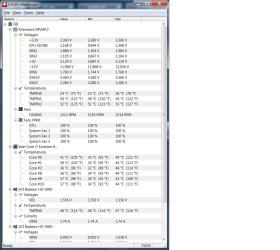
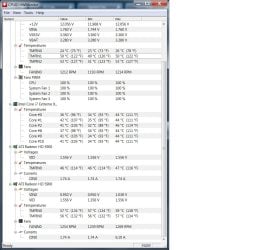
Download Hardware Monitor and give a screenshot of your voltages. This could be a power supply issue. Random hanging and failure to boot. Another thing you could do is the sata connectors on hard drives and DVD drives can get tarnished after a few years. Clean the connectors carefully with alcohol wipes and plug the cables in and unplug them a couple of times to clean up the connector. Also check all your fans are spinning when the machine starts from cold. That may be another reason it hangs. Let us know.
CPUID - System & hardware benchmark, monitoring, reporting
 
Last edited:

My Computer My Computer

At a glance

Windows 7 x64 Ultimate and numerous virtual m...AMD FX-8350 Vishera 32nm Technology @ 4.2 GHz...G Skill 32.0GB Dual-Channel DDR3 @ 1204MHz (1...EVGA GeForce GTX 960 4GB Super SC ACX 2.0+ wi...
Computer type
PC/Desktop
Computer Manufacturer/Model Number
Bluethunder II
OS
Windows 7 x64 Ultimate and numerous virtual machines
CPU
AMD FX-8350 Vishera 32nm Technology @ 4.2 GHz default
Motherboard
ASUSTeK COMPUTER INC. SABERTOOTH 990FX R2.0 (Socket 942)
Memory
G Skill 32.0GB Dual-Channel DDR3 @ 1204MHz (11-13-13-31)
Graphics Card(s)
EVGA GeForce GTX 960 4GB Super SC ACX 2.0+ with Back Plate
Sound Card
Creative X-Fi Titanium HD Audiophile PCIe
Monitor(s) Displays
LG L227WTG x 3
Screen Resolution
1680 x 1050 16:10
Hard Drives
238GB Samsung850 PRO SATA Disk Device (SSD)
1863GB Seagate ST2000DM 001-1CH164 (SATA)
1397GB Seagate ST1500DL 003-9VT16L(SATA)
466GB Western Digital WDC WD50 03AZEX-00K1GA0 (SATA) x 2
932GB Seagate ST310005 28AS SATA Disk Device (SATA)
PSU
Enermax Revolution87+ 1000 Watts Gold Certified Power Supply
Case
Rocketfish Full Tower
Cooling
Cooler Master Hyper 212 EVO Push Pull 120mm Fans
Keyboard
Logitech K740
Mouse
Logitech G100S Laser LED + Logitech Gamepad F310
Internet Speed
500 mbs down and 30mbs up
Antivirus
Malwarebytes Pro & Avast and MSE on certain Virtual Machines
Browser
Firefox (Main) Chrome, Internet Explorer (Back Up)
Other Info
Logitech X 230 2.1 Stereo System and 5.1 Yamaha RX V2090
B&W DM6 Monitor Speakers + Center and Surround Speakers
Using Mouse Without Borders (Google it)
I've uploaded a couple of screenshots from the HWMonitor for you're perusal. I can't see anything untoward here though.

I will try and clean the cable connections a bit later today and check to see if all the fans are running from cold as suggested anfd I will let you know what I discover.
 

Attachments

  • HWMonitor Screenshot 1.jpg
    HWMonitor Screenshot 1.jpg
    104.8 KB · Views: 0
  • HWMonitor Screenshot 2.jpg
    HWMonitor Screenshot 2.jpg
    109.8 KB · Views: 0

My Computer My Computer

At a glance

Windows 7 Ultimate x64 SP1Intel Core i7 x980 @ 3.33GHz6.00 GBAMD Radeon HD 5900 Series
Computer type
PC/Desktop
Computer Manufacturer/Model Number
Alienware Aurora
OS
Windows 7 Ultimate x64 SP1
CPU
Intel Core i7 x980 @ 3.33GHz
Motherboard
Alienware 04VWF2 Intel X58 chipset
Memory
6.00 GB
Graphics Card(s)
AMD Radeon HD 5900 Series
Sound Card
Realtek HD Audio
Monitor(s) Displays
Samsung 46" 3D TV
Screen Resolution
1920 x 1080
Hard Drives
2x Samsung SSD PM800 2.5" 256GB on RAID
PSU
Unknown
Case
Alienware Aurora
Cooling
Water Cooling
Keyboard
Alienware KG900
Mouse
Alienware TactX MG900
Internet Speed
Up to 150Mb download - Measured 60Mb on Speedtest.net
Antivirus
Microsoft Security Essentials
Browser
Mozilla Firefox v31.0
No I can't see anything amiss there either. You have water cooling on the cpu. I would have thought the CPU would have ran cooler that that but it is a hexacore so maybe that is normal. I know my 8 and 6 core CPU's run a little warmer than the 4 cores. Max temp on that chip is 67C.
So back to SATA connectors then. Or one fan is not spinning up when cold.
 

My Computer My Computer

At a glance

Windows 7 x64 Ultimate and numerous virtual m...AMD FX-8350 Vishera 32nm Technology @ 4.2 GHz...G Skill 32.0GB Dual-Channel DDR3 @ 1204MHz (1...EVGA GeForce GTX 960 4GB Super SC ACX 2.0+ wi...
Computer type
PC/Desktop
Computer Manufacturer/Model Number
Bluethunder II
OS
Windows 7 x64 Ultimate and numerous virtual machines
CPU
AMD FX-8350 Vishera 32nm Technology @ 4.2 GHz default
Motherboard
ASUSTeK COMPUTER INC. SABERTOOTH 990FX R2.0 (Socket 942)
Memory
G Skill 32.0GB Dual-Channel DDR3 @ 1204MHz (11-13-13-31)
Graphics Card(s)
EVGA GeForce GTX 960 4GB Super SC ACX 2.0+ with Back Plate
Sound Card
Creative X-Fi Titanium HD Audiophile PCIe
Monitor(s) Displays
LG L227WTG x 3
Screen Resolution
1680 x 1050 16:10
Hard Drives
238GB Samsung850 PRO SATA Disk Device (SSD)
1863GB Seagate ST2000DM 001-1CH164 (SATA)
1397GB Seagate ST1500DL 003-9VT16L(SATA)
466GB Western Digital WDC WD50 03AZEX-00K1GA0 (SATA) x 2
932GB Seagate ST310005 28AS SATA Disk Device (SATA)
PSU
Enermax Revolution87+ 1000 Watts Gold Certified Power Supply
Case
Rocketfish Full Tower
Cooling
Cooler Master Hyper 212 EVO Push Pull 120mm Fans
Keyboard
Logitech K740
Mouse
Logitech G100S Laser LED + Logitech Gamepad F310
Internet Speed
500 mbs down and 30mbs up
Antivirus
Malwarebytes Pro & Avast and MSE on certain Virtual Machines
Browser
Firefox (Main) Chrome, Internet Explorer (Back Up)
Other Info
Logitech X 230 2.1 Stereo System and 5.1 Yamaha RX V2090
B&W DM6 Monitor Speakers + Center and Surround Speakers
Using Mouse Without Borders (Google it)
I've cleaned the sata connectors, doesn't sem to have worked. I can only assume that it's one of the fans. When I have the funds I will replace them one at a time. I just hope it's not the cpu pump as they are quite expensive to replace.

I'll keep you updated

Thanks again for the advice
 

My Computer My Computer

At a glance

Windows 7 Ultimate x64 SP1Intel Core i7 x980 @ 3.33GHz6.00 GBAMD Radeon HD 5900 Series
Computer type
PC/Desktop
Computer Manufacturer/Model Number
Alienware Aurora
OS
Windows 7 Ultimate x64 SP1
CPU
Intel Core i7 x980 @ 3.33GHz
Motherboard
Alienware 04VWF2 Intel X58 chipset
Memory
6.00 GB
Graphics Card(s)
AMD Radeon HD 5900 Series
Sound Card
Realtek HD Audio
Monitor(s) Displays
Samsung 46" 3D TV
Screen Resolution
1920 x 1080
Hard Drives
2x Samsung SSD PM800 2.5" 256GB on RAID
PSU
Unknown
Case
Alienware Aurora
Cooling
Water Cooling
Keyboard
Alienware KG900
Mouse
Alienware TactX MG900
Internet Speed
Up to 150Mb download - Measured 60Mb on Speedtest.net
Antivirus
Microsoft Security Essentials
Browser
Mozilla Firefox v31.0
A lot of these items should have warranties, so do not forget about that.
 

My Computer My Computer

At a glance

Windows 10 ProAMD Ryzen 5 2400G Processor with Radeon RX Ve...G.SKILL Ripjaws V Series 16GB (2 x 8GB) 288-P...2047MB NVIDIA GeForce GTX 1060 6GB (EVGA)
Computer type
PC/Desktop
Computer Manufacturer/Model Number
Custom Built
OS
Windows 10 Pro
CPU
AMD Ryzen 5 2400G Processor with Radeon RX Vega 11 Graphics
Motherboard
ASRock X470 Master SLI/AC AM4 AMD Promontory X470 SATA 6Gb/s
Memory
G.SKILL Ripjaws V Series 16GB (2 x 8GB) 288-Pin DDR4 SDRAM D
Graphics Card(s)
2047MB NVIDIA GeForce GTX 1060 6GB (EVGA)
Sound Card
Motherboard Built in
Monitor(s) Displays
Acer R240HY bidx 23.8-Inch IPS HDMI DVI VGA (1920 x 1080) Wi
Screen Resolution
1920 x 1080
Hard Drives
1TB Sandisk SSD PLUS (Main drive)
500 GB Seagate 7200 RPM (Games)
500 GB Western Digital 7200 RPM (Virtual Machines)
PSU
CORSAIR TX Series TX650M 650W 80+ Gold Modular Power Supply
Case
CORSAIR CARBIDE SPEC-02 Mid-Tower Gaming Case, Red LED Fan
Cooling
220mm, two 120mm, and four 60mm fans
Keyboard
Wired Dell keyboard
Mouse
Wireless Logitech mouse
Internet Speed
250mb down, 30mb up
Antivirus
Panda Cloud Antivirus
Browser
Chrome-ish x64
Other Info
Your awesome for reading this.
You'll be glad to hear that I have finally resolved the issue! :party:

Apparently Dell in their infinate wisdom when assembling my Alienware machine (and many others to :rolleyes:) connected only one power cable to the graphics card. By doing this the graphics card (due to power connectors (rails) are incorrectly distributed on the graphics card) was not getting enough power and therefore was shutting down/restarting the PC.

Here's the link to the resolution...

Alienware Aurora ALX, R1, R2, R3, R4, May Crash Or Experience Blue Screen Errors Due to Graphics Card Power Cable | Dell US

Thank you for the assistance guys :cool:
 

My Computer My Computer

At a glance

Windows 7 Ultimate x64 SP1Intel Core i7 x980 @ 3.33GHz6.00 GBAMD Radeon HD 5900 Series
Computer type
PC/Desktop
Computer Manufacturer/Model Number
Alienware Aurora
OS
Windows 7 Ultimate x64 SP1
CPU
Intel Core i7 x980 @ 3.33GHz
Motherboard
Alienware 04VWF2 Intel X58 chipset
Memory
6.00 GB
Graphics Card(s)
AMD Radeon HD 5900 Series
Sound Card
Realtek HD Audio
Monitor(s) Displays
Samsung 46" 3D TV
Screen Resolution
1920 x 1080
Hard Drives
2x Samsung SSD PM800 2.5" 256GB on RAID
PSU
Unknown
Case
Alienware Aurora
Cooling
Water Cooling
Keyboard
Alienware KG900
Mouse
Alienware TactX MG900
Internet Speed
Up to 150Mb download - Measured 60Mb on Speedtest.net
Antivirus
Microsoft Security Essentials
Browser
Mozilla Firefox v31.0
You'll be glad to hear that I have finally resolved the issue! :party:

Apparently Dell in their infinate wisdom when assembling my Alienware machine (and many others to :rolleyes:) connected only one power cable to the graphics card. By doing this the graphics card (due to power connectors (rails) are incorrectly distributed on the graphics card) was not getting enough power and therefore was shutting down/restarting the PC.

Here's the link to the resolution...

Alienware Aurora ALX, R1, R2, R3, R4, May Crash Or Experience Blue Screen Errors Due to Graphics Card Power Cable | Dell US

Thank you for the assistance guys :cool:

Wow congrats!! :) Glad you got it figured out, and thanks for posting!! Do not forget to mark it solved :) Never mind, see you did.
 

My Computer My Computer

At a glance

Windows 10 ProAMD Ryzen 5 2400G Processor with Radeon RX Ve...G.SKILL Ripjaws V Series 16GB (2 x 8GB) 288-P...2047MB NVIDIA GeForce GTX 1060 6GB (EVGA)
Computer type
PC/Desktop
Computer Manufacturer/Model Number
Custom Built
OS
Windows 10 Pro
CPU
AMD Ryzen 5 2400G Processor with Radeon RX Vega 11 Graphics
Motherboard
ASRock X470 Master SLI/AC AM4 AMD Promontory X470 SATA 6Gb/s
Memory
G.SKILL Ripjaws V Series 16GB (2 x 8GB) 288-Pin DDR4 SDRAM D
Graphics Card(s)
2047MB NVIDIA GeForce GTX 1060 6GB (EVGA)
Sound Card
Motherboard Built in
Monitor(s) Displays
Acer R240HY bidx 23.8-Inch IPS HDMI DVI VGA (1920 x 1080) Wi
Screen Resolution
1920 x 1080
Hard Drives
1TB Sandisk SSD PLUS (Main drive)
500 GB Seagate 7200 RPM (Games)
500 GB Western Digital 7200 RPM (Virtual Machines)
PSU
CORSAIR TX Series TX650M 650W 80+ Gold Modular Power Supply
Case
CORSAIR CARBIDE SPEC-02 Mid-Tower Gaming Case, Red LED Fan
Cooling
220mm, two 120mm, and four 60mm fans
Keyboard
Wired Dell keyboard
Mouse
Wireless Logitech mouse
Internet Speed
250mb down, 30mb up
Antivirus
Panda Cloud Antivirus
Browser
Chrome-ish x64
Other Info
Your awesome for reading this.
Back
Top