Solved How do I recover apparent unused space on my hard drive?

zarfs

New member
Local time
4:55 PM
Messages
22
Location
Southern California USA
I'm running Windows 7 Pro with all updates.

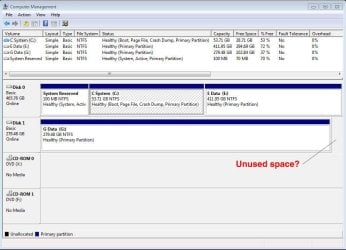
I noticed in Disk Management (see attached screen shot) that my second hard drive (Drive G) seems to have a section that is going unused. It's not listed as unallocated space; it's not identified in any way.

I've been overhauling my computer and wonder whether in the process I've allowed a virtual drive or clone drive or something like that to be created.

Is that really unused space? If so, how do I reclaim it?

PS: That hard drive used to be a dynamic drive. I changed it back to basic drive while retaining the data. The unused space appeared in the dynamic drive as well.
 

Attachments
  • Disk Management screen shot.jpg
    Disk Management screen shot.jpg
    81.1 KB · Views: 3

My Computer My Computer

At a glance

Windows 7, 64-bitIntel Core i3-3240 CPU @ 3.40GHz, 3404 GBIn motherboard
Computer type
PC/Desktop
Computer Manufacturer/Model Number
Dell Inspiron 660
OS
Windows 7, 64-bit
CPU
Intel Core i3-3240 CPU @ 3.40GHz, 340
Memory
4 GB
Graphics Card(s)
In motherboard
Sound Card
In motherboard
Monitor(s) Displays
NEC MultiSync FE992 CRT
Screen Resolution
1280 x 1024
Hard Drives
Main drive: Manufacturer not specified. Model ST500DM002-1BD142 SATA 500 GB
Supplemental drive: Maxtor 6L300S0 SATA 300 GB
Cooling
1 CPU fan, 1 chassis fan.
Keyboard
Standard
Mouse
Dell optical USB
Internet Speed
11 Mb/sec
Antivirus
Norton Internet Security 20.4.0.40
Browser
Firefox
What is the size of the G: drive.

What you are seeing is just a display anomaly in how Windows displays in Disk Management. All of my drives display the same way.
 

My Computer My Computer

At a glance

Windows 10 Pro x64, Windows 8.1 Pro x64, Wind...INTEL i9-7920X LGA 206664 GB (4 X 16 GB) G-Skill V Series DDR4 3200 ...EVGA GTX 1060 SC 3 GB
Computer type
PC/Desktop
Computer Manufacturer/Model Number
Custom Built
OS
Windows 10 Pro x64, Windows 8.1 Pro x64, Windows 7 Ultimate x64 SP1,
CPU
INTEL i9-7920X LGA 2066
Motherboard
Gigabyte X299-WU8 F3
Memory
64 GB (4 X 16 GB) G-Skill V Series DDR4 3200 Quad Channel
Graphics Card(s)
EVGA GTX 1060 SC 3 GB
Sound Card
Realtek Onboard ALC1220
Monitor(s) Displays
2 x Samsung S27E310
Screen Resolution
1920x1080
Hard Drives
Samsung 2 x 970 EVO Plus 500 GB NVMe
1 x 6TB WD 6003FZBX SATA
1 x 6TB WD 60EFRX SATA
12 x 3TB WD 30EFRX SATA
PSU
Seasonic X-1050
Case
Thermaltake Armor+
Cooling
Corsair H80i V2 Liquid AOI Cooler
Keyboard
Logitech G510s
Mouse
Logitech MX Master 2S
Internet Speed
200 Mb/s
Antivirus
ESET NOD32 13.1
Browser
EDGE (Dev, Canary, Beta), Chrome
Other Info
ASUS RT-AC68U router
Malwarebytes 4.0.4
Is that really unused space? If so, how do I reclaim it?
Have you tried expanding the G drive in disk management?
 

My Computer My Computer

At a glance

Windows 7 Pro 64 bitIntel i58GB KINGSTON DUAL-DDR3 1600MHz2GB AMD RADEON™ R7 250
Computer type
PC/Desktop
Computer Manufacturer/Model Number
PC Specialist Custom
OS
Windows 7 Pro 64 bit
CPU
Intel i5
Motherboard
ASUS® H81M-PLUS
Memory
8GB KINGSTON DUAL-DDR3 1600MHz
Graphics Card(s)
2GB AMD RADEON™ R7 250
Hard Drives
120GB KINGSTON V300 SSD
1TB WD CAVIAR BLACK WD1003FZEX
Additional information

When I booted Nero to burn a disk, its browser shows a drive that does not appear in Windows Explorer or Disk Management. It is drive F and is labeled BD-ROM. Whatever it is, I'd like to get rid of it.
 

My Computer My Computer

At a glance

Windows 7, 64-bitIntel Core i3-3240 CPU @ 3.40GHz, 3404 GBIn motherboard
Computer type
PC/Desktop
Computer Manufacturer/Model Number
Dell Inspiron 660
OS
Windows 7, 64-bit
CPU
Intel Core i3-3240 CPU @ 3.40GHz, 340
Memory
4 GB
Graphics Card(s)
In motherboard
Sound Card
In motherboard
Monitor(s) Displays
NEC MultiSync FE992 CRT
Screen Resolution
1280 x 1024
Hard Drives
Main drive: Manufacturer not specified. Model ST500DM002-1BD142 SATA 500 GB
Supplemental drive: Maxtor 6L300S0 SATA 300 GB
Cooling
1 CPU fan, 1 chassis fan.
Keyboard
Standard
Mouse
Dell optical USB
Internet Speed
11 Mb/sec
Antivirus
Norton Internet Security 20.4.0.40
Browser
Firefox
BD-ROM is a virtual CD/DVD drive created by Nero in RAM. You can use it just like a real drive by mounting an ISO in it. But it's nothing to do with your original question.
 

My Computer My Computer

At a glance

Windows 7 Pro 64 bitIntel i58GB KINGSTON DUAL-DDR3 1600MHz2GB AMD RADEON™ R7 250
Computer type
PC/Desktop
Computer Manufacturer/Model Number
PC Specialist Custom
OS
Windows 7 Pro 64 bit
CPU
Intel i5
Motherboard
ASUS® H81M-PLUS
Memory
8GB KINGSTON DUAL-DDR3 1600MHz
Graphics Card(s)
2GB AMD RADEON™ R7 250
Hard Drives
120GB KINGSTON V300 SSD
1TB WD CAVIAR BLACK WD1003FZEX
To pbcopter — The drive in question is a Maxtor 6L3000S0. Seagate rates its capacity as 300 GB.
 

My Computer My Computer

At a glance

Windows 7, 64-bitIntel Core i3-3240 CPU @ 3.40GHz, 3404 GBIn motherboard
Computer type
PC/Desktop
Computer Manufacturer/Model Number
Dell Inspiron 660
OS
Windows 7, 64-bit
CPU
Intel Core i3-3240 CPU @ 3.40GHz, 340
Memory
4 GB
Graphics Card(s)
In motherboard
Sound Card
In motherboard
Monitor(s) Displays
NEC MultiSync FE992 CRT
Screen Resolution
1280 x 1024
Hard Drives
Main drive: Manufacturer not specified. Model ST500DM002-1BD142 SATA 500 GB
Supplemental drive: Maxtor 6L300S0 SATA 300 GB
Cooling
1 CPU fan, 1 chassis fan.
Keyboard
Standard
Mouse
Dell optical USB
Internet Speed
11 Mb/sec
Antivirus
Norton Internet Security 20.4.0.40
Browser
Firefox
To BJB — I went to Disk Management to try expanding the G drive, but that option is greyed out.
 

My Computer My Computer

At a glance

Windows 7, 64-bitIntel Core i3-3240 CPU @ 3.40GHz, 3404 GBIn motherboard
Computer type
PC/Desktop
Computer Manufacturer/Model Number
Dell Inspiron 660
OS
Windows 7, 64-bit
CPU
Intel Core i3-3240 CPU @ 3.40GHz, 340
Memory
4 GB
Graphics Card(s)
In motherboard
Sound Card
In motherboard
Monitor(s) Displays
NEC MultiSync FE992 CRT
Screen Resolution
1280 x 1024
Hard Drives
Main drive: Manufacturer not specified. Model ST500DM002-1BD142 SATA 500 GB
Supplemental drive: Maxtor 6L300S0 SATA 300 GB
Cooling
1 CPU fan, 1 chassis fan.
Keyboard
Standard
Mouse
Dell optical USB
Internet Speed
11 Mb/sec
Antivirus
Norton Internet Security 20.4.0.40
Browser
Firefox
As I said, the display of the drives you are seeing in Disk Management is normal.

All the available space on disk 1 is used and is normal..
 

My Computer My Computer

At a glance

Windows 10 Pro x64, Windows 8.1 Pro x64, Wind...INTEL i9-7920X LGA 206664 GB (4 X 16 GB) G-Skill V Series DDR4 3200 ...EVGA GTX 1060 SC 3 GB
Computer type
PC/Desktop
Computer Manufacturer/Model Number
Custom Built
OS
Windows 10 Pro x64, Windows 8.1 Pro x64, Windows 7 Ultimate x64 SP1,
CPU
INTEL i9-7920X LGA 2066
Motherboard
Gigabyte X299-WU8 F3
Memory
64 GB (4 X 16 GB) G-Skill V Series DDR4 3200 Quad Channel
Graphics Card(s)
EVGA GTX 1060 SC 3 GB
Sound Card
Realtek Onboard ALC1220
Monitor(s) Displays
2 x Samsung S27E310
Screen Resolution
1920x1080
Hard Drives
Samsung 2 x 970 EVO Plus 500 GB NVMe
1 x 6TB WD 6003FZBX SATA
1 x 6TB WD 60EFRX SATA
12 x 3TB WD 30EFRX SATA
PSU
Seasonic X-1050
Case
Thermaltake Armor+
Cooling
Corsair H80i V2 Liquid AOI Cooler
Keyboard
Logitech G510s
Mouse
Logitech MX Master 2S
Internet Speed
200 Mb/s
Antivirus
ESET NOD32 13.1
Browser
EDGE (Dev, Canary, Beta), Chrome
Other Info
ASUS RT-AC68U router
Malwarebytes 4.0.4
Unused space ? What are you talking about ?

Disk 1 is 279 GB and that`s what it shows.

It only looks a bit smaller because the drive above it is 465 GBs
 

My Computer My Computer

At a glance

Windows 10 Pro x64Intel Core i7 6700KGSkill TridentZ RGB 16GB 3600 16-16-16-36EVGA GTX 980 Ti SC x2
Computer type
PC/Desktop
Computer Manufacturer/Model Number
Skylake Special #666
OS
Windows 10 Pro x64
CPU
Intel Core i7 6700K
Motherboard
Asus Sabertooth Z170 Mark 1
Memory
GSkill TridentZ RGB 16GB 3600 16-16-16-36
Graphics Card(s)
EVGA GTX 980 Ti SC x2
Sound Card
Realtek High Definition
Monitor(s) Displays
AOC G2460PG
Screen Resolution
1920 x 1080 144Hz
Hard Drives
Samsung 860 Pro 256GB, Seagate Barracuda 4TB x2
PSU
EVGA 1000 P2, EVGA White Custom Braided Cables
Case
Corsair Vengeance C70 Gunmetal Black
Cooling
Corsair H100i v2, Corsair ML120 x2, Thermal Grizzly Kryonaut
Keyboard
Logitech G910 Orion Spectrum
Mouse
Logitech G700s
Internet Speed
Verizon Fios Quantum Gateway 75/75
Antivirus
Windows Defender, Malwarebytes Free 3.8.3
Browser
Chrome
Other Info
Corsair SP120 x4, LG Blu-ray Drive, Durabrand HT-395 100 Watt Dolby Digital Amp, Corsair H2100 Wireless 7.1 Headset
Many thanks to you all. I guess working on computers makes me paranoid.
 

My Computer My Computer

At a glance

Windows 7, 64-bitIntel Core i3-3240 CPU @ 3.40GHz, 3404 GBIn motherboard
Computer type
PC/Desktop
Computer Manufacturer/Model Number
Dell Inspiron 660
OS
Windows 7, 64-bit
CPU
Intel Core i3-3240 CPU @ 3.40GHz, 340
Memory
4 GB
Graphics Card(s)
In motherboard
Sound Card
In motherboard
Monitor(s) Displays
NEC MultiSync FE992 CRT
Screen Resolution
1280 x 1024
Hard Drives
Main drive: Manufacturer not specified. Model ST500DM002-1BD142 SATA 500 GB
Supplemental drive: Maxtor 6L300S0 SATA 300 GB
Cooling
1 CPU fan, 1 chassis fan.
Keyboard
Standard
Mouse
Dell optical USB
Internet Speed
11 Mb/sec
Antivirus
Norton Internet Security 20.4.0.40
Browser
Firefox
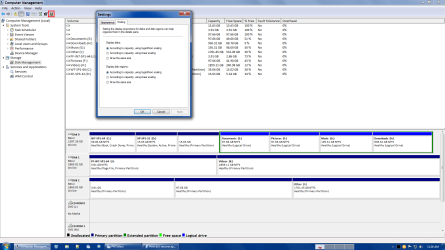
View Settings

You can change the View:

  • Click on the Settings button (or use the menu - View > Settings)
  • Click on the Scaling tab
Disk Management.png
 

My Computer My Computer

At a glance

W7 Ultimate SP1, LM19.2 MATE, W10 Home 1703, ...AMD Phenom II x6 1100T, 3.3 GHz12GB DDR3 1333 G-Skill (4GB x 2), G-Skill (2G...NVIDIA GeForce GTX 660
Computer type
PC/Desktop
Computer Manufacturer/Model Number
n/a
OS
W7 Ultimate SP1, LM19.2 MATE, W10 Home 1703, W10 Pro 1703 VM, #All 64 bit
CPU
AMD Phenom II x6 1100T, 3.3 GHz
Motherboard
ASUS M4A88T-M/USB3 (AM3)
Memory
12GB DDR3 1333 G-Skill (4GB x 2), G-Skill (2GB x 2)
Graphics Card(s)
NVIDIA GeForce GTX 660
Sound Card
Realtek?
Monitor(s) Displays
Samsung S23B350
Screen Resolution
1920x1080
Hard Drives
WD Green 2TB (SATA), WD Green 3TB (SATA), WD Blue 4TB (SATA), WD Blue 6TB (SATA)
PSU
Cooler Master
Case
Antec GX300 Tower
Cooling
3x Antec TRICOOL 120mm Fans
Mouse
Wired Optical
Internet Speed
DSL
Antivirus
Avast
Browser
Pale Moon (64 bit)
Other Info
2018-12-27 Upgraded HDDs
2015-12-10 Upgraded case, graphics card, storage
2015-08-15 Upgraded motherboard & RAM
2015-07-15 Upgraded LM17.1 to LM17.2

My Computer My Computer

At a glance

Windows 10 ProAMD Ryzen 5 2400G Processor with Radeon RX Ve...G.SKILL Ripjaws V Series 16GB (2 x 8GB) 288-P...2047MB NVIDIA GeForce GTX 1060 6GB (EVGA)
Computer type
PC/Desktop
Computer Manufacturer/Model Number
Custom Built
OS
Windows 10 Pro
CPU
AMD Ryzen 5 2400G Processor with Radeon RX Vega 11 Graphics
Motherboard
ASRock X470 Master SLI/AC AM4 AMD Promontory X470 SATA 6Gb/s
Memory
G.SKILL Ripjaws V Series 16GB (2 x 8GB) 288-Pin DDR4 SDRAM D
Graphics Card(s)
2047MB NVIDIA GeForce GTX 1060 6GB (EVGA)
Sound Card
Motherboard Built in
Monitor(s) Displays
Acer R240HY bidx 23.8-Inch IPS HDMI DVI VGA (1920 x 1080) Wi
Screen Resolution
1920 x 1080
Hard Drives
1TB Sandisk SSD PLUS (Main drive)
500 GB Seagate 7200 RPM (Games)
500 GB Western Digital 7200 RPM (Virtual Machines)
PSU
CORSAIR TX Series TX650M 650W 80+ Gold Modular Power Supply
Case
CORSAIR CARBIDE SPEC-02 Mid-Tower Gaming Case, Red LED Fan
Cooling
220mm, two 120mm, and four 60mm fans
Keyboard
Wired Dell keyboard
Mouse
Wireless Logitech mouse
Internet Speed
250mb down, 30mb up
Antivirus
Panda Cloud Antivirus
Browser
Chrome-ish x64
Other Info
Your awesome for reading this.
Back
Top