Show us your SSD performance 2

Is it worth it to get an 840 for a SATA2 system? It could always be moved to a newer system later, but with the way prices and advancements are going, there will be a new Top Dog then. If SATA2 will not benefit, then a lower priced/rated SSD would do just as well. A Guy

I only skimmed the doc Wrend linked to, but it seems Samsung's RAPID mode isn't really restricted by SATA speeds all that much. Perhaps at it's own startup (the data still needs to be fetched from the drive to begin with), but after that it look like it's all up to your RAM speed...

Definitely going to read through that document properly when I get a chance. :)
 

My Computer My Computer

Computer type
PC/Desktop
OS
Win 10 x64 Pro x64 / Ubuntu 15.10 x64
CPU
Intel i7-4960X
Motherboard
Asus Rampage IV Black Edition
Memory
4x8GB Corsair Dominator Platinum @2400MHz 10-12-12-31
Graphics Card(s)
2x MSI GTX780Ti 3GB (SLI)
Sound Card
Onboard SupremeFX (Cirrus Logic CS4398)
Monitor(s) Displays
3x LG Cinema 27" IPS LED (27MP65)
Screen Resolution
[1920x1080]x3
Hard Drives
Crucial M500 120GB, Crucial M500 480GB, Toshiba DT01ACA200 2TB
PSU
CoolerMaster V1000
Case
Corsair Obsidian 750D
Cooling
ThermalTake Water 3.0 Extreme, 4xSP120, 3xAF120
Keyboard
Moshi Luna
Mouse
Logitech G700s / Roccat Tyon
Internet Speed
4Mb uncapped ADSL (Afrihost)
Antivirus
MS Security Essentials
Browser
Chrome... Duh. (:
Is it worth it to get an 840 for a SATA2 system? It could always be moved to a newer system later, but with the way prices and advancements are going, there will be a new Top Dog then. If SATA2 will not benefit, then a lower priced/rated SSD would do just as well. A Guy
Absolutely right. I am still running 2 systems with SSDs from 2008 that are Sata II and have no Trim. The real life speed differences compared to my most modern ones (e.g. OCZ Vector) is minimal. That is a different matter if you run them thru the measurement programs - but that is not real life.
 

My Computer My Computer

Computer Manufacturer/Model Number
HP, Dell, Gateway, Toshiba - 4 laptops and 2 desktops
OS
Vista, Windows7, Mint Mate, Zorin, Windows 8
CPU
from 1.6GHz Duo to i7
Monitor(s) Displays
2x HP w2207
Hard Drives
5x HDD, 7x SSD, 12x Externals
Keyboard
with trackball - no mices
Mouse
Trackball mice
Internet Speed
DSL 6000
well, I know I have an 8 or 10 year old laptop with one of the first Pentium CPUs they came out with and an SSD in it. It does quite well everything else considered. In fact, the SSD is the only reason it is still in use probably. So, as far as I'm concerned, yes, it's worth it. I loaned one to a friend of mine for a couple of weeks because his laptop was too slow to get any work done. He wanted me to fix it, and there was really nothing to fix. But, I loaned him an SSD until he could get a new laptop. That was a year ago and I haven't seen the SSD since and he's still using his old laptop. He said I wasn't getting the SSD back. Ah, how nice it is to have good friends. Seriously, he would give it back if I told him I wanted it, but I have a few more, so no big deal. But, it is something I can use against him in a time of need. :thumbsup:
 

My Computers My Computers

System One System Two

  • Computer type
    PC/Desktop
    Computer Manufacturer/Model Number
    ALWAYS UNDER CONSTRUCTION
    OS
    Windows 11 Pro
    CPU
    Ryzen 9 5900X
    Motherboard
    Asus X570 Crosshair Viii Hero
    Memory
    32GB G Skill DDR4-3600
    Graphics Card(s)
    EVGA RTX 3080 FTW 3 Ultra
    Sound Card
    On Board/Sennheiser PC37X Headset
    Monitor(s) Displays
    3 X Asus 27"
    Screen Resolution
    2560x1440
    Hard Drives
    2 X 1 TB NVME drives
    PSU
    EVGA 850
    Case
    Phanteks Eclipse P400A
    Cooling
    EVGA 280 AIO
    Keyboard
    Logitech G510s/ Logitech G13
    Mouse
    Logitech G502
    Internet Speed
    24/1
    Antivirus
    ESET/MBAM Pro/SAS Pro
    Browser
    Chrome/ Firefox/ Edge
  • Computer type
    Laptop
    System Manufacturer/Model Number
    Dell 16 Plus
    OS
    Windows 11 Pro
    CPU
    Intel Ultra 9 288V
    Memory
    32 GB LPDDR5X 8533
    Monitor(s) Displays
    16" Mini-LED HDR600 Touch 90 Hz
    Screen Resolution
    2560X1600
    Hard Drives
    1 TB NVME
Well I know an SSD is worth it ;) Was specifically wondering about an 840 as that is the speed king. But my system is SATA2, and I won't see those speeds. If I won't notice a difference from my Intel X25M Gen2 (which is less then 1/2 full ;)), then it's just an itch to get a bigger, badder SSD at such low (relative) prices. A Guy
 

My Computer My Computer

Computer type
PC/Desktop
OS
Windows 10 Home x64
CPU
INTEL Core i5-750 Quad-Core 3.37GHz
Motherboard
ASUS P7P55D
Memory
HyperX Fury Black Series 8GB (2 x 4GB) 1866Mhz
Graphics Card(s)
EVGA GeForce GTX 750 Superclocked 1GB 128-Bit GDDR5
Monitor(s) Displays
LG 32MA68HY 32" IPS
Screen Resolution
1920 x 1080
Hard Drives
Samsung 840 Evo 120GB, SEAGATE 500GB Barracuda® 7200.12, SATA 3 Gb/s, 7200 RPM, 16MB cache
PSU
ANTEC TruePower New TP-550, 80 PLUS, 550W
Case
ANTEC Three Hundred Illusion
Cooling
COOLER MASTER Hyper 212 Plus, 4 x 120mm 1 x 140mm Noctua's
Internet Speed
85 + Mbps
Antivirus
Avast
Browser
Vivaldi
Well pretty much what I've seen is the things that matter for an OS drive is access times and 4kb read speeds, and they don't change on sata II. So, if you like running benchmarks, which I know you don't, you will see a big difference. For every day use, you won't notice much difference.
 

My Computers My Computers

System One System Two

  • Computer type
    PC/Desktop
    Computer Manufacturer/Model Number
    ALWAYS UNDER CONSTRUCTION
    OS
    Windows 11 Pro
    CPU
    Ryzen 9 5900X
    Motherboard
    Asus X570 Crosshair Viii Hero
    Memory
    32GB G Skill DDR4-3600
    Graphics Card(s)
    EVGA RTX 3080 FTW 3 Ultra
    Sound Card
    On Board/Sennheiser PC37X Headset
    Monitor(s) Displays
    3 X Asus 27"
    Screen Resolution
    2560x1440
    Hard Drives
    2 X 1 TB NVME drives
    PSU
    EVGA 850
    Case
    Phanteks Eclipse P400A
    Cooling
    EVGA 280 AIO
    Keyboard
    Logitech G510s/ Logitech G13
    Mouse
    Logitech G502
    Internet Speed
    24/1
    Antivirus
    ESET/MBAM Pro/SAS Pro
    Browser
    Chrome/ Firefox/ Edge
  • Computer type
    Laptop
    System Manufacturer/Model Number
    Dell 16 Plus
    OS
    Windows 11 Pro
    CPU
    Intel Ultra 9 288V
    Memory
    32 GB LPDDR5X 8533
    Monitor(s) Displays
    16" Mini-LED HDR600 Touch 90 Hz
    Screen Resolution
    2560X1600
    Hard Drives
    1 TB NVME
Bill I would expect you might see a few seconds faster reboot times but probably not much in real world performance. But if you have an itch, better scratch it. :p
 

My Computer My Computer

Computer type
PC/Desktop
Computer Manufacturer/Model Number
Home Built Desktop By DataTech
OS
Windows 7 Ultimate X64 SP1
CPU
Intel i5-2550K, Differing ~4.4-4.8GHz No built in GPU
Motherboard
ASUS P8Z68-V PRO/GEN3
Memory
16GB G.Skill Sniper 1866MHz @ 2133MHz 2x8GB
Graphics Card(s)
ASUS GTX650TIB-DC2OC-2GD5, (650TI Boost)
Sound Card
Onboard Realtek 5-1
Monitor(s) Displays
Samsung P2570HD
Screen Resolution
1920x1080
Hard Drives
Samsung 840 Pro 256GB SSD for OS, 500GB Seagate Constellation (Enterprise drive) for Data
PSU
Corsair HX650W
Case
Inwin Dragon Rider
Cooling
Hyper 212 EVO w/two Noctua fans, push-pull, @1300 RPM
Keyboard
E-Z Eyes, bright yellow keys with large characters
Mouse
steelseries SENSEI Laser Pro Gaming
Internet Speed
48-51Mbs Mbs down, 11 Mbs up Xfinity Cable
Antivirus
Norton Internet Security 2013
Browser
IE 10, Opera, Pale Moon if needed
Other Info
4 case fans, LG BluRay-RE, ASUS DVD-RW, Mr. Fusion power supply, 1.21 gigawatts.
Well, I'm quite obviously still a bit of a noob when it comes to SSDs, but I'm still loving my M500. Nowhere near the speeds of many other drives, but the 450-odd MB/s seq-read it gets on my system is definitely nothing to complain about. Can't wait to get my games running from an SSD (next build), no more staring at loading screens...
picture.php
 

My Computer My Computer

Computer type
PC/Desktop
OS
Win 10 x64 Pro x64 / Ubuntu 15.10 x64
CPU
Intel i7-4960X
Motherboard
Asus Rampage IV Black Edition
Memory
4x8GB Corsair Dominator Platinum @2400MHz 10-12-12-31
Graphics Card(s)
2x MSI GTX780Ti 3GB (SLI)
Sound Card
Onboard SupremeFX (Cirrus Logic CS4398)
Monitor(s) Displays
3x LG Cinema 27" IPS LED (27MP65)
Screen Resolution
[1920x1080]x3
Hard Drives
Crucial M500 120GB, Crucial M500 480GB, Toshiba DT01ACA200 2TB
PSU
CoolerMaster V1000
Case
Corsair Obsidian 750D
Cooling
ThermalTake Water 3.0 Extreme, 4xSP120, 3xAF120
Keyboard
Moshi Luna
Mouse
Logitech G700s / Roccat Tyon
Internet Speed
4Mb uncapped ADSL (Afrihost)
Antivirus
MS Security Essentials
Browser
Chrome... Duh. (:
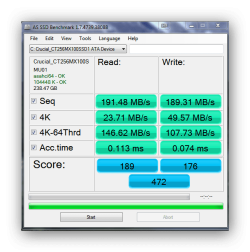
I installed my Crucial MX100 SSD a couple of weeks ago. It was originally connected to a SATA II motherboard port, but today I installed a PCIe SATA III card. Here are the best benchmarks to date. This is probably as good as it gets until I upgrade to a motherboard with embedded SATA III.
 

Attachments

  • Ashampoo_Snap_2014.07.01_11h37m19s_001_.png
    Ashampoo_Snap_2014.07.01_11h37m19s_001_.png
    22.4 KB · Views: 107

My Computer My Computer

Computer type
PC/Desktop
OS
Windows 7 x64
CPU
Intel Core2 Extreme Q6850 3.00GHz
Motherboard
EVGA 132-CK-NF79
Memory
8 GB
Graphics Card(s)
Radeon R7 260X
Sound Card
Xonar DS
Hard Drives
Hitachi Deskstar 1 tb
PNY Optimus 240gb on SATA 6gb
and Seagate 600 searies 480gb on SATA 6gb
 

Attachments

  • AS SSD PNY Optimus 070914.PNG
    AS SSD PNY Optimus 070914.PNG
    27 KB · Views: 89
  • AS SSD Seagate 600 070914.PNG
    AS SSD Seagate 600 070914.PNG
    24.8 KB · Views: 90

My Computer My Computer

Computer type
PC/Desktop
Computer Manufacturer/Model Number
Homebuilt
OS
windows 7 32
CPU
Intel i7 4770K
Motherboard
Asus Z97-A
Memory
Corsair Vengeance 8gb DDR3 2133(PC3 17000)
Graphics Card(s)
nVidia GTX 660 2gb
Sound Card
Asus Xonar D1
Monitor(s) Displays
Dell Ultrasharp UM2913WM
Screen Resolution
2560x1080 32
Hard Drives
PNY 240gb SSD
Seagate 500gb SSD
PSU
Corsair CXM 600
Case
Fractal Design Define R4
Cooling
Arctic Freezer Xtreme rev 2
Keyboard
Logitech K800 Wireless Illuminated
Mouse
MicroSoft 5000
Internet Speed
Cable
Antivirus
MSE
Browser
IE 11 and Chrome
Other Info
Samsung DVD-RW
Cambridge 4.1 speakers
Hauppauge HVR-950 USB Tuner
Asus Optimized Overclock to 4.4ghz
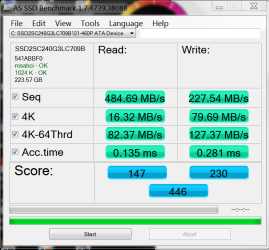
My numbers are not as good as some of you, as my Mobo can't utilize the full potential of an SSD.

9OwKHOH.jpg


oXiDGKy.jpg
 

My Computer My Computer

Computer type
PC/Desktop
Computer Manufacturer/Model Number
Custom Built
OS
Windows 10 Pro
CPU
Core2Quad (2.6 Ghz)
Motherboard
nVidia 775
Memory
8 Gigs DDR2
Graphics Card(s)
Geforce Titan Black
Sound Card
Motherboard Audio
Monitor(s) Displays
25" Asus LCD
Screen Resolution
1680x1050
Hard Drives
120 Gig SSD
60 Gig SSD
750 Gig HDD
PSU
850 Watts
Case
Mid-Size
Keyboard
Logitech
Mouse
Logitech - I love logitech mouses
Internet Speed
DSL 25Mbps - Although extremely expensive
Antivirus
Microsoft Anti-Virus
Browser
FireFox 36.x
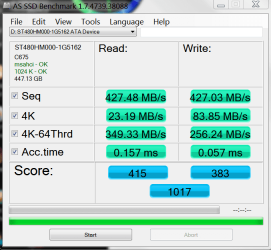
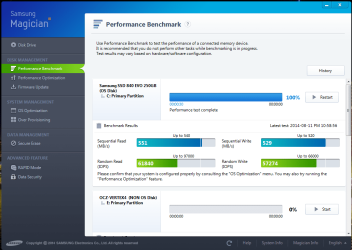
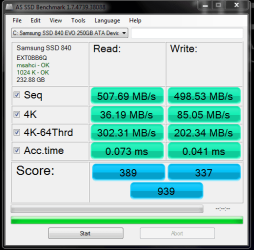
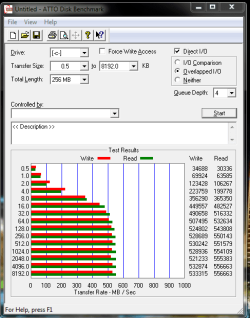
Here's a few benches from the Evo I installed recently. Nothing amazing but about right. Seems like a nice drive and the Samsung software made it very easy moving my OS from my old Vertex 4. A couple of clicks of the mouse and it was fully transferred and working perfectly within 10-15 mins :)

evo.PNG

as.PNG

atto.PNG
 

My Computer My Computer

OS
Windows 7 Professional 64 bit
I installed my Crucial MX100 SSD a couple of weeks ago. It was originally connected to a SATA II motherboard port, but today I installed a PCIe SATA III card. Here are the best benchmarks to date. This is probably as good as it gets until I upgrade to a motherboard with embedded SATA III.

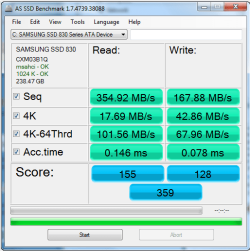
This is on a P7P55D-E6 PRO, Clean install MBR, Samsung 830 I must still not have set up correct yet?
AS%20Benchmark%20Office%20Samsung%20830.png
:mad: I guess I can't post pictures?? My Score AS was only 369
 

My Computer My Computer

Computer type
PC/Desktop
Computer Manufacturer/Model Number
Custom Builds
OS
Windows 7 64 bit Pro MC
CPU
Intel Core i5 760 2.80
Motherboard
Asus P7P55d-E Pro
Memory
8109 GB Corsair CMZ8GX3MA2A1600
Graphics Card(s)
NVIDA GeForce 9800 GTX+
Sound Card
onboard
Screen Resolution
1080
Hard Drives
256 GB Samsung 830
2- 1 TB WD Blacks
1- 3 GB WD 30EZRX-00DC0B0
Antivirus
Norton and Malwarebytes
Browser
IE 11
I installed my Crucial MX100 SSD a couple of weeks ago. It was originally connected to a SATA II motherboard port, but today I installed a PCIe SATA III card. Here are the best benchmarks to date. This is probably as good as it gets until I upgrade to a motherboard with embedded SATA III.

This is on a P7P55D-E6 PRO, Clean install MBR, Samsung 830 I must still not have set up correct yet?
AS%20Benchmark%20Office%20Samsung%20830.png
:mad: I guess I can't post pictures?? My Score AS was only 369


The image works if I click it, here ya go.

ssd.PNG

I would suspect on that motherboard you are running Sata II so the speeds won't be as fast as advertised.
 

My Computer My Computer

OS
Windows 7 Professional 64 bit
Paul, you should try the Intel RST driver instead of the stock Microsoft driver and see what the difference is. As far as I know, Intel RST is somewhat better
 

My Computer My Computer

Computer type
PC/Desktop
Computer Manufacturer/Model Number
Custom Built
OS
Windows 7 Professional 64bit SP1
CPU
Intel Core i5-3570K @ 4.5GHz
Motherboard
Asus Sabertooth Z77
Memory
Corsair Vengeance 16GB (4x4) @1866MHz CL 9-9-9-24 1T
Graphics Card(s)
EVGA GTX 750 Ti FTW
Sound Card
Onboard Audio
Monitor(s) Displays
Dell S2309W
Screen Resolution
1920x1080
Hard Drives
Samsung 830 128GB SSD - OS
(4) Seagate 5TB HDD
(1) Seagate 2TB HDD
PSU
Seasonic X750 80+ Gold Full Modular
Case
Antec Eleven Hundred Super Mid Tower
Cooling
Intel Liquid Cooler
Keyboard
Max Nighthawk X8 Mechanical keyboard
Mouse
Mionix Naos 7000
Internet Speed
50 Mbps Down / 10 Mbps Up
Antivirus
Microsoft Security Essentials/Malwarebytes Anti-Malware
Browser
Chrome/Firefox
Other Info
Klipsch ProMedia 2.1's
Asus RT-N66R Wireless Router
I installed my Crucial MX100 SSD a couple of weeks ago. It was originally connected to a SATA II motherboard port, but today I installed a PCIe SATA III card. Here are the best benchmarks to date. This is probably as good as it gets until I upgrade to a motherboard with embedded SATA III.

This is on a P7P55D-E6 PRO, Clean install MBR, Samsung 830 I must still not have set up correct yet?
AS%20Benchmark%20Office%20Samsung%20830.png
:mad: I guess I can't post pictures?? My Score AS was only 369


The image works if I click it, here ya go.

View attachment 328944

I would suspect on that motherboard you are running Sata II so the speeds won't be as fast as advertised.

No it has SATA 3 on 2 ports this SSD is on the 1 of these two port. They are controlled by a Marvel drivers. I have tried to install IRST drivers with out any luck. I guess this MB is just to old
 

My Computer My Computer

Computer type
PC/Desktop
Computer Manufacturer/Model Number
Custom Builds
OS
Windows 7 64 bit Pro MC
CPU
Intel Core i5 760 2.80
Motherboard
Asus P7P55d-E Pro
Memory
8109 GB Corsair CMZ8GX3MA2A1600
Graphics Card(s)
NVIDA GeForce 9800 GTX+
Sound Card
onboard
Screen Resolution
1080
Hard Drives
256 GB Samsung 830
2- 1 TB WD Blacks
1- 3 GB WD 30EZRX-00DC0B0
Antivirus
Norton and Malwarebytes
Browser
IE 11
This is on a P7P55D-E6 PRO, Clean install MBR, Samsung 830 I must still not have set up correct yet?
AS%20Benchmark%20Office%20Samsung%20830.png
:mad: I guess I can't post pictures?? My Score AS was only 369


The image works if I click it, here ya go.

View attachment 328944

I would suspect on that motherboard you are running Sata II so the speeds won't be as fast as advertised.

No it has SATA 3 on 2 ports this SSD is on the 1 of these two port. They are controlled by a Marvel drivers. I have tried to install IRST drivers with out any luck. I guess this MB is just to old

Looking again at the motherboard specs, it states the fastest ports are Sata 3Gb/s so I guess that's your limiting factor. Obviously all the new boards are 6Gb/s.
 

My Computer My Computer

OS
Windows 7 Professional 64 bit
This is on a P7P55D-E6 PRO, Clean install MBR, Samsung 830 I must still not have set up correct yet?

Looking again at the motherboard specs, it states the fastest ports are Sata 3Gb/s so I guess that's your limiting factor. Obviously all the new boards are 6Gb/s.

Not sure which specs you're looking at Paul. Just to chime in (not sure what the problem is, sorry), but according to the Asus website, the P7P55D-E Pro does actually support SATA3.

I'm not sure what a "P7P55D-E6 Pro" is though, unless that was just a typo(?), I can't find any boards with that model number...
 

My Computer My Computer

Computer type
PC/Desktop
OS
Win 10 x64 Pro x64 / Ubuntu 15.10 x64
CPU
Intel i7-4960X
Motherboard
Asus Rampage IV Black Edition
Memory
4x8GB Corsair Dominator Platinum @2400MHz 10-12-12-31
Graphics Card(s)
2x MSI GTX780Ti 3GB (SLI)
Sound Card
Onboard SupremeFX (Cirrus Logic CS4398)
Monitor(s) Displays
3x LG Cinema 27" IPS LED (27MP65)
Screen Resolution
[1920x1080]x3
Hard Drives
Crucial M500 120GB, Crucial M500 480GB, Toshiba DT01ACA200 2TB
PSU
CoolerMaster V1000
Case
Corsair Obsidian 750D
Cooling
ThermalTake Water 3.0 Extreme, 4xSP120, 3xAF120
Keyboard
Moshi Luna
Mouse
Logitech G700s / Roccat Tyon
Internet Speed
4Mb uncapped ADSL (Afrihost)
Antivirus
MS Security Essentials
Browser
Chrome... Duh. (:
I have one of the older Samsung 840 series - different from the 840 EVO I think which can give higher sequential writes (Rapid DRAM caching thing?)
Samsung 840 (AS SSD).jpg
Also, my Crucial M4 128G isn't great on sequential writes but that doesn't stop the performance (4k R/W, access times) being a standout for the OS drive compared to a HDD.
I also have a Samsung SSD on an older PC connected to a Sata II port and the performance gain is worth it IMO.
 

My Computer My Computer

Computer type
PC/Desktop
Computer Manufacturer/Model Number
Own build
OS
Windows 7x64 Home Premium SP1
CPU
Intel i7 2600k
Motherboard
ASUS P8Z68 Deluxe
Memory
G.Skill Ripjaws (DDR3-1600) 2x4GB
Graphics Card(s)
Nvidia GeForce GTS 450; Intel HD Graphics 3000(GT2+)
Monitor(s) Displays
Dell Ultrasharp IPS panel U2311H, Samsung SyncMaster P2350
Screen Resolution
1920x1080
Hard Drives
Samsung 850 Pro SSD 256GB, Samsung SSD 840 120GB, Seagates 1TB Barracuda ST31000528AS x2
PSU
Seasonic M12II 520W
Case
Lian Li Lancool PC-K60
Cooling
Case: 1x120mm, 3x140mm CPU: Hyper 212+
Keyboard
Logitech MK520 (wireless)
Mouse
Logitech MK520
Internet Speed
6-7 Mbps
Antivirus
Norton Security Premium, Malwarebytes on 2 (MSE on 3rd PC)
Browser
FireFox
Other Info
Audio: Logitech Z523 2.1
I installed my Crucial MX100 SSD a couple of weeks ago. It was originally connected to a SATA II motherboard port, but today I installed a PCIe SATA III card. Here are the best benchmarks to date. This is probably as good as it gets until I upgrade to a motherboard with embedded SATA III.

This is on a P7P55D-E6 PRO, Clean install MBR, Samsung 830 I must still not have set up correct yet?
AS%20Benchmark%20Office%20Samsung%20830.png
:mad: I guess I can't post pictures?? My Score AS was only 369


The image works if I click it, here ya go.

View attachment 328944

I would suspect on that motherboard you are running Sata II so the speeds won't be as fast as advertised.
https://www.dropbox.com/s/woveh1sc48oxukv/P7P MB Add.png

As I typed earlier the P7P does have 2 ports that are SATA III and my Samsung 840 pro is on the first one. I don't seem to be able to install IRST drivers
 

My Computer My Computer

Computer type
PC/Desktop
Computer Manufacturer/Model Number
Custom Builds
OS
Windows 7 64 bit Pro MC
CPU
Intel Core i5 760 2.80
Motherboard
Asus P7P55d-E Pro
Memory
8109 GB Corsair CMZ8GX3MA2A1600
Graphics Card(s)
NVIDA GeForce 9800 GTX+
Sound Card
onboard
Screen Resolution
1080
Hard Drives
256 GB Samsung 830
2- 1 TB WD Blacks
1- 3 GB WD 30EZRX-00DC0B0
Antivirus
Norton and Malwarebytes
Browser
IE 11
That's because they are controlled by a Marvell controller and not the Chipset controller. You will typically get better results from the Chipset controlled ports. IRST will only work on the Intel chipset controllers.
 

My Computers My Computers

System One System Two

  • Computer type
    PC/Desktop
    Computer Manufacturer/Model Number
    ALWAYS UNDER CONSTRUCTION
    OS
    Windows 11 Pro
    CPU
    Ryzen 9 5900X
    Motherboard
    Asus X570 Crosshair Viii Hero
    Memory
    32GB G Skill DDR4-3600
    Graphics Card(s)
    EVGA RTX 3080 FTW 3 Ultra
    Sound Card
    On Board/Sennheiser PC37X Headset
    Monitor(s) Displays
    3 X Asus 27"
    Screen Resolution
    2560x1440
    Hard Drives
    2 X 1 TB NVME drives
    PSU
    EVGA 850
    Case
    Phanteks Eclipse P400A
    Cooling
    EVGA 280 AIO
    Keyboard
    Logitech G510s/ Logitech G13
    Mouse
    Logitech G502
    Internet Speed
    24/1
    Antivirus
    ESET/MBAM Pro/SAS Pro
    Browser
    Chrome/ Firefox/ Edge
  • Computer type
    Laptop
    System Manufacturer/Model Number
    Dell 16 Plus
    OS
    Windows 11 Pro
    CPU
    Intel Ultra 9 288V
    Memory
    32 GB LPDDR5X 8533
    Monitor(s) Displays
    16" Mini-LED HDR600 Touch 90 Hz
    Screen Resolution
    2560X1600
    Hard Drives
    1 TB NVME
Back
Top