SSD Problems?

I believe you can typr regedit in the search box, open regedit, navigate to HKEY_LOCAL_MACHINE\SYSTEM\CurrentControlSet\Contro l\Session Manager\Memory Management\PrefetchPerameters right click EnableSuperfetch, in the right pane right click on it and select modify. If superfetch is disabled there should be a 0 in values. Change it to 3. Then go to to Control Panel select Administrative Tools\Services double click SuperFetch select startup then select enable.

I believe this is the way to do it, however you may want to get some verification on it. there are several threads on in this forum.

Thanks. I enabled both, opened the Intel SSD Toolbox and it complained. So I let it do its thing again. No big deal.
Anyway when I first ran the Intel Toolbox and it turn all that off I went in and deleted all the files in the prefetch folder. I probably deleted the Index.dat file also so even if I enable it nothing gets stored in there.
When I get time I'll image a spinner with a older image and copy that file over to another drive then put it back in the right place on the SSD.
 

My Computer

Computer Manufacturer/Model Number
Built be Me
OS
Windows 7 Pro x64
CPU
i5 760
Motherboard
Asus P7P55D-E Pro
Memory
16GB
Graphics Card(s)
Nvidia GTS450
Sound Card
On board
Monitor(s) Displays
Dell 2007WFP Dell 1800FP
Screen Resolution
1680x1050 1280x1024
Hard Drives
Seagate 250GB & 750GB
WD 1TB
PSU
Antec 750
Case
In Win
Cooling
Cooler Master Hyper 212+
Keyboard
IBM
Mouse
MS
In the past I have run my SSD both ways and I can't really tell any difference. I don't believe you have to worry about writes. I read an interview awhile back with a Microsoft Exec about how win 7 deals with SSDs. He said after lengthy studies the found that most people using any HD, reads outnumber writes 40-1, and the majority of the writes were 4kb or less. That also speaks directly to those who complain about the stats of SSDs with low write speeds. Write speeds are not nearly as important as read speeds, and the ones with low write speeds ate still way faster than a spinner. That's my take on it anyway.
 

My Computers

System One System Two

  • Computer type
    PC/Desktop
    Computer Manufacturer/Model Number
    ALWAYS UNDER CONSTRUCTION
    OS
    Windows 11 Pro
    CPU
    Ryzen 9 5900X
    Motherboard
    Asus X570 Crosshair Viii Hero
    Memory
    32GB G Skill DDR4-3600
    Graphics Card(s)
    EVGA RTX 3080 FTW 3 Ultra
    Sound Card
    On Board/Sennheiser PC37X Headset
    Monitor(s) Displays
    3 X Asus 27"
    Screen Resolution
    2560x1440
    Hard Drives
    2 X 1 TB NVME drives
    PSU
    EVGA 850
    Case
    Phanteks Eclipse P400A
    Cooling
    EVGA 280 AIO
    Keyboard
    Logitech G510s/ Logitech G13
    Mouse
    Logitech G502
    Internet Speed
    24/1
    Antivirus
    ESET/MBAM Pro/SAS Pro
    Browser
    Chrome/ Firefox/ Edge
  • Computer type
    Laptop
    System Manufacturer/Model Number
    Dell 16 Plus
    OS
    Windows 11 Pro
    CPU
    Intel Ultra 9 288V
    Memory
    32 GB LPDDR5X 8533
    Monitor(s) Displays
    16" Mini-LED HDR600 Touch 90 Hz
    Screen Resolution
    2560X1600
    Hard Drives
    1 TB NVME
Admitedly,I havent been very cautious with mine.

Ive done lots of experiementing and playing around, which has involved many, many complete system restores.

(via Acronis system disc restore) which is why mine has such a high Write count.

I would say Ive done far more restores than most would likely ever do.

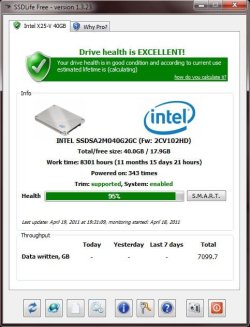
Even with that, heres what mine reports:
 

Attachments

  • Capture.JPG
    Capture.JPG
    51.3 KB · Views: 13

My Computer

Computer Manufacturer/Model Number
Custom (Self Build)
OS
Windows 7 Home Premium 64bit
CPU
Intel Core i7 2700k
Motherboard
eVGA P67 SLI
Memory
8GB Mushkin Redline Ridgebacks @1866
Graphics Card(s)
EVGA GTX570 SC
Sound Card
XiFi Titanium HD
Monitor(s) Displays
LG W2453V
Screen Resolution
1920x1080
Hard Drives
Intel 320 80GB -- Intel X25-V 40GB --WD Black 1TB x2 -- WD Blue 640GB
PSU
Seasonic x750
Case
Corsair 600T SE White
Cooling
eVGA Superclocked CPU Cooler
Keyboard
Saitek Cyborg
Antivirus
Kaspersky
Browser
IE
Other Info
LG BD/DVD
Wishmaster, I'm alot like that. I try too many things I don't know enough about. But, that's how you learn. But, I figure if you do a secure erase brfore you reinstall you always have a clean system.
 

My Computers

System One System Two

  • Computer type
    PC/Desktop
    Computer Manufacturer/Model Number
    ALWAYS UNDER CONSTRUCTION
    OS
    Windows 11 Pro
    CPU
    Ryzen 9 5900X
    Motherboard
    Asus X570 Crosshair Viii Hero
    Memory
    32GB G Skill DDR4-3600
    Graphics Card(s)
    EVGA RTX 3080 FTW 3 Ultra
    Sound Card
    On Board/Sennheiser PC37X Headset
    Monitor(s) Displays
    3 X Asus 27"
    Screen Resolution
    2560x1440
    Hard Drives
    2 X 1 TB NVME drives
    PSU
    EVGA 850
    Case
    Phanteks Eclipse P400A
    Cooling
    EVGA 280 AIO
    Keyboard
    Logitech G510s/ Logitech G13
    Mouse
    Logitech G502
    Internet Speed
    24/1
    Antivirus
    ESET/MBAM Pro/SAS Pro
    Browser
    Chrome/ Firefox/ Edge
  • Computer type
    Laptop
    System Manufacturer/Model Number
    Dell 16 Plus
    OS
    Windows 11 Pro
    CPU
    Intel Ultra 9 288V
    Memory
    32 GB LPDDR5X 8533
    Monitor(s) Displays
    16" Mini-LED HDR600 Touch 90 Hz
    Screen Resolution
    2560X1600
    Hard Drives
    1 TB NVME

My Computer

Computer Manufacturer/Model Number
HP, Dell, Gateway, Toshiba - 4 laptops and 2 desktops
OS
Vista, Windows7, Mint Mate, Zorin, Windows 8
CPU
from 1.6GHz Duo to i7
Monitor(s) Displays
2x HP w2207
Hard Drives
5x HDD, 7x SSD, 12x Externals
Keyboard
with trackball - no mices
Mouse
Trackball mice
Internet Speed
DSL 6000
Thanks for the SSD Life link.
 

My Computer

Computer type
PC/Desktop
Computer Manufacturer/Model Number
Custom Built
OS
Windows 10 Pro 64-bit Build 17134
CPU
Intel(R) Core(TM) i7-6850K CPU @ 3.60GHz
Motherboard
ASUS STRIX X99 GAMING Bios 1801
Memory
G.Skill TridentZ Series 32GB (4 x 8GB) DDR4-3200 Memory
Graphics Card(s)
NVIDIA GeForce GTX 1080
Sound Card
USB Audio Device
Monitor(s) Displays
HP Omen 32"
Screen Resolution
2560 x 1440
Hard Drives
Samsung 950 PRO 512GB M.2-2280 Solid State Drive
Samsung 960 Pro 1.0TB M.2-2280 Solid State Drive
HGST Deskstar NAS 3.5-Inch 3TB HDD
PSU
EVGA SuperNOVA P2 850W 80+ Platinum Certified Fully-Modular
Case
Phanteks Enthoo EVOLV ATX ATX Mid Tower Case
Cooling
Corsair H115i 104.7 CFM Liquid CPU Cooler
Keyboard
Microsoft 4000
Mouse
LogitecK M-U0007
Internet Speed
250 Mbps
Antivirus
Webroot
Browser
Chrome
Admitedly,I havent been very cautious with mine.

Ive done lots of experiementing and playing around, which has involved many, many complete system restores.

(via Acronis system disc restore) which is why mine has such a high Write count.

I would say Ive done far more restores than most would likely ever do.

Even with that, heres what mine reports:

Just FYI I just ran this on mines and this is what I get....

Drive health.JPG

Note the work time says 20 months, 20 days, and 11 hours despite the fact I've had the drive in use since Dec 2010 and only did one secure erase.

I did do a firmware update a couple of months ago though - perhaps that's why it's reading 2 and a half month in use now?

Any way it looks pretty good to me :D
 

My Computer

Computer type
PC/Desktop
Computer Manufacturer/Model Number
Custom built by me.
OS
Windows 10 Pro
CPU
Intel Core i7-4770K (3.5Ghz)
Motherboard
Gigabyte G1 Sniper 5 (F10 Bios)
Memory
32 gig Corsair Dominator Platinum (4x8Gig)
Graphics Card(s)
Sapphire Tri-X R9 Fury
Sound Card
Soundblaster ZXR
Monitor(s) Displays
NEC PA242W 24" LCD Monitor
Screen Resolution
1920 x 1200
Hard Drives
Primary - Samsung 850 Pro (512gig), Samsung 840 Pro (256gig), 2TB WD Caviar Black.
PSU
EVGA Supernova 1000 G2
Case
Cooler Master HAF X
Cooling
Corsair H100i with Corsair Air Series SP120 Quiet Fans
Keyboard
Logitech Wireless Wave
Mouse
Logitech Performance MX
Internet Speed
High Speed Cable
Antivirus
Norton Security
Browser
IE11
Other Info
Memory Timings - 1866MHz @ 9-9-9-27-1T @ 1.5 volts
Back
Top