New SSD - bad performance

pafkata90

New member
Member
Local time
10:41 PM
Messages
73
New SSD - Working in SATA 1.5G, not 3G?

I just installed a fresh SSD on my laptop - Samsung 470 128GB
I have set the BIOS to AHCI mode (it was by default), and I've disabled System Restore which I hear causes problems with TRIM to run properly. I've used the software from Samsung to "optimize" the disk performance also. I checked with CMD and it says TRIM is ON.
The problem is that when I run AS SDD benchmark I get two times lower (or even more) results than what other reviews show, and what Samsung give as specifications. Same results I get with Samsung's software benchmark - Samsung Magician.

The drivers for the laptop should be fine. It's a fresh Windows installation but I noticed that the Defragment schedule wasn't turned off bu default. I hear Windows should detect that it's installing on an SSD and it should set some things (like defrag schedule) the proper way.

I haven't done any manual alignment because as far as I know it isn't needed when you make a fresh Windows installation.

I have also updated to the latest firmware.

Any help on this would be great :) I'll post the benchmark results of some program if you want.
 
Last edited:

My Computer

Computer Manufacturer/Model Number
Dell Vostro 1700
OS
Windows 7 Ultimate x64
CPU
Intel Core2Duo T9300 @2.5 GHz, 6 MB L2 cache
Motherboard
Dell
Memory
2x2048 DDR2 800 MHz
Graphics Card(s)
nVidia GeForce 8600M GT 256 MB DDR2
Screen Resolution
1440x900
Hard Drives
Samsung 470 Series 128GB SSD;
Western Digital Scorpio 250GB SATA 5400RPM 8 MB Cache
Try installing the intel drivers. They seem to help the speed of SSD drives.
 

My Computer

Computer Manufacturer/Model Number
Asus
OS
Windows 7 Pro x64 SP1 and Mac OS X 10.8.3
CPU
Intel Core i7-3820 Sandy Bridge-E at 4.75 GHz
Motherboard
ASUS Rampage IV Extreme
Memory
8 x Corsair 8GB DDR3 64 GB Kit @1866 Overclocked @2000
Graphics Card(s)
GTX 580 and MSI R6870
Sound Card
HDMI on GPU and ACL898
Monitor(s) Displays
32" Sony EX-500 120Hz
Screen Resolution
1920x1080P
Hard Drives
1 x Corsair Force Series GT CSSD-F60GBGT-BK (OS)
2 x Western Digital Caviar Black Sata III 750GB (Raid 0)
1 x Western Digital Caviar Black Sata III 1TB (Media)
2 x Western Digital Caviar Black Sata II 640GB (Raid 0)
PSU
Corsair Professional Series Gold AX850
Case
Corsair 800D
Cooling
Corsair H80 High Performance Liquid CPU Cooler
Keyboard
HP Wireless Elite Keyboard
Mouse
HP Wireless Elite Mouse
Internet Speed
Cable, VisionTek Bigfoot Killer 2100 Gaming Network Card
Other Info
4 x GELID Solutions FN-TX12-15 120mm Case Fan with Superior Temperature Control
1 x Corsair 140mm Case Fan
1 x SilverStone FP55B Aluminum front panel 5.25" to a 3.5" bay converter
1 x Ultra Card Reader
1 x Sony Blu-ray Burner BD-5300S-0B
Which Intel drivers do you mean? I've got the latest chipset drivers, I believe.
 

My Computer

Computer Manufacturer/Model Number
Dell Vostro 1700
OS
Windows 7 Ultimate x64
CPU
Intel Core2Duo T9300 @2.5 GHz, 6 MB L2 cache
Motherboard
Dell
Memory
2x2048 DDR2 800 MHz
Graphics Card(s)
nVidia GeForce 8600M GT 256 MB DDR2
Screen Resolution
1440x900
Hard Drives
Samsung 470 Series 128GB SSD;
Western Digital Scorpio 250GB SATA 5400RPM 8 MB Cache
My Computer

Computer Manufacturer/Model Number
Asus
OS
Windows 7 Pro x64 SP1 and Mac OS X 10.8.3
CPU
Intel Core i7-3820 Sandy Bridge-E at 4.75 GHz
Motherboard
ASUS Rampage IV Extreme
Memory
8 x Corsair 8GB DDR3 64 GB Kit @1866 Overclocked @2000
Graphics Card(s)
GTX 580 and MSI R6870
Sound Card
HDMI on GPU and ACL898
Monitor(s) Displays
32" Sony EX-500 120Hz
Screen Resolution
1920x1080P
Hard Drives
1 x Corsair Force Series GT CSSD-F60GBGT-BK (OS)
2 x Western Digital Caviar Black Sata III 750GB (Raid 0)
1 x Western Digital Caviar Black Sata III 1TB (Media)
2 x Western Digital Caviar Black Sata II 640GB (Raid 0)
PSU
Corsair Professional Series Gold AX850
Case
Corsair 800D
Cooling
Corsair H80 High Performance Liquid CPU Cooler
Keyboard
HP Wireless Elite Keyboard
Mouse
HP Wireless Elite Mouse
Internet Speed
Cable, VisionTek Bigfoot Killer 2100 Gaming Network Card
Other Info
4 x GELID Solutions FN-TX12-15 120mm Case Fan with Superior Temperature Control
1 x Corsair 140mm Case Fan
1 x SilverStone FP55B Aluminum front panel 5.25" to a 3.5" bay converter
1 x Ultra Card Reader
1 x Sony Blu-ray Burner BD-5300S-0B
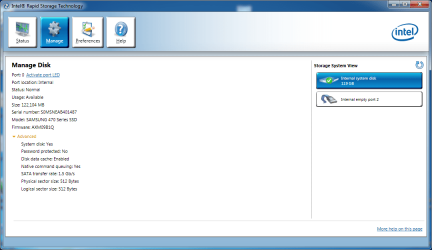
Okay, it didn't raise the speed but it showed up a problem - it looks like something is restricting the connection to SATA 1.5... How can I see who's the bad guy in the system and possibly change that?

Could it be because of this Intel RST power saver feature Link power management? I found this document explaining how to disable it through the regedit http://mbforum.gigabyte.de/forumdownload//Software/OEM_Technical Guide RST_rev1_0 10 0 Release.pdf

Here's a quote:
"3. Go to the below mentioned location to insert or configure the registry keys for LPM

HKEY_LOCAL_MACHINE\System\CurrentControlSet\Services\iaStor\Parame
ters\Port0\

4. Now add the following registry keys under the registry location mentioned in step3,
if they are not available (These registry keys are not available by default, they can be
added by using automated scripts, .reg files, executable utilities, etc). If you find the
below registry keys already available, you can modify the values for desired support.
Values are modified on a port by port basis so modify all ports that you wish the
changes to be supported on

“LPM”=dword: 00000001 {dword: 00000000->Disable; dword: 00000001-
>Enable} [default = Enabled]
“LPMSTATE”=dword: 00000000 {dword: 00000000->Partial; dword: 00000001-
>Slumber} [default = Disabled] (Note: the driver ignores this key when the LPM key’s
value is not set to 1. So when LPM value is 0, this value is N/A.)
“LPMDSTATE”=dword: 00000001 {dword: 00000000->Partial; dword: 00000001-
>Slumber} [default = Enabled]
“DIPM”=dword: 00000001 {dword: 00000000->Disable; dword: 00000001-
>Enable} [default = Enabled]"


The thing is that I don't have a "folder" called Port0 (or any "folder" at all) under "Parameters". Maybe it's worth trying? But I need some assistance :)

PS: Nope, I didn't need one. The bad news is it's still SATA 1.5G. Any suggestions? I'm contacting Dell to ask them if it was their deed and if there's a way to enable 3Gb/s. Also emailed Samsung but I don't expect much there.
 

Attachments

  • sata port.png
    sata port.png
    112.4 KB · Views: 71
Last edited:

My Computer

Computer Manufacturer/Model Number
Dell Vostro 1700
OS
Windows 7 Ultimate x64
CPU
Intel Core2Duo T9300 @2.5 GHz, 6 MB L2 cache
Motherboard
Dell
Memory
2x2048 DDR2 800 MHz
Graphics Card(s)
nVidia GeForce 8600M GT 256 MB DDR2
Screen Resolution
1440x900
Hard Drives
Samsung 470 Series 128GB SSD;
Western Digital Scorpio 250GB SATA 5400RPM 8 MB Cache
First of all, verify exactly what speed (SATA, SATA II, or SATA III) do your motherboard controllers run at. Also, what SATA type is your SSD, is it SATA, SATA II, or SATA III?

Running a SATA III SSD on a SATA (I) controller throttles the SSD to SATA I speeds no matter what the drive is capable of. Likewise, running a sata III drive on a SATA II controller also reduces it's speed.

Second, check if your SSD is on the same controller as a much slower device such as a CD/DVD device. If it is sharing a controller with a slow device, that may be the problem.

Finally just because you have a SSD drive, that doesn't mean that it is as fast as the newer SSD Drives.

I an running a single Patriot Pyro 60 GIG SSD which I bought for $109.00 at Newegg on a Gigabyte GA-990FXA-UD5 motherboard and I am getting very respectable read and write scores which are as follow:


SATA%20III%20SSD%20ACHI%20no%20cache.jpg
 
Last edited:

My Computer

Computer Manufacturer/Model Number
home built
OS
WIN 7 PRO x64
CPU
AMD X6 1090T BE
Motherboard
Gigabyte GA-990FXA-UD5
Memory
16 gig Gskil
Graphics Card(s)
temp cheap card
Sound Card
onboard HD
Monitor(s) Displays
LG W2353V backlit LCD
Screen Resolution
1920 x 1080
Hard Drives
1x Patriot Pyro 60GB 550+ mbs read speed
2x WD5000AKS 500GB, 1X WD20EARS 2TB, 4x WD20EURS 3TB,
7X Seagate 1.5TB
In process of moving 1.5TB drives to 3TB drives,migrating 2X 500GB to another machine
PSU
Xpower 1080watt
Case
Antec 900,soon to be Antec 1200
Cooling
Air cool std AMD heatsink & fan, to be changed to water cool
Keyboard
i-rock KR-6820E Orange backlit
Mouse
MS optical
Internet Speed
Road Runner (Brighthouse) Lightening
Other Info
Much selective tweaking to run smoother & faster. Primary function is audio/Video capture,editing, and compression, machine is also backup for HTPC and video server.
Okay, it didn't raise the speed but it showed up a problem - it looks like something is restricting the connection to SATA 1.5... How can I see who's the bad guy in the system and possibly change that?

Could it be because of this Intel RST power saver feature Link power management? I found this document explaining how to disable it through the regedit http://mbforum.gigabyte.de/forumdownload//Software/OEM_Technical%20Guide%20RST_rev1_0%2010%200%20Release.pdf

Here's a quote:
"3. Go to the below mentioned location to insert or configure the registry keys for LPM

HKEY_LOCAL_MACHINE\System\CurrentControlSet\Services\iaStor\Parame
ters\Port0\

4. Now add the following registry keys under the registry location mentioned in step3,
if they are not available (These registry keys are not available by default, they can be
added by using automated scripts, .reg files, executable utilities, etc). If you find the
below registry keys already available, you can modify the values for desired support.
Values are modified on a port by port basis so modify all ports that you wish the
changes to be supported on

“LPM”=dword: 00000001 {dword: 00000000->Disable; dword: 00000001-
>Enable} [default = Enabled]
“LPMSTATE”=dword: 00000000 {dword: 00000000->Partial; dword: 00000001-
>Slumber} [default = Disabled] (Note: the driver ignores this key when the LPM key’s
value is not set to 1. So when LPM value is 0, this value is N/A.)
“LPMDSTATE”=dword: 00000001 {dword: 00000000->Partial; dword: 00000001-
>Slumber} [default = Enabled]
“DIPM”=dword: 00000001 {dword: 00000000->Disable; dword: 00000001-
>Enable} [default = Enabled]"


The thing is that I don't have a "folder" called Port0 (or any "folder" at all) under "Parameters". Maybe it's worth trying? But I need some assistance :)

PS: Nope, I didn't need one. The bad news is it's still SATA 1.5G. Any suggestions? I'm contacting Dell to ask them if it was their deed and if there's a way to enable 3Gb/s. Also emailed Samsung but I don't expect much there.

Your chipset predates LPM I think.

What kind of speeds are you seeing and with what are you measuring it? Post a benchmark. But anyhow, you can create a key called port 0 and populate it, if you are comfortable with that. But if you are not seeing any difference between the Intel and Microsoft SAT controller drivers, it probably isn't LPM.
 

My Computer

Computer type
PC/Desktop
Computer Manufacturer/Model Number
Home built (GeneO industries)/Model 4
OS
Windows 10 Pro. EFI boot partition, full EFI boot
CPU
i7 4770k 4.4GHz (44-44-43-43 turbo) @ 1.248V
Motherboard
ASUS Maximus VI Hero
Memory
16GB (8GBx2) @2200 MHz G.skill Sniper 10-11-10-30-1, 1.6V
Graphics Card(s)
MSI GTX 970 Gaming 4G
Sound Card
Onboard SupremeFX Audio
Monitor(s) Displays
NEC Spectraview 2490WUXi-SV
Screen Resolution
1920 x 1200
Hard Drives
Samsung 850 Pro 256GB (OS), Samsung 2x 128GB 840 Pro SSD in RAID0, 3x WD Blue 6Gb/s 1TB RAID0, WD 2TB Black external USB 3.0, 2TB WD20EARS Green external USB 3.0, 2x 500GB Seagate and 1 750 GB external USB, 1x 350GB external USB3
PSU
Seasonic X-850 (2012 KM3 model)
Case
Fractal Design Define R4
Cooling
NH-D14, NF-F12, NF-A15; NF-P14, NF-P12,NF-A14, S12A PWM
Keyboard
Cooler Master Storm Quickfire Rapid - Brown
Mouse
Logitech G602
Internet Speed
126.4 Mb/s down, 24.3 Mb/s up
Other Info
USB 3.0 x8 , SATA III x8, eSATA, USB 2.0 x6. Samsung DVD R/W drive.

WEI: CPU 7.8, Memory 7.9, Graphics 7.9, Disk 7.9
The SSD is SATAII and I've tested it on another laptop. It's running properly there with very high scores. I tried another SATAII HDD in my laptop and it was ALSO running only on SATAI. Also after contacting Dell they told me that there is no reason that my computer should not use SATAII, but I'm starting to think that the operator I spoke with wasn't right. I also spoke with Intel support (or whatever it was called) and they concluded that it's probably incompatibility with this SSD and my mother board. Also excluded the option of LPM being the reason for all of this.

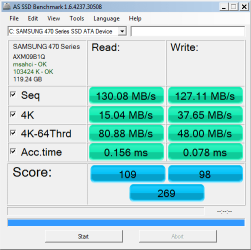
As for the benchmarks – I used almost every piece of benchmarking tool and all of them gave pretty much the same results. Read/Write speeds were around 130 MBps. I'm attaching an AS SSD test, ran in safe mode with the SSD as a system drive.

So what do you think? Could it be something that needs software solution, or maybe a hardware that's not working properly and needs replacement, or is it just a total incapability of the motherboard/the whole laptop to run anything higher than SATAI, despite what DELL are trying to convince me?
 

Attachments

  • AS SSD.png
    AS SSD.png
    30.2 KB · Views: 3

My Computer

Computer Manufacturer/Model Number
Dell Vostro 1700
OS
Windows 7 Ultimate x64
CPU
Intel Core2Duo T9300 @2.5 GHz, 6 MB L2 cache
Motherboard
Dell
Memory
2x2048 DDR2 800 MHz
Graphics Card(s)
nVidia GeForce 8600M GT 256 MB DDR2
Screen Resolution
1440x900
Hard Drives
Samsung 470 Series 128GB SSD;
Western Digital Scorpio 250GB SATA 5400RPM 8 MB Cache
Back
Top