Solved C root folder no system files (but everything works)

gabriolinari

New member
Member
VIP
Local time
7:29 PM
Messages
144
hi

just a curious question... on my Dell work laptop, i don't have any system files on the root of C, like io.sys, etc, and this is on a Win 7 Pro 64bit installed from a "system repair Dell DVD".

On my home pc instead where i have win 7 Ultimate 64bit, i do have some files on C's root.

having said that everything works fine.. just curious, where are those system files?

or it depends by how the installation was made?

tnx
 

My Computer

Computer type
PC/Desktop
OS
Windows 7 Ultimate x64
Is the work PC set to show hidden and operating system files from tools/folder options/view menu in Explorer?

With that enabled on my Home Premium installation, I show 8 items, but not io.sys.
 

My Computer

Computer type
PC/Desktop
Computer Manufacturer/Model Number
Ignatz Special; 4 speed manual gearbox; factory air conditioning; one of one
OS
Windows 7 Home Premium SP1, 64-bit
CPU
Intel Skylake i5-6600K, not overclocked
Motherboard
AsRock Z170M Extreme 4, micro ATX
Memory
8 GB HyperX DDR4-2666 (2 x 4 GB)
Graphics Card(s)
none; graphics are integrated on CPU
Sound Card
onboard: Realtek ALC1150; external: USB Behringer UF0-202
Monitor(s) Displays
Dell S2340M 23 inch IPS
Screen Resolution
1600 x 900
Hard Drives
System: Crucial MX100 series SSD, 128 GB;
Data: Samsung Spinpoint 103SJ, 1 TB;
Backup: WD Caviar Green WD30EZRX-00D8PB0, 3 TB
PSU
Rosewill SilentNight 500 watt fanless, semi-modular
Case
Antec Solo II
Cooling
Noctua NH-U12S; Noctua F12 intake, Noctua S12A exhaust
Keyboard
Microsoft 200 6JH-00001 USB
Mouse
Dell or Microsoft optical wired; USB
Antivirus
Microsoft Security Essentials and Malwarebytes Premium
Browser
Pale Moon
Other Info
All fans PWM; speeds at idle: CPU circa 500 rpm; intake circa 600 rpm; exhaust circa 600 rpm; CPU temps 27 idle and 47 C load in a warm room (27 C/81 F) when running Intel Extreme Tuning Utility stress test.
The only files that are actually needed in the rot of the Windows drive are bootmgr, pagefile.sys, and hiberfil.sys (if hibernation is enabled). All of these are system files and hidden by default. io.sys, autoexec.bat, config.sys, and msdos.sys are obsolete and haven't been used by Windows since Windows ME (released in 2000). They are also hidden by default and on a work PC they may not even exist.
 

My Computer

Computer type
PC/Desktop
Computer Manufacturer/Model Number
HP
OS
Windows 7 Pro 64 bit
CPU
Xeon W3520
Memory
8 GB
Graphics Card(s)
Nvidia Geforce 210
Is the work PC set to show hidden and operating system files from tools/folder options/view menu in Explorer?

With that enabled on my Home Premium installation, I show 8 items, but not io.sys.

it's all enabled and all files show. could it have something to do with the 100 mb partition thingie? on my home PC I got rid of it...
 

My Computer

Computer type
PC/Desktop
OS
Windows 7 Ultimate x64
The only files that are actually needed in the rot of the Windows drive are bootmgr, pagefile.sys, and hiberfil.sys (if hibernation is enabled). All of these are system files and hidden by default. io.sys, autoexec.bat, config.sys, and msdos.sys are obsolete and haven't been used by Windows since Windows ME (released in 2000). They are also hidden by default and on a work PC they may not even exist.

you're absolutely right, I meant files like that and the like...in fact those you mentioned are those I have on my home PC.
 

My Computer

Computer type
PC/Desktop
OS
Windows 7 Ultimate x64
well I didn't like 100 mb gone, it perfectly works, if I'm not wrong I followed tutorial of Brink here

ill post a cap of the work PC anyway...maybe just a different installation path?
 

My Computer

Computer type
PC/Desktop
OS
Windows 7 Ultimate x64
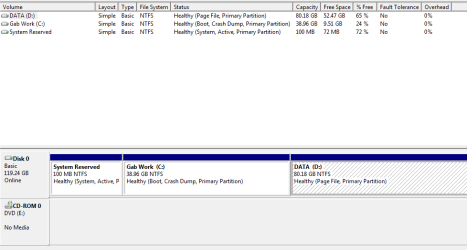
so this is a screen cap of the mysterious laptop without bootmgr on C:\

i've searched it and it seems to be in C:\Windows\Boot\EFI AND also C:\Windows\Boot\PCAT - not familar with these directories though

btw it's SSD drive
 

Attachments

  • disk management.png
    disk management.png
    34.9 KB · Views: 2

My Computer

Computer type
PC/Desktop
OS
Windows 7 Ultimate x64
It's configured correctly and being booted by System Reserved as signified by the System flag there.

I would move the Paging File to C to have all System Files onboard C and so that Data partition is only a data vault ready and waiting in case you need to reimage irreparable Win7 to C.

Virtual Memory Paging File - Change Turn it off and turn it back on for C.
 
Back
Top