
If I remember correctly, the user with a red mark is some type of special user necessary for certain types of operations by some software...but not sure. You can probably find that on the net. This thread seems to have some good info.
http://www.sevenforums.com/general-...own-user-accounts-showing-security-tab-2.html
You are saying when you attach the .vhd file, your cannot right click and select explore? When you attach the file, you do not get an autorun window that opens to offer viewing the files?
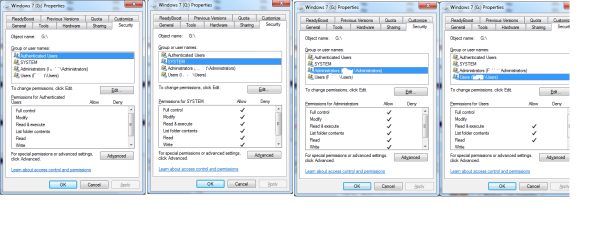
I have attached my security settings for the overall drive, or H: in my case, not the individual files. If you only show one user, you may have to alter your security setting to add additional ones. I would think the System and Admins are necessary, and perhaps yourself. You can probably find a tutorial about how to do this, but if not, let us know.
Anyway look at my settings, which are the same for both my external drive and my NAS.
http://www.sevenforums.com/general-...own-user-accounts-showing-security-tab-2.html
You are saying when you attach the .vhd file, your cannot right click and select explore? When you attach the file, you do not get an autorun window that opens to offer viewing the files?
I have attached my security settings for the overall drive, or H: in my case, not the individual files. If you only show one user, you may have to alter your security setting to add additional ones. I would think the System and Admins are necessary, and perhaps yourself. You can probably find a tutorial about how to do this, but if not, let us know.
Anyway look at my settings, which are the same for both my external drive and my NAS.
Attachments
Last edited:
My Computer
At a glance
Windows 7 x64i7-2600K8 GGTX 480
- Computer Manufacturer/Model Number
- Homebuilt
- OS
- Windows 7 x64
- CPU
- i7-2600K
- Motherboard
- Asus P8Z77-v Pro
- Memory
- 8 G
- Graphics Card(s)
- GTX 480
- Sound Card
- Onboard
- Monitor(s) Displays
- LG W2753V
- Screen Resolution
- 1920x1080
- Hard Drives
- Crucial M4 128 G SSD


