Solved Intel Pentium 4 2.6GHz downclocked to 1.8Ghz?

Jaakow22

New member
Local time
12:18 AM
Messages
51
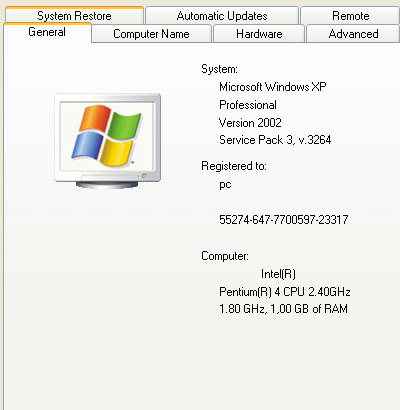
Not long ago I noticed a weird thing on my old computer. When I go to my computer properties it says
this:
KuPHWRN.png
And I was like: what the hell does the 1.8 Ghz stand for? :huh:
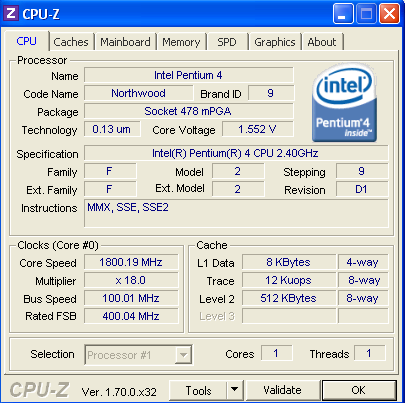
And I realised that games that require 2.4 Ghz cpu were lagging. So I downloaded CPU-Z to see the exact specifications my cpu had, and I saw that my cpu has 1.8 GHz :shock:.
Results from CPU-Z:
6CLSjml.png


It says in specification 2.4 Ghz and in core speed 1.8 Ghz. Wtf?
I'm pretty sure its not the power saving feature because even when I stress test it remains 1.8 GHz.
Any Ideas? Was it downclocked? Its a second hand computer so maybe someone downclocked it before?


Sorry for bad English.
Thanks in advance.

EDIT: Sorry I messed up the title :o it should be 2.4 Ghz and not 2.6 GHz.
 

My Computer My Computer

At a glance

Windows 7 Ultimate x64Intel Celeron E3400 Dual Core 2.6GHz2x2gbGIGABYTE AMD Radeon HD6670 2GB DDR3
Computer type
PC/Desktop
Computer Manufacturer/Model Number
MSGW
OS
Windows 7 Ultimate x64
CPU
Intel Celeron E3400 Dual Core 2.6GHz
Motherboard
ASUS P5G41T-M LX3
Memory
2x2gb
Graphics Card(s)
GIGABYTE AMD Radeon HD6670 2GB DDR3
Monitor(s) Displays
SAMSUNG
Screen Resolution
1920x1080
Hard Drives
HDD 320 GB
PSU
400W
Case
mATX
Cooling
Stock
Internet Speed
5 MBPS download, 0.4 MBPS upload
Antivirus
Microsoft Serciurity Essentials
Browser
Firefox
What does it say in the BIOS?

You could note the current BIOS settings and then load defaults.
 

My Computer My Computer

At a glance

Windows 10 Pro x64, Windows 8.1 Pro x64, Wind...INTEL i9-7920X LGA 206664 GB (4 X 16 GB) G-Skill V Series DDR4 3200 ...EVGA GTX 1060 SC 3 GB
Computer type
PC/Desktop
Computer Manufacturer/Model Number
Custom Built
OS
Windows 10 Pro x64, Windows 8.1 Pro x64, Windows 7 Ultimate x64 SP1,
CPU
INTEL i9-7920X LGA 2066
Motherboard
Gigabyte X299-WU8 F3
Memory
64 GB (4 X 16 GB) G-Skill V Series DDR4 3200 Quad Channel
Graphics Card(s)
EVGA GTX 1060 SC 3 GB
Sound Card
Realtek Onboard ALC1220
Monitor(s) Displays
2 x Samsung S27E310
Screen Resolution
1920x1080
Hard Drives
Samsung 2 x 970 EVO Plus 500 GB NVMe
1 x 6TB WD 6003FZBX SATA
1 x 6TB WD 60EFRX SATA
12 x 3TB WD 30EFRX SATA
PSU
Seasonic X-1050
Case
Thermaltake Armor+
Cooling
Corsair H80i V2 Liquid AOI Cooler
Keyboard
Logitech G510s
Mouse
Logitech MX Master 2S
Internet Speed
200 Mb/s
Antivirus
ESET NOD32 13.1
Browser
EDGE (Dev, Canary, Beta), Chrome
Other Info
ASUS RT-AC68U router
Malwarebytes 4.0.4
What does it say in the BIOS?

You could note the current BIOS settings and then load defaults.
How can I do that? I never used BIOS (except when I was setting the boot device). I found nothing. I checked all the menu-s, haven't found nothing about the CPU except the temperature and fan speed (RPM).
 

My Computer My Computer

At a glance

Windows 7 Ultimate x64Intel Celeron E3400 Dual Core 2.6GHz2x2gbGIGABYTE AMD Radeon HD6670 2GB DDR3
Computer type
PC/Desktop
Computer Manufacturer/Model Number
MSGW
OS
Windows 7 Ultimate x64
CPU
Intel Celeron E3400 Dual Core 2.6GHz
Motherboard
ASUS P5G41T-M LX3
Memory
2x2gb
Graphics Card(s)
GIGABYTE AMD Radeon HD6670 2GB DDR3
Monitor(s) Displays
SAMSUNG
Screen Resolution
1920x1080
Hard Drives
HDD 320 GB
PSU
400W
Case
mATX
Cooling
Stock
Internet Speed
5 MBPS download, 0.4 MBPS upload
Antivirus
Microsoft Serciurity Essentials
Browser
Firefox

My Computer My Computer

At a glance

Windows 10 Pro x64, Windows 8.1 Pro x64, Wind...INTEL i9-7920X LGA 206664 GB (4 X 16 GB) G-Skill V Series DDR4 3200 ...EVGA GTX 1060 SC 3 GB
Computer type
PC/Desktop
Computer Manufacturer/Model Number
Custom Built
OS
Windows 10 Pro x64, Windows 8.1 Pro x64, Windows 7 Ultimate x64 SP1,
CPU
INTEL i9-7920X LGA 2066
Motherboard
Gigabyte X299-WU8 F3
Memory
64 GB (4 X 16 GB) G-Skill V Series DDR4 3200 Quad Channel
Graphics Card(s)
EVGA GTX 1060 SC 3 GB
Sound Card
Realtek Onboard ALC1220
Monitor(s) Displays
2 x Samsung S27E310
Screen Resolution
1920x1080
Hard Drives
Samsung 2 x 970 EVO Plus 500 GB NVMe
1 x 6TB WD 6003FZBX SATA
1 x 6TB WD 60EFRX SATA
12 x 3TB WD 30EFRX SATA
PSU
Seasonic X-1050
Case
Thermaltake Armor+
Cooling
Corsair H80i V2 Liquid AOI Cooler
Keyboard
Logitech G510s
Mouse
Logitech MX Master 2S
Internet Speed
200 Mb/s
Antivirus
ESET NOD32 13.1
Browser
EDGE (Dev, Canary, Beta), Chrome
Other Info
ASUS RT-AC68U router
Malwarebytes 4.0.4
Have you looked at the manual for your motherboard?

Motherboard - P5G41T-M LX3 - ASUS
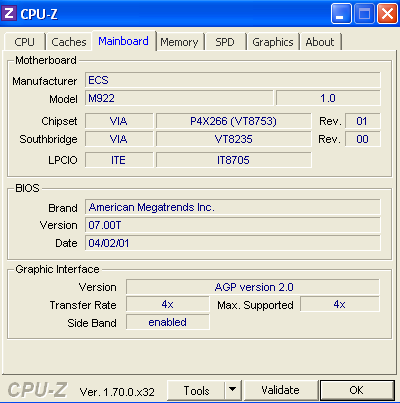
P5G41T-M LX3 - ASUS is the motherboard of my new PC, my old PC has a different one and I was too lazy to open the casing and see what's the motherboard so I went to see what CPU-Z says:
rRbNT54.png

I searched for that motherboard user manual on the internet for 30 min:cry: and I have found nothing. Am I searching incorrectly? Please help!
Thanks in advance!
Sorry for my English.
 

My Computer My Computer

At a glance

Windows 7 Ultimate x64Intel Celeron E3400 Dual Core 2.6GHz2x2gbGIGABYTE AMD Radeon HD6670 2GB DDR3
Computer type
PC/Desktop
Computer Manufacturer/Model Number
MSGW
OS
Windows 7 Ultimate x64
CPU
Intel Celeron E3400 Dual Core 2.6GHz
Motherboard
ASUS P5G41T-M LX3
Memory
2x2gb
Graphics Card(s)
GIGABYTE AMD Radeon HD6670 2GB DDR3
Monitor(s) Displays
SAMSUNG
Screen Resolution
1920x1080
Hard Drives
HDD 320 GB
PSU
400W
Case
mATX
Cooling
Stock
Internet Speed
5 MBPS download, 0.4 MBPS upload
Antivirus
Microsoft Serciurity Essentials
Browser
Firefox
I found the problem! For some unknown reason windows is saying that I have a Pentium 4 2.4 GHZ :huh:. Actually in the BIOS is says that I have a Pentium 4 1.8 GHZ. In the BIOS the CPU voltage, frequency and the multiplier are not changeable. I thought I could change at least the frequency but actually I can't. I can't even lower the multiplier (why would I ever do that but I heard that is the CPU is not unlocked I can at least lower it; just wanted to try). I restored the defaults in the BIOS, saved the settings and guess what, the CPU was still at 1.8 GHZ. I booted in windows successfully but still at 1.8 GHZ :(. But why does Windows say I have 2.4 GHZ?

However thanks on the reply.
I will mark this as solved.
 

My Computer My Computer

At a glance

Windows 7 Ultimate x64Intel Celeron E3400 Dual Core 2.6GHz2x2gbGIGABYTE AMD Radeon HD6670 2GB DDR3
Computer type
PC/Desktop
Computer Manufacturer/Model Number
MSGW
OS
Windows 7 Ultimate x64
CPU
Intel Celeron E3400 Dual Core 2.6GHz
Motherboard
ASUS P5G41T-M LX3
Memory
2x2gb
Graphics Card(s)
GIGABYTE AMD Radeon HD6670 2GB DDR3
Monitor(s) Displays
SAMSUNG
Screen Resolution
1920x1080
Hard Drives
HDD 320 GB
PSU
400W
Case
mATX
Cooling
Stock
Internet Speed
5 MBPS download, 0.4 MBPS upload
Antivirus
Microsoft Serciurity Essentials
Browser
Firefox
Back
Top