
A question of Speed vs Bandwidth

AstaLaVista

Lost in Cyberspace
Guru
Local time
12:52 AM
Messages
1,962
Location
Miami, Florida
Can someone playing online take away all my bandwidth?

I have Comcast 16 Mbps broadband, I have a D-Link DIR-655 wireless-n router, my computer dual boots with Vista + win 7 x64 Ultimate, my kids PC use XP, one has a wireless-G PCI card and the other one a wireless-B usb hub.

My pc, the Xbox 360 and Brother Networkd printer are the only peripherals wired to the router

Well, the kid with the Wireless-G card is the one that plays World of Warcraft online and it seems that at times, my online experience just crawls to a slow halt... just a few minutes ago I was responding to another post and after hitting the submit button, the screen just stood there like if it was thinking and I literally had to close down the browser, open up a new one for my reply to show up.

Can it be him draining all my bandwidth or should I be looking at an outsider hacking it?

The wireless is secured with a WAP password so I would say I am very secured but the D-Link is new to me so I can't navigate like I used to do with the Linksys. I am sure that a password is needed because my other kid has an i-Touch that it requires him to enter a password to use the wi-fi.

After they go to sleep, I will do a speed test and post it here, at the moment, I barely got to 6MBPS Down and .89 up. I am usually at 12 to 16 down and 2 to 3 up. The test can be deceiving though.
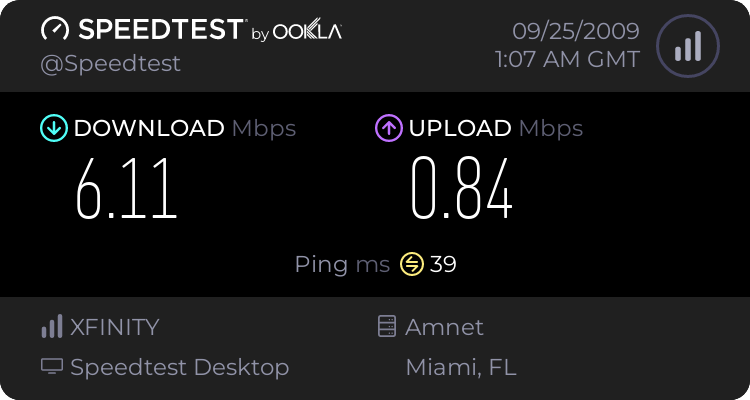
574139091.png


I am not a PC guru but I know my way around computers and I can follow directions fairly well. Any help, hint or guide would be appreciated.
 

My Computer My Computer

Computer type
PC/Desktop
Computer Manufacturer/Model Number
Custom Built... Intel/Nvidia/ASRock
OS
Windows 7 x64 (Ultimate)
CPU
Intel i5-4670K
Motherboard
ASRock Z87 Extreme 6
Memory
8GBs Ripjaws 2133Mhz
Graphics Card(s)
Asus GTX660 (2GBs)
Sound Card
Onboard Realtek HD
Monitor(s) Displays
Acer AL2216W
Screen Resolution
1680 x 1050
Hard Drives
Samsung 840 SSD 120GBs
Samsung 750GB 32MB cache
1.5 TB
PSU
PC Cooling 750w Silencer
Case
Thermaltake Spedo Advance
Cooling
Std Cooler
Keyboard
Logitech G15
Mouse
Logitech G9
Internet Speed
Comcast 20Mbit
Antivirus
Avast
Browser
Firefox
playing wow can use a ton of your bandwidth, you can enable QoS and throttle down the amount of your bandwidth that your son is using.
 

My Computer My Computer

Computer Manufacturer/Model Number
Black_Box (homebuilt)
OS
windows 7 RTM x64
CPU
Phenom II 965 Quad Core 3.4Ghz
Motherboard
Asus M4A79T Deluxe
Memory
Mushkin Blackline 8GB (4x2gb)
Graphics Card(s)
XFX Radeon 5970 Black Edition
Sound Card
onboard
Monitor(s) Displays
Dell 2408WPF-main Dell E248WFP-secondary
Screen Resolution
1920x1200-main 1920x1200-secondary
Hard Drives
OCZ Vertex Limited Edition 100GB (OS)
x1 WD Black Edition 500GB drive (Storage)
PSU
XFX 850w Black Edition (Modular)
Case
Mountian Mods H2go
Cooling
CoolITSystems ECO A.L.C.
Keyboard
Logitech MX 5500 wireless keyboard
Mouse
Razor Copperhead
Internet Speed
16Mb down/2Mb up Wowway Cable Internet
You can log into your router (192.168.1.1 in some cases) and check 'attached 'devices' and account for the connections. Not a bad idea to check, probably only wild geese though.

Sometimes, power cycling your cable modem and router will correct throughput issues.

Sometimes, simply unplugging and re-plugging your LAN cord can correct throughput issues.

ccatlett1984 is correct, but you need to do that on the son's machine.
 
playing wow can use a ton of your bandwidth, you can enable QoS and throttle down the amount of your bandwidth that your son is using.

WOW, thanks for the fast response. Now, I don't suppose you want to tell me how I go about setting up the QoS to throttle the speed down? I googled it but I got more confused than before :o :p
 

My Computer My Computer

Computer type
PC/Desktop
Computer Manufacturer/Model Number
Custom Built... Intel/Nvidia/ASRock
OS
Windows 7 x64 (Ultimate)
CPU
Intel i5-4670K
Motherboard
ASRock Z87 Extreme 6
Memory
8GBs Ripjaws 2133Mhz
Graphics Card(s)
Asus GTX660 (2GBs)
Sound Card
Onboard Realtek HD
Monitor(s) Displays
Acer AL2216W
Screen Resolution
1680 x 1050
Hard Drives
Samsung 840 SSD 120GBs
Samsung 750GB 32MB cache
1.5 TB
PSU
PC Cooling 750w Silencer
Case
Thermaltake Spedo Advance
Cooling
Std Cooler
Keyboard
Logitech G15
Mouse
Logitech G9
Internet Speed
Comcast 20Mbit
Antivirus
Avast
Browser
Firefox
what version of windows is your son's computer running? and do you have admin rights on his computer?
 

My Computer My Computer

Computer Manufacturer/Model Number
Black_Box (homebuilt)
OS
windows 7 RTM x64
CPU
Phenom II 965 Quad Core 3.4Ghz
Motherboard
Asus M4A79T Deluxe
Memory
Mushkin Blackline 8GB (4x2gb)
Graphics Card(s)
XFX Radeon 5970 Black Edition
Sound Card
onboard
Monitor(s) Displays
Dell 2408WPF-main Dell E248WFP-secondary
Screen Resolution
1920x1200-main 1920x1200-secondary
Hard Drives
OCZ Vertex Limited Edition 100GB (OS)
x1 WD Black Edition 500GB drive (Storage)
PSU
XFX 850w Black Edition (Modular)
Case
Mountian Mods H2go
Cooling
CoolITSystems ECO A.L.C.
Keyboard
Logitech MX 5500 wireless keyboard
Mouse
Razor Copperhead
Internet Speed
16Mb down/2Mb up Wowway Cable Internet
what version of windows is your son's computer running? and do you have admin rights on his computer?

XP Pro w/SP3 and I am the sole admin on all the computers at my house.
 

My Computer My Computer

Computer type
PC/Desktop
Computer Manufacturer/Model Number
Custom Built... Intel/Nvidia/ASRock
OS
Windows 7 x64 (Ultimate)
CPU
Intel i5-4670K
Motherboard
ASRock Z87 Extreme 6
Memory
8GBs Ripjaws 2133Mhz
Graphics Card(s)
Asus GTX660 (2GBs)
Sound Card
Onboard Realtek HD
Monitor(s) Displays
Acer AL2216W
Screen Resolution
1680 x 1050
Hard Drives
Samsung 840 SSD 120GBs
Samsung 750GB 32MB cache
1.5 TB
PSU
PC Cooling 750w Silencer
Case
Thermaltake Spedo Advance
Cooling
Std Cooler
Keyboard
Logitech G15
Mouse
Logitech G9
Internet Speed
Comcast 20Mbit
Antivirus
Avast
Browser
Firefox

My Computer My Computer

Computer Manufacturer/Model Number
Multiple machines in various stages of decomposition.
OS
Win7x64
Does not sound like a bandwidth issue to me if you still have .83 meg upload, I run at less than that as a matter of course here in rural SW UK and have no issues posting to forums.
 

My Computer My Computer

Computer Manufacturer/Model Number
Home Built
OS
Windows 7 Ultimate RTM
CPU
AMD Phenom II x4 945
Motherboard
Asus M4A785 TD V Evo
Memory
6GB PC1600 DDR3
Graphics Card(s)
1GB XFX Radeon HD 5770
Sound Card
Onboard
Monitor(s) Displays
2x Daewoo 19" TFT
Screen Resolution
1440 x 900
Hard Drives
WD 120GB SATA
Hitachi 250GB SATA
PSU
Enermax 450w thing
Case
None...well half a case
Cooling
Thermalright Ultra-120 eXtreme 120mm Heat Sink
Other Info
GPU Cooler: Thermaltake V2
To check which computers are connected to your router, log in to the router's web interface. Address is in your case http://192.168.0.1, by default username is admin and there's no password. If still using these defaults, please add a password to eliminate the possibility of outsiders logging in to your router to change settings.

DHCP Client List (i.e which computers/devices are connected to the router) is in SETUP > Network Settings, last at the bottom of the page.

Check out if WISH (Wireless Intelligent Stream Handling) is something for you. You find it on web interface choosing ADVANCED > WISH. You can use WISH to prioritize the traffic of certain applications.

Check OpenDNS, I believe with all the computers in your household you are one of those users who could really benefit of using OpenDNS. Though the service is free and there's no need to register, only registering gives you the full control.

Kari
 

My Computer My Computer

Computer type
Laptop
Computer Manufacturer/Model Number
HP ENVY 17-1150eg
OS
Windows 10 Pro x64 EN-GB
CPU
1.6 GHz Intel Core i7-720QM Processor
Memory
6 GB
Graphics Card(s)
ATI Mobility Radeon HD 5850 Graphics
Sound Card
Beats sound system with integrated subwoofer
Monitor(s) Displays
17" laptop display, 22" LED and 32" Full HD TV through HDMI
Screen Resolution
1600*900 (1), 1920*1080 (2&3)
Hard Drives
Internal: 2 x 500 GB SATA Hard Disk Drive 7200 rpm
External: 2TB for backups, 3TB USB3 network drive for media
Cooling
As Envy runs a bit warm, I have it on a Cooler Master pad
Keyboard
Logitech diNovo Media Desktop Laser (bluetooth)
Mouse
Logitech Performance Mouse MX
Internet Speed
50/10 Mbps VDSL
Antivirus
Windows Defender 4.3.9431.0
Browser
Maxthon 3.5.2., IE11
Back
Top