View reliability history: What to look for

arjfca

New member
Member
VIP
Local time
8:18 AM
Messages
363
Hello

I got another running but problem still unresolved. So I may brake a rule if so pleas delete this post. This is a great community and I don't want to brake any rules.

http://www.sevenforums.com/bsod-hel...ile-downloading-chart-data-2.html#post2855343

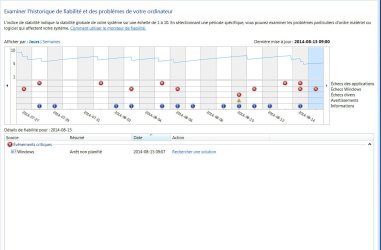
Trough Google, I found this tool: View reliability history

Attach is a snap picture.

It look to have so many error. Can I pinpoint a source for all of them?
Is it hardware, software, both ????

My un-experience bring me to suspect my SSD drive. But not sure how to test it

Any help really appreciated

Martin
 

Attachments
  • Reliability history.jpg
    Reliability history.jpg
    85.7 KB · Views: 2

My Computer My Computer

At a glance

windows 7 Pro x64Intel I5 34508 GB DDR3 dual chanelAsus Radeon 4870 Nevedi Gforce GTX 500Ti
Computer Manufacturer/Model Number
Home made
OS
windows 7 Pro x64
CPU
Intel I5 3450
Motherboard
Gefabye B75M-D3H
Memory
8 GB DDR3 dual chanel
Graphics Card(s)
Asus Radeon 4870 Nevedi Gforce GTX 500Ti
Sound Card
None
Monitor(s) Displays
4 L206W, Synckmaster, Acer X203W, X223W
Screen Resolution
1680 X 1050
Hard Drives
SSD 120G from Intel

640 GB
PSU
Cooler Master 600W
Case
Antec
Cooling
Regular fan
Keyboard
Microsoft Multimedia Bilingual
Mouse
Microsoft Optical 3000
The red X is for an application or Windows error. You can get details by poking the X with your mouse. Maybe applications crashing or Windows not shutting down properly.

Doesn't look too bad to me. I've seen worse. It will vary over time.

Not likely to be your SSD.

What does it look like when you view by week instead of days? Is it much worse in the last week than it has been over the last 3 or 4 months?
 

My Computer My Computer

At a glance

Windows 7 Home Premium SP1, 64-bitIntel Skylake i5-6600K, not overclocked8 GB HyperX DDR4-2666 (2 x 4 GB)none; graphics are integrated on CPU
Computer type
PC/Desktop
Computer Manufacturer/Model Number
Ignatz Special; 4 speed manual gearbox; factory air conditioning; one of one
OS
Windows 7 Home Premium SP1, 64-bit
CPU
Intel Skylake i5-6600K, not overclocked
Motherboard
AsRock Z170M Extreme 4, micro ATX
Memory
8 GB HyperX DDR4-2666 (2 x 4 GB)
Graphics Card(s)
none; graphics are integrated on CPU
Sound Card
onboard: Realtek ALC1150; external: USB Behringer UF0-202
Monitor(s) Displays
Dell S2340M 23 inch IPS
Screen Resolution
1600 x 900
Hard Drives
System: Crucial MX100 series SSD, 128 GB;
Data: Samsung Spinpoint 103SJ, 1 TB;
Backup: WD Caviar Green WD30EZRX-00D8PB0, 3 TB
PSU
Rosewill SilentNight 500 watt fanless, semi-modular
Case
Antec Solo II
Cooling
Noctua NH-U12S; Noctua F12 intake, Noctua S12A exhaust
Keyboard
Microsoft 200 6JH-00001 USB
Mouse
Dell or Microsoft optical wired; USB
Antivirus
Microsoft Security Essentials and Malwarebytes Premium
Browser
Pale Moon
Other Info
All fans PWM; speeds at idle: CPU circa 500 rpm; intake circa 600 rpm; exhaust circa 600 rpm; CPU temps 27 idle and 47 C load in a warm room (27 C/81 F) when running Intel Extreme Tuning Utility stress test.
Thanks you Ignatzstsonic for your input

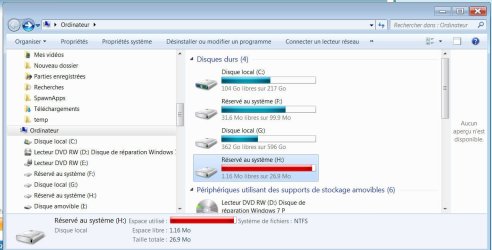
I seem to have different kind of problem. Many error seem to be around volume and drive errors.

A drive H: partitioned on the SSD and mentioned to be used by the system, as been filled completely. Can't see what it is use for. I suppose it is to handle bad sectors

I did a memory test before and no fault found

Any suggestion on test to do to pinpoint error or problem

For sure, I don't wan't to spend ,money on a new drive to found out that the problem is persisting.

Martin
 

Attachments

  • SSD partition.jpg
    SSD partition.jpg
    84.9 KB · Views: 1

My Computer My Computer

At a glance

windows 7 Pro x64Intel I5 34508 GB DDR3 dual chanelAsus Radeon 4870 Nevedi Gforce GTX 500Ti
Computer Manufacturer/Model Number
Home made
OS
windows 7 Pro x64
CPU
Intel I5 3450
Motherboard
Gefabye B75M-D3H
Memory
8 GB DDR3 dual chanel
Graphics Card(s)
Asus Radeon 4870 Nevedi Gforce GTX 500Ti
Sound Card
None
Monitor(s) Displays
4 L206W, Synckmaster, Acer X203W, X223W
Screen Resolution
1680 X 1050
Hard Drives
SSD 120G from Intel

640 GB
PSU
Cooler Master 600W
Case
Antec
Cooling
Regular fan
Keyboard
Microsoft Multimedia Bilingual
Mouse
Microsoft Optical 3000

My Computer My Computer

At a glance

Windows 10 Pro. 64/ version 1709 Windows 7 Pr...Intel i7-6800K @ 4.3Corsair Platinum 16 gig @2400EVGA GTX 1070 OC
Computer type
PC/Desktop
Computer Manufacturer/Model Number
Home made Desktop
OS
Windows 10 Pro. 64/ version 1709 Windows 7 Pro/64
CPU
Intel i7-6800K @ 4.3
Motherboard
ASUS X-99 Deluxe II
Memory
Corsair Platinum 16 gig @2400
Graphics Card(s)
EVGA GTX 1070 OC
Monitor(s) Displays
Asus 27" LED LCD/VE278Q
Screen Resolution
1920-1080 or 1280-720 HDMI
Hard Drives
INTEL SSD 730-240 Gb Sata 3.0/
PSU
EVGA Platium 1200W
Case
Phanteks Luxe Tempered Glass 8 fans/ one radiator
Cooling
XSPC/ Water Cooled CPU
Keyboard
Das 4 Professional
Mouse
Logitech M705/MX Anywhere 2-S
Internet Speed
100 mbits
Antivirus
Microsoft Security Essentials/ Malwarebytes Premium 3.0/ SAS
Browser
I.E. 11 default/Firefox/ ISP Time Warner Cable/Spectrum
Other Info
LG BluRay Burner/
Sound system-KLipsch-THX/
Icy Dock ssd Hot Swap bays.
Thanks you Ignatzstsonic for your input

I seem to have different kind of problem. Many error seem to be around volume and drive errors.

A drive H: partitioned on the SSD and mentioned to be used by the system, as been filled completely. Can't see what it is use for. I suppose it is to handle bad sectors

I did a memory test before and no fault found

Any suggestion on test to do to pinpoint error or problem

For sure, I don't wan't to spend ,money on a new drive to found out that the problem is persisting.

Martin

Looks there's a problem with your System Reserved partition...It should be at least 100Mb as it is the System files in it to be accessible by pressing F8 at boot.

Are you able to open the Advanced Boot Options ?

You can try first to:
SFC /SCANNOW Command - System File Checker

and then:
Startup Repair - Run 3 Separate Times


There's is also the option to delete it then recreate the Boot Loader/BCD by Startup Repair:

System Reserved Partition - Delete


Or do Repair Install :
How to Do a Repair Install to Fix Windows 7
 

My Computer My Computer

At a glance

Windows 7 Professional SP1 - x64 [Non-UEFI Boot]Ivy Bridge Core i5 3570K (Delidded)G.Skill "Ares" DDR3 PC3-12800 - 1600MHz (16Gb)Asus Dual-RX480-O4G
Computer type
PC/Desktop
Computer Manufacturer/Model Number
Custom Build
OS
Windows 7 Professional SP1 - x64 [Non-UEFI Boot]
CPU
Ivy Bridge Core i5 3570K (Delidded)
Motherboard
Asus P8Z77-V LE PLUS
Memory
G.Skill "Ares" DDR3 PC3-12800 - 1600MHz (16Gb)
Graphics Card(s)
Asus Dual-RX480-O4G
Sound Card
Creative Sound Blaster Z w/5.1 sound system
Monitor(s) Displays
Asus IPS 23"
Screen Resolution
16/9
Hard Drives
Internal:
500Go Sata 6Gb/s (x2)
500Go Sata 3Gb/s (x2)
SSD 60Go Sata 6Gb/s
PSU
In Win C 900W Series 80+ Platinum
Case
Thermaltake Chaser A71
Cooling
Custom Water Cooling Loop
Keyboard
Cooler Master QuickFire XTi
Mouse
Razer Imperator 2012 (4G)
Antivirus
MSE
Browser
IE 11.0.xxx Rtm
Other Info
"Raid0" with Intel Smart Response Technology (HDD/SSD)

My Computer My Computer

At a glance

Windows 10 Pro. 64/ version 1709 Windows 7 Pr...Intel i7-6800K @ 4.3Corsair Platinum 16 gig @2400EVGA GTX 1070 OC
Computer type
PC/Desktop
Computer Manufacturer/Model Number
Home made Desktop
OS
Windows 10 Pro. 64/ version 1709 Windows 7 Pro/64
CPU
Intel i7-6800K @ 4.3
Motherboard
ASUS X-99 Deluxe II
Memory
Corsair Platinum 16 gig @2400
Graphics Card(s)
EVGA GTX 1070 OC
Monitor(s) Displays
Asus 27" LED LCD/VE278Q
Screen Resolution
1920-1080 or 1280-720 HDMI
Hard Drives
INTEL SSD 730-240 Gb Sata 3.0/
PSU
EVGA Platium 1200W
Case
Phanteks Luxe Tempered Glass 8 fans/ one radiator
Cooling
XSPC/ Water Cooled CPU
Keyboard
Das 4 Professional
Mouse
Logitech M705/MX Anywhere 2-S
Internet Speed
100 mbits
Antivirus
Microsoft Security Essentials/ Malwarebytes Premium 3.0/ SAS
Browser
I.E. 11 default/Firefox/ ISP Time Warner Cable/Spectrum
Other Info
LG BluRay Burner/
Sound system-KLipsch-THX/
Icy Dock ssd Hot Swap bays.
Looks there's a problem with your System Reserved partition...It should be at least 100Mb as it is the System files in it to be accessible by pressing F8 at boot.

Thank you Non for your help.

I'm so "green" in the field....

Is drive H: is the reserved partition?
If so, how do I increased it size?

Scannow done with no flaw, now, will do the repair Windows 3 times

Martin
 

My Computer My Computer

At a glance

windows 7 Pro x64Intel I5 34508 GB DDR3 dual chanelAsus Radeon 4870 Nevedi Gforce GTX 500Ti
Computer Manufacturer/Model Number
Home made
OS
windows 7 Pro x64
CPU
Intel I5 3450
Motherboard
Gefabye B75M-D3H
Memory
8 GB DDR3 dual chanel
Graphics Card(s)
Asus Radeon 4870 Nevedi Gforce GTX 500Ti
Sound Card
None
Monitor(s) Displays
4 L206W, Synckmaster, Acer X203W, X223W
Screen Resolution
1680 X 1050
Hard Drives
SSD 120G from Intel

640 GB
PSU
Cooler Master 600W
Case
Antec
Cooling
Regular fan
Keyboard
Microsoft Multimedia Bilingual
Mouse
Microsoft Optical 3000
System Reserved partitions normally should not have a drive letter.

A picture of Windows Disk Management might help.

If need be, System Restore can be enlarged, most likely with Partition Wizard.
 

My Computer My Computer

At a glance

Windows 7 Home Premium SP1, 64-bitIntel Skylake i5-6600K, not overclocked8 GB HyperX DDR4-2666 (2 x 4 GB)none; graphics are integrated on CPU
Computer type
PC/Desktop
Computer Manufacturer/Model Number
Ignatz Special; 4 speed manual gearbox; factory air conditioning; one of one
OS
Windows 7 Home Premium SP1, 64-bit
CPU
Intel Skylake i5-6600K, not overclocked
Motherboard
AsRock Z170M Extreme 4, micro ATX
Memory
8 GB HyperX DDR4-2666 (2 x 4 GB)
Graphics Card(s)
none; graphics are integrated on CPU
Sound Card
onboard: Realtek ALC1150; external: USB Behringer UF0-202
Monitor(s) Displays
Dell S2340M 23 inch IPS
Screen Resolution
1600 x 900
Hard Drives
System: Crucial MX100 series SSD, 128 GB;
Data: Samsung Spinpoint 103SJ, 1 TB;
Backup: WD Caviar Green WD30EZRX-00D8PB0, 3 TB
PSU
Rosewill SilentNight 500 watt fanless, semi-modular
Case
Antec Solo II
Cooling
Noctua NH-U12S; Noctua F12 intake, Noctua S12A exhaust
Keyboard
Microsoft 200 6JH-00001 USB
Mouse
Dell or Microsoft optical wired; USB
Antivirus
Microsoft Security Essentials and Malwarebytes Premium
Browser
Pale Moon
Other Info
All fans PWM; speeds at idle: CPU circa 500 rpm; intake circa 600 rpm; exhaust circa 600 rpm; CPU temps 27 idle and 47 C load in a warm room (27 C/81 F) when running Intel Extreme Tuning Utility stress test.
System Reserved partitions normally should not have a drive letter.

A picture of Windows Disk Management might help.

If need be, System Restore can be enlarged, most likely with Partition Wizard.

Hello ignatzatsonic

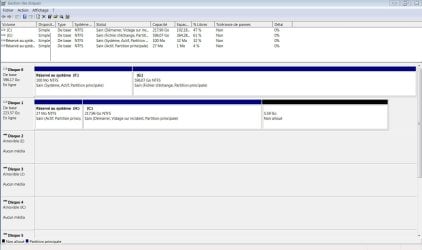
Attached, a picture of the disc Management. Hope it is what you asked

Disk 0 is a hard disk use for data
Disk 1 is the SSD with Windows and divers program application

Martin
 

Attachments

  • Disc manager.jpg
    Disc manager.jpg
    117.2 KB · Views: 4

My Computer My Computer

At a glance

windows 7 Pro x64Intel I5 34508 GB DDR3 dual chanelAsus Radeon 4870 Nevedi Gforce GTX 500Ti
Computer Manufacturer/Model Number
Home made
OS
windows 7 Pro x64
CPU
Intel I5 3450
Motherboard
Gefabye B75M-D3H
Memory
8 GB DDR3 dual chanel
Graphics Card(s)
Asus Radeon 4870 Nevedi Gforce GTX 500Ti
Sound Card
None
Monitor(s) Displays
4 L206W, Synckmaster, Acer X203W, X223W
Screen Resolution
1680 X 1050
Hard Drives
SSD 120G from Intel

640 GB
PSU
Cooler Master 600W
Case
Antec
Cooling
Regular fan
Keyboard
Microsoft Multimedia Bilingual
Mouse
Microsoft Optical 3000
I don't parley vous, but it looks to me like you have your boot files on the F partition on Disk 0. Boot files should normally be on the same drive as the C partition.

Windows is on disk 1, C partition.

You have 2 system reserved partitions. You need only 1, at most.

System Reserved should not have a drive letter.

I think you need to copy your boot files from F to H. And then delete F. I assume disk 0 is purely for data. But H is quite small and should probably be enlarged.

Or you could simply copy your boot files to C and then delete both "system reserved" partitions. You need the boot files, but they can be on C or on system reserved. I don't use system reserved on my own PC.

I have no idea if these issues are related to your reliability history issues.

And you probably want to make the C partition show as being part of "disk 0" rather than "disk 1". You'd do that by swapping cables at the motherboard. This isn't critical.

Let others comment. You've got quite a mess and I have a language barrier to some extent.
 

My Computer My Computer

At a glance

Windows 7 Home Premium SP1, 64-bitIntel Skylake i5-6600K, not overclocked8 GB HyperX DDR4-2666 (2 x 4 GB)none; graphics are integrated on CPU
Computer type
PC/Desktop
Computer Manufacturer/Model Number
Ignatz Special; 4 speed manual gearbox; factory air conditioning; one of one
OS
Windows 7 Home Premium SP1, 64-bit
CPU
Intel Skylake i5-6600K, not overclocked
Motherboard
AsRock Z170M Extreme 4, micro ATX
Memory
8 GB HyperX DDR4-2666 (2 x 4 GB)
Graphics Card(s)
none; graphics are integrated on CPU
Sound Card
onboard: Realtek ALC1150; external: USB Behringer UF0-202
Monitor(s) Displays
Dell S2340M 23 inch IPS
Screen Resolution
1600 x 900
Hard Drives
System: Crucial MX100 series SSD, 128 GB;
Data: Samsung Spinpoint 103SJ, 1 TB;
Backup: WD Caviar Green WD30EZRX-00D8PB0, 3 TB
PSU
Rosewill SilentNight 500 watt fanless, semi-modular
Case
Antec Solo II
Cooling
Noctua NH-U12S; Noctua F12 intake, Noctua S12A exhaust
Keyboard
Microsoft 200 6JH-00001 USB
Mouse
Dell or Microsoft optical wired; USB
Antivirus
Microsoft Security Essentials and Malwarebytes Premium
Browser
Pale Moon
Other Info
All fans PWM; speeds at idle: CPU circa 500 rpm; intake circa 600 rpm; exhaust circa 600 rpm; CPU temps 27 idle and 47 C load in a warm room (27 C/81 F) when running Intel Extreme Tuning Utility stress test.
I don't parley vous, but it looks to me like you have your boot files on the F partition on Disk 0.

Windows is on disk 1, C partition.

You have 2 system reserved partitions. You need only 1.

System Reserved should not have a drive letter.

I think you need to copy your boot files from F to H. And then delete F. I assume disk 0 is purely for data. But H is quite small and should probably be enlarged.

Or you could simply copy your boot files to C and then delete both "system reserved" partitions. You need the boot files, but they can be on C or on system reserved. I don't use system reserved on my own PC.

I have no idea if these issues are related to your reliability history issues.

And you probably want to make the C partition show as being part of "disk 0" rather than "disk 1". You'd do that by swapping cables at the motherboard. This isn't critical.

Let others comment. You've got quite a mess and I have a language barrier to some extent.

I see. The mix could have been done 2 years ago when I installed a ssd. Drive G was my drive C with Windows installed on it. I used the software to move Windows to the new drive, but it seem to have kept
some data on the old driveé

System was stable until few week ago, now it crash sometime with a blue screen and reload.

At the moment, I'm trying to enlarge drive H with Partition Wizard
I will unconnect the hard disk and see if PC is acting normally

What is the content of drive F and H. I suppose that drive F is the old Windows installation.

ignatzatsonic, thanks again for your generous help

Martin
 

My Computer My Computer

At a glance

windows 7 Pro x64Intel I5 34508 GB DDR3 dual chanelAsus Radeon 4870 Nevedi Gforce GTX 500Ti
Computer Manufacturer/Model Number
Home made
OS
windows 7 Pro x64
CPU
Intel I5 3450
Motherboard
Gefabye B75M-D3H
Memory
8 GB DDR3 dual chanel
Graphics Card(s)
Asus Radeon 4870 Nevedi Gforce GTX 500Ti
Sound Card
None
Monitor(s) Displays
4 L206W, Synckmaster, Acer X203W, X223W
Screen Resolution
1680 X 1050
Hard Drives
SSD 120G from Intel

640 GB
PSU
Cooler Master 600W
Case
Antec
Cooling
Regular fan
Keyboard
Microsoft Multimedia Bilingual
Mouse
Microsoft Optical 3000
As things stand now, I'd guess you cannot boot with Disk 0 disconnected. Can you confirm that?

Yes, the oddities shown in Windows Disk Management probably occurred when you moved to an SSD.

If you have no luck enlarging H with Partition Wizard, you can use EasyBCD to copy your boot files from F to C.

Here's a tutorial:

http://www.sevenforums.com/tutorials/209885-bootmgr-move-c-easybcd.html

Notice that your F partition is marked "system". That means your boot files are on that partition.

Notice that your H partition is NOT marked "system". I don't think your boot files are on H, but they should be on H or on C. Right now, I'm not sure if H has any purpose at all.
 

My Computer My Computer

At a glance

Windows 7 Home Premium SP1, 64-bitIntel Skylake i5-6600K, not overclocked8 GB HyperX DDR4-2666 (2 x 4 GB)none; graphics are integrated on CPU
Computer type
PC/Desktop
Computer Manufacturer/Model Number
Ignatz Special; 4 speed manual gearbox; factory air conditioning; one of one
OS
Windows 7 Home Premium SP1, 64-bit
CPU
Intel Skylake i5-6600K, not overclocked
Motherboard
AsRock Z170M Extreme 4, micro ATX
Memory
8 GB HyperX DDR4-2666 (2 x 4 GB)
Graphics Card(s)
none; graphics are integrated on CPU
Sound Card
onboard: Realtek ALC1150; external: USB Behringer UF0-202
Monitor(s) Displays
Dell S2340M 23 inch IPS
Screen Resolution
1600 x 900
Hard Drives
System: Crucial MX100 series SSD, 128 GB;
Data: Samsung Spinpoint 103SJ, 1 TB;
Backup: WD Caviar Green WD30EZRX-00D8PB0, 3 TB
PSU
Rosewill SilentNight 500 watt fanless, semi-modular
Case
Antec Solo II
Cooling
Noctua NH-U12S; Noctua F12 intake, Noctua S12A exhaust
Keyboard
Microsoft 200 6JH-00001 USB
Mouse
Dell or Microsoft optical wired; USB
Antivirus
Microsoft Security Essentials and Malwarebytes Premium
Browser
Pale Moon
Other Info
All fans PWM; speeds at idle: CPU circa 500 rpm; intake circa 600 rpm; exhaust circa 600 rpm; CPU temps 27 idle and 47 C load in a warm room (27 C/81 F) when running Intel Extreme Tuning Utility stress test.
ok
Partition Wizard was not able to extend the drive because to space was to fragmented. Now, I'm doing a defrag on the SSD.

I thought that it was not needed to do it on SSD. It seem to be quite long

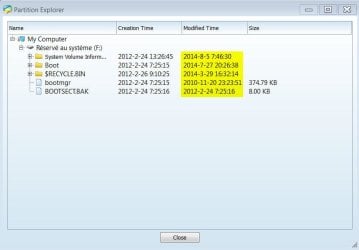
A look at drive F using Partition Wizard show that the drive is not use every day. Last time was August 5.

Martin Theriault
Montreal, Canada
 

Attachments

  • Drive F.jpg
    Drive F.jpg
    34.2 KB · Views: 0

My Computer My Computer

At a glance

windows 7 Pro x64Intel I5 34508 GB DDR3 dual chanelAsus Radeon 4870 Nevedi Gforce GTX 500Ti
Computer Manufacturer/Model Number
Home made
OS
windows 7 Pro x64
CPU
Intel I5 3450
Motherboard
Gefabye B75M-D3H
Memory
8 GB DDR3 dual chanel
Graphics Card(s)
Asus Radeon 4870 Nevedi Gforce GTX 500Ti
Sound Card
None
Monitor(s) Displays
4 L206W, Synckmaster, Acer X203W, X223W
Screen Resolution
1680 X 1050
Hard Drives
SSD 120G from Intel

640 GB
PSU
Cooler Master 600W
Case
Antec
Cooling
Regular fan
Keyboard
Microsoft Multimedia Bilingual
Mouse
Microsoft Optical 3000
Bad form to defragment an SSD, but it won't ruin it. Not sure it will ultimately do you any good.

Personally, I'd copy boot files to C and get rid of both system reserved partitions entirely.

Can you or can't you boot with Disk 0 disconnected?
 

My Computer My Computer

At a glance

Windows 7 Home Premium SP1, 64-bitIntel Skylake i5-6600K, not overclocked8 GB HyperX DDR4-2666 (2 x 4 GB)none; graphics are integrated on CPU
Computer type
PC/Desktop
Computer Manufacturer/Model Number
Ignatz Special; 4 speed manual gearbox; factory air conditioning; one of one
OS
Windows 7 Home Premium SP1, 64-bit
CPU
Intel Skylake i5-6600K, not overclocked
Motherboard
AsRock Z170M Extreme 4, micro ATX
Memory
8 GB HyperX DDR4-2666 (2 x 4 GB)
Graphics Card(s)
none; graphics are integrated on CPU
Sound Card
onboard: Realtek ALC1150; external: USB Behringer UF0-202
Monitor(s) Displays
Dell S2340M 23 inch IPS
Screen Resolution
1600 x 900
Hard Drives
System: Crucial MX100 series SSD, 128 GB;
Data: Samsung Spinpoint 103SJ, 1 TB;
Backup: WD Caviar Green WD30EZRX-00D8PB0, 3 TB
PSU
Rosewill SilentNight 500 watt fanless, semi-modular
Case
Antec Solo II
Cooling
Noctua NH-U12S; Noctua F12 intake, Noctua S12A exhaust
Keyboard
Microsoft 200 6JH-00001 USB
Mouse
Dell or Microsoft optical wired; USB
Antivirus
Microsoft Security Essentials and Malwarebytes Premium
Browser
Pale Moon
Other Info
All fans PWM; speeds at idle: CPU circa 500 rpm; intake circa 600 rpm; exhaust circa 600 rpm; CPU temps 27 idle and 47 C load in a warm room (27 C/81 F) when running Intel Extreme Tuning Utility stress test.
Bad form to defragment an SSD, but it won't ruin it. Not sure it will ultimately do you any good.

Personally, I'd copy boot files to C and get rid of both system reserved partitions entirely.

Can you or can't you boot with Disk 0 disconnected?

Hello again

I did succeed to defrag and reallocate space to H:
I did try to load from SSD.... You where right, it did nor boot
I did the Windows repair and PC is running with the SSD

I will reinstall the hard drive and get ride of the F partition
Since the repair did create a new drive, I will get rid of the H drive to

Turning off the PC to do this task

Martin
 

My Computer My Computer

At a glance

windows 7 Pro x64Intel I5 34508 GB DDR3 dual chanelAsus Radeon 4870 Nevedi Gforce GTX 500Ti
Computer Manufacturer/Model Number
Home made
OS
windows 7 Pro x64
CPU
Intel I5 3450
Motherboard
Gefabye B75M-D3H
Memory
8 GB DDR3 dual chanel
Graphics Card(s)
Asus Radeon 4870 Nevedi Gforce GTX 500Ti
Sound Card
None
Monitor(s) Displays
4 L206W, Synckmaster, Acer X203W, X223W
Screen Resolution
1680 X 1050
Hard Drives
SSD 120G from Intel

640 GB
PSU
Cooler Master 600W
Case
Antec
Cooling
Regular fan
Keyboard
Microsoft Multimedia Bilingual
Mouse
Microsoft Optical 3000
Back
Top