
My external hard drive is unallocated

Navid

New member
Local time
2:09 PM
Messages
17
Hi guys,

I was checking for errors on my WD HD the other day due to low speed and leave it alone but my mother unplug it inadvertently!

Clearly it's unallocated now. I've read a lot of posts especially those sent by jumanji (Windows 7 Help Forums - View Profile: jumanji) and apply almost all the steps. I've downloaded "MiniTool Partition Wizard Home Edition" and followed this thread: http://www.sevenforums.com/hardware-devices/288692-disk-1-unknown-not-initialized-unallocated.html

But the scanning speed was very low.I calculated the ultimate time needed to complete the scan with that speed rate. Guess what? 173 days:confused:

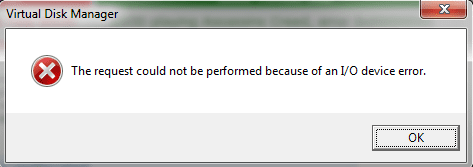
When I tried to format the Disk1, this window appeared:
Untitled.png

Currently I'm following this post by jumanji (http://www.sevenforums.com/software/190430-regain-lost-drive-using-test-disk-illustrated-guide.html) and running the Testdisk, but the windows are quiet different. I'm not optimistic that whether it's going to work or not.

**I don't want my information back. I just want my External WD HD to be formatted.**

I'll be very grateful if anyone can help me, please

My English isn't very good. So I apologize for any grammar mistakes.
 
Last edited:

My Computer My Computer

Computer type
Laptop
Computer Manufacturer/Model Number
Asus
OS
Windows 7 Ultimate x64
CPU
Intel(R) Core(TM) i5 CPU M450 @ 2.40GHz .40 GHz
If you are not interested in recovering any data why do you want to run Test Disk/PhotoRec/Partition Wizard etc.,?

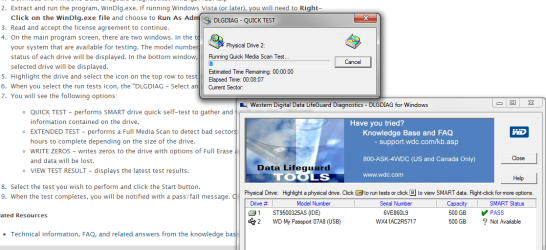
Please download and run Data Lifeguard Diagnostic for Windows WD Support / Downloads / SATA & SAS / WD VelociRaptor( Please read the instructions on that download page.)

Do a Quick Test and if it fails, do the Extended Test. If it fails the extended test also, RMA for a replacement if under warranty.

If bad sectors if any are repaired and your Disk passes the extended test, Write zeros ( you may choose a Quick Erase or Full Erase as you may wish but after the Extended Test a Quick Erase will do. If the Quick Test passes, you may skip the Extended Test and straight away do a Full Erase.) and then format the drive.
 

My Computer My Computer

OS
Windows 7 Home Premium 32 bit
Hi there,

I'm very grateful sir:)

In the beginning I was interested in recovering my data. But after calculation (173 days for Partition Wizard and 4014 days for Test Disk) I gave it up!. All of it is a Movie Collection (The Oscar Winners and etc.,). I can collect them again.

Practically I'm on it.
Untitled.png

I've read the "help" file. Do you have any idea how long is Quick Test going to take?
 
Last edited:

My Computer My Computer

Computer type
Laptop
Computer Manufacturer/Model Number
Asus
OS
Windows 7 Ultimate x64
CPU
Intel(R) Core(TM) i5 CPU M450 @ 2.40GHz .40 GHz
The Quick Test failed. There were too many bad sectors on it. I'm doing the Extended Test now.
 

My Computer My Computer

Computer type
Laptop
Computer Manufacturer/Model Number
Asus
OS
Windows 7 Ultimate x64
CPU
Intel(R) Core(TM) i5 CPU M450 @ 2.40GHz .40 GHz
It's not under warranty anymore.
 
Last edited:

My Computer My Computer

Computer type
Laptop
Computer Manufacturer/Model Number
Asus
OS
Windows 7 Ultimate x64
CPU
Intel(R) Core(TM) i5 CPU M450 @ 2.40GHz .40 GHz
The Extended Test just failed. What should I do now?

Is this useless?:huh:
 

My Computer My Computer

Computer type
Laptop
Computer Manufacturer/Model Number
Asus
OS
Windows 7 Ultimate x64
CPU
Intel(R) Core(TM) i5 CPU M450 @ 2.40GHz .40 GHz
I would think so and get a new drive.
 

My Computer My Computer

OS
Windows 7 Home Premium 32 bit
Thank you.:shock:
 

My Computer My Computer

Computer type
Laptop
Computer Manufacturer/Model Number
Asus
OS
Windows 7 Ultimate x64
CPU
Intel(R) Core(TM) i5 CPU M450 @ 2.40GHz .40 GHz
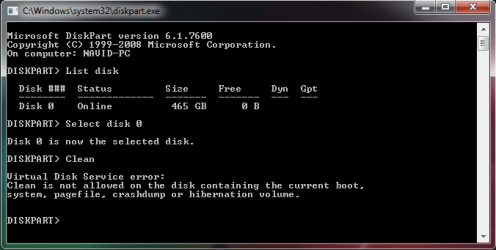
Try to run these commands from an elevated command prompt. Maybe it helps:

Diskpart
List disk
Select disk n (where n is the number that was given for your disk in List disk)
Clean
Exit


My Computer My Computer

Computer Manufacturer/Model Number
HP, Dell, Gateway, Toshiba - 4 laptops and 2 desktops
OS
Vista, Windows7, Mint Mate, Zorin, Windows 8
CPU
from 1.6GHz Duo to i7
Monitor(s) Displays
2x HP w2207
Hard Drives
5x HDD, 7x SSD, 12x Externals
Keyboard
with trackball - no mices
Mouse
Trackball mice
Internet Speed
DSL 6000
Hi,

Thanks for your help.

Untitled.png

It didn't work. I don't believe this simple mistake caused this trouble!:(

Anyway thanks again.
 

My Computer My Computer

Computer type
Laptop
Computer Manufacturer/Model Number
Asus
OS
Windows 7 Ultimate x64
CPU
Intel(R) Core(TM) i5 CPU M450 @ 2.40GHz .40 GHz
Try to run these commands from an elevated command prompt. Maybe it helps:

Diskpart
List disk
Select disk n (where n is the number that was given for your disk in List disk)
Clean
Exit


:cry::cry:

Untitled.png

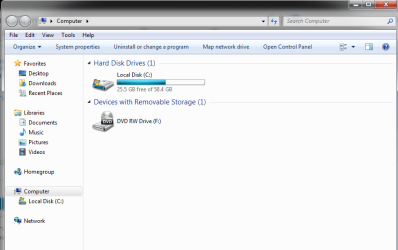
Why it cleared my other drives (D & E). Those information are as valuable as my life:mad:

What should I do nooooowwwww??

Please:shock:
 

My Computer My Computer

Computer type
Laptop
Computer Manufacturer/Model Number
Asus
OS
Windows 7 Ultimate x64
CPU
Intel(R) Core(TM) i5 CPU M450 @ 2.40GHz .40 GHz
Last edited:

My Computer My Computer

Computer type
Laptop
Computer Manufacturer/Model Number
Asus
OS
Windows 7 Ultimate x64
CPU
Intel(R) Core(TM) i5 CPU M450 @ 2.40GHz .40 GHz
hmm.... It would seem that diskpart is unable to see your external drive - presuming that you had it connected - and you were trying to run clean command on your system disk.

True, it is very hard for me too to imagine that just an inadvertent act of pulling out the USB connection running the external drive can result in such a catastrophic failure, but when the manufacturer's diagnostic utility itself cannot repair it and fails it, I don't think there is any hope.

Sometimes we do, do things hoping against hope for a miracle to happen and it does happen sometimes. In these cases also it is really not a miracle but something which we did not understand and hence we could not resolve. In other words it is just a reflection of our own insufficient knowledge.We still do not know a thousand things.

Coming to diskpart, you could still try to write zeros onto the external HDD with the WD utility. It tries to do the samething, a Quick Erase being equivalent to clean and Full Erase a cleanall with no scope of erroneously selecting your system drive for you can see which drive you are selecting.
 

My Computer My Computer

OS
Windows 7 Home Premium 32 bit
I believe the true miracle in our era is the human knowledge. The main gift that Allah gave us. Like your's jumanji.

Last time it didn't pass!

But this time it would!

View attachment 329402
Does it make any sense?
 
Last edited:

My Computer My Computer

Computer type
Laptop
Computer Manufacturer/Model Number
Asus
OS
Windows 7 Ultimate x64
CPU
Intel(R) Core(TM) i5 CPU M450 @ 2.40GHz .40 GHz

My Computer My Computer

Computer type
Laptop
Computer Manufacturer/Model Number
Asus
OS
Windows 7 Ultimate x64
CPU
Intel(R) Core(TM) i5 CPU M450 @ 2.40GHz .40 GHz
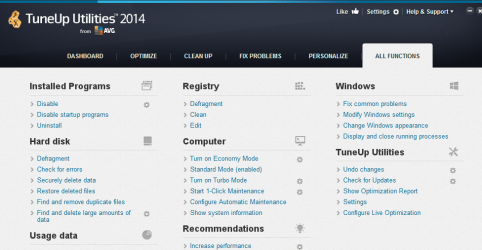
The software that I used for checking errors was AVG TuneUp Utilities.

Untitled.png

Do you think this software did that?
 

My Computer My Computer

Computer type
Laptop
Computer Manufacturer/Model Number
Asus
OS
Windows 7 Ultimate x64
CPU
Intel(R) Core(TM) i5 CPU M450 @ 2.40GHz .40 GHz
Your attachment links are invalid and do not show.

I don't know anything about AVG TuneUp, but those types of programs generally add nothing worthwhile.
 

My Computer My Computer

Computer type
PC/Desktop
Computer Manufacturer/Model Number
Ignatz Special; 4 speed manual gearbox; factory air conditioning; one of one
OS
Windows 7 Home Premium SP1, 64-bit
CPU
Intel Skylake i5-6600K, not overclocked
Motherboard
AsRock Z170M Extreme 4, micro ATX
Memory
8 GB HyperX DDR4-2666 (2 x 4 GB)
Graphics Card(s)
none; graphics are integrated on CPU
Sound Card
onboard: Realtek ALC1150; external: USB Behringer UF0-202
Monitor(s) Displays
Dell S2340M 23 inch IPS
Screen Resolution
1600 x 900
Hard Drives
System: Crucial MX100 series SSD, 128 GB;
Data: Samsung Spinpoint 103SJ, 1 TB;
Backup: WD Caviar Green WD30EZRX-00D8PB0, 3 TB
PSU
Rosewill SilentNight 500 watt fanless, semi-modular
Case
Antec Solo II
Cooling
Noctua NH-U12S; Noctua F12 intake, Noctua S12A exhaust
Keyboard
Microsoft 200 6JH-00001 USB
Mouse
Dell or Microsoft optical wired; USB
Antivirus
Microsoft Security Essentials and Malwarebytes Premium
Browser
Pale Moon
Other Info
All fans PWM; speeds at idle: CPU circa 500 rpm; intake circa 600 rpm; exhaust circa 600 rpm; CPU temps 27 idle and 47 C load in a warm room (27 C/81 F) when running Intel Extreme Tuning Utility stress test.
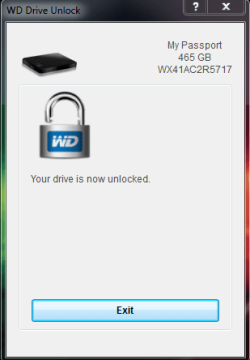
I'm still confused. how can it still remember my password.:rolleyes:

Untitled.png
 

My Computer My Computer

Computer type
Laptop
Computer Manufacturer/Model Number
Asus
OS
Windows 7 Ultimate x64
CPU
Intel(R) Core(TM) i5 CPU M450 @ 2.40GHz .40 GHz
My Computer My Computer

Computer Manufacturer/Model Number
HP, Dell, Gateway, Toshiba - 4 laptops and 2 desktops
OS
Vista, Windows7, Mint Mate, Zorin, Windows 8
CPU
from 1.6GHz Duo to i7
Monitor(s) Displays
2x HP w2207
Hard Drives
5x HDD, 7x SSD, 12x Externals
Keyboard
with trackball - no mices
Mouse
Trackball mice
Internet Speed
DSL 6000
Back
Top