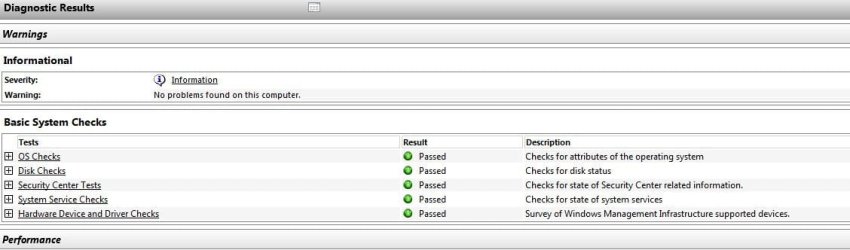
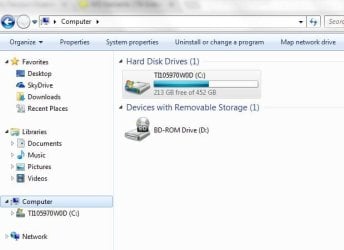
Why would my computer suddenly not recognize my external hard drive?

squirtmph

New member
Member
VIP
Local time
4:16 AM
Messages
235
Location
PDX
WD - Elements 1TB External USB 3.0 Portable Hard Drive
(Model# WDBACX0010BBK-00)

Hard Driver Spinning:thumbsup:
Light is ON:thumbsup:

But docent Show by using two different cables & ports

Thank you for your help!
 

Attachments
  • Capture.JPG
    Capture.JPG
    48.4 KB · Views: 44
  • CaptureA.JPG
    CaptureA.JPG
    59.5 KB · Views: 1
  • CaptureB.JPG
    CaptureB.JPG
    46.2 KB · Views: 0
  • CaptureC.JPG
    CaptureC.JPG
    33 KB · Views: 44

My Computer My Computer

At a glance

Windows 10 Pro Version 22H2 64-bit EditionIntel(R) Core(TM) i7-10875H CPU @ 2.30GHz 2.3...2.0 GB (31.8 GB usable)
Computer type
Laptop
Computer Manufacturer/Model Number
Azure Blade 15.6
OS
Windows 10 Pro Version 22H2 64-bit Edition
CPU
Intel(R) Core(TM) i7-10875H CPU @ 2.30GHz 2.30 GHz
Memory
2.0 GB (31.8 GB usable)
Monitor(s) Displays
4K UHD OLED TOUCH
Screen Resolution
3840 x 2160
Hard Drives
1 TB
Mouse
Logitech MX Master 3S
Antivirus
Windows Security
Browser
Google Chrome
Other Info
______________________________________________


______________________________________________
How old is that HDD. Have you subjected to any shocks such as dropping it even only into a draw. HDDs are very easily damaged.

You said you've tried different USB ports & a different connecting cable, so a failed HDD seems to be the most likely problem, as it's not showing even in the "Computer" window.
 

My Computer My Computer

At a glance

Windows 7 Home Premium 64 bit sp1Intel i5 3570 3.4Ghz Ivy Bridge SKT 1155 quad...G-Skill Rip Jaws 16Gb (8x2) DDR3 -1600 PC3 12...Gigabyte NVIDIA GT610 1Gb DDR3 810/1200 PCI-E...
Computer type
PC/Desktop
Computer Manufacturer/Model Number
Self built using existing case
OS
Windows 7 Home Premium 64 bit sp1
CPU
Intel i5 3570 3.4Ghz Ivy Bridge SKT 1155 quad core
Motherboard
Gigabyte Z77-HD3 SKT 1155 2xSata 3, 4x USB 3.0
Memory
G-Skill Rip Jaws 16Gb (8x2) DDR3 -1600 PC3 12800 CL 10 red
Graphics Card(s)
Gigabyte NVIDIA GT610 1Gb DDR3 810/1200 PCI-E 2.0 Silent
Sound Card
NVIDIA High Definition & Realtech High Definition Audio
Monitor(s) Displays
2 x Philips 226V4L 16:9 aspect ratio
Screen Resolution
1920 x 1080 HD
Hard Drives
Samsung 840 Pro 256gb SSD, SATA 3.
Hitachi Touro Portable 1tb, USB 3.0 HDD used for image b/ups.
PSU
Corsair VS450
Case
Codeng
Cooling
PSU fan & CPU fan
Keyboard
Logitech
Mouse
Logitech Wireless trackball M570
Internet Speed
Wireless 3G. 3mg down & 550kb up.
Antivirus
Bitdefender Internet Security 2020
Browser
Opera (Current Version) & Firefox
Other Info
MS Office 2013 Pro. Davis weather station software. MGE Nova 600 avr UPS.
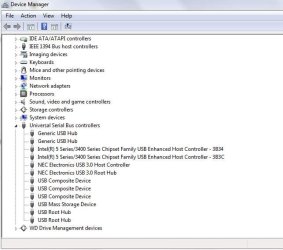
In Device Manager under Universal Serial Bus controllers, I see WD Drive Management Devices. What is it and what does it do? Is there a possibility that it could have somehow locked your drive? Check on it. You may also let me know where I could get to see that software and user manual for it..

Generally if your WD Elements portable drive or any drive for that matter does not show up anywhere, no DIY data recovery is possible. In most cases it may be due to the failure of the SATA to USB bridge Interface electronics inside the enclosure. In WD portable drives this interface Electronics is directly soldered on to the HDD and therefore it is not possible to seperate the HDD and try it out with a direct connection for data recovery, even if the HDD is good. You have to contact WD Data Recovery partners or other Data recovery agencies if they are capable and willing to do it..

Try it out on another working PC ( without any WD software), just to make sure the problem is indeed with the external drive.
 

My Computer My Computer

At a glance

Windows 7 Home Premium 32 bit
OS
Windows 7 Home Premium 32 bit
How old is that HDD. Have you subjected to any shocks such as dropping it even only into a draw. HDDs are very easily damaged.

You said you've tried different USB ports & a different connecting cable, so a failed HDD seems to be the most likely problem, as it's not showing even in the "Computer" window.

===============================================================================
No nothing like you have mention above
as computer window, I have posted images as well!
Its old WD, but I don use it every week nor month! I just use it to back up only
not a single scratch on it
 

My Computer My Computer

At a glance

Windows 10 Pro Version 22H2 64-bit EditionIntel(R) Core(TM) i7-10875H CPU @ 2.30GHz 2.3...2.0 GB (31.8 GB usable)
Computer type
Laptop
Computer Manufacturer/Model Number
Azure Blade 15.6
OS
Windows 10 Pro Version 22H2 64-bit Edition
CPU
Intel(R) Core(TM) i7-10875H CPU @ 2.30GHz 2.30 GHz
Memory
2.0 GB (31.8 GB usable)
Monitor(s) Displays
4K UHD OLED TOUCH
Screen Resolution
3840 x 2160
Hard Drives
1 TB
Mouse
Logitech MX Master 3S
Antivirus
Windows Security
Browser
Google Chrome
Other Info
______________________________________________


______________________________________________

Q1-What is it and what does it do?
External hard drive I use it only to move files, but not often
Hard drive show it working but something stopping them to sink or available to read info

Q2-Is there a possibility that it could have somehow locked your drive?
I don't know, how to do a check on W7

Q3-WD Elements portable drive?
Yes, Portable WD

Q4-Try it out on another working PC ( without any WD software)

I have try on W10 and it shows there, but that is all it does!
 

My Computer My Computer

At a glance

Windows 10 Pro Version 22H2 64-bit EditionIntel(R) Core(TM) i7-10875H CPU @ 2.30GHz 2.3...2.0 GB (31.8 GB usable)
Computer type
Laptop
Computer Manufacturer/Model Number
Azure Blade 15.6
OS
Windows 10 Pro Version 22H2 64-bit Edition
CPU
Intel(R) Core(TM) i7-10875H CPU @ 2.30GHz 2.30 GHz
Memory
2.0 GB (31.8 GB usable)
Monitor(s) Displays
4K UHD OLED TOUCH
Screen Resolution
3840 x 2160
Hard Drives
1 TB
Mouse
Logitech MX Master 3S
Antivirus
Windows Security
Browser
Google Chrome
Other Info
______________________________________________


______________________________________________
1. "In Device Manager under Universal Serial Bus controllers, I see WD Drive Management Devices." Expand that and show me what is in there.(Screenshot)

2. Have you installed Smartware and password-protected your WD Elements ?

3. "I have try on W10 and it shows there, but that is all it does!" If it shows there post a screenshot of Windows Disk Management.
How to post a proper screen capture image of your Disk Management screen: Disk Management - Post a Screen Capture Image - Windows 7 Help Forums
 

My Computer My Computer

At a glance

Windows 7 Home Premium 32 bit
OS
Windows 7 Home Premium 32 bit
I have several WD drives (I'd NEVER buy one) that were originally in an External HD case. (USB External HD)
In every case, the WD External drive was given to me by one of my customers, who was thoroughly disgusted with the drive, that just quit working. In every case, the hard drive itself was just fine, but the HD to USB interface circuitry inside the External Drive case had failed. (NON repairable)

But in general I won't trust a WD drive as far as I could throw it, so the ones I have are used only as Scratch Drives. (for intermittent and temporary use only).

If you can remove the HD itself from the enclosure and connect it directly to your PC, You'll more than likely be able to access the data on the drive. If you can't do that, then take it to someone who can. Any computer repair shop should be able to do that for you.
If you were nearby, I'd do it for you, for FREE. (it's not a really big deal for any Computer Tech.)

Good Luck,
TechnoMage :cool:
 

My Computer My Computer

At a glance

Win 7 Pro, SP1, x86, Win-11/Pro/64AMD8GB CrucialVarious
Computer type
PC/Desktop
Computer Manufacturer/Model Number
Various
OS
Win 7 Pro, SP1, x86, Win-11/Pro/64
CPU
AMD
Motherboard
Various
Memory
8GB Crucial
Graphics Card(s)
Various
Sound Card
OnBoard
Monitor(s) Displays
Acer 21.5"
Hard Drives
Crucial SSD, 500 GB
PSU
OEM
Case
SFF Slim Line Case
Cooling
OEM
Keyboard
eMachines
Mouse
Logitech Wireless
Internet Speed
varies
Antivirus
Windows Defender/Super Anti-Spyware
Browser
Firefox
Q1 - Yes it show it's there but that is all it does
Q2 - No I dont have it installed, beside drivers (installed by default)
It docent have password proteccion
Q3 - I have ask neighbor to allow me to do a screen test (suggestion) .
On hes PC (when I ask hem to do safely unplug was not available to do that either) I was hoping for that, but again never happen.

Thank you for your help

https://www.npcglib.org/~stathis/blog/2013/03/01/hardware-problem-western-digital-my-passport-usb-3-0-disconnects-randomly/
 
Last edited:

My Computer My Computer

At a glance

Windows 10 Pro Version 22H2 64-bit EditionIntel(R) Core(TM) i7-10875H CPU @ 2.30GHz 2.3...2.0 GB (31.8 GB usable)
Computer type
Laptop
Computer Manufacturer/Model Number
Azure Blade 15.6
OS
Windows 10 Pro Version 22H2 64-bit Edition
CPU
Intel(R) Core(TM) i7-10875H CPU @ 2.30GHz 2.30 GHz
Memory
2.0 GB (31.8 GB usable)
Monitor(s) Displays
4K UHD OLED TOUCH
Screen Resolution
3840 x 2160
Hard Drives
1 TB
Mouse
Logitech MX Master 3S
Antivirus
Windows Security
Browser
Google Chrome
Other Info
______________________________________________


______________________________________________
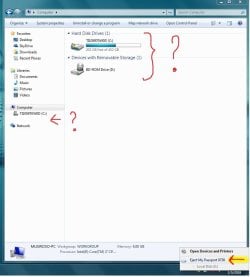
TechnoMage2016

Thank you for you offer :D
If you can remove the HD itself from the enclosure and connect it directly to your PC
Do you happen to have images or some type of tutorial.

By the way I just happen to found out one of the guys I know he has same problem as I do
He owns WD My Passport & has W7 as well..

If I can do these am more willing to do the same for hem as well.

again thank you
 

My Computer My Computer

At a glance

Windows 10 Pro Version 22H2 64-bit EditionIntel(R) Core(TM) i7-10875H CPU @ 2.30GHz 2.3...2.0 GB (31.8 GB usable)
Computer type
Laptop
Computer Manufacturer/Model Number
Azure Blade 15.6
OS
Windows 10 Pro Version 22H2 64-bit Edition
CPU
Intel(R) Core(TM) i7-10875H CPU @ 2.30GHz 2.30 GHz
Memory
2.0 GB (31.8 GB usable)
Monitor(s) Displays
4K UHD OLED TOUCH
Screen Resolution
3840 x 2160
Hard Drives
1 TB
Mouse
Logitech MX Master 3S
Antivirus
Windows Security
Browser
Google Chrome
Other Info
______________________________________________


______________________________________________
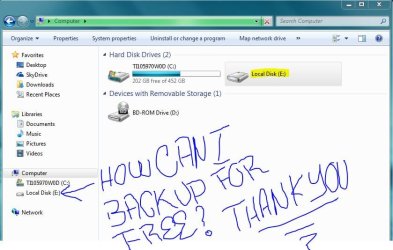
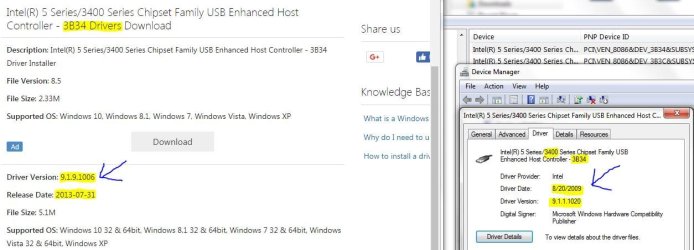
Out of date!
 

Attachments

  • Drivers.JPG
    Drivers.JPG
    77.5 KB · Views: 0

My Computer My Computer

At a glance

Windows 10 Pro Version 22H2 64-bit EditionIntel(R) Core(TM) i7-10875H CPU @ 2.30GHz 2.3...2.0 GB (31.8 GB usable)
Computer type
Laptop
Computer Manufacturer/Model Number
Azure Blade 15.6
OS
Windows 10 Pro Version 22H2 64-bit Edition
CPU
Intel(R) Core(TM) i7-10875H CPU @ 2.30GHz 2.30 GHz
Memory
2.0 GB (31.8 GB usable)
Monitor(s) Displays
4K UHD OLED TOUCH
Screen Resolution
3840 x 2160
Hard Drives
1 TB
Mouse
Logitech MX Master 3S
Antivirus
Windows Security
Browser
Google Chrome
Other Info
______________________________________________


______________________________________________
Still couldn't be available to open!

Thank you for all your support to my question

I still cannot open, what I have to left is to do:
  1. recovery backup

    2. reset external HD
 

Attachments

  • WD Display But cannot open it.jpg
    WD Display But cannot open it.jpg
    53.6 KB · Views: 0
  • WD Display USB3.0-3.0.100.58-Win7-64bit.JPG
    WD Display USB3.0-3.0.100.58-Win7-64bit.JPG
    64.4 KB · Views: 0
  • WD Not In display.JPG
    WD Not In display.JPG
    35 KB · Views: 13

My Computer My Computer

At a glance

Windows 10 Pro Version 22H2 64-bit EditionIntel(R) Core(TM) i7-10875H CPU @ 2.30GHz 2.3...2.0 GB (31.8 GB usable)
Computer type
Laptop
Computer Manufacturer/Model Number
Azure Blade 15.6
OS
Windows 10 Pro Version 22H2 64-bit Edition
CPU
Intel(R) Core(TM) i7-10875H CPU @ 2.30GHz 2.30 GHz
Memory
2.0 GB (31.8 GB usable)
Monitor(s) Displays
4K UHD OLED TOUCH
Screen Resolution
3840 x 2160
Hard Drives
1 TB
Mouse
Logitech MX Master 3S
Antivirus
Windows Security
Browser
Google Chrome
Other Info
______________________________________________


______________________________________________

My Computer My Computer

At a glance

Windows 10 Pro. 64/ version 1709 Windows 7 Pr...Intel i7-6800K @ 4.3Corsair Platinum 16 gig @2400EVGA GTX 1070 OC
Computer type
PC/Desktop
Computer Manufacturer/Model Number
Home made Desktop
OS
Windows 10 Pro. 64/ version 1709 Windows 7 Pro/64
CPU
Intel i7-6800K @ 4.3
Motherboard
ASUS X-99 Deluxe II
Memory
Corsair Platinum 16 gig @2400
Graphics Card(s)
EVGA GTX 1070 OC
Monitor(s) Displays
Asus 27" LED LCD/VE278Q
Screen Resolution
1920-1080 or 1280-720 HDMI
Hard Drives
INTEL SSD 730-240 Gb Sata 3.0/
PSU
EVGA Platium 1200W
Case
Phanteks Luxe Tempered Glass 8 fans/ one radiator
Cooling
XSPC/ Water Cooled CPU
Keyboard
Das 4 Professional
Mouse
Logitech M705/MX Anywhere 2-S
Internet Speed
100 mbits
Antivirus
Microsoft Security Essentials/ Malwarebytes Premium 3.0/ SAS
Browser
I.E. 11 default/Firefox/ ISP Time Warner Cable/Spectrum
Other Info
LG BluRay Burner/
Sound system-KLipsch-THX/
Icy Dock ssd Hot Swap bays.
Back
Top