Solved How to eliminate animated figure in Firefox?

Adela

New member
Member
Local time
9:18 AM
Messages
92
I have Windows 7 desktop and Firefox Browser


How to eliminate the animated little animal toy that's to the left of the Firefox Search Window? It affects my sight and it drives me crazy too! My browser is Firefox and my Search Engine Google.


I can send you a screenshot if necessary. Thanks so much! Adela
 

My Computer My Computer

At a glance

Windows 7 Home, 64 bit.
Computer Manufacturer/Model Number
Dell Inspiron 560 Desktop
OS
Windows 7 Home, 64 bit.
Monitor(s) Displays
LCD
I think a screenshot is a good idea. I've used Firefox for ages and have never seen any animated animal.
This could be an Add-On or Extension of some sort.
If you hover your cursor over it, what pops up?
 

My Computer My Computer

At a glance

Win10 Pro 64-bitAMD Ryzen 7 3800X32 GB Kingston DDR4-2666MSI nVidia GT 710 (2GB)
Computer type
PC/Desktop
Computer Manufacturer/Model Number
Self-Built
OS
Win10 Pro 64-bit
CPU
AMD Ryzen 7 3800X
Motherboard
Gigabyte X570 UD
Memory
32 GB Kingston DDR4-2666
Graphics Card(s)
MSI nVidia GT 710 (2GB)
Sound Card
Creative Audigy FX 5.1
Monitor(s) Displays
ViewSonic VG2439Smh 24"
Screen Resolution
1920x1080
Hard Drives
3xWD1TB; 1xSeagate 1TB... all spinning rust
PSU
EVGA 100-W1-0500-KR (500w)
Case
SilverStone PS10 (modified)
Cooling
CPU:AMD Wraith Prism. Case:3x Noctua 120mm
Keyboard
Compaq Professional PS/2
Mouse
Microsoft Basic Optical Mouse 2.0
Internet Speed
Fiber 1Gbit/sec down/up
Antivirus
Avast Free
Browser
FF, Chrome
Other Info
2x LG GH24NSC0 DVD burners, Mackie CR3 monitor speakers
Hello and thank you! In my desperation I kept clicking on buttons and thus found the Default button. I clicked on it and....lo and behold the little animated figures disappeared and I'm happy; however...

...I just noticed now that when I open Firefox, instead of showing the usual home page with the search window etc., it shows the last website I was using! And only when I click on a 2nd Firefox button it does show the normal page.

If you happen to know why and how to fix I'd appreciate it a lot!

Thanks again so much! Adela
 
Last edited:

My Computer My Computer

At a glance

Windows 7 Home, 64 bit.
Computer Manufacturer/Model Number
Dell Inspiron 560 Desktop
OS
Windows 7 Home, 64 bit.
Monitor(s) Displays
LCD
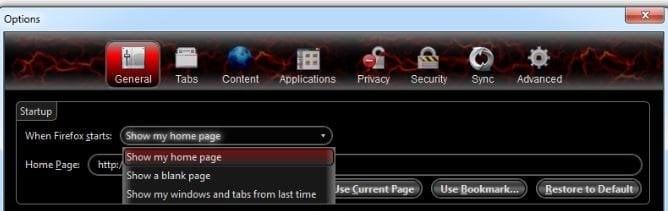
Open firefox, Go to tools > Options > General > When Firefox Starts > Change from show windows and tabs from last time to show Home Page. It happened because you restored to default.
fire.JPG
 

My Computer My Computer

At a glance

Win7 Pro-64 Biti7-2600-3.4GHz8 GIG DDR3onboard
Computer Manufacturer/Model Number
Put together
OS
Win7 Pro-64 Bit
CPU
i7-2600-3.4GHz
Motherboard
ASRock Z68M
Memory
8 GIG DDR3
Graphics Card(s)
onboard
Sound Card
onboard
Hard Drives
Seagate 1TB 7200RPM
PSU
680 W
Case
black
Cooling
stock fans
Keyboard
Microsoft
Mouse
Microsoft optical
Oh THANK YOU so much! How silly of me not to notice that it was set to show the last windows and tabs! :o

I fixed it and now it works beautifully! THANKS AGAIN! :) Adela

P.S. I love the pigeon!
 

My Computer My Computer

At a glance

Windows 7 Home, 64 bit.
Computer Manufacturer/Model Number
Dell Inspiron 560 Desktop
OS
Windows 7 Home, 64 bit.
Monitor(s) Displays
LCD
I think a screenshot is a good idea. I've used Firefox for ages and have never seen any animated animal.
This could be an Add-On or Extension of some sort.
If you hover your cursor over it, what pops up?

Thank you and sorry I overlooked to answer your kind suggestion. Since I found the way to get rid of the animation by going to Default Theme, there was no need to send a screenshot witch I would've if I still had the problem. But just for your information, when I hovered over it nothing happened, and in addition I clicked left and clicked right and nothing happened either. lol! But very happy now. Thanks again! :)
 

My Computer My Computer

At a glance

Windows 7 Home, 64 bit.
Computer Manufacturer/Model Number
Dell Inspiron 560 Desktop
OS
Windows 7 Home, 64 bit.
Monitor(s) Displays
LCD
Oh THANK YOU so much! How silly of me not to notice that it was set to show the last windows and tabs! :o

I fixed it and now it works beautifully! THANKS AGAIN! :) Adela

P.S. I love the pigeon!

Thank you, you're welcome.

P.S. The pigeon is actually a magpie.;)
 

My Computer My Computer

At a glance

Win7 Pro-64 Biti7-2600-3.4GHz8 GIG DDR3onboard
Computer Manufacturer/Model Number
Put together
OS
Win7 Pro-64 Bit
CPU
i7-2600-3.4GHz
Motherboard
ASRock Z68M
Memory
8 GIG DDR3
Graphics Card(s)
onboard
Sound Card
onboard
Hard Drives
Seagate 1TB 7200RPM
PSU
680 W
Case
black
Cooling
stock fans
Keyboard
Microsoft
Mouse
Microsoft optical
Oh she or he is a magpie. I love all the animals but can't tell the difference among some of them. I went to Wikipedia and learned about the magpies. They are just as beautiful and gentle-looking as the pigeons. Thanks for telling me! :)
 

My Computer My Computer

At a glance

Windows 7 Home, 64 bit.
Computer Manufacturer/Model Number
Dell Inspiron 560 Desktop
OS
Windows 7 Home, 64 bit.
Monitor(s) Displays
LCD
Back
Top