Solved DHCP and DNS Errors In Event Viewer

N00berG00ber

Weekend Warrior
Power User
VIP
Local time
6:09 PM
Messages
1,485
so everyday, maybe about 20x i get these errors in event viewer. Does anyone know how to fix these?


Code:
Log Name:      System
Source:        Microsoft-Windows-DNS-Client
Date:          8/26/2014 11:09:43 PM
Event ID:      1014
Task Category: None
Level:         Warning
Keywords:      
User:          SYSTEM
Computer:      Patrick-PC
Description:
Name resolution for the name f5104174.iavs9x.u.avast.com timed out after none of the configured DNS servers responded.
Event Xml:
<Event xmlns="http://schemas.microsoft.com/win/2004/08/events/event">
  <System>
    <Provider Name="Microsoft-Windows-DNS-Client" Guid="{1C95126E-7EEA-49A9-A3FE-A378B03DDB4D}" />
    <EventID>1014</EventID>
    <Version>0</Version>
    <Level>3</Level>
    <Task>0</Task>
    <Opcode>0</Opcode>
    <Keywords>0x4000000000000000</Keywords>
    <TimeCreated SystemTime="2014-08-27T03:09:43.044662400Z" />
    <EventRecordID>753489</EventRecordID>
    <Correlation />
    <Execution ProcessID="4044" ThreadID="1536" />
    <Channel>System</Channel>
    <Computer>Patrick-PC</Computer>
    <Security UserID="S-1-5-18" />
  </System>
  <EventData>
    <Data Name="QueryName">f5104174.iavs9x.u.avast.com</Data>
    <Data Name="AddressLength">16</Data>
    <Data Name="Address">020000350AF0CDA10000000000000000</Data>
  </EventData>
</Event>


Code:
Log Name:      System
Source:        Microsoft-Windows-DNS-Client
Date:          8/26/2014 10:03:52 PM
Event ID:      1014
Task Category: None
Level:         Warning
Keywords:      
User:          SYSTEM
Computer:      Patrick-PC
Description:
Name resolution for the name emupdate.avast.com timed out after none of the configured DNS servers responded.
Event Xml:
<Event xmlns="http://schemas.microsoft.com/win/2004/08/events/event">
  <System>
    <Provider Name="Microsoft-Windows-DNS-Client" Guid="{1C95126E-7EEA-49A9-A3FE-A378B03DDB4D}" />
    <EventID>1014</EventID>
    <Version>0</Version>
    <Level>3</Level>
    <Task>0</Task>
    <Opcode>0</Opcode>
    <Keywords>0x4000000000000000</Keywords>
    <TimeCreated SystemTime="2014-08-27T02:03:52.525010100Z" />
    <EventRecordID>753487</EventRecordID>
    <Correlation ActivityID="{00CC0008-0004-0000-240B-C80488B97E00}" />
    <Execution ProcessID="2852" ThreadID="1224" />
    <Channel>System</Channel>
    <Computer>Patrick-PC</Computer>
    <Security UserID="S-1-5-18" />
  </System>
  <EventData>
    <Data Name="QueryName">emupdate.avast.com</Data>
    <Data Name="AddressLength">16</Data>
    <Data Name="Address">020000350AF0CDA10000000000000000</Data>
  </EventData>
</Event>


Code:
Log Name:      Microsoft-Windows-Dhcp-Client/Admin
Source:        Microsoft-Windows-Dhcp-Client
Date:          8/26/2014 5:30:36 PM
Event ID:      1002
Task Category: Address Configuration State Event
Level:         Error
Keywords:      
User:          LOCAL SERVICE
Computer:      Patrick-PC
Description:
The IP address lease 192.168.1.15 for the Network Card with network address 0x10BF484AF050 has been denied by the DHCP server 0.0.0.0 (The DHCP Server sent a DHCPNACK message).
Event Xml:
<Event xmlns="http://schemas.microsoft.com/win/2004/08/events/event">
  <System>
    <Provider Name="Microsoft-Windows-Dhcp-Client" Guid="{15A7A4F8-0072-4EAB-ABAD-F98A4D666AED}" />
    <EventID>1002</EventID>
    <Version>0</Version>
    <Level>2</Level>
    <Task>3</Task>
    <Opcode>76</Opcode>
    <Keywords>0x4000000000000000</Keywords>
    <TimeCreated SystemTime="2014-08-26T21:30:36.172352200Z" />
    <EventRecordID>1497</EventRecordID>
    <Correlation />
    <Execution ProcessID="572" ThreadID="4540" />
    <Channel>Microsoft-Windows-Dhcp-Client/Admin</Channel>
    <Computer>Patrick-PC</Computer>
    <Security UserID="S-1-5-19" />
  </System>
  <EventData>
    <Data Name="Address1">251766976</Data>
    <Data Name="HWLength">6</Data>
    <Data Name="HWAddress">10BF484AF050</Data>
    <Data Name="Address2">0</Data>
  </EventData>
</Event>

Code:
Log Name:      Microsoft-Windows-Dhcp-Client/Admin
Source:        Microsoft-Windows-Dhcp-Client
Date:          8/26/2014 4:53:44 PM
Event ID:      1003
Task Category: Address Configuration State Event
Level:         Warning
Keywords:      
User:          LOCAL SERVICE
Computer:      Patrick-PC
Description:
Your computer was not able to renew its address from the network (from the DHCP Server) for the Network Card with network address 0x10BF484AF050.  The following error occurred: 0x79. Your computer will continue to try and obtain an address on its own from the network address (DHCP) server.
Event Xml:
<Event xmlns="http://schemas.microsoft.com/win/2004/08/events/event">
  <System>
    <Provider Name="Microsoft-Windows-Dhcp-Client" Guid="{15A7A4F8-0072-4EAB-ABAD-F98A4D666AED}" />
    <EventID>1003</EventID>
    <Version>0</Version>
    <Level>3</Level>
    <Task>3</Task>
    <Opcode>77</Opcode>
    <Keywords>0x4000000000000000</Keywords>
    <TimeCreated SystemTime="2014-08-26T20:53:44.515600000Z" />
    <EventRecordID>1490</EventRecordID>
    <Correlation />
    <Execution ProcessID="572" ThreadID="4416" />
    <Channel>Microsoft-Windows-Dhcp-Client/Admin</Channel>
    <Computer>Patrick-PC</Computer>
    <Security UserID="S-1-5-19" />
  </System>
  <EventData>
    <Data Name="HWLength">6</Data>
    <Data Name="HWAddress">10BF484AF050</Data>
    <Data Name="StatusCode">121</Data>
  </EventData>
</Event>
 

My Computer My Computer

Computer type
PC/Desktop
Computer Manufacturer/Model Number
Weekend Warrior Rig
OS
Windows 10 Pro
CPU
Intel i7-3770K 4.4GHz
Motherboard
ASUS P8Z77-V Pro
Memory
8GB G.SKILL Ripjaws 1866 MHz
Graphics Card(s)
EVGA GTX 980 Classified
Monitor(s) Displays
Asus VH238H 23" 2ms
Screen Resolution
1920x1080
Hard Drives
Intel 330 120GB SSD /
WD Blue 1TB /
WD Black 500GB
PSU
Corsair CX750M
Case
NZXT H440
Cooling
Corsair H80i- CPU / Corsair H90- GPU
Keyboard
Logitech K360 LE
Mouse
Logitech G500
Antivirus
Avast
Browser
Chrome
Other Info
1200W 2.1 Surround Sound Audio
Thats strange, try to Flush your DNS.

   Information

  • Click the start button and navigate to the command prompt (Start > All Programs > Accessories > Command Prompt)
  • Make sure that you right click on the command prompt application and choose "Run as Administrator"
  • Type in the command ipconfig /flushdns
 

My Computer My Computer

Computer type
PC/Desktop
Computer Manufacturer/Model Number
Custom Build
OS
Windows 7 Ultimate 64-bit
CPU
Intel G3420 3.2GHZ Dual Core
Motherboard
Gigabyte H87-HD3
Memory
Kingson 8GB 1600mhz
Graphics Card(s)
MSI R7970 TF 3GD5/OC BE
Monitor(s) Displays
21" LG & "19 Vertical Samsung
Hard Drives
120GB SSD - Boot
1TB WD
350GB External
2TB External (Wireless)
PSU
Corsair CX 500 modular
Case
Zalman Z11 Plus (modified)
Cooling
Corsair H55, 2x 120mm SP Corsair, 1x 140 Coolermaster
Keyboard
Corsair K50
Mouse
CSL Gaming
Internet Speed
164Mbps
Antivirus
Avast, Malwarebytes
Browser
Google Chrome, IE, Firefox
Thats strange, try to Flush your DNS.

   Information

  • Click the start button and navigate to the command prompt (Start > All Programs > Accessories > Command Prompt)
  • Make sure that you right click on the command prompt application and choose "Run as Administrator"
  • Type in the command ipconfig /flushdns


i get an error when i do that. ive disabled some services, maybe it could be a service? its been doing this for as long as i can remember lol.

Code:
Windows IP Configuration

Could not flush the DNS Resolver Cache: Function failed during execution.


C:\Windows\system32>ipconfig /flushdns

Windows IP Configuration

Could not flush the DNS Resolver Cache: Function failed during execution.


EDIT: it was a service. i just enabled it and it flushed. let me clear event view, restart and see what happens.
 

My Computer My Computer

Computer type
PC/Desktop
Computer Manufacturer/Model Number
Weekend Warrior Rig
OS
Windows 10 Pro
CPU
Intel i7-3770K 4.4GHz
Motherboard
ASUS P8Z77-V Pro
Memory
8GB G.SKILL Ripjaws 1866 MHz
Graphics Card(s)
EVGA GTX 980 Classified
Monitor(s) Displays
Asus VH238H 23" 2ms
Screen Resolution
1920x1080
Hard Drives
Intel 330 120GB SSD /
WD Blue 1TB /
WD Black 500GB
PSU
Corsair CX750M
Case
NZXT H440
Cooling
Corsair H80i- CPU / Corsair H90- GPU
Keyboard
Logitech K360 LE
Mouse
Logitech G500
Antivirus
Avast
Browser
Chrome
Other Info
1200W 2.1 Surround Sound Audio
Okay brilliant, with any luck it should help your problem!
 

My Computer My Computer

Computer type
PC/Desktop
Computer Manufacturer/Model Number
Custom Build
OS
Windows 7 Ultimate 64-bit
CPU
Intel G3420 3.2GHZ Dual Core
Motherboard
Gigabyte H87-HD3
Memory
Kingson 8GB 1600mhz
Graphics Card(s)
MSI R7970 TF 3GD5/OC BE
Monitor(s) Displays
21" LG & "19 Vertical Samsung
Hard Drives
120GB SSD - Boot
1TB WD
350GB External
2TB External (Wireless)
PSU
Corsair CX 500 modular
Case
Zalman Z11 Plus (modified)
Cooling
Corsair H55, 2x 120mm SP Corsair, 1x 140 Coolermaster
Keyboard
Corsair K50
Mouse
CSL Gaming
Internet Speed
164Mbps
Antivirus
Avast, Malwarebytes
Browser
Google Chrome, IE, Firefox
i think its finally fixed! no errors yet! thanks a lot man!

ill leave the thread open for now, but seems to be fixed.
 

My Computer My Computer

Computer type
PC/Desktop
Computer Manufacturer/Model Number
Weekend Warrior Rig
OS
Windows 10 Pro
CPU
Intel i7-3770K 4.4GHz
Motherboard
ASUS P8Z77-V Pro
Memory
8GB G.SKILL Ripjaws 1866 MHz
Graphics Card(s)
EVGA GTX 980 Classified
Monitor(s) Displays
Asus VH238H 23" 2ms
Screen Resolution
1920x1080
Hard Drives
Intel 330 120GB SSD /
WD Blue 1TB /
WD Black 500GB
PSU
Corsair CX750M
Case
NZXT H440
Cooling
Corsair H80i- CPU / Corsair H90- GPU
Keyboard
Logitech K360 LE
Mouse
Logitech G500
Antivirus
Avast
Browser
Chrome
Other Info
1200W 2.1 Surround Sound Audio
Brilliant mate! I Havant seen you on here for a while, where have you been?
 

My Computer My Computer

Computer type
PC/Desktop
Computer Manufacturer/Model Number
Custom Build
OS
Windows 7 Ultimate 64-bit
CPU
Intel G3420 3.2GHZ Dual Core
Motherboard
Gigabyte H87-HD3
Memory
Kingson 8GB 1600mhz
Graphics Card(s)
MSI R7970 TF 3GD5/OC BE
Monitor(s) Displays
21" LG & "19 Vertical Samsung
Hard Drives
120GB SSD - Boot
1TB WD
350GB External
2TB External (Wireless)
PSU
Corsair CX 500 modular
Case
Zalman Z11 Plus (modified)
Cooling
Corsair H55, 2x 120mm SP Corsair, 1x 140 Coolermaster
Keyboard
Corsair K50
Mouse
CSL Gaming
Internet Speed
164Mbps
Antivirus
Avast, Malwarebytes
Browser
Google Chrome, IE, Firefox
Brilliant mate! I Havant seen you on here for a while, where have you been?

Most of my pc building has been done. And I don't have the money to risk my components in benchmarks anymore either. Lol. Also, I'm a senior this year, so I've been side tracked by that stuff too.
 

My Computer My Computer

Computer type
PC/Desktop
Computer Manufacturer/Model Number
Weekend Warrior Rig
OS
Windows 10 Pro
CPU
Intel i7-3770K 4.4GHz
Motherboard
ASUS P8Z77-V Pro
Memory
8GB G.SKILL Ripjaws 1866 MHz
Graphics Card(s)
EVGA GTX 980 Classified
Monitor(s) Displays
Asus VH238H 23" 2ms
Screen Resolution
1920x1080
Hard Drives
Intel 330 120GB SSD /
WD Blue 1TB /
WD Black 500GB
PSU
Corsair CX750M
Case
NZXT H440
Cooling
Corsair H80i- CPU / Corsair H90- GPU
Keyboard
Logitech K360 LE
Mouse
Logitech G500
Antivirus
Avast
Browser
Chrome
Other Info
1200W 2.1 Surround Sound Audio
Ohh okay, yeah focus on your education.
 

My Computer My Computer

Computer type
PC/Desktop
Computer Manufacturer/Model Number
Custom Build
OS
Windows 7 Ultimate 64-bit
CPU
Intel G3420 3.2GHZ Dual Core
Motherboard
Gigabyte H87-HD3
Memory
Kingson 8GB 1600mhz
Graphics Card(s)
MSI R7970 TF 3GD5/OC BE
Monitor(s) Displays
21" LG & "19 Vertical Samsung
Hard Drives
120GB SSD - Boot
1TB WD
350GB External
2TB External (Wireless)
PSU
Corsair CX 500 modular
Case
Zalman Z11 Plus (modified)
Cooling
Corsair H55, 2x 120mm SP Corsair, 1x 140 Coolermaster
Keyboard
Corsair K50
Mouse
CSL Gaming
Internet Speed
164Mbps
Antivirus
Avast, Malwarebytes
Browser
Google Chrome, IE, Firefox
I have the same Event ID 1002 DHCP Client error- "The IP address lease 192.168.1.111 for the Network Card with network address..."

Weird thing it happens at close to the same time each day 24 hours apart. Almost to the second. I have a scheduled task to run at midnight in an effort to fix this. The task time does not align with the error.

Here are the actions of the scheduled task each day at midnight. I did not do anything to run this as administrator -

@echo off

ipconfig /release
ipconfig /renew
ipconfig /flushdns
ipconfig /registerdns
netsh dump
nbtstat -R
netsh int ip reset reset.log
netsh winsock reset


It was something I found on the internet I thought to try to fix this recurring issue. No luck.

Can someone offer something else?
 

My Computer My Computer

Computer type
PC/Desktop
Computer Manufacturer/Model Number
Custom
OS
Microsoft Windows 7 Home Premium 64-bit 7601 Multiprocessor Free Service Pack 1
CPU
Intel(R) Core(TM) i7 CPU 860 @ 2.80GHz
Motherboard
ASRock P55 Pro
Memory
8.00 GB
Graphics Card(s)
NVIDIA GeForce GTX 670
Sound Card
(1) High Definition Audio Device (2) Logitech G930 Headset
Screen Resolution
1920 x 1080 x 32 bits (4294967296 colors) @ 60 Hz
Hard Drives
(1) Hitachi HDS5C3020ALA632 ATA Device (2) Samsung SSD 850 EVO 500GB ATA Device (3) EPSON Stylus Storage USB Device (4) (5) Generic- MS/MS-Pro USB Device (6) Generic- SD/MMC USB Device (7) Generic- SM/xD-Picture USB Device
I have the same Event ID 1002 DHCP Client error- "The IP address lease 192.168.1.111 for the Network Card with network address..."

Weird thing it happens at close to the same time each day 24 hours apart. Almost to the second. I have a scheduled task to run at midnight in an effort to fix this. The task time does not align with the error.

Here are the actions of the scheduled task each day at midnight. I did not do anything to run this as administrator -

@echo off

ipconfig /release
ipconfig /renew
ipconfig /flushdns
ipconfig /registerdns
netsh dump
nbtstat -R
netsh int ip reset reset.log
netsh winsock reset


It was something I found on the internet I thought to try to fix this recurring issue. No luck.

Can someone offer something else?

In future can you make your own thread as more people will be able to see it :)

If you make one and link me to it, i will be more then happy to help :)
 

My Computer My Computer

Computer type
PC/Desktop
Computer Manufacturer/Model Number
Custom Build
OS
Windows 7 Ultimate 64-bit
CPU
Intel G3420 3.2GHZ Dual Core
Motherboard
Gigabyte H87-HD3
Memory
Kingson 8GB 1600mhz
Graphics Card(s)
MSI R7970 TF 3GD5/OC BE
Monitor(s) Displays
21" LG & "19 Vertical Samsung
Hard Drives
120GB SSD - Boot
1TB WD
350GB External
2TB External (Wireless)
PSU
Corsair CX 500 modular
Case
Zalman Z11 Plus (modified)
Cooling
Corsair H55, 2x 120mm SP Corsair, 1x 140 Coolermaster
Keyboard
Corsair K50
Mouse
CSL Gaming
Internet Speed
164Mbps
Antivirus
Avast, Malwarebytes
Browser
Google Chrome, IE, Firefox
In future can you make your own thread as more people will be able to see it :)

If you make one and link me to it, i will be more then happy to help :)

Can do. Thx

I have started a new thread HERE
 

My Computer My Computer

Computer type
PC/Desktop
Computer Manufacturer/Model Number
Custom
OS
Microsoft Windows 7 Home Premium 64-bit 7601 Multiprocessor Free Service Pack 1
CPU
Intel(R) Core(TM) i7 CPU 860 @ 2.80GHz
Motherboard
ASRock P55 Pro
Memory
8.00 GB
Graphics Card(s)
NVIDIA GeForce GTX 670
Sound Card
(1) High Definition Audio Device (2) Logitech G930 Headset
Screen Resolution
1920 x 1080 x 32 bits (4294967296 colors) @ 60 Hz
Hard Drives
(1) Hitachi HDS5C3020ALA632 ATA Device (2) Samsung SSD 850 EVO 500GB ATA Device (3) EPSON Stylus Storage USB Device (4) (5) Generic- MS/MS-Pro USB Device (6) Generic- SD/MMC USB Device (7) Generic- SM/xD-Picture USB Device
Make this thread more useful for those who stumble across it?

i get an error when i do that. ive disabled some services, maybe it could be a service? its been doing this for as long as i can remember lol. ...

EDIT: it was a service. i just enabled it and it flushed. let me clear event view, restart and see what happens.

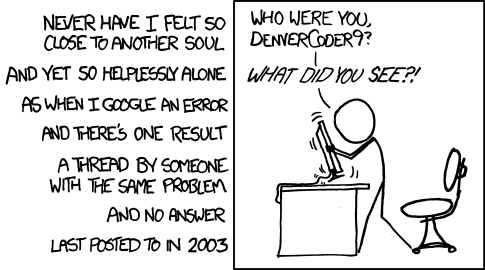
@N00berG00ber --I'm way late to this party, I know, but I found it in a search.... It would be helpful if you could say which service it was that you re-enabled that allowed you to flush your DNS cache, and resolve the problem!

Thanks
 

My Computer My Computer

Computer type
Laptop
Computer Manufacturer/Model Number
Toshiba
OS
Win 7 x64 Pro
CPU
Intel Core i7
Memory
4 GB
Browser
IE; Chrome
I'm even later, but I've got a friend who's having this same issue. Please please please tell us which service you re-enabled!

wisdom_of_the_ancients.png
 

My Computer My Computer

Computer type
PC/Desktop
Computer Manufacturer/Model Number
Custom build
OS
Windows 10 Pro x64
CPU
AMD FX-8370 8-core 4.0GHz
Motherboard
ASRock 990FX Extreme9
Memory
Corsair Vengeance Pro DDR3-2400 32GB (4x8GB)
Graphics Card(s)
Gigabyte GeForce GTX 980Ti 6GB Windforce 3X OC
Hard Drives
Samsung 840 Pro Series 512GB SSD
Western Digital Black 6TB 7200RPM
PSU
Antec High Current Gamer 900W 80+ Bronze
Case
Raidmax Viper GX, soon to be Thermaltake The Tower 900
Cooling
GamerStorm Captain 240 liquid cooler
Keyboard
Razer BlackWidow X Chroma
Mouse
Razer DeathAdder Elite
Antivirus
Kaspersky - always up to date
Browser
Chrome - always up to date
Back
Top