Mustek 1200 UB Scanner

Mark J

New member
Local time
12:46 PM
Messages
6
Can anyone, anyone at all, give me a straight answer to a straight question. IS THERE A WINDOWS 7 COMPATIBLE DRIVER, AVAILABLE FOR THIS SCANNER? - BEFORE I THROW IT IN THE BIN!
 

My Computer My Computer

At a glance

windows 7 32 bit
Computer type
PC/Desktop
Computer Manufacturer/Model Number
Toshiba
OS
windows 7 32 bit
According to what I find, XP was the latest they supported.

Have you tried installing it in an XP compatibility mode? RIGHT click on the install icon for the drivers and then select Properties. In the Properties click on the Compatibility tab and then select Windows XP. If you are lucky it will install and work. If not, time to find a new scanner, not all older XP hardware will work with newer Operating Systems.
 

My Computer My Computer

At a glance

Windows 10 64 bitIntel i7 6700K16GB Corsair DominatorIntel CPU Graphics
Computer type
PC/Desktop
Computer Manufacturer/Model Number
My Own Build
OS
Windows 10 64 bit
CPU
Intel i7 6700K
Motherboard
ASUS ROG Maximus VIII Hero
Memory
16GB Corsair Dominator
Graphics Card(s)
Intel CPU Graphics
Sound Card
RealTek
Monitor(s) Displays
27" Dell S2719dgf
Screen Resolution
2560X1440
Hard Drives
1 TB Samsung 850 EVO SSD for Win 10 Pro
500GB Samsung 850 EVO SSD for Win 10 Insider
2 TB drive for backup
PSU
EVGA Supernova 750G2
Case
BeQuiet Silent Base 600
Cooling
Deepcool Captain 120EX
Keyboard
Microsoft Wireless 2000
Mouse
Microsoft wireless
Internet Speed
100 MB/sec (Cable)
Antivirus
Microsoft Defender and Malwarebytes
Browser
Edge/Firefox
Other Info
Cakewalk (Sonar) by BandLab and Studio One 4.1 Pro recording studio software. MOTU 896Mk3 Hybrid recording interface, Frontier Tranzport wireless control unit, Behringer X-Touch Control Surface.
Five USB connected optical drives for CD Audio production using Nero BurningROM
Hi Welcome to Seven Forums ... Give VueScan a try it has a 30 Day free trial ...


Will give you the chance to save for a new Scanner ....
 

My Computer My Computer

At a glance

windows 7 home 64bitINTEL-CORE I716GB
Computer Manufacturer/Model Number
W530-3630QM1
OS
windows 7 home 64bit
CPU
INTEL-CORE I7
Memory
16GB
Hard Drives
750GB
Browser
Chrome
If it can be recognized as a TWAIN device it might work. But then I had one I had to junk, went with an All-in-One unit I wanted anyway.
 

My Computer My Computer

At a glance

Windows 7 Ultimate 64-bit, Windows 8.1 64-bit...
Computer type
PC/Desktop
Computer Manufacturer/Model Number
Customs, Dell, Gateway, HP, Toshiba, Acer, ASUS
OS
Windows 7 Ultimate 64-bit, Windows 8.1 64-bit, Mac OS X 10.10, Linux Mint 17, Windows 10 Pro TP
Keyboard
Microsoft
Mouse
Microsoft
Can anyone, anyone at all, give me a straight answer to a straight question. IS THERE A WINDOWS 7 COMPATIBLE DRIVER, AVAILABLE FOR THIS SCANNER? - BEFORE I THROW IT IN THE BIN!

Hi there

It's paid software but try VUESCAN - this seems to work with all these old scanners.
VueScan Scanner Software for Windows, Mac OS X and Linux

Another two suggestions

1) Run an XP VM - then your scanner will keep working.
2) Run a Linux V M or dual boot -- XSANE / KOOKA applications on Linux seem to work with loads of these early scanners too.

Remember that the OLDER scanners acquire the image NOT by the current Windows method WIA - Windows Image Acquisition but by using TWAIN so you are unlikely to get W7 drivers for older scanners that use TWAIN which yours does.

Cheers
jimbo
 

My Computer My Computer

At a glance

Linux CENTOS 7 / various Windows OS'es and se...Intel i7 Intel i58GB, 16GBOn Motherboard
Computer type
PC/Desktop
Computer Manufacturer/Model Number
Custom built, several laptops HP/ASUS
OS
Linux CENTOS 7 / various Windows OS'es and servers
CPU
Intel i7 Intel i5
Memory
8GB, 16GB
Graphics Card(s)
On Motherboard
Sound Card
Realtek HD audio
Monitor(s) Displays
Apple Cinema display, Samsung LCD
Screen Resolution
1920 X 1080
Hard Drives
4 X 1TB SATA
Mouse
Toshiba wireless laser
Internet Speed
> 20MB up
Thanks so much folks, for taking the time and trouble to reply and for the welcome to the forum. As a tight wad, I'll try the compatibility mode first. If not, it's raid the piggy bank for some £ notes methinks!
 

My Computer My Computer

At a glance

windows 7 32 bit
Computer type
PC/Desktop
Computer Manufacturer/Model Number
Toshiba
OS
windows 7 32 bit
Thanks so much folks, for taking the time and trouble to reply and for the welcome to the forum. As a tight wad, I'll try the compatibility mode first. If not, it's raid the piggy bank for some £ notes methinks!

Hi there

Why raid the piggy Bank -- what's wrong with the VM idea or even the Linux Distro -- a VM will keep your hardware working for YEARS - and just copy the scan to the HOST.

The problem with Modern software and Old scanners is that the new software uses WIA while your old scanner uses TWAIN - so even in compatibility mode I'd almost bet a billion dollars to a bucket full of "back end of Bull" that it won't work.

Why Junk perfectly good hardware -- now if you WANT a new scanner that's another issue but you don't have to buy into this "planned obsolescence". I'm no "socialist" just rabbiting on against corporates making shedloads of money -- I just don't like junking perfectly GOOD serviceable hardware where the new stuff doesn't offer a significant improvement either.

Some of the older scanners give much better results than these modern "all in" devices - printers + scanner + fax etc.

I'd trust my old CANOSCAN N1240U far better than any modern cheap one combined with a printer

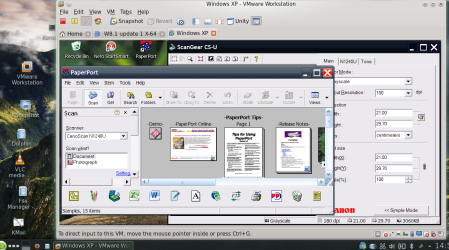
Here's an image on my XP VM running on a Linux OPENSUSE host making a Scan. I'm using VMware workstation - but the FREE VMware player works just as good too -- I'm using workstation since I get it FREE from work !!!.

Cheers
jimbo
 

Attachments

  • snapshot27.png
    snapshot27.png
    162.8 KB · Views: 4

My Computer My Computer

At a glance

Linux CENTOS 7 / various Windows OS'es and se...Intel i7 Intel i58GB, 16GBOn Motherboard
Computer type
PC/Desktop
Computer Manufacturer/Model Number
Custom built, several laptops HP/ASUS
OS
Linux CENTOS 7 / various Windows OS'es and servers
CPU
Intel i7 Intel i5
Memory
8GB, 16GB
Graphics Card(s)
On Motherboard
Sound Card
Realtek HD audio
Monitor(s) Displays
Apple Cinema display, Samsung LCD
Screen Resolution
1920 X 1080
Hard Drives
4 X 1TB SATA
Mouse
Toshiba wireless laser
Internet Speed
> 20MB up
Jimbo,

Thanks for your reply.

You are right. The driver would not install in compatibility mode.
I fully agree with you, about the feeling that manufacturers are constantly trying to 'railroad' us into buying new hardware, just because they won't release updated drivers. This is the case with Mustek - I contacted them and was fobbed off in no uncertain terms.
This is my primary reason for posting on this forum. The 1200UB works well, and produces exceptional results. I didn't just want to chuck it away, if there was an alternative.
Looks like the suggestion here, of running a VM is the best bet. If nothing else, it postpones putting money into the back pockets of Mr. Canon/Epson/Hp/ Kodak and the rest!

Thanks again,
Mark

 

My Computer My Computer

At a glance

windows 7 32 bit
Computer type
PC/Desktop
Computer Manufacturer/Model Number
Toshiba
OS
windows 7 32 bit
It happens with all products, once they are no longer made and sold there's no money coming in to pay the people who write the software to run them. It's like with cars, used to be one could get an OEM part for a 9 or 10 year old car but with all the electronics in them now I get the feeling that time period may no longer be true.
 

My Computer My Computer

At a glance

Windows 7 Ultimate 64-bit, Windows 8.1 64-bit...
Computer type
PC/Desktop
Computer Manufacturer/Model Number
Customs, Dell, Gateway, HP, Toshiba, Acer, ASUS
OS
Windows 7 Ultimate 64-bit, Windows 8.1 64-bit, Mac OS X 10.10, Linux Mint 17, Windows 10 Pro TP
Keyboard
Microsoft
Mouse
Microsoft
Back
Top