Can't connect to the internet in VMware.

adamisapple

New member
Hello,
I am virtualizing Windows 8 in VMware. It has 2GB Ram, 30GB Hard Drive, and is 32-bit. My Host OS is Windows 7 Professional, 4GB Ram, 282GB Hard Drive, and is 64-bit. The VMware will NOT connect to the internet. I have tried Bridged, NAT, and LAN, and the others. If anyone can help, It would be awesome. I've searched for a solution for 6 hours and found NOTHING.
Thanks!
 

My Computer

Computer type
Laptop
Computer Manufacturer/Model Number
Lenovo ThinkPad E431
OS
Windows 7 64 Bit Professional
CPU
Intel Core i3 @2.5 GHz
Memory
4.00 GB
Graphics Card(s)
Intel
Monitor(s) Displays
None
Screen Resolution
1366x768
Hard Drives
1) 282GB
Case
None
Cooling
Fan
Keyboard
A Cheap stock Lenovo one
Mouse
Broken Lenovo trackpad
Internet Speed
7 MBPS (HOME)
Antivirus
Barracuda
Browser
Safari 5
Other Info
Windows Rating: 4.9
Hello,
I am virtualizing Windows 8 in VMware. It has 2GB Ram, 30GB Hard Drive, and is 32-bit. My Host OS is Windows 7 Professional, 4GB Ram, 282GB Hard Drive, and is 64-bit. The VMware will NOT connect to the internet. I have tried Bridged, NAT, and LAN, and the others. If anyone can help, It would be awesome. I've searched for a solution for 6 hours and found NOTHING.
Thanks!

Hello adamisapple,

Can you provide us with more information? What version of VMware are you using? Have you tried other VM's to check and see if you can connect? Have you made sure all of your drivers are in order on the VM?

Do you have connection outside of the VM, as in your PC?

Here is a pretty comprehensive troubleshooting guide that may help:
VMware KB: Troubleshooting networking and internet connection issues in VMware Fusion
 

My Computer

Computer type
PC/Desktop
Computer Manufacturer/Model Number
Custom
OS
Dual Boot: Windows 8.1 & Server 2012r2 VMs: Kali Linux, Backbox, Matriux, Windows 8.1
CPU
A10 7700 Kavari SteamRoller
Motherboard
ASUS A88XM-PLUS (FM2+ )
Memory
8GB DDR3 SDRAM PC3-8500
Graphics Card(s)
1024MB ATI AMD Radeon R7 Graphics
Sound Card
Realtek High Definition Audio
Monitor(s) Displays
Samsung
Hard Drives
SSD Crucial 120gb
WD VelociRaptor 1tb
PSU
Rosewill Gaming 650w
Case
Rosewill Galaxy 2
Internet Speed
55/12
Antivirus
Malwarebytes, MSE, SAS
Browser
FireFox, Chrome
My PC has internet, Im on VMware 10, I have not tried any other. Thanks!
 

My Computer

Computer type
Laptop
Computer Manufacturer/Model Number
Lenovo ThinkPad E431
OS
Windows 7 64 Bit Professional
CPU
Intel Core i3 @2.5 GHz
Memory
4.00 GB
Graphics Card(s)
Intel
Monitor(s) Displays
None
Screen Resolution
1366x768
Hard Drives
1) 282GB
Case
None
Cooling
Fan
Keyboard
A Cheap stock Lenovo one
Mouse
Broken Lenovo trackpad
Internet Speed
7 MBPS (HOME)
Antivirus
Barracuda
Browser
Safari 5
Other Info
Windows Rating: 4.9
Hi there

Have you run Installed the VMWARE TOOLS on the VM yet. Otherwise I can't think of any problem with networking in VMWARE. - Have you perhaps got firewalls blocking service (either on the VM or the Host or both).

Start testing by removing ALL AV software - and see if that's the culprit too -- things like that HIDEOUS Mcafee software seem to cause a lot of hassles at times for example

I run VMWARE without problems on both LINUX and Windows hosts - no probs with Internet acess at all. Even Windows networking which is usually a dog anyway works ok between VM's and the rest of the LAN.


Cheers
jimbo
 

My Computer

Computer type
PC/Desktop
Computer Manufacturer/Model Number
Custom built, several laptops HP/ASUS
OS
Linux CENTOS 7 / various Windows OS'es and servers
CPU
Intel i7 Intel i5
Memory
8GB, 16GB
Graphics Card(s)
On Motherboard
Sound Card
Realtek HD audio
Monitor(s) Displays
Apple Cinema display, Samsung LCD
Screen Resolution
1920 X 1080
Hard Drives
4 X 1TB SATA
Mouse
Toshiba wireless laser
Internet Speed
> 20MB up
VM Tools is in the taskbar as a VM icon. I have no antivirus software installed.
 

My Computer

Computer type
Laptop
Computer Manufacturer/Model Number
Lenovo ThinkPad E431
OS
Windows 7 64 Bit Professional
CPU
Intel Core i3 @2.5 GHz
Memory
4.00 GB
Graphics Card(s)
Intel
Monitor(s) Displays
None
Screen Resolution
1366x768
Hard Drives
1) 282GB
Case
None
Cooling
Fan
Keyboard
A Cheap stock Lenovo one
Mouse
Broken Lenovo trackpad
Internet Speed
7 MBPS (HOME)
Antivirus
Barracuda
Browser
Safari 5
Other Info
Windows Rating: 4.9
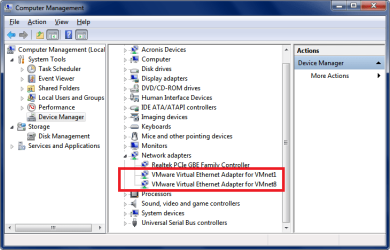
Does the Win 7 Host have VMware Network adapters in Device Manager with no errors ?
Does the Win 8 Guest have a Network adapter in Device Manager with no errors ?

Here is what I have for Win 7 Host VMware Network adapters.
VMNSP01.PNG

Here is what I have for Win 8 Guest Network adapters.
VMNSP02.PNG
 

My Computer

Computer type
PC/Desktop
Computer Manufacturer/Model Number
home built
OS
Multi-Boot W7_Pro_x64 W8.1_Pro_x64 W10_Pro_x64 +Linux_VMs +Chromium_VM
CPU
AMD Athlon II x4 620
Motherboard
Gigabyte GA-MA785G-UD3H
Memory
6GB GSkill DDR2 800
Graphics Card(s)
AMD 4670 GPU + AMD 4200 IGP
Sound Card
on board Realtek ALC889A
Monitor(s) Displays
RCA 40" LCD TV, Insignia 32" LCD TV, HP 15" LCD monitor
Screen Resolution
1680 x 1050
Hard Drives
OCZ Vertex 3 120GB,
Samsung F3 1TB (3),
Several others - WD, Seagate, Hitachi, ...
PSU
Corsair 500 W
Case
Rosewill mid tower
Cooling
CM 90mm rifle
Keyboard
Gyration wireless, Logitech wireless, Dell USB wired
Mouse
Gyration wireless, Logitech wireless, V7 USB wired
Internet Speed
Spectrum - 100Mbps D / 10Mbps U
Antivirus
Avast, MBAM3, EMET, WinPatrol
Browser
Pale Moon, Firefox, IE
Other Info
2 multi-boot PC's
Mainly HTPC/Office/Gen purpose (no gaming).
Trendnet USB KVM.
LG DVD burner/Blue Ray Player.
Tray system for removable SATA backup drives.

Not currently OCd, under-volted.
I use Hybrid sleep, rarely re-boot or shutdown.

Hauppauge HD-PVR, Avermedia PCIe TV Tuner, Hauppauge PCI TV Tuner.
I have Bluetooth and Microsoft Adapter in Windows 8 (Guest) but no VM or Intel one. and VM 1&8 in Windows 7 (Host)
 

My Computer

Computer type
Laptop
Computer Manufacturer/Model Number
Lenovo ThinkPad E431
OS
Windows 7 64 Bit Professional
CPU
Intel Core i3 @2.5 GHz
Memory
4.00 GB
Graphics Card(s)
Intel
Monitor(s) Displays
None
Screen Resolution
1366x768
Hard Drives
1) 282GB
Case
None
Cooling
Fan
Keyboard
A Cheap stock Lenovo one
Mouse
Broken Lenovo trackpad
Internet Speed
7 MBPS (HOME)
Antivirus
Barracuda
Browser
Safari 5
Other Info
Windows Rating: 4.9
Did you work through the troubleshooting guide Gator gave you in post #2 ?
 

My Computer

Computer type
PC/Desktop
Computer Manufacturer/Model Number
home built
OS
Multi-Boot W7_Pro_x64 W8.1_Pro_x64 W10_Pro_x64 +Linux_VMs +Chromium_VM
CPU
AMD Athlon II x4 620
Motherboard
Gigabyte GA-MA785G-UD3H
Memory
6GB GSkill DDR2 800
Graphics Card(s)
AMD 4670 GPU + AMD 4200 IGP
Sound Card
on board Realtek ALC889A
Monitor(s) Displays
RCA 40" LCD TV, Insignia 32" LCD TV, HP 15" LCD monitor
Screen Resolution
1680 x 1050
Hard Drives
OCZ Vertex 3 120GB,
Samsung F3 1TB (3),
Several others - WD, Seagate, Hitachi, ...
PSU
Corsair 500 W
Case
Rosewill mid tower
Cooling
CM 90mm rifle
Keyboard
Gyration wireless, Logitech wireless, Dell USB wired
Mouse
Gyration wireless, Logitech wireless, V7 USB wired
Internet Speed
Spectrum - 100Mbps D / 10Mbps U
Antivirus
Avast, MBAM3, EMET, WinPatrol
Browser
Pale Moon, Firefox, IE
Other Info
2 multi-boot PC's
Mainly HTPC/Office/Gen purpose (no gaming).
Trendnet USB KVM.
LG DVD burner/Blue Ray Player.
Tray system for removable SATA backup drives.

Not currently OCd, under-volted.
I use Hybrid sleep, rarely re-boot or shutdown.

Hauppauge HD-PVR, Avermedia PCIe TV Tuner, Hauppauge PCI TV Tuner.
How can I check to see if the items are in order?
 

My Computer

Computer type
Laptop
Computer Manufacturer/Model Number
Lenovo ThinkPad E431
OS
Windows 7 64 Bit Professional
CPU
Intel Core i3 @2.5 GHz
Memory
4.00 GB
Graphics Card(s)
Intel
Monitor(s) Displays
None
Screen Resolution
1366x768
Hard Drives
1) 282GB
Case
None
Cooling
Fan
Keyboard
A Cheap stock Lenovo one
Mouse
Broken Lenovo trackpad
Internet Speed
7 MBPS (HOME)
Antivirus
Barracuda
Browser
Safari 5
Other Info
Windows Rating: 4.9
I don't understand the question. :confused:
What items and what order ?
 

My Computer

Computer type
PC/Desktop
Computer Manufacturer/Model Number
home built
OS
Multi-Boot W7_Pro_x64 W8.1_Pro_x64 W10_Pro_x64 +Linux_VMs +Chromium_VM
CPU
AMD Athlon II x4 620
Motherboard
Gigabyte GA-MA785G-UD3H
Memory
6GB GSkill DDR2 800
Graphics Card(s)
AMD 4670 GPU + AMD 4200 IGP
Sound Card
on board Realtek ALC889A
Monitor(s) Displays
RCA 40" LCD TV, Insignia 32" LCD TV, HP 15" LCD monitor
Screen Resolution
1680 x 1050
Hard Drives
OCZ Vertex 3 120GB,
Samsung F3 1TB (3),
Several others - WD, Seagate, Hitachi, ...
PSU
Corsair 500 W
Case
Rosewill mid tower
Cooling
CM 90mm rifle
Keyboard
Gyration wireless, Logitech wireless, Dell USB wired
Mouse
Gyration wireless, Logitech wireless, V7 USB wired
Internet Speed
Spectrum - 100Mbps D / 10Mbps U
Antivirus
Avast, MBAM3, EMET, WinPatrol
Browser
Pale Moon, Firefox, IE
Other Info
2 multi-boot PC's
Mainly HTPC/Office/Gen purpose (no gaming).
Trendnet USB KVM.
LG DVD burner/Blue Ray Player.
Tray system for removable SATA backup drives.

Not currently OCd, under-volted.
I use Hybrid sleep, rarely re-boot or shutdown.

Hauppauge HD-PVR, Avermedia PCIe TV Tuner, Hauppauge PCI TV Tuner.
See post #2:
Have you made sure all of your drivers are in order on the VM?
 

My Computer

Computer type
Laptop
Computer Manufacturer/Model Number
Lenovo ThinkPad E431
OS
Windows 7 64 Bit Professional
CPU
Intel Core i3 @2.5 GHz
Memory
4.00 GB
Graphics Card(s)
Intel
Monitor(s) Displays
None
Screen Resolution
1366x768
Hard Drives
1) 282GB
Case
None
Cooling
Fan
Keyboard
A Cheap stock Lenovo one
Mouse
Broken Lenovo trackpad
Internet Speed
7 MBPS (HOME)
Antivirus
Barracuda
Browser
Safari 5
Other Info
Windows Rating: 4.9
I believe that just means make sure they are working - no errors.
 

My Computer

Computer type
PC/Desktop
Computer Manufacturer/Model Number
home built
OS
Multi-Boot W7_Pro_x64 W8.1_Pro_x64 W10_Pro_x64 +Linux_VMs +Chromium_VM
CPU
AMD Athlon II x4 620
Motherboard
Gigabyte GA-MA785G-UD3H
Memory
6GB GSkill DDR2 800
Graphics Card(s)
AMD 4670 GPU + AMD 4200 IGP
Sound Card
on board Realtek ALC889A
Monitor(s) Displays
RCA 40" LCD TV, Insignia 32" LCD TV, HP 15" LCD monitor
Screen Resolution
1680 x 1050
Hard Drives
OCZ Vertex 3 120GB,
Samsung F3 1TB (3),
Several others - WD, Seagate, Hitachi, ...
PSU
Corsair 500 W
Case
Rosewill mid tower
Cooling
CM 90mm rifle
Keyboard
Gyration wireless, Logitech wireless, Dell USB wired
Mouse
Gyration wireless, Logitech wireless, V7 USB wired
Internet Speed
Spectrum - 100Mbps D / 10Mbps U
Antivirus
Avast, MBAM3, EMET, WinPatrol
Browser
Pale Moon, Firefox, IE
Other Info
2 multi-boot PC's
Mainly HTPC/Office/Gen purpose (no gaming).
Trendnet USB KVM.
LG DVD burner/Blue Ray Player.
Tray system for removable SATA backup drives.

Not currently OCd, under-volted.
I use Hybrid sleep, rarely re-boot or shutdown.

Hauppauge HD-PVR, Avermedia PCIe TV Tuner, Hauppauge PCI TV Tuner.

My Computer

Computer type
PC/Desktop
Computer Manufacturer/Model Number
Self Built
OS
Win 10 Pro x64
CPU
Intel I5-2500K @3.3GHz
Motherboard
Asrock P67 Extreme4
Memory
16GB G.Skill Ripjaws X (4x4GB)
Graphics Card(s)
EVGA GeForce 750 Ti SC 2GB
Sound Card
ASUS Xonar DG 5.1 Channels 24-bit 96KHz PCI Interface Sound
Monitor(s) Displays
auria eq2367
Screen Resolution
1920 x 1080
Hard Drives
250GB Samsung 850 EVO SSD
1TB WD Blue
1TB Hitachi
PSU
SeaSonic X 650W 80 Plus Gold
Case
Corsair Obsidian 750D
Cooling
Corsair H60, Three 140mm case fans
Keyboard
Logitech Wireless Keyboard K520
Mouse
Logitech Wireless Mouse M310
Internet Speed
Wave Broadband ~ 100 dn 5 up
Antivirus
Windows Defender, Malwarebytes Premium
Browser
Edge, IE11, Chrome
Other Info
Laptop specs: HP g7-1365dx /
CPU: AMD A6-3420M APU with Radeon(tm) HD Graphics /
RAM: Crucial 8Gb (2x4Gb) /
SSD: Crucial M4-CT128M4SSD2 ATA Device/ FW 000F /
GFX: AMD Radeon HD 6520G /
OS: Windows 10 Pro x64
I am using VMPlayer for Windows on Windows 7 Professional 64-bit


Adamisapple
Skills
Mac System 7.x | Mac OS 9.x | Mac OS X 10.6.x
iOS 4.x | iOS 7.x | iPod Touch 2 & 5 | iPhone 3G | Apple | Windows 7 | Windows Vista
Certified in Office 2010 Word & PowerPoint
iMac G3 | PowerBook 1400 | MacBook
iWork | iLife | Aperture | Garage Band | Xcode
 
Last edited:

My Computer

Computer type
Laptop
Computer Manufacturer/Model Number
Lenovo ThinkPad E431
OS
Windows 7 64 Bit Professional
CPU
Intel Core i3 @2.5 GHz
Memory
4.00 GB
Graphics Card(s)
Intel
Monitor(s) Displays
None
Screen Resolution
1366x768
Hard Drives
1) 282GB
Case
None
Cooling
Fan
Keyboard
A Cheap stock Lenovo one
Mouse
Broken Lenovo trackpad
Internet Speed
7 MBPS (HOME)
Antivirus
Barracuda
Browser
Safari 5
Other Info
Windows Rating: 4.9
Did you work through the troubleshooting guide Gator gave you in post #2 ?
I've used this troubleshooting guide before, your best bet is to read through it and see if you can find the problem. :orb:
 

My Computer

OS
Windows 7 Home Premium 64 bit
Antivirus
Norton 360 Premier Edition
Browser
Firefox & Google Chrome
Hi there

If the VMware adapters aren't on your host PC then your VMWARE installation is hosed up - also ensure system services aren't preventing VMWARE services from starting at boot.

I'd totally UNINSTAL and re-install VMware again - you won't lose any Virtual Machines you've created.

Check also Firewalls, AV software etc.

Cheers
jimbo
 

My Computer

Computer type
PC/Desktop
Computer Manufacturer/Model Number
Custom built, several laptops HP/ASUS
OS
Linux CENTOS 7 / various Windows OS'es and servers
CPU
Intel i7 Intel i5
Memory
8GB, 16GB
Graphics Card(s)
On Motherboard
Sound Card
Realtek HD audio
Monitor(s) Displays
Apple Cinema display, Samsung LCD
Screen Resolution
1920 X 1080
Hard Drives
4 X 1TB SATA
Mouse
Toshiba wireless laser
Internet Speed
> 20MB up
I have them on the host but not the guest.
 

My Computer

Computer type
Laptop
Computer Manufacturer/Model Number
Lenovo ThinkPad E431
OS
Windows 7 64 Bit Professional
CPU
Intel Core i3 @2.5 GHz
Memory
4.00 GB
Graphics Card(s)
Intel
Monitor(s) Displays
None
Screen Resolution
1366x768
Hard Drives
1) 282GB
Case
None
Cooling
Fan
Keyboard
A Cheap stock Lenovo one
Mouse
Broken Lenovo trackpad
Internet Speed
7 MBPS (HOME)
Antivirus
Barracuda
Browser
Safari 5
Other Info
Windows Rating: 4.9
Back
Top