Free continuous backup of multiple folders

Skyzoomer

New member
Member
Local time
6:46 AM
Messages
37
I want to backup selected folders on my D: data drive in real-time. The folders are in the D: root directory as:

D:\Microsoft office
D:\Photos
D:\Graphics
D:\Music
etc.

I already do scheduled backups of the entire D: drive to external drives, but I want to supplement those backup with real-time backups of specific folders.

Anyone know of a free software that can backup selected folders in the root directory in real-time?

Thanks,
Skyzoomer (Running Win7 Home Premium on an i5 PC)
 

My Computer My Computer

At a glance

Windows 7 Home Premium 64bit
OS
Windows 7 Home Premium 64bit
dsynchronize is pretty good and supports real time sync - free from Dimio's Tools
 
Last edited:

My Computer My Computer

At a glance

8.1 Pro x64core2duo3GBATI X1600
Computer type
Laptop
Computer Manufacturer/Model Number
Macbook pro
OS
8.1 Pro x64
CPU
core2duo
Memory
3GB
Graphics Card(s)
ATI X1600
Antivirus
Defender
Browser
IE11
FreeFileSync is an excellent free program for that (it's also good for regular backups to external drives) but, even better would be to use a good (i.e. paid) secure cloud backup program, such as Carbonite, that will also provide real-time backups. I do not recommend free cloud storage since those sites usually aren't secure and are infamous for disappearing with little or no warning. Carbonite is only $60/year for their basic plan. It runs in the background and encrypts your data before uploading it.
 

My Computer My Computer

At a glance

Win 7 Ultimate 64 bitIntel i7-3930KKingston HyperX Genesis 32GB Kit (8x4GB Modul...MSI R7850 Twin Frozr 2GD5/OC Radeon HD 7850 2...
Computer type
PC/Desktop
Computer Manufacturer/Model Number
Custom Build
OS
Win 7 Ultimate 64 bit
CPU
Intel i7-3930K
Motherboard
ASUS P9X79 WS
Memory
Kingston HyperX Genesis 32GB Kit (8x4GB Modules) 1600MHz DDR
Graphics Card(s)
MSI R7850 Twin Frozr 2GD5/OC Radeon HD 7850 2GB 256-bit GDDR
Sound Card
Asus Xonar Essence STX
Monitor(s) Displays
3x Asus VG248QE 24", Vizio 32" TV
Screen Resolution
1920 x 1080, ?
Hard Drives
Samsung 128GB 840 Pro SSD (1),
Samsung 4TB 850 EVO SSDs (4)
Samsung 4TB 850 EVO SSDs (16) external backup drives used in 2.5" hot swap bays in the computer.
PSU
Corsair HX750w
Case
Antec Two Hundred v2 (modified)
Cooling
Cooler Master GeminII S524 120mm (fan replaced with a 140mm)
Keyboard
Logitech G510s
Mouse
Logitech M525 (two in use)
Internet Speed
=< 32Mbps down, 8Mbps up
Antivirus
AVAST!, MBAM, SAS, Spybot S&D (all but MBAM free) Glary Util
Browser
IE11
Other Info
LSI 9211-8i HBA card (8 SATA III ports), 2.5" & 3.5" Hot Swap Bays, HooToo HT-CR001 PCI-E to USB 3.0 Internal Hub + 6 Slot Card Reader, and LG Model CH12LS28 BD-ROM Optical Drive. Also, ScanSnap S1500 ADF duplexing scanner, Canon 9000F flat bed scanner, Corsair SP2500 2.1 speakers, Samsung CLP 415nw laser color printer, Cyberpower PP2200SW UPS
dsynchronize is pretty good and supports real time sync - free from Dimio's Tools
I watched two youtube videos on DSynchronize but they did not explain how to sync more than one folder. I'll install it and see if I can figure out how to do that.

Thanks,
Skyzoomer
 

My Computer My Computer

At a glance

Windows 7 Home Premium 64bit
OS
Windows 7 Home Premium 64bit
FreeFileSync is an excellent free program for that (it's also good for regular backups to external drives) but, even better would be to use a good (i.e. paid) secure cloud backup program, such as Carbonite, that will also provide real-time backups. I do not recommend free cloud storage since those sites usually aren't secure and are infamous for disappearing with little or no warning. Carbonite is only $60/year for their basic plan. It runs in the background and encrypts your data before uploading it.
Can FreeFileSync backup multiple user selected folders in the "root" directory?

EXAMPLE-1:
The Googling that I've done seems to indicate that it can backup sub-folders in a parent folder like this:
D:\My Documents
.... Microsoft Office
.... Photos

EXAMPLE-2:
But not like this:
D:\Microsoft Office
D:\Photos

In EXAMPLE-1, Freefilesync is told to backup the parent folder "My Documents" and it backs-up the sub-folders in "My Documents".

It could be that the tutorials that I've seen missed explaining how to backup example-2.

Thanks,
Skyzoomer
 

My Computer My Computer

At a glance

Windows 7 Home Premium 64bit
OS
Windows 7 Home Premium 64bit
Can FreeFileSync backup multiple user selected folders in the "root" directory?

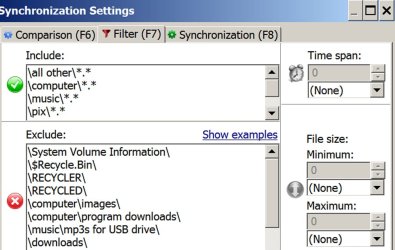
Yes.

In the pic below, you can see where I have manually included certain folders under D:\ and excluded others.
 

Attachments

  • Untitled-1.jpg
    Untitled-1.jpg
    103 KB · Views: 0

My Computer My Computer

At a glance

Windows 7 Home Premium SP1, 64-bitIntel Skylake i5-6600K, not overclocked8 GB HyperX DDR4-2666 (2 x 4 GB)none; graphics are integrated on CPU
Computer type
PC/Desktop
Computer Manufacturer/Model Number
Ignatz Special; 4 speed manual gearbox; factory air conditioning; one of one
OS
Windows 7 Home Premium SP1, 64-bit
CPU
Intel Skylake i5-6600K, not overclocked
Motherboard
AsRock Z170M Extreme 4, micro ATX
Memory
8 GB HyperX DDR4-2666 (2 x 4 GB)
Graphics Card(s)
none; graphics are integrated on CPU
Sound Card
onboard: Realtek ALC1150; external: USB Behringer UF0-202
Monitor(s) Displays
Dell S2340M 23 inch IPS
Screen Resolution
1600 x 900
Hard Drives
System: Crucial MX100 series SSD, 128 GB;
Data: Samsung Spinpoint 103SJ, 1 TB;
Backup: WD Caviar Green WD30EZRX-00D8PB0, 3 TB
PSU
Rosewill SilentNight 500 watt fanless, semi-modular
Case
Antec Solo II
Cooling
Noctua NH-U12S; Noctua F12 intake, Noctua S12A exhaust
Keyboard
Microsoft 200 6JH-00001 USB
Mouse
Dell or Microsoft optical wired; USB
Antivirus
Microsoft Security Essentials and Malwarebytes Premium
Browser
Pale Moon
Other Info
All fans PWM; speeds at idle: CPU circa 500 rpm; intake circa 600 rpm; exhaust circa 600 rpm; CPU temps 27 idle and 47 C load in a warm room (27 C/81 F) when running Intel Extreme Tuning Utility stress test.
Can FreeFileSync backup multiple user selected folders in the "root" directory?

Yes.

In the pic below, you can see where I have manually included certain folders under D:\ and excluded others.
Thanks for taking the time to help. I'll install FreeFileSync and give it a try.

Skyzoomer
 

My Computer My Computer

At a glance

Windows 7 Home Premium 64bit
OS
Windows 7 Home Premium 64bit
I watched two youtube videos on DSynchronize but they did not explain how to sync more than one folder. I'll install it and see if I can figure out how to do that.
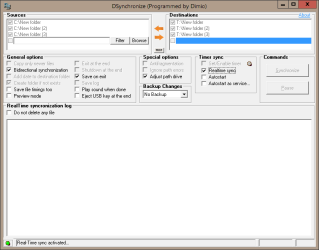
You don't need to install it - just run the .exe. To add more than one folder right click right click and add new source and destination...

Looks like either of these apps would do the trick :)
 

Attachments

  • Capture.PNG
    Capture.PNG
    8.8 KB · Views: 1

My Computer My Computer

At a glance

8.1 Pro x64core2duo3GBATI X1600
Computer type
Laptop
Computer Manufacturer/Model Number
Macbook pro
OS
8.1 Pro x64
CPU
core2duo
Memory
3GB
Graphics Card(s)
ATI X1600
Antivirus
Defender
Browser
IE11
I watched two youtube videos on DSynchronize but they did not explain how to sync more than one folder. I'll install it and see if I can figure out how to do that.
You don't need to install it - just run the .exe. To add more than one folder right click right click and add new source and destination...
Your feedback was instrumental in helping me to get DSyncronize working as I wanted.

I have a question though that I'm not able to find the answer. DSyncronize has two options named:

1. Autostart
2. Autostart as service.

What's the difference?
Also, I'm unable to get the "Autostart as service" working. Know of any documentation that explains how to enable "Autostart as service"?

Thanks!
Skyzoomer
 

My Computer My Computer

At a glance

Windows 7 Home Premium 64bit
OS
Windows 7 Home Premium 64bit
Can FreeFileSync backup multiple user selected folders in the "root" directory?

Yes.

In the pic below, you can see where I have manually included certain folders under D:\ and excluded others.
Thanks for taking the time to help. I'll install FreeFileSync and give it a try.

Skyzoomer
Googling, I learned that the current version of FreeFileSync installs an adware called "OpenCandy". Apparently, there is no option to not install OpenCandy. So I decided not to install FreeFileSync.

I'm running DSyncronize instead and it doesn't appear to have any adware issues.

Thanks,
Skyzoomer
 

My Computer My Computer

At a glance

Windows 7 Home Premium 64bit
OS
Windows 7 Home Premium 64bit
Yes.

In the pic below, you can see where I have manually included certain folders under D:\ and excluded others.
Thanks for taking the time to help. I'll install FreeFileSync and give it a try.

Skyzoomer
Googling, I learned that the current version of FreeFileSync installs an adware called "OpenCandy". Apparently, there is no option to not install OpenCandy. So I decided not to install FreeFileSync.

I'm running DSyncronize instead and it doesn't appear to have any adware issues.

Thanks,
Skyzoomer

No, FreeFileSync does NOT install OpenCandy nor is OpenCandy adware. OpenCandy is a file that is embedded in FreeFileSync's installation file but it doesn't get installed onto a computer when installing FreeFileSync. The purpose of OpenCandy is to offer to install additional programs (often called crapware, shovelware, etc.). As long as one pays attention when running a program installer and uses advanced installation when offered, one can opt out of any crapware OpenCandy offers to install.

Many antivirus and antimalware programs consider OpenCandy to be a PUP (Potentially Unwanted Program), an assessment I won't argue with, and will flag FreeFileSync's installer. Once FreeFileSync has been installed, one could just delete the installer to avoid it getting flagged. Since I like to keep my installation files in case they later become unavailable, I avoid the flagging by renaming the installer by adding .disable to the end of the filename so "FreeFileSync_6.0_Windows_Setup.exe" becomes "FreeFileSync_6.0_Windows_Setup.exe.disable".
 

My Computer My Computer

At a glance

Win 7 Ultimate 64 bitIntel i7-3930KKingston HyperX Genesis 32GB Kit (8x4GB Modul...MSI R7850 Twin Frozr 2GD5/OC Radeon HD 7850 2...
Computer type
PC/Desktop
Computer Manufacturer/Model Number
Custom Build
OS
Win 7 Ultimate 64 bit
CPU
Intel i7-3930K
Motherboard
ASUS P9X79 WS
Memory
Kingston HyperX Genesis 32GB Kit (8x4GB Modules) 1600MHz DDR
Graphics Card(s)
MSI R7850 Twin Frozr 2GD5/OC Radeon HD 7850 2GB 256-bit GDDR
Sound Card
Asus Xonar Essence STX
Monitor(s) Displays
3x Asus VG248QE 24", Vizio 32" TV
Screen Resolution
1920 x 1080, ?
Hard Drives
Samsung 128GB 840 Pro SSD (1),
Samsung 4TB 850 EVO SSDs (4)
Samsung 4TB 850 EVO SSDs (16) external backup drives used in 2.5" hot swap bays in the computer.
PSU
Corsair HX750w
Case
Antec Two Hundred v2 (modified)
Cooling
Cooler Master GeminII S524 120mm (fan replaced with a 140mm)
Keyboard
Logitech G510s
Mouse
Logitech M525 (two in use)
Internet Speed
=< 32Mbps down, 8Mbps up
Antivirus
AVAST!, MBAM, SAS, Spybot S&D (all but MBAM free) Glary Util
Browser
IE11
Other Info
LSI 9211-8i HBA card (8 SATA III ports), 2.5" & 3.5" Hot Swap Bays, HooToo HT-CR001 PCI-E to USB 3.0 Internal Hub + 6 Slot Card Reader, and LG Model CH12LS28 BD-ROM Optical Drive. Also, ScanSnap S1500 ADF duplexing scanner, Canon 9000F flat bed scanner, Corsair SP2500 2.1 speakers, Samsung CLP 415nw laser color printer, Cyberpower PP2200SW UPS
I have a question though that I'm not able to find the answer. DSyncronize has two options named:

1. Autostart
2. Autostart as service.

What's the difference?
Also, I'm unable to get the "Autostart as service" working. Know of any documentation that explains how to enable "Autostart as service"?

Thanks!
Skyzoomer

1. AutoStart starts the program - you'll see the screen as if you clicked on the exe.
2. Autostart as a service means you don't see it - it runs the configuration you defined in the background.

You want "autostart as service" probably.

I have Windows 8 - to be allowed to define the service you need to right click on Dsynchronize.exe and "run as administrator". I guess this is the same in 7 but I can't test it. If you are not running as administrator then you don't have authority to create the service. This is an old XP program when administrator meant something else but I digress.

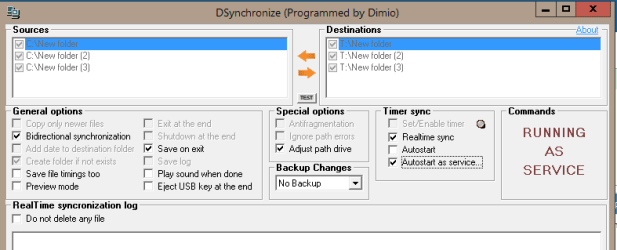
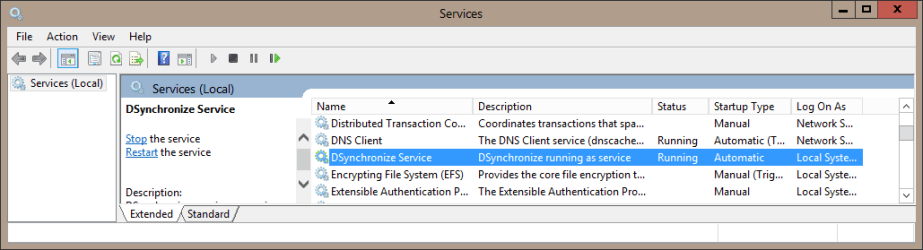
Then tick the 'autostart service" box. Leave the account as the default local service and click on "install service" then "start service". It should look like in Dsynchronize and services.msc
 

Attachments

  • Capture1.PNG
    Capture1.PNG
    7.9 KB · Views: 0
  • Capture2.PNG
    Capture2.PNG
    11.6 KB · Views: 1

My Computer My Computer

At a glance

8.1 Pro x64core2duo3GBATI X1600
Computer type
Laptop
Computer Manufacturer/Model Number
Macbook pro
OS
8.1 Pro x64
CPU
core2duo
Memory
3GB
Graphics Card(s)
ATI X1600
Antivirus
Defender
Browser
IE11
Googling, I learned that the current version of FreeFileSync installs an adware called "OpenCandy". Apparently, there is no option to not install OpenCandy. So I decided not to install FreeFileSync.

I'm running DSyncronize instead and it doesn't appear to have any adware issues.

Thanks,
Skyzoomer

No, FreeFileSync does NOT install OpenCandy nor is OpenCandy adware. OpenCandy is a file that is embedded in FreeFileSync's installation file but it doesn't get installed onto a computer when installing FreeFileSync. The purpose of OpenCandy is to offer to install additional programs (often called crapware, shovelware, etc.). As long as one pays attention when running a program installer and uses advanced installation when offered, one can opt out of any crapware OpenCandy offers to install.

Many antivirus and antimalware programs consider OpenCandy to be a PUP (Potentially Unwanted Program), an assessment I won't argue with, and will flag FreeFileSync's installer. Once FreeFileSync has been installed, one could just delete the installer to avoid it getting flagged. Since I like to keep my installation files in case they later become unavailable, I avoid the flagging by renaming the installer by adding .disable to the end of the filename so "FreeFileSync_6.0_Windows_Setup.exe" becomes "FreeFileSync_6.0_Windows_Setup.exe.disable".
Thanks for your clarification. Here's a link to an article on OpenCandy for other lurkers who may be interested:
Controversial Advertising Program Now Being Embedded in More Software
 

My Computer My Computer

At a glance

Windows 7 Home Premium 64bit
OS
Windows 7 Home Premium 64bit
I have a question though that I'm not able to find the answer. DSyncronize has two options named:

1. Autostart
2. Autostart as service.

What's the difference?
Also, I'm unable to get the "Autostart as service" working. Know of any documentation that explains how to enable "Autostart as service"?

Thanks!
Skyzoomer

1. AutoStart starts the program - you'll see the screen as if you clicked on the exe.
2. Autostart as a service means you don't see it - it runs the configuration you defined in the background.

You want "autostart as service" probably.

I have Windows 8 - to be allowed to define the service you need to right click on Dsynchronize.exe and "run as administrator". I guess this is the same in 7 but I can't test it. If you are not running as administrator then you don't have authority to create the service. This is an old XP program when administrator meant something else but I digress.

Then tick the 'autostart service" box. Leave the account as the default local service and click on "install service" then "start service". It should look like in Dsynchronize and services.msc
Thanks for the additional help. I got "Autostart as a service" to work. Here's the procedure in case other lurkers need it:
... Ran Dsyncronize as administrator.
... Clicked "Install service".
... Clicked "Start service". <===This is easy to miss.
... Now the "Autostart as a service" option was checked.
... Restarted and DSyncronize is indeed running as a service.

Thanks again,
Skyzoomer
 

My Computer My Computer

At a glance

Windows 7 Home Premium 64bit
OS
Windows 7 Home Premium 64bit

My Computer My Computer

At a glance

8.1 Pro x64core2duo3GBATI X1600
Computer type
Laptop
Computer Manufacturer/Model Number
Macbook pro
OS
8.1 Pro x64
CPU
core2duo
Memory
3GB
Graphics Card(s)
ATI X1600
Antivirus
Defender
Browser
IE11
Glad you got it working
One more thing which is not a biggie. DSyncronize is running as a windows service in real-time mode but its icon is not showing up in the windows notifications area by the clock. I've checked "Always show all icons and notifications on the taskbar". I know DSync is running since when I add or delete a file in a source folder, the change is reflected in the destination folder.

If I don't use "Autostart as a service" and use the plain "Autostart", the DSyncronize icon does show up in the notifications area. Of course, as you previously pointed out, DSync starting up in this mode does pop up during the boot process.

Any ideas?
 

My Computer My Computer

At a glance

Windows 7 Home Premium 64bit
OS
Windows 7 Home Premium 64bit
Glad you got it working
One more thing which is not a biggie. DSyncronize is running as a windows service in real-time mode but its icon is not showing up in the windows notifications area by the clock. I've checked "Always show all icons and notifications on the taskbar". I know DSync is running since when I add or delete a file in a source folder, the change is reflected in the destination folder.

If I don't use "Autostart as a service" and use the plain "Autostart", the DSyncronize icon does show up in the notifications area. Of course, as you previously pointed out, DSync starting up in this mode does pop up during the boot process.

Any ideas?
Additional problems running DSyncronize:


PROBLEM 1:
I synchronized my "Microsoft Office" folder on my D: spinner HDD with a "Microsoft Office" folder on a USB3 thumb drive.

When I create a new word document in the "D:\Microsoft Office\Winword\temp files" it does not show up in "H:\Microsoft Office\Winword\temp files". But if I create a .txt file in the D temp files folder, it does show up in real-time in the H temp files folder.

IOW, DSyncronize will not synchronize MS word documents but will synchronize .txt files.


PROBLEM 2:
I'm unable to remove the check mark for "Autostart as a service". So there's no way to stop DSyncronize from running on boot up.

Note that since DSyncronize icon does not show up in the notifications area, there's no way that I know of to open the currently running as a service version of DSyncronize. I run DSyncronize as administrator and try to stop running as a service but the check mark remains for "Autostart as a service".


Any ideas on how I can remove DSyncronize from running as a service?

Thanks,
Skyzoomer
 

My Computer My Computer

At a glance

Windows 7 Home Premium 64bit
OS
Windows 7 Home Premium 64bit
Problem 1.
Save it somewhere. If you make a new .docx it will be temporarily stored in (I think) %appdata% until you decide where you want to save it. Don't replicate %appdata%


Problem 2.
use services.msc
 

My Computer My Computer

At a glance

8.1 Pro x64core2duo3GBATI X1600
Computer type
Laptop
Computer Manufacturer/Model Number
Macbook pro
OS
8.1 Pro x64
CPU
core2duo
Memory
3GB
Graphics Card(s)
ATI X1600
Antivirus
Defender
Browser
IE11
Problem 1.
Save it somewhere. If you make a new .docx it will be temporarily stored in (I think) %appdata% until you decide where you want to save it. Don't replicate %appdata%
That's what I did. I created a new Word document and then saved in "D:\Microsoft Office\Winword\Temp Files\Test Dsync.doc". I closed MS Word. The new document is not replicated on my USB3 thumb drive. But if I create a "Test Dsync.txt" file and save it in the same folder on the D: drive, the "Test Dsync.txt" file is replicated on the USB3 thumb drive. Dsyncronize just refuses to sync my MS Word 2000 .doc files.

Problem 2.
use services.msc
I ran that and tried to stop the Dsyncronize service but after a long wait, Win7 says the Dsyncronize service could not be stopped. Looks like it will be hard to get rid of Dsyncronize.

Skyzoomer
 

My Computer My Computer

At a glance

Windows 7 Home Premium 64bit
OS
Windows 7 Home Premium 64bit
Luckily, there was a system restore point for 9/11/14 because of a Win7 update.

I restored that and my PC is back to normal without Dsyncronize running as a service. All I can say is that DSyncronize running in real-time mode did not work for me at all.

Thanks for the help though,
Skyzoomer
 

My Computer My Computer

At a glance

Windows 7 Home Premium 64bit
OS
Windows 7 Home Premium 64bit
Back
Top