
You are using an out of date browser. It may not display this or other websites correctly.
You should upgrade or use an alternative browser.
You should upgrade or use an alternative browser.
is "backup and restore" and "system restore" different,,,
- Thread starter miltk
- Start date

Backup and Restore backs up by default system files, the registry and documents, pictures, videos, and music. System Restore makes a backup of application files and system files and the registry. A system restore point should be made before installing programs in case anything goes wrong. A backup through backup and restore should be done in a monthly or weekly schedule since a drive can fail at any tine. Backup and Restore needs another drive to backup files to or else you will be filling up your system drive. There are better alternatives for it such as Macrium Reflect, but this is the simplest way of backing up in my opinion.
My Computer
- Computer type
- PC/Desktop
- Computer Manufacturer/Model Number
- Dell Vostro 400/Dell XPS 8700(Slightly Customized for me by Dell)/Toshiba Satellite T135
- OS
- Windows 7 Professional 32-bit/Windows 8 64-bit/Win7 Pro64-bit
- CPU
- Intel Core 2 Quad Q6600/Intel Core i7 4790/Intel Pentium
- Memory
- 2GB/16GB/4GB
- Graphics Card(s)
- Intel G33/G31 Express(Vostro)/NVIDIA GeForce GTX 745(XPS)
- Monitor(s) Displays
- HP 2009m(Vostro)/ViewSonic VX2250wm-LED(XPS)
- Screen Resolution
- 1600x900(Vostro)/1920x1080(XPS)
- Hard Drives
- Seagate ST3160815AS(Vostro)/Western Digital Blue(Satellite)
External:
Western Digital My Passport 0748
Samsung HM121HC
- Keyboard
- Dell L100)(Vostro)/Dell KB2133p(XPS)
- Mouse
- Dell M-UAV-DEL8(XPS)
- Internet Speed
- 100 Mbit/s(Only when IPTV is plugged out)
- Antivirus
- Avast, Malwarebytes PRO
- Browser
- Internet Explorer 11
- Other Info
- Note: Names with slashes between two different parts mean that the left is my old desktop and the right is my old laptop and the middle is my new desktop.(Unless specified)
Ping is horrible for servers overseas in US and Europe.
New laptop:LG Gram(Not available in US) Processor:Intel Core i3 4th Gen Ultra Low Power RAM:4GB Hard Drive:SK Hynix OEM MSATA or M.2 Graphics:Intel HD
Backup and Restore backs up by default system files, the registry and documents, pictures, videos, and music. System Restore makes a backup of application files and system files and the registry. A system restore point should be made before installing programs in case anything goes wrong. A backup through backup and restore should be done in a monthly or weekly schedule since a drive can fail at any tine. Backup and Restore needs another drive to backup files to or else you will be filling up your system drive. There are better alternatives for it such as Macrium Reflect, but this is the simplest way of backing up in my opinion.
when i was using xp, go back was my must have program and it was damned powerful. i just performed a system restore as a desperate measure because this browser hijacker, rocket tab, messed up all my browsers after malwarebytes deleted it. system restore worked great.
My Computer
- Computer type
- PC/Desktop
- Computer Manufacturer/Model Number
- lenovo
- OS
- w7pro/64
Yup, it is always good to make a restore point before donwloaing any suspicious files.
My Computer
- Computer type
- PC/Desktop
- Computer Manufacturer/Model Number
- Dell Vostro 400/Dell XPS 8700(Slightly Customized for me by Dell)/Toshiba Satellite T135
- OS
- Windows 7 Professional 32-bit/Windows 8 64-bit/Win7 Pro64-bit
- CPU
- Intel Core 2 Quad Q6600/Intel Core i7 4790/Intel Pentium
- Memory
- 2GB/16GB/4GB
- Graphics Card(s)
- Intel G33/G31 Express(Vostro)/NVIDIA GeForce GTX 745(XPS)
- Monitor(s) Displays
- HP 2009m(Vostro)/ViewSonic VX2250wm-LED(XPS)
- Screen Resolution
- 1600x900(Vostro)/1920x1080(XPS)
- Hard Drives
- Seagate ST3160815AS(Vostro)/Western Digital Blue(Satellite)
External:
Western Digital My Passport 0748
Samsung HM121HC
- Keyboard
- Dell L100)(Vostro)/Dell KB2133p(XPS)
- Mouse
- Dell M-UAV-DEL8(XPS)
- Internet Speed
- 100 Mbit/s(Only when IPTV is plugged out)
- Antivirus
- Avast, Malwarebytes PRO
- Browser
- Internet Explorer 11
- Other Info
- Note: Names with slashes between two different parts mean that the left is my old desktop and the right is my old laptop and the middle is my new desktop.(Unless specified)
Ping is horrible for servers overseas in US and Europe.
New laptop:LG Gram(Not available in US) Processor:Intel Core i3 4th Gen Ultra Low Power RAM:4GB Hard Drive:SK Hynix OEM MSATA or M.2 Graphics:Intel HD
when multiple system images are created, does each succeeding image add to the disk space being used?
for instance, let's say there's one system image, and during x amount of time there's been only one file created or something minor. does another system image create a whole new image that takes up an equal amount of space as the first,,,or do succeeding images merely have their own modifications of the first image.
thx
for instance, let's say there's one system image, and during x amount of time there's been only one file created or something minor. does another system image create a whole new image that takes up an equal amount of space as the first,,,or do succeeding images merely have their own modifications of the first image.
thx
My Computer
- Computer type
- PC/Desktop
- Computer Manufacturer/Model Number
- lenovo
- OS
- w7pro/64
Yes. For Windows inbuilt imaging shadow storage is used to store "difference" images. I do not recommend this approach for multiple images. I suggest using one only "Create a system image" and used a renaming scheme as described in the tutorial in the tutorial section of this forum.when multiple system images are created, does each succeeding image add to the disk space being used?
A simpler and perhaps better approach is to simply use Macrium Reflect for system images.
My Computer
- Computer type
- PC/Desktop
- Computer Manufacturer/Model Number
- Own build
- OS
- Windows 7x64 Home Premium SP1
- CPU
- Intel i7 2600k
- Motherboard
- ASUS P8Z68 Deluxe
- Memory
- G.Skill Ripjaws (DDR3-1600) 2x4GB
- Graphics Card(s)
- Nvidia GeForce GTS 450; Intel HD Graphics 3000(GT2+)
- Monitor(s) Displays
- Dell Ultrasharp IPS panel U2311H, Samsung SyncMaster P2350
- Screen Resolution
- 1920x1080
- Hard Drives
- Samsung 850 Pro SSD 256GB, Samsung SSD 840 120GB, Seagates 1TB Barracuda ST31000528AS x2
- PSU
- Seasonic M12II 520W
- Case
- Lian Li Lancool PC-K60
- Cooling
- Case: 1x120mm, 3x140mm CPU: Hyper 212+
- Keyboard
- Logitech MK520 (wireless)
- Mouse
- Logitech MK520
- Internet Speed
- 6-7 Mbps
- Antivirus
- Norton Security Premium, Malwarebytes on 2 (MSE on 3rd PC)
- Browser
- FireFox
- Other Info
- Audio: Logitech Z523 2.1
on a fresh w7 (mine was recently purchased) with some small programs(no games, chrome might be the largest program i'll ever install),,,approximately how much disk space do you think will be used on a system image? i mean, w7 creates scheduled images, right - that's a ton of accumulated spaced being used
thx
thx
My Computer
- Computer type
- PC/Desktop
- Computer Manufacturer/Model Number
- lenovo
- OS
- w7pro/64

- Local time
- 3:31 PM
- Messages
- 12,011
on a fresh w7 (mine was recently purchased) with some small programs(no games, chrome might be the largest program i'll ever install),,,approximately how much disk space do you think will be used on a system image? i mean, w7 creates scheduled images, right - that's a ton of accumulated spaced being used
thx
I can't speak for Windows backup, but Macrium Reflect images take up between 40 and 50 percent of the occupied space of the partition being imaged. That's with the default compression. I've got 35 GB occupied on C and images of that partition are circa 15 GB. Those are full images, not incrementals. The space required is one of the reasons it's generally a good idea to put Windows/applications on one partition and data on another and image only the former.
My Computer
- Computer type
- PC/Desktop
- Computer Manufacturer/Model Number
- Ignatz Special; 4 speed manual gearbox; factory air conditioning; one of one
- OS
- Windows 7 Home Premium SP1, 64-bit
- CPU
- Intel Skylake i5-6600K, not overclocked
- Motherboard
- AsRock Z170M Extreme 4, micro ATX
- Memory
- 8 GB HyperX DDR4-2666 (2 x 4 GB)
- Graphics Card(s)
- none; graphics are integrated on CPU
- Sound Card
- onboard: Realtek ALC1150; external: USB Behringer UF0-202
- Monitor(s) Displays
- Dell S2340M 23 inch IPS
- Screen Resolution
- 1600 x 900
- Hard Drives
- System: Crucial MX100 series SSD, 128 GB;
Data: Samsung Spinpoint 103SJ, 1 TB;
Backup: WD Caviar Green WD30EZRX-00D8PB0, 3 TB
- PSU
- Rosewill SilentNight 500 watt fanless, semi-modular
- Case
- Antec Solo II
- Cooling
- Noctua NH-U12S; Noctua F12 intake, Noctua S12A exhaust
- Keyboard
- Microsoft 200 6JH-00001 USB
- Mouse
- Dell or Microsoft optical wired; USB
- Antivirus
- Microsoft Security Essentials and Malwarebytes Premium
- Browser
- Pale Moon
- Other Info
- All fans PWM; speeds at idle: CPU circa 500 rpm; intake circa 600 rpm; exhaust circa 600 rpm; CPU temps 27 idle and 47 C load in a warm room (27 C/81 F) when running Intel Extreme Tuning Utility stress test.
Yes. I "prune" my collection of system images.can i delete selected sys images if they accumulate?
My Computer
- Computer type
- PC/Desktop
- Computer Manufacturer/Model Number
- Own build
- OS
- Windows 7x64 Home Premium SP1
- CPU
- Intel i7 2600k
- Motherboard
- ASUS P8Z68 Deluxe
- Memory
- G.Skill Ripjaws (DDR3-1600) 2x4GB
- Graphics Card(s)
- Nvidia GeForce GTS 450; Intel HD Graphics 3000(GT2+)
- Monitor(s) Displays
- Dell Ultrasharp IPS panel U2311H, Samsung SyncMaster P2350
- Screen Resolution
- 1920x1080
- Hard Drives
- Samsung 850 Pro SSD 256GB, Samsung SSD 840 120GB, Seagates 1TB Barracuda ST31000528AS x2
- PSU
- Seasonic M12II 520W
- Case
- Lian Li Lancool PC-K60
- Cooling
- Case: 1x120mm, 3x140mm CPU: Hyper 212+
- Keyboard
- Logitech MK520 (wireless)
- Mouse
- Logitech MK520
- Internet Speed
- 6-7 Mbps
- Antivirus
- Norton Security Premium, Malwarebytes on 2 (MSE on 3rd PC)
- Browser
- FireFox
- Other Info
- Audio: Logitech Z523 2.1
Yes. I "prune" my collection of system images.can i delete selected sys images if they accumulate?
i manually created a sys image on an external drive, however i cannot find it. are the sys images stored in a folder somewhere? where are they so i go about "pruning" the sys images?
thx
Last edited:
My Computer
- Computer type
- PC/Desktop
- Computer Manufacturer/Model Number
- lenovo
- OS
- w7pro/64
A Windows system image is stored in folder called WindowsImageBackup. Windows explorer will show it as an empty folder with properties 0 bytes. It isn't empty. Unless you rename the folder you will only have one folder. To delete it - shift delete. Making multiple independent images and restoring them is discussed in the tutorials:Yes. I "prune" my collection of system images.can i delete selected sys images if they accumulate?
i manually created a sys image on an external drive, however i cannot find it. are the sys images stored in a folder somewhere? where are they so i go about "pruning" the sys images?
thx
http://www.sevenforums.com/tutorials/663-backup-complete-computer-create-image-backup.html
http://www.sevenforums.com/tutorials/675-system-image-recovery.html
You may also want to consider the (free) Macrium Reflect system imaging program. It is more flexible and preferred by many. You don't need any tricks to make multiple images and they can be deleted manually as well.
Last edited:
My Computer
- Computer type
- PC/Desktop
- Computer Manufacturer/Model Number
- Own build
- OS
- Windows 7x64 Home Premium SP1
- CPU
- Intel i7 2600k
- Motherboard
- ASUS P8Z68 Deluxe
- Memory
- G.Skill Ripjaws (DDR3-1600) 2x4GB
- Graphics Card(s)
- Nvidia GeForce GTS 450; Intel HD Graphics 3000(GT2+)
- Monitor(s) Displays
- Dell Ultrasharp IPS panel U2311H, Samsung SyncMaster P2350
- Screen Resolution
- 1920x1080
- Hard Drives
- Samsung 850 Pro SSD 256GB, Samsung SSD 840 120GB, Seagates 1TB Barracuda ST31000528AS x2
- PSU
- Seasonic M12II 520W
- Case
- Lian Li Lancool PC-K60
- Cooling
- Case: 1x120mm, 3x140mm CPU: Hyper 212+
- Keyboard
- Logitech MK520 (wireless)
- Mouse
- Logitech MK520
- Internet Speed
- 6-7 Mbps
- Antivirus
- Norton Security Premium, Malwarebytes on 2 (MSE on 3rd PC)
- Browser
- FireFox
- Other Info
- Audio: Logitech Z523 2.1

Only if the image was taken before the system was infected with said malware.if my computer gets a malware or virus or hijacker or other intruder, would the system image eliminate them
My Computer
- Computer type
- PC/Desktop
- Computer Manufacturer/Model Number
- Golden Mk. I.4
- OS
- Windows 10 Pro x64 ; Xubuntu x64
- CPU
- Intel i7 860 @ 2.80 GHz O/C'ed to 4.0GHz
- Motherboard
- Gigabyte P55A-UD3R Rev.1. Award BIOS F13
- Memory
- 16GB Corsair Vengance DDR3 @ 661 MHz Dual Channel (9-9-9-24)
- Graphics Card(s)
- EVGA NVidia GTX 560 1024MB
- Sound Card
- Realtek Integrated
- Monitor(s) Displays
- Dual Samsung SyncMaster 2494HS
- Screen Resolution
- 1920*1080 and 1920*1080
- Hard Drives
- 1*Samsung 840 EVO 120GB SSD;
1*OCZ Vertex 2 60GB SSD;
2*Samsung F3 SpinPoint 1TB in RAID0;
1*Samsung F1 SpinPoint 1TB;
2*Western Digital 1TB External USB 3.0
1*Western Digital 500GB External USB 3.0
1*Seagate 500GB External USB 2.0
- PSU
- Thermaltake ToughPower QFan 750W
- Case
- Thermaltake Element S VK60001W2Z
- Cooling
- Corsair H60 Water Cooling, 2*230mm and 2*80mm case fans
- Keyboard
- Logitech G110
- Mouse
- Logitech MX518
10 system images with some compression would take up only ~200-300GB. If you span these over time there is a good chance you can go back far enough before a malware issue or some other mishap.
The key would be to be able to identify that the issue did not exist in a particular system image restore.
The key would be to be able to identify that the issue did not exist in a particular system image restore.
My Computer
- Computer type
- PC/Desktop
- Computer Manufacturer/Model Number
- Own build
- OS
- Windows 7x64 Home Premium SP1
- CPU
- Intel i7 2600k
- Motherboard
- ASUS P8Z68 Deluxe
- Memory
- G.Skill Ripjaws (DDR3-1600) 2x4GB
- Graphics Card(s)
- Nvidia GeForce GTS 450; Intel HD Graphics 3000(GT2+)
- Monitor(s) Displays
- Dell Ultrasharp IPS panel U2311H, Samsung SyncMaster P2350
- Screen Resolution
- 1920x1080
- Hard Drives
- Samsung 850 Pro SSD 256GB, Samsung SSD 840 120GB, Seagates 1TB Barracuda ST31000528AS x2
- PSU
- Seasonic M12II 520W
- Case
- Lian Li Lancool PC-K60
- Cooling
- Case: 1x120mm, 3x140mm CPU: Hyper 212+
- Keyboard
- Logitech MK520 (wireless)
- Mouse
- Logitech MK520
- Internet Speed
- 6-7 Mbps
- Antivirus
- Norton Security Premium, Malwarebytes on 2 (MSE on 3rd PC)
- Browser
- FireFox
- Other Info
- Audio: Logitech Z523 2.1
10 system images with some compression would take up only ~200-300GB. If you span these over time there is a good chance you can go back far enough before a malware issue or some other mishap.
The key would be to be able to identify that the issue did not exist in a particular system image restore.
yes. my hesitancy in migrating over to 7 from xp was my dependence on go-back, which saved my bacon on many occasions...most often for when my computer glitched. i need that life raft.
My Computer
- Computer type
- PC/Desktop
- Computer Manufacturer/Model Number
- lenovo
- OS
- w7pro/64
sebastian869
New member
- Local time
- 6:31 PM
- Messages
- 55
Hi, I have a SSD C: drive, for some reason now im having issues and Id like to run system restore. The thing is that I have turned off the generic system restore setting from c: drive to D: drive as it’s a generic raptor HD and for some reason it’s not simply letting me do so. I have win 7 Home premium.
Just so I learn in the future, what is the best way to back up you pc over time when u have a limited space SSD and have to turn to a “D” drive.
Thanks,
Sebastian
When i was trying to load a .docx file this is what i got:
Winword.exe system error
the program cant start because oart.dll is missing
from your computer . Try reinstalling the program to fix
the problem
Dont know why and i cant run system restore as i have system "backup" on drive d not c
I Don’t understand, why can you get into “system properties”- then “System protection” and here the key once your on this page you normally sent Hard disk c: as the “System” drive and under protection it will say on and alls well you can “Create”” a restore point.
In my case I have an SDD and hard drive c “the system drive” is ‘”OFF” but hard drive d which is a generic hdd raptor has been turned on a while back and over time I’ve been “creating” restore points with no issues, all looked normal. Till one day when I needed to restore to a “restore point” and then I did not know what to do can someone please tell me where or how I can load the “restore points” I’ve created over time?
The only difference I’ve managed to see is that when you select “system protection for d:” the “Restore system settings and previous versions of files” is “grayed out” when you
Just enable the d: drive the other option is selected “Only restore previous versions of files” is selected and the only other option other then the 2 is turn off system protection.
What I don’t understand is HOW DO I GET ACCESS TO THE RESTORE POINTS that I’ve created over time? There is an option of how much space you allocate to system protection and button to “delete” all restore points.
Just so I learn in the future, what is the best way to back up you pc over time when u have a limited space SSD and have to turn to a “D” drive.
Thanks,
Sebastian
When i was trying to load a .docx file this is what i got:
Winword.exe system error
the program cant start because oart.dll is missing
from your computer . Try reinstalling the program to fix
the problem
Dont know why and i cant run system restore as i have system "backup" on drive d not c
I Don’t understand, why can you get into “system properties”- then “System protection” and here the key once your on this page you normally sent Hard disk c: as the “System” drive and under protection it will say on and alls well you can “Create”” a restore point.
In my case I have an SDD and hard drive c “the system drive” is ‘”OFF” but hard drive d which is a generic hdd raptor has been turned on a while back and over time I’ve been “creating” restore points with no issues, all looked normal. Till one day when I needed to restore to a “restore point” and then I did not know what to do can someone please tell me where or how I can load the “restore points” I’ve created over time?
The only difference I’ve managed to see is that when you select “system protection for d:” the “Restore system settings and previous versions of files” is “grayed out” when you
Just enable the d: drive the other option is selected “Only restore previous versions of files” is selected and the only other option other then the 2 is turn off system protection.
What I don’t understand is HOW DO I GET ACCESS TO THE RESTORE POINTS that I’ve created over time? There is an option of how much space you allocate to system protection and button to “delete” all restore points.
My Computer
- Computer type
- PC/Desktop
- Computer Manufacturer/Model Number
- selp built
- OS
- windows 7 x64 home premium
- CPU
- i7-4790k
- Motherboard
- Asrock extreme6 Z97
- Memory
- 16GB Corsair CMZ16GX3M2A2133C10
- Graphics Card(s)
- swaping bad Asus 780ti GTX780TI-DC2OC-3GD5 for 970 or 980
- Hard Drives
- Samsung 850Pro MZ-7KE256BW, Wester Digital VelociRaptor WD 1000DHTZ 1TB 10,000 R.P.M. 64MB Cache
- Antivirus
- microsoft security essentials
- Browser
- explorer 11 and chrome/firefox

NimoTony
New member
- Local time
- 3:31 PM
- Messages
- 42
I apologize in advance if this post seems rude in any way...
from reading the specs of your machine--it seems like you have a really well built machine--but--you apparently didn't/haven't done much research on SSDs...
when using an SSD - one of the first things a quality SSD management program will do is 'shut off system restore' the reasoning is sys restore will constantly write to your SSD and 'can' eventually brick your SSD (it's far easier to restore the whole OS than to keep replacing your drives) -SSDs have a limited number of write cycles and once you've used them up it becomes read only. All NAND memory is like this--that's why thumb drives eventually wear out.
additionally--setting sys restore on a storage drive will NOT save any system setting because there aren't any--you can only restore 'files' that are on those drives
note: I believe you can force system restore to be 'on' but knowing that it will eventually 'brick' your drive--why would you want to?
read this:
The ultimate guide to proper SSD management | PCWorld
and read this:
The Complete Guide to Solid-State Drives
from reading the specs of your machine--it seems like you have a really well built machine--but--you apparently didn't/haven't done much research on SSDs...
when using an SSD - one of the first things a quality SSD management program will do is 'shut off system restore' the reasoning is sys restore will constantly write to your SSD and 'can' eventually brick your SSD (it's far easier to restore the whole OS than to keep replacing your drives) -SSDs have a limited number of write cycles and once you've used them up it becomes read only. All NAND memory is like this--that's why thumb drives eventually wear out.
additionally--setting sys restore on a storage drive will NOT save any system setting because there aren't any--you can only restore 'files' that are on those drives
note: I believe you can force system restore to be 'on' but knowing that it will eventually 'brick' your drive--why would you want to?
read this:
The ultimate guide to proper SSD management | PCWorld
and read this:
The Complete Guide to Solid-State Drives
My Computer
- Computer type
- PC/Desktop
- Computer Manufacturer/Model Number
- SALEON Systems V3.1
- OS
- Windows 7 Ultimate 32bit
- CPU
- Intel Core 2 Extreme QX6850
- Motherboard
- ASUSTeK P5G41-M LE
- Memory
- 4 gb
- Graphics Card(s)
- NVIDIA GeForce 8400GS
- Hard Drives
- Intel 120 GB SSD, Seagate 250GB, Seagate 2TB
- Antivirus
- Comodo
- Browser
- Chrome

Back ups or restore points is not going to do any more damage to a SSD than it will a hard drive.
I personally don't worry about how much I use my SSD's.
I bought them to use and that is exactly what I do with them and it has not been a problem.
Todays quality SSD's will last as long as a hard drive. They are no longer those little new toys we have to baby.
Their are web sits that tell you that SSD's should be babied or harm will come to them and then you will find web sits that state they will last longer than a hard drive.
What ever the true story is it's debatable.
I use SSD's for my systems and external back ups and have no problems.
Some of the SSD's have been used for years and some just a few months and they all work like the day I bought them.
I use Intel and Samsung SSD's.
I personally don't worry about how much I use my SSD's.
I bought them to use and that is exactly what I do with them and it has not been a problem.
Todays quality SSD's will last as long as a hard drive. They are no longer those little new toys we have to baby.
Their are web sits that tell you that SSD's should be babied or harm will come to them and then you will find web sits that state they will last longer than a hard drive.
What ever the true story is it's debatable.
I use SSD's for my systems and external back ups and have no problems.
Some of the SSD's have been used for years and some just a few months and they all work like the day I bought them.
I use Intel and Samsung SSD's.
My Computer
- Computer type
- PC/Desktop
- Computer Manufacturer/Model Number
- Home made Desktop
- OS
- Windows 10 Pro. 64/ version 1709 Windows 7 Pro/64
- CPU
- Intel i7-6800K @ 4.3
- Motherboard
- ASUS X-99 Deluxe II
- Memory
- Corsair Platinum 16 gig @2400
- Graphics Card(s)
- EVGA GTX 1070 OC
- Monitor(s) Displays
- Asus 27" LED LCD/VE278Q
- Screen Resolution
- 1920-1080 or 1280-720 HDMI
- Hard Drives
- INTEL SSD 730-240 Gb Sata 3.0/
- PSU
- EVGA Platium 1200W
- Case
- Phanteks Luxe Tempered Glass 8 fans/ one radiator
- Cooling
- XSPC/ Water Cooled CPU
- Keyboard
- Das 4 Professional
- Mouse
- Logitech M705/MX Anywhere 2-S
- Internet Speed
- 100 mbits
- Antivirus
- Microsoft Security Essentials/ Malwarebytes Premium 3.0/ SAS
- Browser
- I.E. 11 default/Firefox/ ISP Time Warner Cable/Spectrum
- Other Info
- LG BluRay Burner/
Sound system-KLipsch-THX/
Icy Dock ssd Hot Swap bays.
sebastian869
New member
- Local time
- 6:31 PM
- Messages
- 55
Thanks for the help guys, sorry im not sharp on response but i had a spine procedure done where they take 7" needles and inject cortisone between your vertebrae. Really appreciate it.
I’ve been having issues from day one first it turned out to be USB3 though took forever to get there, then I had the fortune as usual of getting the last 780ti made and it was crashing my system that one was easy as I’ve see OC crashes and that’s what it looked like the irony was the only fix was to underclock it. MADE HUGE MISTAKE I mailed in the barcode part of the box for MIR before I knew board was good so had to eat 120$ loss from Newegg on refund got a 980 (To some extent it’s the crux of the prob, built a new system and had to go to win 7)
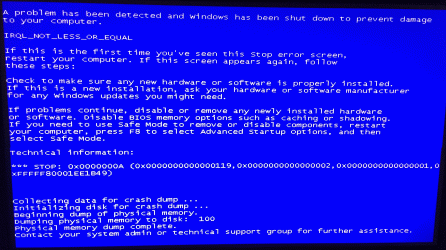
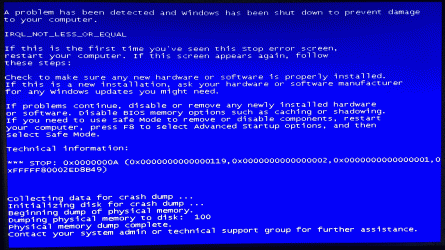
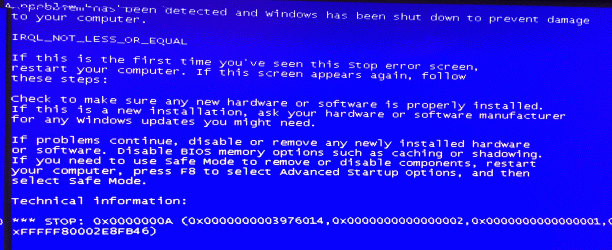
The .Docx issue went away. The thing is since i have SSD HD i turned off my system restore from C: to D: For some reason win 7 does not like that but in a retarded way (Meaning I’m able to still “create” restore points, but I’m not able to restore from them which is pretty dumb, it says system restore is turned off when I go to turn it on I get to the screen where the “create” button is when I investigated further when I turned off c: and left it to d: the setting “Restore system settings and previous versions of files” is grayed out what is there is “Only restore previous version of files” is left open as an option and the last one is “turn off protections” and as you all know you allocate how much HD you sacrifice for the cause. I surmise in the f8 scenario I may be able to revert to the “restore points” I’ve created. I must create a more solid restore point. I’ve always been meaning to do so it’s been my panacea, I install all the important crap all updates and then backup to blu ray and thus if I have issues going forward it’s going to be ¾ easier to deal with. Mean while I’m getting blue screened to death, like never before. I don’t know the culprit I have my hypothesis. Im not OC oh if I try it does not last. Everything is up to date nothing that I can think of has not been tried (Though after the undercloclocking I’m trying to thing out side the box and I don’t want to turn to my brother too much, besides we may see something like ACPI as the reason for a blue screen but that does not say why)
Got brother who works penske IT don’t recommend you store servers with roger though he had the bright idea of underclocking gotta say I would of never guess to go there. He told me to dl nirsoft blue screen view. I can’t manage to get it to load the dump, keeping all of the garbage.
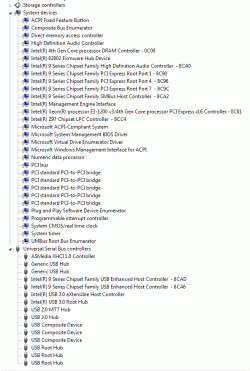
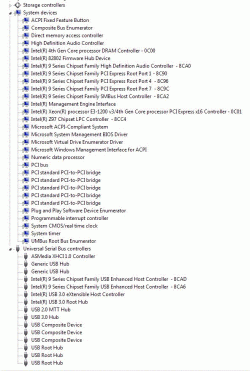
Other thing, I think this is somehow related to acpi related. I hear the comp load and then it seems like the d: drive falls asleep (I looked into it and was told that with 16gb i should be ok with turning off the swap file to limit need for d: ,I don’t know if its more detailed parameters as in bios setup. Tried calling asrock and jesus could not understand a word of what the guy was saying so I ask if he could please put someone else on the phone and that guy was worst. So im in limbo. I attached some of the blue screen but was looking at event viewer and Im getting things going off like a 911 operator on a busy day one says disk is corrupt run chkdsk does not state which, another is readyboost and just crazy stuff like that that ive never heard of before ive looked it up says its not given enough space by default…..
P.S. Can someone please tell me the best way to “read” the dump after a blue screen?
From home work I read Intel had issue with USB on the z87 (But I though they addressed them by z97)
https://communities.intel.com/thread/48617
Lastly, is there a way to “rest” the proper settings in “window features” the boxes that are check or uncheck. Is it possible that something is uncheck and needs to be checked or vice versa?
Thanks,
Sebastian
I’ve been having issues from day one first it turned out to be USB3 though took forever to get there, then I had the fortune as usual of getting the last 780ti made and it was crashing my system that one was easy as I’ve see OC crashes and that’s what it looked like the irony was the only fix was to underclock it. MADE HUGE MISTAKE I mailed in the barcode part of the box for MIR before I knew board was good so had to eat 120$ loss from Newegg on refund got a 980 (To some extent it’s the crux of the prob, built a new system and had to go to win 7)
The .Docx issue went away. The thing is since i have SSD HD i turned off my system restore from C: to D: For some reason win 7 does not like that but in a retarded way (Meaning I’m able to still “create” restore points, but I’m not able to restore from them which is pretty dumb, it says system restore is turned off when I go to turn it on I get to the screen where the “create” button is when I investigated further when I turned off c: and left it to d: the setting “Restore system settings and previous versions of files” is grayed out what is there is “Only restore previous version of files” is left open as an option and the last one is “turn off protections” and as you all know you allocate how much HD you sacrifice for the cause. I surmise in the f8 scenario I may be able to revert to the “restore points” I’ve created. I must create a more solid restore point. I’ve always been meaning to do so it’s been my panacea, I install all the important crap all updates and then backup to blu ray and thus if I have issues going forward it’s going to be ¾ easier to deal with. Mean while I’m getting blue screened to death, like never before. I don’t know the culprit I have my hypothesis. Im not OC oh if I try it does not last. Everything is up to date nothing that I can think of has not been tried (Though after the undercloclocking I’m trying to thing out side the box and I don’t want to turn to my brother too much, besides we may see something like ACPI as the reason for a blue screen but that does not say why)
Got brother who works penske IT don’t recommend you store servers with roger though he had the bright idea of underclocking gotta say I would of never guess to go there. He told me to dl nirsoft blue screen view. I can’t manage to get it to load the dump, keeping all of the garbage.
Other thing, I think this is somehow related to acpi related. I hear the comp load and then it seems like the d: drive falls asleep (I looked into it and was told that with 16gb i should be ok with turning off the swap file to limit need for d: ,I don’t know if its more detailed parameters as in bios setup. Tried calling asrock and jesus could not understand a word of what the guy was saying so I ask if he could please put someone else on the phone and that guy was worst. So im in limbo. I attached some of the blue screen but was looking at event viewer and Im getting things going off like a 911 operator on a busy day one says disk is corrupt run chkdsk does not state which, another is readyboost and just crazy stuff like that that ive never heard of before ive looked it up says its not given enough space by default…..
P.S. Can someone please tell me the best way to “read” the dump after a blue screen?
From home work I read Intel had issue with USB on the z87 (But I though they addressed them by z97)
https://communities.intel.com/thread/48617
Lastly, is there a way to “rest” the proper settings in “window features” the boxes that are check or uncheck. Is it possible that something is uncheck and needs to be checked or vice versa?
Thanks,
Sebastian
Attachments
My Computer
- Computer type
- PC/Desktop
- Computer Manufacturer/Model Number
- selp built
- OS
- windows 7 x64 home premium
- CPU
- i7-4790k
- Motherboard
- Asrock extreme6 Z97
- Memory
- 16GB Corsair CMZ16GX3M2A2133C10
- Graphics Card(s)
- swaping bad Asus 780ti GTX780TI-DC2OC-3GD5 for 970 or 980
- Hard Drives
- Samsung 850Pro MZ-7KE256BW, Wester Digital VelociRaptor WD 1000DHTZ 1TB 10,000 R.P.M. 64MB Cache
- Antivirus
- microsoft security essentials
- Browser
- explorer 11 and chrome/firefox
Similar threads
- Replies
- 4
- Views
- 1K
- Replies
- 11
- Views
- 10K

- Replies
- 1
- Views
- 2K

- Replies
- 7
- Views
- 2K
- Replies
- 2
- Views
- 1K