Solved HP psc 1200 printer scans but won't print on windows 7

Printer

New member
Local time
2:33 AM
Messages
5
I have had my windows 7 machine for several years and have never once been able to figure out how to print using my HP 1200 series printer (yea I know, it's a very old printer). I scan all the time with no problems. What the heck. I click print on a document and all that ever happens is the spooler takes up half my cpu and I end up having to end spooler process via task manager. No printing ever occurs. I'm lost and stuck with this problem.
 

My Computer My Computer

At a glance

Windows 7 home premium 64 bitAMD Phenom II x2 511 processor 3.40 ghz5 GB
Computer type
PC/Desktop
Computer Manufacturer/Model Number
HP
OS
Windows 7 home premium 64 bit
CPU
AMD Phenom II x2 511 processor 3.40 ghz
Memory
5 GB

My Computer My Computer

At a glance

Windows 10 64 bitIntel i7 6700K16GB Corsair DominatorIntel CPU Graphics
Computer type
PC/Desktop
Computer Manufacturer/Model Number
My Own Build
OS
Windows 10 64 bit
CPU
Intel i7 6700K
Motherboard
ASUS ROG Maximus VIII Hero
Memory
16GB Corsair Dominator
Graphics Card(s)
Intel CPU Graphics
Sound Card
RealTek
Monitor(s) Displays
27" Dell S2719dgf
Screen Resolution
2560X1440
Hard Drives
1 TB Samsung 850 EVO SSD for Win 10 Pro
500GB Samsung 850 EVO SSD for Win 10 Insider
2 TB drive for backup
PSU
EVGA Supernova 750G2
Case
BeQuiet Silent Base 600
Cooling
Deepcool Captain 120EX
Keyboard
Microsoft Wireless 2000
Mouse
Microsoft wireless
Internet Speed
100 MB/sec (Cable)
Antivirus
Microsoft Defender and Malwarebytes
Browser
Edge/Firefox
Other Info
Cakewalk (Sonar) by BandLab and Studio One 4.1 Pro recording studio software. MOTU 896Mk3 Hybrid recording interface, Frontier Tranzport wireless control unit, Behringer X-Touch Control Surface.
Five USB connected optical drives for CD Audio production using Nero BurningROM
Last edited:

My Computer My Computer

At a glance

Windows 7 home premium 64 bitAMD Phenom II x2 511 processor 3.40 ghz5 GB
Computer type
PC/Desktop
Computer Manufacturer/Model Number
HP
OS
Windows 7 home premium 64 bit
CPU
AMD Phenom II x2 511 processor 3.40 ghz
Memory
5 GB
It's my belief the scan function uses different hardware from the print function and usually uses a TWAIN driver. The physical connection would be the same. Scanning and Copying use the same hardware in the unit while Copying also uses the print function of the machine. Can you Copy and get the printout? Does the printer give you its diagnostic printout?

Also, since this post is in the Networking forum instead of Hardware, how is the printer connected to the computer?
 

My Computer My Computer

At a glance

Windows 7 Ultimate 64-bit, Windows 8.1 64-bit...
Computer type
PC/Desktop
Computer Manufacturer/Model Number
Customs, Dell, Gateway, HP, Toshiba, Acer, ASUS
OS
Windows 7 Ultimate 64-bit, Windows 8.1 64-bit, Mac OS X 10.10, Linux Mint 17, Windows 10 Pro TP
Keyboard
Microsoft
Mouse
Microsoft
Berton makes good points and asks a few valid questions.

You might find the answers here:
HP LaserJet - Driver support included in Windows 7

Try this method first: Download and install the driver on your computer now

If you still have printer issues, try this method: Download the driver for later use or use on another computer

Both methods are on the same page so you can scroll either one if you find that easier.

You might have to uninstall the scanner and printer for the HP 1200 series printer if your machine continues to have issues with the printer.
 

My Computer My Computer

At a glance

x64 (6.3.9600) Win8.1 Pro & soon dual boot x6...AMD A6-3420M APU with Radeon(tm) HD Graphics6.00 GBAMD Radeon(TM) HD 6520G
Computer type
Laptop
Computer Manufacturer/Model Number
HP Pavilion dv6-6c10us
OS
x64 (6.3.9600) Win8.1 Pro & soon dual boot x64 (6.1.7601) Win7_SP1 HomePrem
CPU
AMD A6-3420M APU with Radeon(tm) HD Graphics
Motherboard
Hewlett-Packard 1805
Memory
6.00 GB
Graphics Card(s)
AMD Radeon(TM) HD 6520G
Sound Card
(1) AMD High Definition Audio Device (2) IDT High Definiti
Monitor(s) Displays
HP W2072a 20" LCD (1600 x 900) @ 60 Hz
Screen Resolution
1366 x 768 x 32 bits (4294967296 colors) @ 60 Hz
Hard Drives
ST640LM0 00 HM641JI SATA Disk Device
Keyboard
Logitech k520 wireless KB
Mouse
Logitech m320 wireless mouse (bundled with KB)
Internet Speed
15/5 | 54 MB Wireless 'n'
Antivirus
Realtime: Defender or Avast | On-demand: Malwarebytes, ESET
Browser
IE 11 on Win8, IE 10 on win 7
Other Info
Media: [Gimp, Audacity, VLC] || Comm: [WEmail 2012, Skype] || Productivity: [OpenOffice,| Textpad] || Utils: [Sysinternals, cCleaner, Speccy, Defraggler]
It's my belief the scan function uses different hardware from the print function and usually uses a TWAIN driver. The physical connection would be the same. Scanning and Copying use the same hardware in the unit while Copying also uses the print function of the machine. Can you Copy and get the printout? Does the printer give you its diagnostic printout?

Also, since this post is in the Networking forum instead of Hardware, how is the printer connected to the computer?

It's connected by a physical cable. The copy function operates separate from the computer anyway and there are buttons on the printer to do copying, so that doesn't help me. If I connect the printer to the windows 8 machine, it prints fine. It's just the windows 7 machine that it won't print from.

What I need people to understand is that when I click print on a document, the spooler (spoolsv.exe) process takes up 50% of my cpu in an unending way. That process just sits there taking up half my cpu but the printer doesn't print. It's like it can't get the document to the printer for some reason.
 
Last edited:

My Computer My Computer

At a glance

Windows 7 home premium 64 bitAMD Phenom II x2 511 processor 3.40 ghz5 GB
Computer type
PC/Desktop
Computer Manufacturer/Model Number
HP
OS
Windows 7 home premium 64 bit
CPU
AMD Phenom II x2 511 processor 3.40 ghz
Memory
5 GB
A friend of mine "upgraded" from XP to 7 and had an HP 1200 all in one. HP supplied the Win 7 driver but basic functions like scan controls, ink level check and printer head alignment were no longer available, and the printer put so much ink on the paper that it soaked through. He had no trouble at all with XP. He reluctantly retired it and bought a Brother.
 

My Computer My Computer

At a glance

Win10 Pro 64-bitAMD Ryzen 7 3800X32 GB Kingston DDR4-2666MSI nVidia GT 710 (2GB)
Computer type
PC/Desktop
Computer Manufacturer/Model Number
Self-Built
OS
Win10 Pro 64-bit
CPU
AMD Ryzen 7 3800X
Motherboard
Gigabyte X570 UD
Memory
32 GB Kingston DDR4-2666
Graphics Card(s)
MSI nVidia GT 710 (2GB)
Sound Card
Creative Audigy FX 5.1
Monitor(s) Displays
ViewSonic VG2439Smh 24"
Screen Resolution
1920x1080
Hard Drives
3xWD1TB; 1xSeagate 1TB... all spinning rust
PSU
EVGA 100-W1-0500-KR (500w)
Case
SilverStone PS10 (modified)
Cooling
CPU:AMD Wraith Prism. Case:3x Noctua 120mm
Keyboard
Compaq Professional PS/2
Mouse
Microsoft Basic Optical Mouse 2.0
Internet Speed
Fiber 1Gbit/sec down/up
Antivirus
Avast Free
Browser
FF, Chrome
Other Info
2x LG GH24NSC0 DVD burners, Mackie CR3 monitor speakers
Berton makes good points and asks a few valid questions.

You might find the answers here:
HP LaserJet - Driver support included in Windows 7

Try this method first: Download and install the driver on your computer now

If you still have printer issues, try this method: Download the driver for later use or use on another computer

Both methods are on the same page so you can scroll either one if you find that easier.

You might have to uninstall the scanner and printer for the HP 1200 series printer if your machine continues to have issues with the printer.

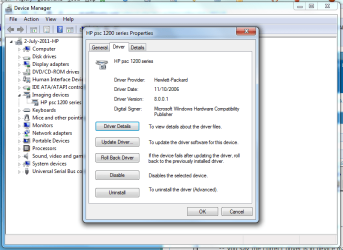
As I said, I already have the most current driver according to the device manager.
 

My Computer My Computer

At a glance

Windows 7 home premium 64 bitAMD Phenom II x2 511 processor 3.40 ghz5 GB
Computer type
PC/Desktop
Computer Manufacturer/Model Number
HP
OS
Windows 7 home premium 64 bit
CPU
AMD Phenom II x2 511 processor 3.40 ghz
Memory
5 GB
As I said, I already have the most current driver according to the device manager.

and you also said:
I have had my windows 7 machine for several years and have never once been able to figure out how to print using my HP 1200 series printer
There aren't too many reasons why a device won't function
1) not plugged in
-- it scans so it's plugged in

2) not connected
-- it scans so it's connected

3) no driver
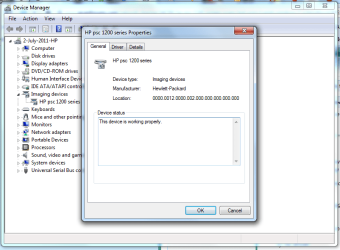
-- you say the driver is in device manager - please post a screen shot of the general tab

4) wrong driver
-- you say the correct driver is in device manager - please post a screen shot of the driver tab

5) misconfigured driver
-- you haven't said anything about the configuration or if you looked in Devices and Printers
- please post a screen shot of Control Panel -> Devices and Printers

Right click on the printer
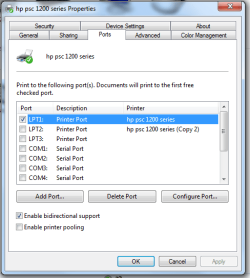
- select properties post a screen shot of the ports tab
- select see what's printing and cancel any pending print jobs

6) busted device
?????​
Try the Control Panel Trouble shooter -> Hardware and Sound -> Use a printer

Post error msgs, codes and screen shots.
 

My Computer My Computer

At a glance

x64 (6.3.9600) Win8.1 Pro & soon dual boot x6...AMD A6-3420M APU with Radeon(tm) HD Graphics6.00 GBAMD Radeon(TM) HD 6520G
Computer type
Laptop
Computer Manufacturer/Model Number
HP Pavilion dv6-6c10us
OS
x64 (6.3.9600) Win8.1 Pro & soon dual boot x64 (6.1.7601) Win7_SP1 HomePrem
CPU
AMD A6-3420M APU with Radeon(tm) HD Graphics
Motherboard
Hewlett-Packard 1805
Memory
6.00 GB
Graphics Card(s)
AMD Radeon(TM) HD 6520G
Sound Card
(1) AMD High Definition Audio Device (2) IDT High Definiti
Monitor(s) Displays
HP W2072a 20" LCD (1600 x 900) @ 60 Hz
Screen Resolution
1366 x 768 x 32 bits (4294967296 colors) @ 60 Hz
Hard Drives
ST640LM0 00 HM641JI SATA Disk Device
Keyboard
Logitech k520 wireless KB
Mouse
Logitech m320 wireless mouse (bundled with KB)
Internet Speed
15/5 | 54 MB Wireless 'n'
Antivirus
Realtime: Defender or Avast | On-demand: Malwarebytes, ESET
Browser
IE 11 on Win8, IE 10 on win 7
Other Info
Media: [Gimp, Audacity, VLC] || Comm: [WEmail 2012, Skype] || Productivity: [OpenOffice,| Textpad] || Utils: [Sysinternals, cCleaner, Speccy, Defraggler]
EDIT AND UPDATE: I changed the port to the usb port (from LPT 1) and it printed (yay). Any guesses as to why my machine couldn't automatically pick the correct port all these years?

THANK YOU ALL!


As I said, I already have the most current driver according to the device manager.

and you also said:
I have had my windows 7 machine for several years and have never once been able to figure out how to print using my HP 1200 series printer
There aren't too many reasons why a device won't function
1) not plugged in
-- it scans so it's plugged in

2) not connected
-- it scans so it's connected

3) no driver
-- you say the driver is in device manager - please post a screen shot of the general tab

4) wrong driver
-- you say the correct driver is in device manager - please post a screen shot of the driver tab

5) misconfigured driver
-- you haven't said anything about the configuration or if you looked in Devices and Printers
- please post a screen shot of Control Panel -> Devices and Printers

Right click on the printer
- select properties post a screen shot of the ports tab
- select see what's printing and cancel any pending print jobs

6) busted device
?????​
Try the Control Panel Trouble shooter -> Hardware and Sound -> Use a printer

Post error msgs, codes and screen shots.


In "devices and printers" it says it needs troubleshooting (yellow triangle with exclamation point). When I run the troubleshooter, it says it couldn't find the problem.

The device can't be busted because it prints from my windows 8 machine.


Attachments

  • printer general tab.png
    printer general tab.png
    36.9 KB · Views: 0
  • printer driver tab.png
    printer driver tab.png
    39.3 KB · Views: 0
  • printer port tab.png
    printer port tab.png
    17.8 KB · Views: 9
Last edited:

My Computer My Computer

At a glance

Windows 7 home premium 64 bitAMD Phenom II x2 511 processor 3.40 ghz5 GB
Computer type
PC/Desktop
Computer Manufacturer/Model Number
HP
OS
Windows 7 home premium 64 bit
CPU
AMD Phenom II x2 511 processor 3.40 ghz
Memory
5 GB
My guess is that the driver software was not installed properly. If the drivers were not installed FIRST, before physically connecting the device, problems can develop as Windows may arbitrarily assign it to an improper port.
 

My Computer My Computer

At a glance

Windows 10 64 bitIntel i7 6700K16GB Corsair DominatorIntel CPU Graphics
Computer type
PC/Desktop
Computer Manufacturer/Model Number
My Own Build
OS
Windows 10 64 bit
CPU
Intel i7 6700K
Motherboard
ASUS ROG Maximus VIII Hero
Memory
16GB Corsair Dominator
Graphics Card(s)
Intel CPU Graphics
Sound Card
RealTek
Monitor(s) Displays
27" Dell S2719dgf
Screen Resolution
2560X1440
Hard Drives
1 TB Samsung 850 EVO SSD for Win 10 Pro
500GB Samsung 850 EVO SSD for Win 10 Insider
2 TB drive for backup
PSU
EVGA Supernova 750G2
Case
BeQuiet Silent Base 600
Cooling
Deepcool Captain 120EX
Keyboard
Microsoft Wireless 2000
Mouse
Microsoft wireless
Internet Speed
100 MB/sec (Cable)
Antivirus
Microsoft Defender and Malwarebytes
Browser
Edge/Firefox
Other Info
Cakewalk (Sonar) by BandLab and Studio One 4.1 Pro recording studio software. MOTU 896Mk3 Hybrid recording interface, Frontier Tranzport wireless control unit, Behringer X-Touch Control Surface.
Five USB connected optical drives for CD Audio production using Nero BurningROM
I would uninstall the printer and reinstall per the instructions I previously posted (HP instructions)

The port shows LPT1, but the printer is connected via USB (right?)

It's far simpler to do it right than to try and untangle a botched install. I mean ... I already suggested this and the response was "but it's installed..."

No offense intended - lots of people do it because it is oft times difficult to figure out. I had a similar printer issue with and old device - took me a few attempts to get the correct settings that allowed it to work.

Uninstall the printer and the scanner
disconnect the USB cable
restart your machine
follow the HP install directions
ask if you get stuck
if there is still an issue afterwards, post the same device and printer property port screen again - thanks
 

My Computer My Computer

At a glance

x64 (6.3.9600) Win8.1 Pro & soon dual boot x6...AMD A6-3420M APU with Radeon(tm) HD Graphics6.00 GBAMD Radeon(TM) HD 6520G
Computer type
Laptop
Computer Manufacturer/Model Number
HP Pavilion dv6-6c10us
OS
x64 (6.3.9600) Win8.1 Pro & soon dual boot x64 (6.1.7601) Win7_SP1 HomePrem
CPU
AMD A6-3420M APU with Radeon(tm) HD Graphics
Motherboard
Hewlett-Packard 1805
Memory
6.00 GB
Graphics Card(s)
AMD Radeon(TM) HD 6520G
Sound Card
(1) AMD High Definition Audio Device (2) IDT High Definiti
Monitor(s) Displays
HP W2072a 20" LCD (1600 x 900) @ 60 Hz
Screen Resolution
1366 x 768 x 32 bits (4294967296 colors) @ 60 Hz
Hard Drives
ST640LM0 00 HM641JI SATA Disk Device
Keyboard
Logitech k520 wireless KB
Mouse
Logitech m320 wireless mouse (bundled with KB)
Internet Speed
15/5 | 54 MB Wireless 'n'
Antivirus
Realtime: Defender or Avast | On-demand: Malwarebytes, ESET
Browser
IE 11 on Win8, IE 10 on win 7
Other Info
Media: [Gimp, Audacity, VLC] || Comm: [WEmail 2012, Skype] || Productivity: [OpenOffice,| Textpad] || Utils: [Sysinternals, cCleaner, Speccy, Defraggler]
Back
Top