Solved Specific web pages only load slowly on all browsers

Yippee38

New member
Member
Local time
6:39 PM
Messages
64
When I log into my work's website, I can log in on the main page and navigate it fine. However, there are several pages within my company website that load extremely slowly. I mean, they take over 10 minutes to load. The pages are my company mail inbox, my schedule, and the page where I bid for my schedule. Maybe some other pages. It's always these pages, and they are always slow. All other web pages load fine. My internet speeds run fine on test and in game. Uploads and downloads work fine.

This problem exists on Firefox, IE, and Opera. If I reboot my machine into linux and access the pages in Firefox there, they load fine. On Windows 7 though, they don't.

I've done the usual suspects such as clearing all history, cache, cookies, etc. I've deleted the cookie and cache files. I've uninstalled Firefox and started with a fresh install. I've also deleted all security certificates in Firefox.

My hosts file contains only the following:
Code:
    127.0.0.1       localhost

I've disabled my antivirus (NOD32 Anti-virus) and shut down my firewall (Comodo Firewall). I do not have Windows Firewall running.

Does anybody have any suggestions on how I can fix this problem, or at least troubleshoot it further?
 

My Computer My Computer

Computer type
PC/Desktop
OS
Windows 7 Home Premium 64-bit
CPU
Intel i7-4790K
Motherboard
GA-Z97X-Gaming 7
Memory
Kingston 8Gb + G.Skil 8Gb
Graphics Card(s)
EVGA GeForce GTX 980Ti (x2)
Sound Card
Asus Xonar DX
Monitor(s) Displays
Acer Predator XB271HU (x3)
Screen Resolution
7680x1440
PSU
EVGA SuperNOVA 1300 G2
Keyboard
Ducky Shine 3
Mouse
Corsair M45
Antivirus
ESET NOD32 Anitvirus
Welcome
If the problem exists only on some browers you may want to reset one that does not work.
Please note that you will lose all of your personal settings and add ons. I have given directions for IE9, others will be similar. Good luck.
Reset Internet Explorer settings in Internet Explorer 9
Before doing anything be sure to have the most up to date version of IE.
 
Last edited:

My Computer My Computer

Computer type
PC/Desktop
Computer Manufacturer/Model Number
Dell XPS 420
OS
Windows 10, Home Clean Install
CPU
Intel Core2 processsor Q8200(2.33Ghz 1333FSB) Quad Core Tech
Motherboard
Dell
Memory
6 gb
Graphics Card(s)
ATI Radeon 256MB HD3650
Sound Card
Intergrated 7.1 Channel Audio
Monitor(s) Displays
Dell SP2009W 20"
Hard Drives
640 GB Serial ATA Hard drive
Cooling
Fan
Keyboard
Dell USB Keyboard
Mouse
Dell Premium Optical USB
Internet Speed
DSL 2.85
No, no. Those pages don't work in ALL browsers in Windows. Firefox is my primary browser, but it also doesn't work in IE or Opera.
 

My Computer My Computer

Computer type
PC/Desktop
OS
Windows 7 Home Premium 64-bit
CPU
Intel i7-4790K
Motherboard
GA-Z97X-Gaming 7
Memory
Kingston 8Gb + G.Skil 8Gb
Graphics Card(s)
EVGA GeForce GTX 980Ti (x2)
Sound Card
Asus Xonar DX
Monitor(s) Displays
Acer Predator XB271HU (x3)
Screen Resolution
7680x1440
PSU
EVGA SuperNOVA 1300 G2
Keyboard
Ducky Shine 3
Mouse
Corsair M45
Antivirus
ESET NOD32 Anitvirus
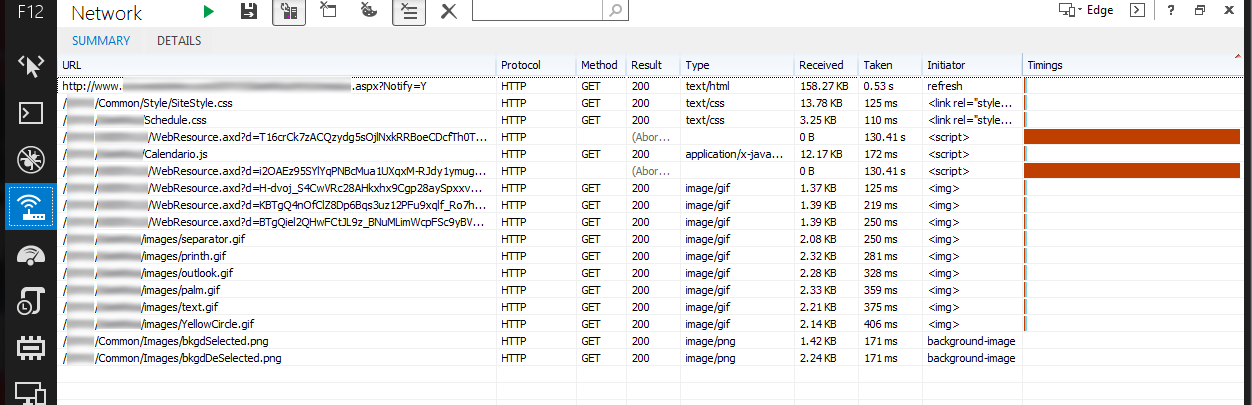
In IE press F12 (Developer Tools), go to Network, press the Play button, then reload the page. Perhaps you can find a certain page, script or something that loads slowly.
 

My Computer My Computer

Computer type
Laptop
Computer Manufacturer/Model Number
HP Elitebook 8540p
OS
Windows 7 Pro 32
CPU
Intel(R) Core(TM) i5 CPU M 540 @ 2.53GHz
Motherboard
Hewlett-Packard 1521
Memory
4,00 GB (Usable 2,98)
Graphics Card(s)
NVIDIA NVS 5100M
Sound Card
NVIDIA High Definition Audio
Screen Resolution
1600x900
Hard Drives
INTEL SSDSA2CW120G3
Antivirus
F-Secure Internet Security
Browser
IE, Firefox, Opera
Other Info
Sandboxie,
SRP (Software Restriction Policy),
EMET (Enhanced Mitigation Experience Toolkit),
WFC (Windows Firewall Control by BiniSoft),
Malwarebytes Premium
In IE press F12 (Developer Tools), go to Network, press the Play button, then reload the page. Perhaps you can find a certain page, script or something that loads slowly.

I tried that, but couldn't find "Network" as I'm using IE 8. I guess I should finally upgrade to the latest version. <sigh>

I'll let you know what I find when I get it upgraded.
 

My Computer My Computer

Computer type
PC/Desktop
OS
Windows 7 Home Premium 64-bit
CPU
Intel i7-4790K
Motherboard
GA-Z97X-Gaming 7
Memory
Kingston 8Gb + G.Skil 8Gb
Graphics Card(s)
EVGA GeForce GTX 980Ti (x2)
Sound Card
Asus Xonar DX
Monitor(s) Displays
Acer Predator XB271HU (x3)
Screen Resolution
7680x1440
PSU
EVGA SuperNOVA 1300 G2
Keyboard
Ducky Shine 3
Mouse
Corsair M45
Antivirus
ESET NOD32 Anitvirus
I ran it and it showed a bunch of stuff that might have been useful. I stopped it and exported to a file, but what it exported was really more like the source code of the page rather than any data about how the page loaded. I'll have to screenshot it and post it tomorrow.
 

My Computer My Computer

Computer type
PC/Desktop
OS
Windows 7 Home Premium 64-bit
CPU
Intel i7-4790K
Motherboard
GA-Z97X-Gaming 7
Memory
Kingston 8Gb + G.Skil 8Gb
Graphics Card(s)
EVGA GeForce GTX 980Ti (x2)
Sound Card
Asus Xonar DX
Monitor(s) Displays
Acer Predator XB271HU (x3)
Screen Resolution
7680x1440
PSU
EVGA SuperNOVA 1300 G2
Keyboard
Ducky Shine 3
Mouse
Corsair M45
Antivirus
ESET NOD32 Anitvirus
Ok. Here's what I got:
DevTools.png
 

My Computer My Computer

Computer type
PC/Desktop
OS
Windows 7 Home Premium 64-bit
CPU
Intel i7-4790K
Motherboard
GA-Z97X-Gaming 7
Memory
Kingston 8Gb + G.Skil 8Gb
Graphics Card(s)
EVGA GeForce GTX 980Ti (x2)
Sound Card
Asus Xonar DX
Monitor(s) Displays
Acer Predator XB271HU (x3)
Screen Resolution
7680x1440
PSU
EVGA SuperNOVA 1300 G2
Keyboard
Ducky Shine 3
Mouse
Corsair M45
Antivirus
ESET NOD32 Anitvirus
May be your isp is blocking the pages ?
 

My Computer My Computer

Computer type
PC/Desktop
OS
Windows 8.1
On another win7 machine at home it works fine?
 

My Computer My Computer

Computer type
Laptop
Computer Manufacturer/Model Number
ACER ASPIRE 5742G
OS
Microsoft Windows 7 Home Premium 64-bits 7601 Multiprocessor Free Service Pack 1
CPU
Intel(R) Core(TM) i3 CPU M 370 @ 2.40GHz
Motherboard
Acer Aspire 5742G
Memory
4,00 GB
Graphics Card(s)
ATI Mobility Radeon HD 5400 Series
Sound Card
(1) AMD High Definition Audio Device (2) Realtek High Defi
Screen Resolution
1366 x 768 x 32 bits (4294967296 colors) @ 60 Hz
Hard Drives
WDC WD5000BEVT-22ZAT0
You should send the screenshot to support at work too since the problem only concerns your company website. Weird that it works when you boot to Linux, and the fact that you have the same problem with 3 different browsers suggests that the problem is not with the browsers but something else.
 

My Computer My Computer

Computer type
Laptop
Computer Manufacturer/Model Number
HP Elitebook 8540p
OS
Windows 7 Pro 32
CPU
Intel(R) Core(TM) i5 CPU M 540 @ 2.53GHz
Motherboard
Hewlett-Packard 1521
Memory
4,00 GB (Usable 2,98)
Graphics Card(s)
NVIDIA NVS 5100M
Sound Card
NVIDIA High Definition Audio
Screen Resolution
1600x900
Hard Drives
INTEL SSDSA2CW120G3
Antivirus
F-Secure Internet Security
Browser
IE, Firefox, Opera
Other Info
Sandboxie,
SRP (Software Restriction Policy),
EMET (Enhanced Mitigation Experience Toolkit),
WFC (Windows Firewall Control by BiniSoft),
Malwarebytes Premium
Hi,
Please show a complete screen shot showing your url address bar and everything full width and height
Also try this,
Right click the ie shortcut and click on Start In-Private browsing and test,
Also can be started with Ctrl+Shift+P if ie is open, Gear symbol/ Safety/..
Cheers.
 

My Computer My Computer

Computer type
PC/Desktop
Computer Manufacturer/Model Number
Custom assembled by me :}
OS
Win-7-Pro64bit 7-H-Prem-64bit
CPU
i7-5930K 2nd i9-9940x both water blocked VRM's too
Motherboard
ASUS SABERTOOTH X99 2nd ASUS x299 Apex
Memory
Trident-z 3200C14 2nd Trident-z 3600C16
Graphics Card(s)
EVGA 1080ti ftw3 2nd Titan Xp both water blocked
Sound Card
Built-in Realtek
Monitor(s) Displays
1-AOC G2460PG 24"G-Sync 144Hz/ 2nd 1-ASUS VG248QE 24" 144Hz
Screen Resolution
1920 x 1080 144Hz
Hard Drives
2-Samsung M.2 Evo & Evo Plus
2-Samsung 850 EVO 500GB SSD's/ 3-2.5 W.D. Black 1tb-&3-1tb/3-3.5 WD Black 1tb hdd's
PSU
EVGA SuperNOVA 1000-P2 2nd 1200-P2
Case
2-Corsair Obsidian Series 450D Black ATX Mid Tower
Cooling
Custom water loops
Keyboard
Logitech G710+/ 2nd Logitech G910
Mouse
2-RedDragon M901 Perdition 16400 dpi Gaming mouse = wired
Internet Speed
Comcast Ping 19ms 89.31mbps download speed 6.12mbps upload
Antivirus
Malwarebytes Pro/ Superantispyware Pro
Browser
FireFox & Pale moon
Other Info
2nd ASUS X299 Apex/Intel i9-9940x with Custom water loop/7H-Prem-x64/Corsair 450D case/Ram Trident-z 3600C16 4x8gb / Samsung970Evo plus 500gb SSD/Dual ssd EZ swap evo/PSU EVGA SuperNova 1200w-P2 80+Platinum/GPU Titan Xp /8-ML-140 on push-pull on 2-280GTX rads
Hi,
Please show a complete screen shot showing your url address bar and everything full width and height
Also try this,
Right click the ie shortcut and click on Start In-Private browsing and test,
Also can be started with Ctrl+Shift+P if ie is open, Gear symbol/ Safety/..
Cheers.

The URL is the same URL on the first line of the image I posted. I'm not going to show the full URL (without blurring) because I don't want my company's name posted here. They are crazy about monitoring the use of their name.

I tried opening the page in Private browsing, but that didn't help at all.
 

My Computer My Computer

Computer type
PC/Desktop
OS
Windows 7 Home Premium 64-bit
CPU
Intel i7-4790K
Motherboard
GA-Z97X-Gaming 7
Memory
Kingston 8Gb + G.Skil 8Gb
Graphics Card(s)
EVGA GeForce GTX 980Ti (x2)
Sound Card
Asus Xonar DX
Monitor(s) Displays
Acer Predator XB271HU (x3)
Screen Resolution
7680x1440
PSU
EVGA SuperNOVA 1300 G2
Keyboard
Ducky Shine 3
Mouse
Corsair M45
Antivirus
ESET NOD32 Anitvirus
You should send the screenshot to support at work too since the problem only concerns your company website. Weird that it works when you boot to Linux, and the fact that you have the same problem with 3 different browsers suggests that the problem is not with the browsers but something else.

I tried contacting them and they are useless. They insist that it's something on my end. I'm inclined to agree with them as it really seems like something in my Windows is causing a problem. Apparently, I'm the only on having this problem. I'm wondering if maybe something is wrong with ActiveX on my computer.

Rolandex said:
May be your isp is blocking the pages ?

No. It's not. It works fine on my laptop and my wife's PC, which both run Windows 7, and on this machine when I boot into Linux (same computer, different OS).
 

My Computer My Computer

Computer type
PC/Desktop
OS
Windows 7 Home Premium 64-bit
CPU
Intel i7-4790K
Motherboard
GA-Z97X-Gaming 7
Memory
Kingston 8Gb + G.Skil 8Gb
Graphics Card(s)
EVGA GeForce GTX 980Ti (x2)
Sound Card
Asus Xonar DX
Monitor(s) Displays
Acer Predator XB271HU (x3)
Screen Resolution
7680x1440
PSU
EVGA SuperNOVA 1300 G2
Keyboard
Ducky Shine 3
Mouse
Corsair M45
Antivirus
ESET NOD32 Anitvirus
Have you tried in Safe Mode? I mean booting to safe mode

Even if something is wrong with ActiveX, it should work in Firefox like when you boot to Linux.
 
Last edited:

My Computer My Computer

Computer type
Laptop
Computer Manufacturer/Model Number
HP Elitebook 8540p
OS
Windows 7 Pro 32
CPU
Intel(R) Core(TM) i5 CPU M 540 @ 2.53GHz
Motherboard
Hewlett-Packard 1521
Memory
4,00 GB (Usable 2,98)
Graphics Card(s)
NVIDIA NVS 5100M
Sound Card
NVIDIA High Definition Audio
Screen Resolution
1600x900
Hard Drives
INTEL SSDSA2CW120G3
Antivirus
F-Secure Internet Security
Browser
IE, Firefox, Opera
Other Info
Sandboxie,
SRP (Software Restriction Policy),
EMET (Enhanced Mitigation Experience Toolkit),
WFC (Windows Firewall Control by BiniSoft),
Malwarebytes Premium
Have you tried in Safe Mode? I mean booting to safe mode

Even if something is wrong with ActiveX, it should work in Firefox like when you boot to Linux.

Ok. I just tried it in Safe Mode and page loads immediately. In Safe Mode, I started my firewall software (Comodo) and tried it. It loaded fine. I then added my anti-virus software and loaded it. Again, it loaded fine.
 

My Computer My Computer

Computer type
PC/Desktop
OS
Windows 7 Home Premium 64-bit
CPU
Intel i7-4790K
Motherboard
GA-Z97X-Gaming 7
Memory
Kingston 8Gb + G.Skil 8Gb
Graphics Card(s)
EVGA GeForce GTX 980Ti (x2)
Sound Card
Asus Xonar DX
Monitor(s) Displays
Acer Predator XB271HU (x3)
Screen Resolution
7680x1440
PSU
EVGA SuperNOVA 1300 G2
Keyboard
Ducky Shine 3
Mouse
Corsair M45
Antivirus
ESET NOD32 Anitvirus

My Computer My Computer

Computer type
Laptop
Computer Manufacturer/Model Number
HP Elitebook 8540p
OS
Windows 7 Pro 32
CPU
Intel(R) Core(TM) i5 CPU M 540 @ 2.53GHz
Motherboard
Hewlett-Packard 1521
Memory
4,00 GB (Usable 2,98)
Graphics Card(s)
NVIDIA NVS 5100M
Sound Card
NVIDIA High Definition Audio
Screen Resolution
1600x900
Hard Drives
INTEL SSDSA2CW120G3
Antivirus
F-Secure Internet Security
Browser
IE, Firefox, Opera
Other Info
Sandboxie,
SRP (Software Restriction Policy),
EMET (Enhanced Mitigation Experience Toolkit),
WFC (Windows Firewall Control by BiniSoft),
Malwarebytes Premium
This is very weird......

As I said in my post above, I rebooted to Safe Mode and loaded the page in Firefox. It loaded right up. No delays. I rebooted to normal mode and tested it again. It loaded great. However, I tried to load one of the other pages that has been a problem, and it loaded really slow. I tried the page that worked great on Opera and IE and it was slow to load. Very strange.

I'm going to try to reboot into Safe Mode and load all of the pages that are problems in all three browsers and see if that fixes the problem (It doesn't make sense that it would, but who knows?).
 

My Computer My Computer

Computer type
PC/Desktop
OS
Windows 7 Home Premium 64-bit
CPU
Intel i7-4790K
Motherboard
GA-Z97X-Gaming 7
Memory
Kingston 8Gb + G.Skil 8Gb
Graphics Card(s)
EVGA GeForce GTX 980Ti (x2)
Sound Card
Asus Xonar DX
Monitor(s) Displays
Acer Predator XB271HU (x3)
Screen Resolution
7680x1440
PSU
EVGA SuperNOVA 1300 G2
Keyboard
Ducky Shine 3
Mouse
Corsair M45
Antivirus
ESET NOD32 Anitvirus
Yea I didn't think it was going to work but I'm always interested in the top right of the url to see if active x filtering is activating,
But I doubt you need to look any further than you third party security as the problem
Cheers.
 

My Computer My Computer

Computer type
PC/Desktop
Computer Manufacturer/Model Number
Custom assembled by me :}
OS
Win-7-Pro64bit 7-H-Prem-64bit
CPU
i7-5930K 2nd i9-9940x both water blocked VRM's too
Motherboard
ASUS SABERTOOTH X99 2nd ASUS x299 Apex
Memory
Trident-z 3200C14 2nd Trident-z 3600C16
Graphics Card(s)
EVGA 1080ti ftw3 2nd Titan Xp both water blocked
Sound Card
Built-in Realtek
Monitor(s) Displays
1-AOC G2460PG 24"G-Sync 144Hz/ 2nd 1-ASUS VG248QE 24" 144Hz
Screen Resolution
1920 x 1080 144Hz
Hard Drives
2-Samsung M.2 Evo & Evo Plus
2-Samsung 850 EVO 500GB SSD's/ 3-2.5 W.D. Black 1tb-&3-1tb/3-3.5 WD Black 1tb hdd's
PSU
EVGA SuperNOVA 1000-P2 2nd 1200-P2
Case
2-Corsair Obsidian Series 450D Black ATX Mid Tower
Cooling
Custom water loops
Keyboard
Logitech G710+/ 2nd Logitech G910
Mouse
2-RedDragon M901 Perdition 16400 dpi Gaming mouse = wired
Internet Speed
Comcast Ping 19ms 89.31mbps download speed 6.12mbps upload
Antivirus
Malwarebytes Pro/ Superantispyware Pro
Browser
FireFox & Pale moon
Other Info
2nd ASUS X299 Apex/Intel i9-9940x with Custom water loop/7H-Prem-x64/Corsair 450D case/Ram Trident-z 3600C16 4x8gb / Samsung970Evo plus 500gb SSD/Dual ssd EZ swap evo/PSU EVGA SuperNova 1200w-P2 80+Platinum/GPU Titan Xp /8-ML-140 on push-pull on 2-280GTX rads
I booted back into Safe Mode and loaded each of the three pages in question on all three browsers. In IE, I did it right away. In Opera, I did it after running my firewall software. In Firefox, I left the firewall running and started my anti-virus too. I figured if one of the browsers wouldn't load the pages properly, it would tell me which software was the problem.

When I booted to Normal Mode, all of the pages loaded great on all browsers, except one of the pages still loaded slowly on IE. So, from that, I'm thinking that the problem lies in Comodo Firewall.

Thanks for everybody's help!
 

My Computer My Computer

Computer type
PC/Desktop
OS
Windows 7 Home Premium 64-bit
CPU
Intel i7-4790K
Motherboard
GA-Z97X-Gaming 7
Memory
Kingston 8Gb + G.Skil 8Gb
Graphics Card(s)
EVGA GeForce GTX 980Ti (x2)
Sound Card
Asus Xonar DX
Monitor(s) Displays
Acer Predator XB271HU (x3)
Screen Resolution
7680x1440
PSU
EVGA SuperNOVA 1300 G2
Keyboard
Ducky Shine 3
Mouse
Corsair M45
Antivirus
ESET NOD32 Anitvirus
After a short time, the problem came back.

I've uninstalled my firewall software (COMODO), yet the problem persists. This is weird.
 

My Computer My Computer

Computer type
PC/Desktop
OS
Windows 7 Home Premium 64-bit
CPU
Intel i7-4790K
Motherboard
GA-Z97X-Gaming 7
Memory
Kingston 8Gb + G.Skil 8Gb
Graphics Card(s)
EVGA GeForce GTX 980Ti (x2)
Sound Card
Asus Xonar DX
Monitor(s) Displays
Acer Predator XB271HU (x3)
Screen Resolution
7680x1440
PSU
EVGA SuperNOVA 1300 G2
Keyboard
Ducky Shine 3
Mouse
Corsair M45
Antivirus
ESET NOD32 Anitvirus
Back
Top