rosawoodsii
New member
I have XP on my desktop computer and decided to install Windows 7 on an unused partition. It installed fine, booted up okay, but will not give me a menu to choose which OS to boot to. I found an old thread from 2010 that said to check the XP boot.ini file and add a line if it wasn't there--but everything is there as it ought to be.
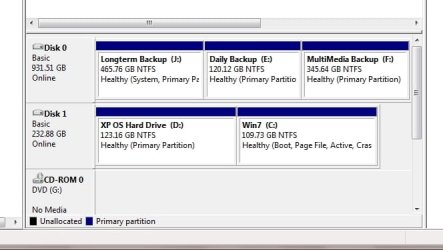
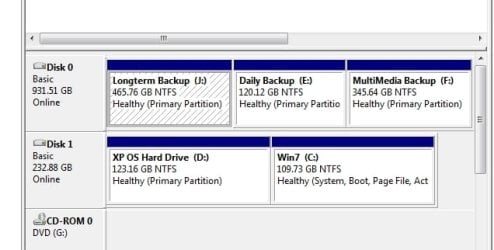
When I look at disk management, Win7 is listed as C:, XP is shown as D. When I look at "Computer" (was "My Computer" on XP), XP is shown but coded in red. I can get to the files okay, but I cannot boot into it.
Eventually I want to eliminate XP, but for the time being, I need to boot into it. This is causing me serious heartburn.
When I look at disk management, Win7 is listed as C:, XP is shown as D. When I look at "Computer" (was "My Computer" on XP), XP is shown but coded in red. I can get to the files okay, but I cannot boot into it.
Eventually I want to eliminate XP, but for the time being, I need to boot into it. This is causing me serious heartburn.
My Computer
- Computer type
- Laptop
- Computer Manufacturer/Model Number
- Acer Aspire 5250 Windows 7, HP 15-f272wm Windows 10
- OS
- Windows 7 Home Premium 64 bit, Windows 10 64 bit
- CPU
- AMD E-300 APU dual processors with Radion graphiics
- Memory
- 4 GB
- Internet Speed
- 15 Mbps on a good day
- Antivirus
- Norton Internet Security
- Browser
- Firefox, Chrome

 Gregrocker advises EasyBCD. I also advise as I required this to 'reintroduce' my missing Windows 7 o/s. EasyBCD is self explanatory so should not be too difficult to navigate.