Laptop DVD drive: not recognising media, except through Dell checkup

dougmarkham

New member
Local time
11:05 AM
Messages
7
Location
UK
Hi folks,

I have a Dell laptop XPS studio 1645 that has a 8X Slot Load CD/DVD Burner (Dual Layer DVD+/-R Drive).

After a recent windows update a few months ago, problems started. Now, when I put in a DVD or CD into the drive, my computer doesn't recognise the disc, so the media cannot be accessed.

I was thinking 'oh, the DVD drive must be broken or disconnected from the motherboard'. However, I ran a program called My Dell PC checkup and this program tests the DVD drive by asking you to provide a music CD. The strange thing is, when checking the DVD/CD drive using My Dell PC checkup, the drive starts working i.e., it plays the music. This makes no sense to me: why would My Computer not recognise DVD's or CD's, whereas, My Dell PC can play music from a CD?

On boot up, the following message is given:
PXE-E61: Media test failure, check cable
PXE-M0F: Exiting PXE ROM

I would like to find out if there is a software problem (OS issue) or whether I need to take apart the laptop and either check the cable or install a new one.

Would you be able to help me?

Thanks in advance,

Doug.
 

My Computer My Computer

At a glance

Windows 7 Home Premium 32 bitIntel® Core™ i7-720QM Quad Core Processor 1.6...8GB, DDR3, 1333MHz 2 DimmATI Mobility Radeon™ HD 5730 - 1GB
Computer type
PC/Desktop
Computer Manufacturer/Model Number
Dell
OS
Windows 7 Home Premium 32 bit
CPU
Intel® Core™ i7-720QM Quad Core Processor 1.6GHz (2.8GHz Tu
Motherboard
DELL 0VV228 MOTHERBOARD
Memory
8GB, DDR3, 1333MHz 2 Dimm
Graphics Card(s)
ATI Mobility Radeon™ HD 5730 - 1GB
Hard Drives
128GB Solid State Drive
Antivirus
AVG free
Browser
Firefox, Chrome, IE
Do you get any beeps at power on? Dell's run a "POST" (Power On Self Test) and report. I have list of beep codes and of the Dell diagnostics, but no PXE codes. At power on, press F12 and run the Dell diagnostics and see if you get any errors.

You could also post on the Dell Community, Laptop Forum for help, since this is a Dell.
http://en.community.dell.com/support-forums/laptop/
 

My Computer My Computer

At a glance

Windows 10 64 bitIntel i7 6700K16GB Corsair DominatorIntel CPU Graphics
Computer type
PC/Desktop
Computer Manufacturer/Model Number
My Own Build
OS
Windows 10 64 bit
CPU
Intel i7 6700K
Motherboard
ASUS ROG Maximus VIII Hero
Memory
16GB Corsair Dominator
Graphics Card(s)
Intel CPU Graphics
Sound Card
RealTek
Monitor(s) Displays
27" Dell S2719dgf
Screen Resolution
2560X1440
Hard Drives
1 TB Samsung 850 EVO SSD for Win 10 Pro
500GB Samsung 850 EVO SSD for Win 10 Insider
2 TB drive for backup
PSU
EVGA Supernova 750G2
Case
BeQuiet Silent Base 600
Cooling
Deepcool Captain 120EX
Keyboard
Microsoft Wireless 2000
Mouse
Microsoft wireless
Internet Speed
100 MB/sec (Cable)
Antivirus
Microsoft Defender and Malwarebytes
Browser
Edge/Firefox
Other Info
Cakewalk (Sonar) by BandLab and Studio One 4.1 Pro recording studio software. MOTU 896Mk3 Hybrid recording interface, Frontier Tranzport wireless control unit, Behringer X-Touch Control Surface.
Five USB connected optical drives for CD Audio production using Nero BurningROM
Do you get any beeps at power on? Dell's run a "POST" (Power On Self Test) and report. I have list of beep codes and of the Dell diagnostics, but no PXE codes. At power on, press F12 and run the Dell diagnostics and see if you get any errors.

You could also post on the Dell Community, Laptop Forum for help, since this is a Dell.
Laptop - Dell Community


Hi Fireberd,

Thanks for replying! I've run the initial Dell diagnostic F12 program (the last 30 mins of optional memory tests are still running). Interestingly, the CD rom test result was a 'pass'. I did post about this on Dell's laptop forum a few months ago and got zero response unfortunately. Thanks for the link though!

Kind regards,
Doug.
 

My Computer My Computer

At a glance

Windows 7 Home Premium 32 bitIntel® Core™ i7-720QM Quad Core Processor 1.6...8GB, DDR3, 1333MHz 2 DimmATI Mobility Radeon™ HD 5730 - 1GB
Computer type
PC/Desktop
Computer Manufacturer/Model Number
Dell
OS
Windows 7 Home Premium 32 bit
CPU
Intel® Core™ i7-720QM Quad Core Processor 1.6GHz (2.8GHz Tu
Motherboard
DELL 0VV228 MOTHERBOARD
Memory
8GB, DDR3, 1333MHz 2 Dimm
Graphics Card(s)
ATI Mobility Radeon™ HD 5730 - 1GB
Hard Drives
128GB Solid State Drive
Antivirus
AVG free
Browser
Firefox, Chrome, IE
What is the status of the drive in the Device Manager? Does it show working OK or does it have an error code (such as Code 10, or Code 19)?

If it shows working OK, RIGHT click on the entry for the drive and then LEFT click "Uninstall". Do not uninstall the driver, as it is only the default Windows driver (there are no other drivers for optical drives). Then restart the PC and when Windows starts it will detect and reinstall the drive. Check to see if it works.
 

My Computer My Computer

At a glance

Windows 10 64 bitIntel i7 6700K16GB Corsair DominatorIntel CPU Graphics
Computer type
PC/Desktop
Computer Manufacturer/Model Number
My Own Build
OS
Windows 10 64 bit
CPU
Intel i7 6700K
Motherboard
ASUS ROG Maximus VIII Hero
Memory
16GB Corsair Dominator
Graphics Card(s)
Intel CPU Graphics
Sound Card
RealTek
Monitor(s) Displays
27" Dell S2719dgf
Screen Resolution
2560X1440
Hard Drives
1 TB Samsung 850 EVO SSD for Win 10 Pro
500GB Samsung 850 EVO SSD for Win 10 Insider
2 TB drive for backup
PSU
EVGA Supernova 750G2
Case
BeQuiet Silent Base 600
Cooling
Deepcool Captain 120EX
Keyboard
Microsoft Wireless 2000
Mouse
Microsoft wireless
Internet Speed
100 MB/sec (Cable)
Antivirus
Microsoft Defender and Malwarebytes
Browser
Edge/Firefox
Other Info
Cakewalk (Sonar) by BandLab and Studio One 4.1 Pro recording studio software. MOTU 896Mk3 Hybrid recording interface, Frontier Tranzport wireless control unit, Behringer X-Touch Control Surface.
Five USB connected optical drives for CD Audio production using Nero BurningROM
What is the status of the drive in the Device Manager? Does it show working OK or does it have an error code (such as Code 10, or Code 19)?

If it shows working OK, RIGHT click on the entry for the drive and then LEFT click "Uninstall". Do not uninstall the driver, as it is only the default Windows driver (there are no other drivers for optical drives). Then restart the PC and when Windows starts it will detect and reinstall the drive. Check to see if it works.

Hi Fireberd,

The status of the drive in Device Manager is 'working'. So I did what you suggested and uninstalled the drive, restarted the computer, which reinstalled the DVD drive. However, this proceedure failed to fix the problem.

I re-ran the CD and DVD media test in My Dell PC checkup. Here are the results:

CD test:

  • DRAM test = Passed
  • Flash ram test = Passed
  • Main IC test = Passed
  • OPU test = Passed
  • Spindle test = Passed
  • CD Linear Seek test = Passed
  • CD Random Seek test = passsed
  • CD Funnel Seek test = passed
  • CD Linear Read Compare Test = Passed
  • CD Audio Test = Passed (heard music play)
DVD test (on DVDRW)


  • Spindle test = Passed
  • DVD Linear seek test = Passed
  • DVD Random seek test = Passed
  • DVD Funnel seek test = Passed
  • DVD Linear read compare test = Passed
Interestingly, when I used a DVD movie for the linear seek test, the result was a fail; however, I'm not sure if the failed test was because of a hardware problem, or if the test was not meant for a DVD movie disc (the DVDRW linear seek test passed). The program simply asked for DVD media (no specific request for DVD movie/DVDR/RW).


DVD test (on DVD movie)

  • DVD Linear seek test = failed
Had one thought: I once had a similar problem with my LaCie portable hard drive, but the solution involved renaming the drive. Probably that's specific to hard drives though.


In summary: the error message at startup is still there despite having reinstalled the drive. Is there anything else we could try?


Kind regards,


Doug
 

My Computer My Computer

At a glance

Windows 7 Home Premium 32 bitIntel® Core™ i7-720QM Quad Core Processor 1.6...8GB, DDR3, 1333MHz 2 DimmATI Mobility Radeon™ HD 5730 - 1GB
Computer type
PC/Desktop
Computer Manufacturer/Model Number
Dell
OS
Windows 7 Home Premium 32 bit
CPU
Intel® Core™ i7-720QM Quad Core Processor 1.6GHz (2.8GHz Tu
Motherboard
DELL 0VV228 MOTHERBOARD
Memory
8GB, DDR3, 1333MHz 2 Dimm
Graphics Card(s)
ATI Mobility Radeon™ HD 5730 - 1GB
Hard Drives
128GB Solid State Drive
Antivirus
AVG free
Browser
Firefox, Chrome, IE
After re-reading your original post, is the problem that Autoplay is not coming up when you insert a disc? Or is it that you can try to access the disc (loaded with either an audio or data CD or a DVD) and it does not show anything is loaded? Since the Dell diagnostic for the drive passes, it sounds like the drive is working.
 

My Computer My Computer

At a glance

Windows 10 64 bitIntel i7 6700K16GB Corsair DominatorIntel CPU Graphics
Computer type
PC/Desktop
Computer Manufacturer/Model Number
My Own Build
OS
Windows 10 64 bit
CPU
Intel i7 6700K
Motherboard
ASUS ROG Maximus VIII Hero
Memory
16GB Corsair Dominator
Graphics Card(s)
Intel CPU Graphics
Sound Card
RealTek
Monitor(s) Displays
27" Dell S2719dgf
Screen Resolution
2560X1440
Hard Drives
1 TB Samsung 850 EVO SSD for Win 10 Pro
500GB Samsung 850 EVO SSD for Win 10 Insider
2 TB drive for backup
PSU
EVGA Supernova 750G2
Case
BeQuiet Silent Base 600
Cooling
Deepcool Captain 120EX
Keyboard
Microsoft Wireless 2000
Mouse
Microsoft wireless
Internet Speed
100 MB/sec (Cable)
Antivirus
Microsoft Defender and Malwarebytes
Browser
Edge/Firefox
Other Info
Cakewalk (Sonar) by BandLab and Studio One 4.1 Pro recording studio software. MOTU 896Mk3 Hybrid recording interface, Frontier Tranzport wireless control unit, Behringer X-Touch Control Surface.
Five USB connected optical drives for CD Audio production using Nero BurningROM
After re-reading your original post, is the problem that Autoplay is not coming up when you insert a disc? Or is it that you can try to access the disc (loaded with either an audio or data CD or a DVD) and it does not show anything is loaded? Since the Dell diagnostic for the drive passes, it sounds like the drive is working.

Hi Fireberd,

Well, when I ran the spindle test on a data CD using My Dell PC checkup, in My Computer, the data cd (CD-R icon) appeared, and next to it, as did the memory bar (which read 139 MB free of 702 MB).

This morning I did a few experiments i.e., attempting to open CD-R, CD-ROM, DVD-R, DVD-RW, and DVD-ROM (movie).

Before inserting any disc, the drive icon reads "DVD", and the description reads "DVD RW Drive (D: ).

  • First test: inserting a data CD (CD-R).
    • The DVD icon becomes CD-R, however, the description still reads "DVD RW Drive (D: ).
    • A memory bar loads (after the disc spins) showing 139 MB free of 702 MB
    • Right click on the icon and selecting autoplay does nothing.
    • Right click on the icon and left clicking the 'open' option does open the disc, but there is nothing in the window that opens. On the downstairs PC, there are myriad files showing on the disc.
  • Second test: inserting an audio CD (CD-ROM).
    • The DVD icon becomes CD-ROM, however, the description still reads "DVD RW Drive (D: ).
    • Right click on the icon and selecting autoplay does nothing.
    • Right click on the icon and left clicking the 'open' option results in the following message: Please insert a disc into Drive D:. Then the audio CD ejects automatically.
  • Third test: inserting a DVD data disc (DVD-R).
    • The DVD icon becomes DVD-R, however, the description still reads "DVD RW Drive (D: ).
    • Right click on the icon and selecting autoplay does nothing (as expected).
    • Right click on the icon and left clicking the 'open' option results in the following message: Please insert a disc into Drive D:. Then the DVD-R ejects automatically.
  • Fourth test: inserting a DVD movie (DVD-ROM).
    • The DVD icon becomes DVD-ROM, however, the description still reads "DVD RW Drive (D: ).
    • Right click on the icon and left clicking the 'open' option results in the following message: Please insert a disc into Drive D:.Then the movie DVD ejects automatically.
Re-testing these same discs on the downstairs PC (which has a DVD drive that reads DVD-R/RW, CD-R/RW but does not write to disc) running windows vista (not 7), inserting any of the discs opens autoplay. The disc names appears as they should e.g.,

  • CD data disc: DVD drive (D: ) German PP RP
  • CD audio disc: DVD drive (D: ) Audio CD
  • DVD data disc: DVD drive (D: ) PhD Thesis
  • DVD movie: DVD drive (D: ) Gravity (that automatically opens in the movie player)
Does this information help?


Kind regards,


Doug
 

My Computer My Computer

At a glance

Windows 7 Home Premium 32 bitIntel® Core™ i7-720QM Quad Core Processor 1.6...8GB, DDR3, 1333MHz 2 DimmATI Mobility Radeon™ HD 5730 - 1GB
Computer type
PC/Desktop
Computer Manufacturer/Model Number
Dell
OS
Windows 7 Home Premium 32 bit
CPU
Intel® Core™ i7-720QM Quad Core Processor 1.6GHz (2.8GHz Tu
Motherboard
DELL 0VV228 MOTHERBOARD
Memory
8GB, DDR3, 1333MHz 2 Dimm
Graphics Card(s)
ATI Mobility Radeon™ HD 5730 - 1GB
Hard Drives
128GB Solid State Drive
Antivirus
AVG free
Browser
Firefox, Chrome, IE
Well, after that, it appears Windows is not seeing data on a disc, but the Dell diagnostic program is. I would have thought the Dell program would use Windows I/O to access and read data from it, but apparently not.

I'm not sure how to fix this, without a complete reinstall, and no assurance that will fix it. Windows is seeing and recognizing the drive, but not data on the drive.

On a remote chance, delete the upper and lower registry filters, restart the PC and see what happens. This is usually for an error code with the drive, but with what is happening its worth a shot and better than a reinstall.

Windows Vista/7

  1. Click Start, and then click All Programs.
  2. Click Accessories, and then click Run.
  3. Type regedit, and then click OK. If you are prompted for an administrator password or for a confirmation, type the password, or click Allow.
  4. In the navigation pane, locate and then click the following registry subkey: HKEY_LOCAL_MACHINESYSTEMCurrentControlSetControlClass{4D36E965-E325-11CE-BFC1-08002BE10318}
  5. In the right pane, click UpperFilters.
    Note You may also see an UpperFilters.bak registry entry. You do not have to remove that entry. Click UpperFilters only. If you do not see the UpperFilters registry entry, you still might have to remove the LowerFilters registry entry. To do this, go to step 8.
  6. On the Edit menu, click Delete.
  7. When you are prompted to confirm the deletion, click Yes.
  8. In the right pane, click LowerFilters.
  9. On the Edit menu, click Delete.
  10. When you are prompted to confirm the deletion, click Yes.
  11. Exit Registry Editor.
  12. Restart the computer.
 

My Computer My Computer

At a glance

Windows 10 64 bitIntel i7 6700K16GB Corsair DominatorIntel CPU Graphics
Computer type
PC/Desktop
Computer Manufacturer/Model Number
My Own Build
OS
Windows 10 64 bit
CPU
Intel i7 6700K
Motherboard
ASUS ROG Maximus VIII Hero
Memory
16GB Corsair Dominator
Graphics Card(s)
Intel CPU Graphics
Sound Card
RealTek
Monitor(s) Displays
27" Dell S2719dgf
Screen Resolution
2560X1440
Hard Drives
1 TB Samsung 850 EVO SSD for Win 10 Pro
500GB Samsung 850 EVO SSD for Win 10 Insider
2 TB drive for backup
PSU
EVGA Supernova 750G2
Case
BeQuiet Silent Base 600
Cooling
Deepcool Captain 120EX
Keyboard
Microsoft Wireless 2000
Mouse
Microsoft wireless
Internet Speed
100 MB/sec (Cable)
Antivirus
Microsoft Defender and Malwarebytes
Browser
Edge/Firefox
Other Info
Cakewalk (Sonar) by BandLab and Studio One 4.1 Pro recording studio software. MOTU 896Mk3 Hybrid recording interface, Frontier Tranzport wireless control unit, Behringer X-Touch Control Surface.
Five USB connected optical drives for CD Audio production using Nero BurningROM
Well, after that, it appears Windows is not seeing data on a disc, but the Dell diagnostic program is. I would have thought the Dell program would use Windows I/O to access and read data from it, but apparently not.

I'm not sure how to fix this, without a complete reinstall, and no assurance that will fix it. Windows is seeing and recognizing the drive, but not data on the drive.

On a remote chance, delete the upper and lower registry filters, restart the PC and see what happens. This is usually for an error code with the drive, but with what is happening its worth a shot and better than a reinstall.

Windows Vista/7

  1. Click Start, and then click All Programs.
  2. Click Accessories, and then click Run.
  3. Type regedit, and then click OK. If you are prompted for an administrator password or for a confirmation, type the password, or click Allow.
  4. In the navigation pane, locate and then click the following registry subkey: HKEY_LOCAL_MACHINESYSTEMCurrentControlSetControlClass{4D36E965-E325-11CE-BFC1-08002BE10318}
  5. In the right pane, click UpperFilters.
    Note You may also see an UpperFilters.bak registry entry. You do not have to remove that entry. Click UpperFilters only. If you do not see the UpperFilters registry entry, you still might have to remove the LowerFilters registry entry. To do this, go to step 8.
  6. On the Edit menu, click Delete.
  7. When you are prompted to confirm the deletion, click Yes.
  8. In the right pane, click LowerFilters.
  9. On the Edit menu, click Delete.
  10. When you are prompted to confirm the deletion, click Yes.
  11. Exit Registry Editor.
  12. Restart the computer.

Hi Fireberd,

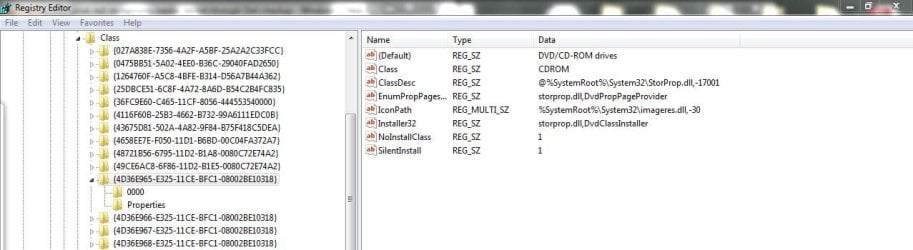
I think we might be getting somewhere. I located that registry entry, but in the right panel, there's no UpperFilters or LowerFilters there (see attached image).

Kind regards,
Doug
 

Attachments

  • dvd drive registry.JPG
    dvd drive registry.JPG
    67.7 KB · Views: 2

My Computer My Computer

At a glance

Windows 7 Home Premium 32 bitIntel® Core™ i7-720QM Quad Core Processor 1.6...8GB, DDR3, 1333MHz 2 DimmATI Mobility Radeon™ HD 5730 - 1GB
Computer type
PC/Desktop
Computer Manufacturer/Model Number
Dell
OS
Windows 7 Home Premium 32 bit
CPU
Intel® Core™ i7-720QM Quad Core Processor 1.6GHz (2.8GHz Tu
Motherboard
DELL 0VV228 MOTHERBOARD
Memory
8GB, DDR3, 1333MHz 2 Dimm
Graphics Card(s)
ATI Mobility Radeon™ HD 5730 - 1GB
Hard Drives
128GB Solid State Drive
Antivirus
AVG free
Browser
Firefox, Chrome, IE
See this thread that I found doing a search for "no upper or lower filters in registry in Win 7".
missing upper/lower filters registry cd/DVD - Microsoft Community

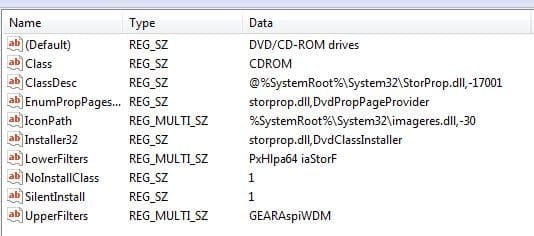
One response in that thread is that you don't need the filters. But, in the case where you delete them, they reinstall themselves after a PC restart.

Here is what my Win 7 shows:
 

Attachments

  • filters.JPG
    filters.JPG
    28.9 KB · Views: 4

My Computer My Computer

At a glance

Windows 10 64 bitIntel i7 6700K16GB Corsair DominatorIntel CPU Graphics
Computer type
PC/Desktop
Computer Manufacturer/Model Number
My Own Build
OS
Windows 10 64 bit
CPU
Intel i7 6700K
Motherboard
ASUS ROG Maximus VIII Hero
Memory
16GB Corsair Dominator
Graphics Card(s)
Intel CPU Graphics
Sound Card
RealTek
Monitor(s) Displays
27" Dell S2719dgf
Screen Resolution
2560X1440
Hard Drives
1 TB Samsung 850 EVO SSD for Win 10 Pro
500GB Samsung 850 EVO SSD for Win 10 Insider
2 TB drive for backup
PSU
EVGA Supernova 750G2
Case
BeQuiet Silent Base 600
Cooling
Deepcool Captain 120EX
Keyboard
Microsoft Wireless 2000
Mouse
Microsoft wireless
Internet Speed
100 MB/sec (Cable)
Antivirus
Microsoft Defender and Malwarebytes
Browser
Edge/Firefox
Other Info
Cakewalk (Sonar) by BandLab and Studio One 4.1 Pro recording studio software. MOTU 896Mk3 Hybrid recording interface, Frontier Tranzport wireless control unit, Behringer X-Touch Control Surface.
Five USB connected optical drives for CD Audio production using Nero BurningROM
Back
Top