Hi,
Windows always had it that if you click on a drive letter and chose details, (name date modified size etc) then went tools>folder options>view and clicked the button apply to folders, it then said this will be applied to all folders the next time you open this directory. Which was so after closing down all instances of win explorer and opening win explorer again.
In Win7 I selected a folder on a drive and got those large icon images so needing details as I always 100% need, I did the routine above.
There is no message though about next time etc etc.
when I then open a folder on that drive, I get those pesky large icons again.
No way am I going to have to go and select details view for every folder I open, so whats happened ?
1) How does one apply details view to all folders and nested folders add infinitum on a drive ?
So far everything I come to do in explorer has been messed up in win7.
Is there a utility to restore windows explorer to how it should be ?
2) There is no 'up a level' button either, ClassicShell I found on the www to restore such function.
I want a utility ideally that gives us back all the things that XP Win Explorer allowed.
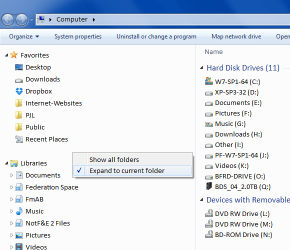
3) I am in the right pane and it doesnt scroll, now one has to click there then scroll, but I dont want to select something I dont want.
4) The drive letter at left doesnt show what folder is open related to what i see in the right pane.
5) I seem to keep having to browse to the folder I had last used, it doesnt remember where I was last visiting.
This is fundamental stuff I have used since 3.1 Its taking a lot longer to browse my PC in win7 and thus jobs are taking longer so I am losing out financially.
Was it not necessary all these yrs to have these functions that have been removed ?
..so one download fix or many and which ?
Cheers
DBenz
Windows always had it that if you click on a drive letter and chose details, (name date modified size etc) then went tools>folder options>view and clicked the button apply to folders, it then said this will be applied to all folders the next time you open this directory. Which was so after closing down all instances of win explorer and opening win explorer again.
In Win7 I selected a folder on a drive and got those large icon images so needing details as I always 100% need, I did the routine above.
There is no message though about next time etc etc.
when I then open a folder on that drive, I get those pesky large icons again.
No way am I going to have to go and select details view for every folder I open, so whats happened ?
1) How does one apply details view to all folders and nested folders add infinitum on a drive ?
So far everything I come to do in explorer has been messed up in win7.
Is there a utility to restore windows explorer to how it should be ?
2) There is no 'up a level' button either, ClassicShell I found on the www to restore such function.
I want a utility ideally that gives us back all the things that XP Win Explorer allowed.
3) I am in the right pane and it doesnt scroll, now one has to click there then scroll, but I dont want to select something I dont want.
4) The drive letter at left doesnt show what folder is open related to what i see in the right pane.
5) I seem to keep having to browse to the folder I had last used, it doesnt remember where I was last visiting.
This is fundamental stuff I have used since 3.1 Its taking a lot longer to browse my PC in win7 and thus jobs are taking longer so I am losing out financially.
Was it not necessary all these yrs to have these functions that have been removed ?
..so one download fix or many and which ?
Cheers
DBenz
My Computer
At a glance
Windows 7 64bit proIntel Core i7 479032Gb DDR3GeForce GTX970
- Computer type
- PC/Desktop
- Computer Manufacturer/Model Number
- Custom built
- OS
- Windows 7 64bit pro
- CPU
- Intel Core i7 4790
- Motherboard
- Gigabyte Z97P-D3 Intel Z97 Socket 1150 DDR3
- Memory
- 32Gb DDR3
- Graphics Card(s)
- GeForce GTX970
- Hard Drives
- Samsung SSD for OS and WD green for data
- Antivirus
- Kaspersky Internet Security 2014
- Browser
- Firefox