What prog or progs will restore traditional Win Explorer functions ?

DBenz

New member
Member
Local time
6:24 AM
Messages
55
Hi,
Windows always had it that if you click on a drive letter and chose details, (name date modified size etc) then went tools>folder options>view and clicked the button apply to folders, it then said this will be applied to all folders the next time you open this directory. Which was so after closing down all instances of win explorer and opening win explorer again.

In Win7 I selected a folder on a drive and got those large icon images so needing details as I always 100% need, I did the routine above.

There is no message though about next time etc etc.

when I then open a folder on that drive, I get those pesky large icons again.

No way am I going to have to go and select details view for every folder I open, so whats happened ?

1) How does one apply details view to all folders and nested folders add infinitum on a drive ?

So far everything I come to do in explorer has been messed up in win7.

Is there a utility to restore windows explorer to how it should be ?

2) There is no 'up a level' button either, ClassicShell I found on the www to restore such function.

I want a utility ideally that gives us back all the things that XP Win Explorer allowed.

3) I am in the right pane and it doesnt scroll, now one has to click there then scroll, but I dont want to select something I dont want.

4) The drive letter at left doesnt show what folder is open related to what i see in the right pane.

5) I seem to keep having to browse to the folder I had last used, it doesnt remember where I was last visiting.

This is fundamental stuff I have used since 3.1 Its taking a lot longer to browse my PC in win7 and thus jobs are taking longer so I am losing out financially.

Was it not necessary all these yrs to have these functions that have been removed ?

..so one download fix or many and which ?

Cheers

DBenz
 

My Computer My Computer

At a glance

Windows 7 64bit proIntel Core i7 479032Gb DDR3GeForce GTX970
Computer type
PC/Desktop
Computer Manufacturer/Model Number
Custom built
OS
Windows 7 64bit pro
CPU
Intel Core i7 4790
Motherboard
Gigabyte Z97P-D3 Intel Z97 Socket 1150 DDR3
Memory
32Gb DDR3
Graphics Card(s)
GeForce GTX970
Hard Drives
Samsung SSD for OS and WD green for data
Antivirus
Kaspersky Internet Security 2014
Browser
Firefox
I use this all the time with Win 7 and Win 8 / 8.1 . Free and does what you want ..

Classic Shell
 

My Computer My Computer

At a glance

Windows 10 Pro - 64 bitIntel i7 2600K8 Gig ddr3 1600 mhz - viper extreme (Patriot)EVGA 980 TI
Computer type
PC/Desktop
Computer Manufacturer/Model Number
Custom Build
OS
Windows 10 Pro - 64 bit
CPU
Intel i7 2600K
Motherboard
Asus P8P67
Memory
8 Gig ddr3 1600 mhz - viper extreme (Patriot)
Graphics Card(s)
EVGA 980 TI
Monitor(s) Displays
2 - Lg 21" LED , sony 48 " bravia LED
Hard Drives
one - samsung 840 series 465.76 GB SSD
two - wd 2 tB black
one - wd 1.5 tb black
one - wb 1 tb black
PSU
1000 Watt Coolmaster : Silent Pro Gold
Case
antec 1200
Cooling
watercooled
Mouse
logitech wireless
Antivirus
Norton Security 2015
Other Info
powerware 3.1 KVA FERRUPS with 4 - 1000 Amp Deep cycle batteries ...
I had discovered that prog for the up a level arrow, but wondered if it dealt with all 5 issues and more besides. Things like hover and scroll, not have to click,
hover right pane loses left pane + or -
importantly give us back closed and open folder icons left pane.

Anything that worked then MS decided to mess up.

The cause is by the way the fact that they just dare not leave things alone, and as it was fine, the only option is to mess it up. Rather than add to functionality, preview panes, they have to alter existing. Also sales wise they can then market a newer OS that fixes the existing.

How safe and stable is Classic Shell ?

It will be put into the foundations of this new PC build and I don't want to build onto dodgy foundations so just need to be sure.

DBenz
 

My Computer My Computer

At a glance

Windows 7 64bit proIntel Core i7 479032Gb DDR3GeForce GTX970
Computer type
PC/Desktop
Computer Manufacturer/Model Number
Custom built
OS
Windows 7 64bit pro
CPU
Intel Core i7 4790
Motherboard
Gigabyte Z97P-D3 Intel Z97 Socket 1150 DDR3
Memory
32Gb DDR3
Graphics Card(s)
GeForce GTX970
Hard Drives
Samsung SSD for OS and WD green for data
Antivirus
Kaspersky Internet Security 2014
Browser
Firefox
I have be using classic shell for ever ... No issues .. Give it a try ..
 

My Computer My Computer

At a glance

Windows 10 Pro - 64 bitIntel i7 2600K8 Gig ddr3 1600 mhz - viper extreme (Patriot)EVGA 980 TI
Computer type
PC/Desktop
Computer Manufacturer/Model Number
Custom Build
OS
Windows 10 Pro - 64 bit
CPU
Intel i7 2600K
Motherboard
Asus P8P67
Memory
8 Gig ddr3 1600 mhz - viper extreme (Patriot)
Graphics Card(s)
EVGA 980 TI
Monitor(s) Displays
2 - Lg 21" LED , sony 48 " bravia LED
Hard Drives
one - samsung 840 series 465.76 GB SSD
two - wd 2 tB black
one - wd 1.5 tb black
one - wb 1 tb black
PSU
1000 Watt Coolmaster : Silent Pro Gold
Case
antec 1200
Cooling
watercooled
Mouse
logitech wireless
Antivirus
Norton Security 2015
Other Info
powerware 3.1 KVA FERRUPS with 4 - 1000 Amp Deep cycle batteries ...

My Computer My Computer

At a glance

W7 Ultimate SP1, LM19.2 MATE, W10 Home 1703, ...AMD Phenom II x6 1100T, 3.3 GHz12GB DDR3 1333 G-Skill (4GB x 2), G-Skill (2G...NVIDIA GeForce GTX 660
Computer type
PC/Desktop
Computer Manufacturer/Model Number
n/a
OS
W7 Ultimate SP1, LM19.2 MATE, W10 Home 1703, W10 Pro 1703 VM, #All 64 bit
CPU
AMD Phenom II x6 1100T, 3.3 GHz
Motherboard
ASUS M4A88T-M/USB3 (AM3)
Memory
12GB DDR3 1333 G-Skill (4GB x 2), G-Skill (2GB x 2)
Graphics Card(s)
NVIDIA GeForce GTX 660
Sound Card
Realtek?
Monitor(s) Displays
Samsung S23B350
Screen Resolution
1920x1080
Hard Drives
WD Green 2TB (SATA), WD Green 3TB (SATA), WD Blue 4TB (SATA), WD Blue 6TB (SATA)
PSU
Cooler Master
Case
Antec GX300 Tower
Cooling
3x Antec TRICOOL 120mm Fans
Mouse
Wired Optical
Internet Speed
DSL
Antivirus
Avast
Browser
Pale Moon (64 bit)
Other Info
2018-12-27 Upgraded HDDs
2015-12-10 Upgraded case, graphics card, storage
2015-08-15 Upgraded motherboard & RAM
2015-07-15 Upgraded LM17.1 to LM17.2
Hi, Thanks for the GUI docx. Old habits die hard, in fact I have started using that bar now.

I would like it though that the windows explorer interface showed open and closed folders. Also when I downloaded something and click F drive, the drive letter was highlighted, no indication of folder its going into, created earlier and used, select the drive letter and then I could see it was different to my planned location. Its less inclined to be helpful than XP. Doesnt always go back to same location I am using.

DBenz
 

My Computer My Computer

At a glance

Windows 7 64bit proIntel Core i7 479032Gb DDR3GeForce GTX970
Computer type
PC/Desktop
Computer Manufacturer/Model Number
Custom built
OS
Windows 7 64bit pro
CPU
Intel Core i7 4790
Motherboard
Gigabyte Z97P-D3 Intel Z97 Socket 1150 DDR3
Memory
32Gb DDR3
Graphics Card(s)
GeForce GTX970
Hard Drives
Samsung SSD for OS and WD green for data
Antivirus
Kaspersky Internet Security 2014
Browser
Firefox
Expand To Current Folder

Hi, Thanks for the GUI docx. Old habits die hard, in fact I have started using that bar now.
I use a combination of the Breadcrumb bar and the Navigation pane.

Windows Explorer probably was better in XP.

I would like it though that the windows explorer interface showed open and closed folders. Also when I downloaded something and click F drive, the drive letter was highlighted, no indication of folder its going into, created earlier and used, select the drive letter and then I could see it was different to my planned location. Its less inclined to be helpful than XP. Doesnt always go back to same location I am using.
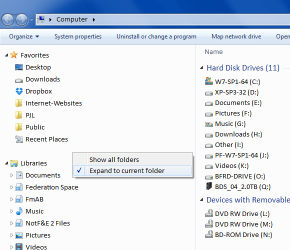
Try setting "Expand to current folder":

  • Right Click in an empty section of the Navigation pane.
  • Choose "Expand to current folder"
Expand To Current Folder.png
If you do a lot of file manipulation you might want to install a 3rd party manager.

Whenever I need to move files between multiple folders or I need to perform mass renaming of files, I use FreeCommander.
FreeCommander - freeware file manager

It looks like he has finished the new version (I'm still using the old one - v2009.02b).
 
Last edited:

My Computer My Computer

At a glance

W7 Ultimate SP1, LM19.2 MATE, W10 Home 1703, ...AMD Phenom II x6 1100T, 3.3 GHz12GB DDR3 1333 G-Skill (4GB x 2), G-Skill (2G...NVIDIA GeForce GTX 660
Computer type
PC/Desktop
Computer Manufacturer/Model Number
n/a
OS
W7 Ultimate SP1, LM19.2 MATE, W10 Home 1703, W10 Pro 1703 VM, #All 64 bit
CPU
AMD Phenom II x6 1100T, 3.3 GHz
Motherboard
ASUS M4A88T-M/USB3 (AM3)
Memory
12GB DDR3 1333 G-Skill (4GB x 2), G-Skill (2GB x 2)
Graphics Card(s)
NVIDIA GeForce GTX 660
Sound Card
Realtek?
Monitor(s) Displays
Samsung S23B350
Screen Resolution
1920x1080
Hard Drives
WD Green 2TB (SATA), WD Green 3TB (SATA), WD Blue 4TB (SATA), WD Blue 6TB (SATA)
PSU
Cooler Master
Case
Antec GX300 Tower
Cooling
3x Antec TRICOOL 120mm Fans
Mouse
Wired Optical
Internet Speed
DSL
Antivirus
Avast
Browser
Pale Moon (64 bit)
Other Info
2018-12-27 Upgraded HDDs
2015-12-10 Upgraded case, graphics card, storage
2015-08-15 Upgraded motherboard & RAM
2015-07-15 Upgraded LM17.1 to LM17.2
FreeCommander XE

FreeCommander XE is a bit twitchy on my PC. :(

I've reinstalled the previous version (2009.02b).
 

My Computer My Computer

At a glance

W7 Ultimate SP1, LM19.2 MATE, W10 Home 1703, ...AMD Phenom II x6 1100T, 3.3 GHz12GB DDR3 1333 G-Skill (4GB x 2), G-Skill (2G...NVIDIA GeForce GTX 660
Computer type
PC/Desktop
Computer Manufacturer/Model Number
n/a
OS
W7 Ultimate SP1, LM19.2 MATE, W10 Home 1703, W10 Pro 1703 VM, #All 64 bit
CPU
AMD Phenom II x6 1100T, 3.3 GHz
Motherboard
ASUS M4A88T-M/USB3 (AM3)
Memory
12GB DDR3 1333 G-Skill (4GB x 2), G-Skill (2GB x 2)
Graphics Card(s)
NVIDIA GeForce GTX 660
Sound Card
Realtek?
Monitor(s) Displays
Samsung S23B350
Screen Resolution
1920x1080
Hard Drives
WD Green 2TB (SATA), WD Green 3TB (SATA), WD Blue 4TB (SATA), WD Blue 6TB (SATA)
PSU
Cooler Master
Case
Antec GX300 Tower
Cooling
3x Antec TRICOOL 120mm Fans
Mouse
Wired Optical
Internet Speed
DSL
Antivirus
Avast
Browser
Pale Moon (64 bit)
Other Info
2018-12-27 Upgraded HDDs
2015-12-10 Upgraded case, graphics card, storage
2015-08-15 Upgraded motherboard & RAM
2015-07-15 Upgraded LM17.1 to LM17.2
Back
Top