I was trying to connect my laptop to my HDtv but I realized that my laptop doesn't have an hdmi port (which was irritating), so I was wondering if a normal usb cord would suffice, or if there was a usb-hdmi cord?
sorry if this seems very basic...
thanks in advance!
No a normal USB cord will not work as the connections don't match.
Does your laptop have a VGA or DVI outlet on it?. It may not have an HDMI outlet but it would most likely have a VGA or DVI outlet. You can then get an adapter for one of these to go to HDMI.
You can also get an adapter to go from a USB port to HDMI but this is a more complex set up.
Take your laptop down to a computer specialist store & explain to them what you want to do & they should be able to advise you.
My Computer
At a glance
Windows 7 Home Premium 64 bit sp1Intel i5 3570 3.4Ghz Ivy Bridge SKT 1155 quad...G-Skill Rip Jaws 16Gb (8x2) DDR3 -1600 PC3 12...Gigabyte NVIDIA GT610 1Gb DDR3 810/1200 PCI-E...
I'm not sure what the VGA or DVI outlets look like....
but I like the idea of bringing my laptop in to a computer store, I will try that for sure. thank you!
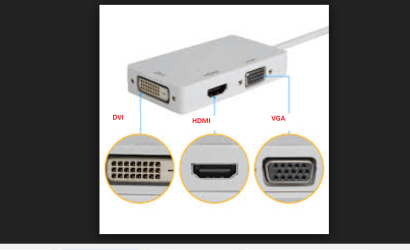
Lady Vi see my pic and then look around the machine to see if it has sockets that look like the ones pictured - I have labeled them for you. If so then you can get the appropriate adaptors
Attachments
SOCKETS.PNG
49.9 KB
· Views: 1
My Computer
At a glance
Desk1 7 Home Prem / Desk2 10 Pro / Main lap A...Desk1 i5 3750K / Laptop i7 GTX 860M / Desk2 i...Desk1 8GB (1866) / Desk2 16GB (1333) / Laptop...Desk 1& 2NVidia GTX 650 & Laptops on board Intel
Computer type
PC/Desktop
Computer Manufacturer/Model Number
Own build (new) Desk1 / Asus ROG Win 7 / Desk2 1st build
OS
Desk1 7 Home Prem / Desk2 10 Pro / Main lap Asus ROG 10 Pro 2 laptop Toshiba 7 Pro Asus P2520 7 & 10
One other Desktop (tester) and spare Toshba laptop both with SSD's
Running Kaspersky 2016 ISS on all machines config'd identically
Logitec audio stereo systems on each machine (x3)
Canon MG5250MFC
Router/modem TP-Link running WPA2SK
On most modern systems, they've color-coded the VGA plug. Most of the time, the inner section (grey, in the pic above) is blue. Most DVI-D connections are white.
My Computer
At a glance
Microsoft Windows 10 Home Build 15036Intel(R) Core(TM) i7-860 @ 2.80GHz4.00 GBNVIDIA GeForce GTX 750
Computer type
PC/Desktop
Computer Manufacturer/Model Number
iBuyPower NZXT
OS
Microsoft Windows 10 Home Build 15036
CPU
Intel(R) Core(TM) i7-860 @ 2.80GHz
Motherboard
Gigabyte Technology Co., Ltd. P55-UD3L
Memory
4.00 GB
Graphics Card(s)
NVIDIA GeForce GTX 750
Sound Card
(1) Line 6 UX2 (2) Realtek High Definition Audio
Monitor(s) Displays
23" acer
Screen Resolution
1920 x 1080 x 32 bits (4294967296 colors) @ 60 Hz
Hard Drives
(1) WDC WD5000AAKS-00D2B0 ATA Device (2) Seagate FreeAgent Go 250G USB Device
Cooling
Corsair H75 liquid cooler (Very easy to install, actually)
Internet Speed
60M cable modem-->Linksys E1200-->1Gbps net card
Browser
Chrome
Other Info
This is probably the longest I've ever had a Windows machine run without having to restore it to scratch. I'm used to restoring to "factory" about every 2 yrs. I've run with Win7 since new in 2009 and only recently (Nov, '14) restored to clean up the machine from all my 'xperimenting. LOL!! I may never need another machine.
Upgraded to 10 when it was still free, then installed 2017 update.
On most modern systems, they've color-coded the VGA plug. Most of the time, the inner section (grey, in the pic above) is blue. Most DVI-D connections are white.
One other Desktop (tester) and spare Toshba laptop both with SSD's
Running Kaspersky 2016 ISS on all machines config'd identically
Logitec audio stereo systems on each machine (x3)
Canon MG5250MFC
Router/modem TP-Link running WPA2SK
Yeah.....wasn't pickin', IC. Just mentioning to the OP that she'll prolly see blue. LOL
My Computer
At a glance
Microsoft Windows 10 Home Build 15036Intel(R) Core(TM) i7-860 @ 2.80GHz4.00 GBNVIDIA GeForce GTX 750
Computer type
PC/Desktop
Computer Manufacturer/Model Number
iBuyPower NZXT
OS
Microsoft Windows 10 Home Build 15036
CPU
Intel(R) Core(TM) i7-860 @ 2.80GHz
Motherboard
Gigabyte Technology Co., Ltd. P55-UD3L
Memory
4.00 GB
Graphics Card(s)
NVIDIA GeForce GTX 750
Sound Card
(1) Line 6 UX2 (2) Realtek High Definition Audio
Monitor(s) Displays
23" acer
Screen Resolution
1920 x 1080 x 32 bits (4294967296 colors) @ 60 Hz
Hard Drives
(1) WDC WD5000AAKS-00D2B0 ATA Device (2) Seagate FreeAgent Go 250G USB Device
Cooling
Corsair H75 liquid cooler (Very easy to install, actually)
Internet Speed
60M cable modem-->Linksys E1200-->1Gbps net card
Browser
Chrome
Other Info
This is probably the longest I've ever had a Windows machine run without having to restore it to scratch. I'm used to restoring to "factory" about every 2 yrs. I've run with Win7 since new in 2009 and only recently (Nov, '14) restored to clean up the machine from all my 'xperimenting. LOL!! I may never need another machine.
Upgraded to 10 when it was still free, then installed 2017 update.
Unfortunately, there is no mandatory color coding - only optional, so go by shape to be sure.
The thing you need to remember, Lady Vi is that the digital video signals carried by HDMI and DVI are exactly the same. The main difference (besides connector size) is HDMI is also capable of carrying 6 channels of audio (plus a control channel) where DVI carries only the video. This is because HDMI came out of the home theater world to interconnect audio/video receivers, Blu-ray/DVD players, DVRs to TV monitors). So simple and cheap DVI to HDMI adapters are readily available.
D-Sub (VGA) uses an analog video signal - still able to provide a good graphics, but digital is preferred.
I definitely have a vga port, and this one happens to be blue
so a vga cord will work the same as an hdmi into the back of my tv? or did I read correctly that a dvi cable doesn't carry audio?
thank you all for your assistance; it is very much appreciated!
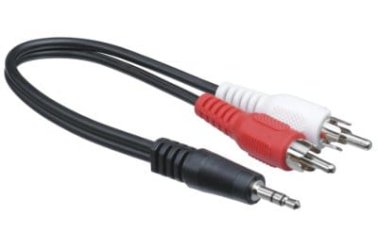
LadyVi. You are correct on VGA & DVI cables do not carry audio. If your laptop has a VGA outlet it probably has an audio outlet socket which is usually a stereo mini type. These audio leads can be purchased with RCA plugs that are probably necessary for your TV's audio.
So you would have the VGA cable & a separate audio cable & the audio cable would similar to this one.
My Computer
At a glance
Windows 7 Home Premium 64 bit sp1Intel i5 3570 3.4Ghz Ivy Bridge SKT 1155 quad...G-Skill Rip Jaws 16Gb (8x2) DDR3 -1600 PC3 12...Gigabyte NVIDIA GT610 1Gb DDR3 810/1200 PCI-E...
One other Desktop (tester) and spare Toshba laptop both with SSD's
Running Kaspersky 2016 ISS on all machines config'd identically
Logitec audio stereo systems on each machine (x3)
Canon MG5250MFC
Router/modem TP-Link running WPA2SK
Not the same as VGA is analog and HDMI is digital. But both will send your computer display to the TV. But with DVI and VGA, as noted you must also make an audio connection.
alright that's great, so all I need it a VGA cord and one of those audio cables and then i should be able to make it work!
thanks so much for your help, and everyone's help!
alright that's great, so all I need it a VGA cord and one of those audio cables and then i should be able to make it work!
thanks so much for your help, and everyone's help!
One other Desktop (tester) and spare Toshba laptop both with SSD's
Running Kaspersky 2016 ISS on all machines config'd identically
Logitec audio stereo systems on each machine (x3)
Canon MG5250MFC
Router/modem TP-Link running WPA2SK